
Overview
Serverless cloud technologies in Oracle Cloud Infrastructure (OCI) transform how organizations build, deploy, and scale applications. The power of serverless in OCI lies in its ability to simplify infrastructure management, reduce operational overhead, and enhance scalability while offering a cost-efficient, flexible approach to application deployment. Here are some of the key advantages and features of OCI’s serverless offerings:
1. No Infrastructure Management
Serverless computing abstracts away the underlying infrastructure, so developers can focus entirely on writing code rather than managing virtual machines, containers, or server configurations.
2. Scalability
OCI’s serverless offerings automatically scale resources up or down based on demand. That means you don’t need to manually adjust your infrastructure to handle spikes in traffic or load—serverless functions scale horizontally, which allows organizations to easily accommodate unpredictable workloads without over-provisioning or under-provisioning resources.
3. Cost Efficiency
In a serverless model, you only pay for what you use—whether that’s the execution time of your functions or the number of requests made. OCI uses a consumption-based pricing model, meaning that you’re not paying for unused resources if your application is idle. This pay-per-use pricing structure can result in significant cost savings, especially for workloads with fluctuating demand.
4. Zero Maintenance
Since serverless functions are managed entirely by Oracle, users don’t have to worry about maintaining underlying infrastructure or runtime environments. This allows teams to focus on writing code and delivering business value instead of worrying about server maintenance, patching, or updates.
5. High Availability and Fault Tolerance
OCI’s serverless functions are built with high availability and fault tolerance in mind. The underlying architecture ensures that resources are distributed across multiple availability domains (ADs), meaning that your serverless applications will continue to operate even if one region experiences a failure.
The problem Statement
You might wonder why I am talking about serverless technology and its advantages. One of my customers recently had a requirement to configure multiple Identity Providers for off-the-shelf enterprise applications. The application allowed multiple Identity Provider trusts, but only one would work simultaneously. The standard answer to this problem is to use an identity domain and let it act as a federation proxy. The identity domain is an IAM service on OCI for those who don’t know it. However, that requires syncing identities from all the identity providers to the identity domain. I want a lightweight federation proxy without syncing users to the proxy.
The Solution
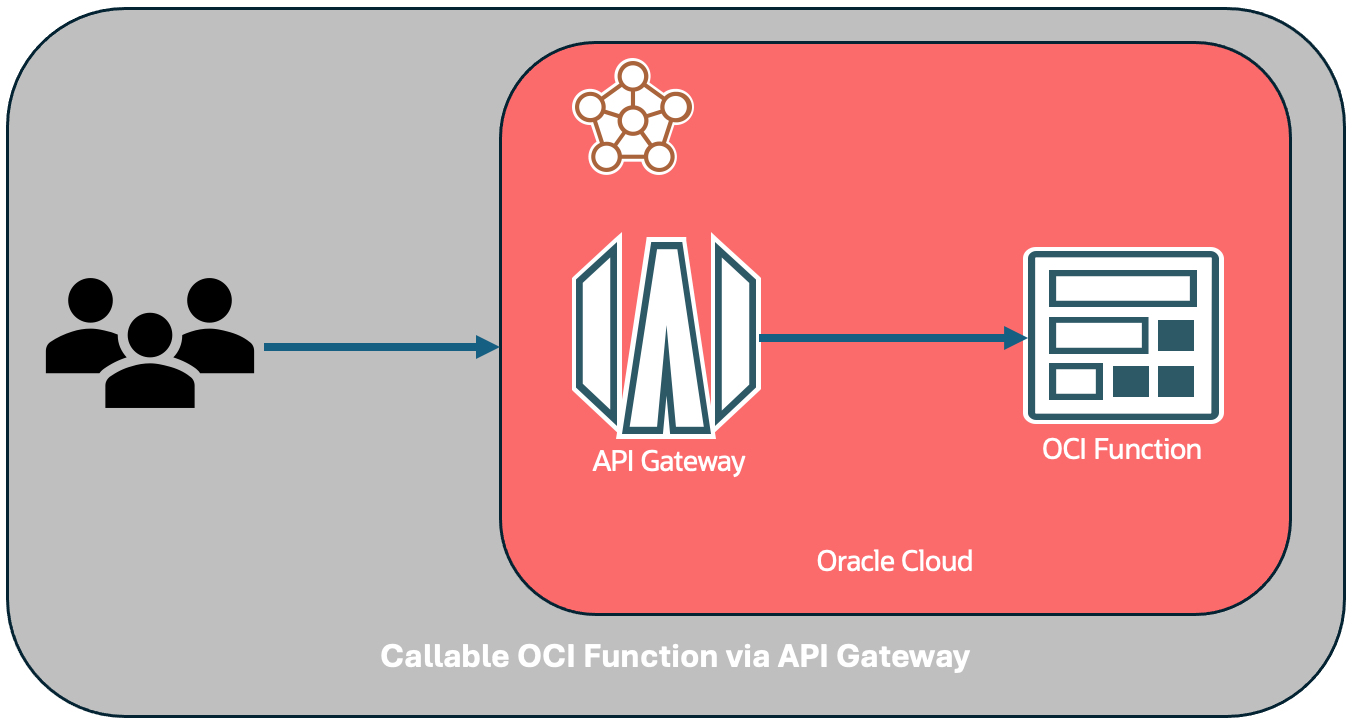
I used OCI API gateway and OCI function to implement that. A function can do one of the two things.
- If SAML request is not signed, then it can update destination attribute in the SAML request and sends that to the selected IDP along with the relay state.
- Or it can just display all the IDP options with IDP initiated SSO URL.
Pre-Requisites
- Configure SSO trust between all the Identity providers and the service provider application as you would have done without federation proxy. The reason is, once authenticated, IDP will redirect user directly to the application with SAML assertion and relay state.
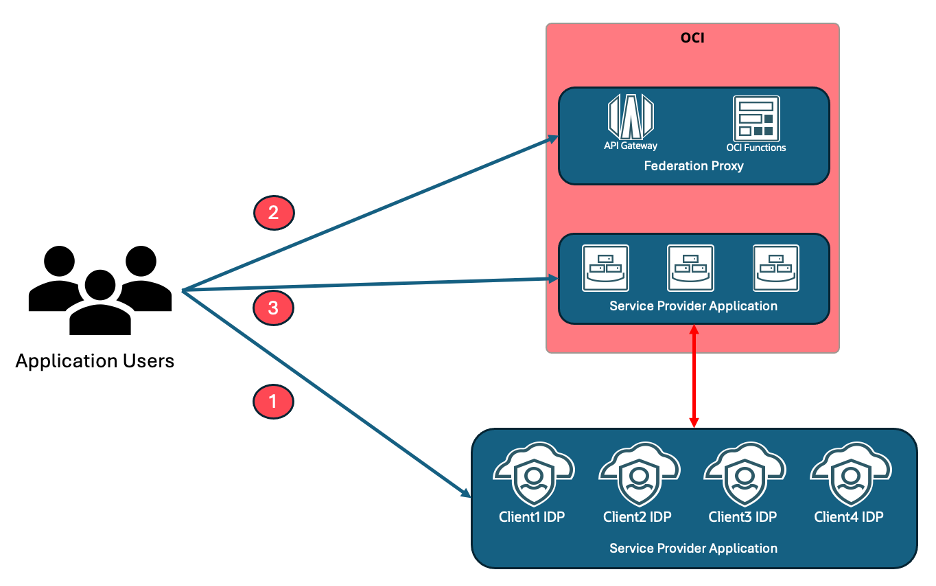
OCI Function
As mentioned above, the function can either display both the IDP URLs or replace IDP URL in the SAML request and send those updated SAML requests to original IDPs. The second option would only work if the requests are not signed.
Using IDP Initiated SSO URL
Configure all the Identity providers IDP initiated SSO URLs as function configuration parameters. In the sample code below, I only have two IDPs. However, you could add as many IDPs as required. In the code below, I have to take screenshot of the HTML return code because the page doesn’t render it well.
import io
import logging

from fdk import response

def handler(ctx, data: io.BytesIO = None):
    logging.getLogger().info("Inside SAML Utility Function")

    try:
        cfg = ctx.Config()
        if cfg:
            idp1 = cfg["idp1"]
            idp2 = cfg["idp2"]
    except (Exception, ValueError) as ex:
        logging.getLogger().info('Error in reading function arguments' + str(ex))

    return response.Response(
        ctx, response_data=returnText,
        headers={"Content-Type": "text/html"}
    )
Updating SAML request
For this function to work, other than IDP URLs, you also need the API gateway URL because we need to replace that in the SAML request with the IDP URLs. Just like above, for this code as well, I have to take screenshot of the HTML return code because the page doesn’t render it well.
import io
import logging
import base64
import zlib
from urllib.parse import urlparse
from urllib.parse import parse_qs

from fdk import response

def handler(ctx, data: io.BytesIO = None):
    logging.getLogger().info("Inside SAML Utility Function")

    try:
        cfg = ctx.Config()
        if cfg:
            idp1 = cfg["idp1"]
            idp2 = cfg["idp2"]
            gateway = cfg["gateway"]
            #Gateway URL is the API gateway URL. We need to replace gateway URL with IDP URL in SAML request.
    except (Exception, ValueError) as ex:
        logging.getLogger().info('Error in reading function arguments' + str(ex))

    try:
        requestURL =  ctx.RequestURL()
        logging.getLogger().info("Request URL: " + requestURL)

         # retrieving query string from the request URL, e.g. {"param1":["value"]}
        parsed_url = urlparse(requestURL)
        queryString = parse_qs(parsed_url.query)
        samlRequest = queryString["SAMLRequest"][0]
        relayState = queryString["RelayState"][0]
        logging.getLogger().info("samlRequest: " + samlRequest)
        logging.getLogger().info("relayState: " + relayState)

        samlXML = zlib.decompress(base64.b64decode(samlRequest), -15).decode('utf-8')

        idp1SamlXML = samlXML.replace(gateway,idp1)
        idp2SamlXML = samlXML.replace(gateway,idp2)

        idp1EncodedSAML = base64.urlsafe_b64encode(idp1SamlXML.encode('utf-8')).decode('utf-8')
        idp2EncodedSAML = base64.urlsafe_b64encode(idp2SamlXML.encode('utf-8')).decode('utf-8')

        idp1URL = idp1 + "?SAMLRequest=" + idp1EncodedSAML + "&RelayState=" + relayState
        idp2URL = idp2 + "?SAMLRequest=" + idp2EncodedSAML + "&RelatState=" + relayState

        logging.getLogger().info("IDP1 URL is: " + idp1URL)
        logging.getLogger().info("IDP2 URL is: " + idp2URL)
    except (Exception, ValueError) as ex:
        logging.getLogger().info('Error in parsing Request Query Parameters: ' + str(ex))
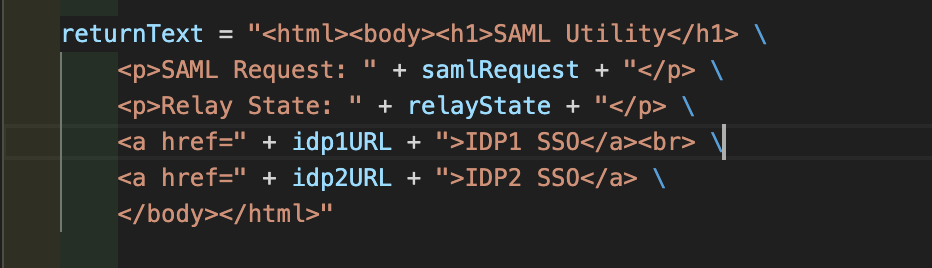
    return response.Response(
        ctx, response_data=returnText,
        headers={"Content-Type": "text/html"}
    )
Deploy the OCI function using the steps mentioned in the document.
API gateway configuration
You cannot invoke OCI function with just a URL without signed request. We cannot update service provider application to sign requests. So, we use API gateway as a proxy to invoke OCI function.
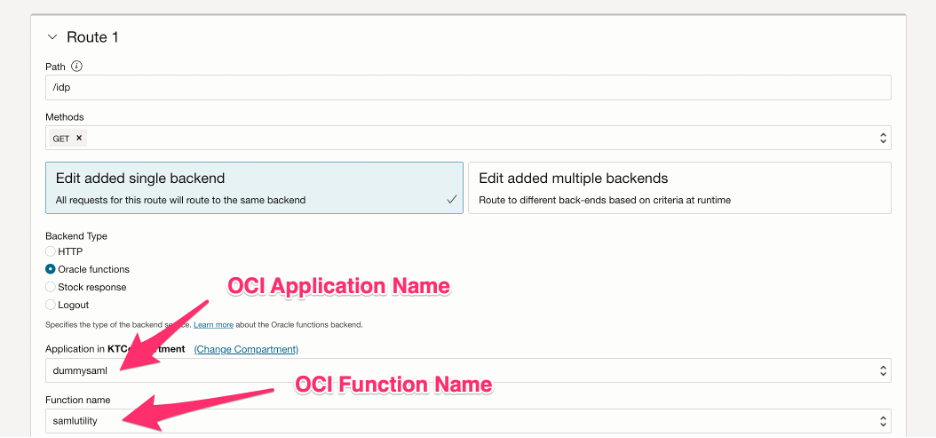
You can follow the steps to create API gateway from OCI documentation.
For IDP URL, configure API gateway to invoke samlutility function as shown in the picture above.
Service Provider Application
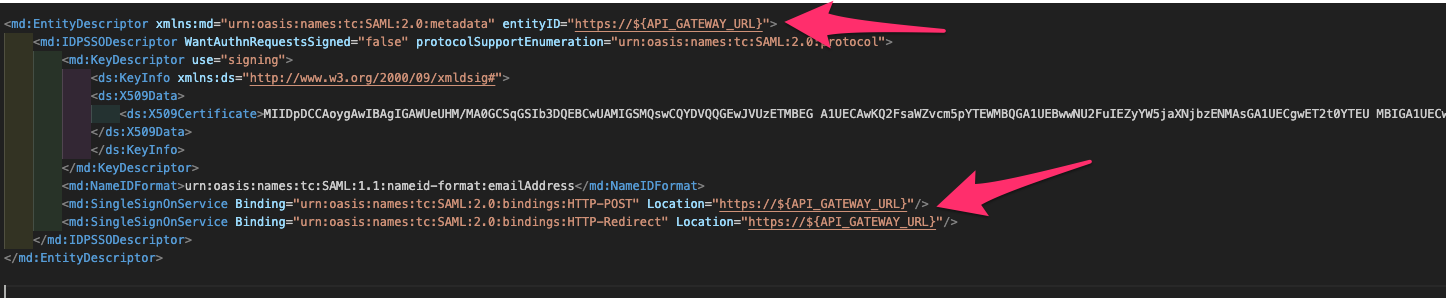
For the service provider application, as mentioned in the prerequisite, integrate the service provider application with all the Identity providers. Other than that, integrate with API gateway as an IDP. Generate metadata for the federation proxy using the below XML. That is just dummy metadata. The proxy does not have to generate SAML assertion. Like the HTML text above, XML does not render as expected on the page. So, I have to put the screenshot again.
Conclusion
API gateway with OCI function can do wonders and help address lot of unique use cases.
Note: Please write to me at kiran.thakkar@oracle.com if you run into issues with the setup. It is a bit complex to deploy, especially the generation of dummy SAML metadata. I would be happy to work with you and tweak the solution if necessary.