

Overview
To meet diverse and specific business needs, Oracle delivers the most complete suite of cloud applications in the industry. Oracle Cloud Applications come with robust, built-in tools that let customers tailor applications to their unique requirements. Furthermore, Oracle’s powerful cloud infrastructure and platform services (Integration cloud, Visual Builder, and FDI) enable customers to extend and enhance application functionality, seamlessly incorporating new innovations without worrying about upgrade limitations. This combination of application, platform, and infrastructure services offers a level of flexibility and capability that no other vendor can match.
However, there were some challenges with subscription and Identity that Oracle has overtime addressed. One such challenge has to do with Universal Credit Subscription and the SaaS tenancy.
Note: All Oracle tenancies are OCI tenancies. Oracle does not have SaaS tenancy and OCI tenancy distinctions like it used to. However, I might use those terms in this blog to make distinction between a tenancy with SaaS workload and a tenancy with PaaS workload.
New SaaS and PaaS workload
If a customer has OCI tenancy with Fusion SaaS applications, they were not able to activate UCM subscription in the same tenancy to create SaaS extensions using PaaS services. They had to create a new tenancy and sync Identities from SaaS to the PaaS services. However, any new tenancies as of early 2024 can host both SaaS subscription and UCM subscription in the same tenancy.
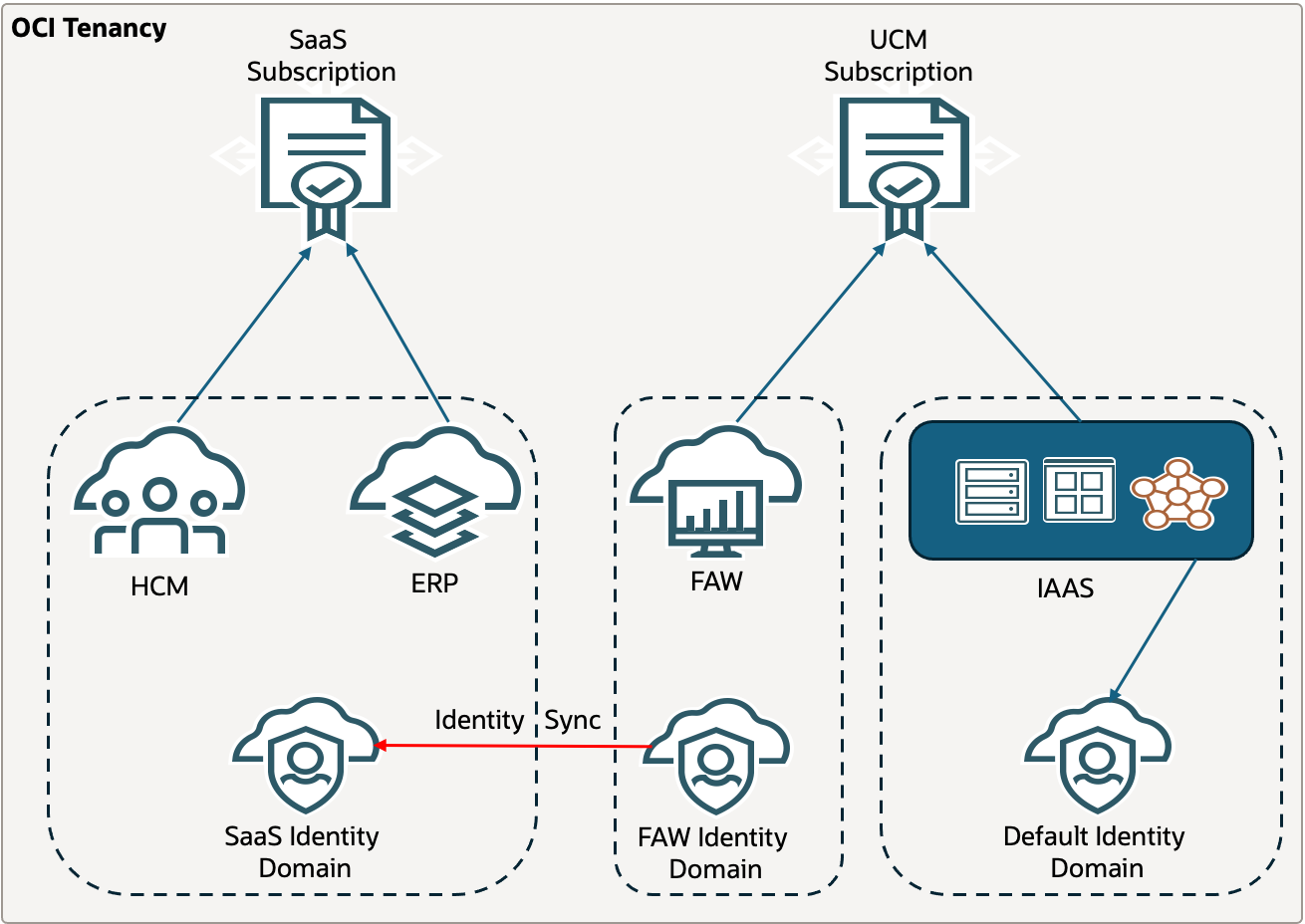
If customers have existing tenancy with SaaS workload, then they can activate UCM subscription in the same tenancy. They can order universal credits subscription through Oracle sales. When an Oracle Sales representative orders Oracle Cloud services on customer’s behalf, the customer receives a welcome email. Anyone who is forwarded the email (UCM tenancy administrator) can do the activation of the services. For the activation to work, UCM tenancy administrator must be added in OCI_Administrators group in the existing tenancy. Once the user is added to the group, follow the steps below.
- Open the email you received from Oracle Cloud.
- Review the information about adding your subscription in the email.
- Click the Add to existing cloud account button at the bottom of the email.
- Your web browser opens, where you can next sign in to your cloud account with your username and password.
- The Add Subscription page is displayed, where you can add the new subscription to your tenancy. The page indicates the subscription name, subscription ID, and subscription description (with product SKU). If you want to add a subscription to a different tenancy, sign out and change to the tenancy you want to associate with the subscription.
- Click Add subscriptions. A confirmation is displayed indicating that the process is nearly complete. You’ll next receive a final email that your new services are ready to use. Click the Sign in button to sign in to the Console and get started with Oracle Cloud Infrastructure. You’ll see a notification in the Console that your subscriptions have been successfully added to your tenancy.
Existing SaaS and PaaS workload
There are many SaaS customers with split tenancy setup. SaaS workload is deployed in the SaaS tenancy and PaaS services are created in PaaS/UCM tenancy. In that setup, customers have to setup user sync between SaaS pod Identity domain and PaaS services Identity domain, as shown in the screenshot below.
For technical and billing reasons, it is not possible to move a subscription from one tenancy to the other. However, if customers want to merge their workload in one tenancy, they can setup parent-child relationship between the two tenancies and consumer UCM credits from the parent child tenancy into the child tenancy.
Existing setup
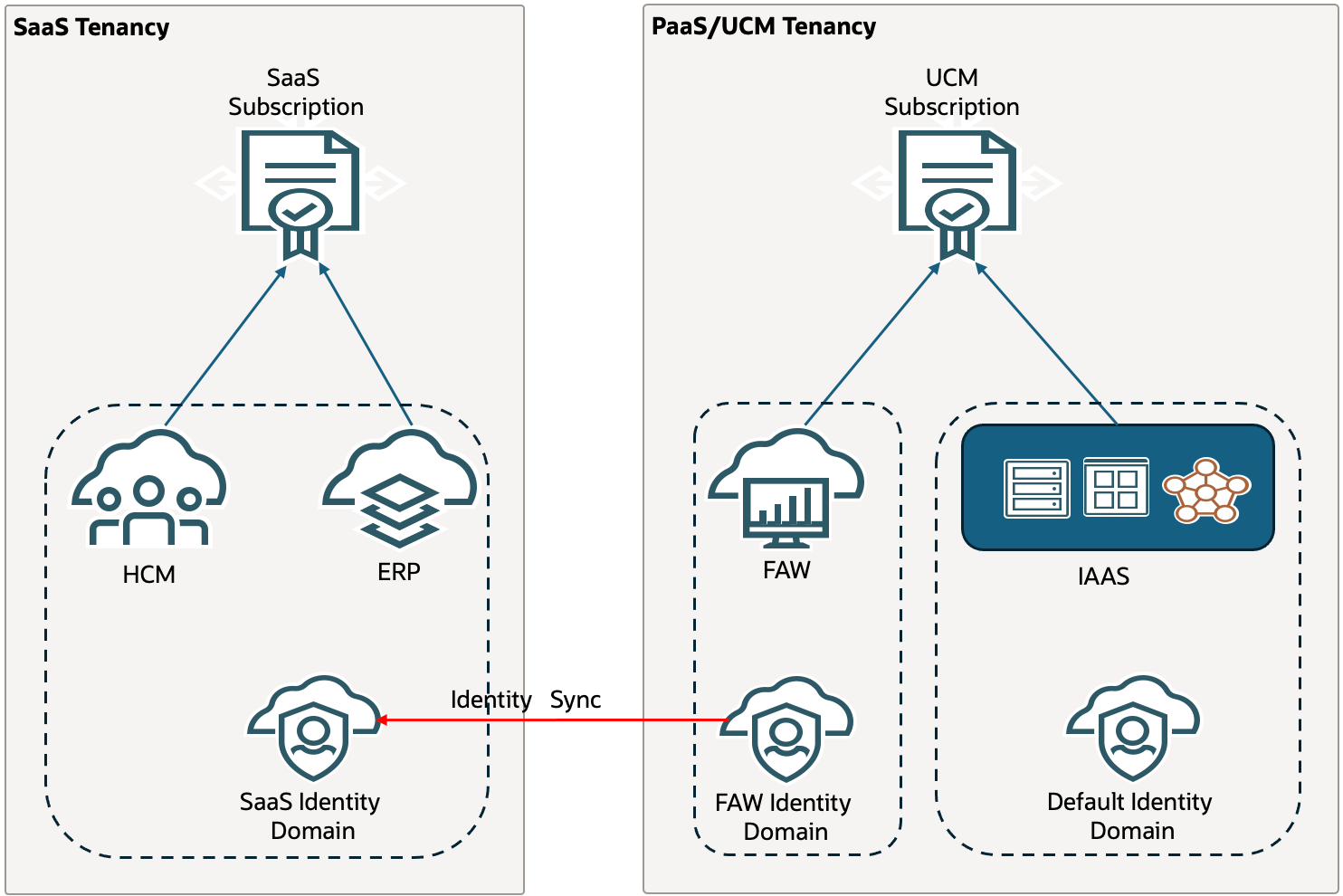
SaaS-PaaS Parent Child Tenancies
After you setup parent-child relationship, a subscription (UCM subscription) from the parent tenancy (PaaS tenancy) can be used in the child tenancy (SaaS tenancy).
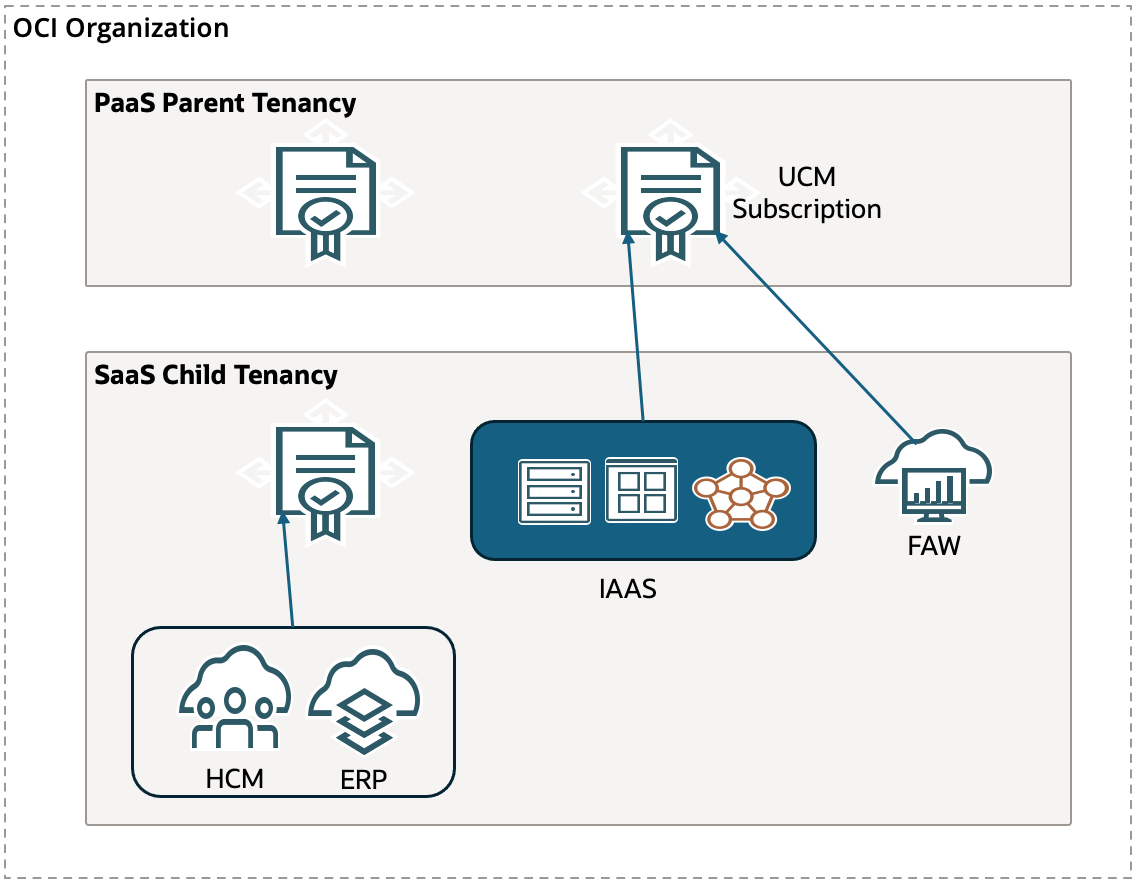
The exact steps to invite a tenancy to join as a child tenancy and consume from parent UCM subscription are described in the below blog.
https://learnoci.cloud/how-to-invite-a-tenancy-into-your-existing-oci-tenancy-59d17bcbaaf
Conclusion
Setting up parent-child relationship between SaaS tenancy and PaaS tenancy can significantly simplify SaaS extensions deployment, including eliminating the need to sync identities. I would highly recommend customers to follow that architecture unless it is too disruptive to migrate existing PaaS service instances to the SaaS tenancy.