

Overview
Scaling IAM (Identity and Access Management) policies for Independent Software Vendor (ISV) customers is a strategic challenge, especially when managing access permissions at scale across multiple client environments in one OCI tenancy. I recently helped many such customers streamline and minimize IAM policies using resource tags. The goal is to minimize IAM policies by writing broad attribute-based (tag-based) access-control policies that compare attributes assigned to the principal and the target resources. Have fewer/lesser policies that do more or precisely what they are designed to do. However, we do not compromise on the least privileged model. An entity or a resource should only be permitted to perform the smallest set of actions necessary to fulfill a specific task.
In this blog, I talk about two use cases that I implemented using tag based IAM policies.
Pre-requisites for using tags based IAM policies
- Only security Administrator should be able to manage tag namespaces.
- Only terraform runner or Infrastructure-as-a-code script principal should be able to use tag namespaces used in IAM policies.
- Do not use ‘manage all-resources’ policies for any target. Otherwise, the principal group can manipulate tags on the target resources and gain access.
- As much as possible, use compartment level default tags to eliminate human and configuration errors in infrastructure-as-a-code script.
Note: For this blog, I will refer to OCI customer’s customer environment as tenant.
Use case – 1
Requirements
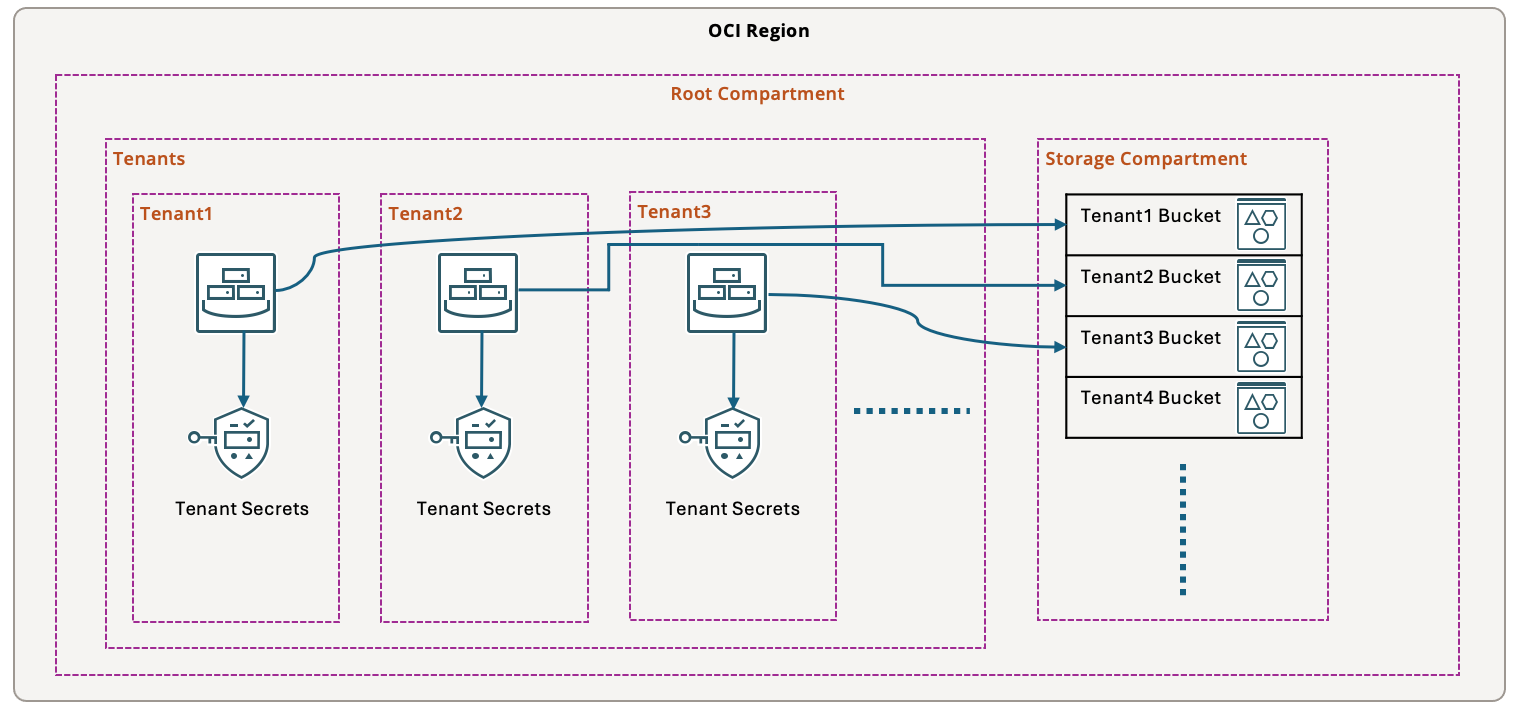
- All instances for a specific tenant/customer can read buckets for that specific tenant/customer in shared storage compartment.
- All instances for a specific tenant can read secrets for that specific tenant.
Design
- Create a compartment for every tenant and create resources for that tenant inside tenant compartment.
- Create Enterprise tag namespace with Tenant tag key to capture tenant name for every resource.
- For tenant compartments, create compartment default tags to capture tenant name in Enterprise.Tenant tag.
- For every target resource like bucket and secret, tag target them with tenant name in Enterprise.Tenant tag.
Policies
- Assuming InfoSec group is the security administrator group. Only that group should have access to manage tags.
Allow group InfoSec to manage tag-namespaces in tenancy
Allow group InfoSec to manage policies in tenancy
Allow group InfoSec to use users in tenancy
Allow group InfoSec to manage groups in tenancy where all {target.group.name != ‘Administrators’, target.group.name != ‘InfoSec’}
- Assuming terraform-runner is a group used for user principals or service users to execute infrastructure-as-a-code terraform scripts, write below policies.
Allow group terraform-runner to use tag-namespaces in tenancy
Allow group terraform-runner to manage instance-family in compartment Tenants
Allow group terraform-runner to manage virtual-network-family in compartment Tenants
Allow group terraform-runner to manage volume-family in compartment Tenants
Allow group terraform-runner to manage object-family in compartment Storage
Allow group terraform-runner to manage secret-family in compartment Tenants
Allow group terraform-runner to manage key-family in compartment Tenants
- Now for tenant resources to be able to use secrets and read objects, write below policies.
Allow any-user to use object-family in compartment Storage where request.principal.compartment.tag.Enterprise.Tenant = target.resource.tag.Enterprise.Tenant
Allow any-user to use secret-family in compartment Tenants where request.principal.compartment.tag.Enterprise.Tenant = target.resource.tag.Enterprise.Tenant
Use Case – 2
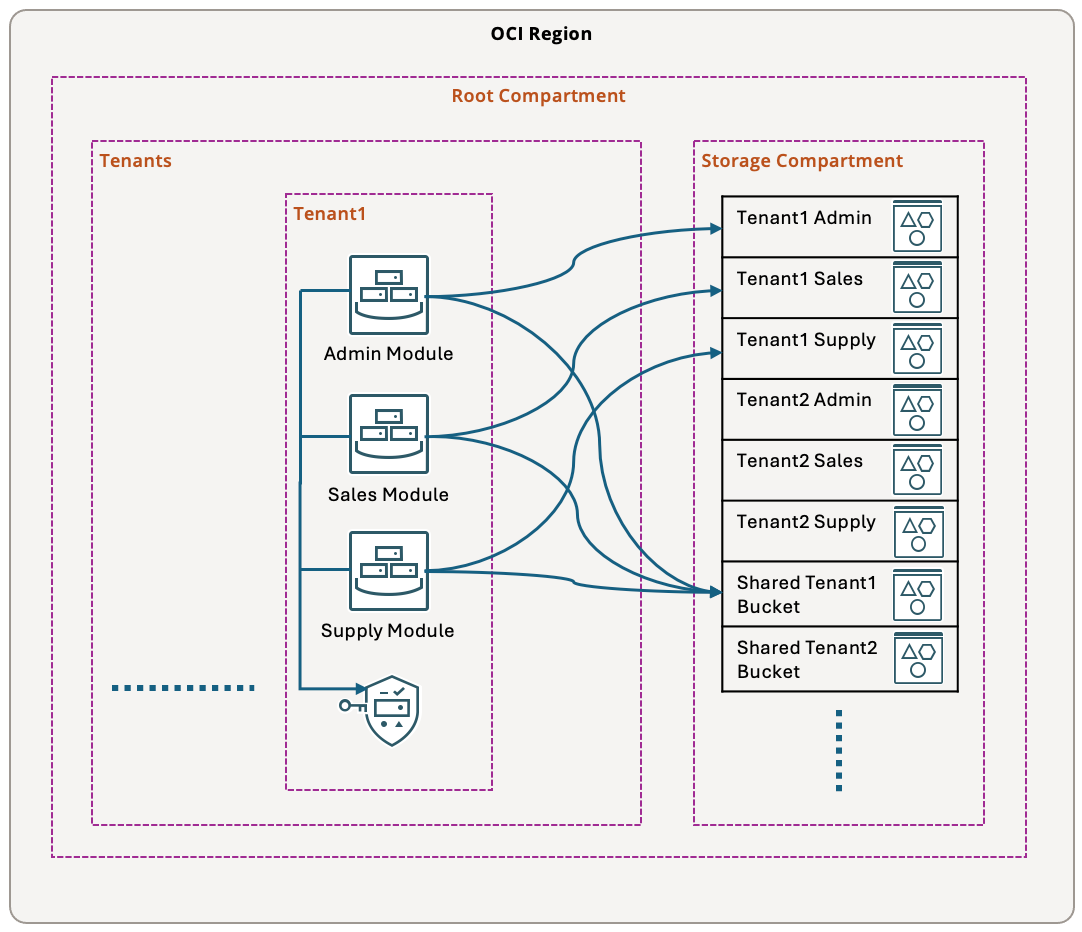
Second use case is little more complicated. There are a few types of services for every tenant. Each service can only read buckets and secrets of that service for the given tenant.
Requirements
- All instances of Admin service for a specific tenant can read Admin buckets for that specific tenant in shared storage compartment.
- All instances of Sales service for a specific tenant can read Sales buckets for that specific tenant in shared storage compartment.
- All instances of Supply service for a specific tenant can read Supply buckets for that specific tenant in shared storage compartment.
- All instances for a specific tenant can read shared services buckets for that specific tenant in shared storage compartment.
- All instances for a specific tenant can read secrets for that specific tenant in the tenant compartment.
Design
- Create a compartment for every tenant and create resources for that tenant inside tenant compartment.
- Create Enterprise tag namespace with Tenant and Service tag keys to capture tenant name and service name for every resource.
- For tenant compartments, create compartment default tags to capture tenant name in Enterprise.Tenant tag.
- For every resource in tenant compartment, tag resources with the service type Enterprise.Service tag.
- For every target resource like bucket and secret, tag them with tenant name in Enterprise.Tenant tag.
- For every target resource that is specific to a service type, tag them with service type in Enterprise.Service tag.
- For shared bucket resources tag Enterprise.Service tag key with ‘Shared’ value.
Dynamic Groups
Create three dynamic groups for instances of three service types.
- Dynamic group AdminInstances
All {tag.Enterprise.Service.value=’Admin’}
- Dynamic group SalesInstances
All {tag.Enterprise.Service.value=’Sales’}
- Dynamic group SupplyInstances
All {tag.Enterprise.Service.value=’Supply’}
Policies
- Assuming InfoSec group is the security administrator group. Only that group should have access to manage tags.
Allow group InfoSec to manage tag-namespaces in tenancy
Allow group InfoSec to manage policies in tenancy
Allow group InfoSec to use users in tenancy
Allow group InfoSec to manage groups in tenancy where all {target.group.name != ‘Administrators’, target.group.name != ‘InfoSec’}
- Assuming terraform-runner is a group used for user principals or service users to execute infrastructure-as-a-code terraform scripts, write below policies.
Allow group terraform-runner to use tag-namespaces in tenancy
Allow group terraform-runner to manage instance-family in compartment Tenants
Allow group terraform-runner to manage virtual-network-family in compartment Tenants
Allow group terraform-runner to manage object-family in compartment Storage
Allow group terraform-runner to manage secret-family in compartment Tenants
Allow group terraform-runner to manage key-family in compartment Tenants
- Now for tenant resources to be able to use secrets and read objects, write below policies.
Allow dynamic-group AdminInstances to use object-family in compartment Storage where all {request.principal.compartment.tag.Enterprise.Tenant=target.resource.tag.Enterprise.Tenant, target.resource.tag.Enterprise.Service=’Admin’}
Allow dynamic-group SalesInstances to use object-family in compartment Storage where all {request.principal.compartment.tag.Enterprise.Tenant=target.resource.tag.Enterprise.Tenant, target.resource.tag.Enterprise.Service=’Sales’}
Allow dynamic-group SupplyInstances to use object-family in compartment Storage where all {request.principal.compartment.tag.Enterprise.Tenant=target.resource.tag.Enterprise.Tenant, target.resource.tag.Enterprise.Service=’Supply’}
Allow any-user to use object-family in compartment Storage where all {request.principal.compartment.tag.Enterprise.Tenant=target.resource.tag.Enterprise.Tenant, target.resource.tag.Enterprise.Service=’Shared’}
Allow dynamic-group AdminInstances to use secret-family in compartment Tenants where all {request.principal.compartment.tag.Enterprise.Tenant=target.resource.tag.Enterprise.Tenant, target.resource.tag.Enterprise.Service=’Admin’}
Allow dynamic-group SalesInstances to use secret-family in compartment Tenants where all {request.principal.compartment.tag.Enterprise.Tenant=target.resource.tag.Enterprise.Tenant, target.resource.tag.Enterprise.Service=’Sales’}
Allow dynamic-group SupplyInstances to use secret-family in compartment Tenants where all {request.principal.compartment.tag.Enterprise.Tenant=target.resource.tag.Enterprise.Tenant, target.resource.tag.Enterprise.Service=’Supply’}
Resources
- OCI IAM Policies
- Tag based access control
- Tagging Security
- Tagging best practices
- Scaling IAM policies for IAM groups