
Hi! Oracle Integration has recently launched its 3rd generation. With many changes compared to Generation 2 and many new features, I think it is worth having a small discussion on the Generation 3 capabilities focusing on the network flows and architectures.
Oracle Cloud Networks
Oracle Integration is a Platform as a Service deployed on the Oracle Cloud Infrastructure. In any OCI Region there are two major network domains:
a) IaaS – In the Infrastructure as a Service domain you deploy Virtual Cloud Networks which are part of your routing domain. The IP Space is typically private, chosen from RFC 1918, routable in your network. In this domain you will deploy Virtual Machines which will have private IPs.
b) OSN – In the same region you will find a network called Oracle Services Network. Here you will find all SaaS and PaaS deployments (ex: Autonomous Databases, Oracle Integration, Oracle Analytics, Fusion SaaS) and all of them will have Oracle owned public IPs and public DNS names.
Note: OCI provides a VCN Gateway called Service Gateway for connectivity from IaaS to OSN. The reverse, OSN to IaaS is not supported via this gateway.
OIC Gen3 Default Deployment
You can deploy and fully use an Integration Instance without any IaaS components present in the tenancy. As this is PaaS, all traffic will be using public IPs from the Oracle Services Network. Let’s see a network diagram:
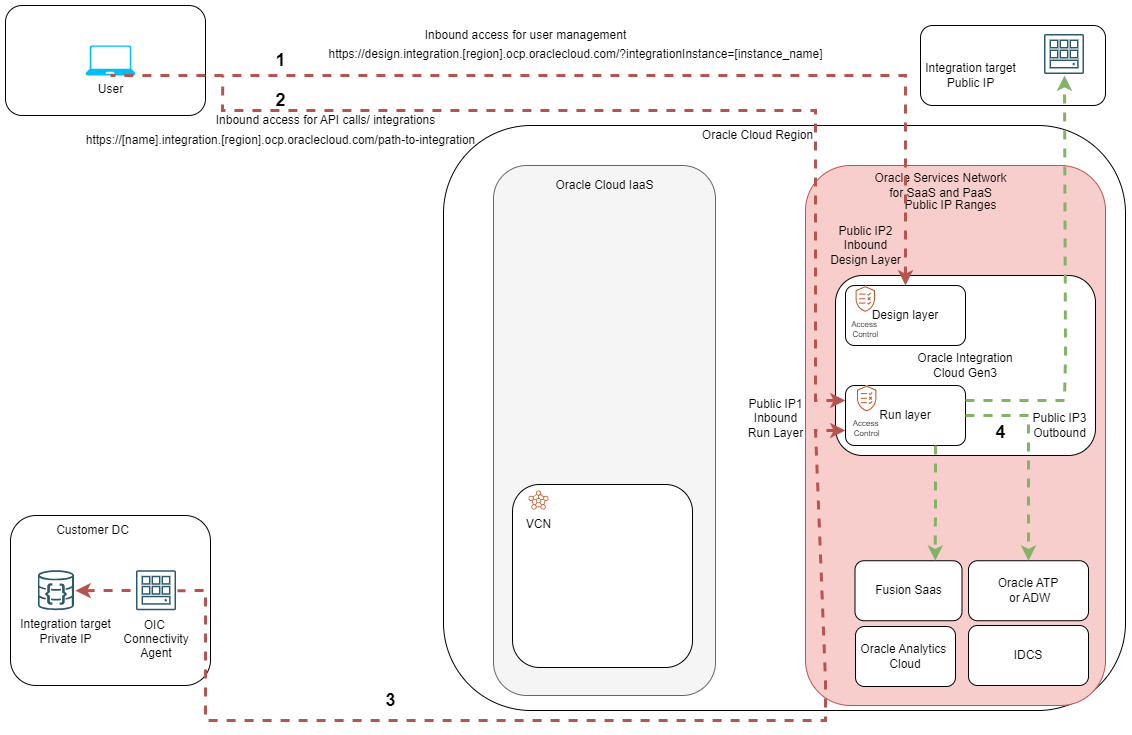
The OIC Instance has two large components, I like to call them Layers. Each has a different use and available network flows. Let’s see some details.
The Design-time Layer
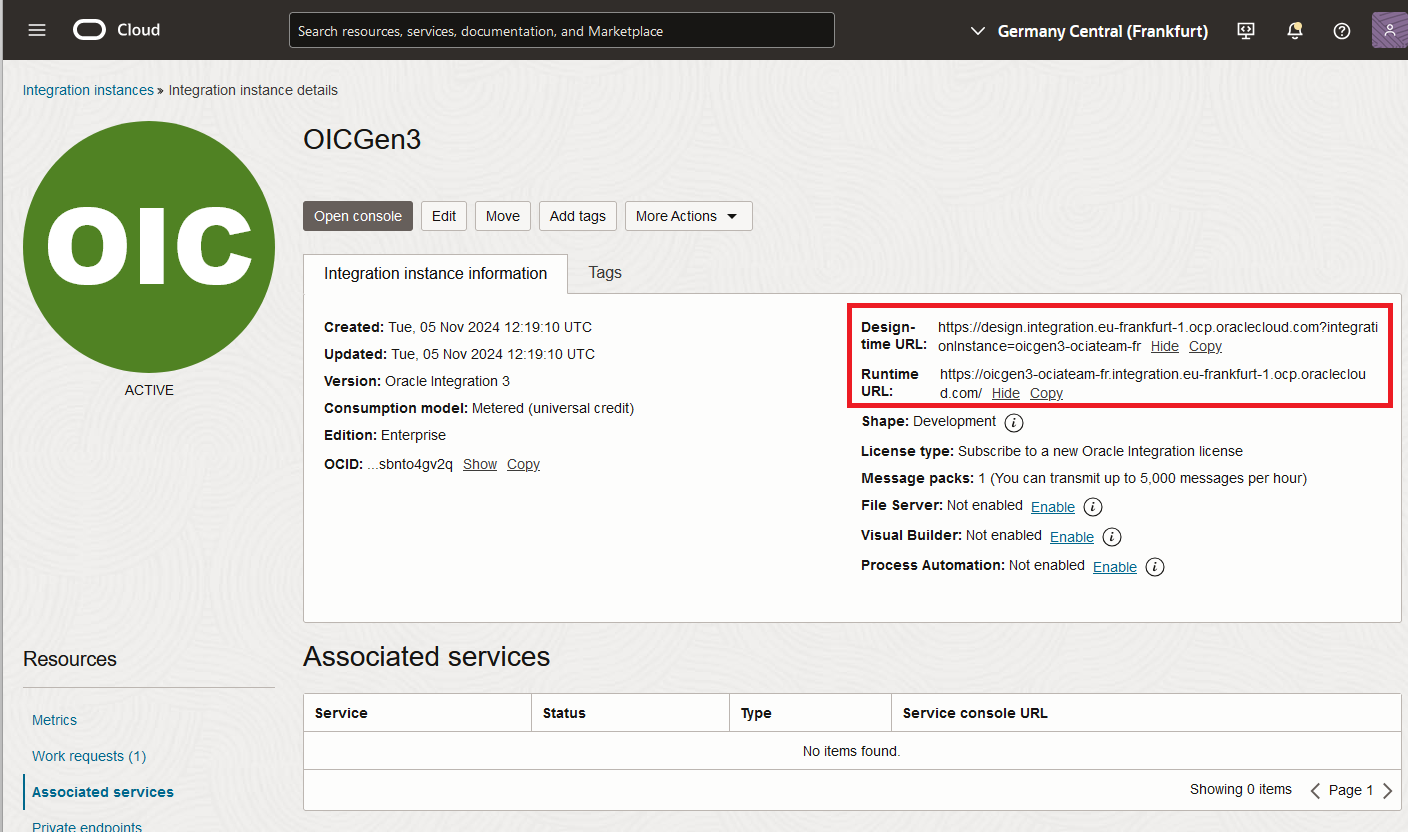
This is an ingress-only layer used for the instance management. It has its own public IP and Oracle provided DNS name. The URL is in the format:
https://design.integration.[region].ocp.oraclecloud.com/?integrationInstance=[instance_name]
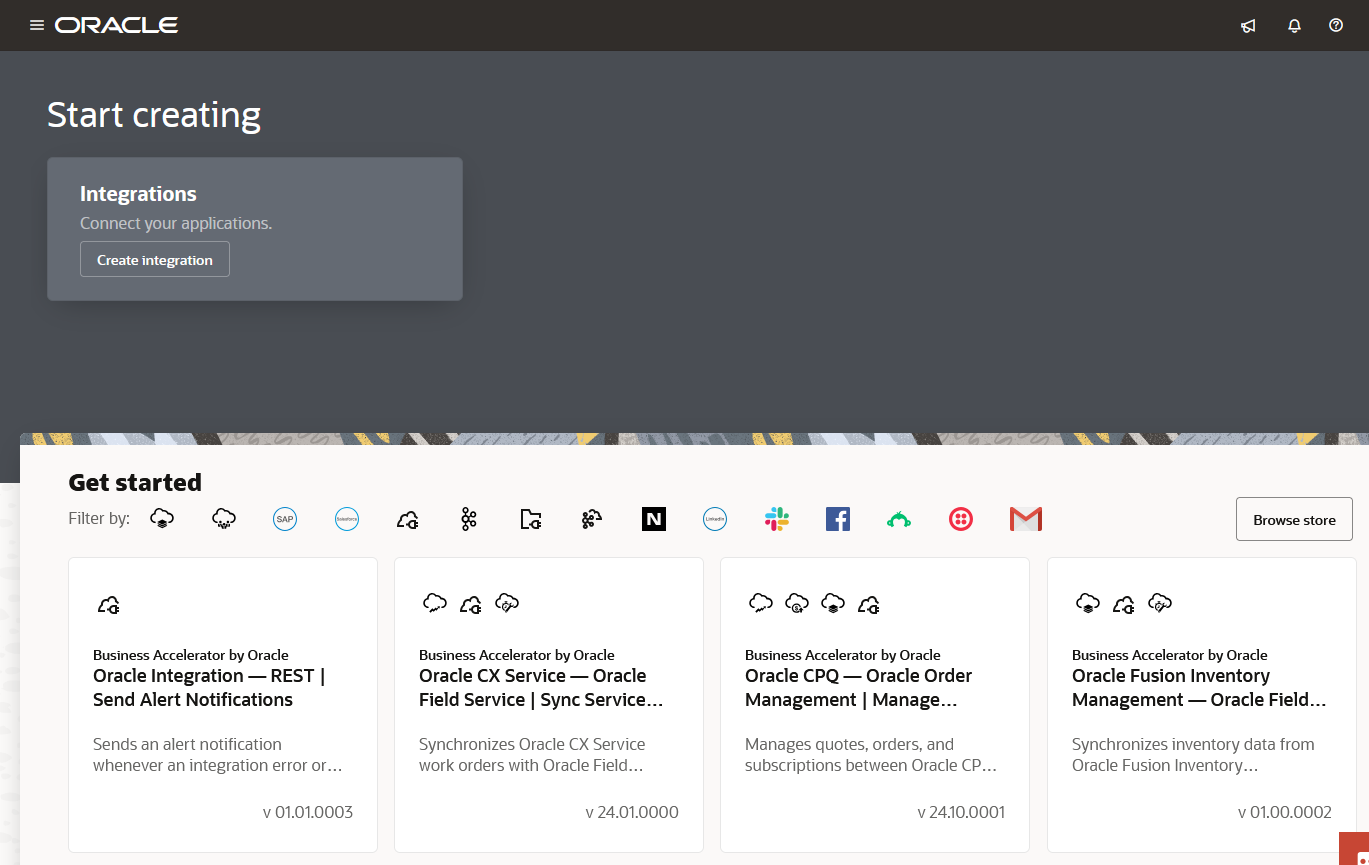
All Integration admins will use the URL above to connect to the OIC Instance management layer to build, destroy and manage integration jobs (Flow 1 in the diagram). The URL will redirect users to OCI IDCS for authentication and then give them the management interface which looks like this:
The Runtime Layer
This Layer can have both inbound and outbound flows and is strictly used for integration jobs. The inbound connections will come on a different public IP than the Design Layer and a different DNS name. The URL is in the format:
https://[name].integration.[region].ocp.oraclecloud.com/path-to-integration
One important thing to note is that opening a browser to the DNS name of the Runtime Layer will redirect the user to the Design Layer. Only by providing the full integration path, obtained after the integration is configured, will the flow reach the Runtime Layer.
Flows 2 and 3 in the diagram show inbound access to the Run Layer. While flow 2 shows a direct API call, flow 3 depicts the use of a connectivity agent. The OIC connectivity agent is a software component that can be installed on a Linux machine and can act as a go-between private integration sources and the OIC instance.
The outbound integration jobs (flow 4 on the diagram) will be initiated from the Run Layer with a third public IP, different than the inbound public IPs. This will be used by OIC to connect to data sources that also have public IPs and which can be either in OSN or in different locations completely. As noted above, if the data source has a private IP, a connectivity agent is required to proxy the connection.
When you deploy the OIC instance you can see most of this information in the OCI Console:
Access control
The inbound connections for both the design and the run layers are, by default, open to all Internet sources. However, the OIC Instance does have an access list which can be configured to allow only known IPs. This list can be accessed from the Oracle Cloud Console:
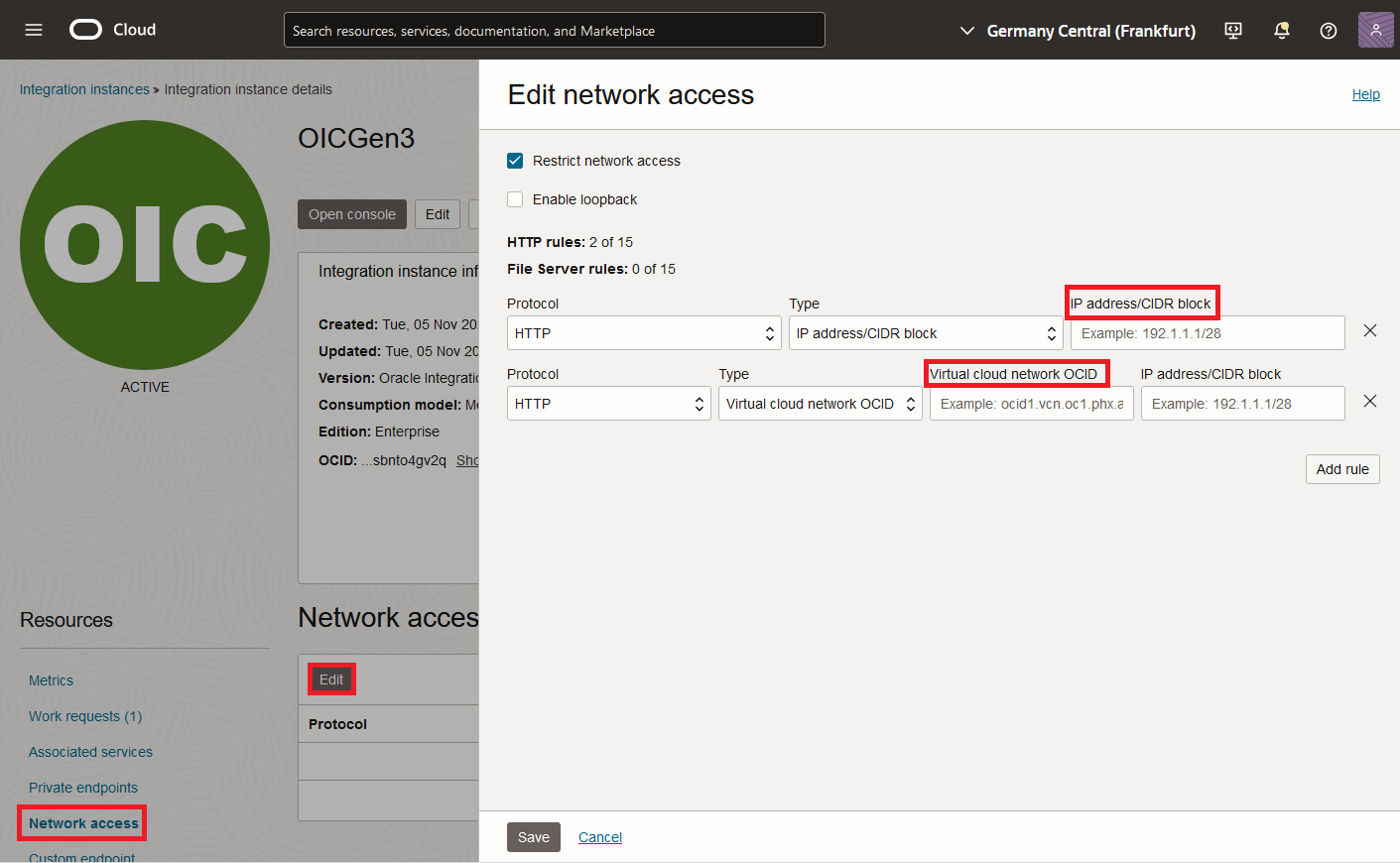
The network access can be configured to restrict access from IaaS too, by allowing only specific VCNs to connect through the Service Gateway.
OIC Gen3 Enhancements
The new Integration Instance has a lot of improvements, but we will only focus on two of them which are relevant to the networking topic.
Custom Endpoint
The Custom Endpoint is a feature which enables customers to use their own DNS name to access the OIC Run Layer. The feature is NOT supported for the design-layer access which will always be on the Oracle DNS name. Creating a custom endpoint adds complexity because OIC will not hold the SSL/TLS certificates for the new connection so you will need to use an SSL/TLS proxy that you manage. OCI offers the solution in a form of a Load Balancer which needs to be deployed inside a VCN. This Load Balancer will hold the SSL/TLS certificates for your domain (ex: oic.example.com). Note that you can use a Load Balancer from your datacenter too, to achieve the same result. The Custom Endpoint is for inbound flows only.
For a tutorial on deploying OIC Gen3 Custom endpoints you can follow this great blog post.
Private Endpoint
The other enhancement is the private endpoint, which you deploy inside IaaS, in a VCN subnet of your choosing. This will give the OIC Instance a private IP from your routing domain. With that private IP, OIC can reach private data sources available inside OCI VCNs or in remote locations which have private connectivity to OCI (IPSEC, FastConnect, Azure/GCP Interconnect, etc.). Note that the private endpoint is available only for the Runtime Layer and only for outbound connections, you cannot connect to the private endpoint for inbound API calls. Also, the private endpoint makes the OIC Agent obsolete, for most of the deployment scenarios.
When deploying the private endpoint, it will follow the routing and security rules of the VCN subnet. This means:
– The VCN Route tables must have entries for the needed target.
– The VCN Security Lists must allow the traffic.
– The VCN DNS Resolver must be able to resolve the target FQDN.
Let’s put these enhancements on the diagram:
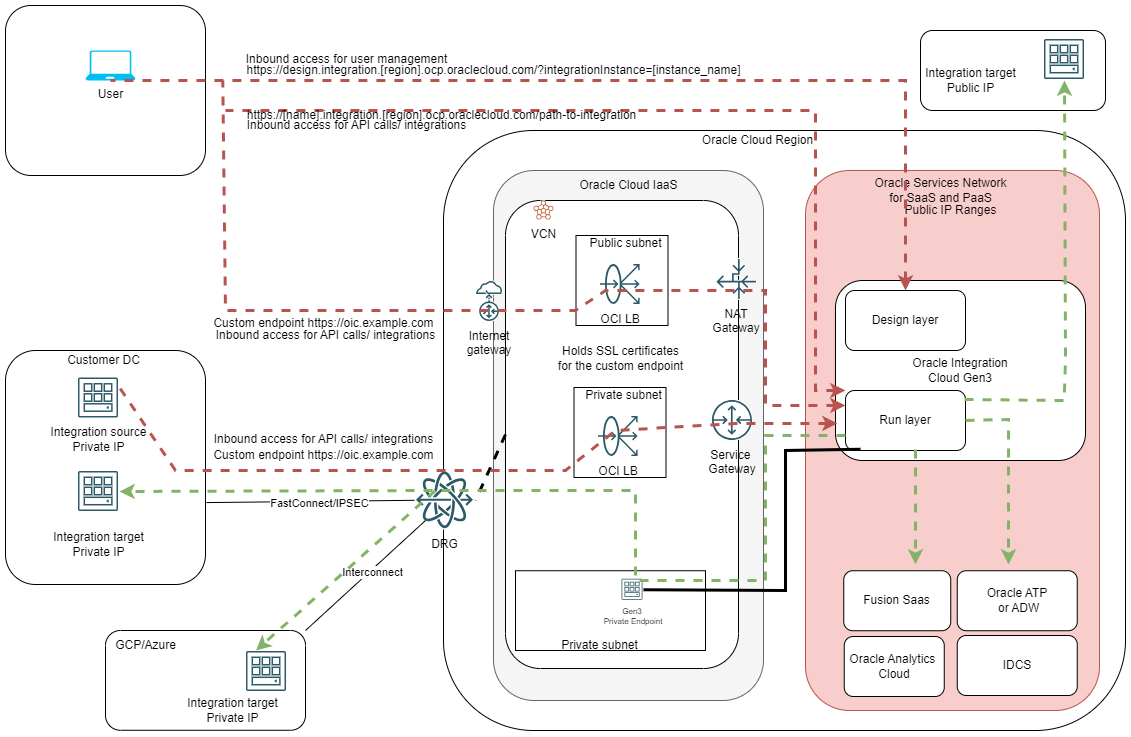
While the diagram may look complicated, a closer look will reveal:
a) All previous network flows are still available.
b) New inbound and outbound connection paths are available, only for the Runtime layer.
i. For Inbound we can now reach the Run Layer from the Internet (using a Public Load Balancer) or from the Datacenter (using a Private Load Balancer and a private connection to OCI), using the Custom Endpoint. Note that you will need SSL/TLS certificates on the load balancers. You will also have to manage the DNS entries for the Custom Endpoint.
ii. For Outbound, the integration jobs can now use the private endpoint which can connect to any private target if there is a network path available.
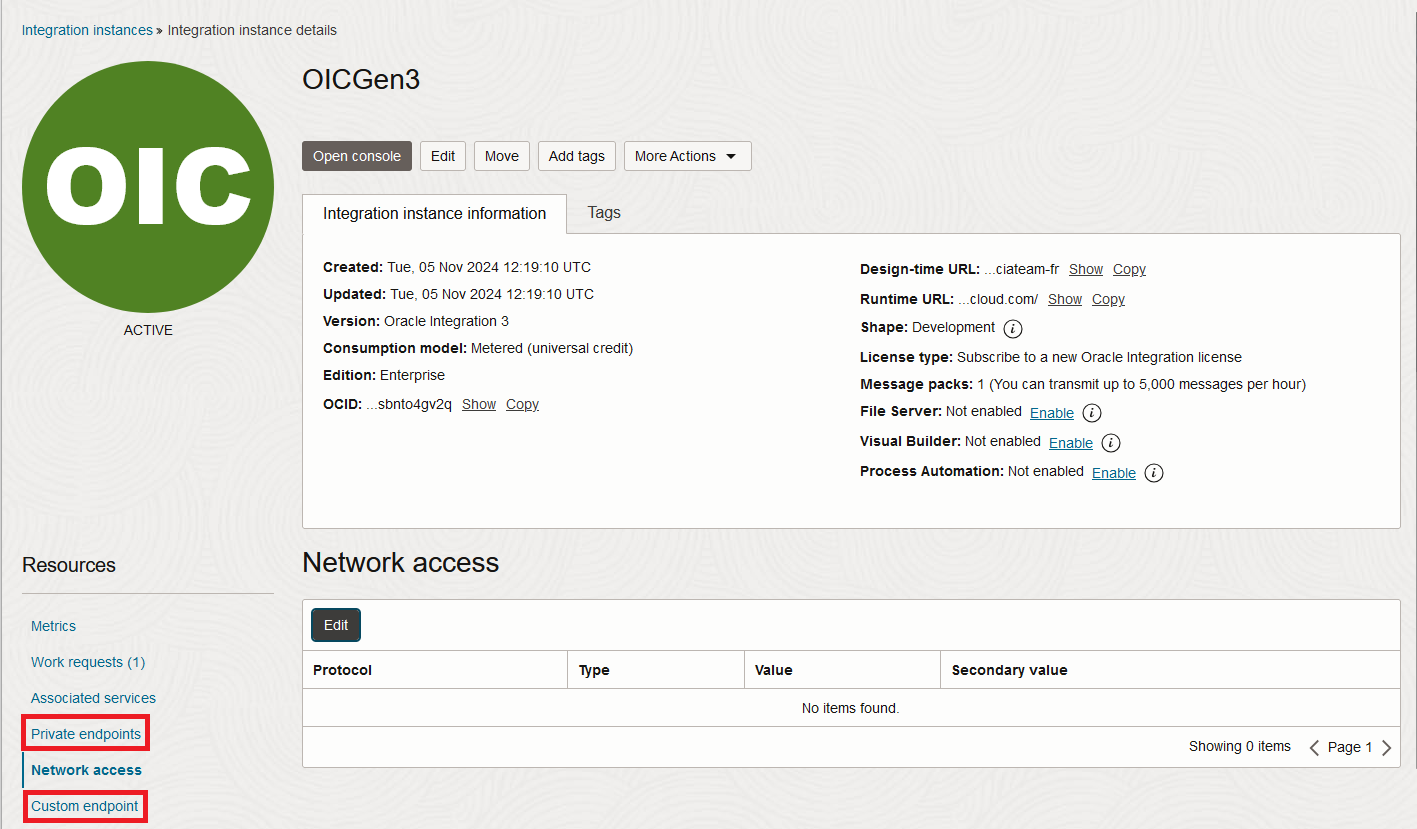
Both the Custom Endpoint and the Private Endpoint features are configurable from the OCI Console:
And this concludes this blog. I hope it helps you!