
Introduction
In Fusion Cloud, a journey is a collection of tasks designed to facilitate various business processes. A Guided Journey is a specific type of journey that supports users by providing contextual guidance such as tutorials, company policies, and best practices throughout a business flow. Guided Journey tasks can be applied at both the page and section levels, ensuring that users receive relevant assistance precisely when needed.
Integrating Journeys with Generative AI allows for the incorporation of AI-driven insights directly into Fusion pages, making the information more contextually relevant to the user’s experience. This blog outlines the steps to integrate OCI Generative AI with Fusion HCM using Guided Journeys. Additionally, the approach outlined here can be adapted to integrate other AI providers, not just OCI Generative AI.
Use Case
Note that this use case is a sample only to illustrate the implementation steps.
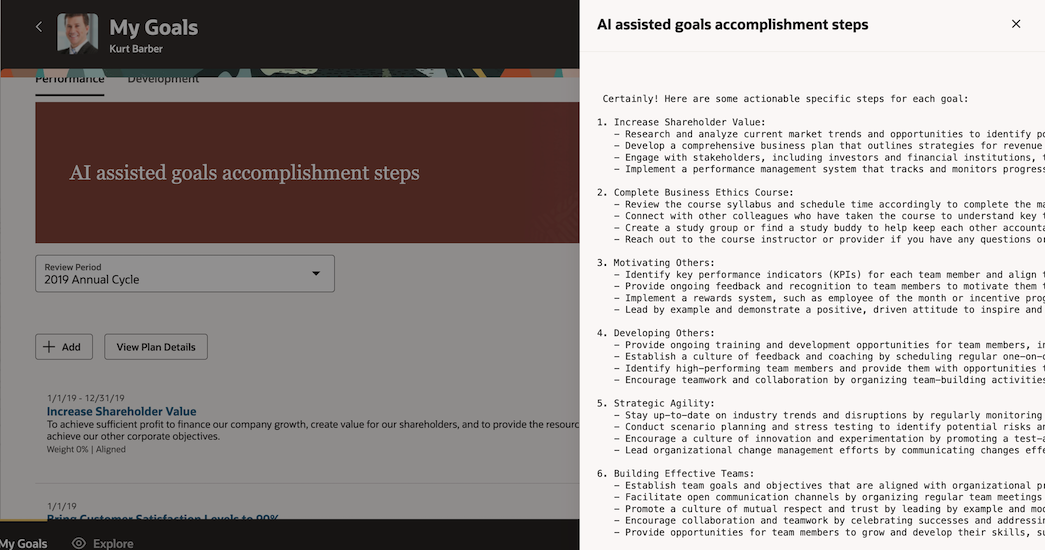
Consider a scenario where users need guidance on the high-level steps to achieve their goals within the Goal Summary page. This Goal Summary page lists goal names and descriptions, and the integration of AI-assisted goal accomplishment steps enhances the user experience by providing actionable insights.
Here’s how the integration works:
-
Integration Overview:
- The Goal Summary page displays a list of goals along with their descriptions.
- The “AI Assisted goals accomplishment steps” is a Guided Journey integration embedded within this page.
- This integration calls OCI Generative AI, passing the goal names and descriptions as context.
-
End Result:
- The AI-driven insights, generated based on the provided context, are displayed to the user, offering steps to achieve each goals effectively.
By implementing this integration, users receive actionable guidance that is dynamically generated based on the goals listed on their summary page.
Steps for extension with AI
Here’s an overview of the steps to integrate AI using Guided Journey:
Step 1: Define a Custom REST API:
Create a REST API that can retrieve data from OCI Generative AI models or other AI providers, based on the context information passed by the calling user.
Step2: Associate with a Guided Journey Task and Enable It in the UI:
Link the custom REST API to a Guided Journey task and activate the task in the user interface. The Guided Journey task UI will display the formatted text returned by the REST API within the Guided Journey task panel drawer.
Implementation pattern for Step 1
Let’s explore an implementation pattern for Step 1 in more detail.
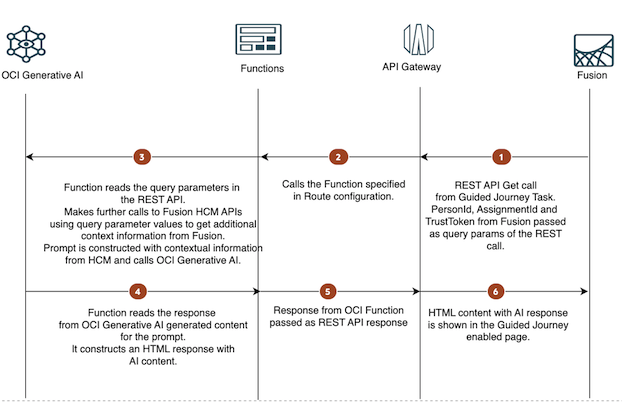
The following diagram depicts the pattern.
Components
This architecture uses the following components,
OCI Generative AI is a fully managed service that provides customizable large language models (LLMs). You can use the ready-to-use pre-trained models, or create and host your own fine-tuned custom models based on your data on dedicated AI clusters.
OCI Functions is a fully managed, multi-tenant, highly scalable, on-demand, Functions-as-a-Service platform.
OCI API Gateway enables you to publish APIs with private endpoints that are accessible from within your network, and which you can expose with public IP addresses if you want them to accept internet traffic.
Flow
-
Fusion Initiates the REST API Call: The Guided Journey Task in Fusion triggers a GET request to the REST API, which is an API Gateway endpoint. The request includes
PersonId,AssignmentId, andTrustTokenas parameters. -
API Gateway Invokes the Function: The API Gateway forwards the request to the specified Function according to the Route configuration.
-
Function Processes the Request:
- The Function reads the query parameters from the REST API request.
- It then uses these parameters to make additional calls to the Fusion HCM APIs, depending on the specific use case, to gather more contextual information.
- A prompt is created using the retrieved contextual data.
-
Function Calls OCI Generative AI: The Function sends the constructed prompt to the OCI Generative AI model, which generates a response. It formats the generated response according to the requirements of the Guided Journey and returns it.
-
API Gateway Delivers the Response: The formatted REST API response is sent back to the API Gateway endpoint.
-
Fusion HCM UI Displays the Response: The AI-generated response is displayed in a modal window within the Fusion HCM UI where the Guided Journey is configured.
Implementation
Below are the steps to set up this integration:
1. Create an OCI Function Application. Make sure you have OCI IAM Policies defined to use resource principal to access OCI Generative AI service.
Set up two configuration parameters within the OCI Function Application:
- SERVICE_ENDPOINT: The endpoint for the OCI Generative AI service.
- COMPARTMENT_OCID: The OCID of the compartment where the Generative AI resources are located.


2. Create an OCI Function
The Function code must ensure that it meets the Custom REST API requirements specified by Guided Journey. The custom REST API integration in Guided Journey expects a GET operation. The URL parameters for the REST API are used to pass context from the calling UI to the custom REST API.
The supported optional URL parameters are:
- TrustToken: This is the bearer token. The client can send this token in the authorization header when making requests to protected REST resources from within the CUSTOM REST API.
- PersonId: Person identifier of the context person.
- AssignmentId: Assignment identifier of the context person.
These parameters should be enclosed in curly braces {} within the URL. The tokens inside {} are replaced with actual values during the REST call:
?trusttoken={TrustToken}&personid={PersonId}&assignmentid={AssignmentId}
GET Response Format: The custom REST API expects the text results to be returned in the following format:
{

"Content": "<HTML Content>"

}
Function Sample code
In this sample code, HCM Goals REST API is called to retreive performance goal names. These goal names are passed to OCI Generative AI to generate a response that shows the steps to achieve the goals.
Import necessary modules and connect to OCI Generative AI service. Refer OCI Geneartive AI SDK to see the usage of the APIs.
import io
import logging
import os
from urllib.parse import urlparse, parse_qs

import oci.auth.signers
import oci.generative_ai_inference
import requests
from fdk import response


# Configuration and setup to access OCI Generative AI client.

def setup_oci_clients():
    """
    Sets up and returns the OCI Generative AI client.
    Fetches service endpoint and compartment OCID from environment variables.
    Raises an error if the required configurations are missing.
    """
    endpoint = os.getenv("SERVICE_ENDPOINT")
    compartment_ocid = os.getenv("COMPARTMENT_OCID")

    if not endpoint:
        raise ValueError("ERROR: Missing configuration key SERVICE_ENDPOINT")
    if not compartment_ocid:
        raise ValueError("ERROR: Missing configuration key COMPARTMENT_OCID")

    # Use the Resource Principals Signer to authenticate
    signer = oci.auth.signers.get_resource_principals_signer()

    # Create the Generative AI Inference Client with the specified endpoint and signer
    ai_client = oci.generative_ai_inference.GenerativeAiInferenceClient(
        config={},
        service_endpoint=endpoint,
        signer=signer,
        retry_strategy=oci.retry.NoneRetryStrategy()  # Disable retries
    )

    return ai_client, compartment_ocid
Helper function to parse query parameters from the request URL.
def get_query_params(request_url):
    """
    Extracts and returns query parameters from the request URL as a dictionary.
    """
    parsed_url = urlparse(request_url)  # Parse the URL to get the query part
    query_params = parse_qs(parsed_url.query)  # Parse the query parameters

    # Convert query parameters from lists to single values
    return {k: v[0] for k, v in query_params.items()}
Method to call the Fusion HCM REST API to get additional context. In this example, REST API to get performance goals is used.
# Method to call the Oracle Fusion HCM API
def call_fusion_hcm_api(person_id, assignment_id, bearer_token):
    """
    Makes a GET request to the Fusion HCM API using the provided person ID, assignment ID, and bearer token.
    Returns the API response.
    """
    hcm_api_url = "https://<replace with your host>/hcmRestApi/resources/latest/performanceGoals?fields=Description,GoalName&onlyData=true"

    # Set the request headers, including the bearer token for authorization
    headers = {
        'Authorization': f'Bearer {bearer_token}',
        'Content-Type': 'application/json'
    }

    # Make the GET request to the HCM API
    response = requests.get(hcm_api_url, headers=headers)
    logging.getLogger().info(f"Fusion HCM API response status code: {response.status_code}")

    return response
Method that constructs the AI prompt and calls the OCI Generative AI. The prompt given here is only a sample. Follow prompt guidelines to get a good response.
# Method to generate content using OCI Generative AI
def generate_content(hcm_api_response_json, ai_client, compartment_ocid):
    """
    Generates content based on the HCM API response using OCI Generative AI.
    Constructs a prompt from the JSON data and sends a request to the Generative AI service.
    Returns the generated text content.
    """
    prompt = (
        "Given the data that contains details of performance goals, "
        "use the GoalName and Description of the goals. Then, for each goalName, provide a set of "
        "actionable specific steps that could help achieve them effectively.Goals details are here: "
        f"{hcm_api_response_json}."
    )

    logging.getLogger().info(f"Generated prompt: {prompt}")

    # Create an inference request with specific parameters
    inference_request = oci.generative_ai_inference.models.CohereLlmInferenceRequest(
        prompt=prompt,
        is_stream=False,
        max_tokens=2000,  # Limit the number of tokens in the generated response
        temperature=0.7,  # Set the creativity level of the response
        top_k=0,
        top_p=0.75
    )

    # Specify the text generation details, including the model and compartment ID
    generate_text_detail = oci.generative_ai_inference.models.GenerateTextDetails(
        serving_mode=oci.generative_ai_inference.models.OnDemandServingMode(model_id="cohere.command"),
        compartment_id=compartment_ocid,
        inference_request=inference_request
    )

    try:
        # Generate the text content using the Generative AI client
        generate_text_response = ai_client.generate_text(generate_text_detail)
        generated_text = generate_text_response.data.inference_response.generated_texts[0].text
        return generated_text
    except Exception as e:
        # Log any errors that occur during text generation and raise the exception
        logging.getLogger().error(e)
        raise
Function handler method that reads the input query params, processes the requests, constructs the HTML response and returns a response.
# Main handler for the HTTP request
def handler(ctx, data: io.BytesIO = None):
    """
    Handles incoming HTTP requests.
    Parses query parameters, calls the Fusion HCM API, and generates content using OCI Generative AI.
    Returns an HTML response with the generated content.
    """
    logging.getLogger().info("HTTP function handler")

    try:
        # Extract the request URL and query parameters
        request_url = ctx.RequestURL()
        query_params = get_query_params(request_url)

        # Extract specific query parameters
        person_id = query_params.get('personid')
        assignment_id = query_params.get('assignmentid')
        bearer_token = query_params.get('trusttoken')

        # Call the Fusion HCM API with the extracted parameters
        hcm_api_response = call_fusion_hcm_api(person_id, assignment_id, bearer_token)

        # If the API call is successful, generate content using OCI Generative AI
        if hcm_api_response.status_code == 200:
            ai_client, compartment_ocid = setup_oci_clients()
            ai_generated_content = generate_content(hcm_api_response.json(), ai_client, compartment_ocid)
            logging.getLogger().info("ai_generated_content" + ai_generated_content)
            # Return an HTML response containing the generated content
            return response.Response(
                ctx,
                status_code=200,
                response_data=f'''{{
                    "Content": "<pre>{ai_generated_content}</pre>",

                }}''',
                headers={"Content-Type": "application/json"}
            )

    except Exception as e:
        # Log any exceptions that occur
        logging.getLogger().error(e)

    # Return an HTML response indicating failure if an exception occurs or the API call fails
    return response.Response(
        ctx,
        status_code=200,
        response_data=f'''{{
                        "Content": "<div>Failed to generate content.</div>"
                    }}''',
        headers = {"Content-Type": "application/json"}
    )
3. Set up OCI API Gateway.
- Create a new deployment in API Gateway:
Add a deployment with a path prefix and Authentication settings.
-
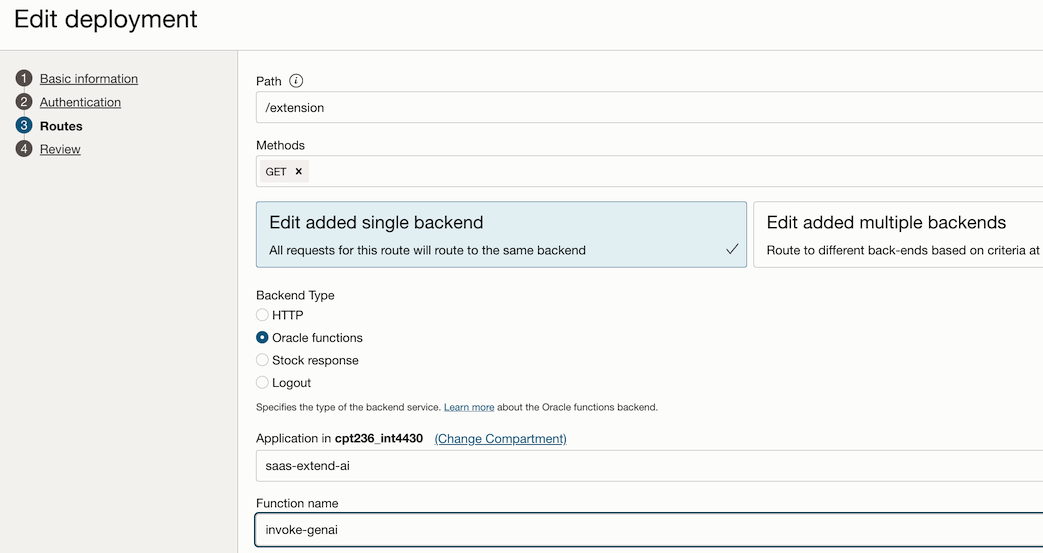
Configure the Route Path:
Add a new route within the deployment that points to the OCI Function you created earlier.
Define the path for your route, e.g., /extension. This path will be appended to the deployment’s base path.
Set the Method to GET
Since the Guided Journey expects a GET REST endpoint, ensure that the method for the route is set to GET.
Link to the OCI Function
In the backend type configuration of the route, set the type as Oracle Functions and link to the OCI Function you created. This allows the API Gateway to forward requests to your Function.
4. Test the API Gateway Endpoint.
Test the GET endpoint by making a request to the API Gateway’s URL with the required parameters. Ensure that the OCI Function returns the expected HTML content in the specified JSON format. Tune the prompt in the OCI Functions code until you get the desired AI response.
With these steps, your custom REST API is now accessible via the OCI API Gateway, ready to be integrated into a Guided Journey in Fusion SaaS. The Guided Journey task can now call this API to retrieve AI-generated content and display it within the task UI.
In the part 2 of this series, we will see how to add the Guided Journey to a Fusion Cloud HCM page to display the AI generated content.