
Enabling Secured REST calls from VBS to custom secured REST Services using Oracle Fusion Application Composer
Introduction
For some time, the Oracle Visual Builder (VB) runtime is now also deployed within Oracle Fusion Applications which means a customer can develop, and deploy, Oracle VB user interfaces directly into Oracle Fusion Applications (FA) infrastructure without needing a separate Oracle VB runtime. The primary development environment of this VB runtime is called Visual Builder Studio, or VBS. VBS is a complete development environment containing VB Design time, Source Control Support, Collaboration and integration with Oracle Fusion Applications. For more information see the Visual Builder Studio landing page at Oracle.com
The VB runtime within Fusion Applications has however one limitation, that REST endpoints must be:
- An Oracle Fusion Applications REST API, or more precisely it must be secured with Oracle Fusion Applications Identity Stack
- Or the endpoint has no authentication security (SSL is ok)
This means if you want to call an authenticated secured REST endpoint that has nothing to do with Oracle Fusion Applications, e.g. calling Oracle Integration Cloud from a VB then you cannot ☹.
You can however deploy your VB app into a separate VB instance running in Oracle OCI. To do this you will need to associate the VB instances IDCS (Identity Mgmt. Store) with Oracle Fusion otherwise SSO wont work as you would expect.
Recently a customer of ours however did not have a separate VB instance in Oracle Cloud Infrastructure (OCI) but they needed to call a secured endpoint in in OIC, so we went looking for an answer.
This customer is licensed for Oracle Sales Cloud and thus has access to Oracle Application Composer so a solution was found using Oracle Application Composer.
The Solution
This solution revolves around a feature in Oracle Application composer (App Composer) where:
- A groovy function, within a business object, can be exposed so that it is executable via a REST Service. We call this a “REST Action” in FA REST API talk.
- A groovy function within Application composer can also call an external REST endpoint with security (Basic, OAuth etc)
- And finally, the VB instance running within Oracle FA can call a secured Fusion REST Endpoint (the REST Action) and return a JSON payload to VB for future processing
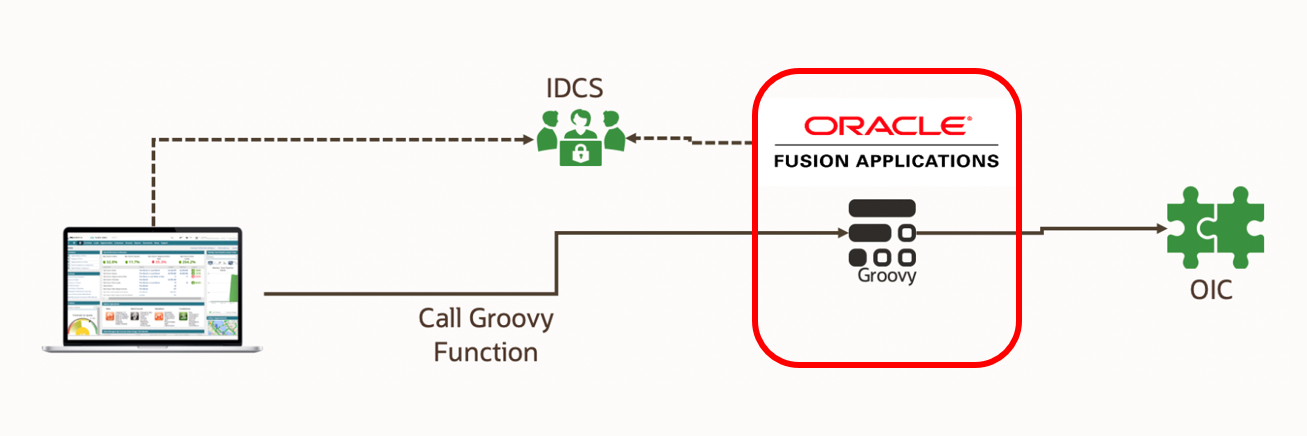
Our architecture now looks like this
How does this work?
- Oracle VB calls the REST Action endpoint for the groovy function stored within App Composer
- This groovy function contains all the code to call our secured REST endpoint and we can use native App Composer functionality to store and send the authentication to the REST Endpoint
- The REST endpoint returns the JSON data to the groovy function which in turn returns the data back to the client (VB, Postman etc).
Implementation
The following section explains how this can be implemented using VBS, App Composer and Oracle Integration Cloud. Oracle Integration Cloud here is just one example of a secured REST endpoint you can use which ever one you want, and the rest of this blog entry assumes there is a secured REST Endpoint available.
Ensure you can call your secured REST endpoint
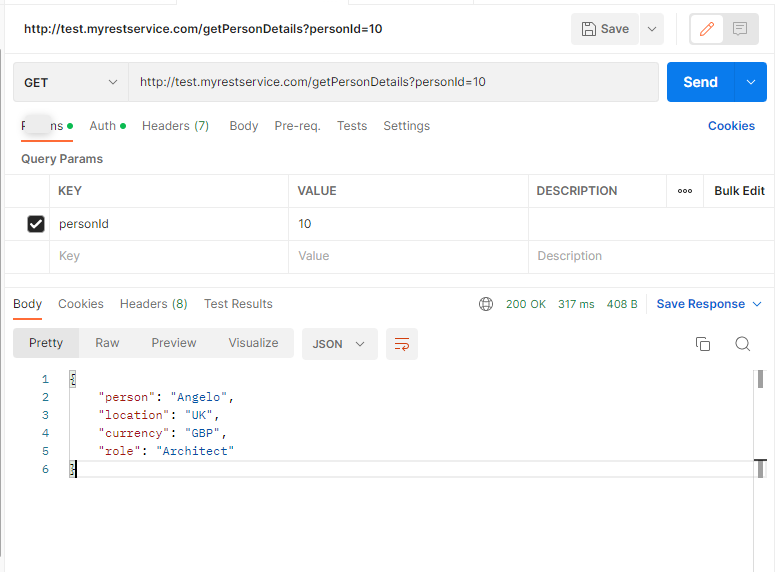
Before starting, and it may sound obvious, but make sure you can call your secured REST endpoint using CURL, Postman, or another tool.
Add your secured endpoint App Composer
Within App Composer there is a common setup item called “WebServices”, you will need to add your API endpoint, the response payload, authentication details etc,
so that we can call it from within groovy.
e.g.

In my example I’ve used Basic authentication but as you can see above you can propagate the identity using SAML and you can use OAuth.
Create the custom function within an App Composer Object
We now need an object to put our groovy function into. This object can be a standard out of the box object (e.g., Opportunity, contact etc) or it can be a custom object. If your function is not related to a standard object then the best practice is that you create a custom object called “GlobalFunctions” and create your function within this object.
For our example we’ve just used the “opportunity” business object
Within your chosen object navigate to “Server Scripts”
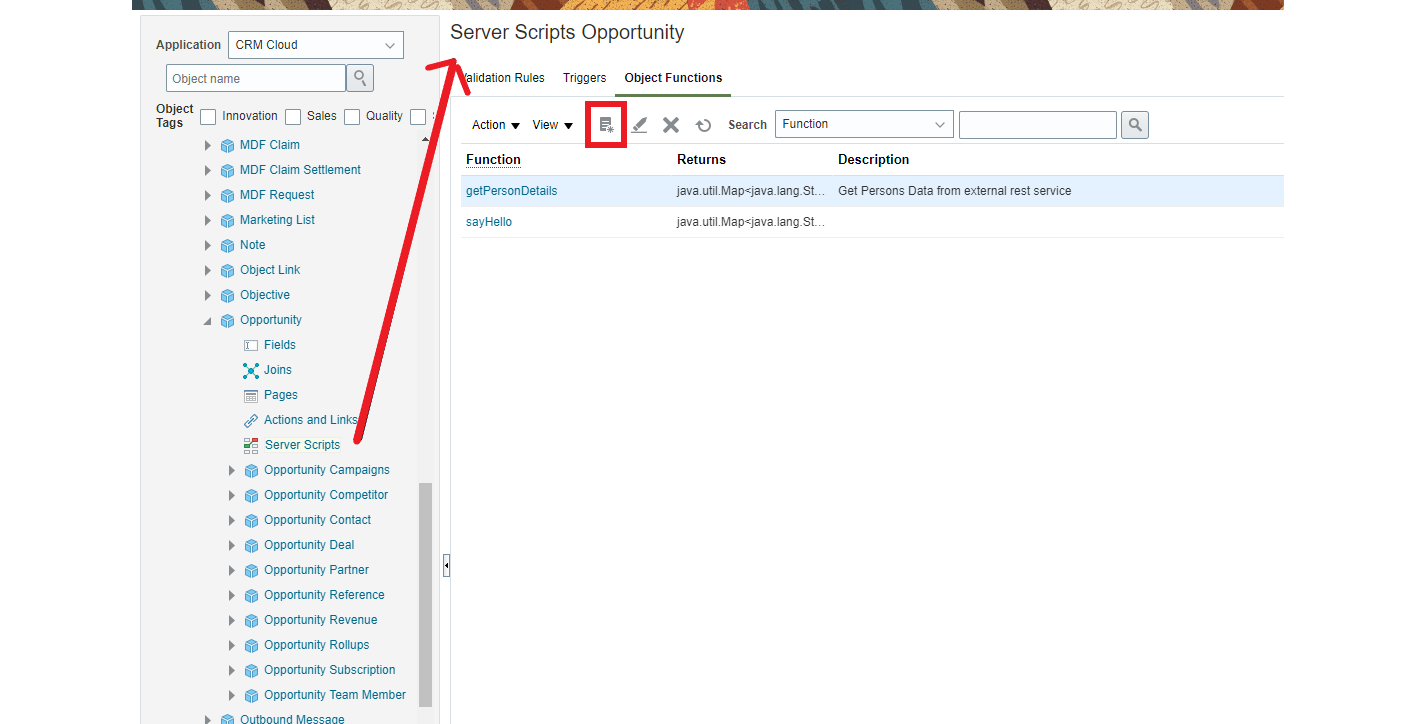
Then add an object function. Within this object function add some code which will call your secured REST endpoint
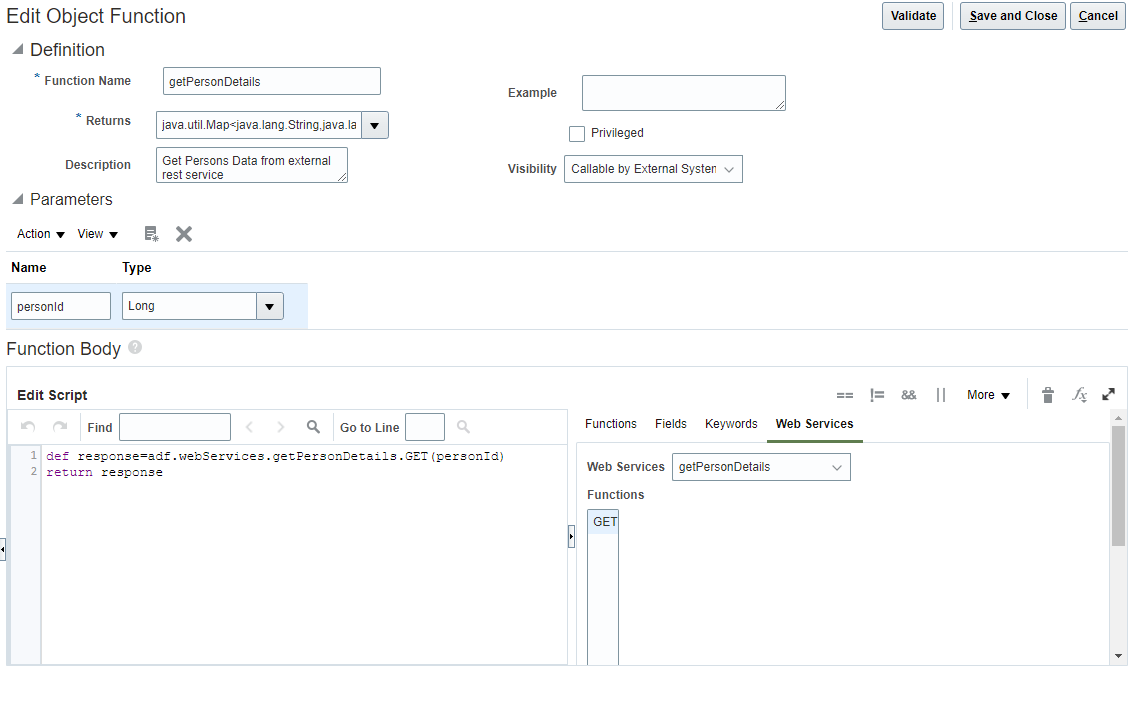
Important notes
- As we are returning a JSON data type the “Returns” combo box must be filled with the datatype
java.util.Map<java.lang.String,java.lang.String>
NOTE : The java.util datatype above is not available from the pulldown you need to enter it
manually - Within the visibility pull down, ensure “Callable by External Systems”, is selected.
This allows the groovy function to be called from the REST API
You Can Now Call Your Groovy Script
Object Functions can be called from REST BUT they are not globally available and can only be called at the row level. So, for you to call a groovy function you need to ensure there is at least ONE row in the object and execute the REST call against that.
In my example I used the Sales Cloud Opportunity object, so I execute the following REST call to get the first row and importantly the OptyNumber.
This Linux CURL command will retrieve the OptyNumber for the first row returned (you can also use postman)
Hint: Replace {{fusionHostname}}, {{username}} and {{password}} with your authentication details
| curl –location –request GET https://{{fusionHostname}}/resources/11.13.18.05/opportunities?fields=OptyNumber&limit=1&onlyData=true \ –user “{{username}}:{{password}}”
|
And now we can execute our Groovy function using that OptyNumber
| curl –location –request POST ‘https://{{fusionHostName}} \ crmRestApi/resources/latest/opportunities/11001/action/getPersonDetails’ \ –header ‘Content-Type: application/vnd.oracle.adf.action+json’ \ –user {{username}}:{{password}}’ |
If all is well, you should receive the data back in JSON format
e.g. This is what it could look like in Postman

Finally Call this from within VB
Within VB go to your services tab (1) and add a new Service (2)
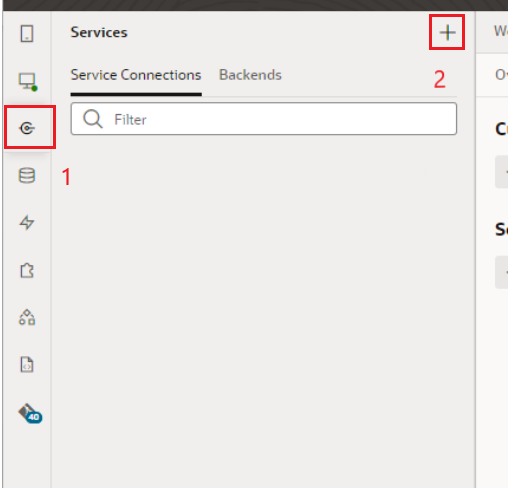
In this example I’m going to add a service connection to Oracle Fusion , specifically to the opportunity service, and then we’ll configure it to call out getPersonDetails groovy script
- Select Define by Specification

- Give a valid service name and set the api type to be OpenAPI/ Swagger and select the URL field
- This should open and give you a list of OOTB backends like base:fa , base:fscmRest, base:hcmRest, base:crmRest etc (see screenshot below)
<Image> - Select base:crmRest backend, and then supply the rest of the URL for the opportunities resource as given in the example in https://docs.oracle.com/en/cloud/paas/visual-builder/visualbuilder-building-appui/create-service-connection-service-specification.html .
- The full URL will then be something like vb-catalog://backends/base:crmRest/11.13.18.05:9/describe.openapi/opportunities . You can click the info icon next to URL and see the resolved URL too which would be something like https://<FA base URL>/crmRestApi/rest/rv:2fee1cc5-8291-4d18-aff8-cae3203f0b36/en/11.13.18.05:9/describe.openapi/opportunities.
- Note : VB uses a slightly different optimized URL which includes the rv (release version) string, the REST API version (11.13.18.05) and the REST-Framework-Version 9. You dont need to give the authentication, it will automatically be used from the selected backend but you do need to set the “Metadata Retreival Option” to be “Copy full OpenAPI to the application” because we will be selecting only the specific endpoint we need.
- Expand and select the groovy action
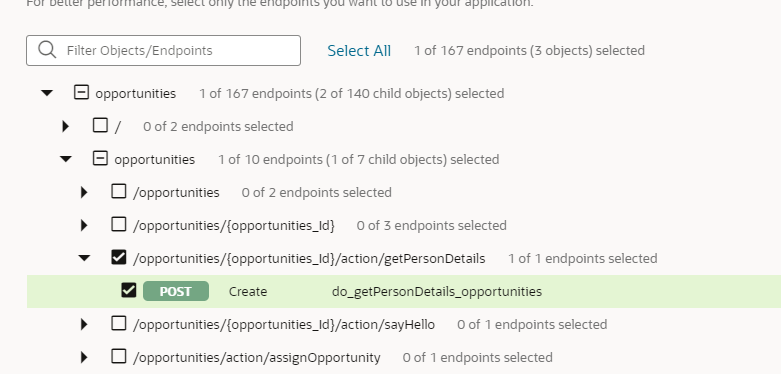
- Navigate to the endpoints and within the getPersonDetails method
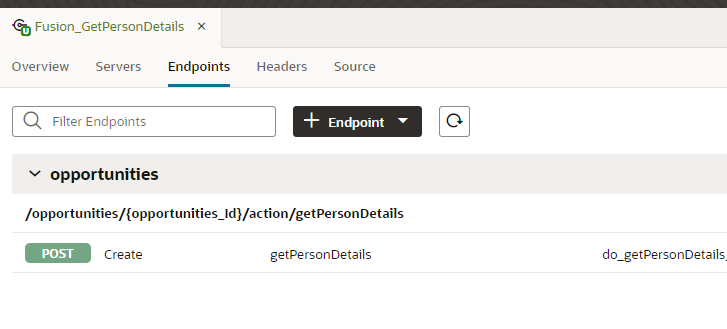
- Within the Request tab add a static Header called “Content-Type” and set it to “application/vnd.oracle.adf.action+json”

- Finally you should now be able to test the service call works by going to the “test” tab, entering a valid Opportunity ID (e.g. 11001) and then hitting Test.

You can now use this endpoint in your VB/VBCS application just any other REST Service, you will need to pass a default Opportunity ID at runtime, however.
Conclusion
The following blog post shows how a VBS client, running within Oracle Fusion, can call non fusion authenticated endpoints by leveraging Oracle Application Composer. Oracle Application Composer is only supported in Fusion Sales Cloud, Projects, and a few other Fusion module. If you are using a module which does not support Application Composer then my colleague Maximilian Froeschl has written an alternative architecture using Cloud Native components such as OCI API Gateway, Oracle Cloud Functions and a few other OCI Services.