
Executive Summary
Oracle Integration Cloud (OIC) platform Is commonly used in many large enterprise implementations and is a key component for integrating business-critical applications. Often, these applications have a need to poll a remote server, pick up files and process them quickly to meet stringent SLAs. A common OIC pattern leveraged in such situation uses a scheduled integration which fires at short intervals, picks up the list of files to process and passes the list on to a child integration in a fire-and-foget mode. The child integration instance then processe the files asynchronously. However, the child integration process may take relatively longer intervals to complete before the next scheduled integration is triggered. As a result, we sometimes see multiple child integration instances working with overlapping set of files in parallel thus leading to different types of concurrency issues. This blog attempts to describe an efficient pattern that can be implemented to eliminate any race conditions generated as result of the concurrent processing described in this situation.
Integration Pattern Architecture
The details of the OIC patterns with the issue and the remedy are both described in this section. First, we will look at the general use case where this pattern can be applied. We commonly see a requirement to poll a remote SFTP server and pick up files as soon as possible and then process the records in them by updating the data in a remote SaaS endpoint. To meet this requirement, we design short-lived scheduled integrations that is triggered at short intervals to look for newly arrived files in the directory. As shown in Fig.1, this task is usually broken up into 2 component integrations.
- A scheduled integration to poll the remote directory and get the information on files present.
- An asynchronous child integration that the scheduled integration calls to process the files and archive them. As a part of the processing cycle, the child integration can be making API calls to SaaS endpoints or other third-party applications via Adapters.
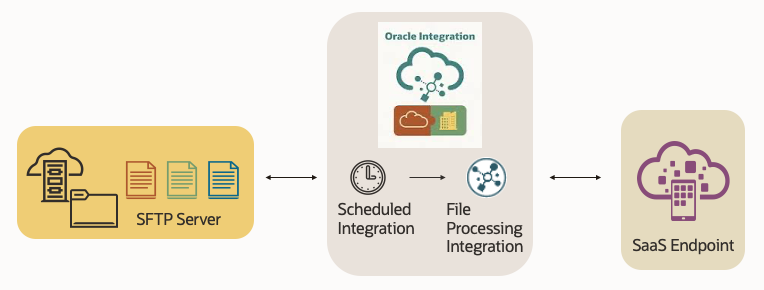
Fig. 1 File Handling Pattern with Scheduler for SaaS Integration
Simplified Flow with Concurrency Issue
The timing issue is best described in the high-level flow diagram with the runtime integration processes shown below in Fig. 2.
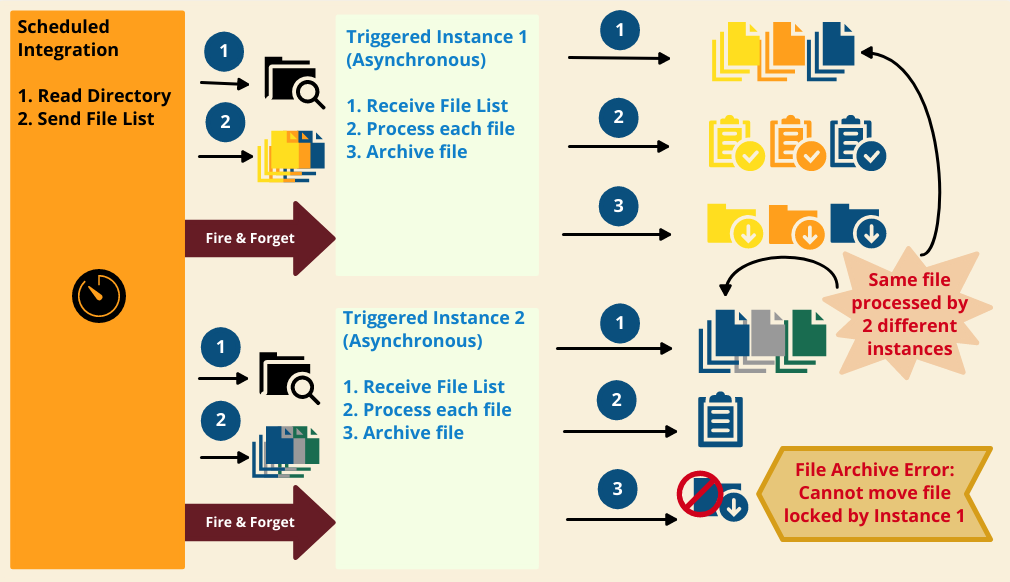
Fig. 2 Integration Flow with Original Issue
As shown in the diagram, the sequence of steps executed are listed below.
- Scheduled Integration is triggered at a pre-set time.
- It reads a directory to pick up a list of files to process
- It calls a child integration (instance# 1) asynchronously and passes the list of files to process
- Child integration process (instance# 1) receives the list of files
- For each file in the list
- Lines in the file are processed
- Upon completion of processing, the file is moved to an archive location.
- Scheduled Integration is triggered for the next interval.
- It reads the same directory and picks up a list of files to process, which contains a file from the previous list (blue file), as the child integration instance# 1 has not yet completed processing it
- It calls a child integration (instance# 2) asynchronously and passes the list of files to process
- Child integration process (instance# 2) receives its list of files
- For each file in the list
- Lines in the file are processed
- Upon completion of processing, one of the files (blue file) cannot be moved to the archive location as instance# 1 is also working on the same file.
Modified Flow with Best Practices Pattern
The original flow is now enhanced with the additional of a new intermediate layer of child integration as described in Fig. 3 below.
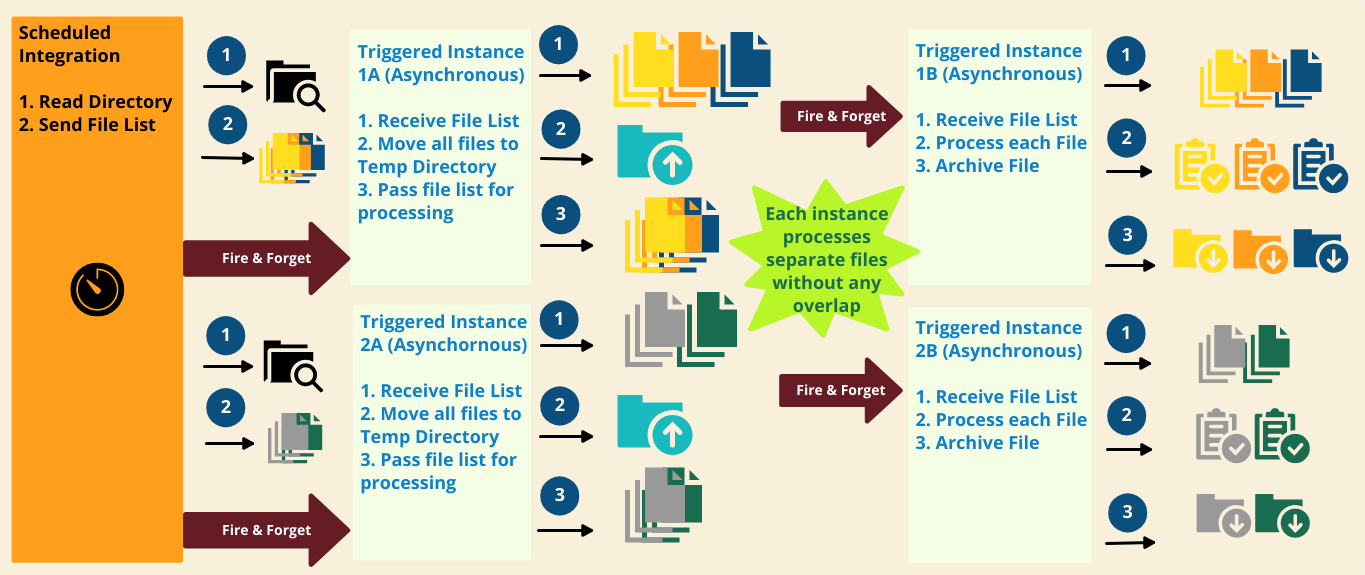
Fig. 3. Modified Integration Flow to eliminate concurrency errors
As shown in the diagram, the sequence of steps executed are listed below.
- Same scheduled Integration from Fig. 2 is triggered at a pre-set time
- It reads a directory to pick up a list of files to process
- It now calls a new child integration (instance# 1A) asynchronously and passes the list of files to process
- Child integration process (instance# 1A) receives the list of files.
- It moves all the files to a temporary staging directory
- It then calls the original child integration (instance# 1B) asynchronously and passes the list of files from the staging directory to process
- Child integration process (instance# 1B) receives its list of files.
- As usual, it processes the files one at a time and archives them at the end of processing in a loop.
- Scheduled Integration is triggered for the next interval
- It reads the same directory but picks up a list of different files to process, because the list from the previous scheduled integration has already been moved to a temporary staging directory.
- It calls the child integration (instance# 2A) asynchronously and passes the list of files to process
- Child integration process (instance# 2A) receives its list of files which is unique without any overlap.
- It moves all the files to a temporary staging directory
- It then calls the original child integration from Fig. 2 (instance# 2B) asynchronously and passes the list of files from the staging directory to process
- Child integration process (instance# 2B) receives its unique list of files
- As usual, it processes the files one at a time and archives them at the end of processing in a loop.
This pattern guarantees that each scheduled integration instance and its child integration instances are working with unique set of files, thereby eliminating all possibilities of concurrency related errors.
Setup
To further demonstrate the validity and effectiveness of this pattern, a few integration flows were built and tested. Rest of these sections describe the setup and actual results from the test performed.
To create the concurrency issue, a few simplified approaches were adopted for our tests, as listed below.
- The built-in Fileserver within Oracle Integration was used for the SFTP server.
- The time to process the data in each file and post them to the SaaS endpoints is simulated by introducing a wait activity for a few seconds inside the loop for processing each line within a file.
- To simulate the steady arrival of files in the SFTP server to process, few files were added manually to the SFTP server directory between successive scheduled integration cycles.
- The time interval between each scheduled integration was reduced to ensure that the child integration instance from the previous scheduled run was not completed thus leading to generation of the concurrency related errors.
Original Flow with Concurrency Issue

Fig. 4 Scheduled Integration Flow
The scheduled integration design-time flow is shown in Fig. 4. The key steps in this integration are listed below.
- Invoke FTP Adapter and get a list of files from the target SFTP server.
- Pass this list of files as input argument and invoke another local integration to process these files. This call is asynchronous resulting in the quick completion of the scheduled integration instance.
- A logging activity is included for debugging and monitoring.
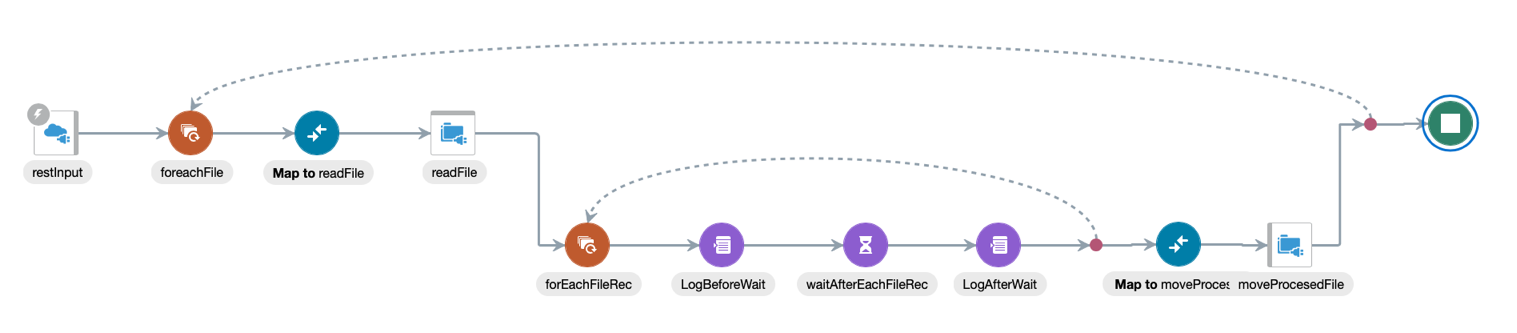
Fig. 5 Integration Flow to Process Files
Fig. 5 shows the design-time flow for the integration that processes the files received in the list as input argument. The key steps in this integration consist of 2 nested loops for each file and each line in a file, as listed below.
- For each file in the received list as input, do the following:
- Read the file contents via FTP Adapter
- For each line in the current file, do the following:
- Process each current line. This processing task is simulated by a wait activity for a few seconds. In real scenarios, it could involve invoking a REST API hosted at the SaaS endpoints.
- Move the file to an archive directory using FTP Adapter, after processing of the file content is completed.
- A few logging activities are included for debugging and monitoring.
Enhanced Flow with Improved Design
The modified design introduces a third layer of integration in the middle of the end-to-end processing cycle (Fig. 3). We could have easily modified the scheduled integration to combine the tasks completed by this additional layer. But keeping mind the constraints of a real production environment, we wanted to keep the changes to the original flawed integration setup as less invasive as possible. So, in our approach, we have maintained the 2 integrations described earlier in its original form. In addition, we have introduced a new integration flow in the middle that receives the file list from the schedule integration and moves them to a temporary staging directory before passing the same list to the original integration for processing the files in them.

Fig. 6 Integration flow to move files to a temporary staging directory
The design-time flow for the new integration is shown in Fig. 6 and the key steps in this flow are listed below..
- For each file in the received list as input, do the following:
- Move the file contents via FTP Adapter to a temporary staging directory
- Pass this list of files as input argument and invoke the original local integration to process these files. This call is asynchronous resulting in the quick completion of this integration instance.
- It is worth pointing out that the scheduled integration will also invoke this intermediate integration asynchronously to allow quick completion of the scheduler triggered instance.
This completes the setup of the integrations to simulate the concurrency error and its remedy. The next section describes the results obtained by testing these integration flows.
Test Results
The preliminary setup prior to testing the flows involved the following tasks.
- We started with placing 9 CSV files (file01-09.txt) in the polled directory (OICRead) of the SFTP server. Each file contained line data with varying number of lines.
- The scheduled integration was set to run every 2 minutes.
- 2 file (file10-11.txt) were kept ready and were placed in the SFTP server’s polling directory after the first scheduled instance completed successfully.
- Testing was carried out for 2 cycles of scheduled integration.
The test results obtained with the 2 designs are shown in the following subsections.
Original Flow
Both the instances of the scheduled integration completed successfully. A sample run-time flow is shown in Fig. 7.

Fig. 7 Scheduled Integration – Successful Completion
However, the integration flow to process files triggered by the second scheduled integration instance errored out as it was trying to move a file after processing the lines in it (Fig. 8).
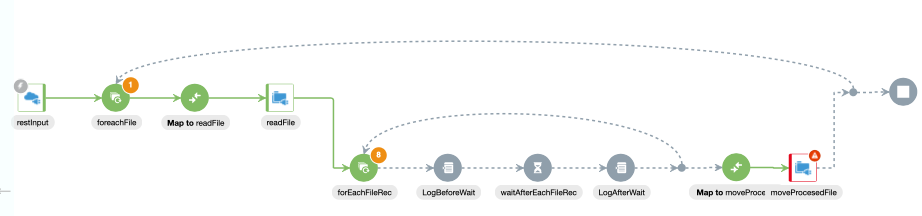
Fig. 8 Processing File Integration, Instance #2 – Error Encountered
Upon further investigation, we observed that the error was a File I/O error as shown in Fig. 9. We know that the files File01-09.txt were picked up by the first scheduled instance and hence being processed by its corresponding child integration instance #1. However, before that processing could be completed, instance #2 of the scheduled integration also picked up the file File08.txt in its list. As a result, this file (File08.txt) was also processed in parallel by instance #2 of the child integration for processing files. The file move operation in instance #2 was not premitted as the instance #1 already had a lock on the file.
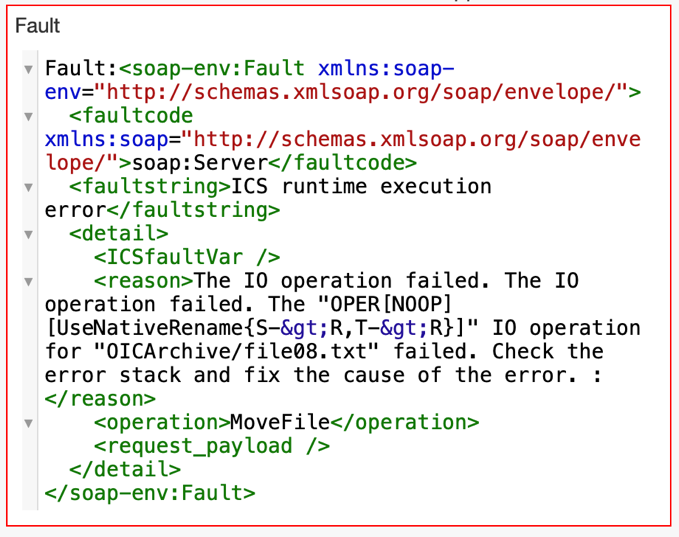
Fig. 9 Error Details – File I/O Error seen in Instance #2 of Integration for Processing Files
Depending on the actual timings of the integration processes, the concurrency related errors could vary. For example, if File08.txt was completely processed and archived by instance #1 before instance #2 tried to process it, we could have seen a “File Not Found” error in instance #2. It is not worthwhile to implement cumbersome logic with retries to handle such concurrency errors as exception handling mechanism. On the contrary, if we replace the faulty design pattern with a cleaner, efficient model then all the concurrency issues can be eliminated in its entirety and the design of integration can be kept cleaner.
For the sake of completion, we waited till the integration instance #1 for processsing files completed successfully after this error was observed in instance #2. Fig. 10 shows that all the 9 files (file01-09.txt) were successfully processed.
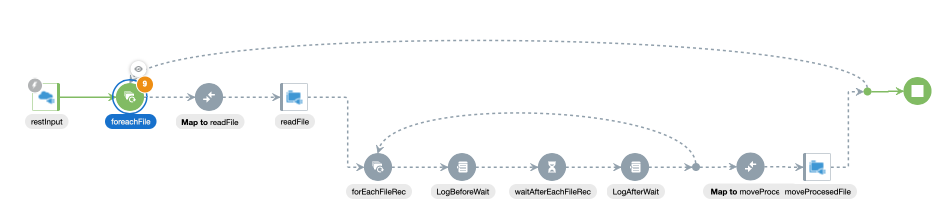
Fig. 10 Processing File Integration, Instance #2 – Successful Completion
Enhanced Flow
Both the instances of the scheduled integration completed successfully and so did the instances of the integration for processing the files. The runtime flows looked similar to Fig. 7 and Fig. 10.
No I/O contention errors were seen, which is expected because each integration instance processed a distinct set of files. The intermediate integration layer inserted in between the 2 integrations of the original flow guaranteed this behavior. A sample runtime flow of this newly introduced integration in the middle is shown in Fig. 11 below.

Fig. 11 Newly introduced intermediate integration to move the files to a temporary staging directory
This concludes the testing of the enhanced integration pattern. The basic pattern presented here can be leveraged to design integrations that involve polling a directory for processing of several files in short intervals.
Summary
To summarize, a high level architecture diagram showing the 3 integrations in the recommended pattern is shown in Fig. 12 below.
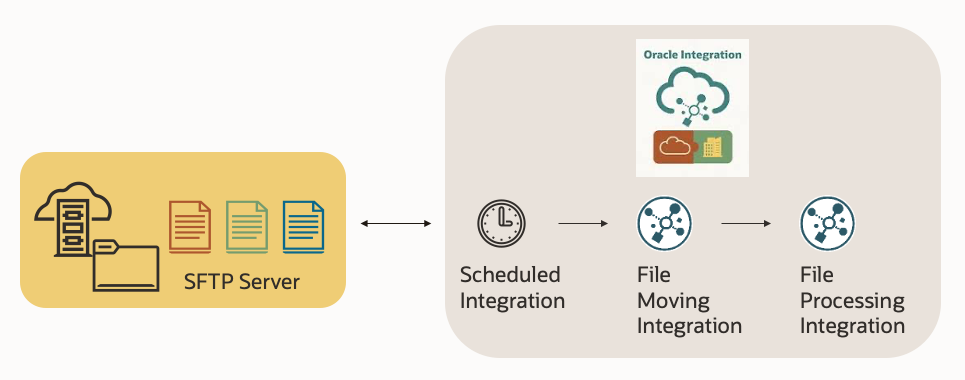
Fig. 12 Solution Architecture of the Enhanced Design Pattern
We have selected a set of simplified integrations here to demonstrate the benefits of the underlying pattern. This model can be easily extended by modifying the processing cycle for each file to include REST API calls to SaaS endpoints and other external endpoints like databases or third-party applications.
For more details on integration of Oracle Integration with SaaS and other external endpoints, please refer to the Oracle Integration Product Documentation portal [1].
Acknowledgements
I would like to acknowledge the assistance I received from my teammate, Greg Mally for the compilation of this blog. I would also like to thank Alexandru Bentu from the Oracle Support team of OIC for his help at different times.
References
- OIC Documentation Portal – Product Documentation for Oracle Integration