

In today’s enterprise landscape, governance isn’t just about granting access — it’s about ensuring accountability. Oracle Access Governance (AG) empowers organizations with robust audit capabilities that offer real-time visibility into identity-driven activities, supporting compliance, security monitoring, and operational transparency.
Why Audit Events Matter
Audit events are critical for enforcing security, meeting compliance mandates, and ensuring operational accountability. These records provide fine-grained insights into every action – who did what, when, and to which resource. Their importance spans several areas:
- Security Monitoring: Detects anomalous or unauthorized activity to enable rapid response.
- Compliance Adherence: Supports regulatory standards like GDPR, HIPAA, and ISO 27001 through detailed identity and access logging.
- Operational Insight: Enables better decision-making with a clear view of access patterns and changes.
- Forensics and Retention: Facilitates incident investigation and audit readiness via long-term log storage.
Event Data Publisher (Data Feed) in Access Governance
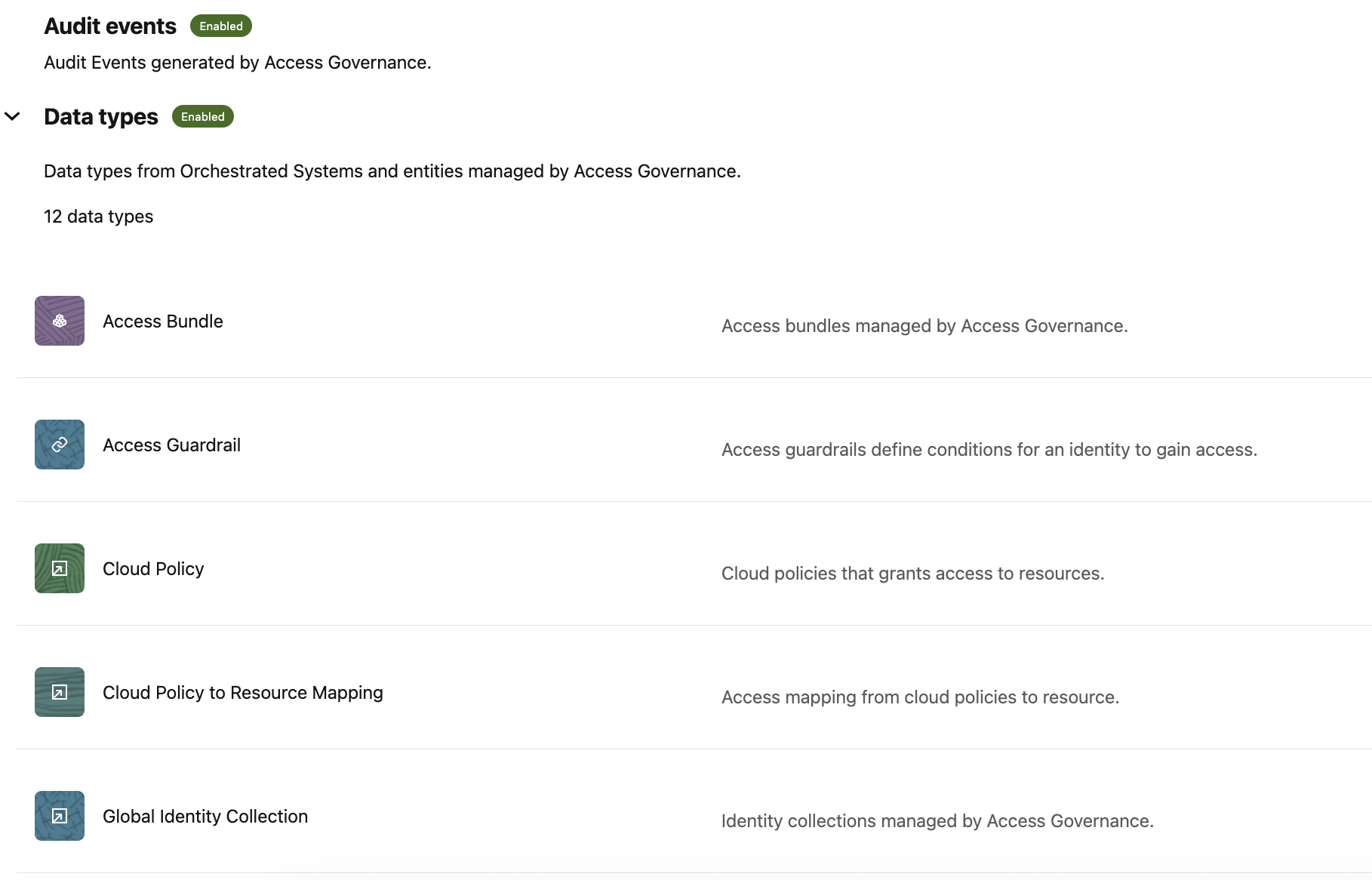
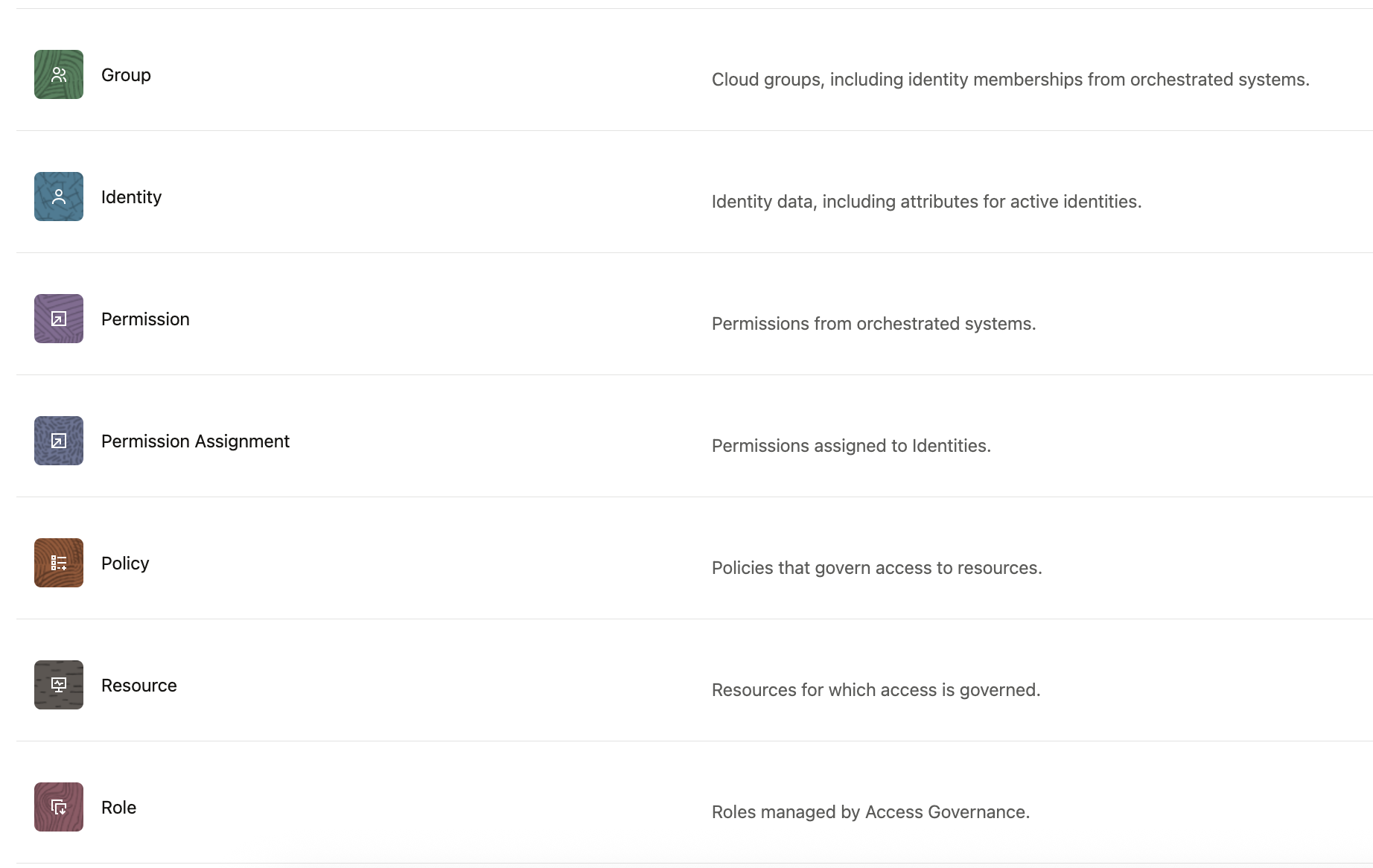
Event Data Publisher enables the export of one-time and continuous data events from Oracle Access Governance to an OCI tenancy. This data can be used for insights, compliance, long-term storage, and access governance analysis. These events include:
- Audit Events
- Data Types
Audit event delivery and integration options
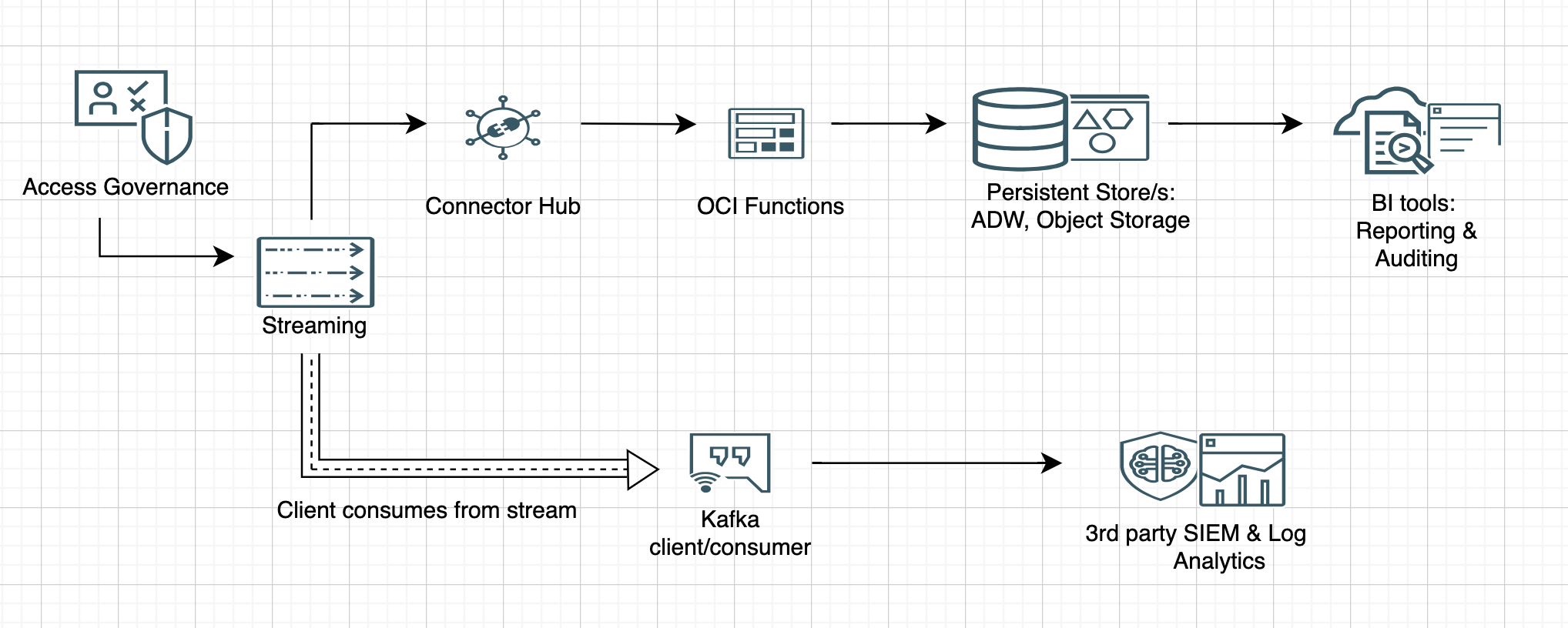
AG supports near real-time delivery of audit data through OCI Streams via the Data Feed feature. This enables event-driven processing and eliminates the lag associated with batch-based systems.
Audit events are published to OCI Streams, which can then be integrated with reporting, monitoring, security, and analytics systems. For example:
- Connector Hub + OCI Functions: Can be used to parse and route events to persistent stores such as Autonomous Database or Object Storage.
- Kafka clients/consumers : Using these, events can be forwarded to third-party SIEM platforms like Splunk and/or search and analytics engines like Elasticsearch for security monitoring and log analysis.
OCI Streaming is Kafka-compatible allowing data to be routed to various Oracle and third-party systems based on the use case. For long-term data, retention to support auditing and reporting needs, OCI functions can be triggered via the Connector Hub. These functions can process and send the data to a persistent store such as an Autonomous Database, or Object Storage. These persistent stores can then be leveraged by BI tools for dashboarding and visualization.
For security monitoring and log analysis in general, OCI streaming can integrate with leading SIEM platforms to enable real-time monitoring and threat detection. Additionally, Stream data can be forwarded to search and analytics engines for in-depth analysis.
The Data Feed architecture in AG enables customers to leverage a variety of Oracle and third-party systems, for audit, analytics, and compliance.
The diagram below shows a reference architecture illustrating some of these options:
Enabling Audit events in AG
Enabling audit event integration is straightforward. You can activate it directly from the console by providing the required OCI Stream and Object Storage bucket details to handle both Day-0 and Day-N data events.
You can follow the setup steps here: Configure Event Data Publisher in Oracle Access Governance
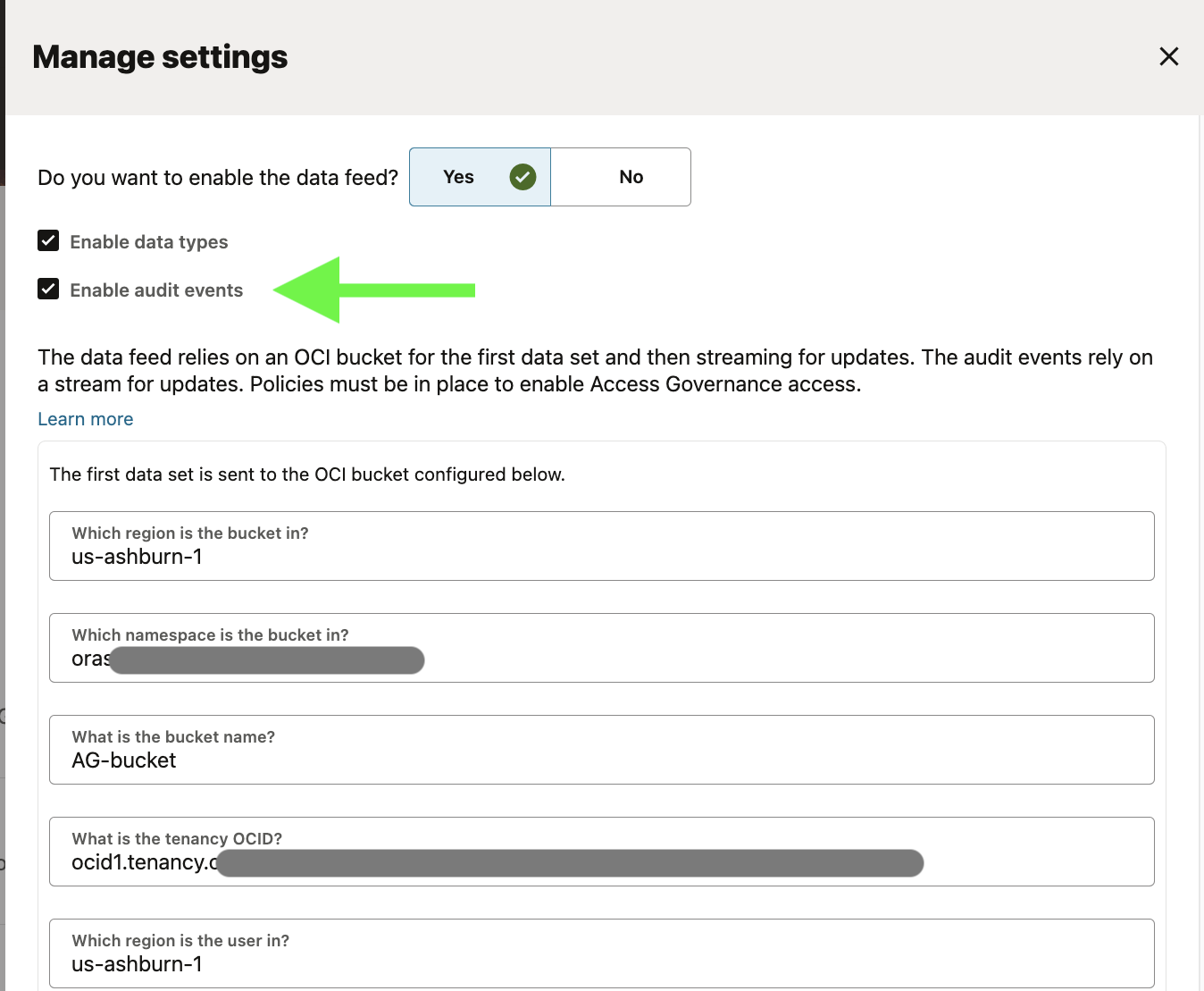
Once enabled, audit events are streamed in JSON format and some of the key fields include:
- headers.eventType
- headers.operation
- headers.messageType
- headers.eventTime
- headers.tenancyId
- headers.serviceInstanceId
- headers.opcRequestId
- headers.eventId
- source
- eventType
- contentType
- region
- availabilityDomain
- identity.host
- identity.userAgent
- identity.principalId
- request.requestTime
- request.id
- request.path
- request.action
- request.parameters
- request.headers
- response.responseTime
- response.status
- response.headers
- response.payload
- stateChange
Processing events
- Using OCI Functions
The code snippet below illustrates the setup from an OCI Functions perspective – you initialize the configuration, create a stream client and a cursor, and start processing messages.
Note: The example processes stream messages using a cursor with an offset. You can explore other cursor types such as AT_TIME, TRIM_HORIZON, or LATEST, and choose the one that best fits your requirements.
  # Initialize OCI client
  logging.getLogger().info('Initialize OCI Config and Client')

  rps = oci.auth.signers.get_resource_principals_signer()
  stream_client = oci.streaming.StreamClient(config={}, service_endpoint=ENDPOINT, signer=rps)

  # Create a cursor
  logging.getLogger().info('Creating cursor')
  cursor = create_cursor(stream_client, STREAM_OCID, PARTITION, CURSOR_TYPE, OFFSET)

  # Retrieve messages
  logging.getLogger().info('Retrieving messages')
  messages = retrieve_messages(stream_client, STREAM_OCID, cursor, limit=100)

  if not messages:
     logging.getLogger().info('No valid messages found.')
     sys.exit(1)

    for message in messages:

      if message.key is None:
         continue

      logging.getLogger().info('Decoding message')
      decoded_json = decode_message(message)
- Using Kafka Consumers
The example code snippet below demonstrates a Kafka client configuration: it initializes the client with settings specific to OCI Streaming, subscribes to the topic (stream), and then begins polling and consuming messages in real time.
    topic = STREAM_NAME
    conf = {
    'bootstrap.servers': BOOTSTRAP_SERVERS_ENDPOINT,
    'security.protocol': SECURITY_PROTOCOL,
    'sasl.mechanism': 'PLAIN',
    'sasl.username': f"{OCI_TENANCY_NAME}/{OCI_USER_NAME}/{STREAM_POOL_OCID}",
    'sasl.password': OCI_USER_AUTH_TOKEN,
    'group.id': 'kafka-python-getting-started'
   }
    # Create Consumer instance
    consumer = Consumer(conf)

    # Subscribe to topic
    consumer.subscribe([topic])

    # Process messages
    try:
        while True:
            msg = consumer.poll(1.0)
            if msg is None:
                print("Waiting for message or event/error in poll()")
                continue
            elif msg.error():
                print('error: {}'.format(msg.error()))
            else:
                #Check for Kafka message
                record_key = "Null" if msg.key() is None else msg.key().decode('utf-8')
                record_value = base64.b64decode(msg.value().decode('utf-8')).decode('utf-8')
                print("Consumed record with value " + record_value)
# Sample processed event (Access Bundle request)
{
  "eventType": "com.oracle.idm.agcs.data.enablement.auditEvents",
  "operation": "CREATE",
  "messageType": "AUDIT_EVENTS",
  "eventTime": "2025-04-27T08:50:14.612341635Z",
  "tenancyId": "ocid1.tenancy.XXXXXXXXXXXXXXXXXXXXXXXXX",
  "serviceInstanceId": "ocid1.agcsgovernanceinstance.XXXXXXXXXXXXXXXXXXXXXXXXX",
  "opcRequestId": "XXXXXXXXXXXXXXXXXXXXXXXXX",
  "eventTypeVersion": "1.0",
  "eventId": "7128e5a0-65fa-4a2d-XXXXXXXXXXXXXX",
  "data": {
    "source": "pm-selfservice",
    "eventType": "com.oracle.idm.agcs.audit.pm-selfservice.createPermissionRequest",
    "eventTypeVersion": "20230331",
    "contentType": "application/json",
    "region": "IAD",
    "availabilityDomain": "IAD_AD_3",
    "identity": {
      "host": "<AG_INST_HOST>",
      "userAgent": "Mozilla/5.0 (Macintosh; Intel Mac OS X 10_15_7) AppleWebKit/537.36 (KHTML, like Gecko) Chrome/135.0.0.0 Safari/537.36",
      "principalId": "globalId.XXXXXXXXXXXXXXXXXXXXXXXXX"
    },
    "request": {
      "requestTime": 1745743813634,
      "id": "7fe67586-XXXXXXXXXXXXXX",
      "path": "/pm-selfservice/20230331/permissionRequests",
      "action": "POST"
    },
    "response": {
      "responseTime": 1745743814463,
      "status": "200",
      "headers": {
        "Content-Type": [
          "application/json"
        ]
      },
      "payload": {
        "id": "191edc67-XXXXXXXXXXXXXX",
        "justification": "need it for operations",
        "requestStatus": "PENDING_APPROVALS",
        "createdOn": 1745743813892,
        "updatedOn": 1745743813892,
        "createdBy": "globalId.XXXXXXXXXXXXXXXXXXXXXXXXXXXX",
        "permissionRoles": [],
        "accessBundles": [
          {
            "id": "2ed59d95-XXXXXXXXXXXXXX",
            "name": "JDE Viewer",
            "displayName": "JDE Viewer"
          }
        ],
        "identities": [
          {
            "id": "globalId.XXXXXXXXXXXXXXXXXXXXXXXXXXXX",
            "name": "Aaron Simmons",
            "displayName": "Aaron Simmons"
          }
        ],
        "attributes": {}
      }
    },
    "stateChange": {}
  }
}
Summary
Oracle Access Governance’s audit event framework empowers organizations to:
- Gain real-time visibility into access actions
- Meet regulatory and compliance requirements
- Build flexible processing pipelines using native OCI and Kafka tools
- Retain and secure audit logs for long-term retention and investigations
Oracle Access Governance doesn’t just deliver access control – it ensures accountability, transparency, and trust across the entire identity lifecycle. With robust audit capabilities and seamless integration options, organizations can move from reactive compliance to proactive governance.