Autonomous Data Warehouse – Oracle Database 19c Enterprise Edition Release – Production Version 19.11.0.0.0
Oracle Cloud Application 22C (11.13.22.07.0)
Fusion Analytics Warehouse Application Version 22.R2R4
Code Asset
If you which to evaluate the solution described in this blog, you can download the ODI Project SmartExport here.
Background
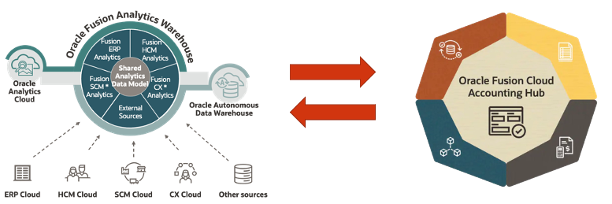
Oracle Fusion Analytics (FAW) provides analytics for Oracle Cloud applications, powered by Autonomous Data Warehouse (ADW) and Oracle Analytics (OAC). More specifically:
Fusion ERP Analytics provides accounting data sourced from ERP Cloud in a warehouse designed to support broad set of analytics use cases.
Fusion HCM Analytics provides comprehensive workforce, turnover data sourced from Fusion HCM Cloud.
Fusion SCM Analytics give customers the ability to gain visibility into Supply Chain performance, correlate Supply Chain processes with business goals and detect, understand and predict Supply Chain issues.
Fusion Accounting Hub (FAH) is a cloud application that unifies data from different financial systems, giving customer finance teams a complete view of financial data to increase forecasting accuracy, shorten reporting cycles, and simplify decision-making.
This blog is part of a series of blogs that details the Reference Architecture leveraging the FAW extensibility framework to use FAW as :
an Inbound Data Store layer to
Standarize and group customer source financial systems data
Transform customer source financial systems data into FAH data file format
Upload tranformed FAH data file to Fusion
Run the Accounting Engine to generate Subldeger Accouting entries in FAH
an Outbound Data Store layer to:
Enable analytics for the FAH data foundation
Enable enrichement of the FAH data foundation via the AI / Machine Learning capabilities of the FAW platform
Allow fine grained sub-ledgers analysis, general ledger balances and supporting references drill-downs with end to end traceability for operational and financial insights.
Figure 1: FAW and FAH Integration
This blog will focus on the Inbound Data Flows and Orchestration to FAH Reference Architecture.
* Have access to an Fusion Analytics Instance (OAC, ADW) with Administrative privileges
* Have access to a Oracle Cloud Application instance with
* Have provision an Oracle Data Integrator Marketplace instance
* Follow the steps in the first blog for instructions on:
Policies Assignment (Step 1)
SSH key-pair Generation (Step 4-b and 4-c)
ODI Marketplace Provisioning (Step 2)
ADW Configuration (Step 5-h, 5-i, 5-j and 6-d)
Reference Architecture Overview
Rationale
Banks feed transactions from many upstream source systems to the Fusion Accounting Hub. These could be trading systems, loans, retail banking, foreign exchange deals, hedges, etc. Key characteristics of the upstream feeds:
Very high volumes at a level of detail unnecessary for accounting purposes.
Acquisitions often mean that source systems are duplicated. That is, transactions from different source systems warrant a similar accounting treatment.
Large number of source system transaction attributes that are irrelevant to accounting. But they must be made available to downstream operational reporting.
Source systems are often not transactional in nature in the sense that a current status can be extracted at end of day but, no coherent / robust history of transaction status is possible.
Customers have requirements to make source transactions available in a central, persistent and robust reporting platform, aka Transaction Data Store (TDS).
The source systems feeds must be prepared prior to the upload to the Accounting Hub. Transformations include:
standardization – mapping source system attributes to a common list of values. For example, 0 and N = No; and 1 and Y = Yes.
summarization – merging many source system lines using a subset of attributes and facts (i.e. amounts and counts).
derived “records”, derived fields, sequences, etc.
Value Proposition
In addition to the existing FAW value proposition (reporting tools, extensibility, pre-defined subject areas, etc.), the FAW FAH Integration architecture offers s a single platform for pre-processing, enrichment and reporting. It eliminates data migration from the TDS to the enrichment and / or reporting platform and its reconciliation. The end to end process is faster, more reliable and cheaper.
Architecture Blueprint
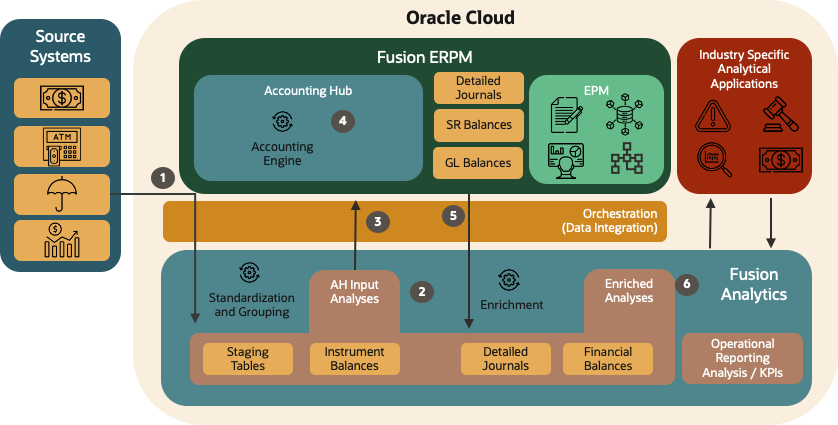
FAW to FAH Architecture Blueprint is depicted in Figure 2 below. This architecture has a set of pre requisites :
Having a clear Master Data Management strategy
Having derived the Metadata Object Model for Financials products from the Master Data Management strategy, including mapping from source systems data elements to FAH data elements (such as Accounts, Products, Party, Events , FX rates lookups and mappings)
Having defined the functional configuration in FAH applications according to best practices
Loading source transactions and instrument balances into FAW tables (staging tables and instrument balances).
Based on the Metadata Object Model, invoking the process to cleanse, validate and re-format the source transactions and instrument balances in preparation for their upload to the Accounting Hub. The results will be “stored” in AH Input Analyses. The architecture technical components will capture and process any errors that occur.
Extracting AH Input Analyses from FAW Staging tables, generating Accounting Hub input files and invoking the Accounting Engine.
The Accounting Engine will process the transactions to generate detailed journal entries and financial balances. The architecture technical components will invoke SR balance calculations.
FAW Data Pipeline will load the Accounting Hub results (detailed journal entries and financial balances) into FAW ADW tables.
FAW Data Pipeline will combine Accounting Hub detailed journal entries and financial balances with source transactions (staging tables and instrument balances). This process is known as enrichment. The resulting enriched source system transactions and financial balances will be available for further processing by Financial Services Industry specific analytical applications and operational reporting (FAW OAC).
In this blog, we will leverage Oracle Data Integration on the Marketplace and the AHC_Loan FAH Application. In a subsequent blog, we will use the OCI Native Data Integration serverless Service to implement this inbound architecture.
Standardization and Grouping of Source Systems Data in FAW ADW
Loading Source Systems Data to OCI
The first step in the Inbound data flow is to onboard the Source System data into OCI. The best route to do so it so copy the files to an OCI Object Storage bucket.
This document describes how to put files in object storage. The example in this blog covers :
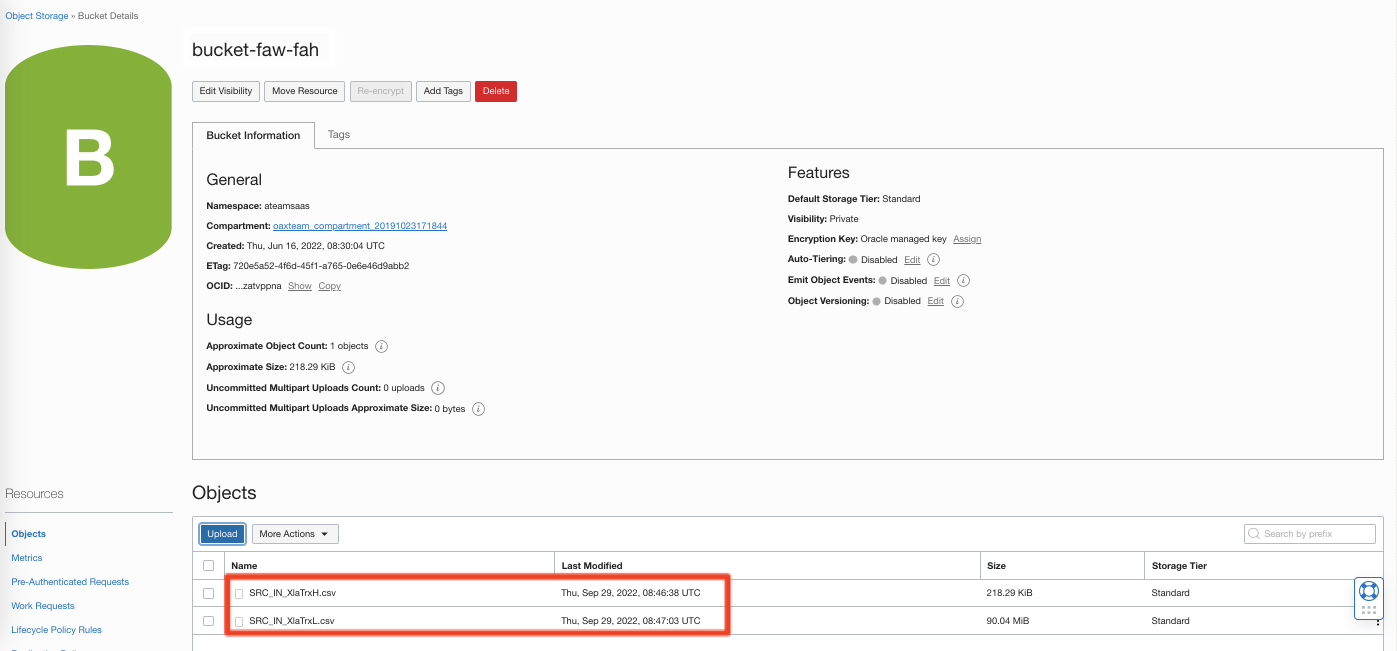
a transactions header file named SRC_IN_XlaTrxH.csv
a transactions lines file named SRC_IN_XlaTrxL.csv
The following picture shows the two files in a bucket named bucket-faw-fah :
Figure 4: Source System Files in OCI Object Storage Bucket
Cleansing, Validating and re-formatting Source Systems Data into FAH Data Format
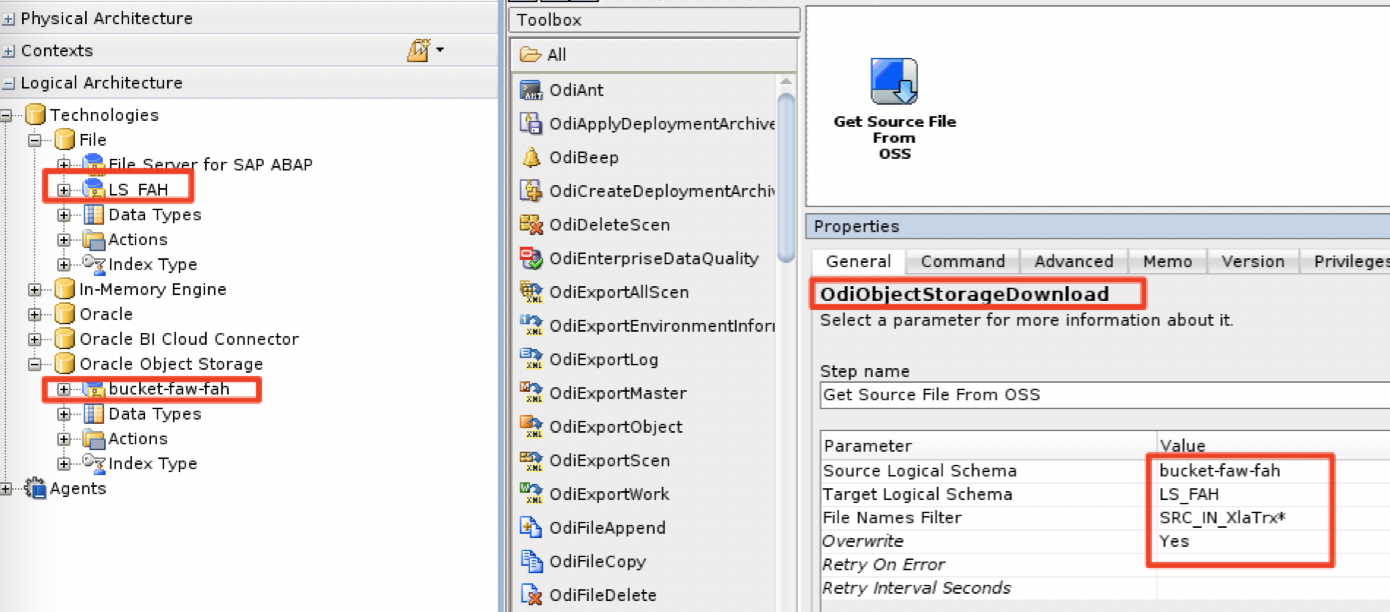
Once the data is available in OCI Object Storage bucket, the cleansing, validation and transformation process can start. Oracle Data Integrator (ODI) has tools to get files from an object storage bucket and copy them locally to the ODI compute instance file system. Please refer to this document to land the object storage file to a local folder on the ODI compute instance.
A sample command to download the files from the bucket-faw-fah to the local file system (LS_FAH logical schema in ODI topology)
Data profiling : analyzes the frequency of data values and patterns in your existing data based on predefined rules and rules you define.
Data Cleansing: validates and modifies data based on predefined rules and rules you define, deleting duplicate, invalid, incorrectly formatted or incomplete data based on the data profiling process ouput
The steps below heavily rely on the master data definition of the customer : having all these functional rules available in database objects (stored procedures, mapping and lookup tables,…) is a driver to allow Oracle Data Integrator to apply the rules to profile and cleanse the source system data.
All the database objects will be created in a custom schema named FAW_FAH_STG in the FAW ADW instance.
This section describes a simple transformation step where we are mapping the product from the source system data to products as they are expected by FAH
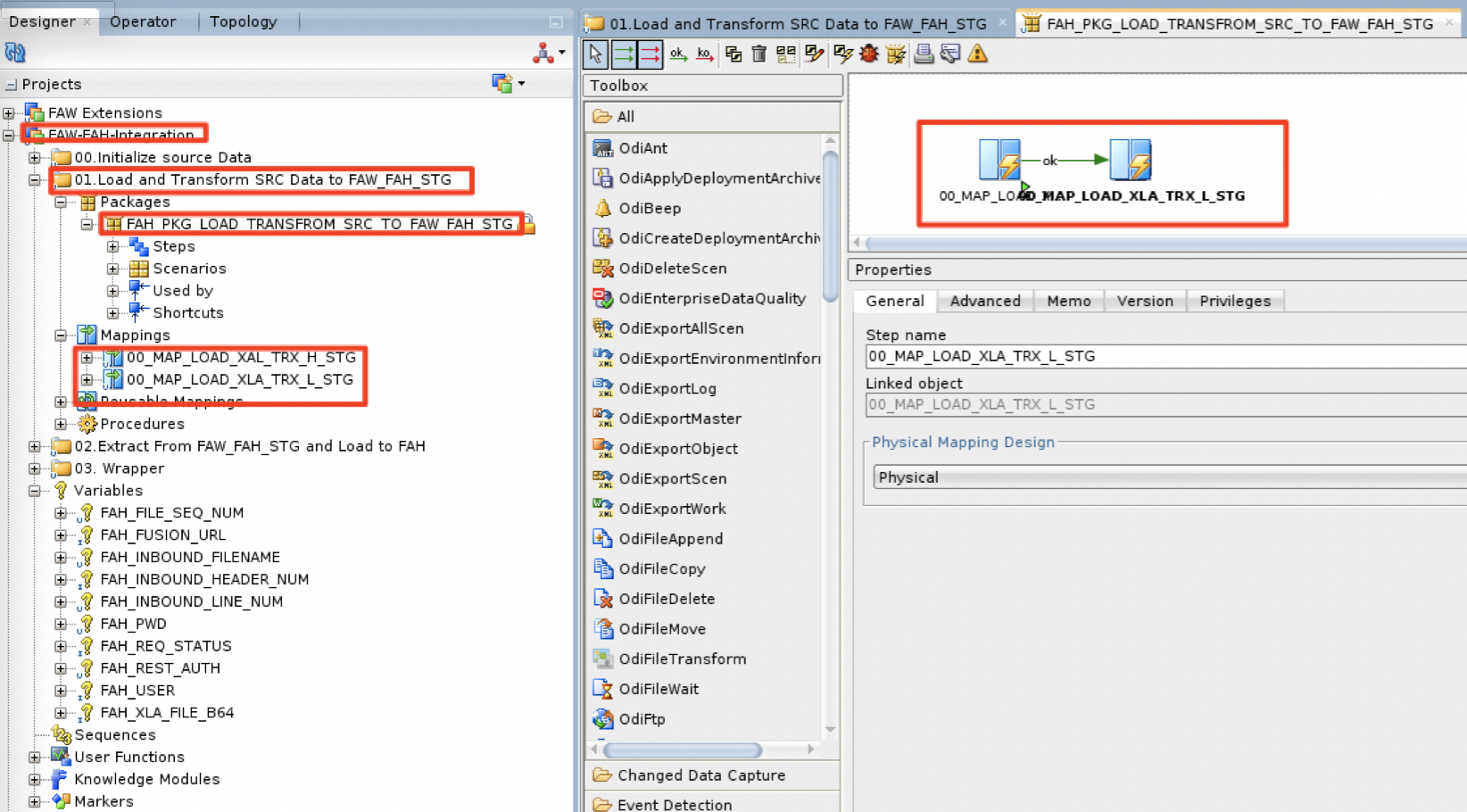
a) In the ODI Studio / Designer, we have defined a FAW-FAH-Integration project. Within this project, under the 01.Load and Transform SRC Data to FAW_FAH_STG folder, the package FAH_PKG_LOAD_TRANSFROM_SRC_TO_FAW_FAH_STG will run two ODI Mappings :
00_MAP_LOAD_XAL_TRX_H_STG
00_MAP_LOAD_XLA_TRX_L_STG
Figure 6: Load and Transform to FAW_FAH_STG schema package
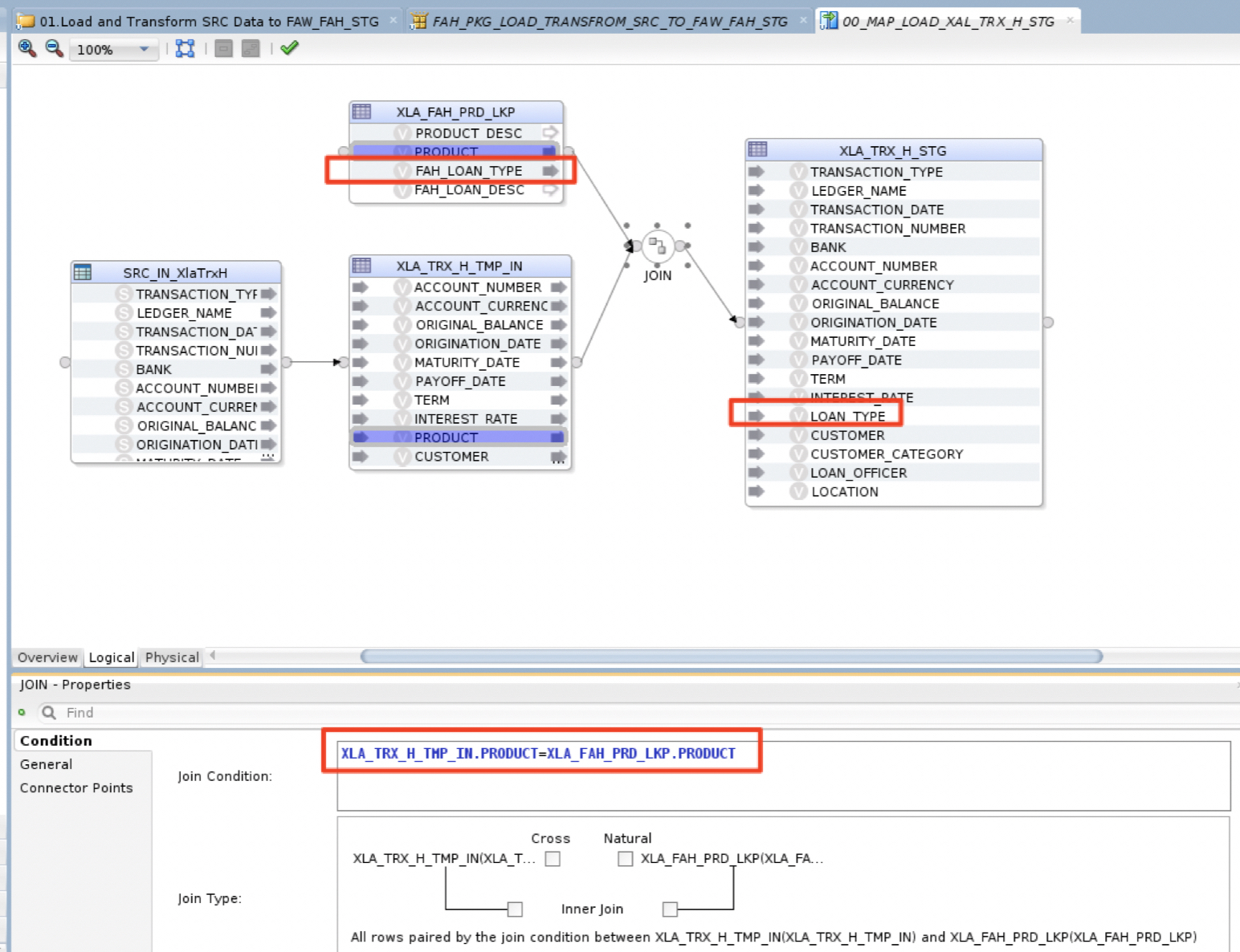
b) 00_MAP_LOAD_XLA_TRX_H_STG ODI Mapping will load (FIle to Oracle LKM and Oracle Insert IKM) the Header Source file data SRC_IN_XlaTrxH.csv from the local file system into a temporary table XLA_TRX_H_TMP_IN in the FAW_STG. Then join this temp table with a product lookup table XLA_FAH_PRD_LKP ot map the source products with FAH product (here LOAN_TYPE) and load all other columns to the table XLA_TRX_H_STG.
Figure 7: Load Headers to FAW_FAH_STG schema Mapping
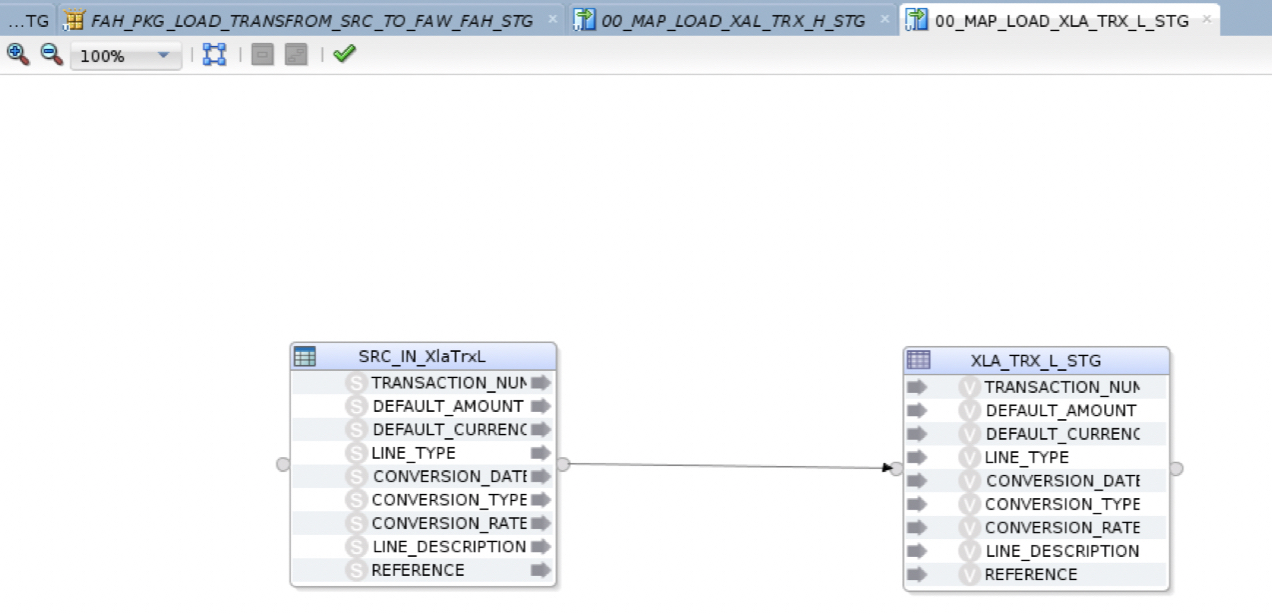
c) 00_MAP_LOAD_XLA_TRX_L_STG ODI Mapping will load (FIle to Oracle LKM and Oracle Insert IKM) the Lines Source file data SRC_IN_XlaTrxL.csv from the local file system into XLA_TRX_H_STG table without any transformation – for the simplicity of the example
Figure 8: Load Lines to FAW_FAH_STG schema Mapping
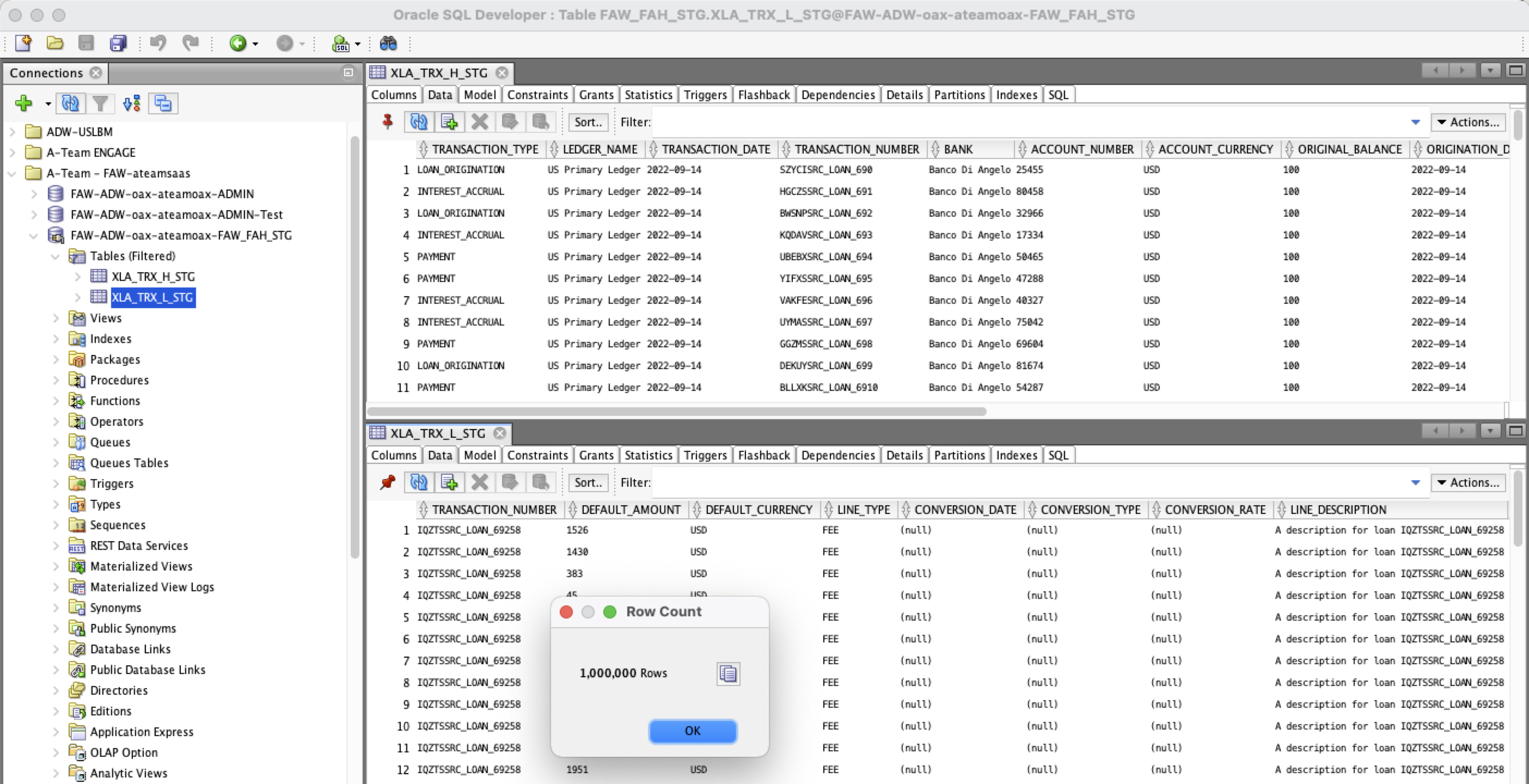
d) Once run, the tables are popuplated in FAW_FAH_STG schema
Figure 9: FAW Staging tables for Headers and Lines
Preparing Standardized Data to load to FAH
Now that the Source System Data is loaded, cleansed and transformed into FAW ADW tables , we need to extract them into flat files and package them so they can be loaded into FAH.
Extracting AH Input Analyses from FAW Staging tables
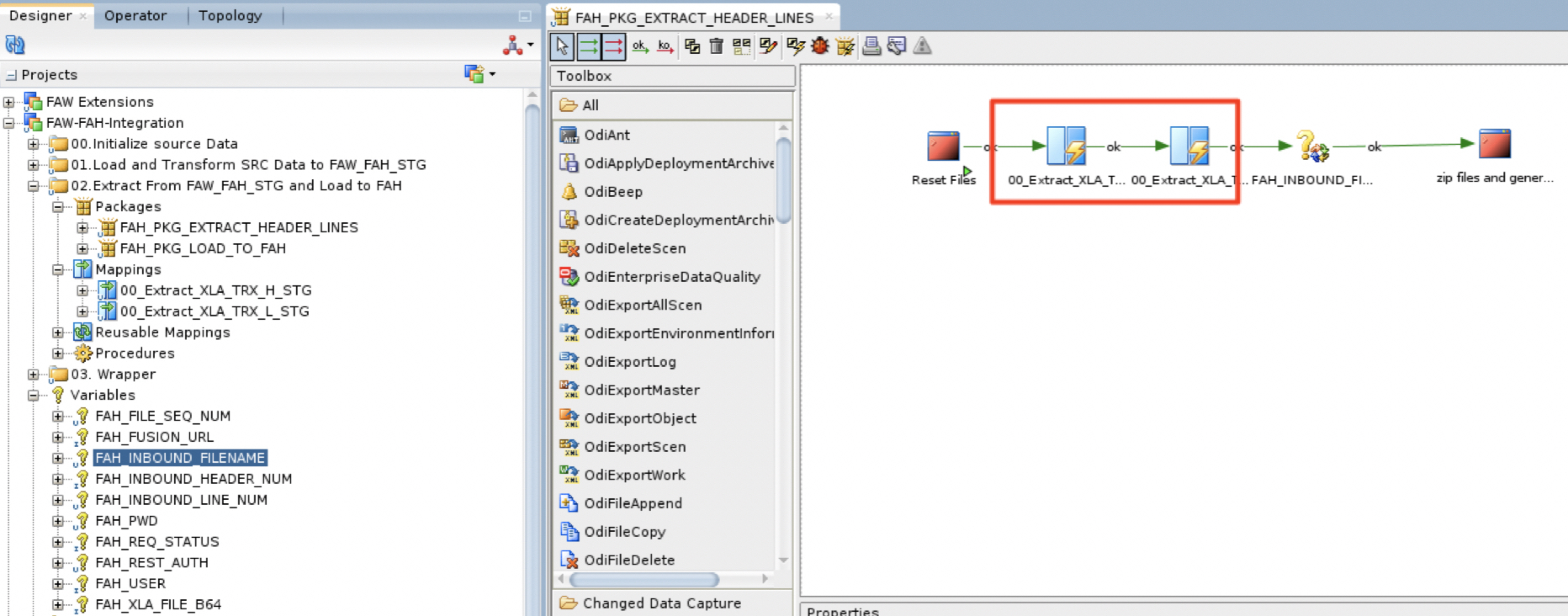
Extracting the AH Input Analyses (Header and Lines) to comma separated value files (CSV) is done by the ODI package FAH_PKG_EXTRACT_HEADER_LINES :
a) Within the FAW-FAH-Integration project, under the 02.Extract From FAW_FAH_STG and Load to FAH folder, the package FAH_PKG_EXTRACT_HEADER_LINES will run two ODI Mappings :
00_Extract_XLA_TRX_H_STG
00_Extract_XLA_TRX_L_STG
Figure 10: Extracting AH Input Analyses – ODI Package
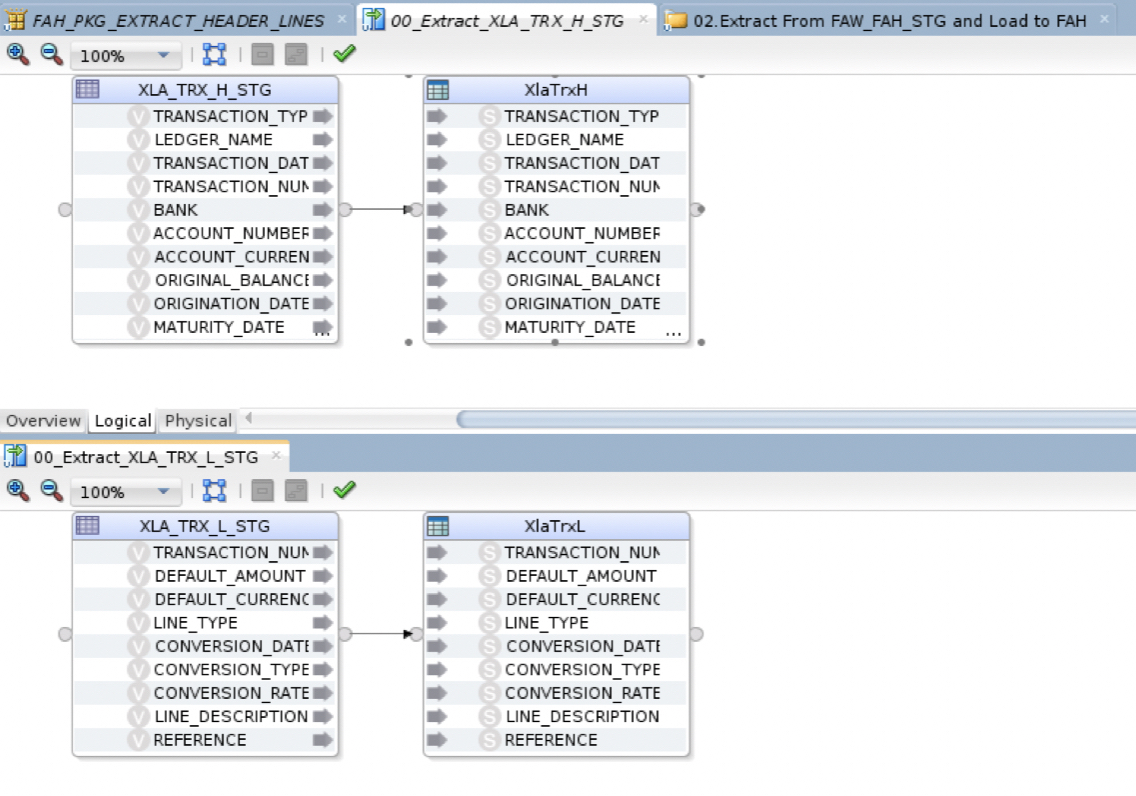
b) Both Mappings are extracting the Header and Lines tables to their corresponding csv files. Both Mappings are using SQL to File LKM.
Figure 11: Extracting AH Input Analyses – ODI Mappings
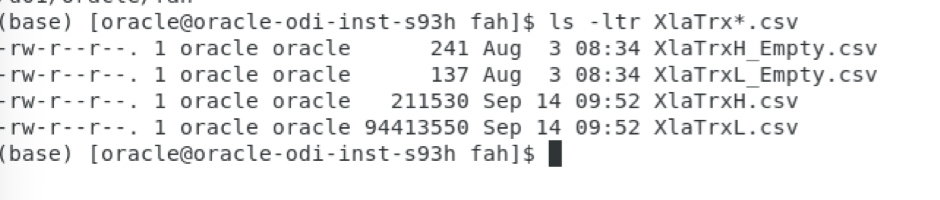
b) When these two steps are executed, the csv files are generated in our case under the /u01/oracle/fah folder: the headers file is XlaTrxH.csv and the lines file is XlaTrxH.csv. We will see the operator logs in the next sub section as the FAH files preparation once extracted step is part of the same package as the FAH files extraction.
Figure 12: Extracting AH Input Analyses – ODI target files
Preparing Accounting Hub input files
When loading data into FAH, the file needs to adhere to a certain set of rules and requirements:
The final file to upload to FAH needs to be a compressed zip file
The final file to upload to FAH name needs to staret with XlaTransaction
The final file to upload to FAH needs to contain three files:
The transaction header file named XlaTrxH.csv
The transaction lines file named XlaTrxL.csv
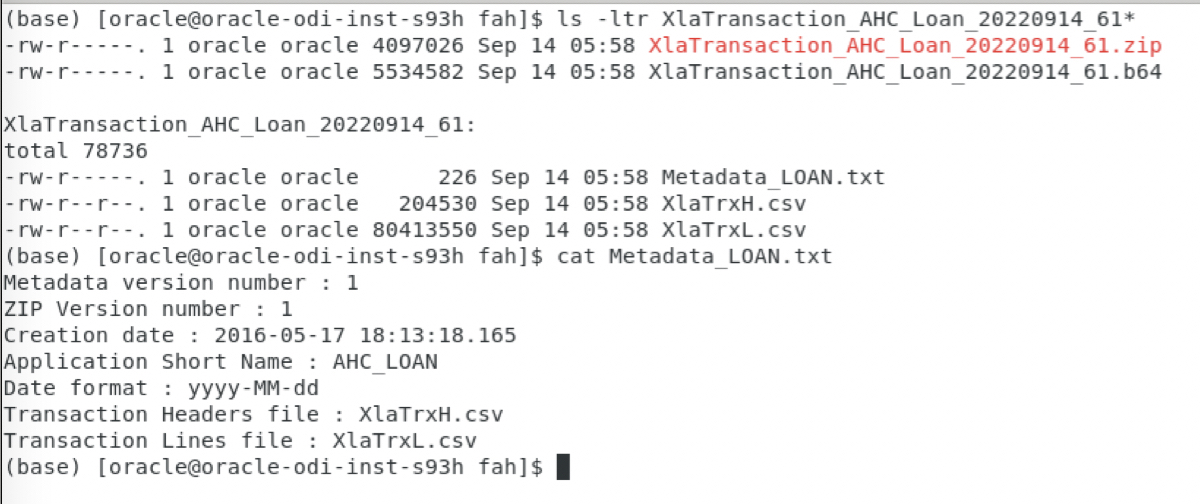
The metadata definition file named Metadata_LOAN.txt. The picture below details the metadata definition file content
Figure 13: Extracting AH Input Analyses – compressed zip file
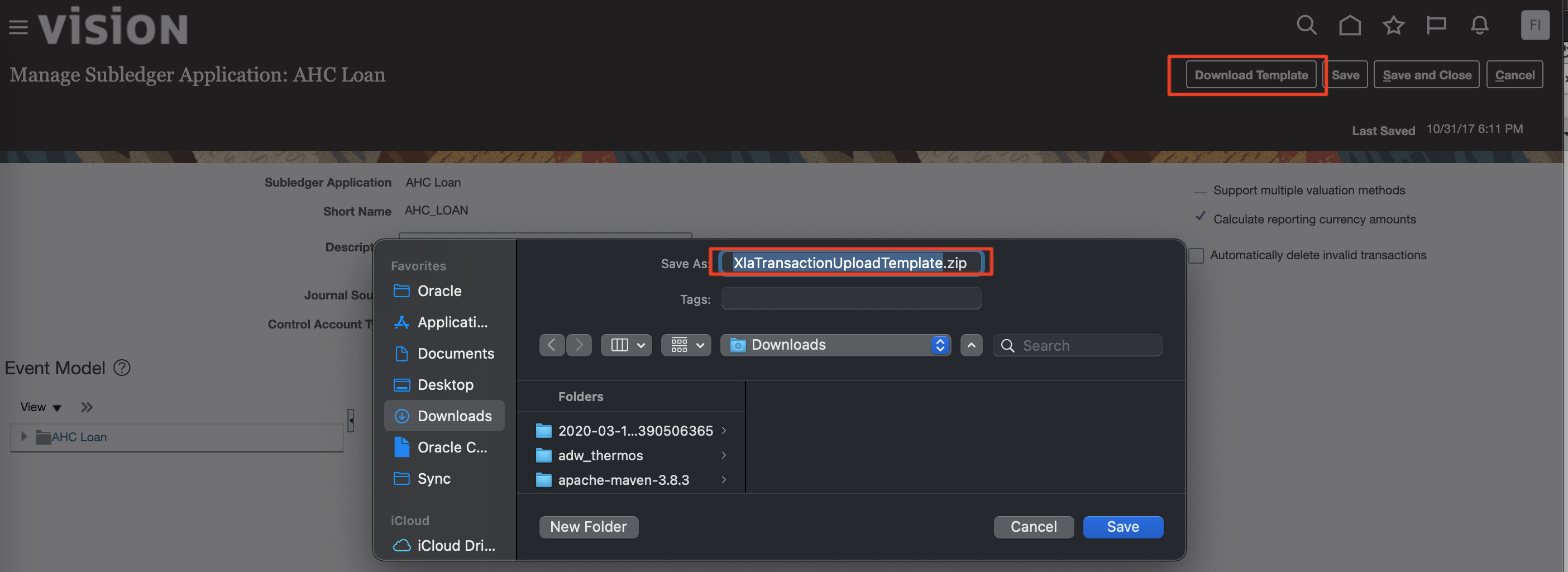
To download a template file for FAH data upload from Fusion, follow the steps below:
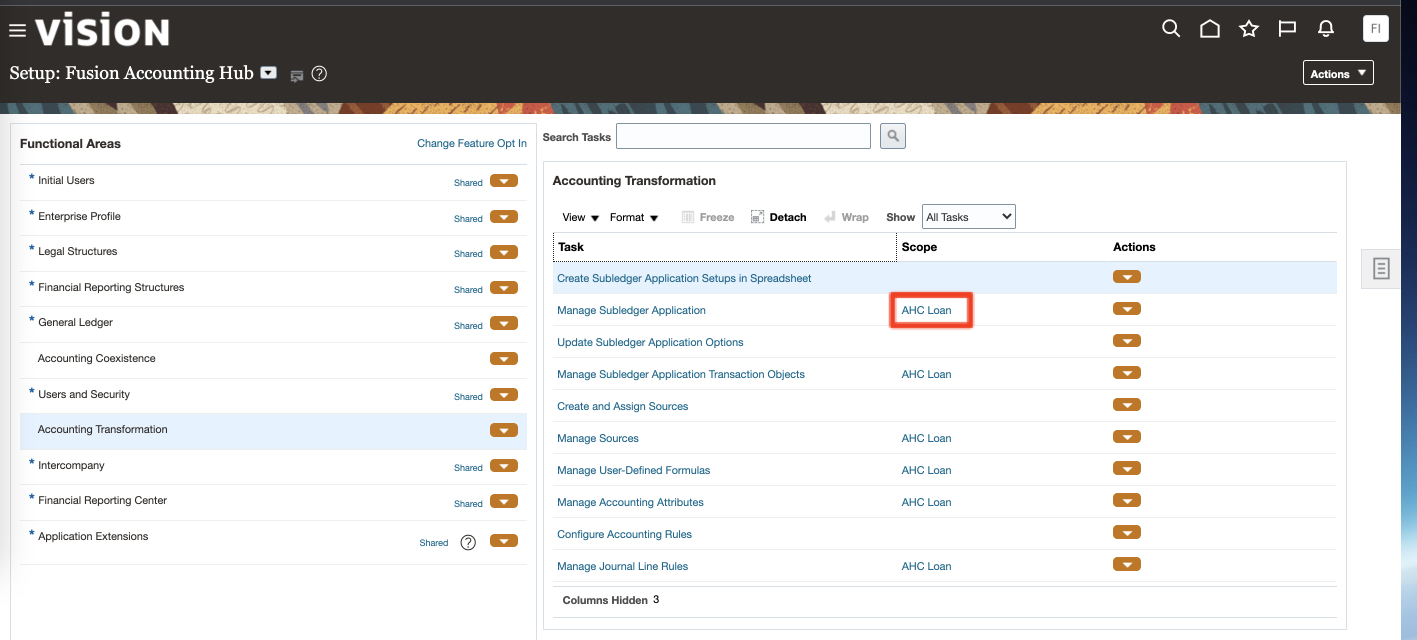
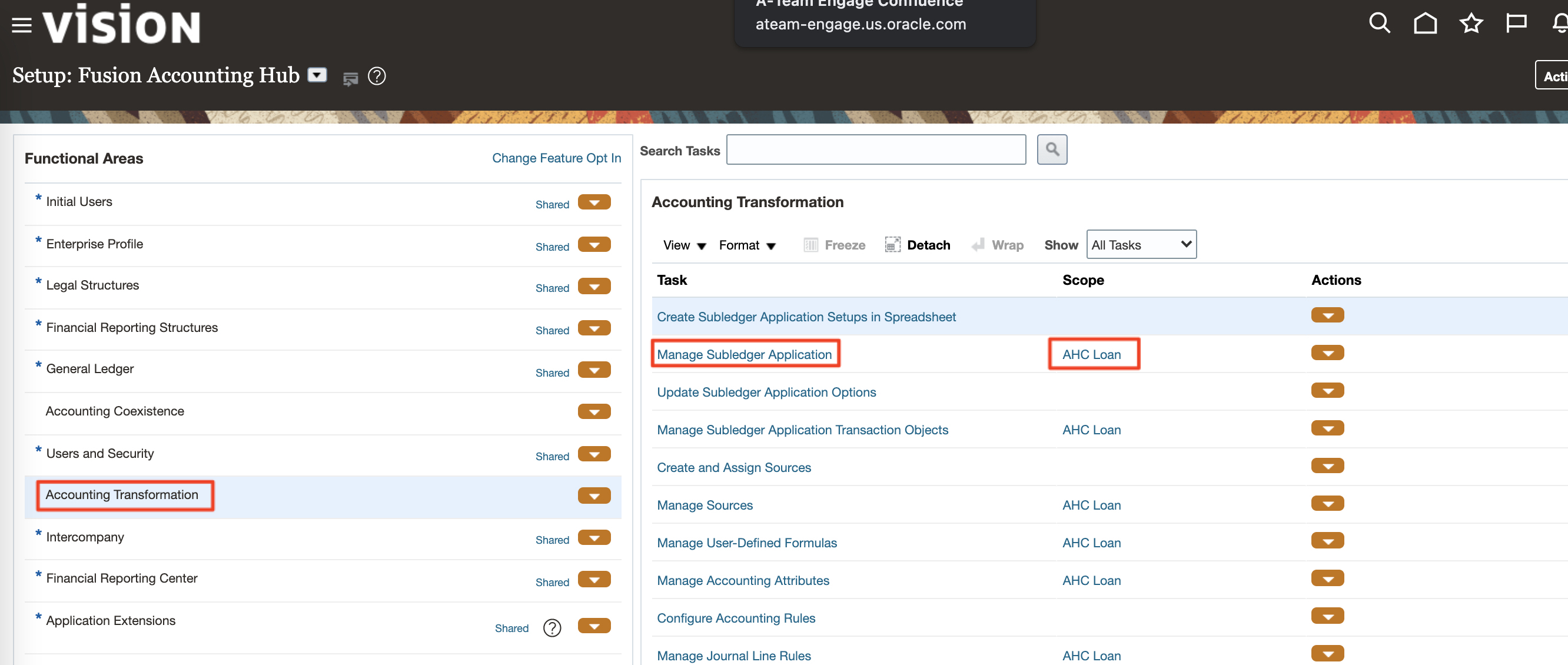
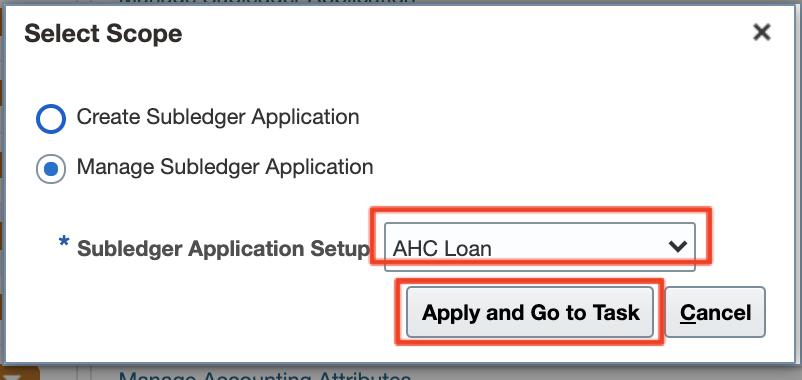
a) In Fusion, navigate to Home > Others > Setup and Maintenance > Fusion Accounting Hub and under Accounting Transformation > Manage Subledger application select the AHC_Loan Application
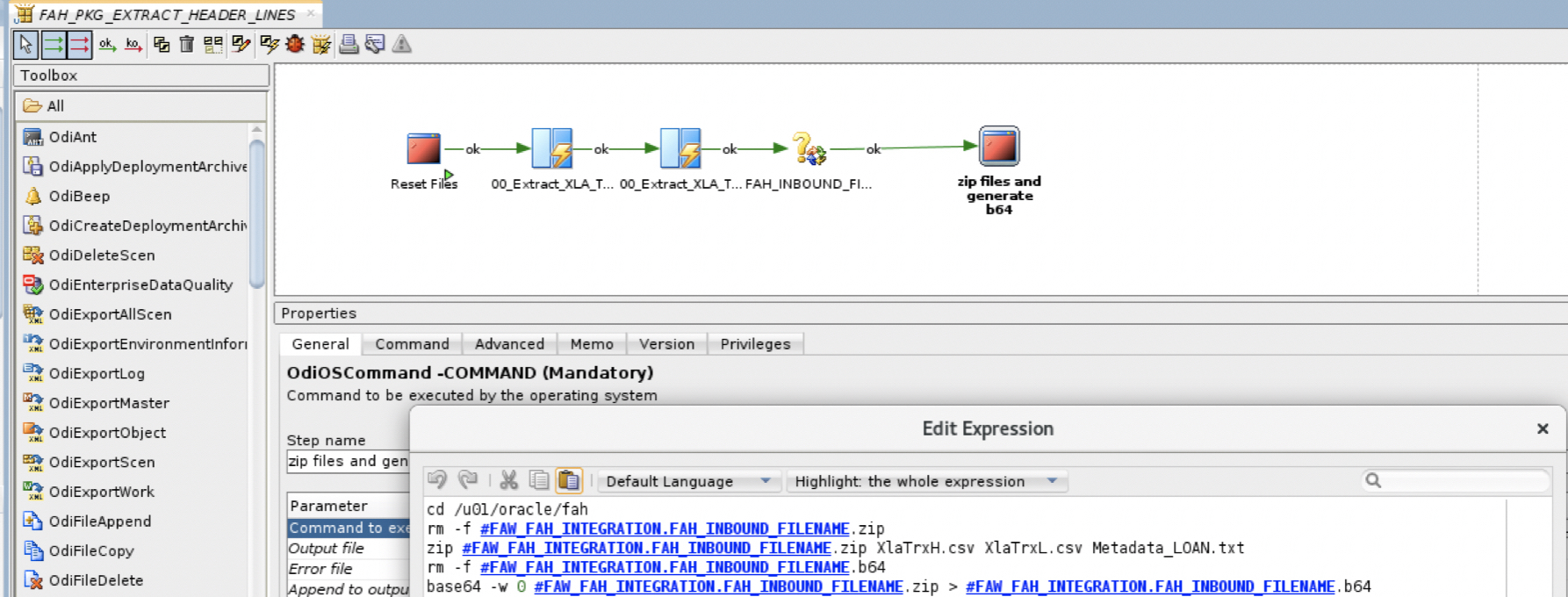
a) Within the FAW-FAH-Integration project, under the 02.Extract From FAW_FAH_STG and Load to FAH folder, the package FAH_PKG_EXTRACT_HEADER_LINES after runnning the two mappings will run a bash script via an OdiOsCommand that compresses the two header and line csv file along with the metadata defintion file and convert the zip file to base64 so it can be used in a subsequent step of this blog:
Figure 17: Generate FAH Compressed Zip and b64 file from ODI
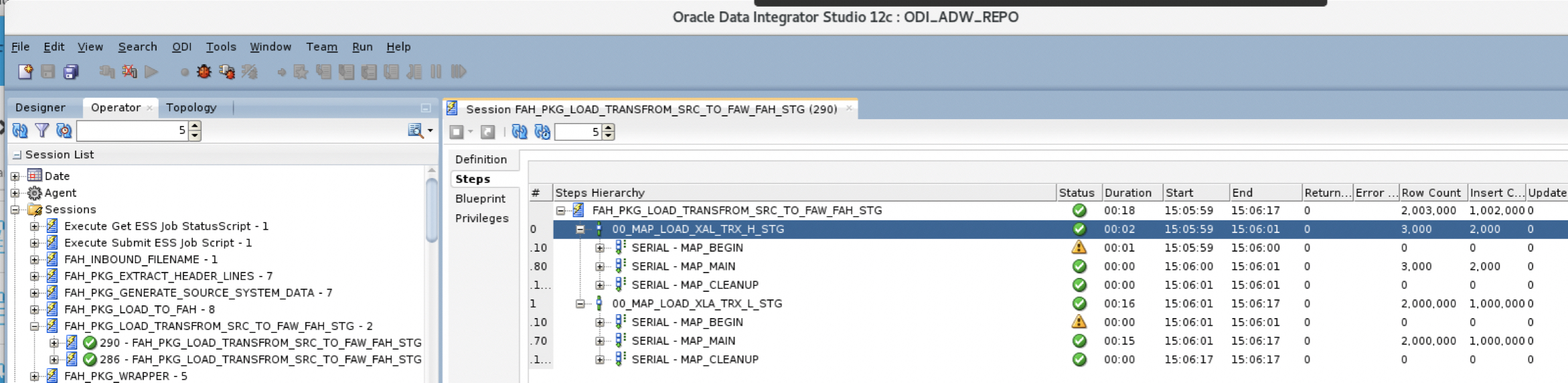
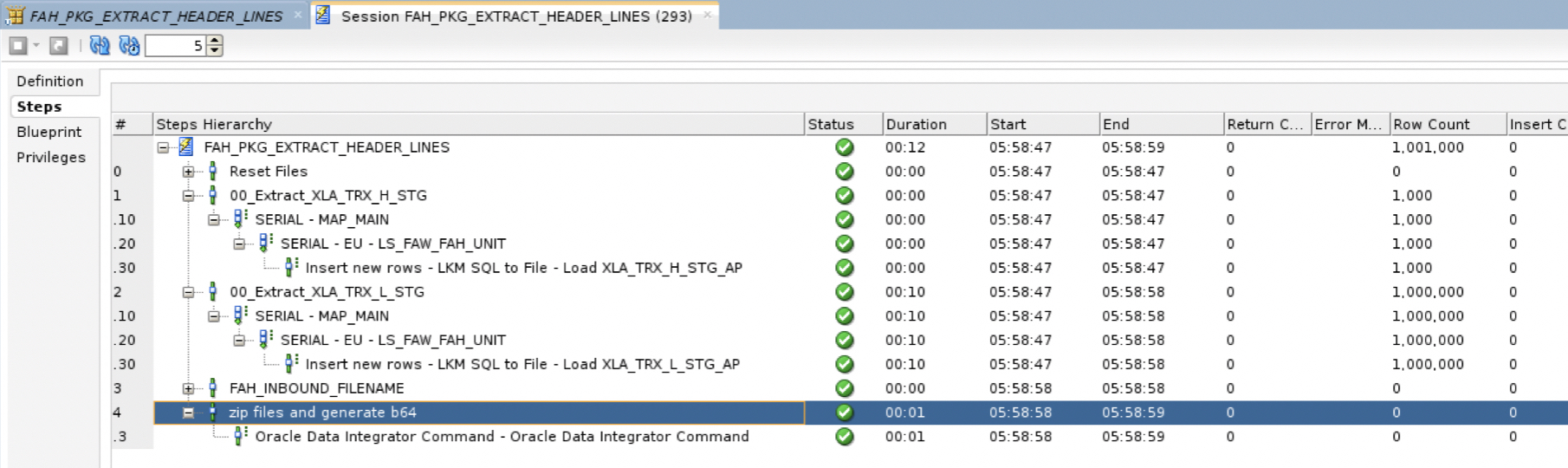
b) When running the package from ODI, we can review the logs in Operator. Figure 13 above shows the zip and b64 files.
Figure 18: Extracting AH Input Analyses – Operator logs in ODI
Loading AH Input Analyses and Invoking the Accounting Engine
Now that the FAH zip file is prepared with cleansed and formatted data, it is ready to be uploaded to FAH after which the Accounting Engine can be invoked so the subledger journal can be updated. This is achieved via three steps and three sequential REST API Calls against /fscmRestApi/resources/11.13.18.05/erpintegrations endpoint:
Loading the FAH prepared file to the Universal Content Management (UCM)
Submitting the Enterprise Scheduler Service (ESS) job to import the file to Accounting Hub and running the Accounting Engine. The job is named “Import accounting Transaction” .
Monitoring the ESS job request status for completion
The below examples of REST API Calls are :
being coded with Python language
using Basic Authentication
being called by ODI via the Python scripts and OdiOsCommand
The user calling these REST API needs to have the following duties:
ORA_XLA_ACCOUNTING_HUB_INTEGRATION_DUTY
ORA_XLA_ACCOUNTING_HUB_INTEGRATION_DUTY_OBI
FIN_FUSIONACCOUNTINGHUB_IMPORT_RWD
For more details about the ERP Integrations REST APIs, please refer to this document.
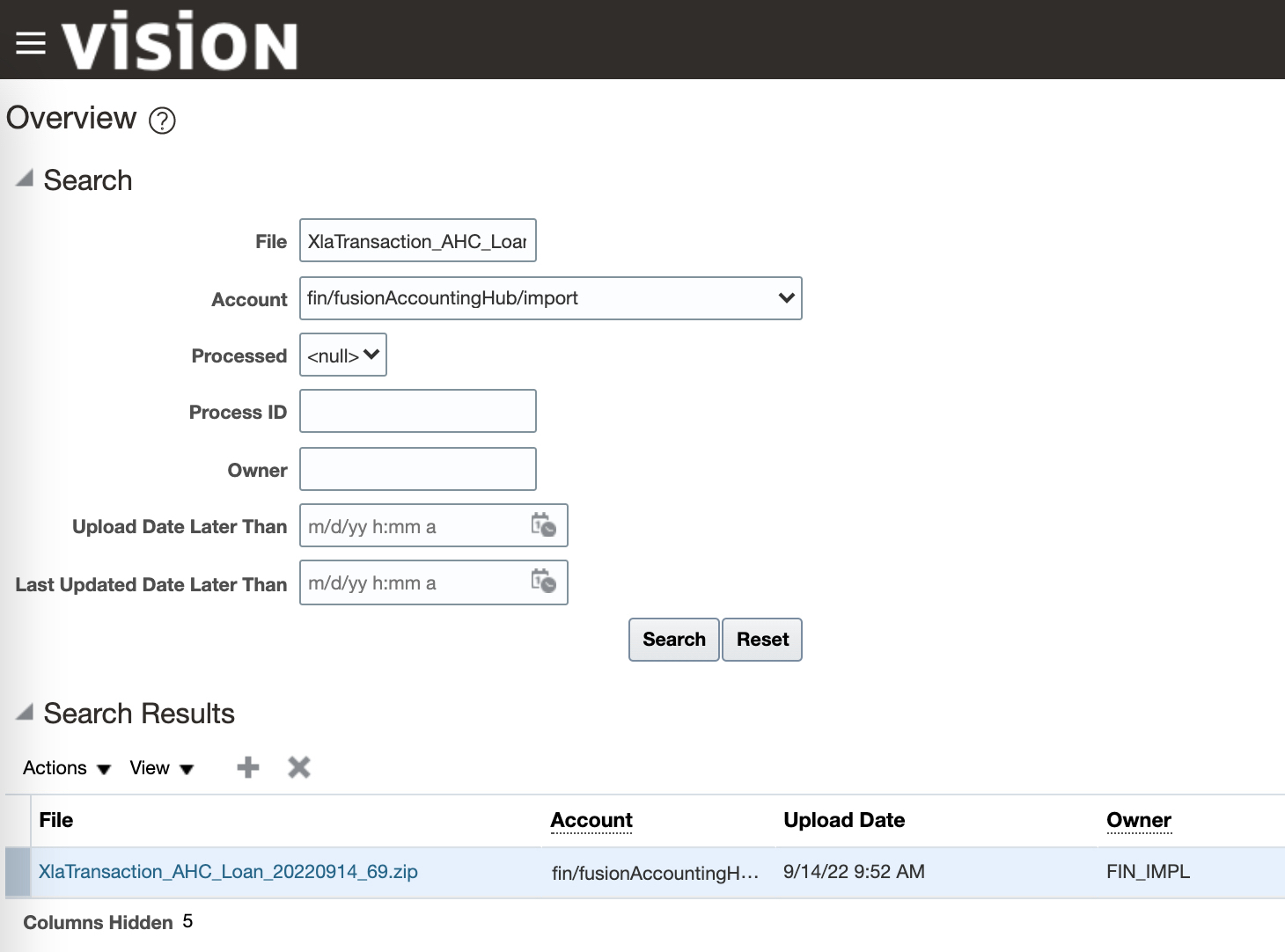
Loading AH Input Analyses to FAH
The first step of the process is to load the FAH file in b64 format to UCM. This step is divided into three sub steps:
a) First ODI will generate the Python Script to load the file to UCM. Below is a code snippet describes a sample script with the required payload, where :
The OperationName is uploadFileTo
The DocumentContent is the zip file converted to base64
The DocumentAccount is fin$/fusionAccountingHub$/import$
The second step of the process is to submit the ESS job to import the file from UCM to the FAH and invoke the Accounting Engine. This is achieved by three sub steps:
a) With the DocumentId from the previous response, ODI will generate the python script to submit the ESS job. Below is a snippet of the script where the payload contains:
The OperationName is submitESSJobRequest
The JobPackageName is oracle/apps/ess/financials/subledgerAccounting/shared/
The JobDefName is XLATXNIMPORT
The ESSParameters are the DocumentId from previsous REST call response and the file name
c) Finally ODI will parse, using jq, the REST call response and persist the RequestId as it will be required for the next REST call.
Reviewing AH Input Analyses in Fusion Accounting Hub UI
The last step is to monitor the ESS job status and validate the transactions have been posted to the subledger for AHC_Loan.
a) To monitor the status of the ESS job, ODI will generate and execute a Python script that will GET the status of the job and poll it until it is completed. Below is a snippet of the script:
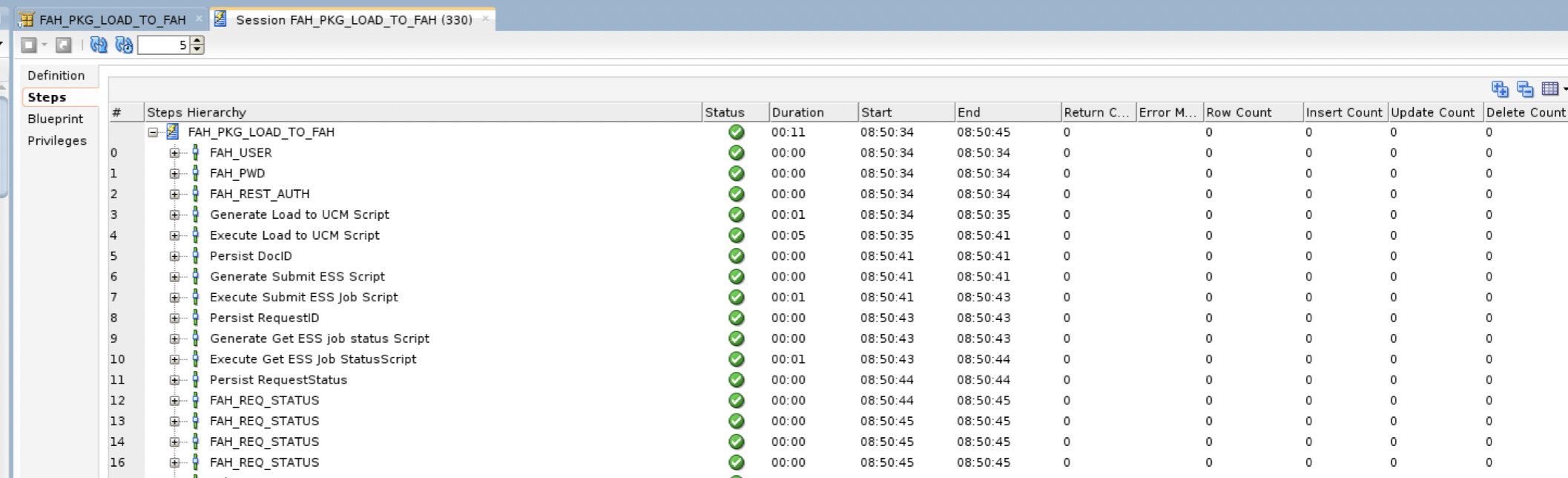
c) When executing the ODI package that calls the sequential REST endpoint above, we can review the status in Operator
Figure 20: Importing AH Input Analyses – REST Calls from ODI
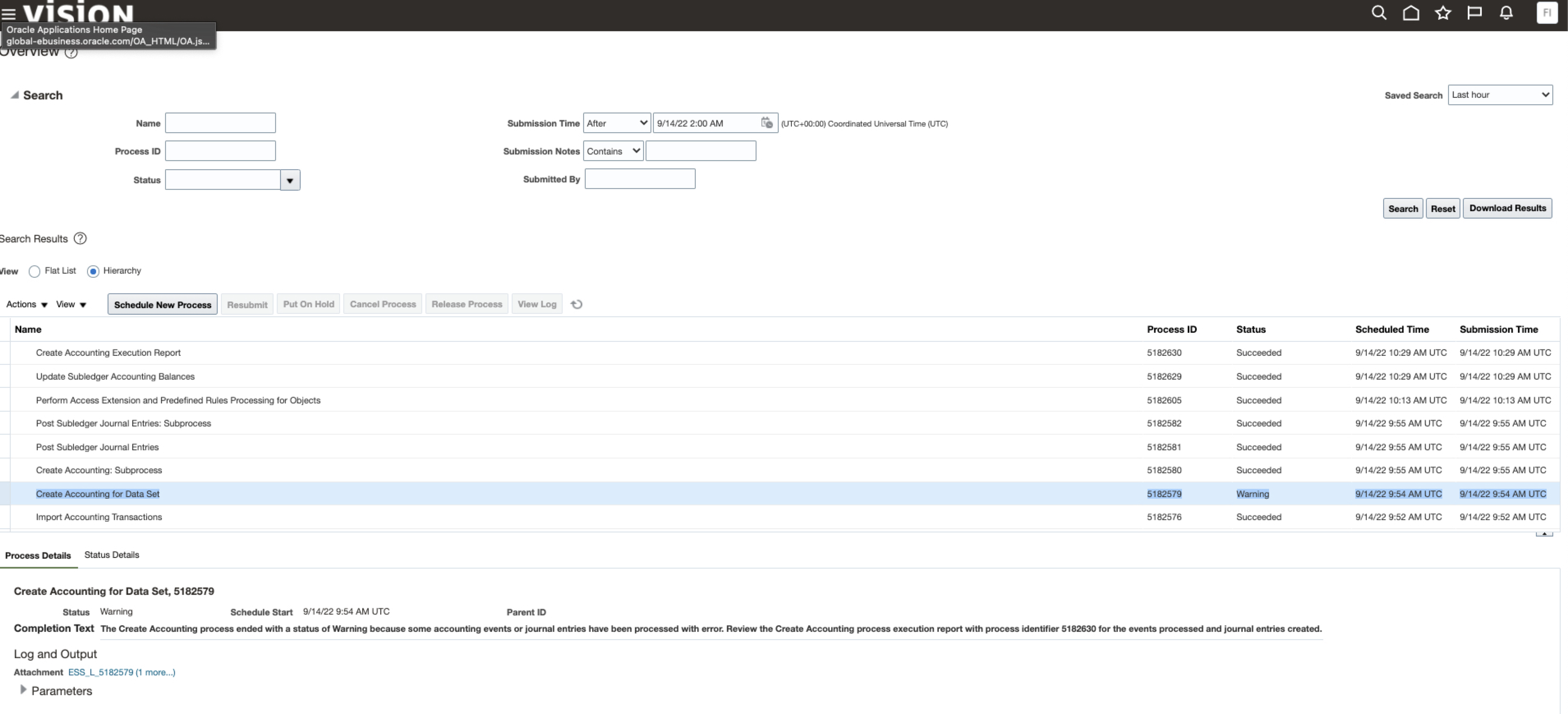
d) When review the Status of the scheduled job in Fusion, we can review and confirm that the Import Accounting Transactions is successful. We can also review any accounting warning\
Figure 21: Importing AH Input Analyses – Status in ESS
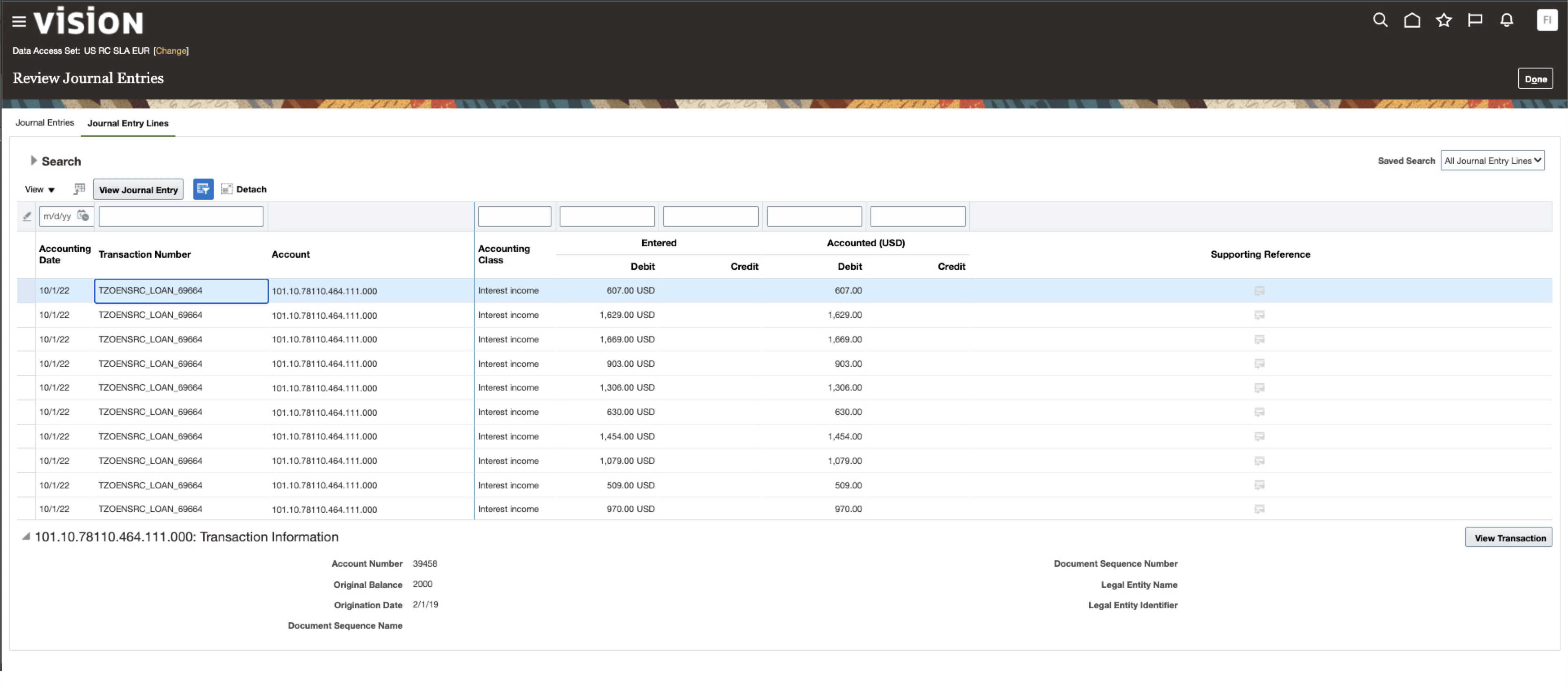
d) One can then validate that the Journal Entries are actually posted in the Subledger module
Click here to sign up to the RSS feed to receive notifications for when new A-team blogs are published.
Summary
In this blog, we leveraged Oracle Data Integration on the Marketplace to prepare and load data to the AHC_Loan FAH Application. The high level data flow steps were as follow:
Loading source transactions and instrument balances into FAW tables (staging tables and instrument balances).
Based on the Metadata Object Model, invoking the process to cleanse, validate and re-format the source transactions and instrument balances in preparation for their upload to the Accounting Hub. The results will be “stored” in AH Input Analyses. The architecture technical components will capture and process any errors that occur.
Extracting AH Input Analyses from FAW Staging tables, generating Accounting Hub input files and invoking the Accounting Engine.
The Accounting Engine will process the transactions to generate detailed journal entries and financial balances. The architecture technical components will invoke SR balance calculations.
In a subsequent blog, we will use the OCI Native Data Integration serverless Service to implement this inbound architecture and also demonstrate the Outbound Architecture from within FAW
FAW Data Pipeline will load the Accounting Hub results (detailed journal entries and financial balances) into FAW ADW tables.
FAW Data Pipeline will combine Accounting Hub detailed journal entries and financial balances with source transactions (staging tables and instrument balances). This process is known as enrichment. The resulting enriched source system transactions and financial balances will be available for further processing by Financial Services Industry specific analytical applications and operational reporting (FAW OAC).
Bookmark this post to stay up-to-date on changes made to this blog as our products evolve.
Authors
Matthieu Lombard
Consulting Solution Architect
The Oracle A-Team is a central, outbound, highly technical team of enterprise architects, solution specialists, and software engineers.
The Oracle A-Team works with external customers and Oracle partners around the globe to provide guidance on implementation best practices, architecture design reviews, troubleshooting, and how to use Oracle products to solve customer business challenges.
I focus on data integration, data warehousing, Big Data, cloud services, and analytics (BI) products. My role included acting as the subject-matter expert on Oracle Data Integration and Analytics products and cloud services such as Oracle Data Integrator (ODI), and Oracle Analytics Cloud (OAC, OA For Fusion Apps, OAX).