ADW Version Oracle Database 19c Enterprise Edition Release – Production Version 19.11.0.0.0
Oracle Cloud Application 24B (11.13.24.04.0)
Fusion CX Analytics Application Version 24.R1.P3
Background
Oracle announced recently the Fusion Data Intelligence Platform, the next generation data, analytics, and AI platform for Fusion Cloud Applications customers and an evolution of Fusion Analytics Warehouse. The Fusion Data Intelligence (FDI) will provide users with curated data, ready-to-use analytics, and AI-powered intelligent applications that enable smart decisions and directed actions for optimal business outcomes. It is an evolution of the existing Fusion Analytics offering, with a dramatically increased scope and vision.
The Oracle Fusion Data Intelligence Platform includes the following out-of-box capabilities that will enable Oracle Fusion Cloud Applications customers to derive the most value out of their data.
360-Degree Data Models: Will help business users understand how their data relates to business processes and goals by providing them with a clear and consistent representation of their organization’s data. By providing a collection of conformed data models based on Oracle Fusion Cloud Applications data and other data sources, the platform will provide organizations with a 360-degree view into various aspects of their business—customers, products, accounts, suppliers, and employees.
Prescriptive AI/ML Models: Will help organizations solve specific business problems by using out-of-box AI/ML models, such as workforce skills assessment and customer payment forecasting, to automate time-consuming tasks and free up employees to focus on more strategic tasks. In addition, large volumes of data can be quickly analyzed, uncovering valuable insights and patterns to identify opportunities for business growth and efficiency.
Rich Interactive Analytics: Will help business users interactively explore and visualize their data using out-of-box dashboards, reports, and KPIs. In addition, they can use Analytics Cloud capabilities like natural language query, auto insights, and mobile apps to gain quick access to data and insights.
Intelligent Applications: Will help organizations make more informed decisions faster by leveraging underlying prebuilt data models, AI/ML models, and analytics content. These applications will go beyond insights and recommend intelligent actions that improve business outcomes.
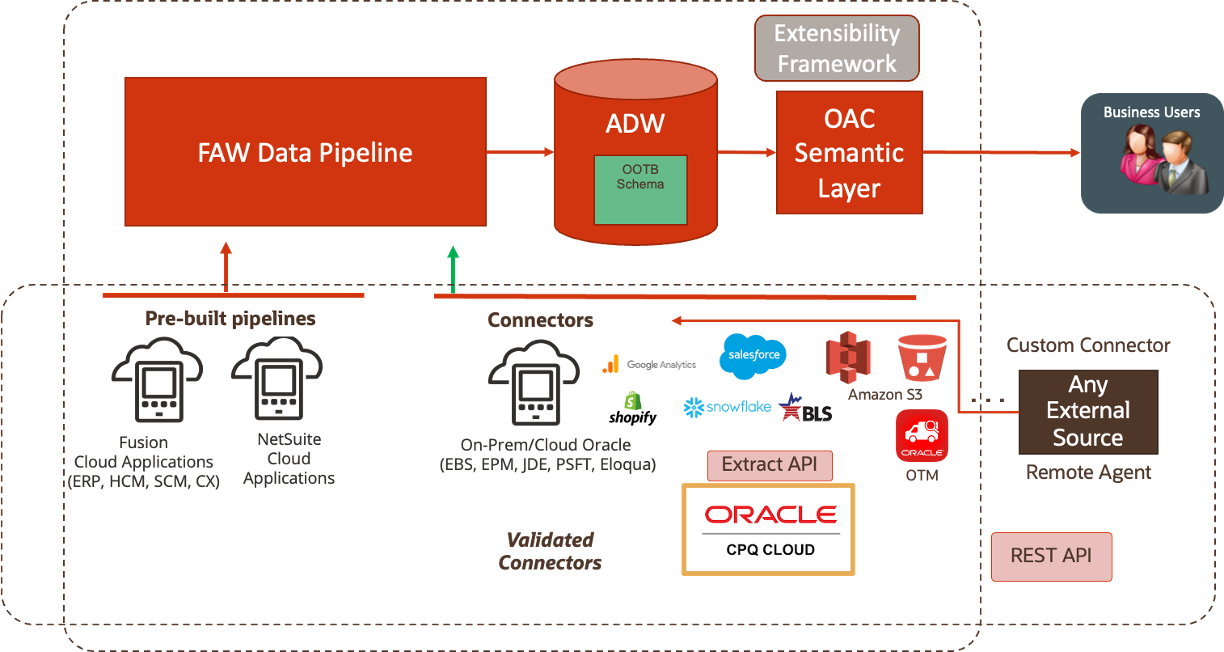
Making the right business decisions is intrinsinclty tied to the system of records data accuracy of a company. In many specific use cases, Fusion Analytics data can be complemented with additional data from external source such as On Premise, Legacy applications, Non Fusion SaaS application, OCI source, Third party cloud applications, and so on…
To support these data enrichment and consilidation requirements, Fusion Analytics is introducing a new Connectors to leverage the Fusion Analytics Oracle data pipeline infrastructure to extract data (full and incremental) from these external sources following a defined schedule, potentially reducing custom data extraction code, infrastructure and platform costs.
This blog describes how to utilize FDI Data Augmentation feature to replicate transaction data from Oracle Configure Price Quote or CPQ Cloud Applications into ADW to extend the Data Layer of FDIP.
Which sales team or salesperson is generating the most quotes?
What is the average discount given on quotes?
What are the most common reasons for quote rejection?
How does the quote value vary by different sales channels or geographic locations?
What is the revenue generated by each sales team or salesperson?
…
This blog also share the artefacts that Fusion Analytics and CPQ users can use as a starting point to analyze CPQ data, that is :
Data Augmentation Bundles
SQL Views (to allow snowflake modeling)
Semantic Model Extensions Bundles
OAC Visualization Bundles
To conclude, this blog will walk through how to deploy these artefacts into a target environment.
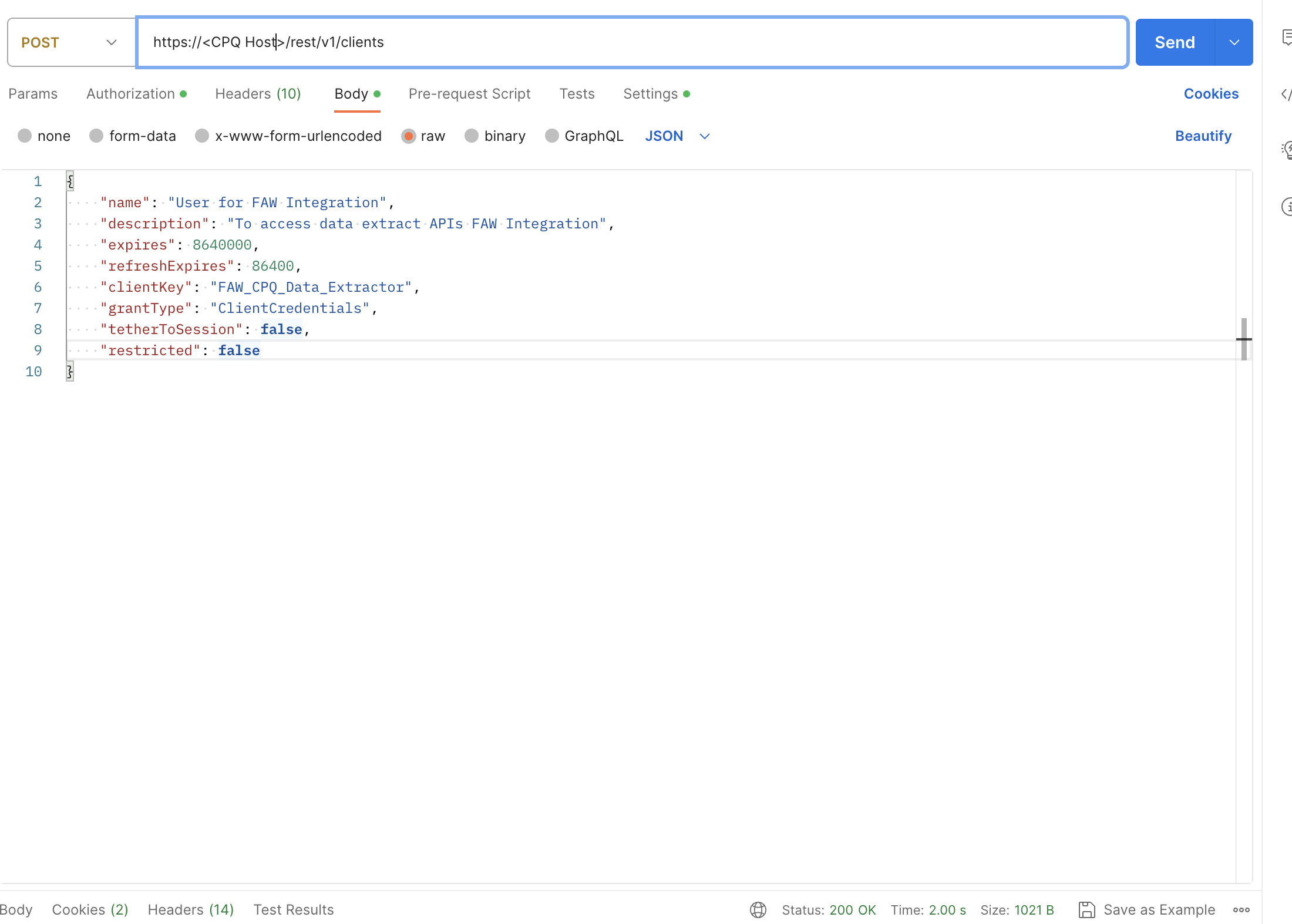
Figure 2: FDIP – Create CPQ Client for FDIP data extract
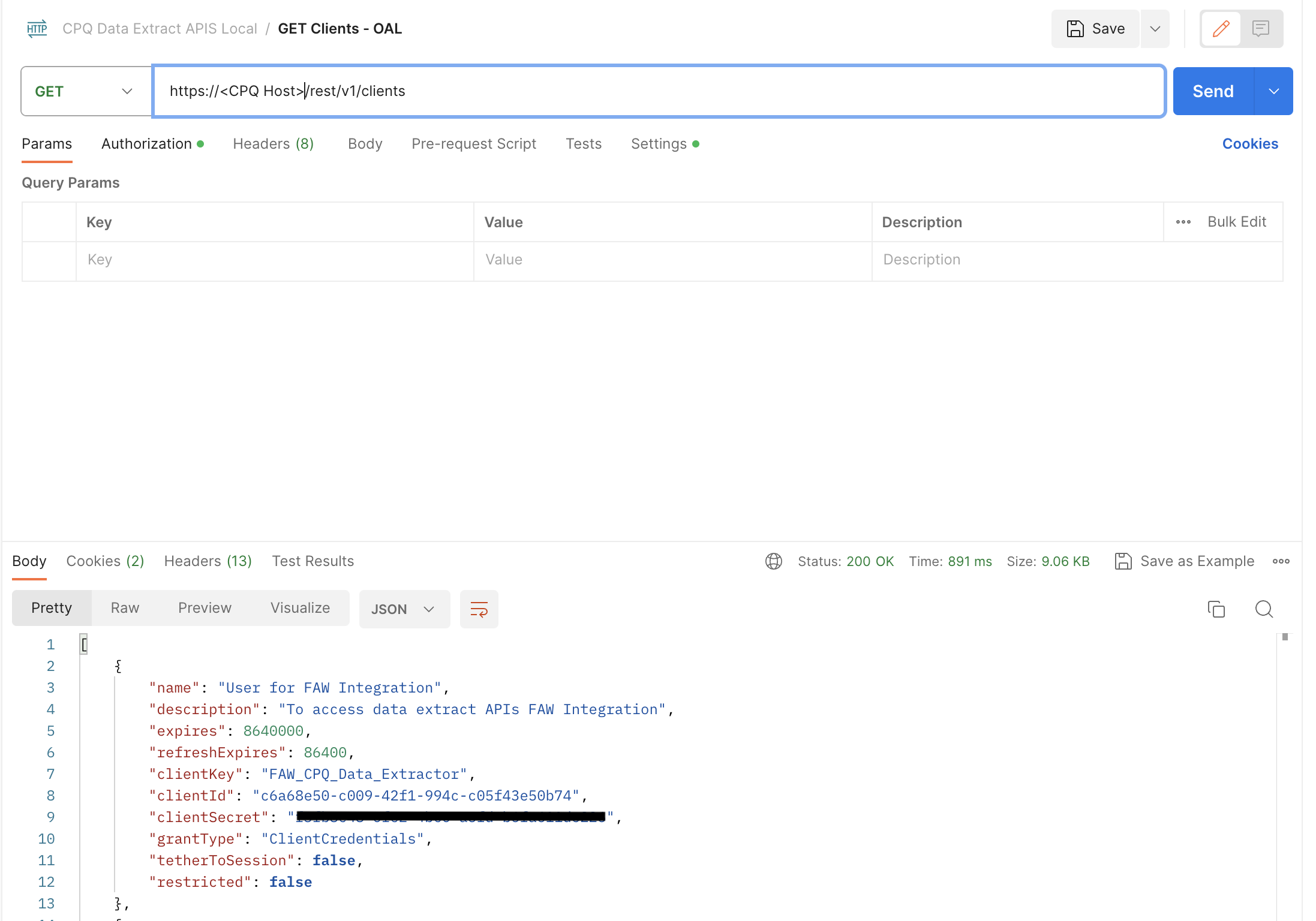
Collect the REST Client ID and Client Secret from the REST API Call GET on https://<CPQ Host>/rest/v1/clients
Figure 3: FDIP – Get CPQ Client details for FDIP data extract
FDIP Data Augmentation
Create the CPQ connection
Create Dimensions and Fact Data Augmentation on CPQ source tables
Choose Attributes for the Data Augmentation
Select dimensions to be mapped with Fact columns
Save and Schedule the data augmentation pipeline jobs
FDIP Data Pipeline processes the data augmentation pipeline jobs, extract the data from CPQ tables and load it into ADW, queryable via synonyms starting with DW_CPQ_X
Augmented data can be then queried directly using OAC Data set or a SQL client like SQL developer, through the database synonym named after the table name give in the first step
Semantic model can be extended by customizing an existing subject area or addition of a new subject area to allow reporting on augmented data extracted in ADW. This will require the creation of database objects (views and grants).
Semantic model extensions can be achieve through the Semantic Model Extension wizards.
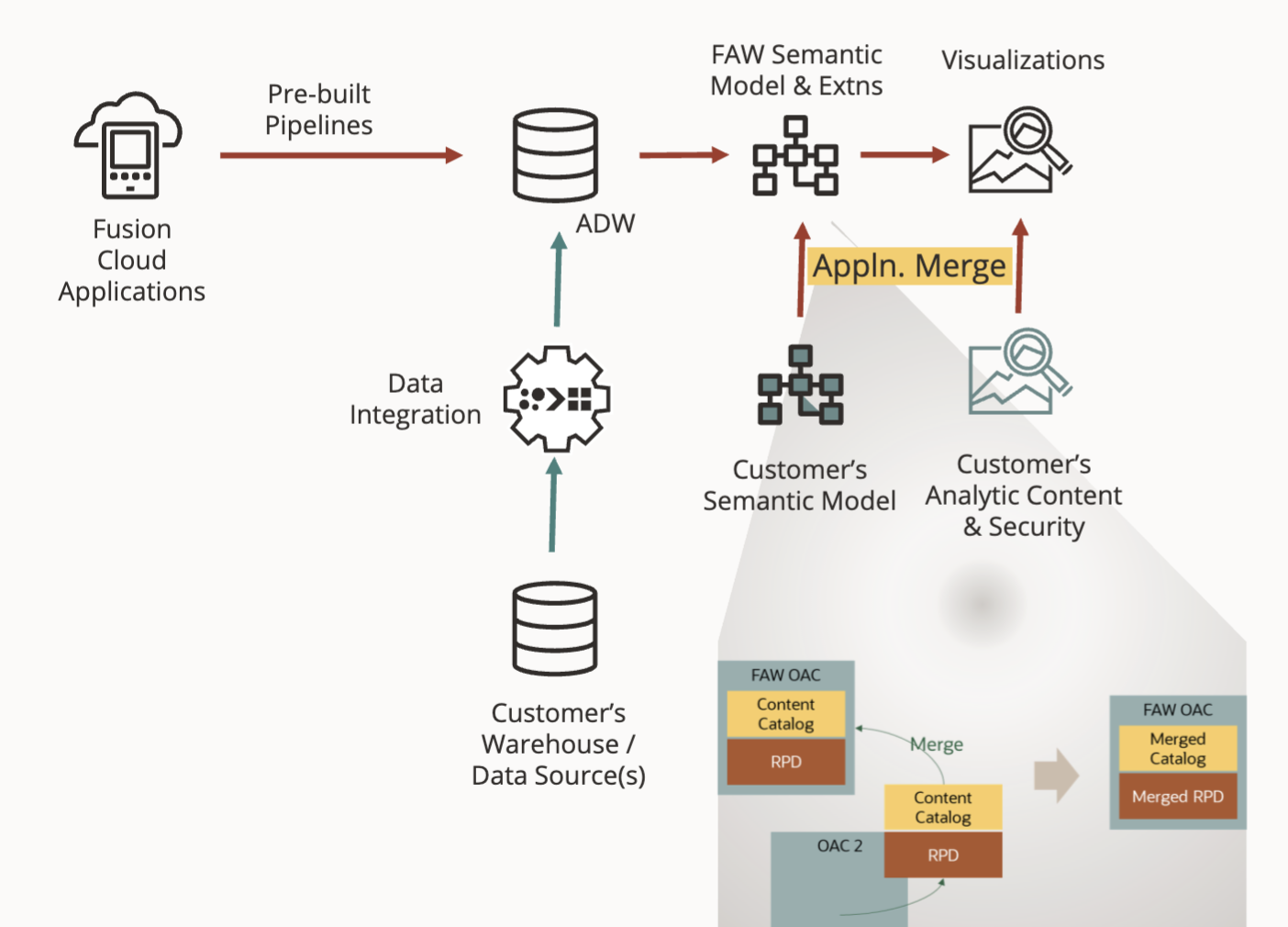
They can be achieve with a new feature Fusion Analytics is realising in Limited Availability named External Application Merge. This feature allow customers with advanced model administration knowledge to leverage the Model Administation tool to merge their existing RPD with FDIP RPD. It allows customers to combine FDIP with Customer’s OAC/OAS, integrate data into ADW, merge FDIP and customer OAC/OAS components.
There are some pre requisites when using External Application Merge:
Remove any publish action in Data Augmentations such as joins or exposing in Subject Areas.
Move these Subject Areas changed in the External RPD.
Use Data Augmentations to move data only.
Rerun the existing Data Augmentation.
Customer can then request External Application Merge Feature to be enabled in their Fusion Analytics Tenant.
Considerations :
If conformance is needed between FDIP and bespokeRPDs, datatypes of conforming columns must match –otherwise queries will error out. RPD will be rejected.
The data for the mapped columns must match –otherwise queries will not return correct results.
Dimension grain must match between FDIP and bespoke Logical Table Sources–otherwise queries will return incorrect results.
RPD and datasets will only connect to FDIP ADW. Connections to external databases or platforms will not be supported.
BespokeRPD size can be up to 25MB.
Catalog objects should only be in Folder names that do not conflict with FDIP OOTB folders. All bespokecatalog objects should be in /Shared/Custom/ folder.
BespokeRPD content will not be updatable through the semantic model extensions UI/APIs.
Figure 4: FDIP – External Application Merge
We will cover the steps required to set up External Application Merge here to be able to build a visualization against the extracted CPQ Data in a dedicated video in this blog
Star Schemas
The CPQ bundles are covering seven subject areas. This section describes the star schemas for each for these subject areas
CPQ Quotes
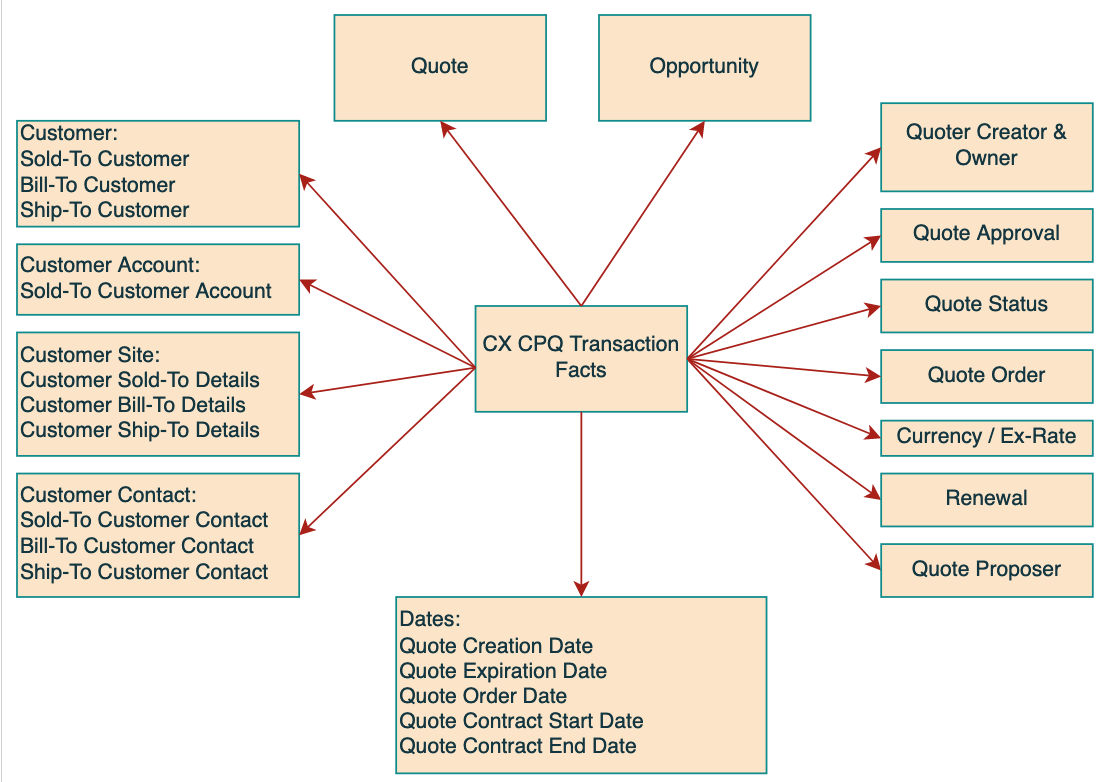
The Quotes Subject Area contains the necessary facts and dimensions that will allow an analysis of Quotes in the CPQ.
By exposing key related objects, namely Opportunity, Ship To, Bill To , Sold To Customer, Approvals…
the subject area makes it possible to build reports for comprehensive analysis around these contexts. All key metrics, are exposed at a Quote (Transaction) level.
The Business Questions it allows to answer are:
What is the average quote value for different customers?
What is the conversion rate for quotes?
Which sales team or salesperson is generating the most quotes?
What is the average discount given on quotes?
What are the most common reasons for quote rejection?
How does the quote value vary by different sales channels or geographic locations?
What is the revenue generated by each sales team or salesperson?
What is the average revenue per quote?
What are the most profitable sales channels or geographic locations?
What is the impact of discounts on revenue?
Against how many Opportunities, were the Quotes submitted this month?
How long does it take from the time an opportunity is created till the Quote creation?
What is the average revenue values for different types (Recurring, Non-recurring & Usage)?
How many quotes get generated for Won vs Lost Opportunities?
What is the typical quote cycle time?
How many Quotes have expired?
Below star schema details the Quotes fact
Figure 5: CPQ Quotes Fact Star Schema
CPQ Lines
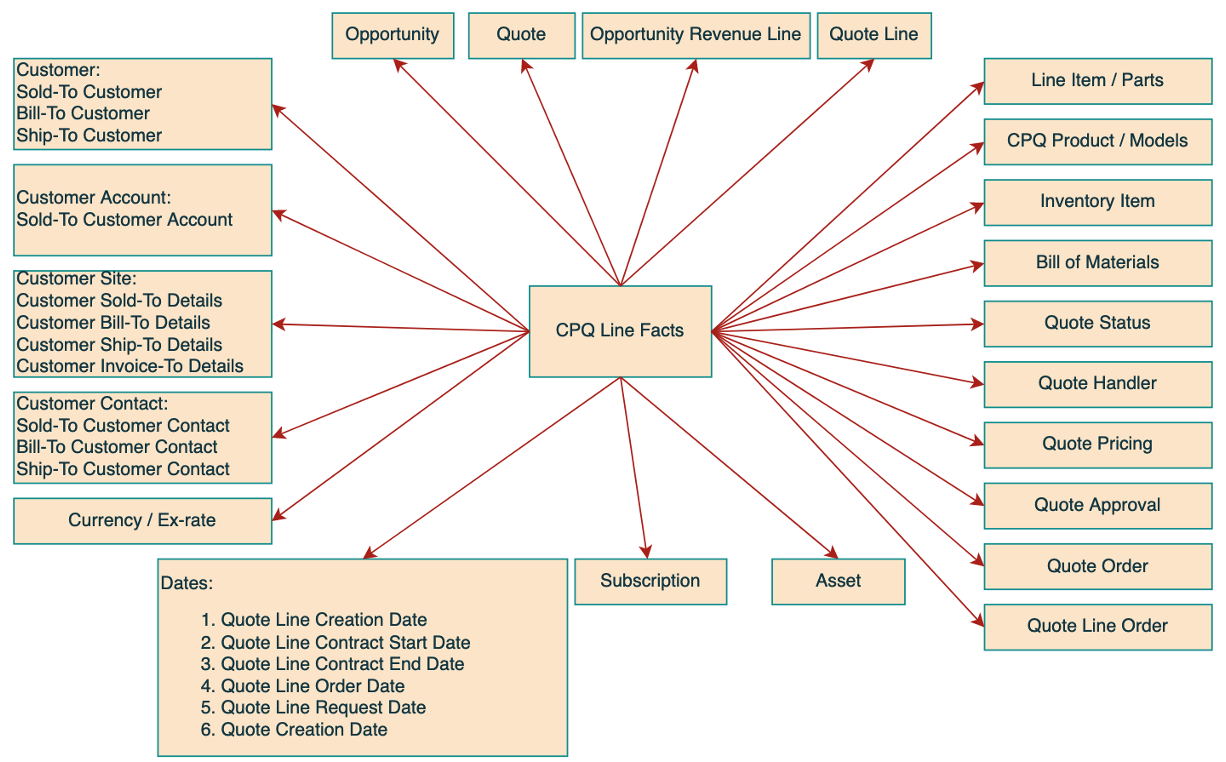
The CPQ Line Subject Area contains the necessary facts and dimensions that will allow an analysis of CPQ Lines.
The Business Questions it allows to answer are:
What are the most profitable products or services being quoted?
What are the most common configurations for each product or service?
What is the margin of each product or service?
What is the revenue generated by each product or service?
What are the Top 10 Quotes by Quote Line Revenue?
What Product has the highest Quote Line items created against?
Which Product has the highest Recurring Revenue Quotes against?
Which Opportunity has the most number of Quote lines?
What is the Total Quotes Revenue for the current quarter?
Which Product has the highest Usage revenue Quoted across the customers?
What is the average revenue per Quote Line?
Below star schema details the Lines fact
Figure 6: CPQ Lines Star Schema
Set Up CPQ Connection, Enable External RPD Merge, Download and Deploy the Bundles
Overview Set up CPQ Connection in FDIP
Watch the overview video as well as the CPQ connection set up in FDIP
Set up External Application Merge
Watch the video on how to set up External Application Merge
Download the artefacts
Below are the download link to the Data Augmentation Bundle, the SQL Views and the Semantic Model Extensions
Disclaimer : these bundles and code artifcats are provided “as is”, i.e. Oracle will not be responsible for supporting their use
Deploy the artefacts
The artefact deployments steps are :
Ensure the CPQ connection is enabled in Fusion Analytics
Ensure the CPQ connection test is successfull
Ensure CPQ metadata are extracted
Import the Data Augmentation, Content bundles and wait for deploying
Deploy the Data Augmentation and choose “Import the data pipelines, but do not activate” option
Activate each Data Augmentation one by one, once the Data Augmentation bundle is deployed
Execute the SQL to create the views in the OAX_USER schema and grant proper access to views to OAX$OAC user
Import the External Application
Deploy the Content Bundle and validate the CPQ catalog folder is created
To deploy the artefact, watch the video below:
Accessing an OAC Workbook to Gain Business Insight with CPQ Data
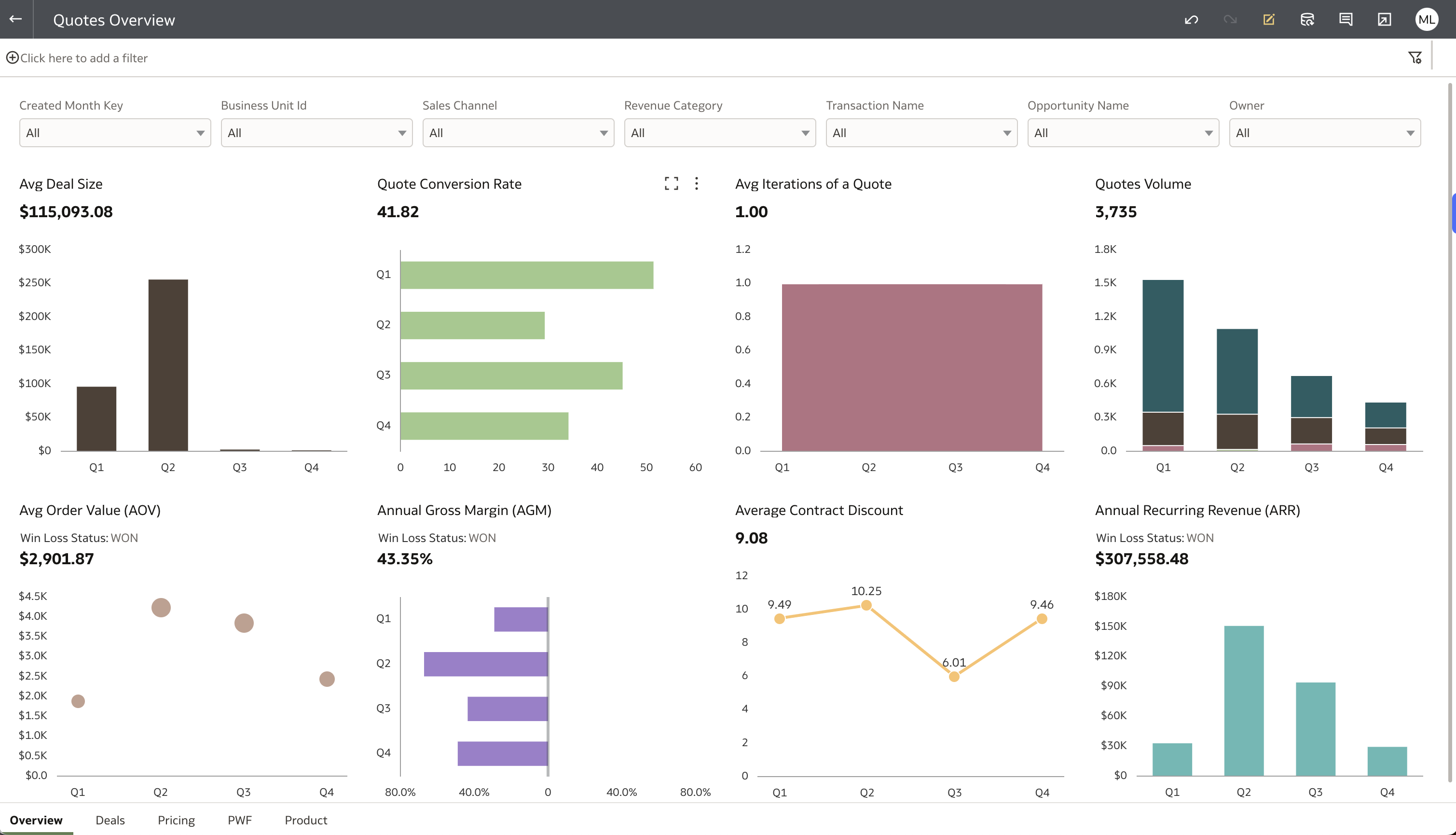
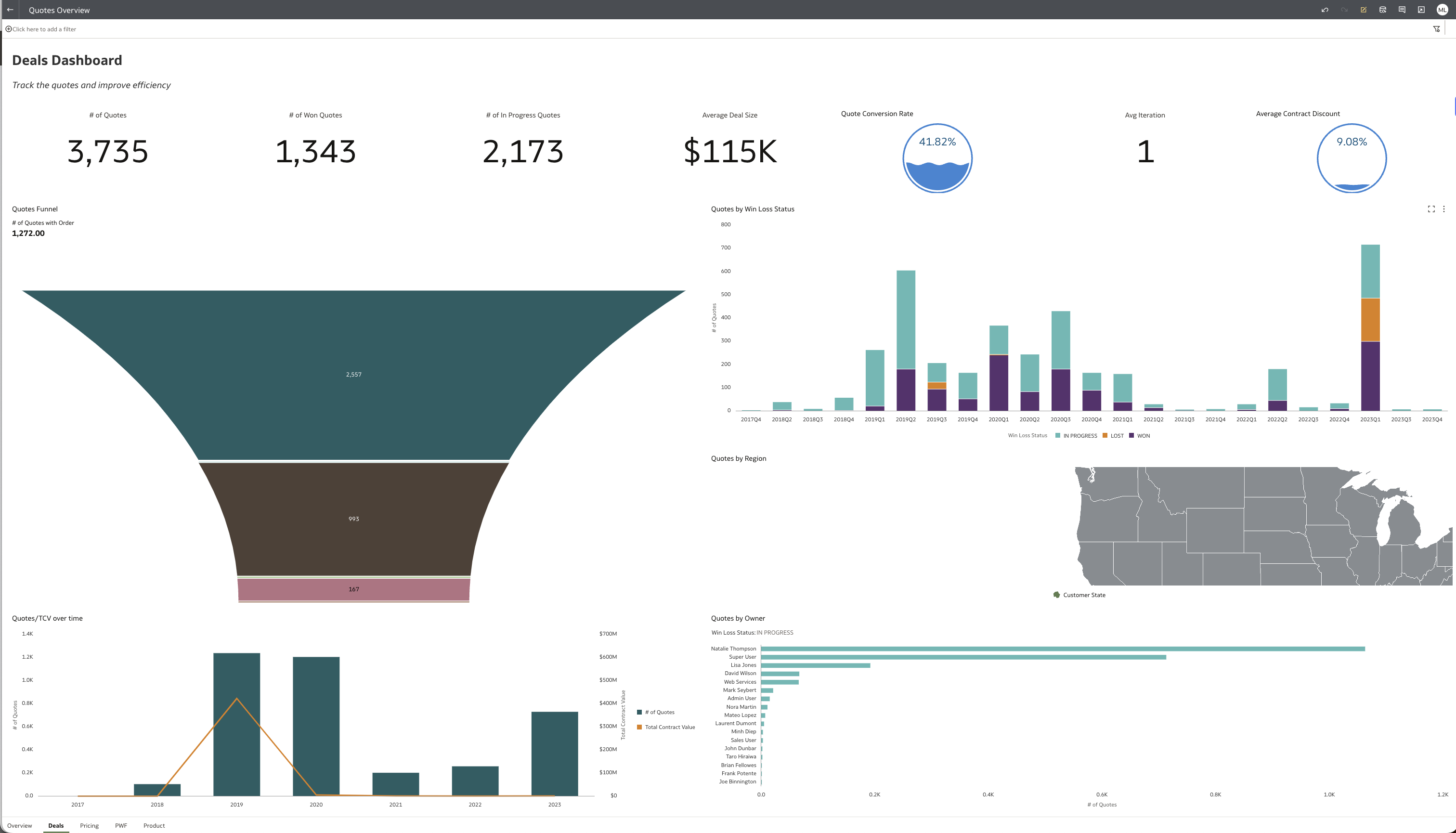
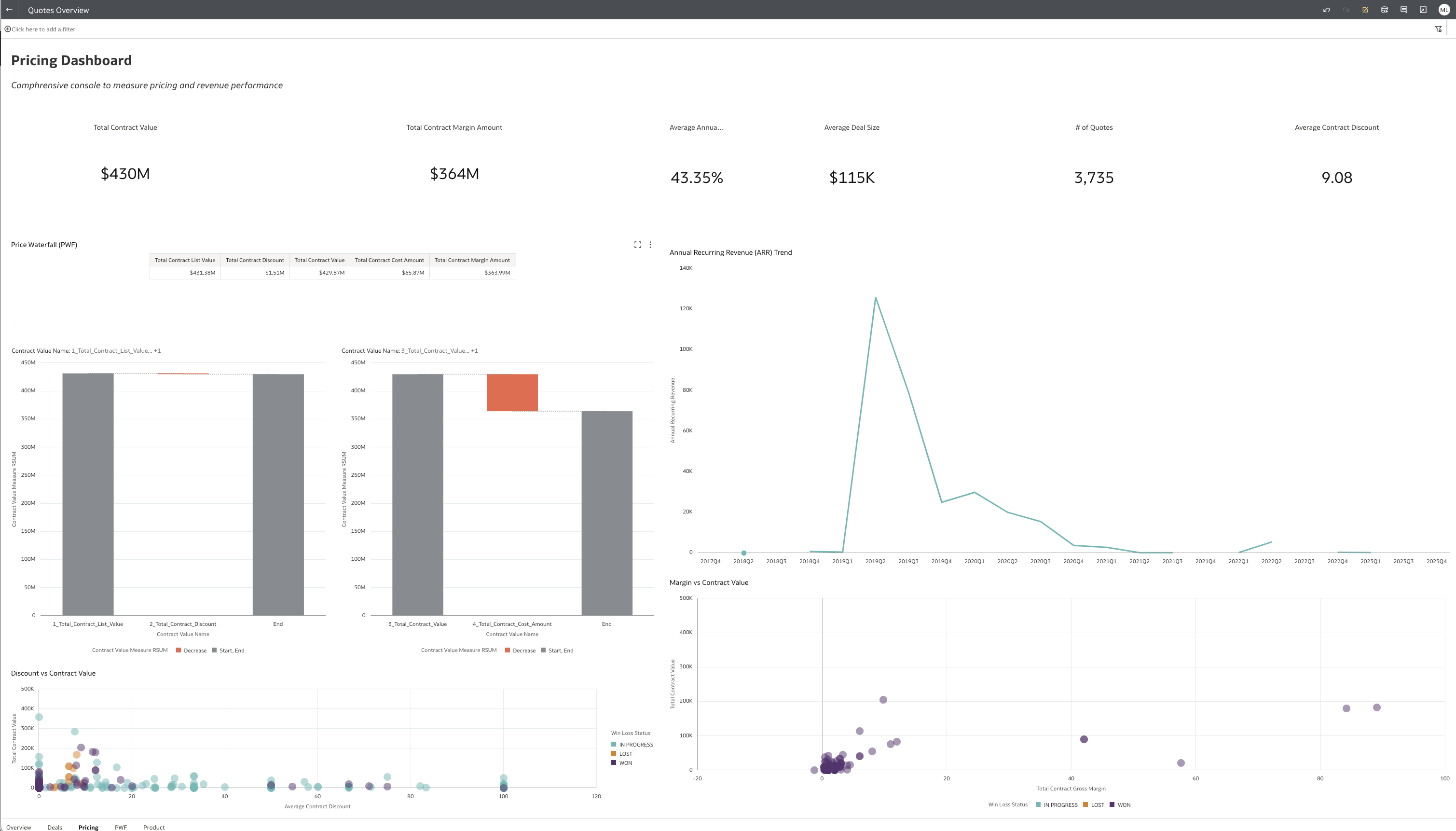
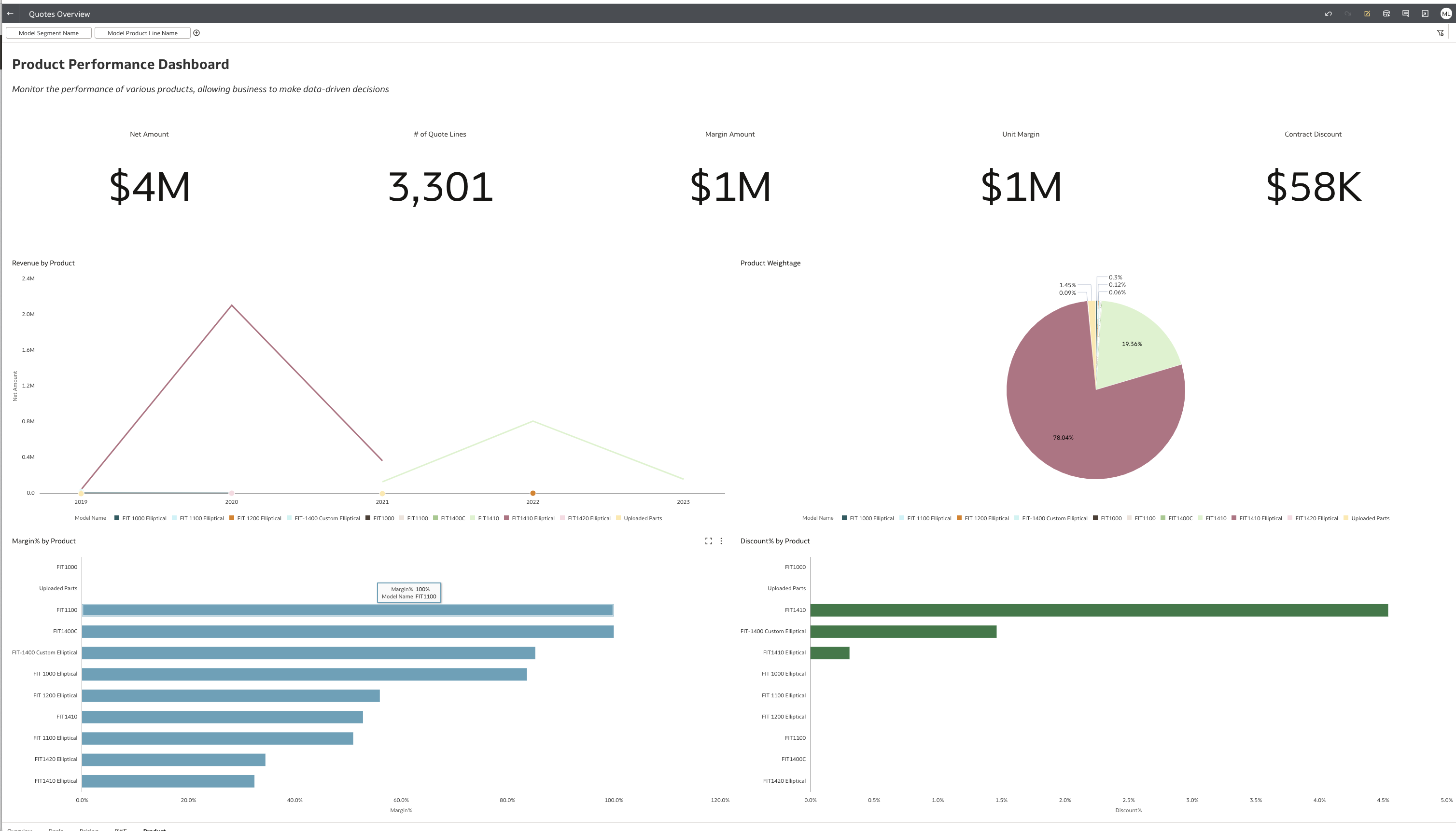
Now that we have imported and deployed the bundles, we can open CPQ visualization in OAC.
Figure 7: CPQ visualization samples
This concludes the activities in the blog.
Want to Learn More?
Click here to sign up to the RSS feed to receive notifications for when new A-team blogs are published.
Summary
This blog described how to utilize Fusion Analytics Data Augmentation Connector to replicate transactions data from CPQ Cloud Applications into Autonomous Data Warehouse (ADW) to extend the Data Layer of FDIP. This blog also detailed the steps to extend the semantic model to ultimate allow customers to answer business questions and gaining business insight.
This blog also shared the artefacts that Fusion Analytics and CPQ users can use as a starting point to analyze CPQ data, that is :
Data Augmentation Bundles
SQL Views (to allow snowflake modeling)
Semantic Model Extensions – External Application Merge artifact
OAC Visualization Bundles
We also went through the steps to set up External Application Merge feature.
To conclude, this blog walked through how to deploy these artefacts into a target environment.
Bookmark this post to stay up-to-date on changes made to this blog as our products evolve.
Authors
Elói Lopes
Cloud Solution Architect
Elói is a Cloud Solution Architect for Data Integration and Analytics. He has experience in developing ELT / ETL projects and delivering analytics solutions to multiple customers across different industries.
The Oracle A-Team is a central, outbound, highly technical team of enterprise architects, solution specialists, and software engineers.