
After I published FastConnect, SD-WAN and Traffic Inspection blog post where we analyzed that the SDWAN and FastConnect can be used together as two separate paths for network traffic, I received many questions for one obvious use case, SDWAN running over private FastConnect.
As a short review, in the mentioned blog post, the SDWAN is running and establishes IPSec tunnels with the SDWAN controller over the Internet and the FastConnect was only used as a backup traffic path if SDWAN fails for some reasons.
With the SDWAN usage having more and more traction, the need for running it over a dedicated and predictable low latency path becomes critical. That being said, the use case raised was the implementation of the SDWAN over FastConnect. Few weeks ago I finished an implementation project with SDWAN running over FastConnect and I thought it is a very good time to share the routing details and configuration with you.
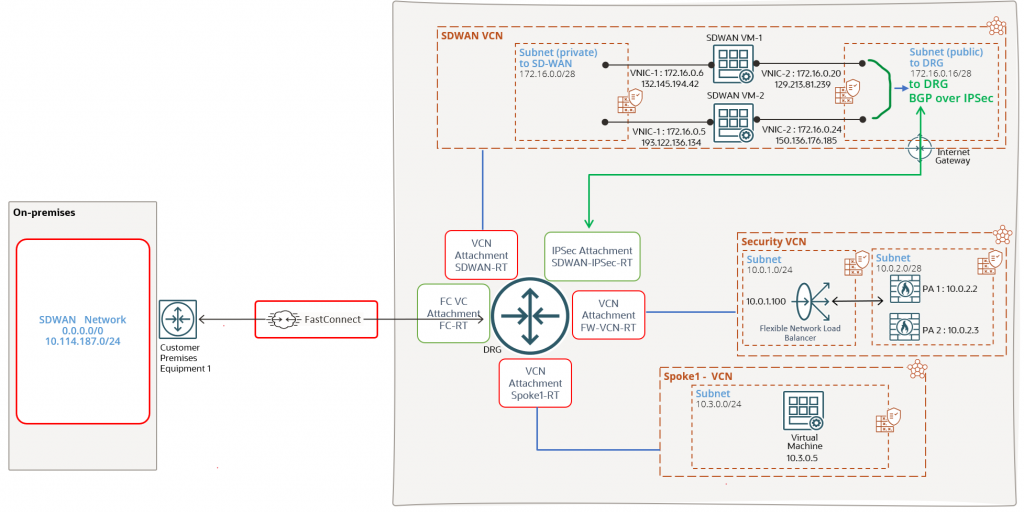
Let’s analyze the networking diagram in use for highlighting the routing configuration:
We have multiple components and the best practice is to keep the SDWAN appliances, Firewall VMs, workload VMs and DBs in separate VCNs. We will talk about each and every DRG attachment and about the routes that needs to be received and advertised over each attachment since this will be most important routing configuration for a successful deployment.
FC VC attachment route table -> FC-RT
This DRG route table will only dynamically import the SDWAN VCN. The on-premises SDWAN controller will be able to reach the OCI SDWAN VMs and establish connectivity for control and data plane. The SDWAN controller needs to create IPSec tunnels with the SDWANs VMs for on-premises subnets route advertisement and the overlay network path used will be the FastConnect.
In our scenario the on-premises SDWAN routers are announcing only a default route to OCI over the FastConnect VC. The other IP prefix 10.114.187.0/24 will be announced using the BGP over IPSec sessions that will be established over the FastConnect between the SDWAN controller on-premises and SDWAN VMs on OCI. Bidirectional connectivity is required between 10.114.187.0/24 and Spoke1-VCN. For management purposes, 10.114.187.0/24 must have connectivity to Security VCN.
Below are the routes and the next-hop used for each one:

SDWAN VCN attachment route table -> SDWAN-RT
It is important to know the attachment route table where the on-premises advertised routes will be imported.
The SDWAN-RT will import only the on-premises advertised prefixes (0.0.0.0/0 in our case). Importing the on-premises routes, the SDWAN VMs will know how to route the traffic back to on-premises for SDWAN network control and data plane:

IPSec attachment -> SDWAN-IPSec-RT
The SDWAN VMs will establish BGP over IPSec sessions with the DRG for redundancy purposes and to obtain the OCI workload VCN CIDRs that will be announced to on-premises via the SDWAN IPSec established over the FastConnect.
The DRG announces to SDWAN both Spoke1 – VCN and Security VCN. The traffic to Spoke1-VCN initiated from 10.114.187.0/24 and vice-versa needs to be inspected by the firewalls in Security VCN:

We should not forget about the transit routing configuration that will require a DRG VCN route table associated to the Security VCN:

Security VCN attachment route table -> FW-VCN-RT
This DRG attachment route table will be used by the DRG to perform the traffic forwarding after it was inspected by the firewalls in the Security VCN. The VCN attachment is ECMP enabled to use both IPSec tunnels for on-premises traffic.
It contains the following routes:

Spoke1 – VCN attachment route table -> Spoke1-RT
This attachment contains just one route, a static default route with the Security VCN as the next-hop attachment:

All the traffic originated from Spoke1-VCN or the response will be directed to the Security VCN for inspection.
We have the DRG routing configuration in place, let’s enable all the pieces and analyze the traffic forwarding path.
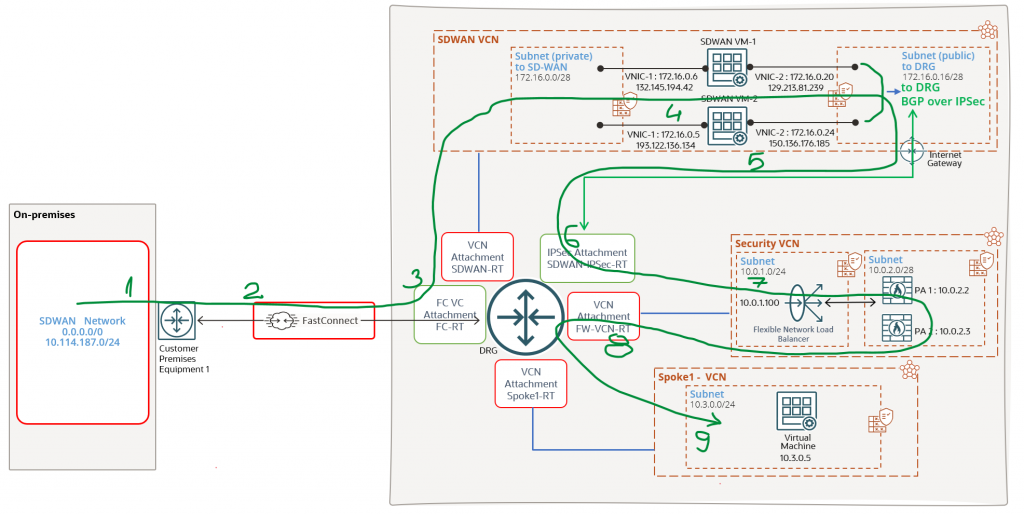
When the traffic is originated from 10.114.187.0/24 to 10.3.0.0/24 it will use the following network path:
- On-premises SDWAN
- SDWAN IPSec tunnel running over the FastConnect
- Reaching the DRG and using the DRG FC-RT to perform the forwarding to SDWAN VMs
- The traffic is reaching the SDWAN VMs where it is decrypted to read the Spoke1-VCN destination IP address
- The traffic is re-encrypted by the SDWAN VMs and sent over the IPSec tunnel to the DRG
- The encrypted traffic reaches the DRG and using the SDWAN-IPSec-RT will perform the forwarding for 10.3.0.0/24 using the Security VCN as next-hop
- After step 6, the DRG will use the transit routing DRG VCN route table to send the traffic for 10.3.0.0/24 to the NLB and then to the firewall for inspection
- After the traffic is inspected, it is sent back to the DRG and using the FW-VCN-RT will perform the forwarding to Spoke1-VCN
- The traffic reaches the Spoke1-VCN destination VM
Let’s highlight the above steps using our networking topology (the green line is crossing through the attachment route tables used):
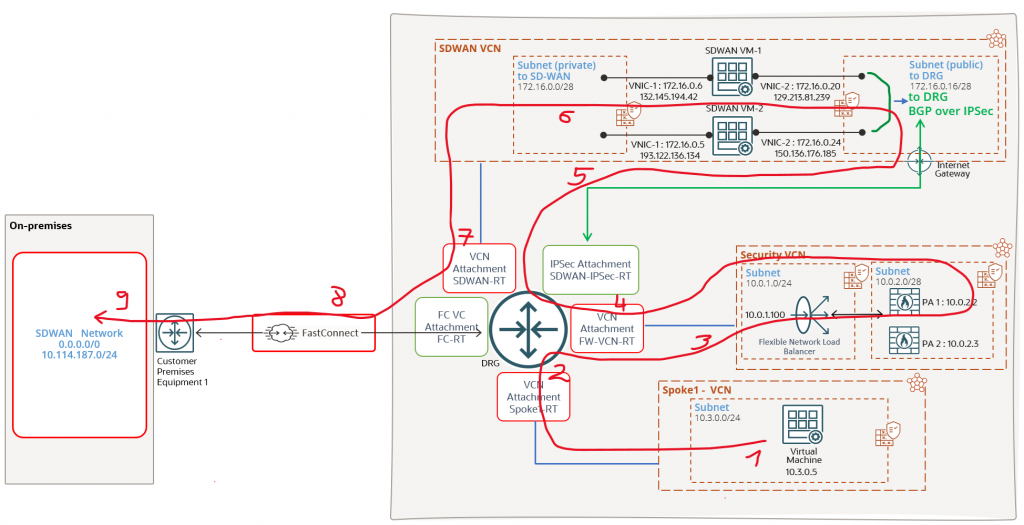
When 10.3.0.0/24 will respond, the traffic will use the networking path depicted by the red line (the red line is crossing through the attachment route tables used):
- 10.3.0.0/24 is responding
- The traffic is reaching the DRG and Spoke1-RT is used to forward the traffic back to 10.114.187.0/24 using the Security VCN as next-hop attachment
- After step 2, the DRG will use the transit routing DRG VCN route table to send the traffic for 10.114.187.0/24 to the NLB and then to the firewall for inspection
- After the traffic is inspected it is sent back to the DRG and using the FW-VCN-RT will perform the forwarding to 10.114.187.0/24 via the IPSec tunnels
- The traffic is reaching the SDWAN VMs where it is decrypted to read the 10.114.187.0/24 destination IP address
- The traffic is re-encrypted by the SDWAN VMs and sent over the IPSec tunnel over the FastConnect to on-premises SDWAN controller for decryption and final forwarding
- Reaching the DRG and using the DRG SDWAN-RT to perform the forwarding over the FastConnect for the encrypted traffic
- The traffic is reaching the SDWAN controller on-premises where it is decrypted and forwarded to 10.114.187.0/24
- The response traffic is reaching 10.114.187.0/24
The steps can be visualized using our networking diagram:
That concludes are scenario where the FastConnect private virtual circuit is used as an overlay network for SDWAN control and data planes.