
Introduction – Why Secret Rules Matter
Secrets such as database passwords, API keys, OAuth tokens, and certificates are fundamental to application security. While storing secrets securely is important, governing how secrets are reused, expired, and accessed over time is often overlooked.
A common assumption is that rotating or expiring a secret automatically blocks access or forces applications to change behavior. In OCI Vault, that is not always true.
This blog explains OCI Secret Rules in a practical, UI-driven way by mapping the official documentation directly to what you see in the OCI Console, and by explaining what actually happens at runtime.
What Are Secret Rules in OCI Vault?
Secret Rules define governance controls for secrets stored in OCI Secrets Management Service. They do not encrypt secrets themselves and do not rotate secrets automatically. Instead, they enforce how secrets are allowed to be reused and when they are considered expired.
Key characteristics: –
- Secret Rules are configured per secret
- You can configure a maximum of two rules per secret: –
- One Secret Reuse Range
- One Secret Expiry Rule
- Rules apply to future secret versions as well after they are configured.
Where to Configure Secret Rules in the OCI Console
You can configure Secret Rules from the OCI Console using the following path:
Identity & Security → Secret Management → <Secret Name> → Secret Rules → Edit Rules
From the Edit Rules panel, you can add or modify the Secret Reuse Range and the Secret Expiry Rule.
Secret Reuse Rule – Allowing/Preventing Credential Reuse
OCI CLI Example
oci vault secret update --secret-id {secret_ocid} --secret-rules '[{"ruleType":"SECRET_REUSE_RULE","isEnforcedOnDeletedSecretVersions":no}]'
What the UI Shows
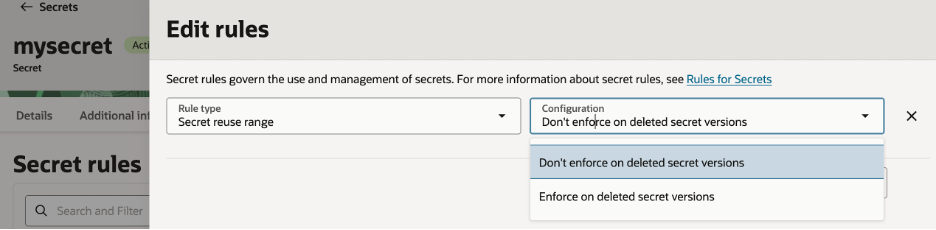
- Rule type: Secret reuse range
- Configuration:
- Enforce on deleted secret versions
- Don’t enforce on deleted secret versions
What This Rule Does
The Secret Reuse Range allows/prevents the same secret content from being reused across different versions of a secret.
When Enforce on deleted secret versions is enabled: – A secret value used in any previous version cannot be reused, even if that older version is deleted
This helps prevent accidental rollback to older or compromised credentials.
Example:
- Version 1 of a secret contains a database password
- The password is rotated and stored as Version 2
- An administrator attempts to reuse the old password
- OCI Secret Management rejects the update due to the reuse rule
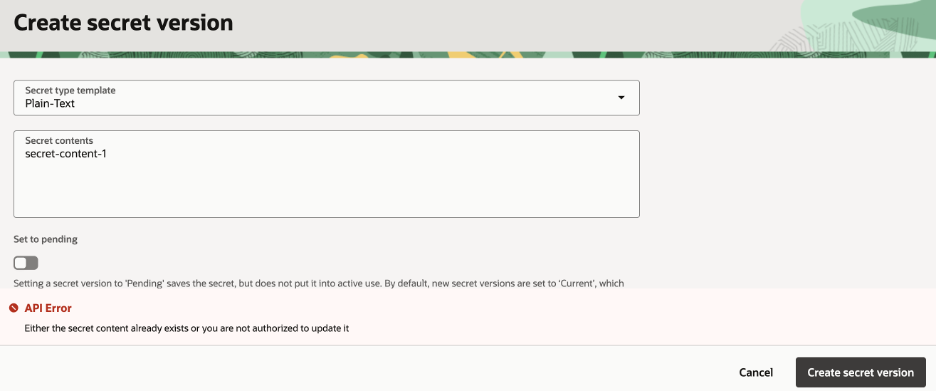
Fig: Sample error shown when attempting to reuse secret content with the Secret Reuse Rule enforced
When to Use This Rule
- Production environments
- Regulated workloads
- Human-managed credentials
- Secrets with a history of compromise
Secret Expiry Rule – Understanding Expiry vs Access
The Secret Expiry Rule is often misunderstood. This rule controls when secrets or secret versions expire, but expiration does not always mean access is blocked.
OCI CLI Example
oci vault secret update --secret-id {secret_ocid} --secret-rules '[{"ruleType":"SECRET_EXPIRY_RULE","secretVersionExpiryInterval":"P30D","isSecretContentRetrievalBlockedOnExpiry":false,"timeOfAbsoluteExpiry":"2026-12-31T22:00:00.000Z"}]'
What the UI Shows
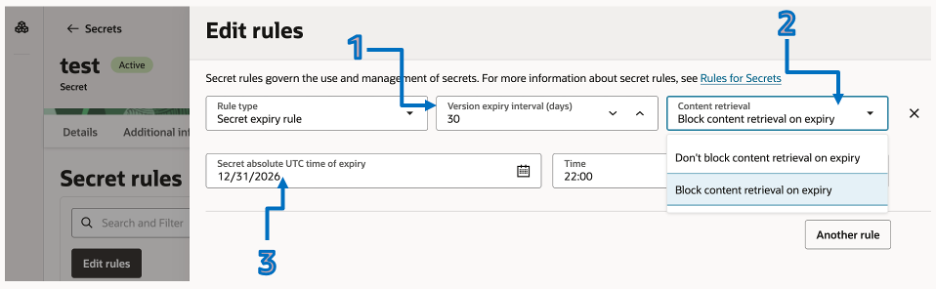
The rule has three independent components.
1. Version Expiry Interval (Days)
UI field: Version expiry interval (1–90 days)
This setting controls how long each secret version remains valid after it is created.
Example: – Version created on January 1 – Version expiry interval set to 90 days – Version expires on March 31
2. Content Retrieval – Block or Allow Access After Expiry
UI field: Content retrieval
This setting controls what happens when a secret or secret version is expired.
Options: – Don’t block content retrieval on expiry – Block content retrieval on expiry
Key point: – Expired does not automatically mean inaccessible.
If retrieval is not blocked: – Applications can continue to read expired secrets – Useful for avoiding application outages
If retrieval is blocked: – Applications fail when attempting to read expired secrets – Useful for strict compliance environments
3. Absolute Secret Expiry (UTC Date and Time)
UI fields: – Secret absolute UTC time of expiry – Time (1–365 days)
This setting defines a hard expiration date for the entire secret, regardless of how many versions exist.
Common use cases:
– Temporary project secrets
– Vendor or partner access credentials
– Time-bound access requirements
Once this date is reached, the entire secret and its contents are expired.
Combining Version Expiry and Absolute Expiry
Both expiry mechanisms can be configured together or independently.
Examples: – Use version expiry for regular rotations – Use absolute expiry for final cutoff dates – Use both for layered governance
OCI Secret Management evaluates these settings independently.
What Secret Rules Do NOT Do
It is important to clarify what Secret Rules are not responsible for:
- They do not rotate secrets automatically
- They do not notify applications
- They do not re-encrypt older secret versions
- They do not enforce application-side changes
Secret rotation and automation must be handled using Secret’s auto rotation feature, OCI Functions, scripts, or CI/CD pipelines.
Recommended Configurations
Production Environments
- Secret Reuse Rule: Enforced
- Version expiry: 30–90 days
- Content retrieval: Block after expiry
Non-Production Environments
- Secret Reuse Rule: Optional
- Version expiry: 90 days
- Content retrieval: Don’t block
Final Thoughts
Secret Rules in OCI Secrets Management Service are governance controls, not automation tools. They define how secrets are allowed to be reused, when they expire, and whether applications are impacted after expiry.
Understanding these rules helps avoid outages, enforce compliance, and design secure secret lifecycle management strategies.