
Overview
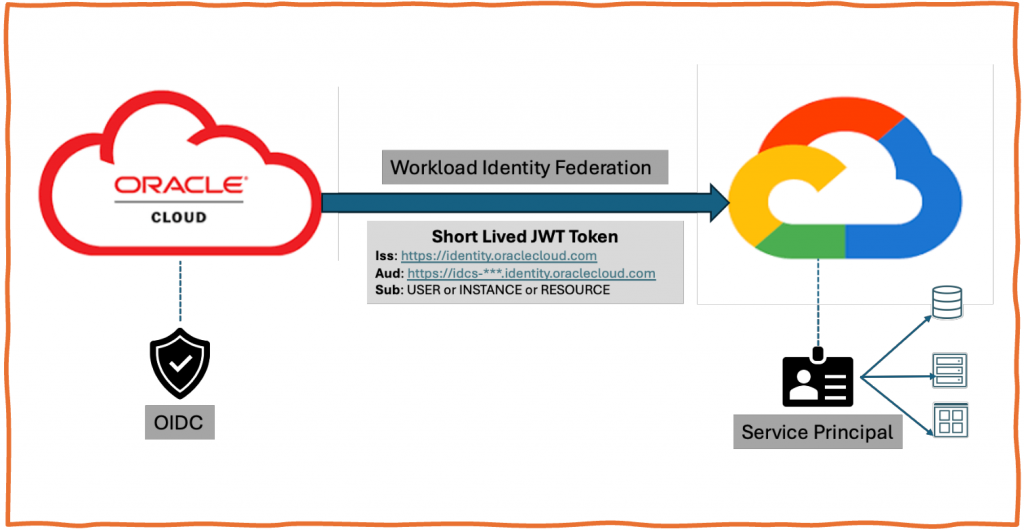
Taking inspiration from my colleague and good friend Ramesh’s recent blog (https://www.ateam-oracle.com/using-oci-identity-domain-as-an-oidc-provider-for-aws-sts), I am writing this blog to federate OCI workload identity to Google. The use case could be trying to invoke Google storage or any other service using OCI workload identity (Instance Principal or Resource Principal).
OCI Instance Principal or Resource Principal tokens are signed by Internal STS or trust anchor. Even though they are JWT tokens, you cannot use them to federate to GCP. You have to exchange OCI Instance principal or resource principal token for identity domain token and use identity domain token to exchange for GCP token in return.
If you want to exchange OCI IAM user token for GCP token then follow steps mentioned in Ramesh’s blog to create OAuth client app and use the client app to generate OAuth token for the user.
Pre-Requisites
- As outlined above, based on your requirements, finalize one of the two approaches. (User workload Identity token with GCP or user token with GCP).
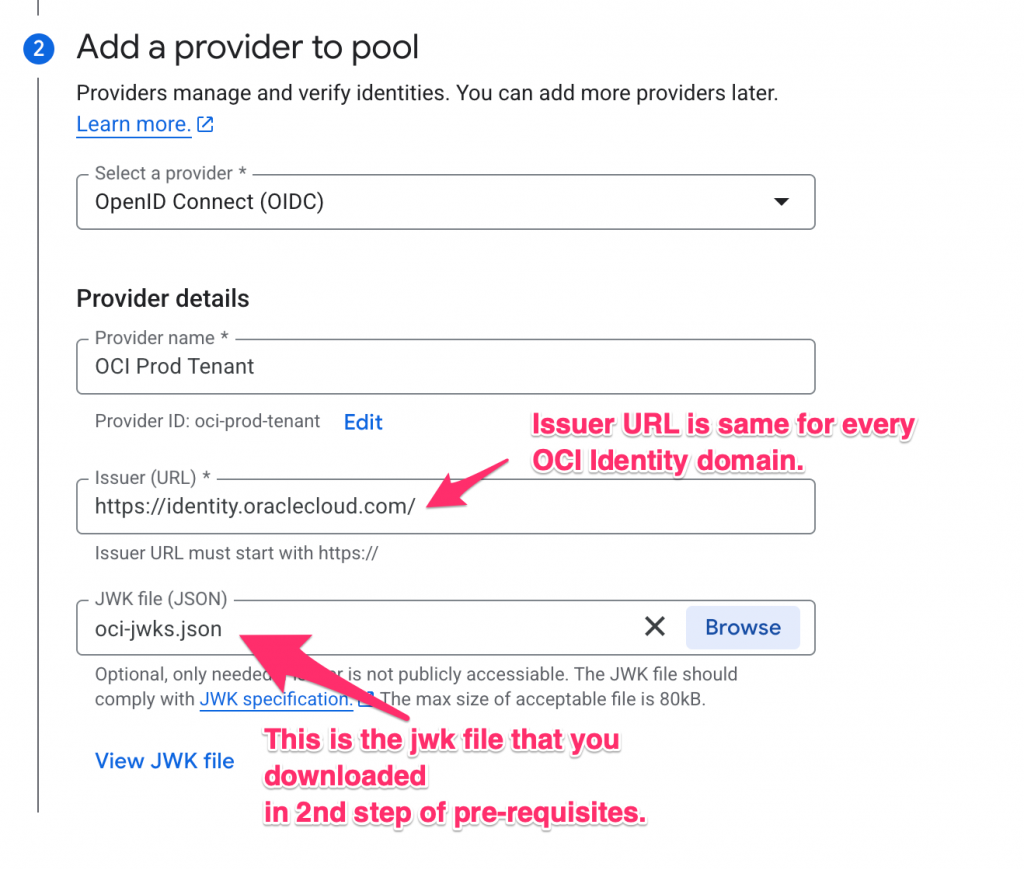
- For the Identity domain that you are planning to use, download JWK’s file from (https://<Identity_Domain_Endpoint>/admin/v1/SigningCert/jwk). If the JWK’s endpoint is protected then you may have to login to download JWK file. Save the output in jwk-certs.json file. We will use it while configuring trust in GCP.
Google Cloud trust configuration
Follow the steps as mentioned below to configure trust in GCP.
- Create a workload identity pool resource object in your GCP project. The workload identity Pool is a new component built to facilitate this keyless federation mechanism. The pool acts as a container for your collection of external identities.
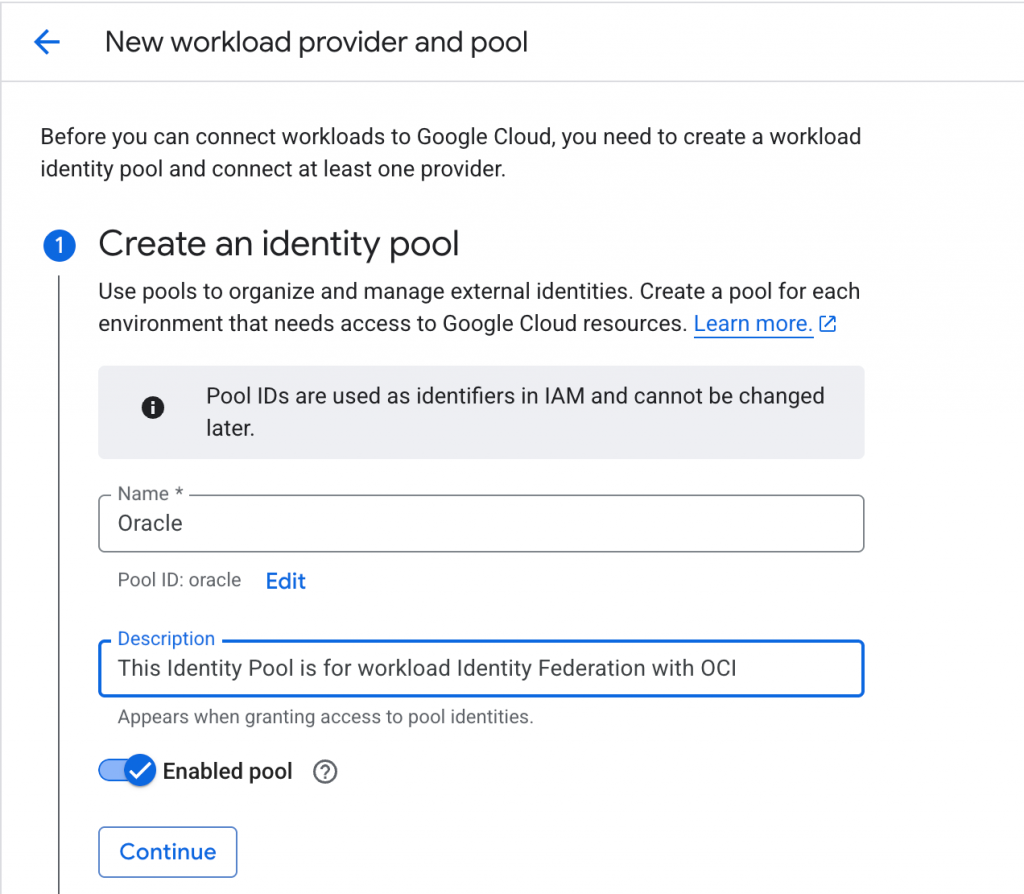
- For the Identity pool, add an Identity provider.
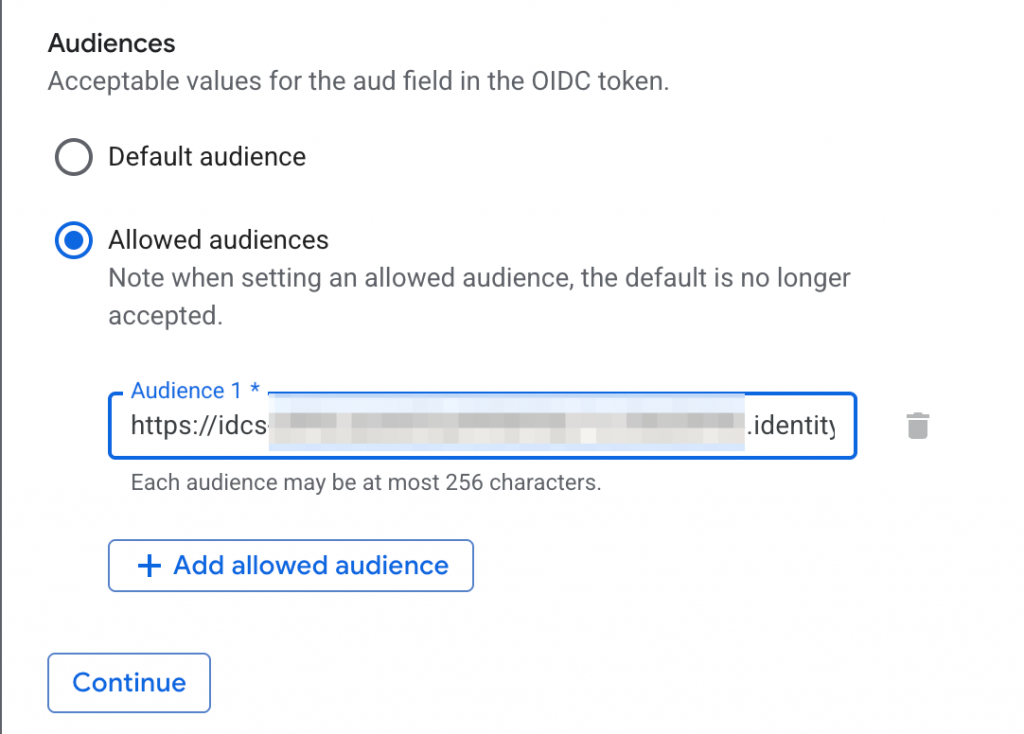
- OCI Identity domains add the domain URL in the audience’s claim. Configure that in the provider. (https://<Identity_Domain_Endpoint>)
- Map incoming token to GCP token based on an attribute in the claim. You can also add claim attribute conditions. Learn more about those conditions from https://docs.cloud.google.com/iam/docs/workload-identity-federation?_gl=1*1l7jwn3*_ga*MTQxNTQzOTY3My4xNzcwMzYxNzU0*_ga_WH2QY8WWF5*czE3NzAzOTk2NDQkbzIkZzEkdDE3NzAzOTk2NTYkajQ4JGwwJGgw#conditions
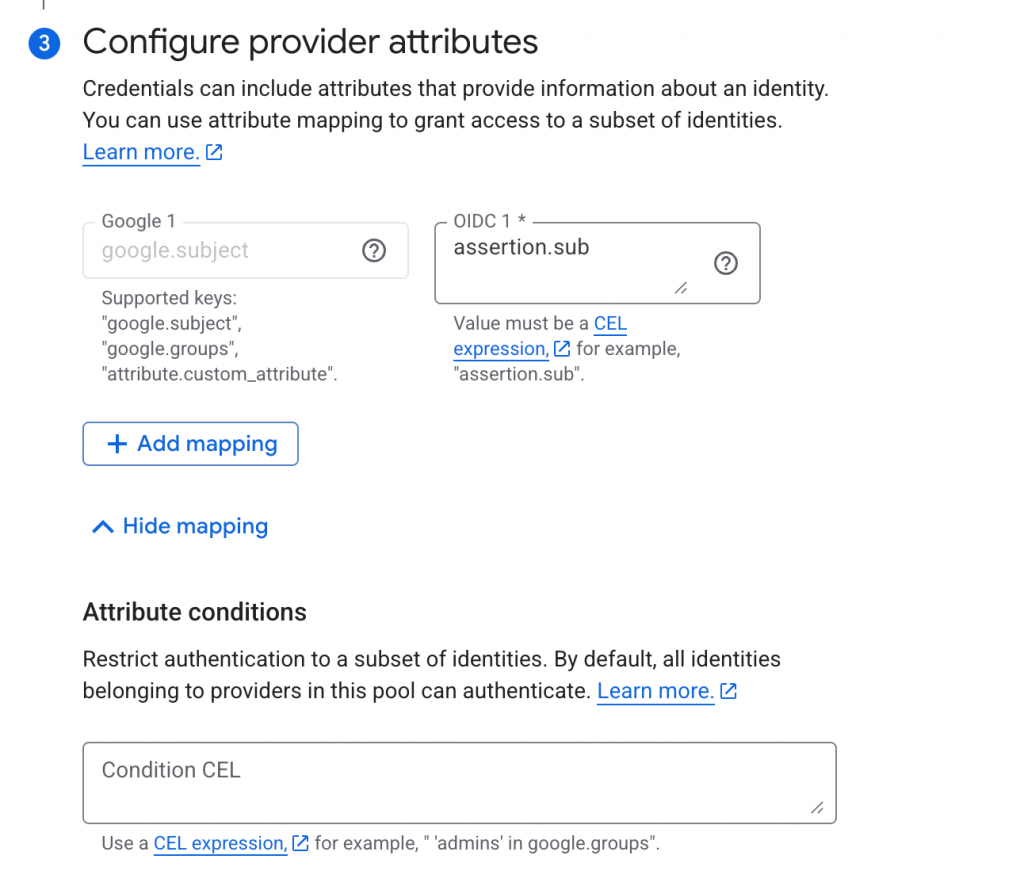
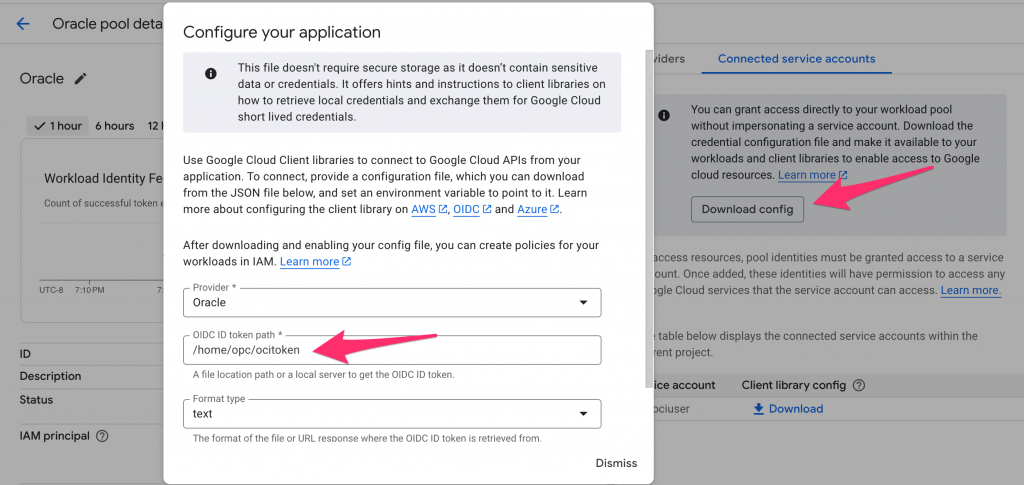
- Once the trust configuration is complete, you can download the credentials or config file, as shown in the screenshot below. When configuring the credentials file, you must specify the location of the file where the IDP token will be stored. That is in case you are exchanging a user token for a Google Cloud token. You can either impersonate an incoming identity to a service account in Google Cloud or grant direct access to a federated identity. You can learn more about it from https://docs.cloud.google.com/iam/docs/workload-download-cred-and-grant-access?_gl=1*6ti9p0*_ga*MTQxNTQzOTY3My4xNzcwMzYxNzU0*_ga_WH2QY8WWF5*czE3NzAzOTk2NDQkbzIkZzEkdDE3NzA0MDA3NDYkajU4JGwwJGgw.
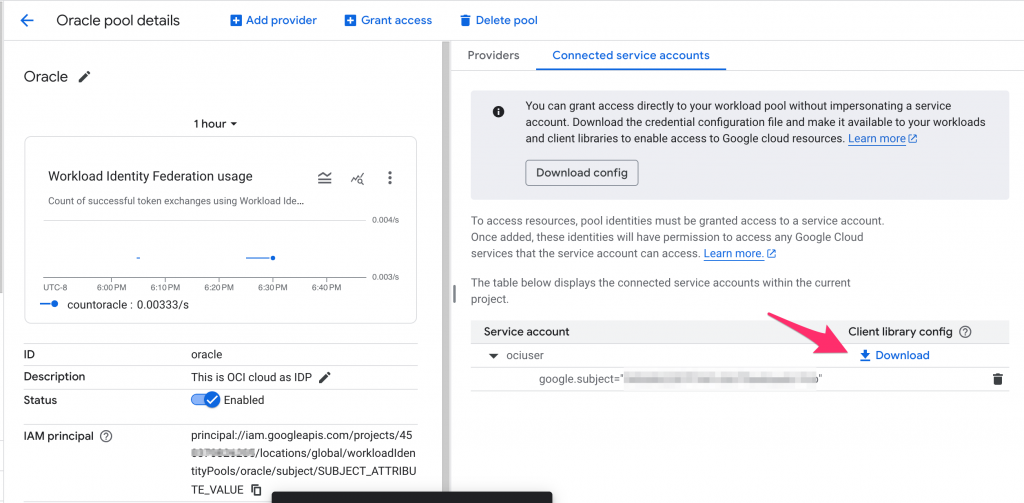
Once the trust is configured, you can use the file you downloaded in the last step with the Google SDK. At runtime, you first need to exchange an OCI Instance Principal Session Token or a Resource Principal Session Token for an OCI IAM token (OIDC token).
If you are using Instance Principal, you can add configuration to environment variables, and with the code below, you can exchange the token and fetch buckets from Google Cloud.
Instance Principal Token Exchange
If your application is running on OCI compute or OKE, it can use the instance principal token to obtain a Google Cloud token. Please note that OKE can also use a resource principal session token.
Please set environment variables as mentioned in the code comments.
import os
from google.cloud import storage
import oci
import requests
from google.auth.transport.requests import Request
from google.auth import identity_pool

# This is a sample Python script to demonstrate how to use OCI Instance Principals to fetch an OCI JWT token.
# Use the JWT token to exchange for a GCP access token and then use the GCP access token to list GCP buckets.
# Make sure to set following environment variables before running the script:
# export OCI_IAM_DOMAIN_URL=idcs-xxxxxx.identity.oraclecloud.com
# export GOOGLE_CLOUD_PROJECT=your-gcp-project-id
# export GCP_IMPERSONATION_URL=https://iamcredentials.googleapis.com/v1/projects/-/serviceAccounts/$GCP_SA_MAPPED:generateAccessToken
# export GCP_AUDIENCE=//iam.googleapis.com/projects/$GCP_PROJECT_ID/locations/global/workloadIdentityPools/oracle/providers/oracle


def fetch_gcp_buckets(credentials, project_id):
    # Create a GCS client using the supplied credentials and project.
    storage_client = storage.Client(credentials=credentials, project=project_id)
    # Fetch all buckets in the project.
    buckets = list(storage_client.list_buckets())
    return buckets

class OCITokenSupplier(identity_pool.SubjectTokenSupplier):
    """Custom supplier to fetch an OCI OIDC token via POST or OCI SDK."""

    def __init__(self, iam_domain_url):
        # Store the OCI IAM domain for token requests.
        self.iam_domain_url = iam_domain_url

    def get_subject_token(self):
        # Use OCI Instance Principals to sign the request.
        signer = oci.auth.signers.InstancePrincipalsSecurityTokenSigner()
        # OCI token endpoint.
        oci_url = f'https://{self.iam_domain_url}/oauth2/v1/token'
        # Token exchange payload for OCI access token.
        oci_data = 'grant_type=urn:ietf:params:oauth:grant-type:token-exchange&scope=urn:opc:idm:__myscopes__&requested_token_type=urn:ietf:params:oauth:token-type:access_token'

        # Build and sign the HTTP request for OCI.
        headers = {'Content-type': 'application/x-www-form-urlencoded'}
        req = requests.Request('POST', url=oci_url, headers=headers, data=oci_data, auth=signer)
        r = req.prepare()

        # Send request and extract access token.
        s = requests.Session()
        response = s.send(r)
        access_token = response.json()['access_token']
        print(f"Access Token generated for RPST: {access_token}")
        return access_token

if __name__ == "__main__":

    # Create the OCI subject token supplier using env-configured domain.
    supplier = OCITokenSupplier(iam_domain_url=os.environ["OCI_IAM_DOMAIN_URL"])

    # Create GCP workforce identity credentials using the OCI subject token.
    credentials = identity_pool.Credentials(
        credential_source=None,
        audience=os.environ["GCP_AUDIENCE"],
        subject_token_type="urn:ietf:params:oauth:token-type:jwt",
        token_url="https://sts.googleapis.com/v1/token",
        service_account_impersonation_url=os.environ["GCP_IMPERSONATION_URL"],
        subject_token_supplier=supplier
    )

    # Show the constructed credentials object (debug/logging).
    print(f"Credentials: {credentials} ")

    # List GCS buckets in the target project using the exchanged credentials.
    gcp_buckets = fetch_gcp_buckets(credentials, os.environ['GOOGLE_CLOUD_PROJECT'])

    # Output the bucket list.
    print(f'GCP Buckets: {gcp_buckets}')
Resource Principal Token Exchange
If your application is running on OKE or is running as OCI function then it can use resource principal session token to exchange for Google cloud token. In this example, I have below code for OCI function. You can refer to Oracle Cloud Documentation for instructions on how to setup OCI function cli and deploy the function. I will not go over those details in this blog.
In the above example, you had to set a few variables as environment variables. In this case, we will set them in application or function configuration. You will get both GCP_IMPERSONATION_URL and GCP_AUDIENCE from the credentials file that you downloaded in the last step of GCP trust configuration. OCI_IAM_DOMAIN_URL is the domain that was used to configure trust with GCP.
This code requires 3.11 or higher version of Python. You can see these details in func.yaml for the function on Github. https://github.com/kiranthakkar/ocifunctions/tree/main/rpsttokenexchange
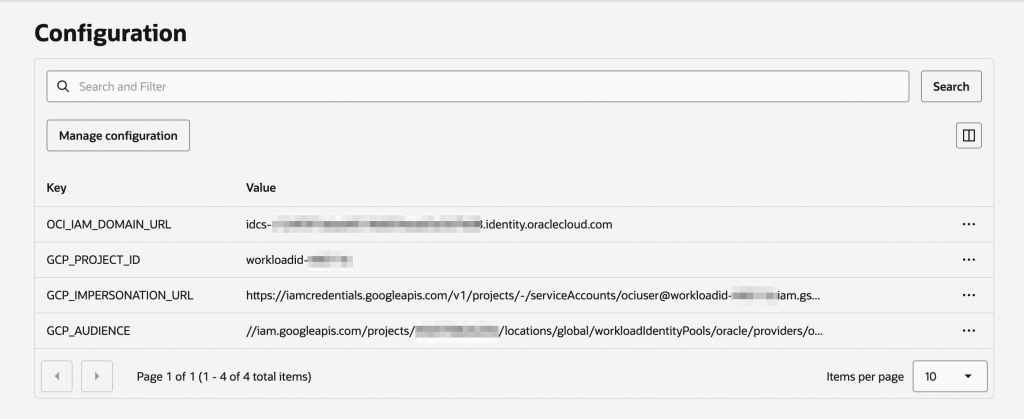
from google.cloud import storage
import oci
import requests
from google.auth import identity_pool
import logging
import json
import io
from fdk import response


class OCITokenSupplier(identity_pool.SubjectTokenSupplier):
    """Custom supplier to fetch an OCI OIDC token via POST or OCI SDK."""

    def __init__(self, iam_domain_url):
        self.iam_domain_url = iam_domain_url

    def get_subject_token(self, context, request):
        logging.getLogger().info("Get Subject Token called for RPST token exchange")
        # Use OCI resource principal signer to authenticate the token exchange call.
        signer = oci.auth.signers.get_resource_principals_signer()
        # Build OCI IAM token endpoint and token exchange payload.
        oci_url = f'https://{self.iam_domain_url}/oauth2/v1/token'
        oci_data = 'grant_type=urn:ietf:params:oauth:grant-type:token-exchange&scope=urn:opc:idm:__myscopes__&requested_token_type=urn:ietf:params:oauth:token-type:access_token'

        headers = {'Content-type': 'application/x-www-form-urlencoded'}
        req = requests.Request('POST', url=oci_url, headers=headers, data=oci_data, auth=signer)
        r = req.prepare()

        # Perform the HTTP request and extract the access token from the response.
        s = requests.Session()
        response = s.send(r)
        access_token = response.json()['access_token']
        logging.getLogger().info(f"Access Token generated for RPST: {access_token}")
        return access_token

def handler(ctx, data: io.BytesIO = None):
    try:
        # Read function configuration for OCI and GCP settings.
        cfg = ctx.Config()
        iam_domain_url = cfg["OCI_IAM_DOMAIN_URL"]
        gcp_project_id = cfg["GCP_PROJECT_ID"]
        gcp_audience = cfg["GCP_AUDIENCE"]
        gcp_impersonation_url = cfg["GCP_IMPERSONATION_URL"]
    except Exception as ex:
        logging.getLogger().error('ERROR: Missing configuration keys', str(ex))

    # Supply an OCI access token as the subject token for GCP workload identity.
    supplier = OCITokenSupplier(iam_domain_url=iam_domain_url)

    # Configure GCP identity pool credentials using the OCI subject token.
    credentials = identity_pool.Credentials(
        credential_source=None,
        audience=gcp_audience,
        subject_token_type="urn:ietf:params:oauth:token-type:jwt",
        token_url="https://sts.googleapis.com/v1/token",
        service_account_impersonation_url=gcp_impersonation_url,
        subject_token_supplier=supplier
    )

    # Access GCS using the federated credentials and list buckets.
    storage_client = storage.Client(credentials=credentials, project=gcp_project_id)
    buckets = list(storage_client.list_buckets())
    print(buckets)
    logging.getLogger().info('Buckets received are ' + str(buckets))

    logging.getLogger().info("buckets are retrieved successfully using RPST token exchange")
    return response.Response(
        ctx, response_data=json.dumps(
            {"message": "Hello {0}".format(buckets)}),
        headers={"Content-Type": "application/json"}
    )
Google Cloud Credentials File without OCITokenSupplier
There is another approach that does not use the credentials object or OCITokenSupplier. You generate an OCI token and write it to one of the files. You have to specify the location of the Google Cloud credentials file when downloading it, as shown in the screenshot below. Save the credentials file on the file system along with the OCI token and use it to connect to Google Cloud.
import os
from google.cloud import storage
import oci
import requests

# This is a sample Python script to demonstrate hot to use OCI Instance Principals to fetch OCI JWT token.
# Use the JWT token to exchange for GCP access token and then use the GCP access token to list GCP buckets.
# Make sure to set following environment variables before running the script:
# export OCI_IAM_DOMAIN_URL=idcs-xxxxxx.identity.oraclecloud.com
# export GOOGLE_APPLICATION_CREDENTIALS=/path/to/your/gcp/credentials.json
# exportr GOOGLE_CLOUD_PROJECT=your-gcp-project-id

def fetch_gcp_buckets():
    """
    Fetches and returns a list of all GCS buckets in the configured GCP project.
    Uses the default credentials from GOOGLE_APPLICATION_CREDENTIALS environment variable.
    """
    # Initialize GCS client with project ID from environment variable
    storage_client = storage.Client(project=os.environ['GOOGLE_CLOUD_PROJECT'])

    # List all buckets in the project and convert to a list
    buckets = list(storage_client.list_buckets())
    return buckets

def fetch_oci_token():
    """
    Fetches an OCI access token using Instance Principals authentication.
    Returns the access token as a string.
    """
    # Create a signer that uses OCI Instance Principals for authentication
    # Instance Principals allow OCI compute instances to make API calls without hardcoded credentials
    signer = oci.auth.signers.InstancePrincipalsSecurityTokenSigner()

    # Construct the OCI IAM token endpoint URL using the domain from environment variable
    oci_url = f'https://{os.environ["OCI_IAM_DOMAIN_URL"]}/oauth2/v1/token'

    # Token exchange request body specifying OAuth grant type and requested token type
    oci_data = 'grant_type=urn:ietf:params:oauth:grant-type:token-exchange&scope=urn:opc:idm:__myscopes__&requested_token_type=urn:ietf:params:oauth:token-type:access_token'

    # Set content type header for form data
    headers = {'Content-type': 'application/x-www-form-urlencoded'}

    # Create a POST request with the signer for authentication
    req = requests.Request('POST', url=oci_url, headers=headers, data=oci_data, auth=signer)

    # Prepare the request (applies authentication signing)
    r = req.prepare()

    # Send the signed request
    s = requests.Session()
    response = s.send(r)

    # Extract and return the access token from the JSON response
    return response.json()['access_token']

if __name__ == "__main__":
    # Fetch OCI access token using Instance Principals
    oci_token = fetch_oci_token()

    # Save the OCI token to a file for future use or debugging
    with open("/home/opc/ocitoken", "w", encoding="utf-8") as f:
        f.write(oci_token)

    # Fetch all GCP buckets using the configured credentials
    gcp_buckets = fetch_gcp_buckets()

    # Print the list of GCP buckets
    print(f'GCP Buckets: {gcp_buckets}')