
Multicloud is the new normal. In addition to OCI, enterprises often run workloads on platforms such as AWS and need secure access across cloud boundaries. In these scenarios, OCI Identity Domain acts as an enterprise-grade identity provider, enabling OCI workloads to authenticate to AWS using standards-based OpenID Connect and short-lived tokens, instead of creating IAM users or managing long-lived credentials.
This blog explains how to configure OCI Identity Domain as an OIDC identity provider and use it to assume an AWS IAM role using AWS STS AssumeRoleWithWebIdentity.
Step 1: Create an Integrated Application in OCI Identity Domain
Navigate to:
Identity & Security → Domains → Your Domain → Integrated Applications
Create a Confidential Application and enable OAuth.
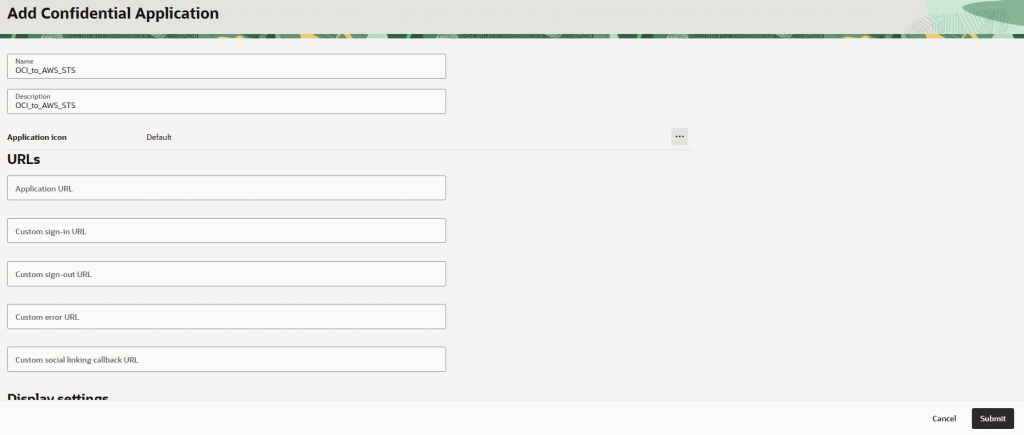
Step 2: Configure Resource Server and OAuth Client
This step has two required parts. The resource server must be configured before the client.
2.1 Configure Resource Server
Inside the application:
- Go to OAuth Configuration and click Edit OAuth configuration
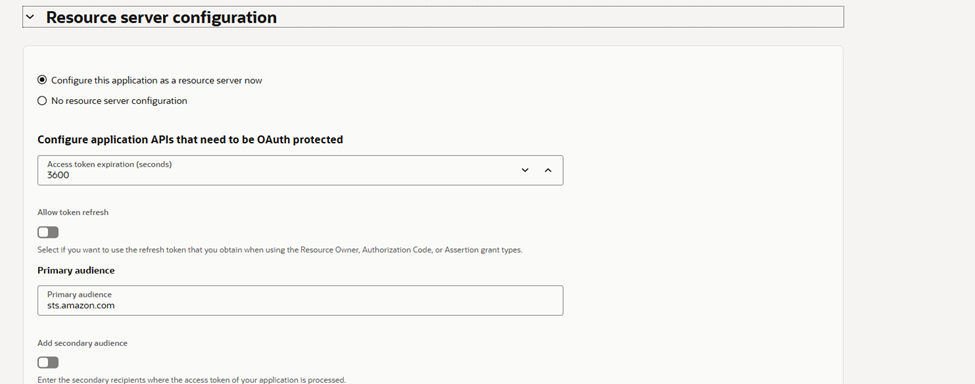
- Click on Configure this application as a resource server now
- Set Primary Audience to:
sts.amazon.com
- Under Scopes, add: / under scope and description all
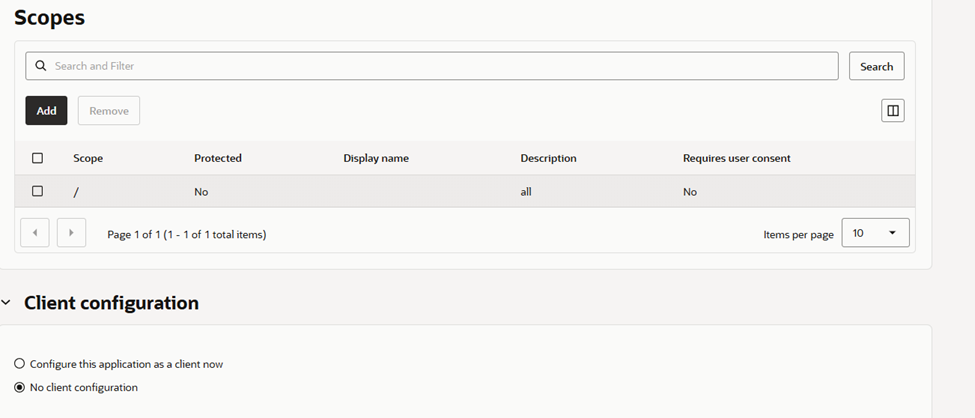
Why this matters:
- AWS STS validates the
audclaim sts.amazon.com(or any value that will be used in AWS IAM Role Trust Policy) must appear in the token audience- The
/scope is required for client credentials flow - Submit.
2.2 Configure OAuth Client
Now configure the client side.
- Go to OAuth Client Configuration -> click Edit OAuth configuration -> Configure this application as a client now
- Enable Client Credentials grant
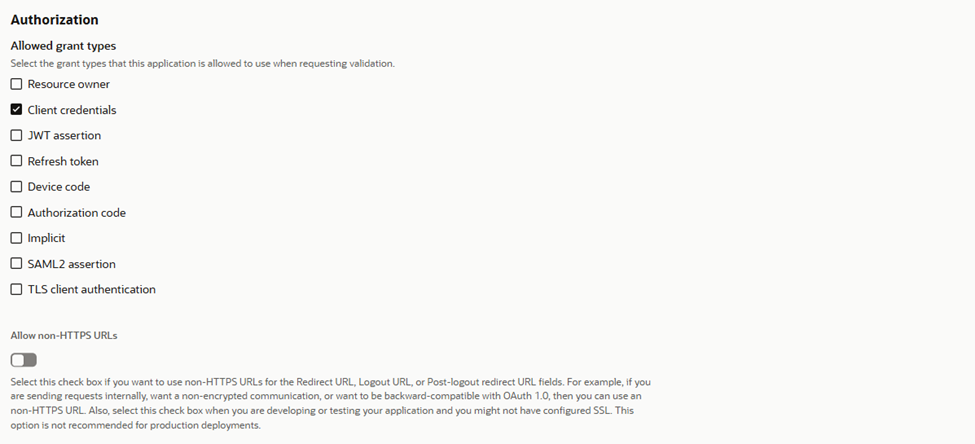
- Under Resources:
- Enable Add Resources
- Select the resource server you created in the previous step
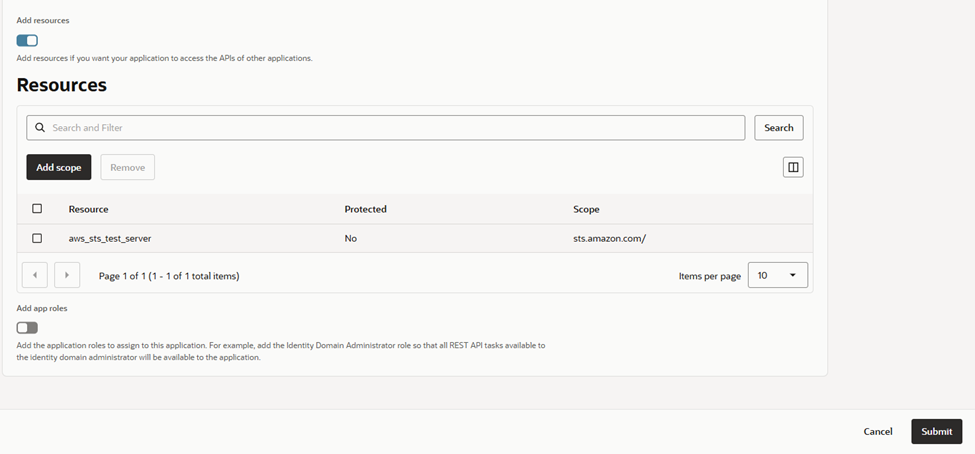
This explicitly binds the client to the resource server that issues tokens for AWS.
2.3 Activate the Application
Once both configurations are complete:
- Activate the application
Step 3: Update Domain OAuth Token Issuance Policy
Navigate to:
Domain → Security → OAuth Settings → Default Token Issuance Policy
Update the Issuer value.
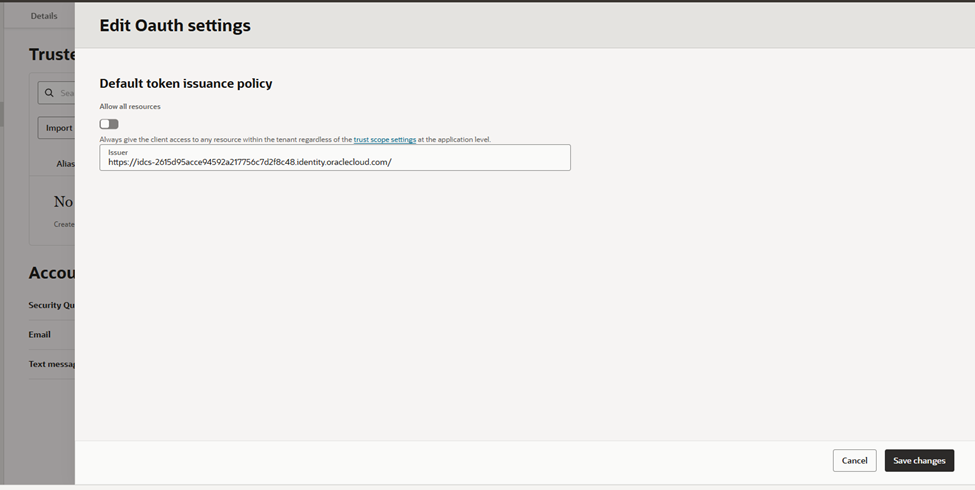
What to change
- Change issuer from:
identity.oraclecloud.com - Change issuer to:
https://idcs-<domain-id>.identity.oraclecloud.com
This value becomes the JWT iss claim.
Why this matters
- AWS validates the JWT
issclaim and uses it to discover the OpenID configuration and JWKS endpoint. - The default
identity.oraclecloud.comissuer will not work
Step 4: Domain Settings
Navigate to:
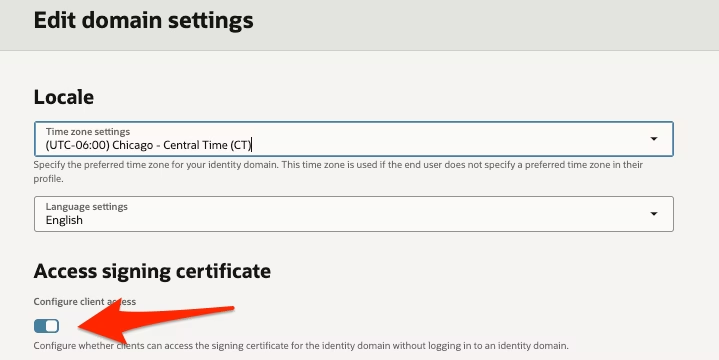
Domain → Settings → Domain Settings
Make sure:
- Configure client access is enabled
Step 5: Create AWS IAM Role Trust Policy
Use this trust policy:
{
  "Version": "2012-10-17",
  "Statement": [
    {
      "Effect": "Allow",
      "Principal": {
        "Federated": "arn:aws:iam::<account-id>:oidc-provider/idcs-<domain-id>.identity.oraclecloud.com"
      },
      "Action": "sts:AssumeRoleWithWebIdentity",
      "Condition": {
        "StringEquals": {
          "idcs-<domain-id>.identity.oraclecloud.com:aud": "sts.amazon.com"
        }
      }
    }
  ]
}
The aud condition must match what you configured in the OCI resource server.
Step 6: Generate OAuth Token from OCI
Use client credentials flow:
curl -X POST \
  -u "<client_id>:<client_secret>" \
  -H "Content-Type: application/x-www-form-urlencoded" \
  -d "grant_type=client_credentials&scope=sts.amazon.com/" \
  https://idcs-<domain-id>.identity.oraclecloud.com/oauth2/v1/token
Save the returned access_token as a file, for example:
echo "<access_token>" > idtoken.jwt
Step 7: Call AWS STS
aws sts assume-role-with-web-identity \
  --role-arn arn:aws:iam::<account-id>:role/<role-name> \
  --role-session-name oci-oidc-test \
  --web-identity-token file://idtoken.jwt \
  --duration-seconds 900
AWS returns temporary credentials if everything is correct.
Common Breakpoints
- Resource server not configured → token rejected
- Wrong issuer → AWS rejects JWT
- Incorrect audience Claim value or multiple values → STS fails
Every step here is required. Skipping any one will fail.
Conclusion
This setup gives you:
- Short-lived AWS credentials
- No static secrets
- Centralized identity in OCI
- Standards-based OIDC integration
This pattern scales well and applies to other clouds and SaaS platforms that support OIDC.