
Introduction
A frequently raised governance and audit question in Oracle Fusion Cloud Applications is:
While a user held a specific role, what transactions were performed under that access?
Although this question appears straightforward, Oracle Fusion Cloud Applications implements a role based access control (RBAC) model in which access assignment, access configuration changes, and transaction execution are managed and audited through distinct mechanisms. Each of these components serves a defined purpose within the overall security framework.
Because these audit layers are intentionally structured to address different aspects of security and governance, attempts to directly associate a completed transaction with a specific role or privilege can lead to misunderstanding. A clear understanding of how Fusion security operates is essential to provide accurate, consistent, and Oracle aligned audit responses.
Objective
The objective of this article is to:
- Provide a clear architectural explanation of the Oracle Fusion role-based access control model
- Distinguish between access assignment, access change history, and transaction auditing
- Present a structured and Oracle aligned approach to correlating access configuration with transactional activity
- Support governance, compliance, and audit readiness through accurate interpretation of Fusion security data
Details
We will cover this in three parts –
- How Oracle Fusion RBAC Works
- Access vs Usage vs Change History
- The Audit Model (Capability-Based Correlation)
Section 1 – How Oracle Fusion RBAC Works
Oracle Fusion Cloud Applications implements a role based access control model using various role types in which access is derived through structured inheritance.
Access Structure
- A user is assigned:
- Abstract roles
- Job roles
- Job roles inherit:
- Duty roles
- Aggregate privileges
- Privileges are mapped to:
- Resource types such as user interface components, REST services, and scheduled processes
- Specific resource or artifact identifiers
- Defined actions such as view, manage, execute, get, or post
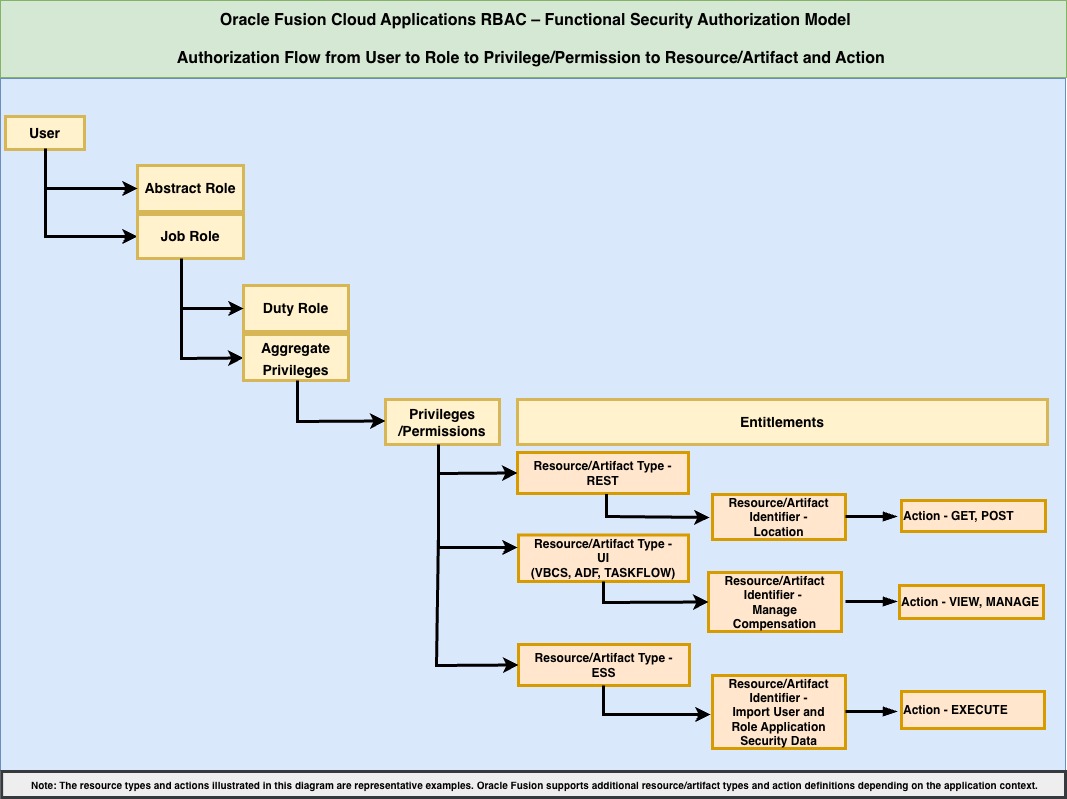
Additionally, data roles are derived from job roles to associate functional access with scoped data security policies to restrict access to specific organizational data sets such as business units, legal entities, departments, or supervisory hierarchies.
Runtime Authorization Flow
At runtime:
- All roles assigned to the user are evaluated
- All inherited privileges are aggregated
- Authorization is evaluated against the requested resource and action
- The system records the authorization outcome = ALLOW / DENY
- The specific evaluation path is not retained
This behavior reflects Oracle Fusion’s centralized authorization model, where access decisions are based on the user’s complete effective privilege set.
This is a critical architectural principle.
Section 2 – Access vs Usage vs Change History
Oracle Fusion separates access visibility, access change tracking, and transactional activity into distinct audit layers.
1. Access Assignment
Reports:
- User Role Membership Report (ESS Job)
- Shows which roles are currently assigned to users
- Useful for role certification and provisioning validation
Refer: Section 3.h – User Role Membership Report
Methods to extract audit & monitoring data from Fusion cloud applications for SIEM Integrations
- User and Role Access Audit Report (ESS Job)
- Expands roles into effective access, including:
- Duty roles
- Functional privileges
- Data security policies
- Shows what access a user effectively has at the time the report is run
- Expands roles into effective access, including:
Refer: Section 3.g – User and Role Access Audit Report
Methods to extract audit & monitoring data from Fusion cloud applications for SIEM Integrations
These reports provide visibility into:
- Roles assigned to users
- Inherited duties and privileges
- Effective access at the time the report is generated
This layer answers: Who has what access?
2. Access Change History
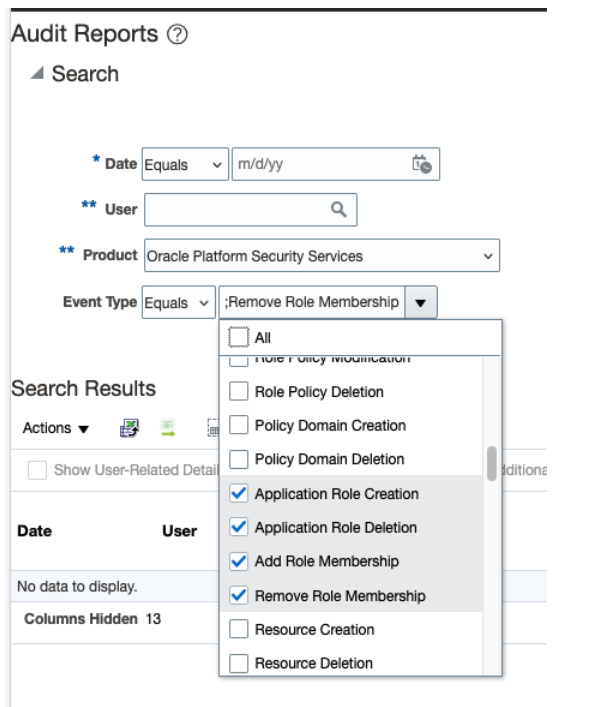
After enabling auditing for Application Roles, the Generate Audit Report provides the history of security configuration changes
Note – Audit history is not retroactive, Audit events are captured only from the time auditing is enabled, historical events prior to enablement cannot be reconstructed.
Refer – Set Up Auditing for Oracle Fusion Applications
Audit Report:
This report captures:
- Role membership additions and removals
- Role creation, updates, and deletions
- Privilege modifications within roles
- The actor who performed the change
- Timestamp of the change
OPSS Audit Report Events Parameters –
Example of Audit Report
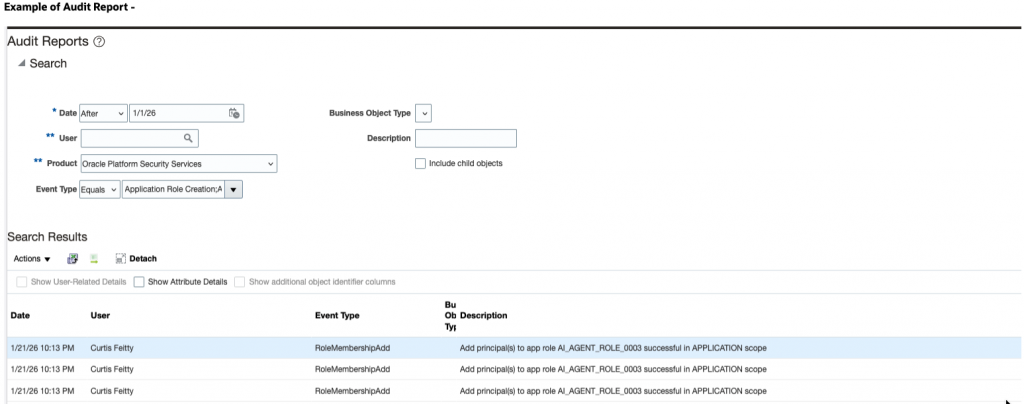
This audit information can also be downloaded by Fusion Audit REST API explained here
Refer: Section 5.b – Fusion Application Roles Audit
Methods to extract audit & monitoring data from Fusion cloud applications for SIEM Integrations
This layer answers: When did access change, and who performed the change?
3. Usage (Transaction Execution)
Usage information can be obtained through Business Object/Platform Configurations Auditing, once auditing is enabled for the relevant business objects. Usage can also be partially inferred from transaction tables via standard WHO columns (CreatedBy, LastUpdatedBy), but by enabling auditing provides finer-grained detail, including which attributes were changed.
Business objects/ Platform Configuration auditing captures:
- User who performed the transaction
- Business object/Platform Configuration involved
- Attribute changed
- Timestamp
- Old and new values
Fusion Audit REST End Point – /fscmRestApi/fndAuditRESTService/audittrail/getaudithistory
Example – Fusion Business Object
Enabling audit for the Person business object and requesting audit history using the following payload:
Operation – POST
Request Payload –
{
"fromDate":"2025-11-15 00:00:00",
"toDate":"2025-12-15 23:59:59",
"product":"hcmCore",
"businessObjectType":"oracle.apps.hcm.people.core.uiModel.view.ManagePersonVO",
"includeChildObjects":"true",
"includeAttributes":"true",
"attributeDetailMode":"true"
}
Response Payload –
The response returns:
- Who performed the change
- When the change occurred
- What business object and attribute were changed
- Old and new values
"auditData": [
{
"voForeignKeyMap": {},
"userInternalName": "FIN_IMP",
"userName": "FIN_IMP",
"eventType": "Object Data Update",
"qualifiedBusinessObject": "oracle.apps.hcm.people.core.uiModel.view.ManagePersonEmailAddressVO",
"businessObject": "Person Email",
"description": "Person ID:Curtis Feitty/PersonId:Curtis Feitty",
"descriptionInternal": "Person ID:300000047888610/PersonId:300000047888622",
"attributeInternalName": "EmailAddress",
"attribute": "Email",
"oldValue": "curtis.feitty_zbic@oracledemos.com",
"newValue": "ccc.yyy@oracle.com",
"attributeDetails": [
{
"attributeInternalName": "EmailAddress",
"attribute": "Email",
"oldValue": "curtis.feitty_zbic@oracledemos.com",
"newValue": “ccc.yyy@XXXX.com"
}
],
"date": "2025-12-10 11:42:09"
}
Similarly you can get Audit for Fusion platform configurations –
- ESS (Enterprise Scheduler Service Jobs)
- OPSS (Platform Security – Policy store for fusion )
- MDS (Fusion Metadata/Sandbox)
- SOA (Approval configuration)
- ADF (ADF Page definition/Taskflow changes)
Audit data can also be downloaded via – Generate Audit Report Job explained here
Refer – Section 4 – Fusion Business Object Audit [Transactions]
Section 5 – Fusion platform audit [Configurations]
Methods to extract audit & monitoring data from Fusion cloud applications for SIEM Integrations
This layer answers: What did the user do, and when?
Section 3 – The Audit Model (Capability-Based Correlation)
Oracle Fusion Cloud Applications supports governance and audit requirements through a structured correlation approach that aligns transactional activity with assigned access.
By correlating:
- Business Object/Platform Configuration Audit logs, which capture what the user did and when
- Role assignment history and access reports, which capture what access the user held at that time and how it was provisioned
Organizations can demonstrate that a transaction performed on date D1 occurred while the user held role R1, and that the role included privileges – P1 capable of performing the action (Delete)
This approach reflects the Fusion authorization model, where access is evaluated dynamically at runtime based on the user’s effective privileges.
Usage and Access Are tracked Separately in Fusion SaaS, Oracle Fusion SaaS tracks usage (transactions) and access (roles/privileges) through different audit mechanisms. These datasets are correlated for audit purposes.
Structured Correlation Process
To support audit and compliance objectives, the following steps are applied:
- Extract transaction audit records for the relevant time period
- Reconstruct the user’s role assignments at the time of the transaction
- Expand assigned roles into their effective privileges
- Validate that the effective access included privileges capable of authorizing the observed action
Through this structured methodology, Fusion audit capabilities enable organizations to align transaction evidence with effective access in a manner consistent with Oracle’s security architecture.
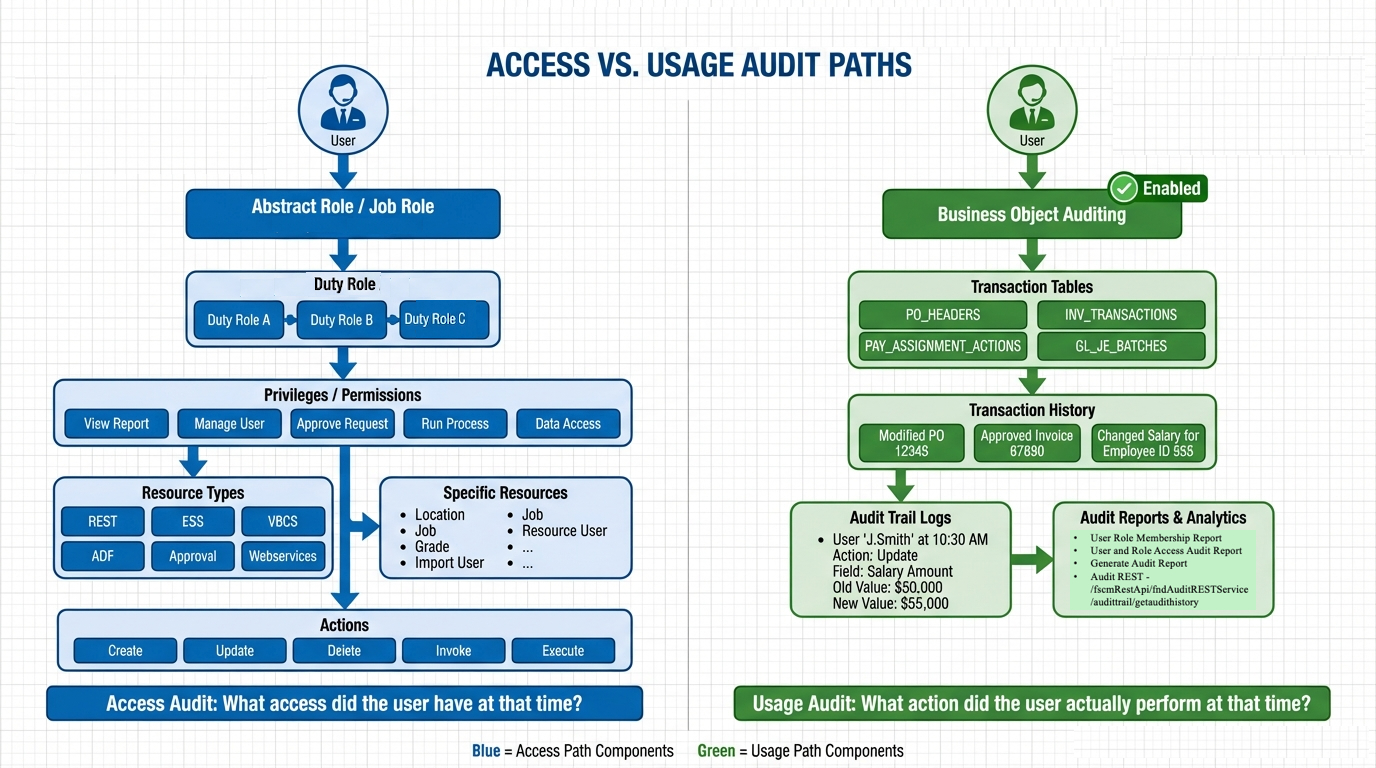
This approach provides a clear and Oracle aligned method to show that a transaction occurred while the user held access capable of performing the action.
Conclusion
Oracle Fusion Cloud Applications provides a structured security framework based on role based access control. Within this framework, access assignment, access changes, and transaction activity are managed and audited through clearly defined mechanisms.
Fusion provides visibility into:
- What access a user has
- When access was granted, modified, or revoked
- What transactions were performed and when
When auditing is enabled, organizations can track:
- Role membership additions and removals
- Role and privilege modifications
- The user who performed the change
- The timestamp of the event
- Old and new values associated with the change
By correlating transaction audit records with role assignment history and effective privilege definitions, organizations can demonstrate that user activity occurred within the scope of assigned access. This structured correlation approach aligns with Oracle’s security architecture and supports governance and compliance objectives.
Understanding the distinction between access configuration and transaction execution enables organizations to:
- Provide accurate and consistent audit responses
- Maintain controlled oversight of role changes
- Implement structured access review processes
- Strengthen least privilege and internal control practices
Governance Best Practices for Audit Readiness
To maintain audit readiness within Oracle Fusion:
- Enable relevant audit policies for security and business objects
- Enforce formal access change governance processes
- Periodically generate and retain audit reports
Key Takeaway
Oracle Fusion maintains comprehensive audit records across access and transaction layers. Applying a structured and Oracle aligned correlation methodology enables organizations to confidently support governance, compliance, and audit requirements.