
The DNS design and configuration probably is one of the most important part in a networking design. When a new service is added, the DNS is also impacted and it need to be configured to serve the new service.
In our blog we will talk about a use cause raised some weeks ago by one of my customers. My customer added some brand new services in the existing OCI production network. The new services added were mostly PSA (Private Service Access) endpoints for private connectivity access, each PSA to a single OCI service.
So, as you may guess, our blog will be centered on PSA and DNS when the customer is using custom domain names for compute resources and custom DNS servers within OCI production network.
A network diagram depict the high level architecture:
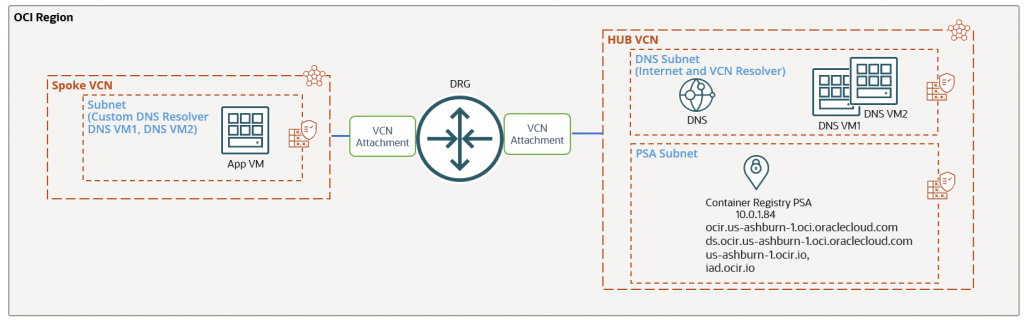
In the HUB VCN we have a subnet for DNS Servers with the default choice of Internet and VCN Resolver. The DNS servers are configured for the custom domain the customer uses for App VM and for all other OCI resources configured with the custom domain.
In the PSA subnet we have provisioned a Container Registry PSA endpoint with private IPv4 address of 10.0.1.84 and the following FQDNs: ocir.us-ashburn-1.oci.oraclecloud.com, ds.ocir.us-ashburn-1.oci.oraclecloud.com, us-ashburn-1.ocir.io, iad.ocir.io.
The FQDNs cannot be changed and are configured automatically when the PSA is created. The FQDN for a PSA is not associated with a VCN where it is configured and it not using *.oraclevcn.com domain.
After the PSA was provisioned the four DNS Private Zones were created and added to the VCN Private View:

As we might expect, each and every zone contain the DNS A entry for our PSA:

The App VM subnet is configured to use the custom DNS servers in the HUB VCN.
The name resolution is working just fine for all existing resources, however when the customer tries to resolve the IPv4 address of the newly created PSA, it fails:
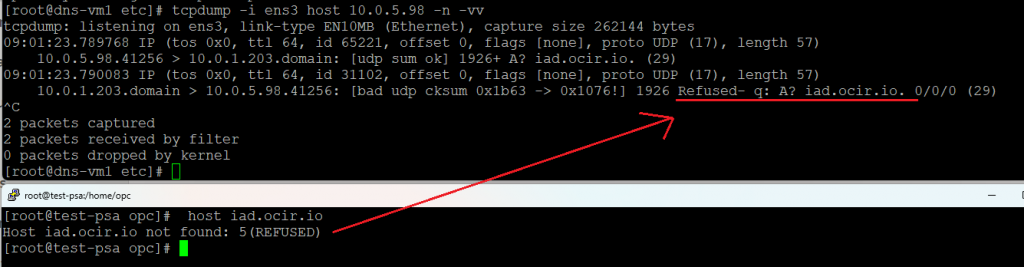
The customer request was to not change anything at the subnet DNS configuration and the existing custom DNS servers should be able to resolve the IPv4 address of the PSA.
As we recall, the custom DNS servers subnet uses the default choice of Internet and VCN Resolver. This means that we can add a new zone to the custom DNS servers to forward all the queries related to *oraclecloud.com to the default OCI DNS server at 169.254.169.254.
The custom DNS servers in this blog are configured with bind, however, any DNS software can be used.
The zone configuration will look like:
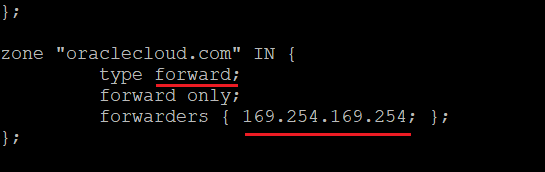
Do not forget to set the recursion flag to yes in the named.conf (/etc/named.conf) configuration file and reload the named process.
Let’s try again to resolve the PSA endpoint:
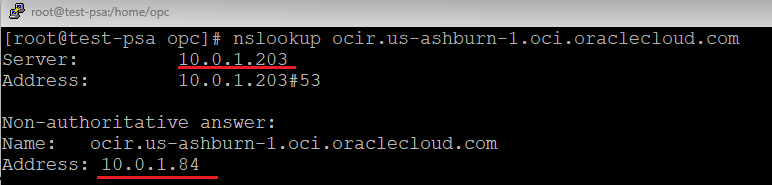
With a simple configuration on the custom DNS servers we are able now to resolve the PSA endpoint without performing any changes at the subnet level for DNS configuration.