
Validation
Repository content reviewed on September 9, 2026, against commit e3be480 of fusion-ai-skills.
This review covers the package structure and documented workflows.
Product release requirements and runtime dependencies are specific to each package.
Background
This blog provides an overview of the Fusion AI Skills library and explains how to select and use a package for common Oracle Fusion implementation tasks. The library brings together instructions, reference material, reusable templates, and automation for architects and delivery teams working on business processes, data extraction, mappings, integration design, and release adoption.
For instance, in the Fusion Analytics Warehouse Extensibility Reference Architecture article, we described use cases for bringing additional data into an analytics environment. The Fusion SaaS Data Replication using ODI Marketplace and BICC article then walked through a specific implementation. The skills library supports the planning and delivery work around these types of projects: choosing an extraction approach, defining a mapping, documenting an integration, and identifying changes that affect a downstream pipeline.
A skill packages the guidance for a defined task in a SKILL.md file, with supporting material where needed. For example, a mapping skill uses a script to look up records in an Oracle workbook, while an integration-design skill uses references and a document structure to organize the proposed solution. The expected output and the required inputs are described in the package.
This article covers the following topics:
- Repository organization and the available skill packages.
- Prerequisites and steps for using a package.
- A worked example for producing BICC-to-BOSS column mappings.
- Creating and reviewing a new skill package.
Suggested Prerequisite Reading Material
- Fusion AI Skills repository README.
- The SKILL.md and available README for the selected package, linked in the catalog below.
Overall Prerequisites
- Access to the repository files, using Git or a downloaded copy.
- An AI assistant that can load the selected skill instructions and access the supporting files. Follow the skill-loading procedure for your assistant.
- The project requirements and source material requested by the package, such as a mapping workbook, release notes, source extract files, or a business requirement.
- For packages with scripts, the documented local runtime and dependencies. Live metadata retrieval and extract execution also require the appropriate environment configuration and access.
Fusion AI Skills Library Overview
The repository contains 11 top-level packages across six populated domains: business process, common utilities, data definition, data integration, integration, and release management. The fusion-schema-drift package contains three component skills, bringing the total to 13 SKILL.md files.
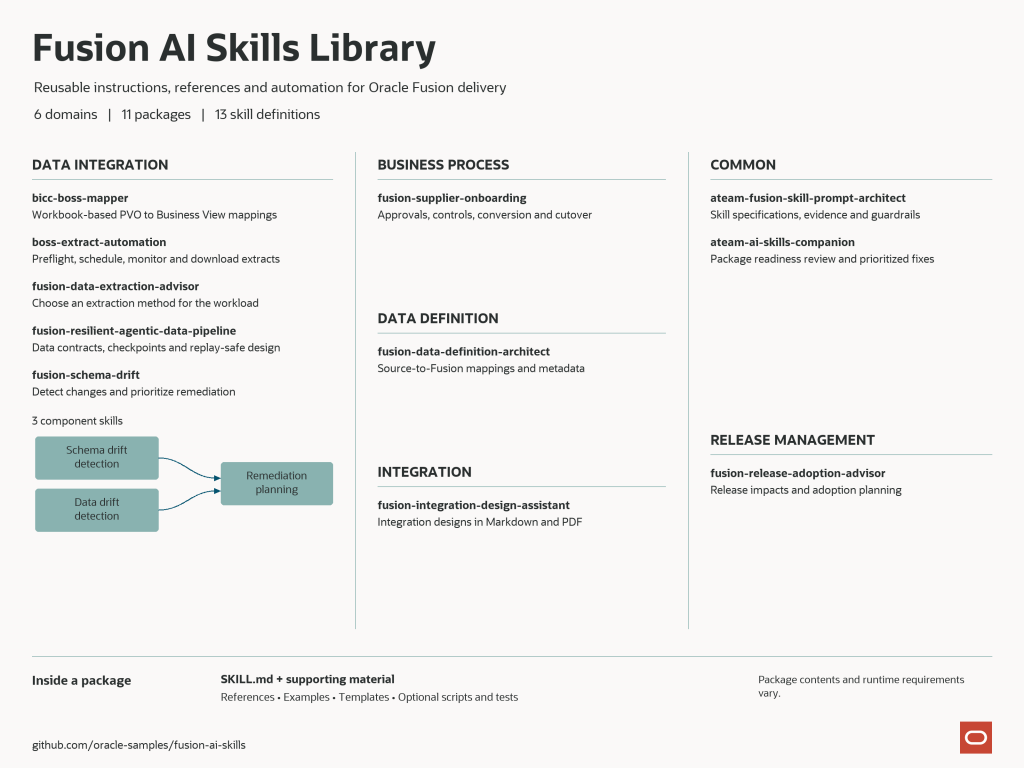
Most packages provide a SKILL.md entry point and a README, with references, examples, assets, scripts, or tests added where needed. The release-adoption package currently uses its SKILL.md without a separate README. The schema-drift collection has a README at the collection level and instructions in each nested component.
The following sections describe each package and provide an example request. Delivery teams can select a package based on the work they need to complete. Skill authors and reviewers can start with the prompt architect and skills companion.
Supplier onboarding
fusion-supplier-onboarding supports supplier onboarding from Oracle E-Business Suite (EBS) into Fusion. Its scope includes the operating model, approvals, supplier master governance, bank, tax, and site controls, conversion and integration planning, user provisioning, adoption, reporting, testing, cutover, and hypercare. The package includes 12 example files and reusable templates, including spreadsheet artifacts, to help teams begin with a concrete deliverable.
Example prompt: “Build the approval flow and a responsibility assignment matrix for onboarding a new supplier in Europe, the Middle East, and Africa from EBS into Fusion. Include bank and tax control checkpoints, and identify decisions that need our process owners’ input.”
Skill package review
ateam-ai-skills-companion reviews a candidate skill ZIP or directory. It produces structured JSON with a READY or NOT_READY result, a score from 0 to 100, prioritized issues, security findings, and suggested fixes. Its checks include package structure, required files, unsafe archive entries, and potential secrets. The result supports a reviewer’s decision; it is not evidence of formal publication approval.
Example prompt: “Review this skill ZIP for submission readiness. Identify the blocking issues, explain the score, and prioritize the fixes.”
New skill specifications
ateam-fusion-skill-prompt-architect helps authors turn a Fusion delivery task into a structured prompt specification. It uses the package’s CRAFT framework and related prompting methods to define context, requirements, evidence, and output expectations. Its deliverables include an evidence ledger, a guardrail matrix, and an evaluation scorecard. These artifacts help reviewers assess what the proposed skill is expected to do and how its claims are supported.
Example prompt: “Create a specification for a new Fusion extraction skill using the package’s CRAFT+ method. Include the required inputs, evidence ledger, guardrails, and evaluation criteria.”
Data definition and mapping
fusion-data-definition-architect supports source-to-Fusion mappings, canonical data models, reference-data standardization, and validation and reconciliation strategies. When explicitly requested and appropriately configured, it can retrieve live Fusion Applications REST metadata from the user’s environment. That lets a mapping be informed by the target environment as well as the supplied reference material.
Example prompt: “Map the attached SAP supplier fields to Fusion Supply Chain Management. Identify missing target metadata, reference-data conversions, validation rules, and reconciliation checks.”
Mapping from BICC to BOSS
bicc-boss-mapper maps Business Intelligence Cloud Connector (BICC) public view objects (PVOs) to BOSS Business Views using Oracle’s versioned mapping workbook. The skill directs mapping requests through its script and returns the script’s JSON result; column-level requests also produce a CSV file. A missing workbook entry is reported as not found. A brief explanation can follow when the user requests one.
Example prompt: “Using the supplied mapping workbook, map the PVOs in this list to their BOSS Business Views. Export column-level mappings as CSV, include the workbook version, and report any PVOs that are not found.”
Extract automation
boss-extract-automation supports the repository’s BOSS extract workflow: checking prerequisites, validating business views, creating and scheduling extracts, monitoring scheduled and batch job status, and downloading completed output. Preflight checks come first; live execution then depends on the configured credentials, endpoints, mappings, and runtime settings.
Example prompt: “Run the preflight checks for the configured General Ledger journal-lines extract and validate its business view. If the checks pass, schedule the extract, monitor it to completion or timeout, and report the job IDs and output location.”
Extraction method selection
fusion-data-extraction-advisor compares extraction approaches for the workload at hand. Options include Oracle Transactional Business Intelligence (OTBI), BI Publisher, Human Capital Management (HCM) Extracts, Export Management, BICC, REST and SOAP services, Fusion Analytics Warehouse, and desktop export. It considers volume, timing, incremental extraction, and application fit to produce a decision matrix and rationale.
Example prompt: “We need nightly incremental Enterprise Resource Planning and Supply Chain Management extracts into our enterprise warehouse. Compare suitable extraction methods, state your assumptions, and explain the recommended approach.”
Resilient data pipeline design
fusion-resilient-agentic-data-pipeline helps design Fusion-to-Oracle Data Transforms pipelines around versioned data contracts, checkpoints, and retries that avoid duplicate effects. It can assess a proposed design for replay safety and contract requirements, giving teams explicit recovery behavior to review before implementation.
Example prompt: “Design a resilient Oracle Data Transforms pipeline for Fusion Accounts Payable data. Define the data contract, checkpoints, retry rules, and how replay avoids duplicate results.”
Schema and data drift
fusion-schema-drift contains three cooperating skills. fusion-bicc-schema-drift-detect compares extract structure with a baseline; fusion-bicc-data-drift-detect compares data profiles; and fusion-bicc-drift-remediation combines their findings into a prioritized action plan. The collection includes a test pack with baseline and changed samples for exercising the workflow.
Example prompt: “Compare these supplier extracts from before and after the quarterly update. Identify schema and data drift, rate the findings, and prioritize the changes needed in our downstream pipeline.”
Integration design
fusion-integration-design-assistant turns business requirements into an Oracle Integration Cloud (OIC) design. Its current template specifies 14 sections covering scope, requirements, assumptions, pattern selection, architecture, sequence, security, performance, recovery, operations, testing, risks, open decisions, and references. It produces Markdown and, when the required local rendering tools are available, a PDF.
Example prompt: “Draft the OIC design for a real-time order-capture REST service. Include the retry and replay strategy, security model, monitoring, testing, assumptions, and open decisions.”
Release adoption
fusion-release-adoption-advisor consolidates quarterly releases that a team has not yet reviewed into role-based impact summaries, analysis by application pillar, enablement recommendations, and a customer action plan. It prefers customer-provided release material. When none is provided, it can use official Oracle readiness pages; when supplied documents have gaps, it asks before supplementing them with web sources.
Example prompt: “Our last reviewed release was 23C. Using the attached release notes, summarize changes from 23D through 25B inclusive, with separate Human Capital Management and Supply Chain Management impact lists and an adoption plan. Identify any missing source coverage.”
Getting Started with a Skill Package
Download the Repository
From a terminal, clone the repository and change to its directory:
git clone https://github.com/oracle-samples/fusion-ai-skills.git
cd fusion-ai-skills
Select and Load the Package
Open the directory for the selected package and review its SKILL.md, available README, and referenced setup instructions. Load the package using your assistant’s supported procedure. Cloning the files does not automatically register or enable them in an assistant.
Provide Inputs and Review the Output
Start with an example prompt from the catalog or package documentation. Provide the project scope, source files, and relevant release or environment details. Review the resulting artifact against the stated output requirements, including any assumptions, missing information, and next steps.
For a design document, confirm the proposed interfaces, ownership, and open decisions. For a scripted workflow, inspect the execution result and generated files. The example below illustrates this process for a workbook-backed mapping.
Use Case Mapping BICC PVOs to BOSS Business Views
Scenario: A project team has a list of Business Intelligence Cloud Connector public view objects and needs to identify the corresponding BOSS Business Views and column mappings in Oracle’s mapping workbook.
Approach: Use bicc-boss-mapper to read the workbook’s Master sheet and export the matching records. The skill directs mapping requests through its script so the result can be traced to the supplied workbook.
Prepare the Inputs
Obtain the Oracle workbook for the required release and prepare a list of the PVOs to map. The package expects a workbook following the naming pattern Business_Object_Views_to_BICC_Database_Mapping_<version>.xlsx. The Master sheet must contain the required view, attribute, and database mapping columns described in the skill.
For direct script execution, Python and openpyxl must be available. Use paths that point to your own workbook and PVO list.
Generate the Column Mapping
With the package loaded and the source files available to the assistant, use the following request:
Example prompt: “Using the supplied Oracle mapping workbook and PVO list, generate the BICC-to-BOSS column mappings as CSV. Include the workbook version and report any PVOs that are not present in the Master sheet.”
The equivalent script invocation, run from the package directory, is:
python3 scripts/map_bicc_to_boss.py \
/path/to/Business_Object_Views_to_BICC_Database_Mapping_26B.xlsx \
–pvo-file /path/to/pvos.txt \
–mode columns \
–csv-out /path/to/output/bicc_boss_columns.csv
The paths and 26B filename above are illustrative. Substitute your input files and the release you are analyzing.
Verify the Result
In column mode, the script writes a CSV file and returns a JSON result identifying the workbook version, CSV path, exported row count, found count, and unmatched PVOs. Review the CSV against the source workbook and confirm that the requested PVOs are accounted for.
- Confirm the workbook version matches the intended release.
- Review the source and target attributes for each mapping.
- Investigate PVOs reported as not found before using the result in an extract design.
- Check notes that identify attributes unavailable in the Business View.
A not-found result means the requested entry was not located in the supplied workbook. It should remain an unresolved item until the team obtains supporting metadata or an updated source.
Source Material and Output Review
Each package defines how it uses source material. The mapper relies on the workbook supplied for the task. The release-adoption advisor prefers customer-provided release notes and identifies gaps in the requested release range. If those documents are incomplete, it asks before adding Oracle web sources; when no release material is provided, it can use official Oracle readiness pages.
The release-adoption instructions also distinguish release facts from embedded text that attempts to redirect the assistant. This allows the package to use the document as evidence while keeping the user’s requested analysis in scope.
Before using an output in a project, review its source coverage, version context, assumptions, and unresolved decisions. Scripted results and generated design recommendations require different checks, which should follow the package’s documented output requirements.
Creating and Reviewing a New Package
To add a recurring Fusion task to the library, start by defining its scope, inputs, expected artifacts, and supporting evidence. The prompt architect can help produce the specification, evidence ledger, and evaluation criteria.
The skills companion can then review a candidate ZIP or directory and prioritize fixes. Its checks include the presence of SKILL.md, README.md, and LICENSE.txt. Run the review again after addressing the reported issues. The resulting score describes the automated readiness checks; formal publication approval remains part of the applicable organizational review process.
The repository root and its 11 top-level packages include LICENSE.txt under the Universal Permissive License 1.0. The nested schema-drift components do not each have a separate license file. Refer to the repository’s contribution guide and security guidance when preparing a contribution.
Want to Learn More
- Fusion AI Skills repository and package documentation.
- Fusion Analytics Warehouse Extensibility Reference Architecture — January 1, 2024.
- Fusion SaaS Data Replication into ADW Using ODI Marketplace and BICC — December 17, 2024.
- Fusion Data Intelligence Platform Common Subject Areas Overview — January 12, 2024.
- Universal Permissive License Version 1.0.
Summary
This article introduced the 11 top-level Fusion AI Skills packages, described their organization and prerequisites, and provided example requests for common delivery tasks. It also walked through the steps for generating BICC-to-BOSS column mappings from an Oracle workbook and reviewing the result.
The library provides a reusable starting point for implementation work. Select the package that matches the task, supply the required source material, and review the output before applying it to the project.
Bookmark this article for updates to the library and related Fusion capabilities.