
Introduction
In our earlier blog, my colleague Derek Kam explored how to build robust MCP servers using Helidon, demonstrating both declarative and imperative approaches. That post laid the groundwork for understanding how MCP servers expose structured, model-driven capabilities to agentic applications. This blog is a continuation of that journey, focusing on one of the most critical aspects of any MCP deployment — security. As organizations increasingly connect MCP servers to internal and external AI agents, securing these endpoints becomes essential to prevent unauthorized access and data exposure.
In this blog, we’ll dive into how to integrate Oracle Identity Domain with Helidon’s OpenID Connect (OIDC) to establish a secure authentication and authorization layer for your MCP server. We’ll walk through the complete flow from registering OAuth clients and validating access tokens to configuring Helidon security and testing it all with MCP Inspector and Postman.
MCP Security Flow
The security architecture of an MCP server typically follows the OAuth 2.0 authorization framework combined with OpenID Connect (OIDC) for identity verification. The flow can be summarized as:
- OAuth Client Application (e.g., Helidon MCP Server) is registered in Oracle Identity Domain.
- The user accesses the host application, which initiates the Oracle Identity Domain authorization flow for authentication. The user is prompted to enter their username and password. If the requester is an agent instead of a user, the host authenticates with the Oracle Identity Domain using client credentials (Client ID and Secret) to obtain an access token.
- An Access Token is issued by the Identity Domain authorization server.
- The token is presented to the MCP Server in API requests (usually via the Authorization: Bearer <token> header).
- The Helidon OIDC Security Provider validates the token’s signature and claims using the Identity Domain’s introspect endpoint
- If valid, the request is processed; otherwise, the server returns an HTTP 401 Unauthorized response.
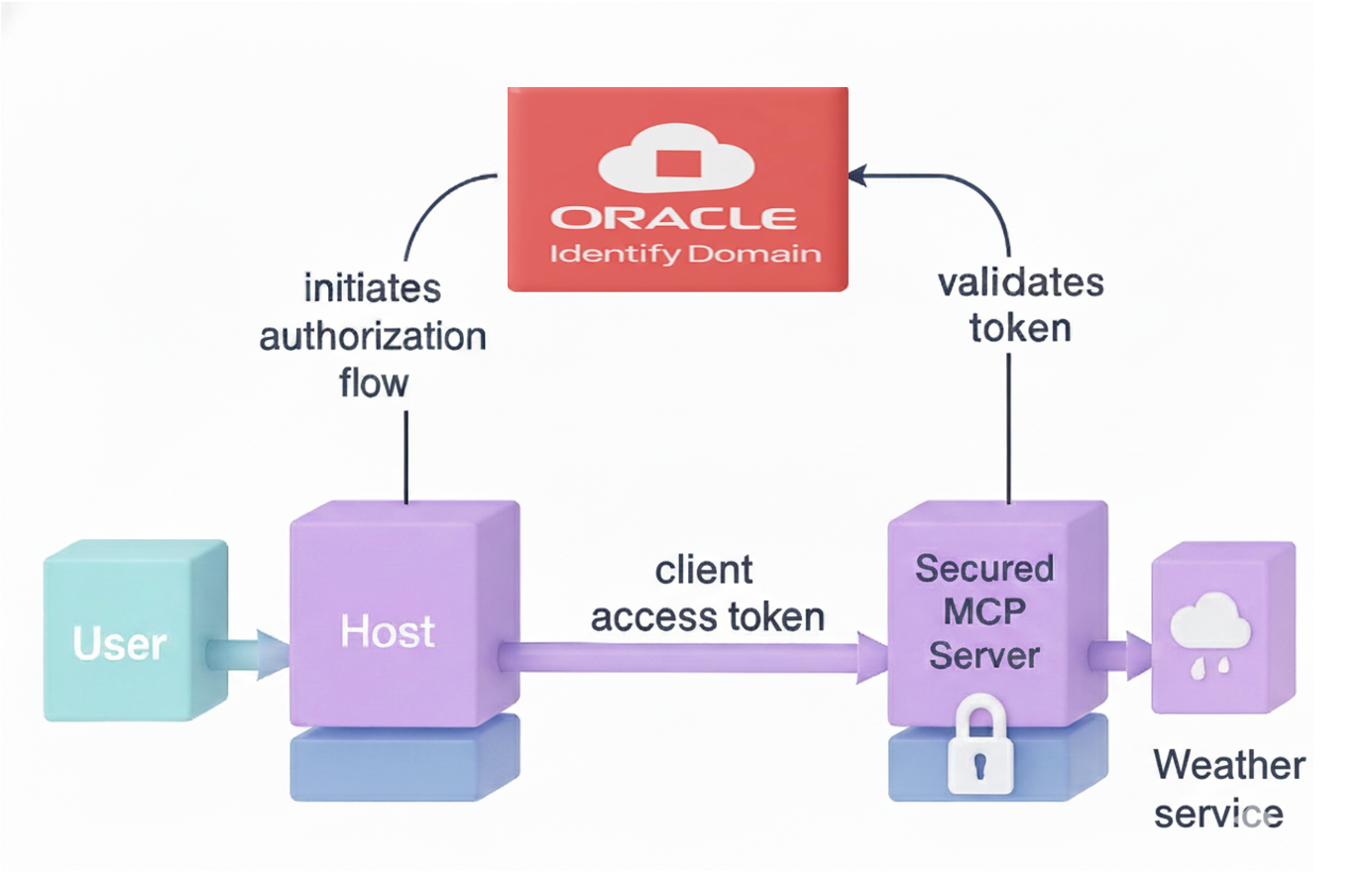
This ensures that only trusted clients can invoke the MCP server’s APIs, protecting internal data and logic from unauthorized access.
OAuth Client Application in Identity Domain
To begin, we need to register an OAuth 2.0 client in Oracle Identity Domain:
- Log in to the Oracle Cloud Console and navigate to Identity & Security → Identity Domains.
- Select your Identity Domain and go to Integrated Applications → Add Application.
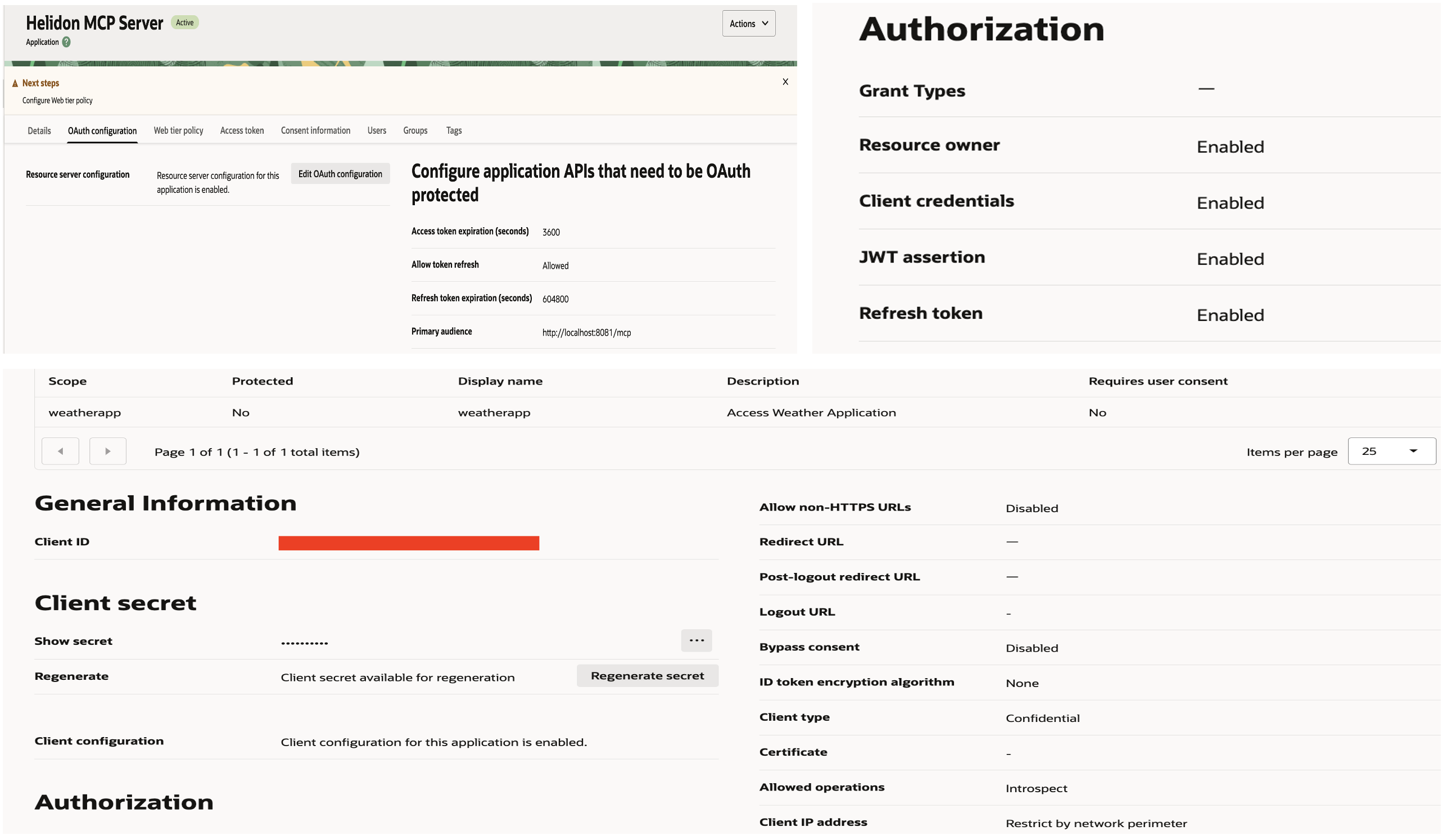
- Choose Confidential Application and provide:
- Name: Helidon MCP Server
- Redirect URI: Optional (if not using authorization code flow)
- Choose “configure this application as resource” now.
- Primary audience: http://localhost:8081/mcp
- Scope: weatherapp (Description: Access Weather Application)
- Enable Client Credentials Grant under Allowed Grant Types.
- Client Credentials, Resource Owner, JWT Assertion, Refresh Token
- Tick on Introspect under Allowed Operation
- Enable Add resources and add “Helidon MCP Server” created in step3
- Activate the application
- Under Client Configuration, note
- Client ID
- Client Secret
Once created, this client can request tokens from the Identity Domain token endpoint.
Helidon OpenID Connect with Oracle Identity Domain
Helidon offers native integration with OpenID Connect (OIDC) providers such as Oracle Identity Domain. Once configured, the OIDC provider intercepts incoming requests and validates tokens with the identity provider. In the following sections, we’ll walk through the steps to configure the OIDC provider to secure the MCP server. The Helidon product team has published an MCP server for the Weather application in their GitHub repository.The MCP server implementations are located in the mcp-server and mcp-server-declarative modules.Both share the same functionality: the first demonstrates the Helidon API using the imperative approach, while the second implements it using the declarative style. We’ll use that project as our starting point and enhance it by securing the MCP server.
OIDC Provider Dependencies
Include the Helidon security and OIDC modules in Declarative and Imperative MCP servers pom.xml files.
    <dependency>
        <groupid>io.helidon.security</groupid>
        <artifactid>helidon-security</artifactid>
    </dependency>
    <dependency>
        <groupid>io.helidon.microprofile</groupid>
        <artifactid>helidon-microprofile-security</artifactid>
    </dependency>
    <dependency>
        <groupid>io.helidon.security.providers</groupid>
        <artifactid>helidon-security-providers-oidc</artifactid>
    </dependency>
OIDC Provider Configuration & Token Validation
Once the client obtains an access token, it is a JWT (JSON Web Token) signed by the Oracle Identity Domain. Each request to the MCP server must include this token in the header: Authorization: Bearer <access_token>
On the server side, Helidon’s OIDC security module validates the token by invoking the Identity Domain’s introspection endpoint, passing the client ID and secret for verification. To enable this, you’ll need to define OIDC configuration including the token endpoint, audience, and client credentials in the application.yaml file inside Declarative and Imperative MCP servers Helidon applications.
    security:
      providers:
        - oidc:
            client-id: "OAUTH_CLIENT_ID"
            client-secret: "OAUTH_CLIENT_SECRET"
            audience : "http://localhost:8081/mcp"
            header-use: true
            identity-uri: "https://idcs-xxx.identity.oraclecloud.com"
            server-type: "idcs"
            introspect-endpoint-uri: "https://idcs-xxx.identity.oraclecloud.com:443/oauth2/v1/introspect"
            redirect: false
Secure Helidon MCP Server
The declarative and imperative implementations share similar functionality and some configuration, but differ in how they are implemented. Add the following entries to the application.yaml file for both servers, these settings ensure that the Helidon framework secures the MCP server endpoint /mcp.
    mcp:
      server:
        path: "mcp"
        name: "secured-mcp-server"

    server:
      port: 8081
      host: 0.0.0.0
      features:
        security:
          # protected paths on the web server
          paths:
            - path: "/mcp"
              methods: [ "post", "get" ]
              authenticate: true
Imperative Server Implementation: Open the Main.java file and replace its existing main function with the updated version shown below. The new implementation loads the MCP server configuration from the YAML file and integrates OIDC security to protect tool execution.
    public static void main(String[] args) {
        Config config = Config.create();
        WebServer.builder()
                .config(config.get("server"))
                .routing(routing ->
                        routing.addFeature(
                        McpServerConfig.builder()
                                .config(config.get("mcp.server"))
                                //.name("helidon-mcp-weather-server-imperative")
                                .addTool(tool -> tool.name("get-weather-alert-from-state")
                                        .description("Get weather alert per US state")
                                        .schema(createWeatherSchema())
                                        .tool(Main::getWeatherAlertFromState)))
                        .addFeature(OidcFeature.create(config)))
                .build()
                .start();
    }
Decalartive Server Implementation: Open the McpServer.java file, add the necessary import statement and apply the @Authenticated annotation to the McpServer class, as illustrated below. This annotation ensures that the MCP server and its tools are protected through authentication.
    import io.helidon.security.annotations.Authenticated;

    @Authenticated
    @Mcp.Server("helidon-mcp-weather-server")
    class McpServer {
    ...
    }
Testing with MCP Inspector and Postman
After configuring security, it’s important to validate the flow.
- Get Access Token from Oracle Identity Domain.
- Use Postman to send a POST request to the token endpoint: https://idcs-<domain>.oraclecloud.com/oauth2/v1/token
- Include form data:
- grant_type=client_credentials
- scope=http://localhost:8081/mcpweatherapp
- Configure basic authentication
- Username=<client_id>
- Password=<client_secret>
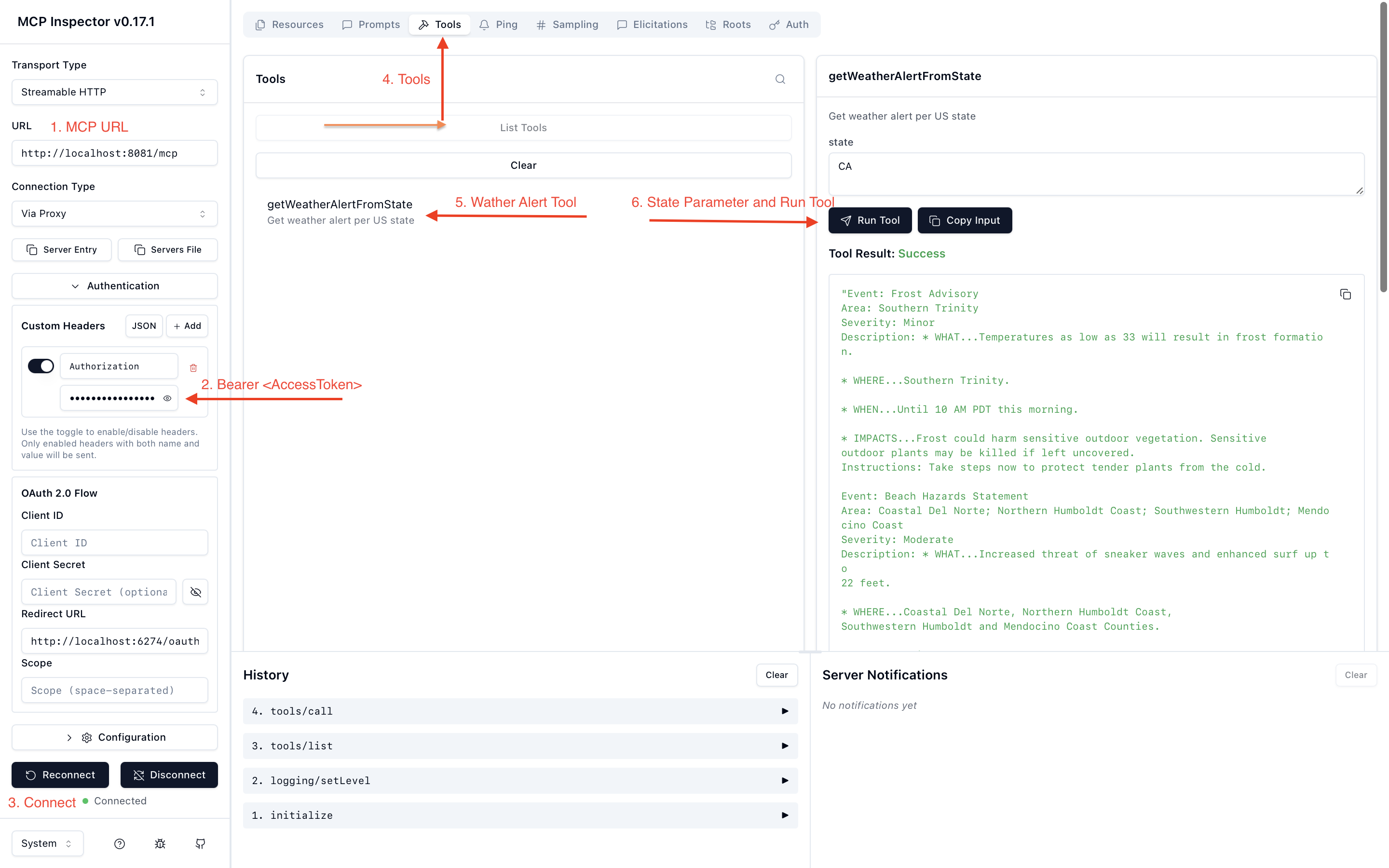
- Validate via MCP Inspector
- Open MCP Inspector.
- Select the transport type StreamableHTTP and enter the MCP server URL
- In the authentication field, enter the token in the format: Authorization: Bearer <access_token>, replace <access_token> with the token obtained from Postman
- Connect to the MCP server and verify that the connection is successful
- Navigate to Tools → List Tools → getWeatherAlertFromState
- Enter the state parameter and run the tool
Conclusion
Securing your MCP server is critical to protecting sensitive data, model interactions, and API calls. By leveraging Oracle Identity Domain’s OAuth 2.0 and Helidon’s OIDC capabilities, you can establish a robust authentication layer with minimal custom code. This approach not only simplifies token validation but also integrates seamlessly into modern enterprise frameworks ensuring your MCP deployment is both scalable and secure.