
Automating Policy and Dynamic Group Monitoring in Oracle Cloud Infrastructure
Why It Matters:
In Oracle Cloud Infrastructure (OCI), Identity and Access Management (IAM) policies and Dynamic Groups (DGs) define how users, groups, and resources interact. They form the foundation of secure access control.
As OCI environments expand across multiple compartments and identity domains, keeping track of these resources becomes increasingly complex. Each has service limits — for example, a tenancy can only have a certain number of policies or policy statements, and each identity domain has its own cap on dynamic groups.
OCI offers robust identity and access management features, but gaining a unified view of how many policies exist across compartments or how many dynamic groups exist per domain can still be challenging. Teams often need to navigate through multiple pages or manually compile reports to get this visibility. Introducing a consolidated view would further enhance governance and make it easier to manage IAM resources efficiently at scale.
With better visibility, teams can stay proactive and maintain a well-governed environment by:
- Avoiding unexpected hits on IAM policy or dynamic group limits that could block new configurations.
- Identifying and cleaning up orphaned or redundant policies to reduce risk.
- Surfacing Dynamic Groups that may no longer be needed and can be targated for cleanup.
The Solution:
To solve these visibility and monitoring challenges, we built an automated OCI Function-based solution that continuously tracks IAM policies and dynamic groups across all compartments and identity domains.
Here’s what it does at a high level:
1. Policy Monitoring
- Scans all compartments in the tenancy to collect IAM policy data.
- Captures key details such as compartment hierarchy and number of OCI IAM policy statements.
- Produces summarized metrics for quick identification of heavily populated compartments for dashboard visualization.
2. Dynamic Group Monitoring
- Enumerates all dynamic groups within each identity domain.
- Tracks the total number of DGs across the OCI Tenancy to help avoid hitting the limits.
3. Metrics and Dashboards.
- Publishes summarized data as custom metrics into OCI Monitoring under dedicated namespace.
- Dashboards built in OCI provide a tenancy-wide view of policy and dynamic group distribution.
- These Dashboard help teams monitor growth trends of OCI IAM Policies and Dynamic Groups give a tenancy -wide view. You can quickly see:
- OCI IAM Policy – Current vs Limit: Shows the current number of IAM policies in the tenancy compared to the allowed limit.
- OCI IAM Policy Statement – Current vs Limit: Displays the total number of policy statements across the tenancy versus the limit.
- Dynamic Group – Per Domain: Lists the number of dynamic groups in each identity domain.
- Dynamic Group – Total: Shows the total number of dynamic groups across all identity domains.
- OCI IAM Policy Statement – Top 10 Compartment: Highlights the top 10 compartments with the highest number of policy statements.
- OCI IAM Policy – Top 10 Compartment: Displays the top 10 compartments by total number of IAM policies.
- OCI IAM Policy – Per Compartment: Shows the count of IAM policies per compartment for detailed breakdown.
- OCI IAM Policy Statement – Per Compartment
Shows the total number of policy statements per compartment.
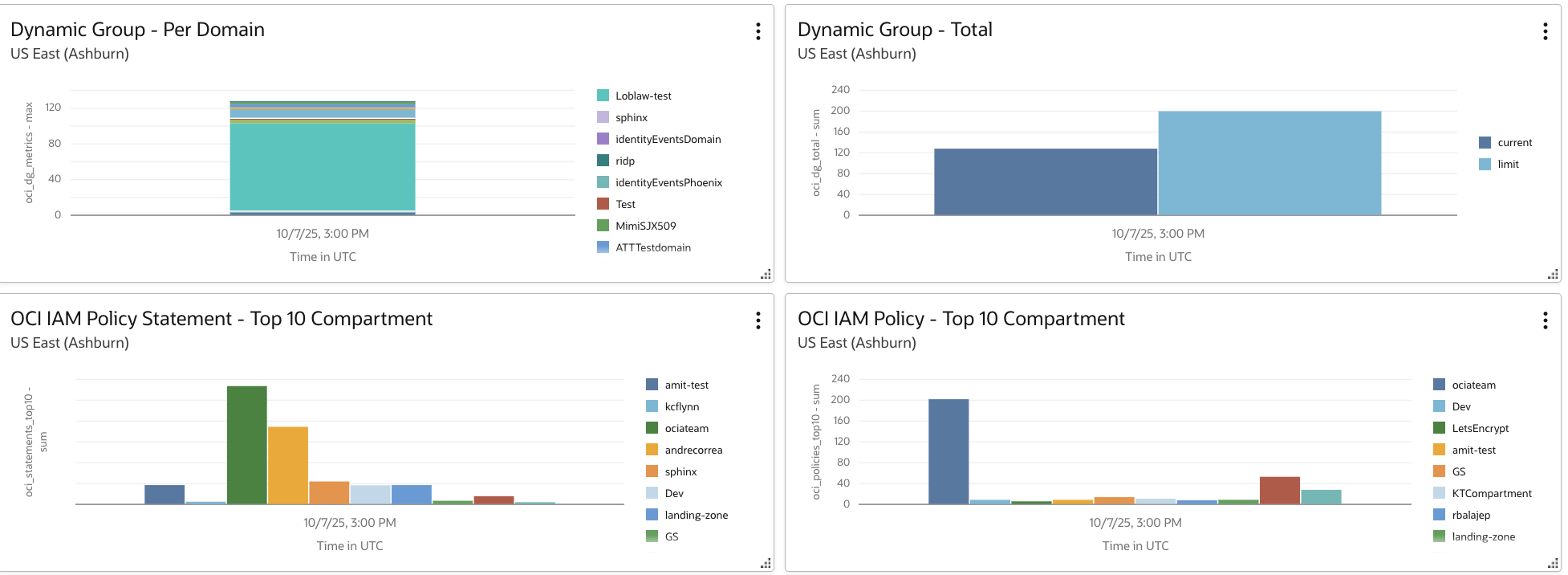

These widgets collectively provide a clear snapshot of IAM resource distribution and growth patterns across compartments and domains. Also, it makes it easier to spot trends, manage limits, and maintain IAM hygiene.
4. Automated and Serverless
- Runs as an OCI Function, triggered via OCI Resource Schedular or manually via Cloud Shell.
- Uses environment variables for easy configuration (namespaces, thresholds, resource groups, etc.).
- Operates completely serverless, with minimal maintenance overhead.
Benefits:
- Centralized Visibility: A single place to understand IAM policy and DG distributions across compartments and domains respectively.
- Proactive Limit Management: Early detection before hitting OCI service limits.
- Compliance and Audit Readiness: Continuous data for governance and reporting.
- Operational Efficiency: Automated data collection and dashboard refresh.
- Scalable and Lightweight: Works seamlessly in large multi-compartment environments.
Conclusion:
IAM policies and dynamic groups are the backbone of access control in OCI, but as environments grow, staying aware of their scale can be challenging.
The Policy and Dynamic Group Monitoring Function bridges that gap by giving teams real-time insights into how IAM Policies grow across compartments and Dynamic Groups within identity domains.
With automated data collection, limit awareness, and rich tenancy-wide dashboards, this solution helps maintain a secure, compliant, and well-governed OCI environment. It also simplifies auditing, ensures adherence to organizational policies, improves operational efficiency, reduces the risk of misconfigurations, and provides teams with clear insights to make informed IAM decisions at scale.
Next Steps
Want to try this out in your own tenancy?
All deployment details, including function code, configuration, and setup steps, are available in the project’s GitHub repository: Github-Link.
The repository includes instructions for configuring environment variables, setting up triggers with OCI Resource Scheduler, and customizing dashboard metrics.