
Introduction
Oracle Integration (OIC) Gen3 supports OAuth 2.0–based SOAP service integrations using JWT token-based authentication flows. Customers invoking Oracle SOAP services can leverage supported OAuth authentication patterns based on integration and adapter capabilities.
This blog covers two OAuth 2.0 authentication approaches currently supported for SOAP integrations in OIC Gen3:
Connection security type – OAuth 2.0 in OIC Gen3 SOAP Adaptor is designed for inbound authentication (external → OIC), not for outbound calls from OIC to target SOAP services, it protects OIC APIs (SOAP) to external callers using OAuth token validation, the external client must provide an OAuth2.0 token when invoking the OIC SOAP trigger ie. OAuth2.0 is protecting OIC’s exposed trigger endpoint.
As of now Oracle Integration Cloud (OIC) Gen3 SOAP adapters do not natively support identity propagation in the same way as newer REST adapters. Authorization Code flow can therefore be used for SOAP integrations where user-context-aware access is required.
Current Fusion IAM operational guidance increasingly favors delegated user-context authorization approaches for Fusion integrations where supported by the target service and adapter capabilities.
Refer – Identity Propagation – VBCS > IC > Fusion Apps
Connection security policy – OAuth using JWT User Assertion which provides identity propagation is not available as of now in SOAP adaptor
Refer – A Test Run of Identity Propagation with OIC REST Adapter
This blog also outlines key considerations for selecting OAuth authentication patterns for SOAP integrations in OIC Gen3.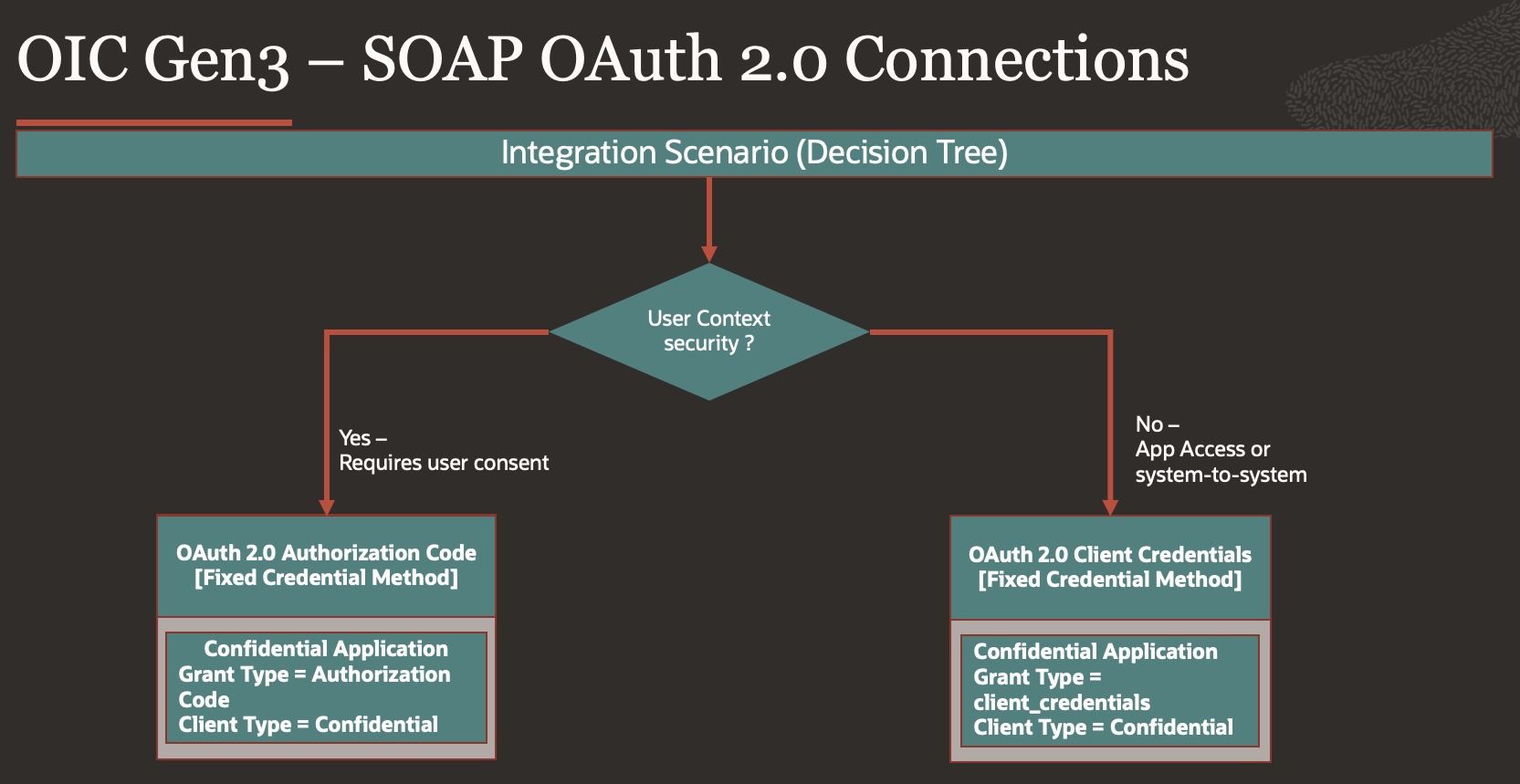
Details:
1. Using OAuth 2.0 Authorization Code Flow
When to Use
Best suited for user-context operations where actions must run on behalf of a user.
For this example, Fusion Applications is used as the target application.
Steps
- Create OAuth Confidential Client in FA IAM
- Login to IAM in same domain which is domain of FA
- Navigate to Identity > Domain> Choose FA Domain
- Go to Integrated Application, Press Button – Add Application
- Choose Confidential Application.
- Configure this application as a client now
- Select Client Configuration
- Authorization Code
- Refresh Token
- Add the Redirect URI for OIC Gen3:
- https://<oic_instance>/ic/pub/oauth2callback
- https://<oic_instance>/icsapis/agent/oauth/callback
- Add Resource >> Add Scope
- Oracle Applications Cloud (Fusion)
- Press Next for Configure Policy
- Finish
- Activate Application.
- Make note of the application’s Client ID and Client Secret & Scope.
- Configure Connection in OIC Gen3
- Create a new SOAP Connection.
- Enter WSDL URL Information ending with ?wsdl
- Choose OAuth 2.0 Authorization Code as the security policy.
- Enter:
- Client ID & Client Secret (from IAM app).
- Authorization Code URI (FA IAM /oauth2/v1/authorize).
- Access Token URI (FA IAM /oauth2/v1/token).
- Optional Security
- Scope (Defined from IAM app – Resource/Scope)
- In scope to obtain refresh token along with access_token, you need to add – offline_access, refer Scopes, eg..
- urn:opc:resource:fa:instanceid=XXXXXurn:opc:resource:consumer::all offline_access
- Client Authentication – Send client credential as basic auth header
- Test the connection – you’ll be prompted for consent.
- Enter Fusion Application Username/password.
- Post Consent, test, validate and save connection.
- Use in Integration
- Invoke SOAP adapter
- OIC automatically injects the JWT Bearer token.
- No need to manually configure headers.
2. Using OAuth 2.0 Client Credentials Flow
As of current OIC Gen3 SOAP adapter capabilities, OAuth 2.0 Client Credentials flow can be used for certain SOAP integration scenarios where delegated user-context propagation is not required.
Unlike newer REST adapter patterns supporting identity propagation and JWT User Assertion, SOAP adapter authentication capabilities may vary depending on the target Application and OIC adapter support.
When to Use
Can be used for system-level SOAP integrations where delegated user-context propagation is not required.
Steps
- Create OAuth Confidential Client in IAM
- Login to IAM Domain
- Navigate to Identity > Domain> Choose IAM Domain
- Go to Integrated Application, Press Button – Add Application
- Choose Confidential Application.
- Configure this application as a client now
- Select Client Configuration
- Client Credentials
- No redirect URI is needed.
- Add Resource >> Add Scope
- Oracle Applications Cloud (Fusion)
- Press Next for Configure Policy
- Finish
- Activate Application.
Make note of the application’s Client ID and Client Secret & Scope.
- Configure Connection in OIC Gen3
- Create a new SOAP Connection.
- Enter WSDL URL Information ending with ?wsdl
- Choose OAuth 2.0 Client Credentials as the security policy.
- Enter:
- Client ID & Secret.
- Access Token URI – Token Endpoint.
- Test connection – OIC will request a token automatically.
- Optional Security
- Scope (Defined from IAM app – Resource/Scope)
- Client Authentication – Send client credential as basic auth header
- Test the connection
- Validate and Test – save connection.
- Use in Integration
- Same as above: use SOAP adapter.
- No need for extra headers.
- OIC handles JWT token management.
Conclusion
With these approaches, you can securely modernize SOAP calls in OIC Gen3, eliminating basic authentication and aligning with Oracle’s JWT token-based security model.