

Hi! Welcome to a new blog about Oracle’s VMware Solution and OCI Networking. In this entry, we will talk about exposing your OCVS workloads or applications to the Internet.
First, if you are not familiar with OCVS supported deployment modes, please read this blog entry which talks about the NSX Overlay and OCI Native VLANs. Also, this blog is meant as a high-level architecture discussion and not really an implementation guide. However, if you are familiar with OCVS and OCI Networking constructs, this blog will help you understand the supported architectures for inbound Internet flows. Since OCVS supports two main deployments modes (NSX and Native VLANs), I will create a dedicated section on each.
OCI Native VLANs
When deploying OCVS with OCI Native VLAN workloads, there are two main supported architectures for exposing a service to the Internet, each supporting an optional Firewall on the path, for extra security.
1) Native DMZ VLAN with the Public IP mapped to the VM.
– This is the easiest architecture to implement;
– Each Virtual Machine deployed inside OCVS and assigned to the DMZ VLAN will have a private IP with a dedicated Public IP;
– The Internet traffic will work for both inbound and outbound flows.
Let’s look at a diagram, to understand the architecture:
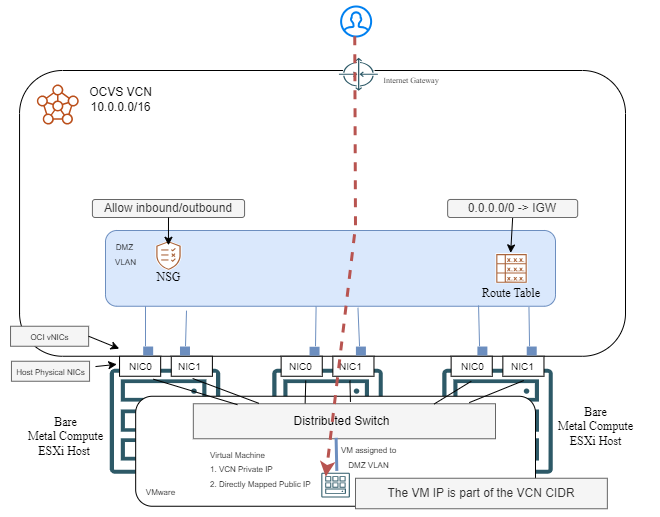
The implementation steps are:
a) Create a DMZ VLAN in the VCN where OCVS is deployed;
b) Create an Internet Gateway and adjust the VLAN Route table and Network security group to allow the traffic.
c) Configure OCVS with the new added VLAN ID (steps out of scope for this blog) and add any VMs you wish to expose to the Internet, to that VLAN.
d) In the VLAN details page, add External Access by mapping the VM’s private IP to a Public IP.
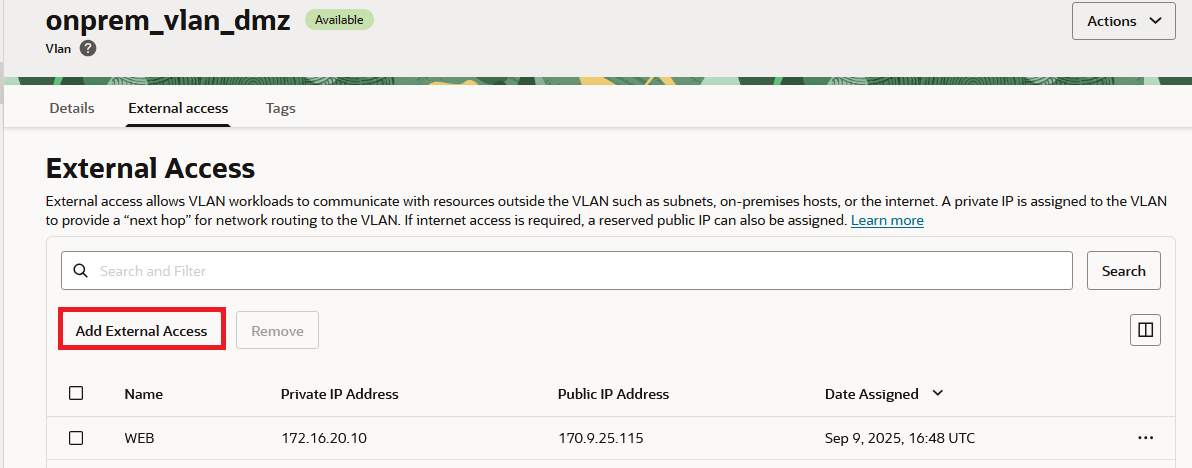
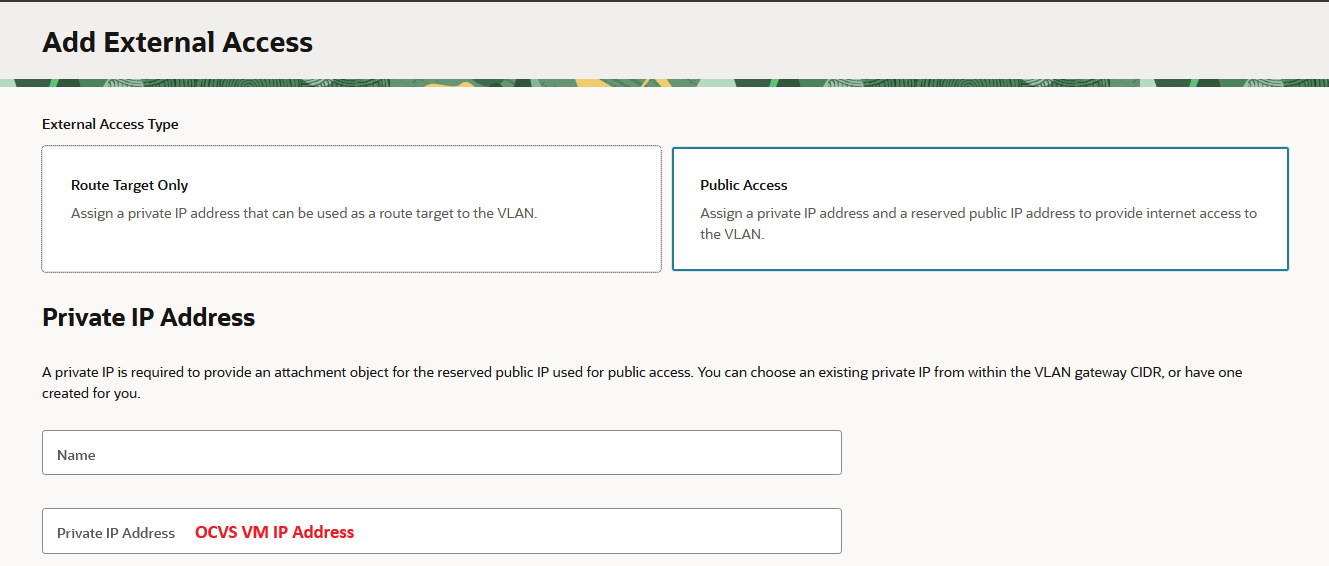
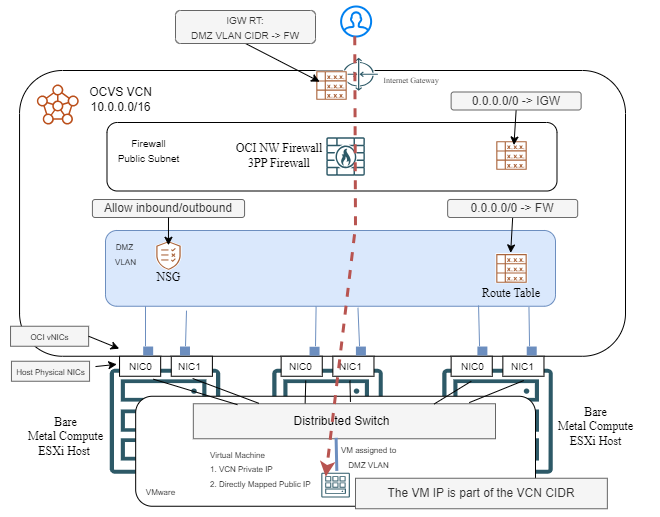
If you wish to add more security, you can easily insert a network firewall on the path of the flow, like the OCI Network Firewall. However, there are some considerations:
– The network firewall interface has to be in the same VCN as the OCVS deployment.
– If you already have a 3rd Party firewall (Palo Alto, Fortigate, etc) in a different VCN and you want to use that, you will need to deploy a new vNIC in the OCVS VCN. However, this will complicate the firewall’s internal routing.
– You will need to adjust VCN routing to force the traffic through the firewall.
2) Native DMZ VLAN with the only a private IP mapped to the VM.
The other way of exposing a service in OCVS, native VLANs, is to have the VM(s) running the service use only private IPs in the DMZ VLAN. The Public IP, which is exposed to the Internet, will be hosted by another service, which can be:
– An OCI Public Load Balancer
– A 3rd Party Network Firewall
– Any VM capable of performing Destination NAT
a) OCI Public Load Balancer
You can use an OCI Load balancer as the frontend for the application. The load balancer will have the OCVS VM as a backend. This adds a few advantages, over the previous architecture:
– The LB can be deployed in any VCN and it usually is deployed in a DMZ VCN, to allow the traffic to also be inspected by a firewall.
– The LB has Web Application Firewall capabilities which will enhance the security.
– The LB can target 2 OCVS hosts that run the same app which will provide high-availability.
– The LB has health checks which will alert you if something is wrong with the app.
– The LB is a reverse proxy and can do SSL Offloading which will take some load off your app VMs. It also simplifies SSL certificate management when used with the OCI Certificate service.
One downside would be that the load balancers will perform SNAT as they send traffic to the OCVS VMs so if your app needs to see the real source IP of the traffic, this might not be a good solution. However, the LB does use the X-Forwarded-For HTTP header so Web applications can rely on that.
One other downside is that this will only cover inbound flows. For the VM to go to the Internet, you will need to set up a alternate path, like a NAT Gateway in the OCVS VCN.
Let’s look at a diagram:
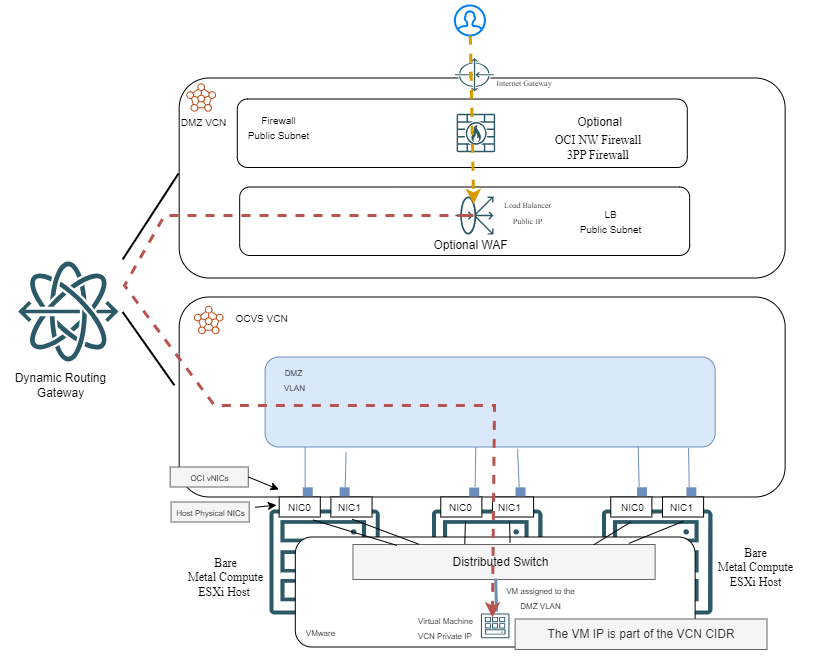
Note: in the example above, the Firewall in the DMZ VCN inspects the traffic before it reaches the LB. However, the firewall can also be placed after the LB (between the LB and the backends) without any issues. Some things will change but it’s a supported architecture.
b) 3rd Party Network Firewall
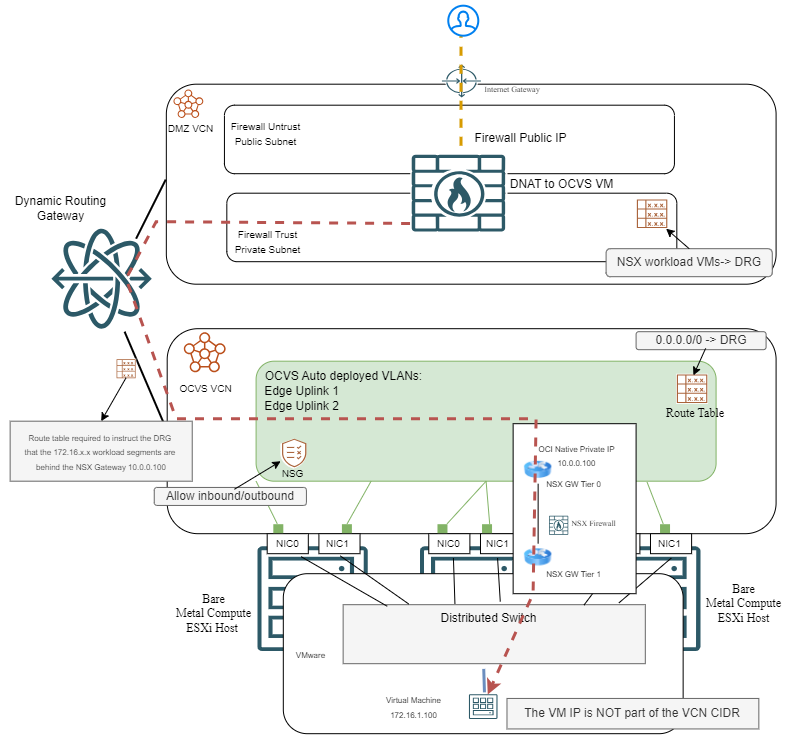
While not as common, you can put a Public IP on a Network Firewall, such as Palo Alto, Fortigate, Checkpoint, etc. You then have a Destination NAT rule to send that traffic to the OCVS Virtual Machine.
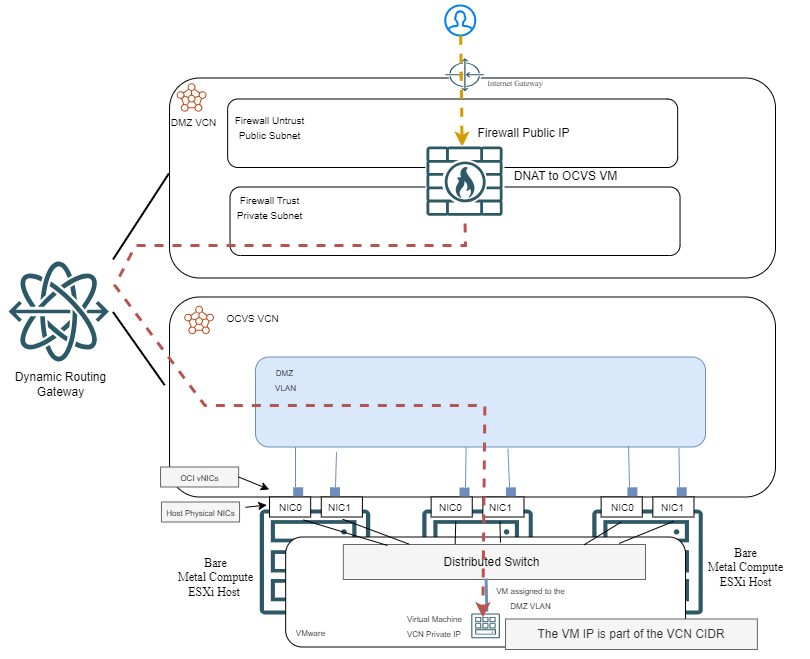
While this architecture has its value, it is important to note that there is a limit on the number of public IPs you can have on a firewall deployed in OCI. To put it simply, you can use this architecture if you only want to expose up to 64 services of the same type (ex: HTTPS). Going beyond that you will need to change the customer facing port. Also, the same firewall can be used for Internet Egress traffic, for the same VMs.
Related to routing in OCI, you have two options:
– Perform Source NAT on the Firewall, towards the OCVS VLAN – this will make all traffic seem to come from the Firewall’s Trust interface so you will need a route on the VLAN Route Table to return the traffic through the DRG.
– Allow the packet to pass through with the original Source IP. In this model, you will need to make sure the OCVS VLAN has the default route pointed back at the DRG.
NSX Overlay
When the workloads are behind the NSX Overlay, a few things will change related to possible architectures. All the traffic will need to pass through the NSX Edge routers, tier 0 and tier 1. Let’s see how.
1) Public IP on NSX Edge
The first architecture that you can implement is to use the provided Edge Vlan where the NSX Tier 0 router has a vNIC. Summary of the solution:
– NSX Tier 0 router has a private IP from the VCN and a Public IP mapped to it.
– The external DNS will point to the Public IP of the NSX router.
– Inside OCVS, in the NSX manager, we need a Destination NAT rule, on the relevant port, that targets the actual host which has the service.
Let’s see a diagram of the solution:
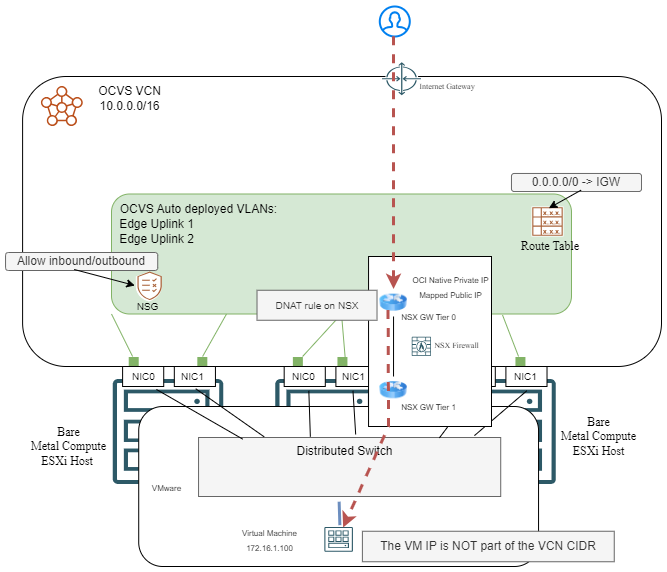
You can add as many private IP – public IP mappings on the NSX router as you want, the only limit is the VLAN size. For example, if the NSX Uplink VLAN has an allocated IP space of /24, you can add more than 250 IPs. Note that each new private IP has to be configured on the NSX side too. In OCI, the menu to add these mappings is the same as on the Native DMZ VLAN, it’s called External Access.
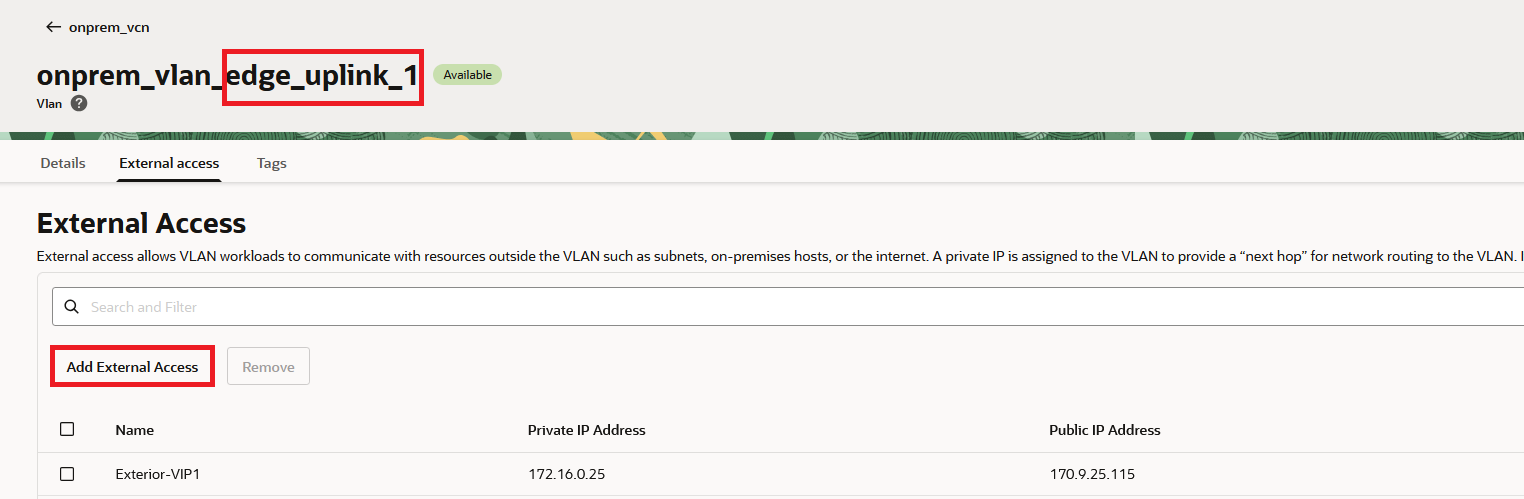
Also note that OCI Automation deploys 2 VLANs for this purpose, “Edge-Uplink 1” and “Edge-Uplink 2”.
For a step by step guide on how to implement this scenario, follow this blog post.
One other thing, this architecture supports adding a network firewall on the path, for extra security. The way to do it is described on the VLAN native section above, it will be the exact same steps. However, since all flows are now passing through NSX, there is no real reason to use a firewall on the OCI side since the NSX provided firewall is quite capable.
2) Use an OCI service with a public IP which targets the OCVS VM’s private IP.
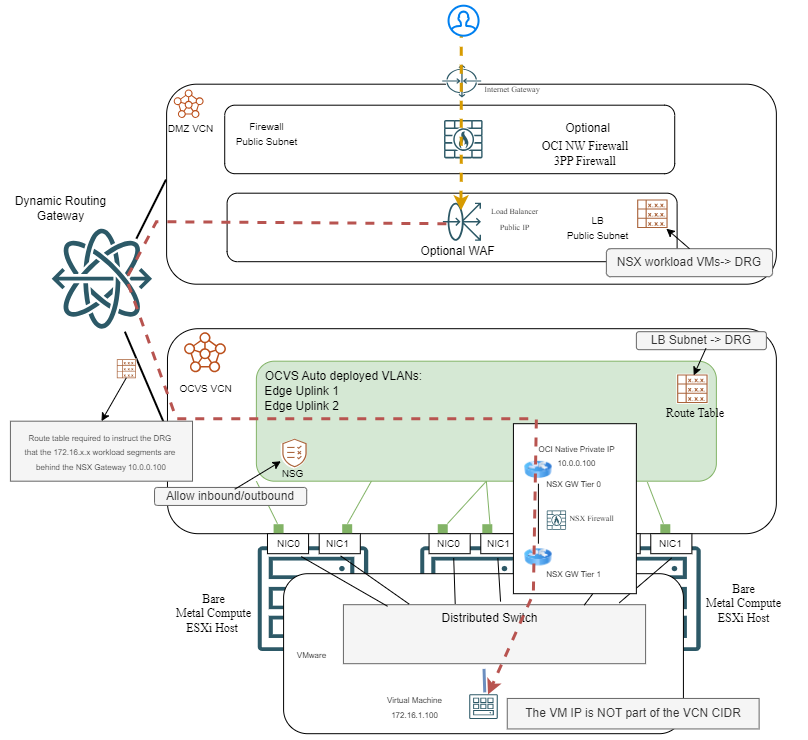
In this architecture, the NSX tier 0 and tier 1 routers will ensure the OCVS VM can be reached by an OCI service without any type of NAT involved. This is very similar to the Native VLAN architecture around Load Balancers, where NSX is just another router on the path.
a) OCI Load Balancer
The OCI Load Balancer will have the Public IP which users connect to and the OCVS VMs inside NSX Overlay will be used as backends. Typically, the LB is deployed in a HUB VCN and uses an OCI Dynamic Routing Gateway to reach the OCVS deployment. There are many reasons to use an OCI LB, which are detailed in the Native VLAN section, like health checks, SSL offload, WAF, etc.
Here is a high level architecture diagram:
b) Similarly to the Native VLAN architecture, you can use a Firewall in the HUB to expose the service to the Internet. The Public IP will live on the firewall and Destination NAT is needed so the traffic can reach the Virtual Machine inside OCVS NSX.
Summary
In this blog entry, we explored a few ways on how to expose to the Internet services running in Oracle’s VMware Solution . Since OCVS is deeply integrated with OCI Native networking constructs, we have a number of options available, which should satisfy most requirements.
I hope you will find it useful.