
In modern enterprise IT environments, balancing cloud flexibility with on-premises performance is a growing priority. Oracle’s Exadata Cloud@Customer (ExaC@C) bridges this gap by delivering the power of Exadata infrastructure within the customer’s data center, managed through Oracle’s public cloud control plane. This blog dives into the underlying network architecture of a single VM cluster in an ExaC@C deployment, exploring how traffic is intelligently segmented across dedicated interfaces and VLANs to ensure security, high availability, and performance.
Below diagram illustrates the network architecture for an Oracle Exadata Cloud@Customer (ExaC@C) deployment, which combines Oracle’s public cloud control plane with on-premises hardware. The design prioritizes performance, security, and high availability by segregating different types of traffic onto distinct networks and VLANs.
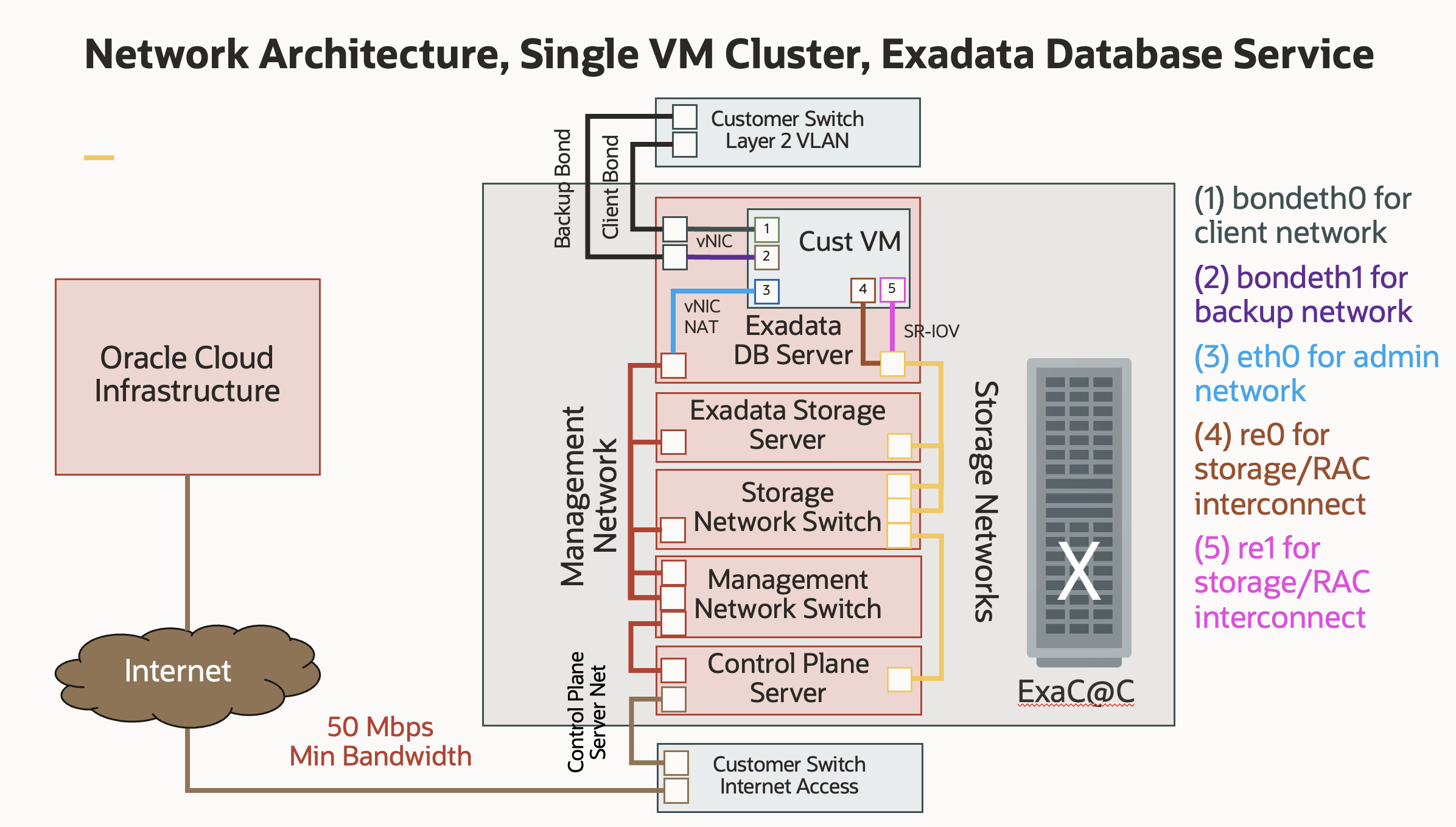
Core Components and Network Segregation
The architecture is built around several key components, each with a specific networking role:
- Customer VM (Cust VM): A virtual machine running on the Exadata Database Server. This VM hosts the Oracle Database and is the focal point for all database-related network traffic.
- Exadata Hardware (ExaC@C): The physical rack located in the customer’s data center. It includes DB servers, storage servers, and internal high-speed switches.
- Customer Network: The existing corporate network infrastructure, which is connected to the Exadata system via Layer 2 VLANs.
- Oracle Cloud Infrastructure (OCI): The public cloud service that remotely manages the ExaC@C system. This connection is exclusively for control and management, not for customer data.
The design uses network bonding and VLANs to isolate different traffic streams for performance and security.
Network Interfaces and Their Roles
The Customer VM is equipped with several virtual network interfaces, each mapped to a specific function:
- Client Network (bondeth0): This bonded interface is dedicated to application and user connections to the database. Bonding two physical interfaces provides high availability (if one link fails, traffic continues on the other) and can be configured for increased throughput.
- Backup Network (bondeth1): This second bonded interface is used exclusively for database backup and recovery operations, typically with a tool like Oracle RMAN. Separating this traffic prevents large backup jobs from impacting the performance of the client network.
- Admin Network (eth0): A single interface providing administrative access (e.g., SSH) to the VM’s operating system. It connects to the internal Exadata management network.
- Storage/RAC Interconnect (re0, re1): These are ultra-high-speed interfaces for the private storage network. They use SR-IOV, which allows the VM to bypass the hypervisor and communicate directly with the physical network hardware. This dramatically reduces latency and is critical for Storage access and RAC interconnect.
Packet Flow Analysis
Here’s how network packets travel between the different components for key operations:
1. Client Application to Database Flow
This is the primary data path for applications using the database.
- An application server on the customer’s corporate network sends a SQL query to the database’s SCAN (Single Client Access Name) listener IP address.
- The packet travels through the customer switch on the designated client VLAN.
- The switch forwards the packet to the client bonded links connected to the Exadata machine.
- The packet is received by the bondeth0 interface on the customer VM and passed up the network stack to the Oracle Database listener, which then directs it to the appropriate database process.
- The response packet follows the reverse path back to the application server.
2. Database Backup Flow
This flow isolates heavy backup traffic from client traffic.
- A database administrator initiates a backup job using a tool like RMAN, targeting a backup appliance (e.g., an NFS server or a Zero Data Loss Recovery Appliance) on the customer network.
- The Customer VM sends the backup data packets out through the bondeth1 interface.
- The packets traverse the backup bonded links to the customer switch on the designated backup VLAN.
- The switch routes the traffic to the backup appliance on the same network segment.
3. Control Plane Management Flow
This flow is for management and monitoring by Oracle, not for customer data.
- The Control Plane Server within the ExaC@C rack needs to communicate with the Oracle Cloud Infrastructure (OCI) for tasks like sending health metrics and receiving patches.
- This server sends its traffic out through the customer switch designated for internet access.
- The traffic is securely routed over the public Internet (requiring a minimum of 50 Mbps bandwidth) to the OCI management endpoints. This connection is firewalled and secured, ensuring that only control signals are exchanged.
The Role of Multiple Linux Route Tables
A key aspect of Exadata’s network management within the Linux-based VMs is the use of multiple routing tables. In a standard Linux configuration, all network traffic is governed by a single main routing table. However, Exadata leverages a more advanced feature called policy-based routing, which allows for the creation of multiple, independent routing tables. This enables fine-grained control over how different types of traffic are directed.
The routing decisions in an Exadata VM are governed by a set of rules that determine which routing table to use for a given packet. These rules can be viewed using the ip rule show command. Each routing table then contains specific routes that direct traffic to the appropriate network interface.
For simplicity, we will focus only on two traffic flows: client traffic and backup traffic. The goal of this discussion is to explain how ExaC@C maintains strict isolation between the client interface and the backup interface.
Routing Rules
The ip rule show command might display output similar to this:
[opc@exacs-xxx ~]$ ip rule show
0: from all lookup local
32752: from all to 172.17.101.0/25 lookup 218
32753: from 172.17.101.0/25 lookup 218
32754: from all to 100.106.65.179 lookup 121
32755: from all to 172.17.100.0/24 lookup 219
32756: from all to 100.106.65.178 lookup 120
32757: from all to 100.107.1.181 lookup 151
32758: from 100.106.65.179 lookup 121
32759: from all to 100.107.1.180 lookup 150
32760: from 172.17.100.0/24 lookup 219
32761: from 100.106.65.178 lookup 120
32762: from 100.107.1.181 lookup 151
32763: from 100.107.1.180 lookup 150
32764: from all to 169.254.200.4/30 lookup 220
32765: from 169.254.200.4/30 lookup 220
32766: from all lookup main
32767: from all lookup default
Let’s go through this and decode what it’s doing
Built-In Rule
0: from all lookup local
- Highest priority rule.
- Ensures packets destined to local addresses (loopback, directly assigned IPs) are routed internally.
- This is always present on Linux.
Custom PBR Rules (Main Focus)
These are the ones with priorities 32752 → 32765.
They override the normal main routing table for specific source/destination traffic.
Rule Set 1: Table 218
32752: from all to 172.17.101.0/25 lookup 218
32753: from 172.17.101.0/25 lookup 218
- Effect:
- If the destination is 172.17.101.0/25, OR
- If the source is 172.17.101.0/25,
- Use routing table 218.
- Use case: Ensures all traffic to and from that subnet follows the routes defined in table 218 (client traffic).
Rule Set 2: Table 219
32755: from all to 172.17.100.0/24 lookup 219
32760: from 172.17.100.0/24 lookup 219
- Same pattern as before, but applies to a different subnet (172.17.100.0/24) and uses table 219 (backup traffic).
Conclusion
Oracle ExaC@C network architecture demonstrates how thoughtful design can deliver both performance and security in hybrid deployments. By leveraging VLAN segregation, bonded interfaces, and policy-based routing, ExaC@C ensures that client, backup, and management traffic remain strictly isolated preventing resource contention and maintaining predictable performance. This approach allows enterprises to enjoy the flexibility of cloud control with the reliability and security of on-premises infrastructure.