
Introduction
Oracle Integration Cloud (OIC) now supports Identity Propagation making it possible to carry the end user’s identity from a source application into Fusion SaaS. This is a powerful capability and enables common Fusion SaaS integration patterns to preserve the user identity from PaaS services into SaaS using OIC as a conduit. It is especially useful for implementing Fusion extensions where authorization, auditing, and queries require to honor the end user’s roles and privileges on Fusion SaaS.
An example use case is Order Capture and Submission extension shown in below diagram. A VBCS or third‑party Order portal is integrated with Oracle Fusion Order Management via OIC. With identity propagation, the portal user who submits the order becomes the owner of the order and subsequent queries and workflows enforce that user’s access rights.
This blog will outline the deployment topologies, necessary configurations and considerations to enable identity propagation from OIC into Fusion SaaS applications.
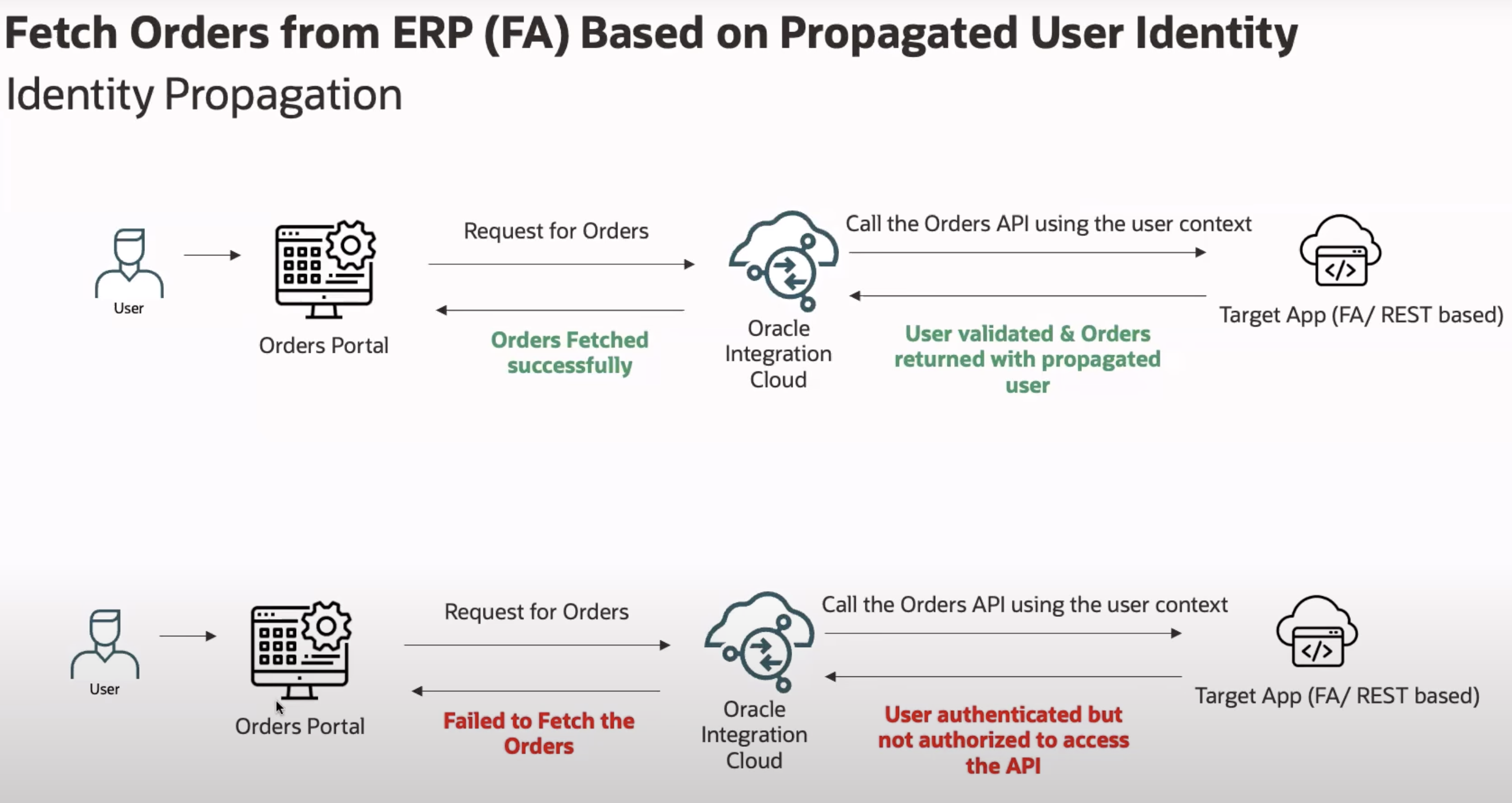
pic courtesy – OIC documentation – Propagate OAuth User Identity Between Services
Identity propagation with OIC
The REST Adapter, Oracle ERP Cloud Adapter, Oracle HCM Cloud Adapter, and Oracle CX Sales and B2B Service Adapter provide support for OAuth identity propagation when invoking REST API operations. OAuth identity propagation enables you to securely transfer the same user identity and access credentials across services.
Identity propagation is achieved through use of the OAuth using the JWT User Assertion security policy.
Adapters supporting Identity propagation
REST adapter
Oracle ERP Cloud Adapter
Oracle HCM Cloud Adapter
Oracle CX Sales and B2B Service Adapter
Reference – OIC Whats new – 25.04
Consider a simple integration as shown in the diagram below that recieves a REST trigger and invokes Fusion HCM Workers REST API.
For Identity propagation to happen for this flow, the invoke to getFusionHCMWorker should execute with the identity of the user that invoked the integration at trigger getWorkerDetails.
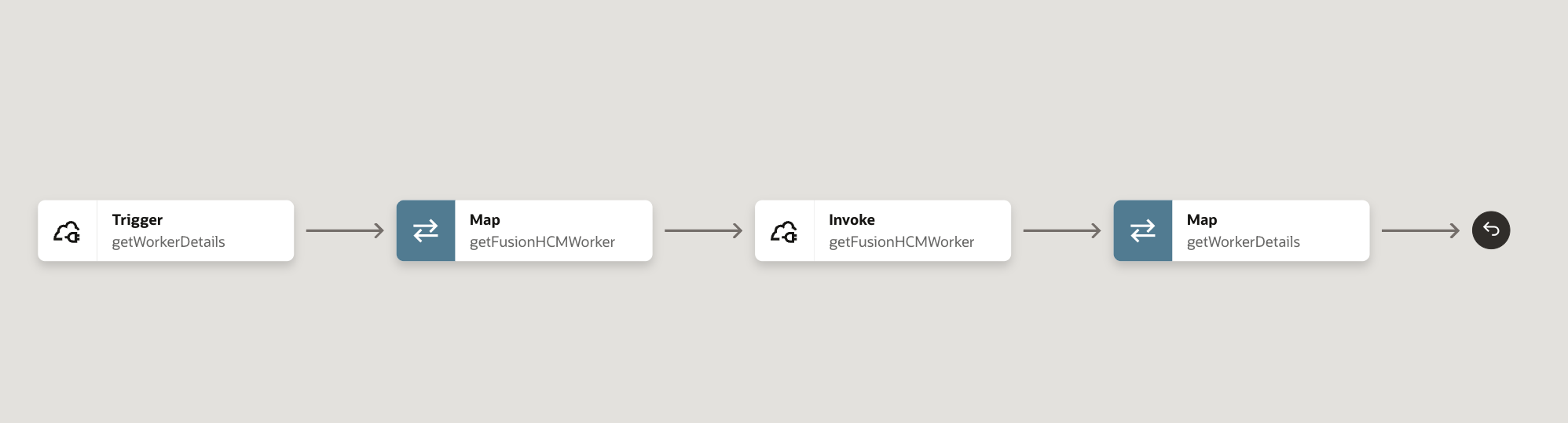
In the subsequest sections, let us look how we can ensure that the user identity that invokes the OIC trigger is dynamically passed on as the identity for Fusion REST API invoke operations, The diagram below summarises the configuration.
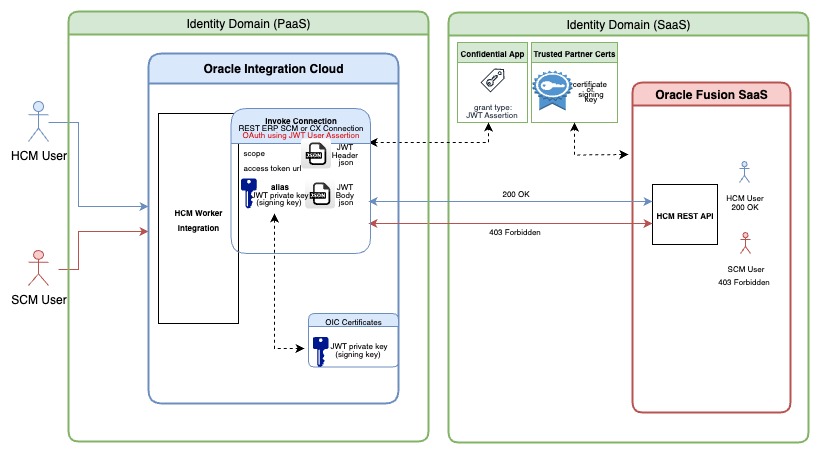
Prerequisites
The prerequistes for this to happen are as follows
- User with the same username must exist in both the OIC identity domain and the Fusion SaaS identity domain
- The user on OIC identity domain must be authorized to invoke integrations on OIC. This is typically done by assigning a valid OIC role like ServiceDeveloper or ServiceInvoker for the user
- The corresponding user in Fusion SaaS identity domain user must be authorized to invoke Fusion SaaS REST API which is also achived by assigning the required roles based on the target Fusion REST API
- The Mapper getFusionHCMWorker should map the trigger subject to the invoke subject for passing the identity
- OIC needs to be provided a private key which can be used to generate and sign a valid user assertion JWT token
- Fusion SaaS Identity domain requires the corresponding public key certificate of the signing key which Fusion can use to validate the JWT token
OIC will exchange the JWT User assertion token with a valid Oauth Access token which will be used to perform the Fusion SaaS REST API invocation on bahalf of the calling user.
Configuration
With the above context, let us look at the required configuration on OIC and Fusion SaaS
1. Generate private signing key and a corresponding public key certificate
The private signing key will be used by OIC to create and sign the JWT user assertion token, whereas the certificte will be used by Fusion identity domain to validate the user assertion token. The key and certificate needs to be created outside of OIC or Fusion SaaS.
Here are sample commands provided to generate the key and certificate using keytool and openssl utilities.
========= commands ==========
# generate key pair using JAVA keytool  (create keystore jks)
keytool -genkey -keyalg RSA -alias shreekey -keystore shreekey.jks -storepass welcome1 -validity 3650 -keysize 2048

# export the cert from the jks store using JAVA keytool  (jks --> cer)
keytool -exportcert -alias shreekey -file shreekey.cer -keystore shreekey.jks -storepass welcome1

# import jks key and cert input a pkcs store (jks --> p12 )
keytool -importkeystore -srckeystore shreekey.jks -srcstorepass welcome1 -srcalias shreekey -destalias shreekey -destkeystore shreekey.p12 -deststoretype PKCS12 -deststorepass welcome1 -destkeypass welcome1

# export the key from pkcs12 store to pem format  (p12 --> key)
openssl pkcs12 -in shreekey.p12 -nodes -nocerts -out shreekey.key

# convert the key into pem format
openssl rsa -outform pem -in shreekey.key -out shreekey.pem
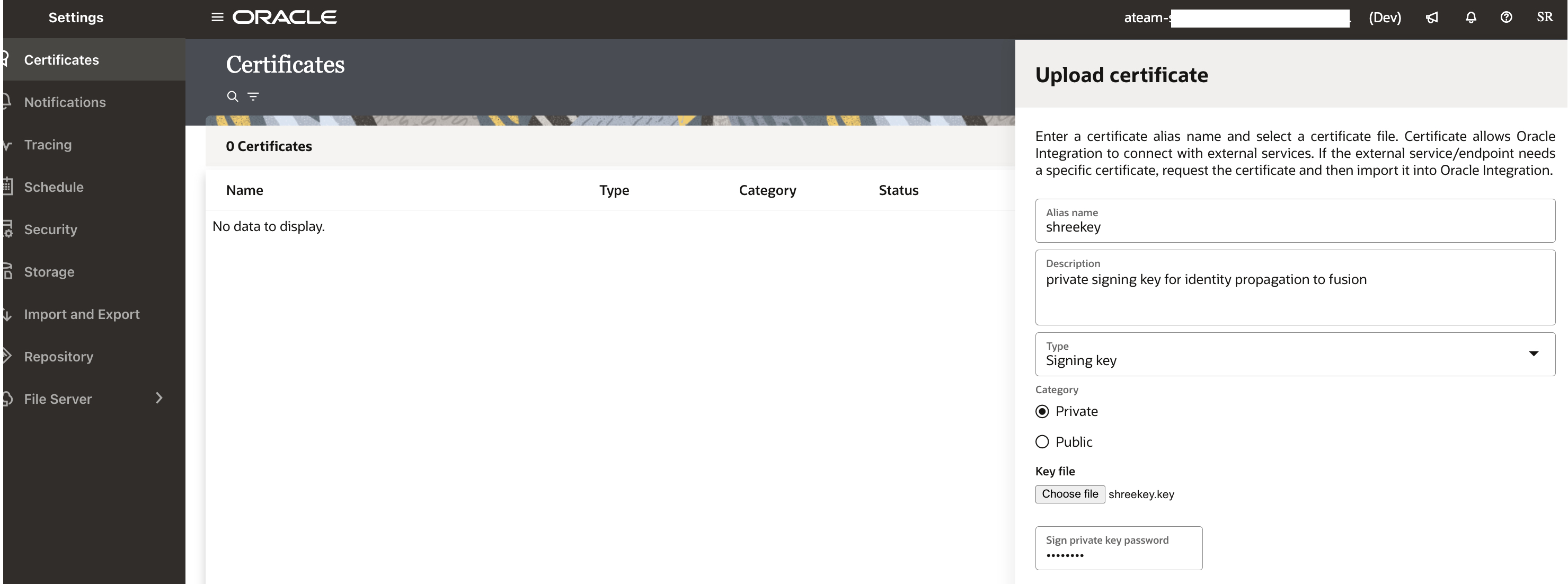
2. Upload the private signing key into OIC certificates
Provide an alias name during the upload which will be referenced in other sections below.
Refer to the below diagram where the private key shreekey.pem or shreekey.key is uploaded with an alias shreekey

3. Upload the certificate of signing key into Trusted Partner certificates of Fusion Identity domain
This needs to be done on the identity domain of the Fusion SaaS Application instance.
Login to the OCI console as identity admin, choose to identity domain of Fusion saas instance, and navigate to security-> Trusted Partner certificates.
Upload the certificate (shreekey.cer in the above example) and reference the same alias from step#2 above.
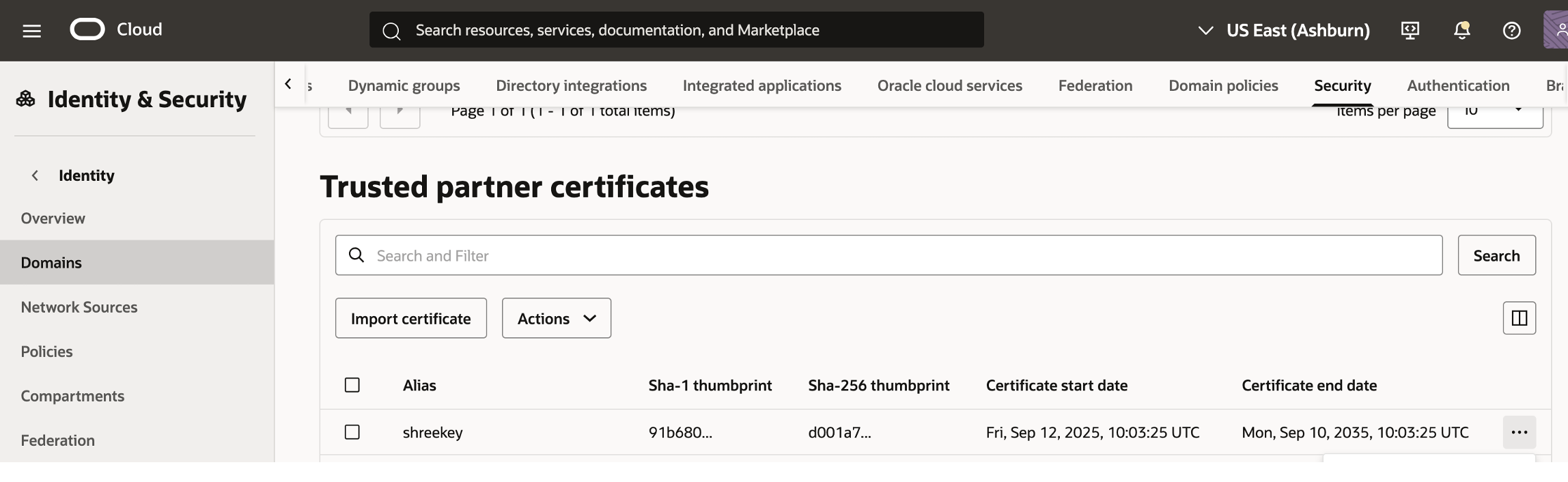
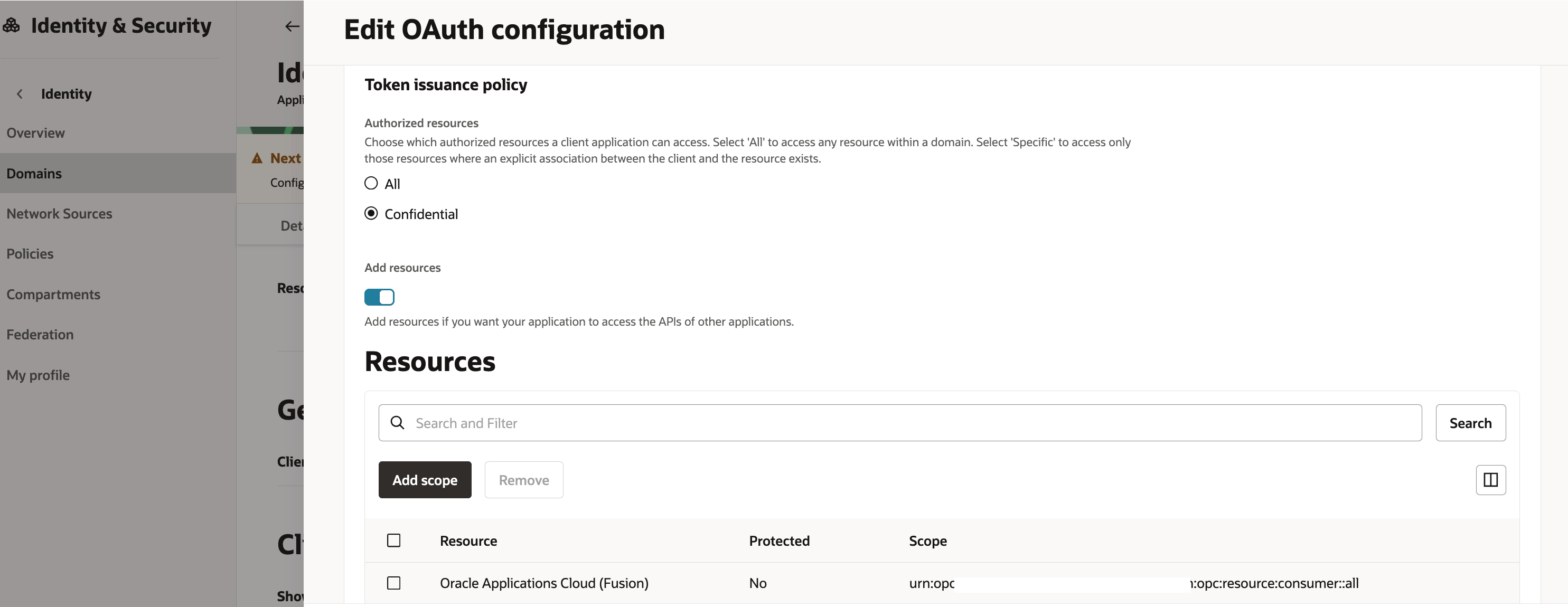
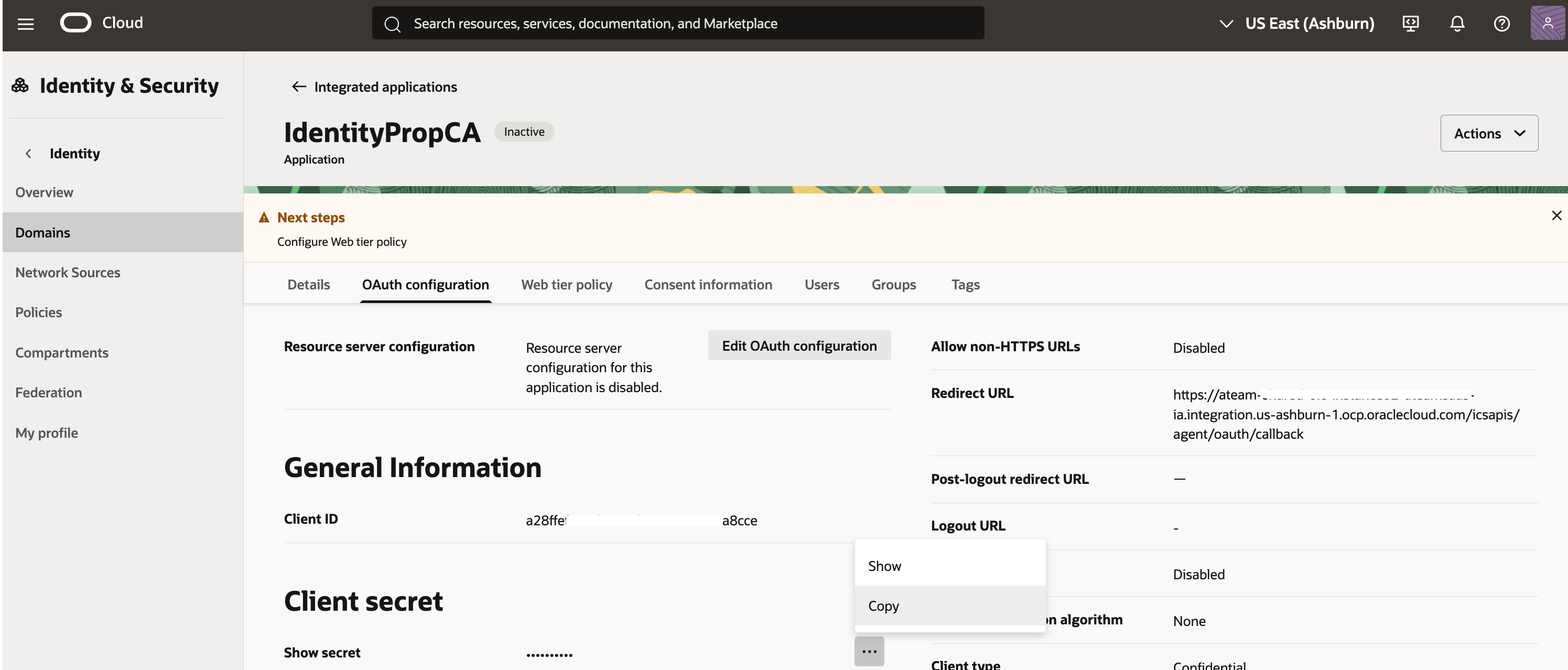
4. Create a confidential application on Fusion Identity domain
Again, this step needs to be performed on the Fusion SaaS Identity domain by an identity admininstrator.
Create a confidential application
Make sure that JWT assertion grant type is enabled under Oauth Client configuration
Select trusted client and import the public key certificate with alias in the certificate section
Finally, activate the confidential application.
Note down the Client Id
sample screenshots below show the confidential application creation


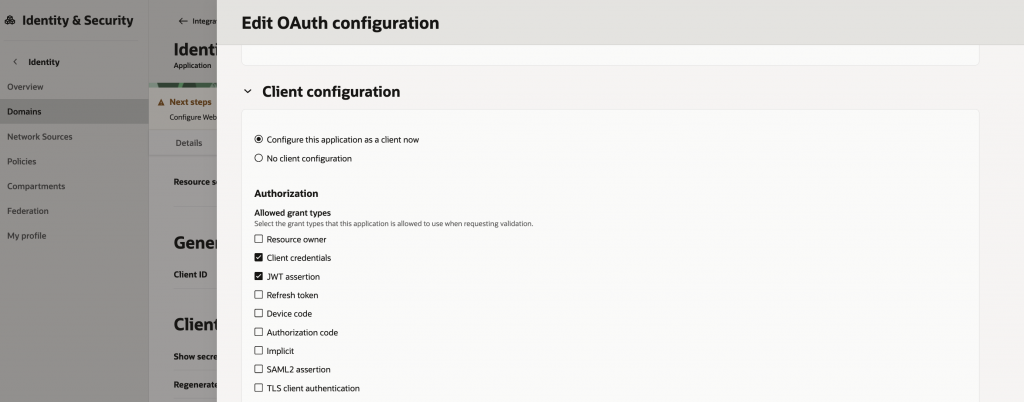
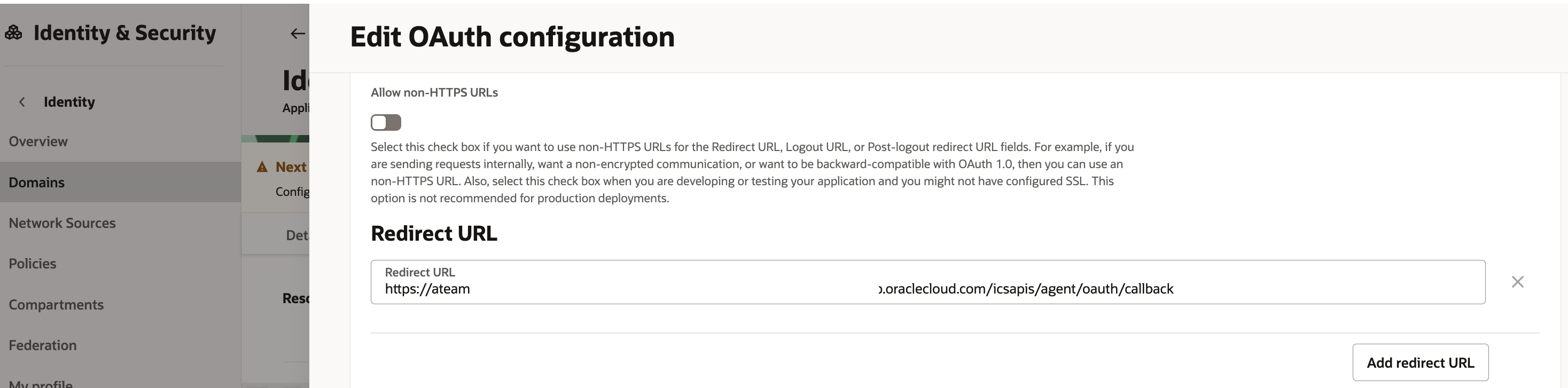
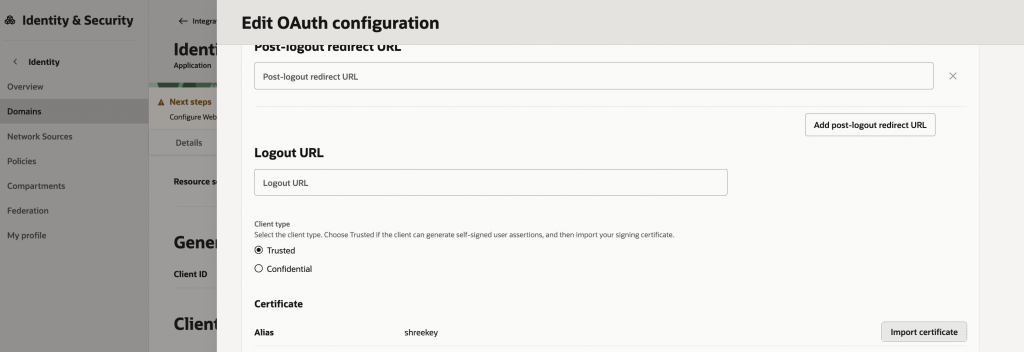
Refer here to obtain the OIC callback URL
5. Create the JWT assertion token header and body json files
For identity propagation to work, OIC will need to create user asserion token using the identity (username) of the incoming request. As discussed earlier, OIC will then exchange this JWT token with an access token from Fusion SaaS Identity domain. Hence, OIC needs to know the JWT token format as needed by Fusion Identity domain.
Given below are sample JWT header and JWT payload (body) json formats. The values provided in these json files are significant. We shall see that we reference the private key alias from Step#2, the client Id of the confidential App from Step#4 and a valid user who exists in the Fusion SaaS identity domain.
Construct 2 files as shown below in
JWT Header file in json format (userAssertion_header.json)
{
 "alg": "RS256",
 "typ": "JWT",
 "kid": "shreekey"
}
Here the value of Kid claim should match the private key alias. The Algorithm needs to be RS256 and Type of token JWT
JWT payload in json format (userAssertion_body.json)
{
 "sub": "CASEY.BROWN",
 "iss": "a2dffexxxxxxxxxxxxxxa8cce",
 "aud": "https://identity.oraclecloud.com/",
 "iat": 123,
 "exp": 123
}
In the above json file, Subject needs to be a valid user. This user is used to generate a token during “Test Connection” in Step#7. Else the Test connecton fails. The Issuer claim should reference the clientId of the Confidential Application from Step#4. The Audience claim should be exectly as shown (including the training / for Oracle Identity Domain. The iat (Issued at) and exp (Expiry) claims should be present and have some numerical value, but the values are not used.
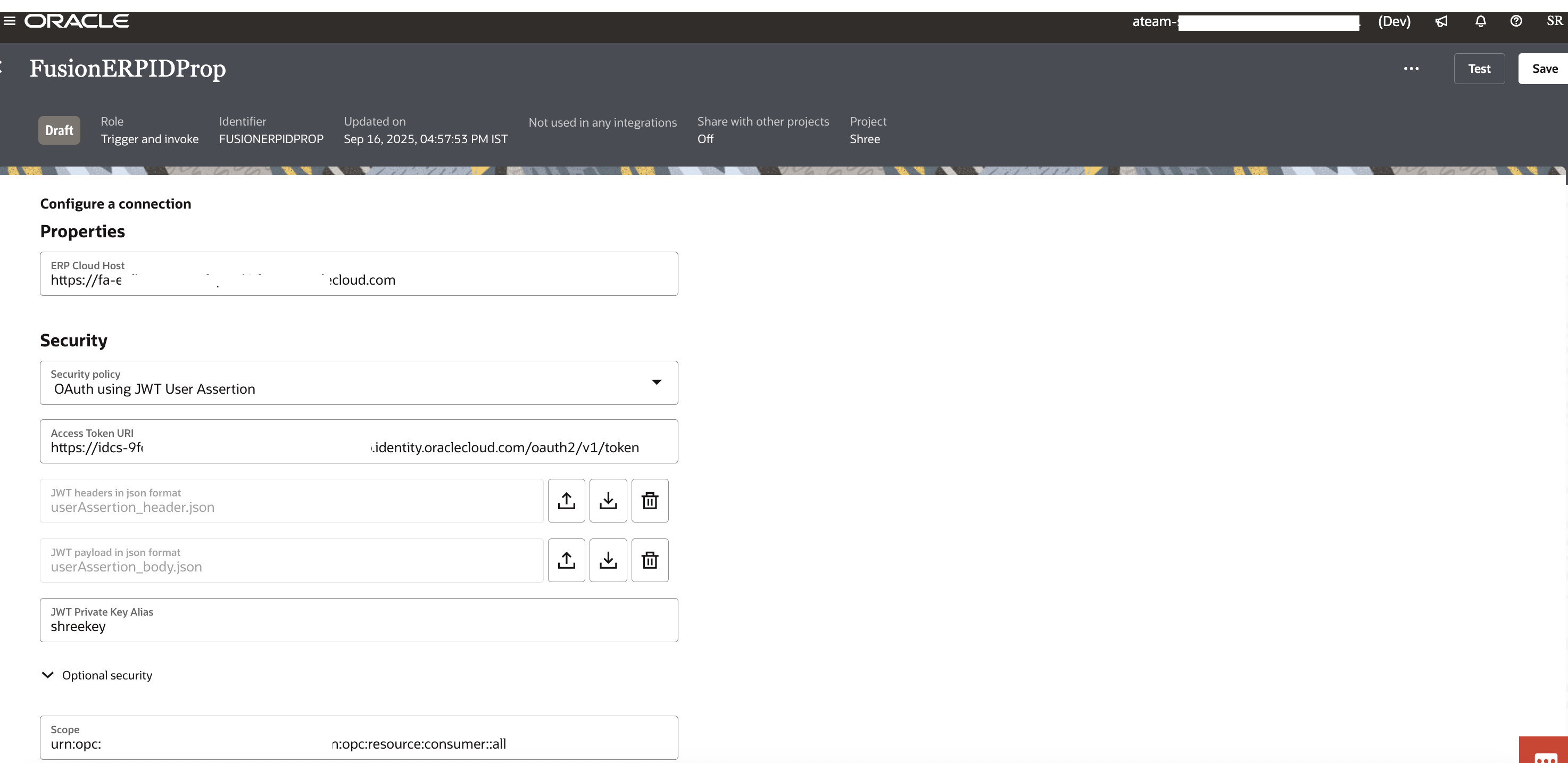
6. Create an Invoke connection to Fusion SaaS instance
This is the invoke connection to invoke Fusion SaaS Cloud Application. As discussed above, this connection could be of types REST, HCM, CX or ERP Cloud which all share the same configuration for JWT user assertion. The connection thus created can be used to invoke Fusion SaaS REST API endpoints by dynamically passing the user identity using the JWT assertion grant type.
– make sure the security policy is chosen to be “Oauth using JWT User Assertion”
– reference the private signing key alias name (from Step#2)
– upload the JWT assertion token header and body json files (from Step#5)
– provide the appropriate scope for invoking the target Fusion REST APIs as shown
– provide the Fusion identity domain access token URL ( https://Identity Domain URL/oauth2/v1/token)
These properties in the invoke connection will be used by OIC to internally generate the JWT user Assertion token and exchange it for an Oauth Access token
Test connection and verify
7. Complete the integration
The trigger connection has no additional considerations. It needs to be a rest adapter so that identity can propagate to invoke connection
The mapping from trigger request to invoke request should explicitly map the subject (under security) from source to target as shown in the screenshot below.
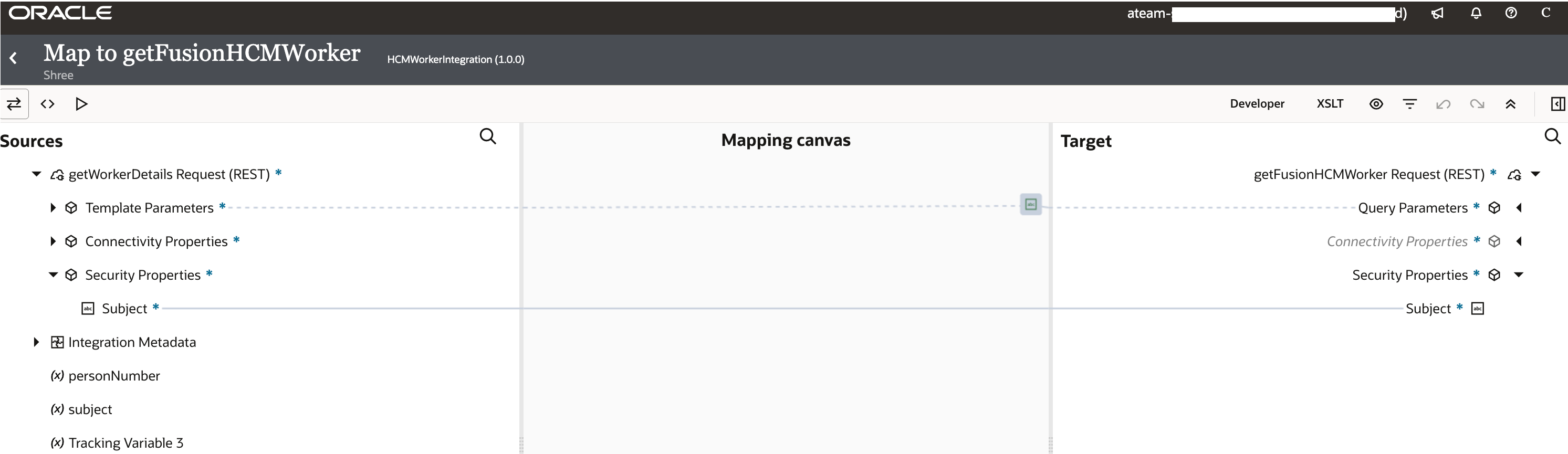
Alternately, the subject can be injected from other mapping sources like request payload elements or even using string literal. OIC will use the subject thus injected to create user assertion JWT and exchange it for an access token using the confidential app created in step #4. Also note that if this mapping is absent, then the ‘valid.user’ provided in the JWT payload in json format (userAssertion_body.json) will be used to obtain the access token.
Testing
Let us execute a simple test to verify the identity propagation from OIC to Fusion SaaS HCM application from our example. We will execute the HSMWorkerIntegration in OIC using 2 users from Fusion.
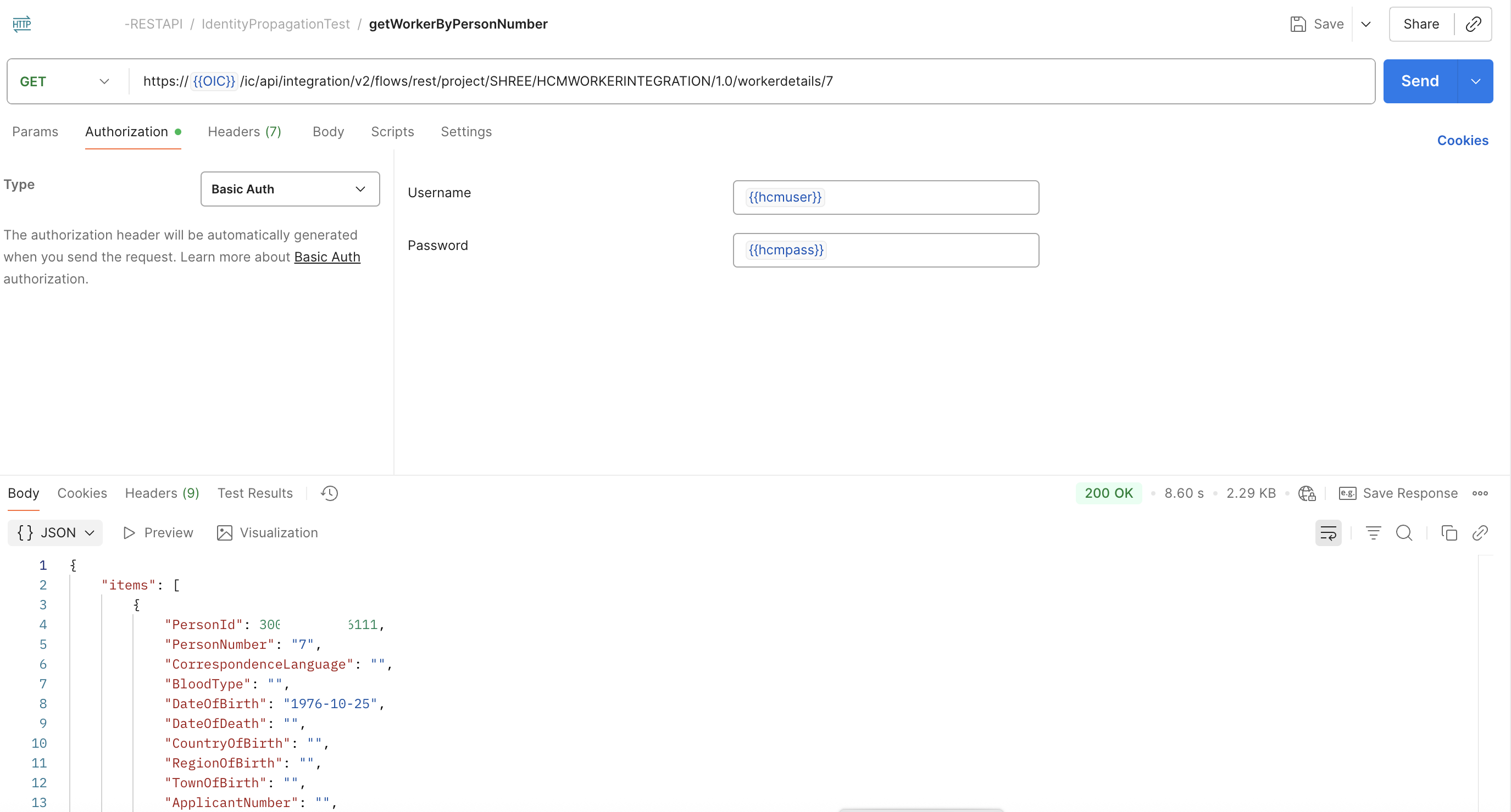
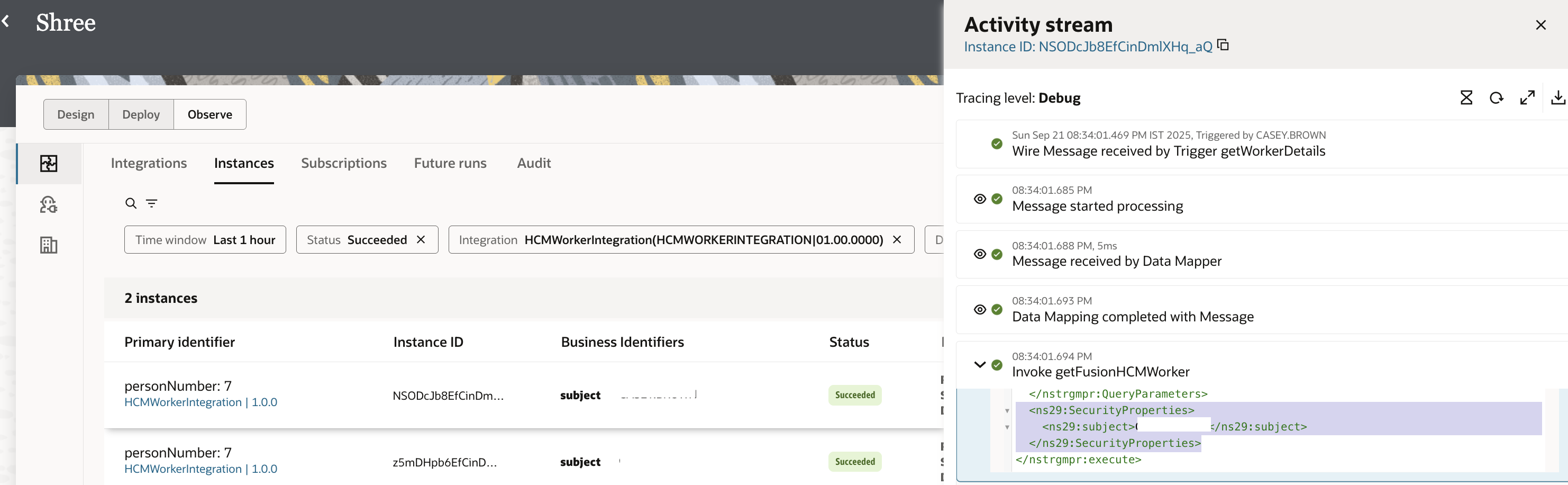
The first positive test case using HCMUser who is eligible to execute the Fusion HCM REST API. Screenshots below show a 200 OK successful execution since the HCMUser identity is able to obtain an access token which can successfully execute the Fusion HCM Workers REST API. The debug mode activity stream of the integration instance will display the identity being passed into Fusion SaaS invocation.
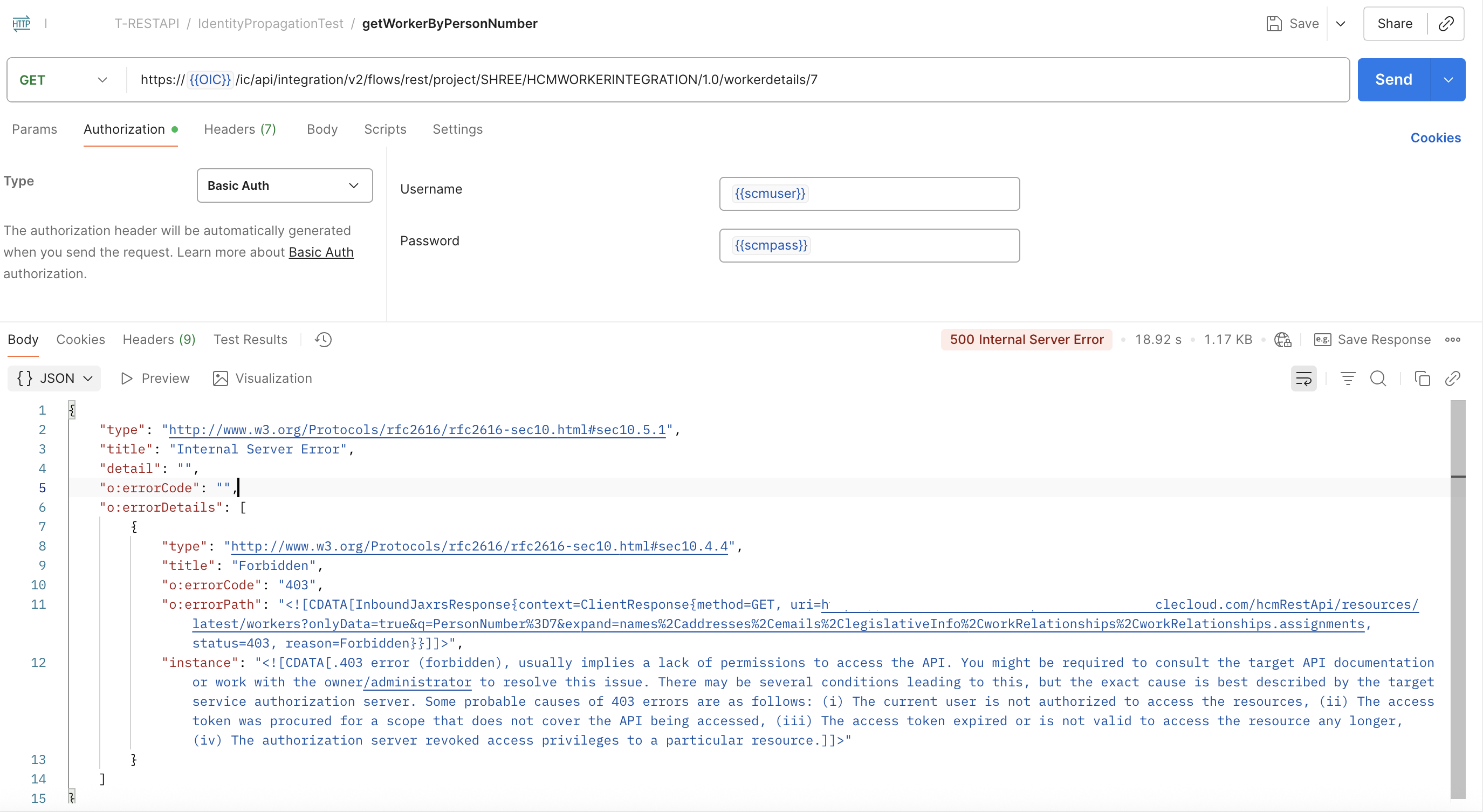
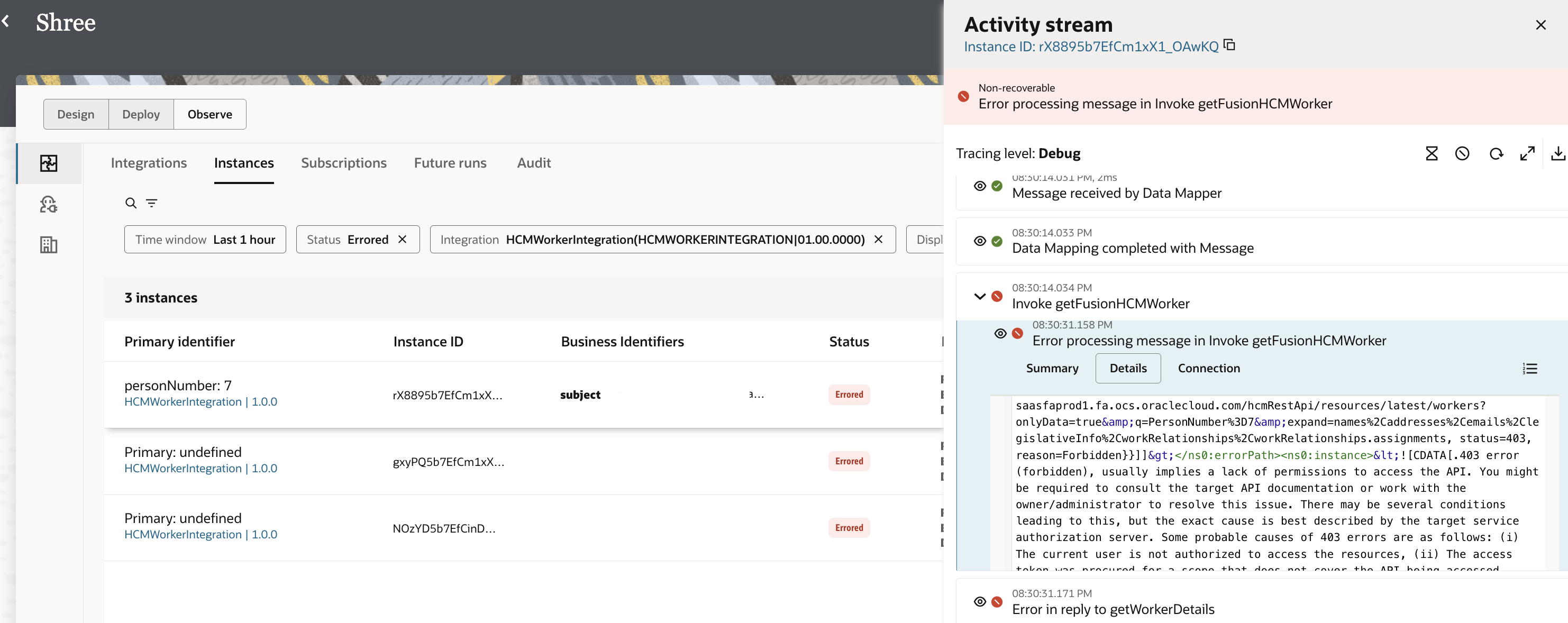
The second negative test case involvs calling the same integration using an SCMUser. This user’s identity is successfully propagated to Fusion HCM. However the access token obtained fails with 403 Forbidden due to lacking roles by SCM user to invoke the HCM REST API. The 403 Forbidden error can also be seen in the HCM REST API invoke activity in debug activity stream.
Deployment topologies
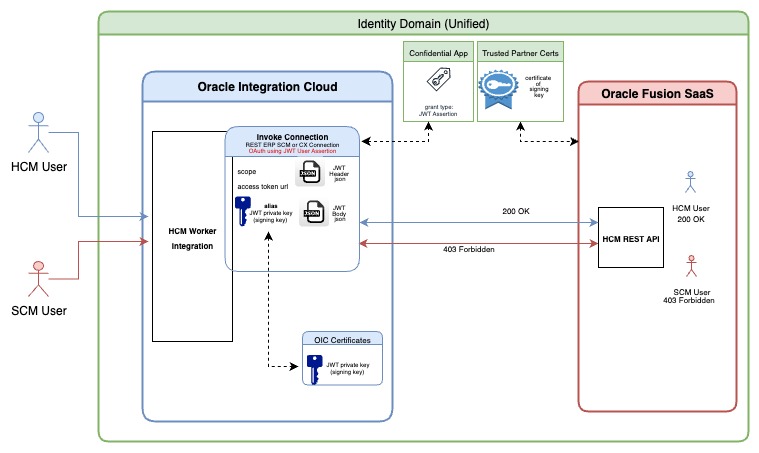
Finally, a note on a simpler deployment topology where the customer’s OIC and Fusion SaaS instance reside in the same identity domain. The steps to enable identity propagation in such a topology can be understood using the below diagrams.
Conclusion
In this blog we have seen how the user identity of the calling client can be dynamically propagated via OIC into Fusion SaaS applications. This is a powerful capability which enables implementing various extension usecases in Fusion SaaS HCM, SCM, ERP and CX which require identity propagation from source systems.
References:
- REST Adapter – JWT Assertion Support for Outbound Invocations
- Oracle ERP Cloud Adapter – Propagate OAuth User Identity Between Services
- User is recommended to read this earlier A-team blog by my colleague Siming Mu explaining the identity propagation in the context of 2 OIC instances. The principles are valid and hold good for identity propagation to and from Fusion SaaS application