
Overview
While building OCI, we decided that it is easier for customers to manage all or most of their workload in one single tenancy using one single Identity. That is why we built Compartments construct that allows you to isolate workload within one single tenancy. Customers can also, if desired, create multiple identity domains within the same tenancy to isolate the user population. That is essentially a unified “One Oracle” (One tenancy for all use cases) experience. Customers could still choose to isolate workload in two separate tenancies if they require hard isolation between different life cycle environments or between parent-subsidiary companies.
Oracle has one of the most comprehensive portfolio of SaaS, IaaS, and PaaS services. It is a huge benefit for customers using any combination of the three types of services to be able to manage these services from within one cloud console. To extend unified “One Oracle” experience across all Oracle services, Oracle has migrated all of the SaaS services administration from my services portal (SaaS customers would know what I am talking about) to the OCI console. Customers can now use one Identity, with one session, to manage both IaaS services and SaaS services.
The tenancy unification effort started last year, when we began allowing customers to activate a UCC subscription into an existing SaaS subscription OCI tenancy or an active SaaS subscription into an existing UCC subscription tenancy. A lot of you already read about that in one of my blogs last year. From there on, SaaS services administration also moved to the OCI console, as I stated in the previous paragraph.
Deep-Dive
From a technology perspective, it is a massive enabler for OCI customers to adopt any of the SaaS services. However, business needs often require customers to implement administrative isolation between IaaS and SaaS services. For accountability reasons, customers might want complete administrative isolation between OCI or IaaS Administrators and SaaS administrators. You can implement that by creating IaaS_Administrators and SaaS_Administrators groups and writing appropriate IAM policies to enforce business requirements.
OCI bootstraps the tenancy with an Administrator group. You should create an administrative service user(s) (aka. break glass users) and add them to the Administrator group, and remove any other users from the Administrator group. The break-glass users are shared between both IaaS and SaaS teams for break-glass use cases. You put guardrails in place (Audit and Monitoring) on this group of users. I have covered those guard rails in one of the sections below.
To support the isolation, you should also create non-root parent compartments for both IaaS and SaaS services. IaaS Administrators can manage resources only in the IaaS_Root compartment or in one of the children compartments. Similarly, SaaS Administrators can manage resources only in the SaaS_Root compartment or in one of the children compartments. You could also create a shared services compartment for the services that are shared between IaaS and SaaS services. For example, fast connect setup to customers’ on-premise or other CSP can be a shared resource. You could also create a private vault in the shared root compartment and share that between IaaS resources and SaaS services.
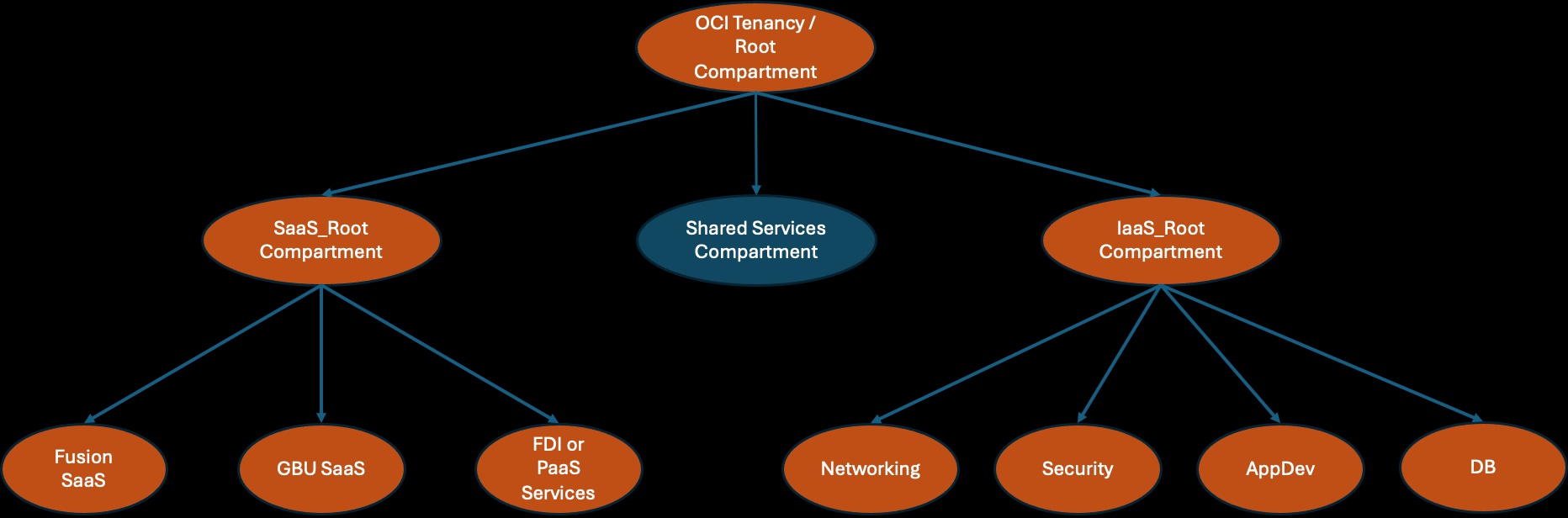
There are, however, some shared resources that live in the root compartment, ex, IAM, Cost and Usage reports, and Cloud Guard recipes. During the tenancy setup, you should (using the break-glass Admin user) create Administrator groups for those services, and write IAM policies to allow those groups to manage respective resources.
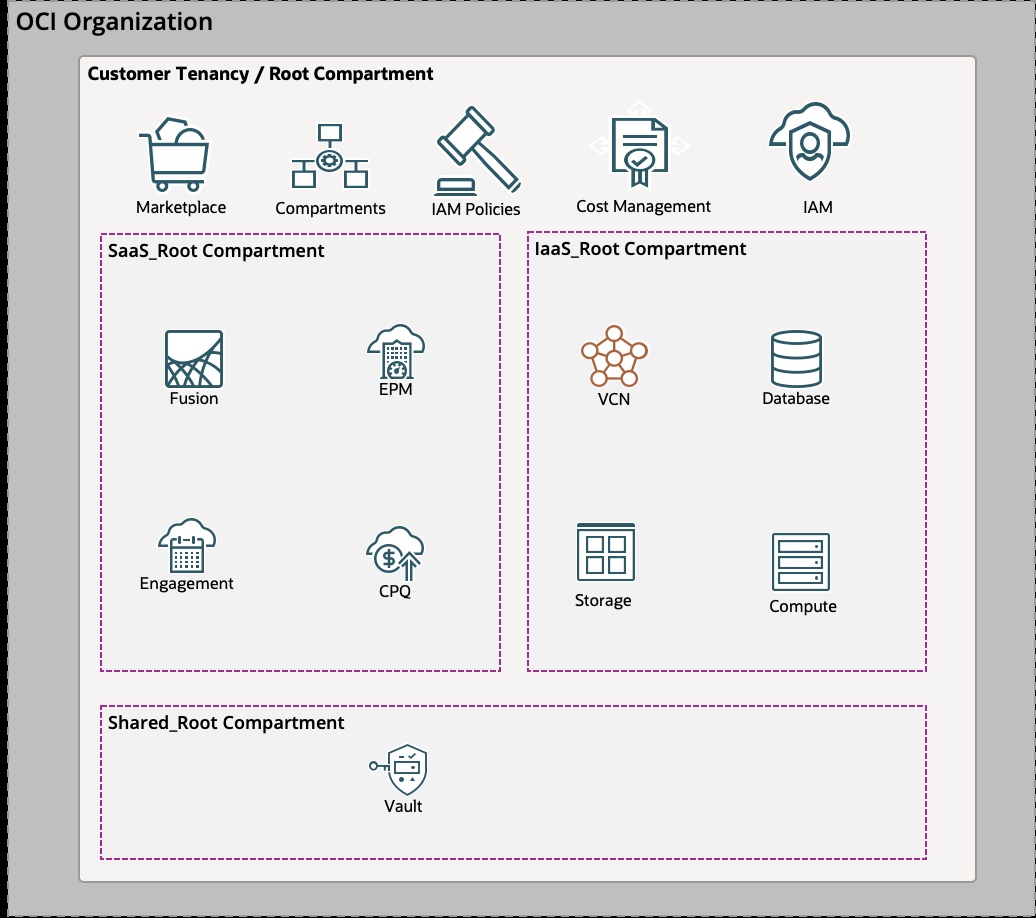
The limitations
- Cost management is a shared responsibility. Both IaaS cost administrators and SaaS cost administrators should have permission to do cost analysis and create usage reports as required. However, there is no way to prevent IaaS administrators from viewing the cost of SaaS services.
- Organization and Subscriptions live in the root compartment. Both the administrators and the shared administrators group will have permission to view and add subscriptions to the tenancy.
Split tenancy Model
If those limits are deal breaker or for any other isolation requirements; you need to split IaaS and SaaS workload in two different tenancies, then setup parent-child relationship between those tenancies to be able to consume UCM subscription in the SaaS workload tenancy. However, read advantages of single tenancy from below before you make the decision.
SaaS and IaaS Tenancies Organization Setup
There are advantages of setting up OCI Organization and create IaaS and PaaS tenancies in the organization as parent-child tenancies. Before you add SaaS tenancy as a child, there is a pre-requisite.
Pre-requisite
To be able to add or invite an existing tenancy to join the organization as a child tenancy, the tenancy has to have either PAYG subscription or an active UCM subscription (it could be $0 UCM subscription or $0 PAYG subscription).
Parent-Child Tenancy setup
To setup IaaS and SaaS tenancies as parent-child you need to follow steps from below guide. https://learnoci.cloud/how-to-invite-a-tenancy-into-your-existing-oci-tenancy-59d17bcbaaf
To learn more about IaaS and SaaS tenancies setup, read one of my blogs from last year. https://www.ateam-oracle.com/post/unified-saas-and-paas-tenancies
Rules of the Game or FAQ
- Can I share subscriptions between the parent and child tenancies?
Ans: Yes, you can share/use subscription from the parent tenancy in the child tenancy. However, you cannot share/use subscription from the child tenancy in the parent tenancy. - Can I use UCM subscription to pay for SaaS services?
Ans: No, you cannot use UCM subscription to pay for SaaS services. - If I have split tenancy model (two or more OCI tenancies), Can I move subscriptions in one unified tenancy?
Ans: No. Once a subscription is activated, it cannot be moved around or transferred to other OCI tenancy. - Can I remove a child tenancy from the organization?
Ans: If the child tenancy is born into an organization (was created from the parent tenancy) then it cannot be emancipated and removed from the organization. However, if the child tenancy was invited to join the organization from the parent tenancy then it can be emancipated and removed from the organization. - Can I add a subscription in an existing tenancy?
Ans: Yes, you can add as many subscriptions as you require in the tenancy. However, tenancy will use only one UCM subscription to pay for IaaS and PaaS resources in the tenancy. - Can I retire a subscription?
Ans: Yes, if the tenancy has more than one UCM subscriptions then you can retire one of the two. However, retiring the last active UCM subscription is not supported. Retiring last active UCM subscription is same as deleting the tenancy. - Does renaming a tenancy have any impact on an organization or subscriptions?
Ans: No. Renaming a tenancy does not change OCID of the tenancy. That is why there is no impact on organization or subscriptions. - How do I add PAYG or UCM subscription to an existing tenancy?
Ans: It is not a self service functionality. Oracle Sales team can help you with that. - Which one of the two tenancies (Tenancy with UCM subscription and IaaS/PaaS resources and Tenancy with SaaS subscriptions) should be the parent?
Ans: Tenancy with UCM subscription should be the parent so that you can share UCM subscription with children tenancies.
Advantages of Single Tenancy
- Single tenancy gives customers a single pane of glass to manage all of their OCI resources, including SaaS application pods, without logging out of the session.
- Building SaaS extensions that interact with or use other IaaS services doesn’t require any Identity synchronization.
- You can take advantage of advanced networking constructs available in OCI with UCM subscription to secure SaaS applications. You can also share networking connectivity setup (fast connect setup) between IaaS workload and SaaS applications.
- With split tenancies, identity data is replicated in every single tenancy. That is an overhead that can be eliminated with single tenancy.
Drawbacks of Single Tenancy
- OCI tenancy Administrators (aka. Break glass users) have God like permission in the entire tenancy. That can be, however, mitigated with a small number of break glass users and strong monitoring on break glass user activities in the tenancy.
Guardrails for the break-glass user
Even though I am drafting break-glass user guardrails in the context of shared IaaS+SaaS tenancy use case, these guardrails apply to IaaS-only or SaaS only tenancy as well.
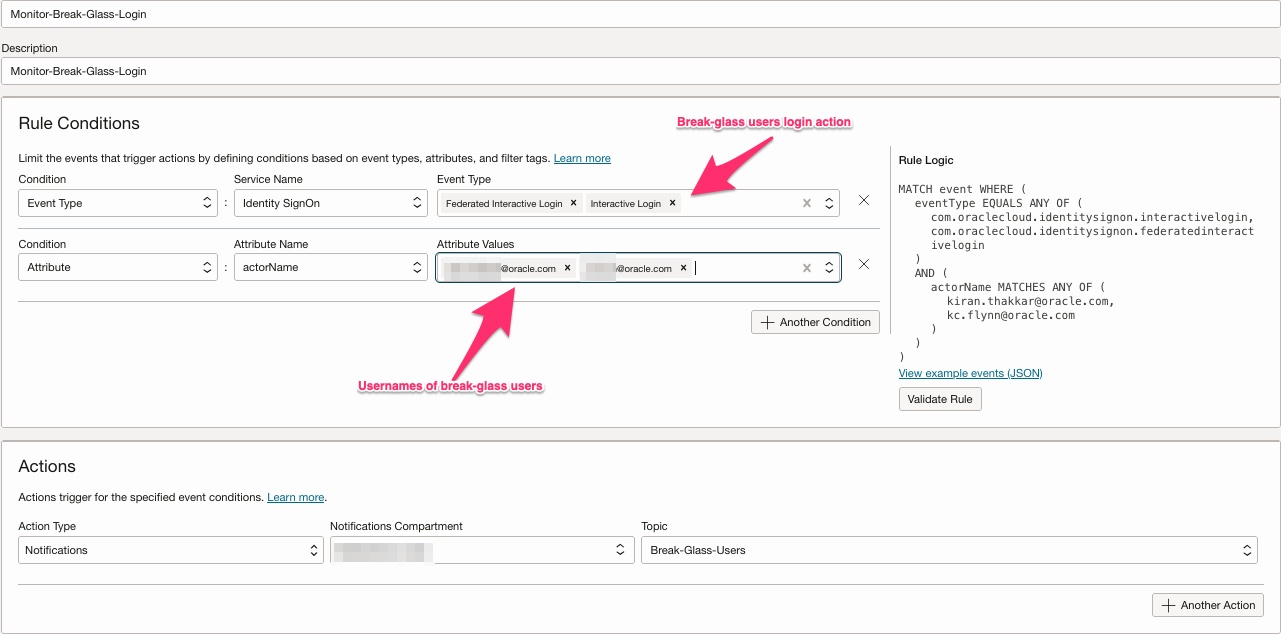
- Any login from break-glass user(s) should be flagged. More than one administrator should be notified of the login activity.
- Any modification to the break-glass user account should be flagged. It could be a malicious user trying to add an API key to the break-glass user account or it could be an attempt to deactivate or delete a break-glass user.
Note: By default OCI prevents User Administrators to delete or deactivate last remanning user from the Administrators group.
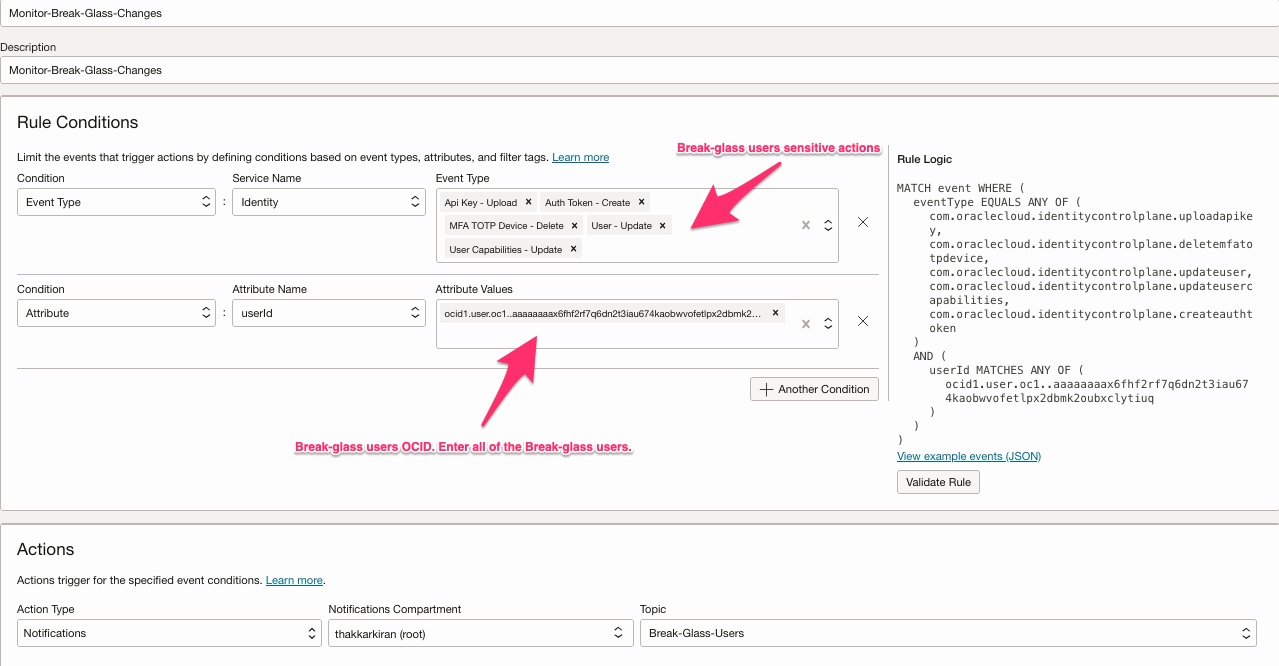
- [Optional] Any Create/Update/Delete operation performed from the break glass user should be monitored.
- No workload administrator, including IAM administrator or SaaS administrator, should have permission to manage the Administrator group.
- Any changes to the Administrator group (updates) must be monitored and flagged.
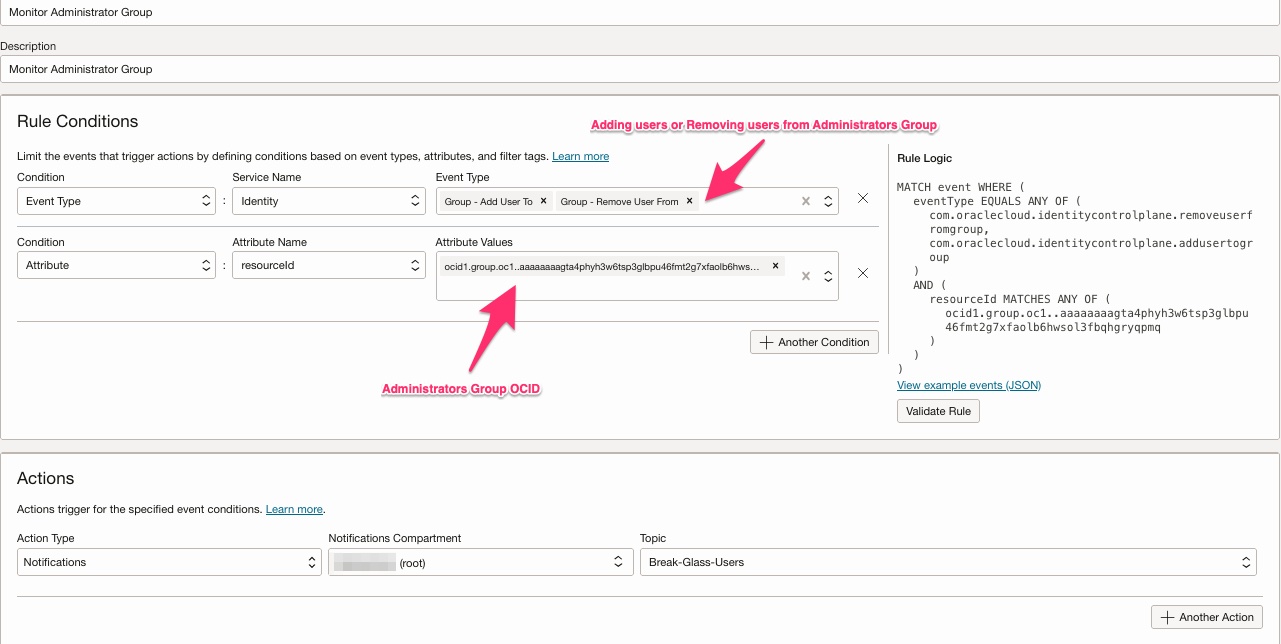
- Identity Domain Administrator or User Administrator users should not be able to add themselves or any other user to the Administrator group.
Key takeaway
In the end, choosing between a single tenancy and a multiple tenancy setup in OCI depends on the balance between simplicity and isolation. A single tenancy offers a unified experience with streamlined identity, administration, and integration across IaaS, PaaS, and SaaS, making it ideal for organizations that value ease of management and seamless extensions. That should be the de facto choice unless there is a strong reason not to.
On the other hand, multiple tenancies provide stronger administrative boundaries and organizational separation, which can be critical for regulatory, lifecycle, or business structure reasons. By carefully weighing these trade-offs—and putting in place the right guardrails, policies, and monitoring—organizations can design a tenancy model that best aligns with their security, governance, and operational needs.