
Introduction
If you are working on AI Agents, you might have heard about model context protocol. MCP is often described as a “USB C for AI applications,” MCP provides a standardized way for large language models (LLMs) to seamlessly interact with external tools, prompts, and data sources. Rather than relying on raw text instructions to access or manipulate external systems, MCP defines a clear protocol for:
- Discovering available tools or APIs
- Exchanging requests and responses in a consistent, structured format
The Model Context Protocol (MCP) is an open standard, introduced by Anthropic, that enables AI language models to connect with external data sources, tools, and prompts in a unified manner. This two-part blog series explores the key components of the Model Context Protocol (MCP) and uncovers the underlying implementation details that are typically hidden behind today’s AI agent SDKs. In this blog, we will begin by creating the OIC Monitoring Agent without MCP integration using OCI Generative AI’s latest Grok model to perform Oracle Integration Cloud (OIC) monitoring tasks through built in tools. Once the agent is in place, we will explore the key MCP components. In the next part of this blog series, we’ll build an OIC Monitoring MCP server and refactor the agent to interact with it, replacing the built-in tools for executing monitoring tasks.
OIC Monitoring Agent without MCP integration
This agent performs Oracle Integration Cloud (OIC) monitoring tasks using built-in tools and is powered by the xai.grok-3-mini model hosted on Oracle Cloud Infrastructure (OCI). The agent is implemented as a Python class. The full implementation is included in this blog in agent code section. Let’s break down the key components of the agent’s code. For a deeper understanding of how AI agents function, you can refer to my earlier blog: AI Agents for Oracle FA: Next-Gen Intelligent Automation
Configuration: The agent is built on the OCI Generative AI service and requires specific configurations to seamlessly run inference using the xai.grok-3-mini model. Before executing the code, make sure to update the following settings based on your OCI environment.
- compartment_id: Your OCI compartment identifier
- config: Path to your local OCI configuration file.
- model_id: The OCID of the xai.grok-3-mini model.
- inference end point: The OCI model inference URL specific to your subscribed region.
Tools: The agent is equipped with four tools designed to perform Oracle Integration Cloud (OIC) monitoring tasks. These tool schemas are defined within the get_available_tools method and are made available to the xai.grok-3-mini LLM, allowing it to recognize and invoke the appropriate function based on the user’s input. Each tool has a corresponding method that carries out the actual monitoring operation. Tool invocation is managed by the execute_tool_call method, which uses the tools_map object to map tool names to their implementations. These tools rely on OIC Monitoring REST APIs. Before running the code, ensure you update the oic_base_url and oicinstance values to match your specific OIC environment.
- runtime_summary_retrieval: This tool provides a high-level overview of the current state of all integration messages within Oracle Integration Cloud. It aggregates and returns a summary of total messages processed, along with counts for successful, errored, and aborted executions. It’s ideal for getting a quick snapshot of overall integration health and performance trends.
- get_integration_message_metrics: Use this tool to dig deeper into the performance of a specific integration flow. By specifying the integration name and a time window, you can retrieve granular message metrics—including counts for total, processed, succeeded, errored, and aborted messages. This is especially useful for monitoring individual flows over time or diagnosing anomalies.
- get_errored_instances: This tool identifies all recently failed integration instances and surfaces them in a prioritized manner based on the most recent update time.
- resubmit_errored_integration: This tool allows you to programmatically resubmit a failed integration instance using its unique ID. It streamlines the recovery process and minimizes manual intervention, improving operational efficiency and reliability.
Tool Authentication: The agent accesses OIC Monitoring REST APIs using a token stored in a local token.txt file. However, in a production environment, the agent should leverage OAuth2 authorization or JWT assertion flow to request an access token from the OIC Identity domain dynamically. For this prototype, simply create a token.txt file containing a valid access token and place it in the same directory as the agent script.
System Prompt: The system prompt establishes the agent’s persona as the OIC Monitoring Agent and outlines its four core capabilities. It includes detailed instructions for each capability to help the agent understand and respond to user queries effectively. This prompt is configured within the process_user_request method.
Process User Query: This method contains the core logic for executing user interactions. It uses the xai.grok-3-mini LLM hosted on OCI, combined with external tools, to interpret user queries, execute relevant tools, analyze outputs, and refine its responses in an iterative loop. All interactions including queries, tool invocations, and results are tracked in an internal messages list, enabling ReAct-style reasoning and final response generation.
Start Chat: The chat loop begins with the start_chat method. It initializes available tools and calls the process_user_request method to handle user input. Responses are displayed in the command line, and users can type quit to exit. You’re welcome to integrate this flow with Streamlit or any other user interface of your choice.
Agent Code
import oci
import json
from mcp import ClientSession, StdioServerParameters, types
from mcp.client.stdio import stdio_client
from typing import List
import asyncio
import nest_asyncio
import requests,json

nest_asyncio.apply()
# OIC Instance URL and Integration Instance ()
oic_base_url="https://xxx.ocp.oraclecloud.com"
oicinstance="integration Instance Part of Design time url"

class Agent_without_MCP:

    def __init__(self):
        # Initialize session and client objects
        self.session: ClientSession = None
        self.available_prompts: List[dict] = []
        self.available_tools: List[dict] = []
        self.compartment_id = "Your OCI compartment identifier"
        self.config = oci.config.from_file('~/.oci/config', "DEFAULT")
        self.model_id="The OCID of the xai.grok-3-mini model"
        self.endpoint = "https://inference.generativeai.us-chicago-1.oci.oraclecloud.com"

    async def process_user_query(self,user_query):
        generative_ai_inference_client = oci.generative_ai_inference.GenerativeAiInferenceClient(config=self.config, service_endpoint=self.endpoint, retry_strategy=oci.retry.NoneRetryStrategy(), timeout=(10,240))
        chat_detail = oci.generative_ai_inference.models.ChatDetails()

        syscontent = oci.generative_ai_inference.models.TextContent()
        syscontent.text = """
        You are The OIC Monitoring Agent designed to help administrators and support teams actively monitor and manage Oracle Integration Cloud runtime activity.
        It provides real‑time insights into integration health and also supports automated remediation actions.

        Core Capabilities:

        1. Runtime Summary Retrieval
        The agent can retrieve an aggregated summary of all messages (integration instances) currently present in the tracking runtime, broken down into:
        - Total messages
        - Processed
        - Succeeded
        - Errored
        - Aborted
        Use **runtime_summary_retrieval** tool to retrieve the data. This gives a quick health snapshot of your OIC environment.

        2. Retrieve Message Metrics for provided Integration and time window
        The agent can retrieve an aggregated summary of messages for specified integration within specified timewindow :
        - Total
        - Processed
        - Succeeded
        - Errored
        - Aborted
        timewindow values: 1h, 6h, 1d, 2d, 3d, RETENTIONPERIOD. Default value is 1h.
        Use **get_integration_message_metrics** tool to retrieve the data.
        This allows you to quickly identify which integrations are generating errors or bottlenecks.

        3. Errored Instances Discovery
        The agent can fetch information about all integration instances with an errored status in the past hour.
        timewindow values: 1h, 6h, 1d, 2d, 3d, RETENTIONPERIOD. Default value is 1h.
        Use **get_errored_instances** tool to retrieve the data.
        Results are ordered by last updated time, making it easy to prioritize the most recent or urgent failures.

        4. Automatic Resubmission of Error Integrations
        For recovery actions, the agent can resubmit an errored integration instance when provided with its unique identifier, helping to automate operational fixes without manual intervention.
        Use **resubmit_errored_integration** tool to resubmit the error instance.
        """

        sysmessage = oci.generative_ai_inference.models.Message()
        sysmessage.role = "SYSTEM"
        sysmessage.content = [syscontent]

        usercontent = oci.generative_ai_inference.models.TextContent()
        usercontent.text = user_query
        usermessage = oci.generative_ai_inference.models.Message()
        usermessage.role = "USER"
        usermessage.content = [usercontent]

        messages = [sysmessage, usermessage]

        chat_request = oci.generative_ai_inference.models.GenericChatRequest()
        chat_request.api_format = oci.generative_ai_inference.models.BaseChatRequest.API_FORMAT_GENERIC
        chat_request.max_tokens = 4000
        chat_request.temperature = 0.3
        #chat_request.top_p = 1
        #chat_request.top_k = 0
        chat_request.tools = self.available_tools

        chat_detail.compartment_id = self.compartment_id
        chat_detail.serving_mode = oci.generative_ai_inference.models.OnDemandServingMode(model_id=self.model_id)

        while True:
            chat_request.messages = messages
            chat_detail.chat_request = chat_request
            response = generative_ai_inference_client.chat(chat_detail)

            if not response.data.chat_response.choices[0].message.tool_calls:
                final_response=response.data.chat_response.choices[0].message.content[0].text
                break
            else:
                tool_calls=response.data.chat_response.choices[0].message.tool_calls
                print("Priting Tool Call Message from Assistant:", tool_calls)
                tool_call_id=tool_calls[0].id
                tool_name=tool_calls[0].name
                tool_args=tool_calls[0].arguments

                toolsmessage = oci.generative_ai_inference.models.AssistantMessage()
                toolsmessage.role = "ASSISTANT"
                toolsmessage.tool_calls=tool_calls
                messages.append(toolsmessage)

            # === 2. handle tool calls ===
            for tool_call in tool_calls:
                tool_result=await self.execute_tool_call(tool_call.name,json.loads(tool_call.arguments))

                print(f'Printing Tool Result : {tool_result}')

                toolcontent = oci.generative_ai_inference.models.TextContent()
                toolcontent.text = tool_result

                toolsresponse = oci.generative_ai_inference.models.ToolMessage()
                toolsresponse.role = "TOOL"
                toolsresponse.tool_call_id=tool_call.id
                toolsresponse.content = [toolcontent]

                messages.append(toolsresponse)

        # Print result
        print("**************************Final Agent Response**************************")
        print(final_response)

    async def get_available_tools(self):
        tools = json.loads(
                '''
                [
                    {
                        "name": "runtime_summary_retrieval",
                        "description": "Use this tool to retrieve the summary of all integration messages by viewing aggregated counts of total, processed, succeeded, errored, and aborted messages.",
                        "type": "FUNCTION",
                        "parameters": {
                            "type": "object",
                            "properties": {}
                        }
                    },
                    {
                        "name": "get_integration_message_metrics",
                        "description": "Use this tool to retrieve message metrics for given integration and time window by viewing aggregated counts of total, processed, succeeded, errored, and aborted messages.",
                        "type": "FUNCTION",
                        "parameters": {
                            "type": "object",
                            "properties": {
                                "integration_name": {
                                    "title": "Integration Name",
                                    "type": "string"
                                },
                                "timewindow": {
                                    "title": "Timewindow",
                                    "type": "string"
                                }
                            },
                            "required": ["integration_name","timewindow"]
                        }
                    },
                    {
                        "name": "get_errored_instances",
                        "description": "Use this tool to find all recently errored integration instances and prioritize them based on the latest update time.",
                        "type": "FUNCTION",
                        "parameters": {
                            "type": "object",
                            "properties": {
                                "timewindow": {
                                    "title": "Timewindow",
                                    "type": "string"
                                }
                            },
                            "required": ["timewindow"]
                        }
                    },
                    {
                        "name": "resubmit_errored_integration",
                        "description": "Use this tool to automatically resubmit a failed integration instance by providing its unique identifier, helping you recover from errors quickly.",
                        "type": "FUNCTION",
                        "parameters": {
                            "type": "object",
                            "properties": {
                                "instanceId": {
                                    "title": "instanceId",
                                    "type": "string"
                                }
                            },
                            "required": ["instanceId"]
                        }
                    }
                ]
                '''
            )
        return tools

    #Tools

    def runtime_summary_retrieval() :
        """Use this tool to retrieve the summary of all integration messages by viewing aggregated counts of total, processed, succeeded, errored, and aborted messages"""
        apiEndpoint = "/ic/api/integration/v1/monitoring/integrations/messages/summary"
        oicUrl = oic_base_url+apiEndpoint+"?integrationInstance="+oicinstance
        print(oicUrl)

        with open("./token.txt", "r") as f:
            token = f.read().strip()

        headers = {
            "Authorization": f"Bearer {token}",
            "Accept": "application/json"
        }

        response = requests.get(oicUrl,headers=headers)
        if response.status_code >= 200 and response.status_code < 300:
            messageSummary = response.json()['messageSummary']
            return (json.dumps(messageSummary))
        else:
            return f"Failed to call events API with status code {response.status_code}"

    def get_integration_message_metrics(integration_name: str,timewindow: str) -> dict:
        """Use this tool to retrieve message metrics for given integration and time window by viewing aggregated counts of total, processed, succeeded, errored, and aborted messages."""

        apiEndpoint = "/ic/api/integration/v1/monitoring/integrations"
        qParameter="{name:'"+integration_name+"',timewindow:'"+timewindow+"'}"
        oicUrl = oic_base_url+apiEndpoint+"?integrationInstance="+oicinstance+"&q="+qParameter
        print(oicUrl)

        with open("./token.txt", "r") as f:
            token = f.read().strip()

        headers = {
            "Authorization": f"Bearer {token}",
            "Accept": "application/json"
        }

        response = requests.get(oicUrl,headers=headers)
        if response.status_code >= 200 and response.status_code < 300:

            integration_details = [{
                "name": item['name'],
                "version": item['version'],
                "noOfAborted": item['noOfAborted'],
                "noOfErrors": item['noOfErrors'],
                "noOfMsgsProcessed": item['noOfMsgsProcessed'],
                "noOfMsgsReceived": item['noOfMsgsReceived'],
                "noOfSuccess": item['noOfSuccess'],
                "scheduleApplicable": item['scheduleApplicable'],
                "scheduleDefined": item['scheduleDefined']
            } for item in response.json()['items']]
            return (json.dumps(integration_details))
        else:
            return (f"Failed to call events API with status code {response.status_code}")

    def get_errored_instances(timewindow: str) -> dict:
        """Use this tool to find all recently errored integration instances and prioritize them based on the latest update time."""

        apiEndpoint = "/ic/api/integration/v1/monitoring/errors"
        qParameter="{timewindow:'"+timewindow+"'}"
        limit="5"
        oicUrl = oic_base_url+apiEndpoint+"?integrationInstance="+oicinstance+"&q="+qParameter+"&limit="+limit
        print(oicUrl)

        with open("./token.txt", "r") as f:
            token = f.read().strip()

        headers = {
            "Authorization": f"Bearer {token}",
            "Accept": "application/json"
        }

        response = requests.get(oicUrl,headers=headers)
        if response.status_code >= 200 and response.status_code < 300:

            error_integration_details = [{
                "instanceId": item['instanceId'],
                "primaryValue": item['primaryValue'],
                "recoverable": item['recoverable'],
                "errorCode": item['errorCode'],
                "errorDetails": item['errorDetails']
            } for item in response.json()['items']]
            return (json.dumps(error_integration_details))
        else:
            return (f"Failed to call events API with status code {response.status_code}")

    def resubmit_errored_integration(instanceId) -> str:
        """Use this tool to automatically resubmit a failed integration instance by providing its unique identifier, helping you recover from errors quickly."""

        with open("./token.txt", "r") as f:
            token = f.read().strip()

        headers = {
            "Authorization": f"Bearer {token}",
            "Accept": "application/json"
        }

        response = requests.post(oicUrl,headers=headers)
        if response.status_code >= 200 and response.status_code < 300:
            return ("Your resubmission request was processed successfully.")
        else:
            return f"Failed to call events API with status code {response.status_code}"

    tools_map = {
        "runtime_summary_retrieval": runtime_summary_retrieval,
        "get_integration_message_metrics": get_integration_message_metrics,
        "get_errored_instances": get_errored_instances,
        "resubmit_errored_integration": resubmit_errored_integration
    }

    async def execute_tool_call(self,tool_name,tool_args):
        # call corresponding function with provided arguments
        return self.tools_map[tool_name](**tool_args)

    async def start_chat(self):
        print("Type your queries or 'quit' to exit.")

        self.available_tools = await self.get_available_tools()

        while True:
            try:
                query = input("Query: ").strip()
                if query.lower() == 'quit':
                    break

                await self.process_user_query(query)
                print("\n")
            except Exception as e:
                print(f"\nError: {str(e)}")

async def main():
    agent_without_mcp = Agent_without_MCP()
    await agent_without_mcp.start_chat()

if __name__ == "__main__":
    asyncio.run(main())
MCP Core Components
The Model Context Protocol (MCP) is designed with a modular and extensible framework, allowing smooth interaction between LLM based applications and external integrations. At its core, MCP adopts a client–server approach: the server publishes resources, prompt templates, and executable tools, and the client consumes and applies them hosted inside an AI agent or an LLM based applications.
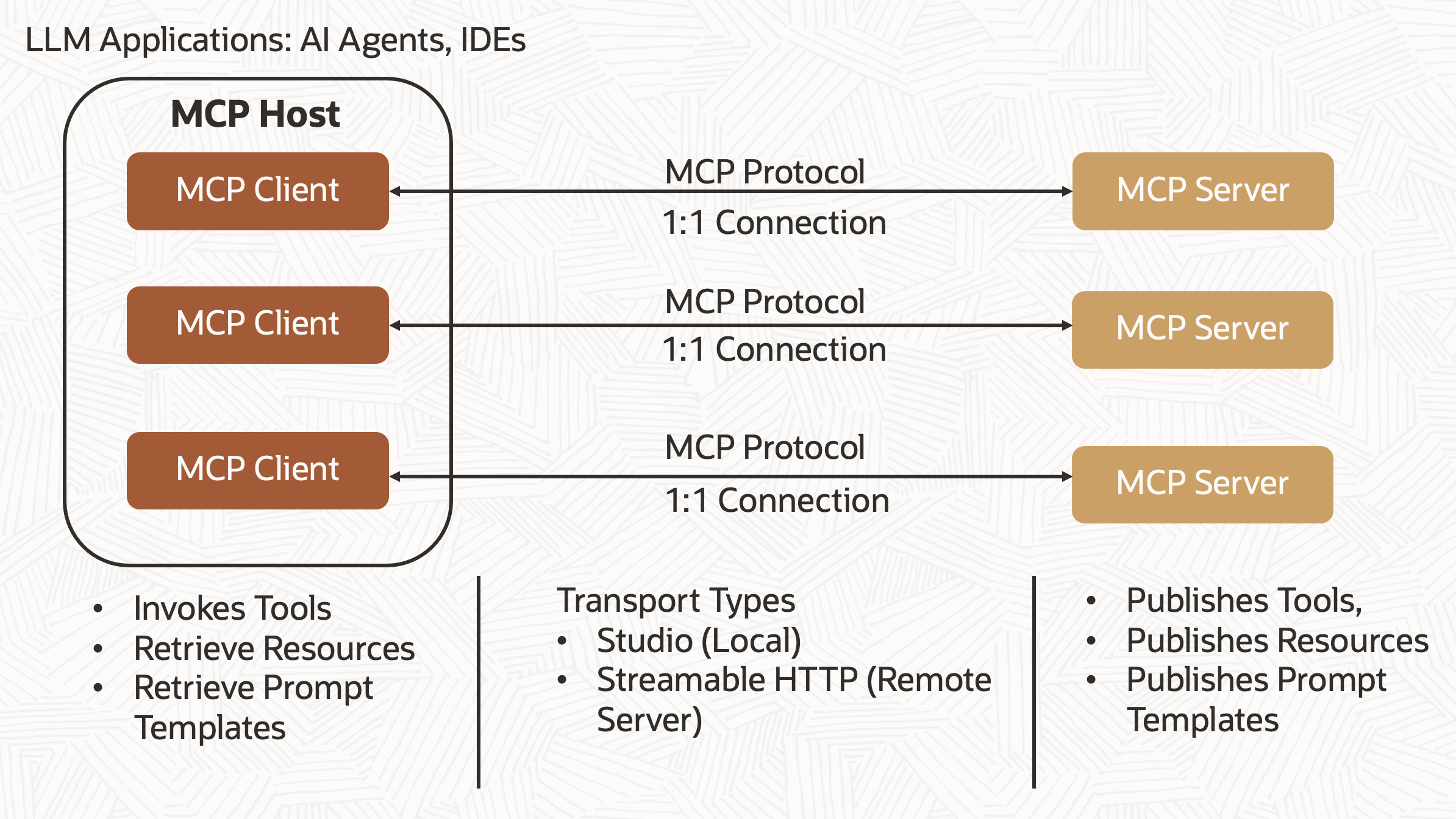
MCP Server: MCP server can be built to integrate with Oracle Databases, file systems, OCI services, or many other products. A wide range of ready‑to‑use MCP servers are available on the official GitHub repository. The Oracle Database team has also introduced their own MCP server for database access, detailed here. We will develop OIC Monitoring MCP server that enables administrators and support teams to actively track and manage Oracle Integration Cloud runtime activity.
- Tools: These are callable functions, the Agent can execute to perform tasks or pull live data. Examples include fetching files from object storage, creating compartment, performing calculations, or invoking APIs. Tools are “model‑driven,” meaning the language model decides when and how to use them during its reasoning. We will build four tools that provide real time visibility into integration health and support automated remediation. These tools will retrieve an aggregated summary of all messages, fetch message metrics for a specific integration, obtain details of errored integration instances, and resubmit any errored integration instance.
- Resources: These are read‑only data that supply additional context—such as files, records from a database, or policy documents. Resources essentially act as an extended memory or reference library that the Agent can query through the client.
- Prompts: These are pre‑configured prompt templates or instruction sets related to the server’s domain. They help shape how the Agent interacts with a given tool—for instance, by showing how to structure a SQL query or by outlining steps to use an instructions-based action. Prompt definitions are typically provided by whoever developed the server. We will design a prompt template that enables the OIC monitoring agent to carry out tasks in response to user queries.
MCP Client: The MCP Client is a lightweight component that sits between the MCP Host (LLM‑powered application or AI agent) and an MCP Server (the service exposing tools, resources, and prompts). It is responsible for establishing and managing the connection to the server and for translating the server’s advertised capabilities into something the host can use.
MCP Host: The MCP Host is the main LLM‑powered environment or application that the end user interacts with such as a Claude desktop app, any LLM‑powered Application or AI agent. It oversees the entire lifecycle of an interaction between the user, and connected MCP servers. It can connect to multiple servers at the same time (each via its own MCP Client). We will build OIC Monitoring Agent as host application.
How MCP Communicates: The Model Context Protocol (MCP) leverages the JSON-RPC 2.0 standard to handle communication between clients and servers. Each client-server connection is managed as a separate session, it supports basic function calls, real-time data streaming, and dynamic context sharing. MCP’s transport layer officially supports Stdio and Streamable HTTP + SSE, with custom implementations as needed.
Stdio (Standard I/O)
- The default transport for local tools, where the client launches the server as a child process.
- Communication happens over stdin and stdout
- Ideal for embedding MCP servers within local tools or agent frameworks.
Streamable HTTP (HTTP POST + SSE)
- Enables remote or network based MCP servers to operate independently.
- Clients POST JSON-RPC messages to a designated endpoint, and optionally open a Server-Sent Events (SSE) stream to receive responses and server-initiated notifications.
Conclusion
In the first part of this blog series, we built an OCI Monitoring Agent that performs Oracle Integration Cloud (OIC) monitoring tasks using built-in tools and explored the core components of the Model Context Protocol (MCP). In the next part, we’ll take it a step further to create OIC monitoring MCP server and replace these built-in tools and system prompts with custom MCP tools and prompt templates.