
Overview
To make Multi Cloud easy, Oracle released a new feature this month. Workload Identity Federation enables access to Oracle cloud resources without storing static credentials. It can be used to access (use, provision, or manage) OCI resources from GitLab CI/CD, GitHub Action, or from any other CSP.
Any OCI API requires a valid service token. If you run workload or OCI Infrastructure as Code (IaC) (aka. Terraform script) on OCI instance, then you can use OCI instance principal to invoke OCI API. However, suppose the workload or IaC script is running outside of OCI. In that case, you must use static credentials (API key) to generate a User Principal Service Token (UPST) and invoke the OCI API. To avoid using static credentials, Oracle has implemented Workload Identity Federation (WIF). Using WIF, you can configure OCI IAM to trust external Identity Provider (IDP) JWT tokens. Once the trust relationship is established, you can exchange the IDP JWT token for an OCI UPST. OCI UPST can be used to invoke OCI APIs. UPST tokens, also known as temporary tokens, are valid for 60 minutes.
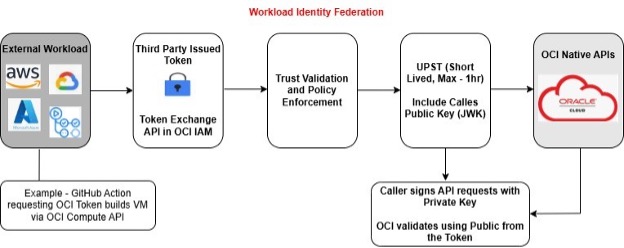
Workload Identity Federation Workflow
Workload Identity Federation requires one time setup (trust configuration setup) using IAM domain Administrator. Once the setup is done, the workload can exchange IDP JWT tokens for OCI UPST tokens.
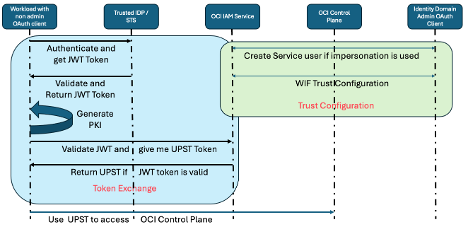
Terminology and Concepts
Service User
A Service User is an Identity Domain user without interactive login privileges. These users can be granted to groups and service roles. Customer workload or applications can impersonate to service users using WIF. Using a Service User is optional. If user impersonation is used as part of the Trust configuration, then Service Users are needed. Otherwise, any other identity domain user is used. Only identity domain administrators can create, replace, update or delete a Service User. Other administrators may read Service Users and their attributes.
Service Users have the following characteristics:
- Must have a userName. First name and last name isn’t required.
- Can have an email address (Optional).
- Can be a member of groups and application roles.
- Can’t have API keys.
- Can’t use self-service endpoints.
- Can’t have passwords and password policies don’t apply.
Identity Impersonation
When you run token exchange, you can exchange user X’s JWT token for user X’s OCI UPST token. That does not require user impersonation. However, often, IaaS code scripts are run as non-human (application) identities. To support those use cases, OCI IAM supports user impersonation. Using impersonation, you can get a service user’s token in exchange for an application’s JWT token. Using the token, the application will assume the same role/permissions as that of the service user. Note: You cannot impersonate an incoming JWT token to a regular OCI IAM user.
Token Exchange Service
Token Exchange Service will issue temporary tokens in exchange for Trusted partner’s tokens. These tokens can take logged-in users’ context, or they can impersonate a Service User at runtime. Token Exchange Service has the following core elements.
- Token Exchange API – API to get a UPST Token in exchange for OCI API Keys and Third party-issued tokens – This API will allow multi-cloud workloads to obtain UPST Tokens for their IDP-issued tokens. UPST tokens can then be used to access OCI resources and carry the user context to the endpoint.
- Trust Configuration – will allow customers to define the following details of a trusted partner:
- Trusted Partner Details – Provider Name, Token Type, Issuer Details with Certificate / Public
- Authorized Caller – This will contain a list of OCI Service Principals or OAuth Clients who are allowed to get tokens for a specific trusted partner.
- Audience Claim Validation – This will contain the list of Audiences to which IDP Token was issued. By validating audience claims, we will make sure that the recipient of the UPST token is correct.
- User Impersonation Conditions – This configuration will allow customers to define if the resulting token should contain the authenticated user as the subject or if it should impersonate another Service User in IAM.
- Session Duration – Defined the validity of Temporary UPST
- Trust Validation – At run time, the following security checks will be performed by Token Exchange Service
- The caller is authorized to make Token Exchange end-point calls.
- The caller is authorized to get a UPST token for the trusted partner defined in the IDP Token
- The incoming token (JWT Token) is issued by a Trusted Partner. By doing signature validation of the Trusted partner’s public key/certificate.
- The IDP-issued token contains the Audience Claims defied in the Trust Configuration. This will ensure that we are issuing a Temporary Token to the Client who got the IDP-issued token in the first place. You can configure OCI IAM to perform validation on any claim from the JWT token.
- Token issuance – Once all the validations described in the Trust Validations are passed, the Token issuance service will issue a UPST token with the subject as a logged-in user or impersonated Service User after evaluating claims in the incoming IDP Token. The token should contain an authenticated username, the impersonated Service Username, and the audience.
- Token Usage and Expiry – The UPST token issued by the Token Exchange Service can then be used to access OCI Native APIs. The token will automatically expire after the defined period.
- The duration of UPST will be calculated based on the minimum of (IDP Issued token remaining duration, API Supplied value, 60 minutes).
Workload Identity Federation Implementation
The implementation is divided into two steps.
Trust Configuration
Trust configuration is a one-time step to configure OCI IAM to trust IDP tokens. This is done by OCI IAM domain administrator. The easiest way is to create an OAuth client with Identity Domain Administrator privilege and use OAuth client to configure the trust.
Create OAuth Client
An OAuth client is a trusted application registered with Identity domain to obtain access token and perform administrative operations on the Identity Domain. To create an application follow the steps from Create Confidential Application.
You require two confidential applications (OAuth clients) to use workload Identity Federation.
- Trust configuration with the IDP and service user creation in identity domain requires an Identity Domain Administrator OAuth client app. We will refer to this app as Domain Admin OAuth client.
- To exchange JWT token for OCI token, you have to invoke (/oauth2/v1/token) endpoint on Identity Domain. It is an authenticated endpoint. You can create a confidential application without any app role for this use case. We will refer to this app as Token Exchange OAuth client.
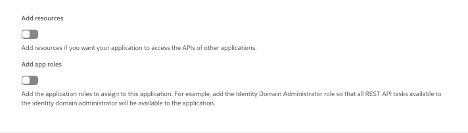
Note: While creating the confidential applications, choose Identity Domain Administrator App role for the Domain Admin OAuth client. For Token Exchange OAuth client, do not select any app role. For both the OAuth clients, select client credentials grant type. Those configurations are shown in the below screenshots.
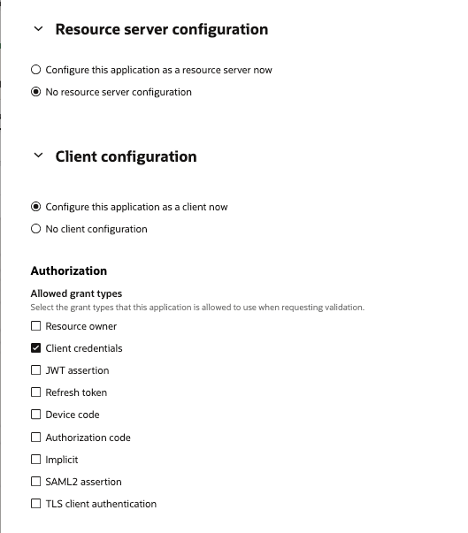
Domain Admin App role for Domain Admin OAuth Client
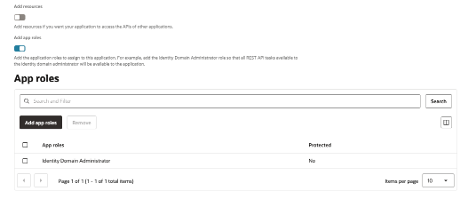
No App role for Token Exchange OAuth Client
Creation of OAuth Token
Once the Domain Administrator OAuth client is created, note down ClientID and clientSecret of the OAuth client. We will use them to generate OAuth token. Below is the API to generate OAuth token. The response is access token. We will use the access token to configure trust and create service user if you are planning to use Identity Impersonation. Save the access token as ADMIN_OAUTH_TOKEN. We will use that in service user creation and trust configuration API call.
Service User Creation
Service user creation is required if you plan on doing user impersonation. Refer to Trust configuration section to learn more about impersonation. The response of the service user creation will include userID and user OCID. We use OCID of the service user in user impersonation rules configuration. Replace $IAM_DOMAIN_URL with the URL of Identity domain in your tenancy.
curl --location 'https://$IAM_DOMAIN_URL/admin/v1/Users' \
--header 'Authorization: Bearer $ADMIN_OAUTH_TOKEN' \
--header 'Content-Type: application/json' \
--data '{
    "schemas": [
        "urn:ietf:params:scim:schemas:core:2.0:User"
    ],
    "urn:ietf:params:scim:schemas:oracle:idcs:extension:user:User": {
        "serviceUser": true
    },
    "userName": "ServiceUser"
}'
Identity Propagation Trust Configuration
Trust configuration is the heart of WIF setup. This is where we configure OCI IAM to trust JWT tokens generated from an IDP and issue UPST tokens in return. IdentityPropagationTrusts endpoint is a SCIM endpoint and supports all four CRUD operations. Update operation is supported using patch operation. Once the trust is created, you can get the trust configuration using the GET API. However, it only returns trust configuration without impersonation attribute. To get impersonation configuration, you can use the second GET API call as documented below.
curl --location 'https://$IAM_DOMAIN_URL/admin/v1/IdentityPropagationTrusts' \
--header 'Authorization: Bearer $ADMIN_OAUTH_TOKEN’ \
--header 'Content-Type: application/json' \
--data '$PAYLOAD'

curl --location 'https://$IAM_DOMAIN_URL/admin/v1/IdentityPropagationTrusts' \
--header 'Authorization: Bearer $ADMIN_OAUTH_TOKEN'

curl --location 'https://$IAM_DOMAIN_URL/admin/v1/IdentityPropagationTrusts?attributes=impersonationServiceUsers,issuers' \
--header 'Authorization: Bearer $ADMIN_OAUTH_TOKEN'
Below are the parameters of trust configuration payload.
Issuer is the providerID of the IDP Authorization service.
oauthClients multi-values, specifies OAuth clients that are authorized to use the trust configuration and exchange JWT token for UPST token. This is unique to Identity domains. Most cloud provider support WIF as unauthenticated endpoint. However, it is an authenticated endpoint and the client has to authenticate using OAuth client.
publicKeyEndpoint – this is the location of the JWKS URL if it is accessible or exists. If it does not, you can upload the x509 public key of the Token Provider.
publicCertificate – if public JWKS is not routable or exists – add the certificate directly to the trust configuration to establish the cryptographic integrity of the tokens. You will just need to remember when that certificate expires and rotate it accordingly when a new signing cert is replaced at the token issuer.
clientClaimName – this is an additional authorization mechanism (which is optional) to check to see if another claim inside of the incoming JWT token is present. If the correct Claim and Claim Value are not present in the token – the token exchange will be not authorized.
clientClaimValues – multi-valued, Accepted claim values for clientClaimName attribute as above.
allowImpersonation – Boolean value to indicate if you want to support impersonation to service accounts. If you set allowImpersonation to false, then UPST token is returned for the same user as the JWT token. To map the user, Identity domain uses subjectClaimName attribute and tries to map that attribute to subjectMappingAttribute in Identity Domain.
Payload without Impersonation
{
    "active": true,
    "allowImpersonation": false,
    "issuer": "https://sts.idp.com/",
    "name": "Token Trust JWT to UPST",
    "oauthClients": [
        "25dxxxxxxxxxx6"
    ],
    "publicKeyEndpoint": "$JWK_URI_IDP",
    "publicCertificate": "

   ",
    "clientClaimName": "

    ",
    "clientClaimValues": [
        "Value1, Value2, Value3"
    ],
    "subjectClaimName": "sub",
    "subjectMappingAttribute": "userName",
    "subjectType": "User",
    "type": "JWT",
    "schemas": [
        "urn:ietf:params:scim:schemas:oracle:idcs:IdentityPropagationTrust"
    ]
}
Payload with Impersonation
{
    "active": true,
    "allowImpersonation": true,
    "issuer": "https://sts.idp.com/",
    "name": "Token Trust JWT to UPST",
    "oauthClients": [
        "25dxxxxxxxxxx6"
    ],
    "publicKeyEndpoint": "$JWK_URI_IDP",
    "publicCertificate": "

   ",
    "clientClaimName": "

    ",
    "clientClaimValues": [
        "Value1, Value2, Value3"
    ],
    "impersonationServiceUsers": [
        {
            "rule": "hd eq ktdemos.com",
            "value": "52ee42e90dfb4135b648152e1e1f2576"
        },
        {
            "rule": "hd eq rbdemos.com",
            "value": "8afcf2982aab4b29a747f37b888787bb"
        }
    ],
    "subjectType": "User",
    "type": "JWT",
    "schemas": [
        "urn:ietf:params:scim:schemas:oracle:idcs:IdentityPropagationTrust"
    ]
}
One can specify several rules to specify which resulting principal is going to impersonate based on token claim name and value conditions.
"impersonationServiceUsers": [
    {
        "rule": "sub eq *",
        "OCID": "OCID of the serviceuser1"
    },
    {
        "rule": "grp co xyz_admin",
        "value": "OCID of the serviceuser2"
    }
]
• Allow a specific impersonating principal for all the IDP authenticated users. Or
• Multiple rules/conditions:
- Based on Token claim name
- Condition: contains (co) or equals (eq)
- Value
- Can be a string
- Array of values and complex/composite values are not supported.
- With equals condition wildcard * is allowed.
- With contains condition wildcard * is not supported
- Impersonating principal.
| Rule |
Service user Value |
Sample JWT Claim |
Mapped Service User |
Result |
| “sub” eq * |
ServiceUserX |
“sub” : “UserXYZ” |
ServiceUserX |
All the authenticated users are eq * impersonated with IAM’s service user serviceUserX. The resulting UPST contains serviceUserX as the authenticated user principal. |
| “grp” co “xyz_admin” |
xyzAdmin |
“grp”: [“xyz_admin”, “abc_admin”] |
xyzAdmin |
Authenticated users who belong to the “xyz_admin” are impersonated with service user xyzAdmin. The resulting UPST contains service user xyzAdmin as the authenticated user principal. |
| “serviceuser” co “xyz” |
Xyz |
“serviceUser”: “xyzUser” |
Xyz |
Based on the custom claim, the resulting UPST contains service user xyz as the authenticated user principal. |
- In case of impersonation allowed, the token exchange resulting OCI security token (UPST), will have original authenticated user related claim (source_authn_prin) as well to indicate on whose behalf impersonation is done.
- If subject claim name is configured, it will be used to extract that claim value.
- If subject claim name is not configured, defaults to “sub” in the incoming token. If “sub” claim itself is not present, ignore.
- How multiple rules get evaluated? If any of them is matching (stops with the first matched rule), then retrieve the corresponding resulting principal using the display name attribute. If none of them matches, then token request results out an error.
Token Exchange
The workload that is trying to access OCI will use token exchange endpoint (/oauth2/v1/token) to exchange JWT token for OCI UPST token.
OCI enforces Proof-of-Possession requirement for any OCI API. That does not change with WIF. Before you exchange IDP JWT token for OCI UPST, you have to generate PKI. Use the private key from PKI to sign requests. The public key is embedded into the UPST token. To do that, you have to include public key in the payload for token exchange API call.
Steps to Generate PKI
Use the following commands in a terminal (Linux/macOS) or Git Bash on Windows:
# Generate a 2048-bit RSA private key
openssl genrsa -out private_key.pem 2048
# Extract the public key in PEM format
openssl rsa -in private_key.pem -pubout -out public_key.pem
After running these:
- private_key.pem is the private key, used to sign the JWT.
- public_key.pem is the public key, used by OCI to verify the JWT signature.
Token Exchange API
The Token Exchange API is invoked by the workload at runtime when it needs an OCI token to access OCI resources/APIs. You will use the Token Exchange OAuth client credentials as captured in the curl request below to invoke the token exchange API. It was a deliberate decision by the OCI security team to make the token exchange API an authenticated API, thereby enforcing better security. The IDP_JWT_TOKEN in the payload below is the JWT token obtained from the trusted IDP. PUBLIC_KEY is the public key that you generated in the last step without any whitespaces and without “begin public key” and “end public key” markers.
curl --location 'https://$IAM_DOMAIN_URL/oauth2/v1/token' \
--header 'Content-Type: application/x-www-form-urlencoded' \
--header 'Authorization: Basic $BASE64ENCODED($TOKEN_EXCHANGE_CLIENTID:$TOKEN_EXCHANGE_CLIENTSECRET' \
--data-urlencode 'grant_type=urn:ietf:params:oauth:grant-type:token-exchange' \
--data-urlencode 'requested_token_type=urn:oci:token-type:oci-upst' \
--data-urlencode 'subject_token=$IDP_JWT_TOKEN' \
--data-urlencode 'subject_token_type=jwt' \
--data-urlencode 'public_key=$PUBLIC_KEY'
The response of the API call is a UPST token. You can use that token to invoke OCI APIs.
Conclusion
In a multi-cloud setup, workload identity federation will act as a glue to make multi-cloud possible. By enabling secure and seamless authentication across cloud providers, it eliminates the need for managing long-term credentials and simplifies access to resources across environments. This approach not only enhances security but also improves operational efficiency and developer experience. As organizations increasingly adopt hybrid and multi-cloud strategies, identity federation becomes a critical enabler—bridging gaps between platforms, reducing complexity, and laying the foundation for scalable, resilient, and secure cloud architectures.
Before I conclude, Sample code to exchange GCP token and Entra token for OCI UPST token are in the works and will be published very soon.
So stay tuned!