
Connecting and sharing data across diverse systems is crucial in modern software development. Almost every application requires communication and data exchange with various services, both internally and externally. This is where an event-driven integration becomes particularly useful. An event-driven integration allows you to share information about events (a.k.a state change) which occur in your systems, and downstream applications listen to those events and update their state accordingly if necessary. This approach allows decoupled systems in a distributed architecture to easily communicate and work with each other effectively.
This idea can be leveraged and applied in handling changes to your IAM (Identity & Access Management) resources, such as users or groups, as well. If you’ve been in the identity management space for a while, you’ve probably encountered the concept of “IAM events.” If not, no worries—let’s start with the basics.
A change to a IAM resource is referred to as an “IAM event“. Here are few common examples:
- User creation (New Joinee)
- Group creation
- Change in user’s department (Job transfer)
- Disabling an user account (Termination)
- Locking an user account (due to certain no.of wrong password attempts)
- Adding an user to a group (Granting additional access)
- User’s API key creation
As a result of a specific IAM event, you may wish to trigger an action. This action could involve either notifying downstream applications about the event or executing a specific function/code to accomplish a particular task. For example, you may wish to notify a system administrator when a new employee joins the company, or invoke an access review when an employee’s role changes.
Event Driven Integration with OCI IAM (Identity & Access Management)
Based on my recent discussions with several Oracle Cloud customers about their needs related to integrating OCI IAM events with their applications, I found it valuable to put something together on this topic.This blog post provides you high level details for implementing OCI IAM events based integration by utilizing OCI Events servcie.
OCI IAM service is critical for managing security and ensuring proper access controls in your Oracle cloud tenancy, as well as in applications within the organization.
OCI Events Service monitors changes to resources (e.g., user identities) through events, allowing developers to automatically respond to changes in real-time by triggering code execution, writing to streaming service, or sending alerts using Notifications.
OCI IAM service emits events whenever there’s a change to IAM resources mentioned below (it’s more than just user identities).
- User
- Group
- IAM Policy
- API Key
- Auth Token
- Other resources.
Here is a sample list of possible state changes, per IAM resource type, for which events are emitted.
| User | Group | IAM Policy | API Key | Auth Token |
|
|
|
|
|
To capture an event as soon it’s generated, you need have an event rule in place that allows you take an appropriate action. Here are high level steps to do this.
- Create an event rule using OCI Events Service. Select Event Type, Service Name and Event Type as per your need.
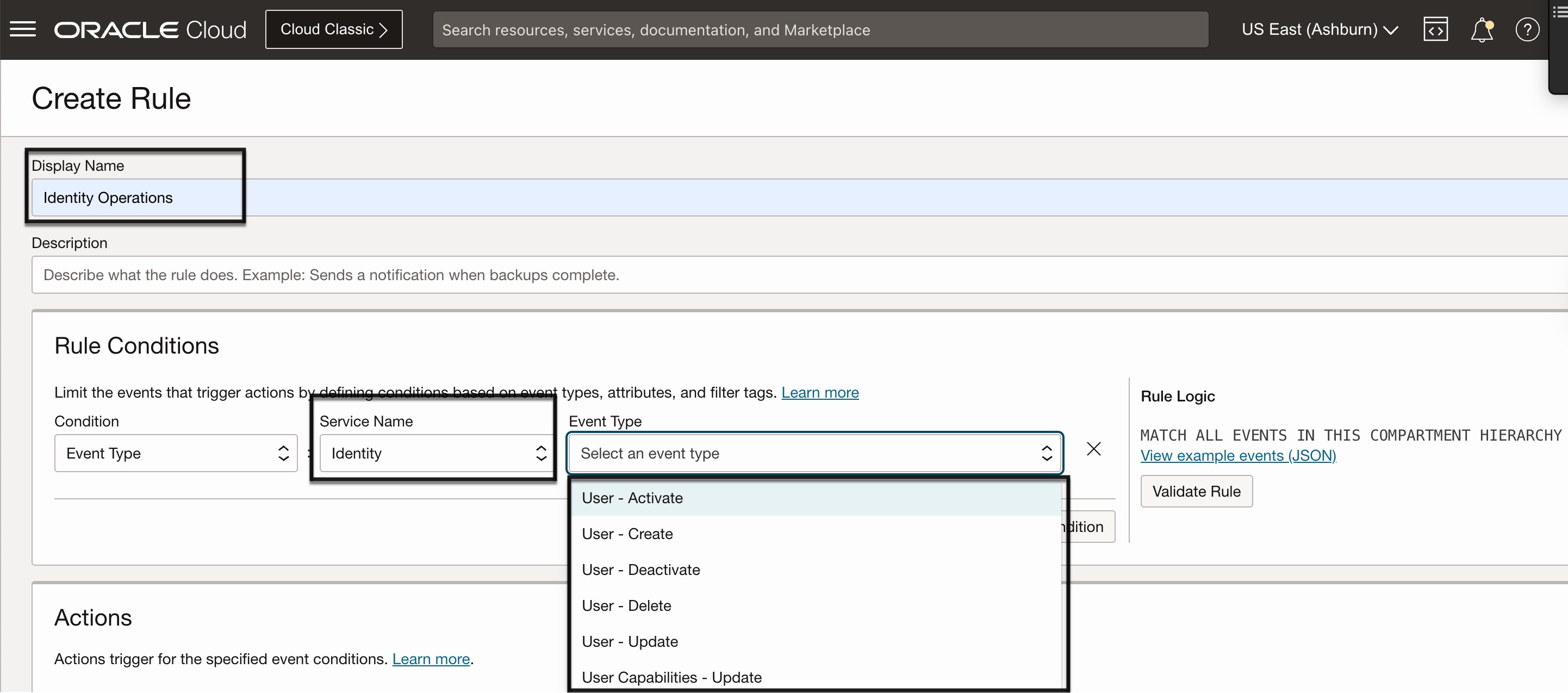
- Configure appropriate action that drives how you would like to process the generated event.
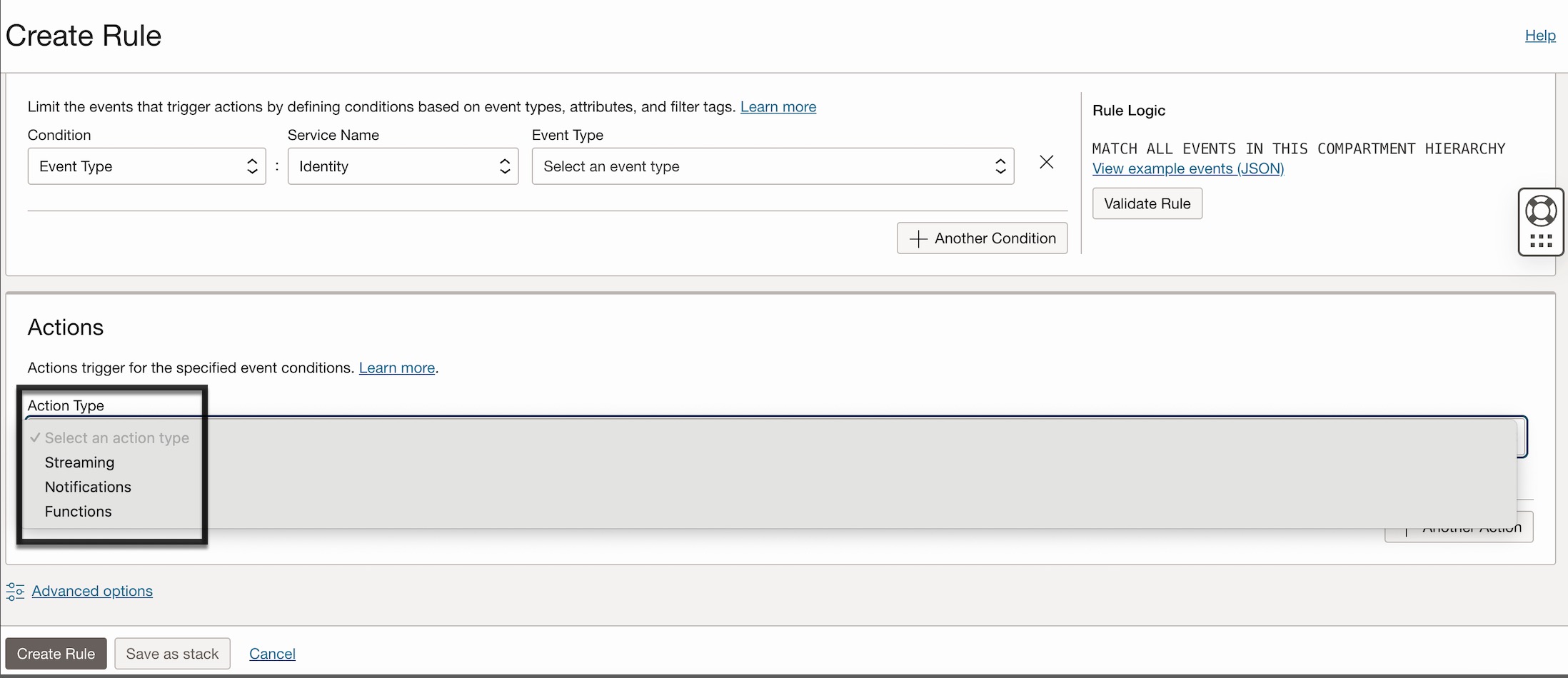
As shown in the above picture, action type could be one of below types.
- Streaming
- Notifications
- Functions
Streaming: This action type allows you to push IAM event information to a Kafka-based OCI stream. Once the information is available in the stream, it can be either pushed to or pulled by your downstream applications, such as a SIEM system.
Notification: This action type allows you to notify IAM event details to a required party (human or a subscripton endpoint) through supported channels mentioned below.
- SMS
- Slack
- PagerDuty
- HTTPS Custom Endpoint
Functions: This action type allows you to trigger a code execution to carry out a specific job in your downstream applications. This option is more suited for your custom use cases.
Note: While action types “Streaming” and “Notifications” are essentially “Fire and Forget” methods (unidirectional), the “Function” action type (bi-directional) allows you to execute your code/script to take action in downstream applications, receive responses from those applications, and, if necessary, updates your IAM resource based on the response.
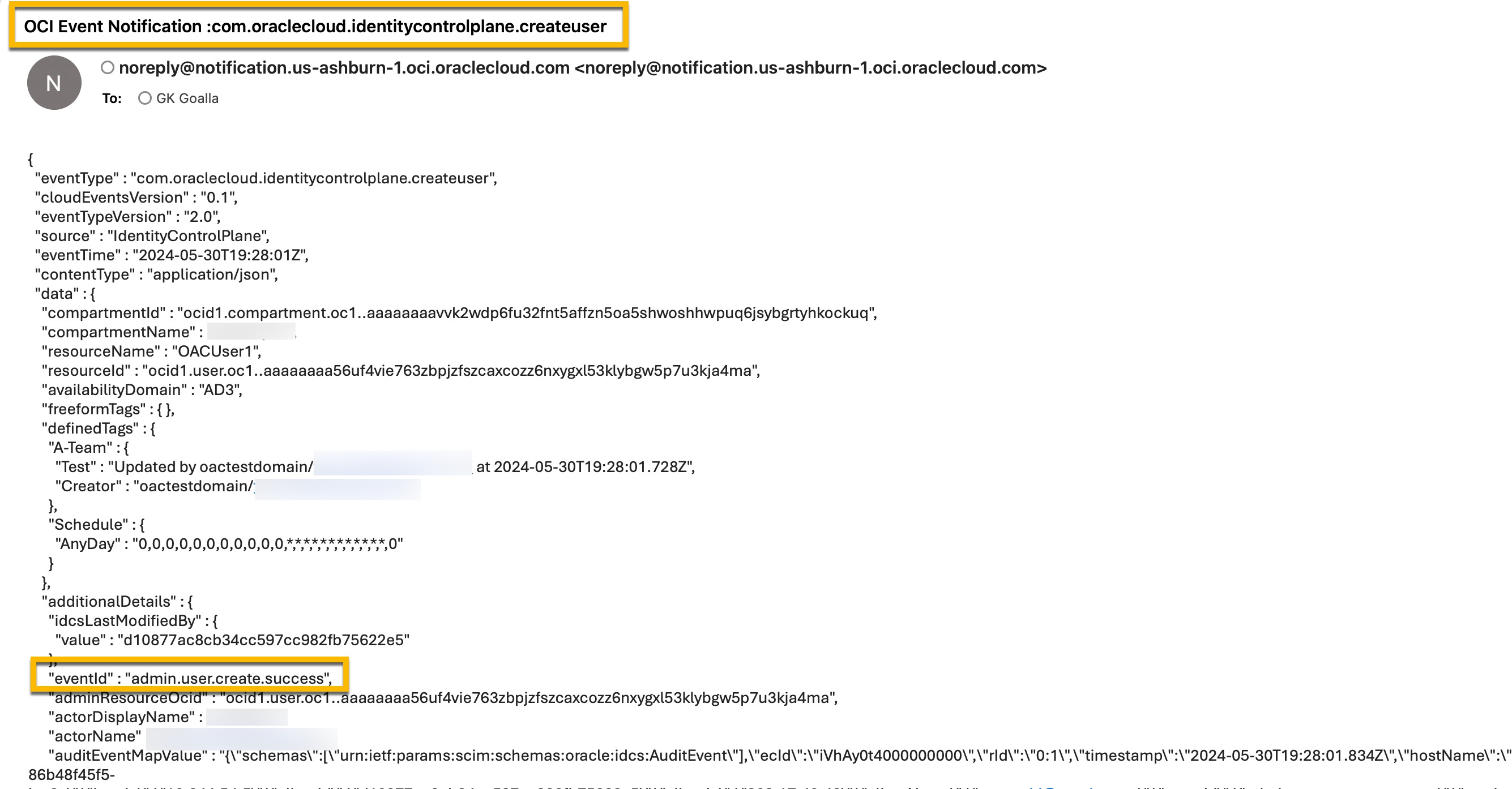
When OCI IAM emits an event that matches the condition specified in the event rule, the event will be intercepted, and the corresponding action type will be triggered. Each event’s information is emitted in the form of a JSON payload. For example, for the “create user” operation, the IAM service emits an event as shown below.
Conclusion:
Integrating IAM events with your downstream applications using the OCI IAM and Events services offers a robust and efficient way to manage and respond to changes in real-time. By leveraging event-driven integration, organizations can enhance their security posture, streamline workflows, and ensure seamless communication between decoupled systems. This approach not only improves operational efficiency but also provides the flexibility to adapt to evolving business needs and technological advancements. Implementing these integrations can ultimately lead to more resilient and responsive identity management systems.
In this blog post, Part 1, we explored what IAM events-based integration is and Oracle’s approach to addressing this use case. In the next installment of this series, you will dive into a hands-on approach with a practical use case. Stay tuned!