

Introduction
This is my first partnership with Emily and in this blog we will explain the steps needed to secure an Object Storage Object.
We will start by creating the required IAM policies to access the Object and we will finish with the restriction of the access from a specific IP address to that Object.
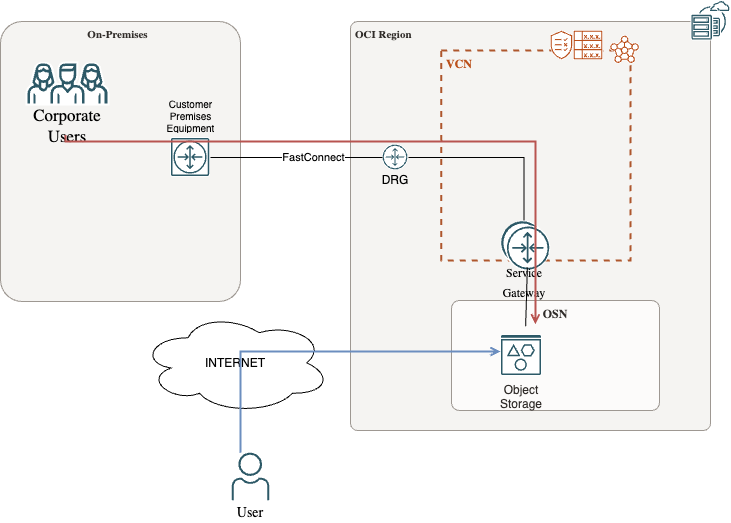
We will follow two different scenarios depicted in the diagram below. In the first scenario the User connects to the Object Storage Endpoint via the Internet, the connection goes dirrectly to the object Storage. In the second scenario, the user connects from on-prem via Fastconnect or IPSEC connection or from a subnet in the VCN. The connection from on-prem goes to DRG and from there to the Service Gateway and from there to the Oracle Services Network (OSN) which includes the Object Storage.
During the post we will use API calls to test the access to the Object Storage Object, and configuration of the OCI CLI and the python SDK will not be shown and it needs to be configured by the reader following the official documentation.
The CLI can be installed locally on a laptop (we used it in both Windows linux subsystem – Ubuntu and on MacOS), or on a Compute Linux VM in the OCI. The documentation for installing the OCI CLI can be found here and the documentation for the python OCI module can be found here.
In order to be able to follow the post you need to understand OCI Identity concepts like: Policy Syntax, How the policies work and Securing Object Storage.
Create the Necessary IAM policies
Before creating the policies, the user should understand the concept of Policy Inheritance (check the “Policy Inheritance” section from the “How Policies Work” document).
As a summary, if you are trying to restrict a group of users, that already have “super-powers”, will not work.
We created the following artefacts:
- an user-group called “AccessGroup” and assigned a user to the group;
- an Object Storage Bucket called “AccessBucket”with an object called “some.file”
Following the Securing the Object Storage we created the IAM policies which allows listing and reading objects by group AccessGroup from a specific bucket named AccessBucket.
Allow group AccessGroup to read buckets in tenancy
Allow group AccessGroup to manage objects in tenancy where all {target.bucket.name='AccessBucket', any {request.permission='OBJECT_INSPECT', request.permission='OBJECT_READ'}}
Allow group AccessGroup to read buckets in tenancy
Allow group AccessGroup to manage objects in tenancy where all {target.bucket.name='AccessBucket', any {request.permission='OBJECT_INSPECT', request.permission='OBJECT_READ'}}
For the purpose of testing the policies, we used the API Object Storage ListObjects and followed the PythonSDK example.
Bellow you can see the python code:
import oci
config = oci.config.from_file(profile_name="xxxx")
#if you are using the DEFAULT profile, delete the profile_name="xxx"
object_storage_client = oci.object_storage.ObjectStorageClient(config)

list_objects_response = object_storage_client.list_objects(
    namespace_name="xxxx",
    bucket_name="AccessBucket",
)
print(list_objects_response.data)
import oci
config = oci.config.from_file(profile_name="xxxx")
#if you are using the DEFAULT profile, delete the profile_name="xxx"
object_storage_client = oci.object_storage.ObjectStorageClient(config)

list_objects_response = object_storage_client.list_objects(
    namespace_name="xxxx",
    bucket_name="AccessBucket",
)
print(list_objects_response.data)
The script will return the following result:
kawa@192-168-0-153 os % python3 os.py
{
  "next_start_with": null,
  "objects": [
    {
      "archival_state": null,
      "etag": null,
      "md5": null,
      "name": "some.file",
      "size": null,
      "storage_tier": null,
      "time_created": null,
      "time_modified": null
    }
  ],
  "prefixes": null
}
kawa@192-168-0-153 os % python3 os.py
{
  "next_start_with": null,
  "objects": [
    {
      "archival_state": null,
      "etag": null,
      "md5": null,
      "name": "some.file",
      "size": null,
      "storage_tier": null,
      "time_created": null,
      "time_modified": null
    }
  ],
  "prefixes": null
}
Restrict access from a specific Public IP Address
Each access request to the Object Storage is evaluated and based on the policies it will be allowed or denied.
With the set of policies we setup so far, the access is allowed to the Users that are part of the AccessGroup.
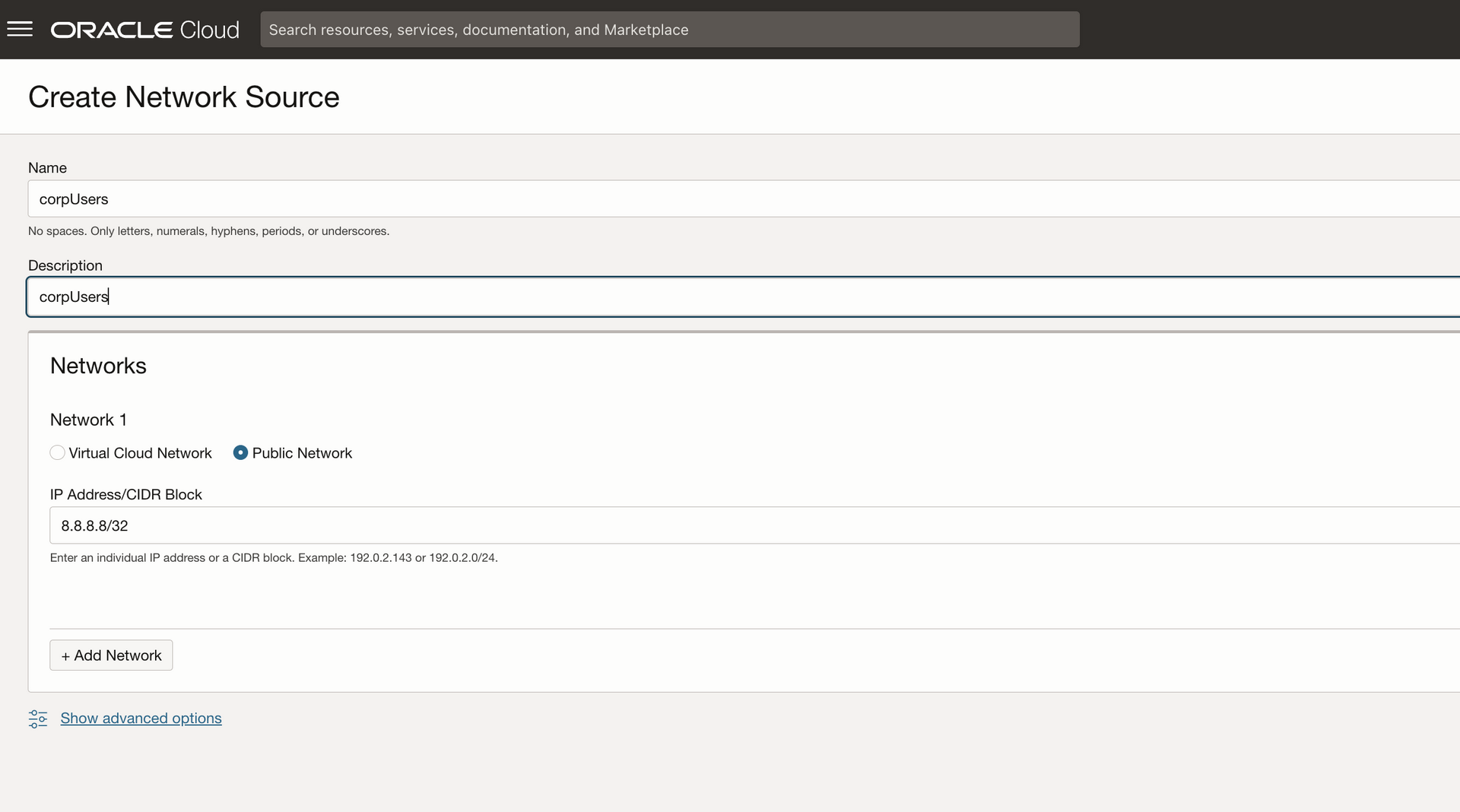
If we want to restrict access to the Object Storage from a specific public IP address, we need to create a Network Sources and attach it to the IAM Policy.
Please be extra careful when you are connecting the the Object Storage from a corporate network which is NAT-ing your traffic towards the Internet. The IP addresses that will be configured in the Network Sources must the the NAT IP address and not the IP address of your Computer.
Bellow i created a Network Sources called “corpUsers”with a Public Network of 8.8.8.8/32.
Edit the previous IAM Policy to use the Network Sources:
Allow group AccessGroup to read buckets in tenancy
Allow group AccessGroup to manage objects in tenancy where all {target.bucket.name='AccessBucket', any {request.permission='OBJECT_INSPECT', request.permission='OBJECT_READ'}, request.networkSource.name='corpUsers'}
Allow group AccessGroup to read buckets in tenancy
Allow group AccessGroup to manage objects in tenancy where all {target.bucket.name='AccessBucket', any {request.permission='OBJECT_INSPECT', request.permission='OBJECT_READ'}, request.networkSource.name='corpUsers'}
Running the python script will provide the following output:
kawa@192-168-0-153 os % python3 os.py
Traceback (most recent call last):
  File "/Users/kawa/1/os/os.py", line 6, in <module>
    list_objects_response = object_storage_client.list_objects(
                            ^^^^^^^^^^^^^^^^^^^^^^^^^^^^^^^^^^^
  File "/opt/homebrew/lib/python3.11/site-packages/oci/object_storage/object_storage_client.py", line 3964, in list_objects
    return retry_strategy.make_retrying_call(
           ^^^^^^^^^^^^^^^^^^^^^^^^^^^^^^^^^^
  File "/opt/homebrew/lib/python3.11/site-packages/oci/retry/retry.py", line 308, in make_retrying_call
    response = func_ref(*func_args, **func_kwargs)
               ^^^^^^^^^^^^^^^^^^^^^^^^^^^^^^^^^^^
  File "/opt/homebrew/lib/python3.11/site-packages/oci/base_client.py", line 531, in call_api
    response = self.request(request, allow_control_chars, operation_name, api_reference_link)
               ^^^^^^^^^^^^^^^^^^^^^^^^^^^^^^^^^^^^^^^^^^^^^^^^^^^^^^^^^^^^^^^^^^^^^^^^^^^^^^
  File "/opt/homebrew/lib/python3.11/site-packages/circuitbreaker.py", line 159, in wrapper
    return call(function, *args, **kwargs)
           ^^^^^^^^^^^^^^^^^^^^^^^^^^^^^^^
  File "/opt/homebrew/lib/python3.11/site-packages/circuitbreaker.py", line 170, in call
    return func(*args, **kwargs)
           ^^^^^^^^^^^^^^^^^^^^^
  File "/opt/homebrew/lib/python3.11/site-packages/oci/base_client.py", line 718, in request
    self.raise_service_error(request, response, service_code, message, operation_name, api_reference_link, target_service, request_endpoint, client_version, timestamp, deserialized_data)
  File "/opt/homebrew/lib/python3.11/site-packages/oci/base_client.py", line 875, in raise_service_error
    raise exceptions.ServiceError(
oci.exceptions.ServiceError: {'target_service': 'object_storage', 'status': 404, 'code': 'BucketNotFound', 'opc-request-id': 'phx-1:phx5MtUoSNla5UeyPQ6F-gmc9o5rJCSiKVrhyJQFQ_75urC-8FDr0Fc_4QYa1pKA', 'message': "Either the bucket named 'AccessBucket' does not exist in the namespace 'xxxx' or you are not authorized to access it", 'operation_name': 'list_objects', 'timestamp': '2023-07-22T14:04:24.581146+00:00', 'client_version': 'Oracle-PythonSDK/2.104.2', 'request_endpoint': 'GET https://objectstorage.us-phoenix-1.oraclecloud.com/n/git-test/b/AccessBucket/o', 'logging_tips': 'To get more info on the failing request, refer to https://docs.oracle.com/en-us/iaas/tools/python/latest/logging.html for ways to log the request/response details.', 'troubleshooting_tips': "See https://docs.oracle.com/iaas/Content/API/References/apierrors.htm#apierrors_404__404_bucketnotfound for more information about resolving this error. Also see https://docs.oracle.com/iaas/api/#/en/objectstorage/20160918/Object/ListObjects for details on this operation's requirements. If you are unable to resolve this object_storage issue, please contact Oracle support and provide them this full error message."}
kawa@192-168-0-153 os % python3 os.py
Traceback (most recent call last):
  File "/Users/kawa/1/os/os.py", line 6, in <module>
    list_objects_response = object_storage_client.list_objects(
                            ^^^^^^^^^^^^^^^^^^^^^^^^^^^^^^^^^^^
  File "/opt/homebrew/lib/python3.11/site-packages/oci/object_storage/object_storage_client.py", line 3964, in list_objects
    return retry_strategy.make_retrying_call(
           ^^^^^^^^^^^^^^^^^^^^^^^^^^^^^^^^^^
  File "/opt/homebrew/lib/python3.11/site-packages/oci/retry/retry.py", line 308, in make_retrying_call
    response = func_ref(*func_args, **func_kwargs)
               ^^^^^^^^^^^^^^^^^^^^^^^^^^^^^^^^^^^
  File "/opt/homebrew/lib/python3.11/site-packages/oci/base_client.py", line 531, in call_api
    response = self.request(request, allow_control_chars, operation_name, api_reference_link)
               ^^^^^^^^^^^^^^^^^^^^^^^^^^^^^^^^^^^^^^^^^^^^^^^^^^^^^^^^^^^^^^^^^^^^^^^^^^^^^^
  File "/opt/homebrew/lib/python3.11/site-packages/circuitbreaker.py", line 159, in wrapper
    return call(function, *args, **kwargs)
           ^^^^^^^^^^^^^^^^^^^^^^^^^^^^^^^
  File "/opt/homebrew/lib/python3.11/site-packages/circuitbreaker.py", line 170, in call
    return func(*args, **kwargs)
           ^^^^^^^^^^^^^^^^^^^^^
  File "/opt/homebrew/lib/python3.11/site-packages/oci/base_client.py", line 718, in request
    self.raise_service_error(request, response, service_code, message, operation_name, api_reference_link, target_service, request_endpoint, client_version, timestamp, deserialized_data)
  File "/opt/homebrew/lib/python3.11/site-packages/oci/base_client.py", line 875, in raise_service_error
    raise exceptions.ServiceError(
oci.exceptions.ServiceError: {'target_service': 'object_storage', 'status': 404, 'code': 'BucketNotFound', 'opc-request-id': 'phx-1:phx5MtUoSNla5UeyPQ6F-gmc9o5rJCSiKVrhyJQFQ_75urC-8FDr0Fc_4QYa1pKA', 'message': "Either the bucket named 'AccessBucket' does not exist in the namespace 'xxxx' or you are not authorized to access it", 'operation_name': 'list_objects', 'timestamp': '2023-07-22T14:04:24.581146+00:00', 'client_version': 'Oracle-PythonSDK/2.104.2', 'request_endpoint': 'GET https://objectstorage.us-phoenix-1.oraclecloud.com/n/git-test/b/AccessBucket/o', 'logging_tips': 'To get more info on the failing request, refer to https://docs.oracle.com/en-us/iaas/tools/python/latest/logging.html for ways to log the request/response details.', 'troubleshooting_tips': "See https://docs.oracle.com/iaas/Content/API/References/apierrors.htm#apierrors_404__404_bucketnotfound for more information about resolving this error. Also see https://docs.oracle.com/iaas/api/#/en/objectstorage/20160918/Object/ListObjects for details on this operation's requirements. If you are unable to resolve this object_storage issue, please contact Oracle support and provide them this full error message."}
Because we do not originate the API call from 8.8.8.8/32, the request is rejected with
oci.exceptions.ServiceError: {'target_service': 'object_storage', 'status': 404, 'code': 'BucketNotFound', 'opc-request-id': 'phx-1:phx5MtUoSNla5UeyPQ6F-gmc9o5rJCSiKVrhyJQFQ_75urC-8FDr0Fc_4QYa1pKA', 'message': "Either the bucket named 'AccessBucket' does not exist in the namespace 'xxxx' or you are not authorized to access it"
oci.exceptions.ServiceError: {'target_service': 'object_storage', 'status': 404, 'code': 'BucketNotFound', 'opc-request-id': 'phx-1:phx5MtUoSNla5UeyPQ6F-gmc9o5rJCSiKVrhyJQFQ_75urC-8FDr0Fc_4QYa1pKA', 'message': "Either the bucket named 'AccessBucket' does not exist in the namespace 'xxxx' or you are not authorized to access it"Restrict Access to Object Storage from a VCN
If the originator of the API call is a VM in an Public Subnet from a VCN which will get to the Object Storage REST Endpoint via the Internet Gateway, the Network Sources will use the Public IP Address of the VM.
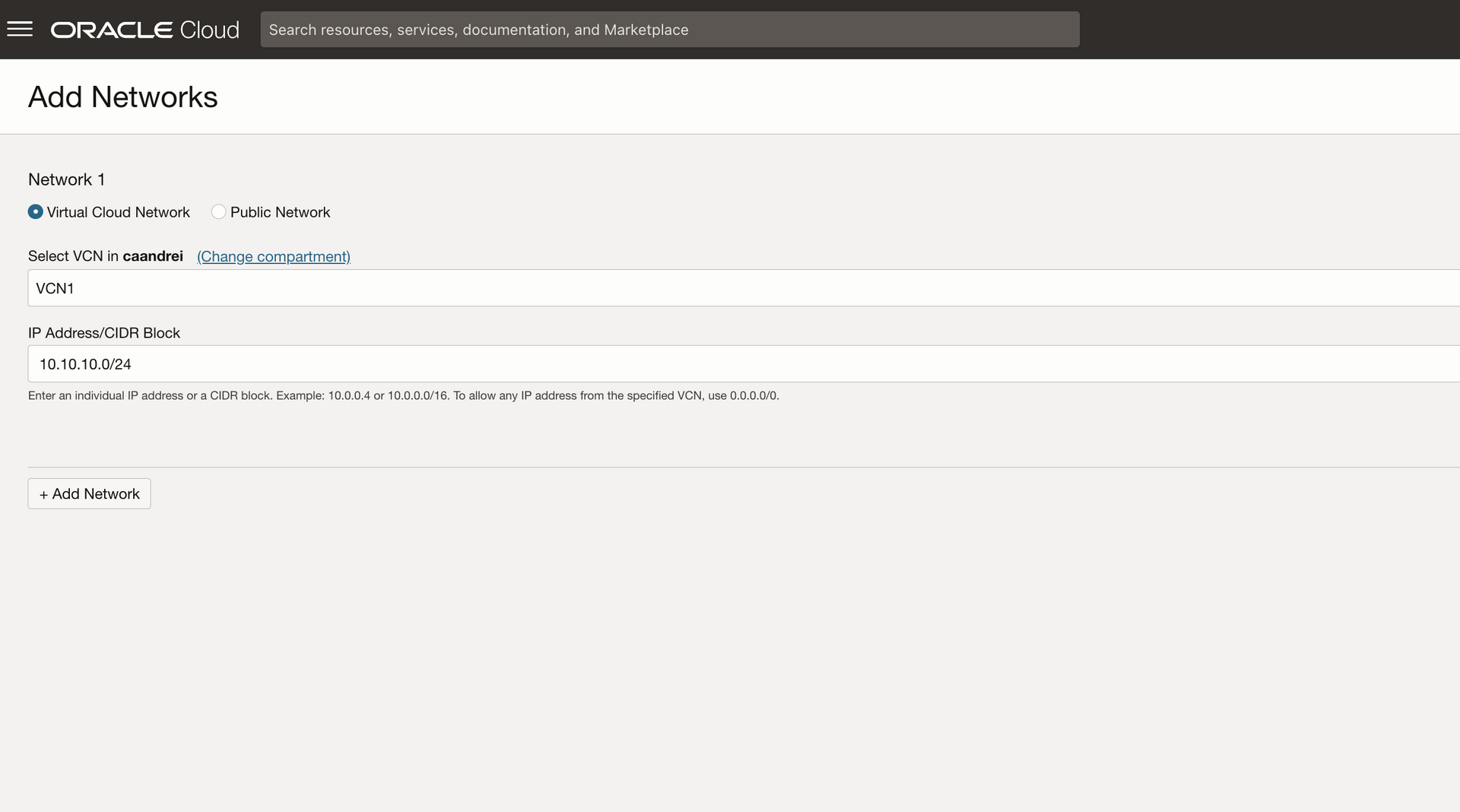
If the originator of the API call is a VM in a Private Subnet from a VCN, or Users from on-prem connecting via VPN or FastConnect, the request will be routed via the Service Gateway.
When adding these Networks to the Network Sources we will select the VCN where the Service Gateway is attached. By default the CIDR of the VCN is added. You can modify it and put the CIDR that best suites your need (a subset of the VCN or another VCN that connects via LPG or DRG or the CIDR of the on-prem).
Conclusion
The Object Storage REST API endpoint has a Public IP address and by default it has global reachability.
Enterprises are looking to restrict the access to the Objects from specific IP addresses (either public IP addresses or their on-prem networks) in order to reduce the attack surface.
This post showed the required steps needed to secure the Object Storage.