Hitesh Patel, Senior Principal Product Manager, Analytics Apps for CX
Validation
Content validated on 04/14/2023 with
ADW Version Oracle Database 19c Enterprise Edition Release – Production Version 19.11.0.0.0
Oracle Cloud Application 22C (11.13.22.07.0)
Fusion Analytics Warehouse Application Version 23.R1
Salesforce Developer Edition
Background
Oracle Fusion Analytics provides analytics for Oracle Cloud applications, powered by Autonomous Data Warehouse and Oracle Analytics. More specifically:
Fusion ERP Analytics provides accounting data sourced from ERP Cloud in a warehouse designed to support broad set of analytics use cases.
Fusion HCM Analytics provides comprehensive workforce, turnover data sourced from Fusion HCM Cloud.
Fusion SCM Analytics give customers the ability to gain visibility into Supply Chain performance, correlate Supply Chain processes with business goals and detect, understand and predict Supply Chain issues.
Making the right business decisions is intrinsinclty tied to the system of records data accuracy of a company. In many specific use cases, Fusion Analytics data can be complemented with additional data from external source such as On Premise, Legacy applications, Non Fusion SaaS application, OCI source, Third party cloud applications, and so on…
To support these data enrichment and consilidation requirements, Fusion Analytics is introducing a new Connectors to leverage the Fusion Analytics Oracle data pipeline infrastructure to extract data (full and incremental) from these external sources following a defined schedule, potentially reducing custom data extraction code, infrastructure and platform costs.
We have cover in this previous blog how to use Oracle Analytics Cloud (OAC) to extract data from Salesforce to Autonomous Data Warehouse (ADW) and in this one how to use Oracle Data Integrator (ODI) to achieve the same goal.
This blog describes how to utilize Fusion Analytics (FAW) Data Augmentation feature to replicate transaction data from Salesforce Cloud Applications into ADW to extend the Data Layer of FAW. This blog will also covers the high level steps to extend the semantic model to ultimately allow customers to answer business questions and gaining business insight such as :
Opportunity conversion: As open sales opportunities move through the stages of sales, a sales executive wants to track the progress so that he/she can guide their team members
Bookings and Revenue by Customers and/or Channels or Regions
Forecast accuracy : As a sales/business executive, compute and manage open opportunities to bookings
Average resolution time : Compute and manage/improve resolution of customer issues 
Customer retention: An executive in customer support or customer experience organization needs to track and manage customer satisfaction leading to customer retention, in many industries such as retail, banking, financial services, etc.
Lead generation : Gaining the interest of potential customers in order to increase future sales
For more details on Salesforce Data Augmentation and Semantic Model Extensions, please refer to my previous blog here.
This blog also share the artefacts that Fusion Analytics and Salesforce users can use as a starting point to analyze Salesforce data, that is :
Data Augmentation Bundles
SQL Views (to allow snowflake modeling)
Semantic Model Extensions Bundles
OAC Visualization Bundles
To conclude, this blog will walk through how to deploy these artefacts into a target environment.
* Have configured SQL level access to Fusion Analytics ADW, as described in Krithika and Gunaranjan blog post here.
* Have the Salesforce connector enabled for your Fusion Analytics tenant through Service Request with Oracle Support
Architecture Overview
FAW Data Augmentation allows customers to leverage the FAW data pipeline to augment reports with datasets created :
By adding a new dimension in the target instance,
By adding a new fact in the target instance.
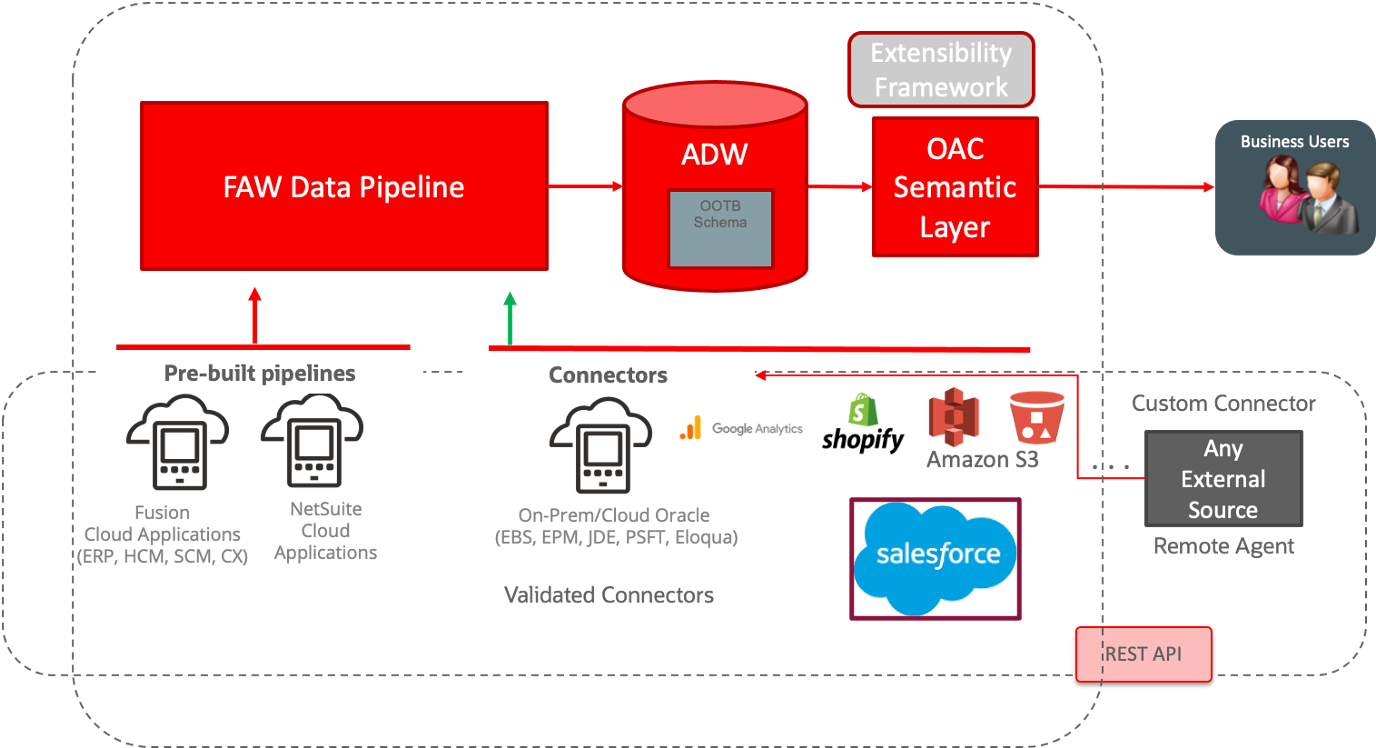
The diagram below details the architecture for the Connectors :
Figure 1: FAW Data Augmentation flow with Salesforce Connectors
The high level configuration flow is as follow:
FAW Data Augmentation
Create the Salesforce connection
Create Dimensions and Fact Data Augmentation on Salesforce source tables
Choose Attributes for the Data Augmentation
Select dimensions to be mapped with Fact columns
Save and Schedule the data augmentation pipeline jobs
FAW Data Pipeline processes the data augmentation pipeline jobs, extract the data from Salesforce tables and load it into ADW, queryable via synonyms starting with DW_SAR_X
Augmented data can be then queried directly using OAC Data set or a SQL client like SQL developer, through the database synonym named after the table name give in the first step
Semantic model can be extended by customizing an existing subject area or addition of a new subject area to allow reporting on augmented data extracted in ADW. This will require the creation of database objects (views and grants). We will cover the basics here to be able to build a visualization against the extracted Salesforce Data.
Star Schemas
The Salesforce bundles are covering seven subject areas. This section describes the star schemas for each for these subject areas
Salesforce Opportunity
The Opportunity Subject Area contains the necessary facts and dimensions that will allow an analysis of opportunities in the current pipeline.
By exposing key related objects, namely, Opportunity, Customer, Contact, Sales Resource (Employee) and Competitor, the subject area makes it possible to build reports for comprehensive analysis around these contexts. All key metrics, are exposed at a opportunity header level and a separate subject area will be exposed to analyze revenue line details. Win-loss analysis against competition is a key area of interest to sales executives and this subject area supports it with a focus on product performance.
The Business Questions it allows to answer are:
What is the Pipeline for the Current Quarter and how is the closed pipeline trend for the last three quarters?
What is the Pipeline by Sales stage?
What are the Opportunities in the same stage for more than a month and who is the owner of that Opportunity?
What are the most likely reasons the Opportunities are lost against our key competitors?
Who has won and lost the most number of Opportunities in the last 4 quarters?
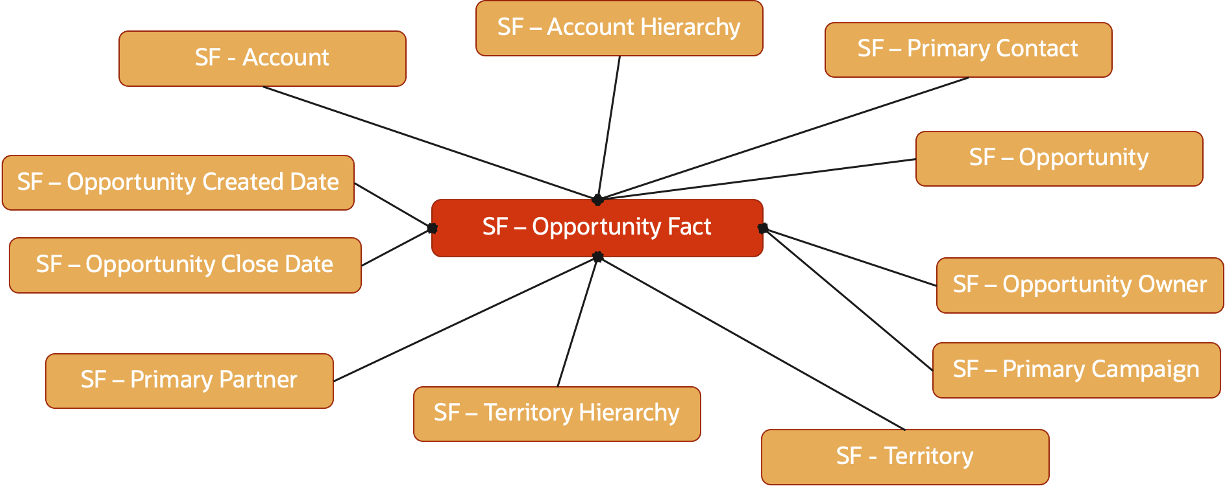
Below star schema details the Opportunity fact
Figure 2: Opportunity Fact Star Schema
Salesforce Opportunity Revenue Line
The Opportunity Revenue Line Subject Area contains the necessary facts and dimensions that will allow an analysis of opportunities in the current pipeline.
The Business Questions it allows to answer are:
What Products have the most number of Won Opportunities?
What is the Quantity of Products won in the last quarter vs Current quarter?
What Product revenue is increasing QoQ at the highest rate?
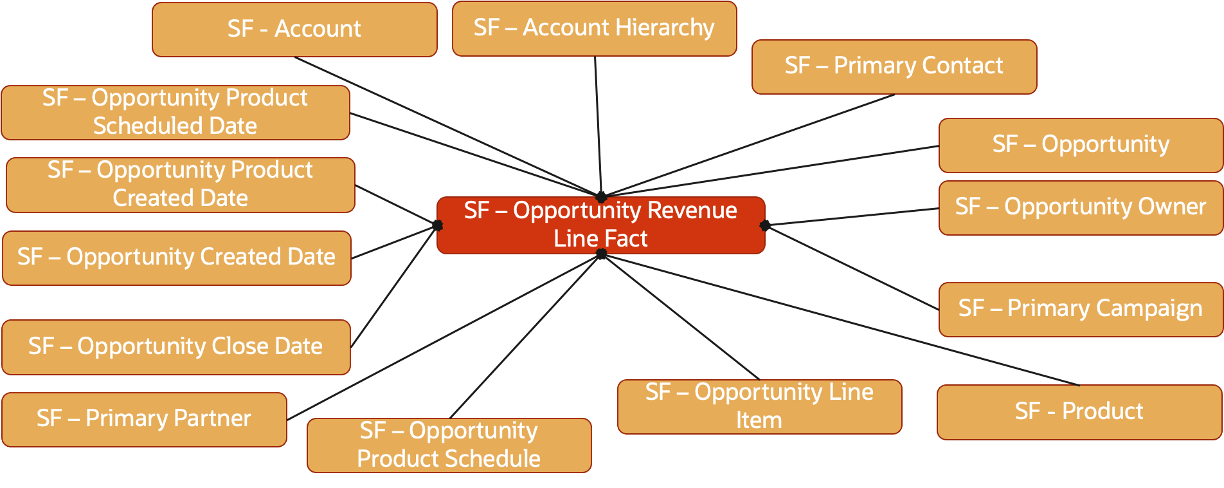
Below star schema details the Opportunity Revenue Line fact
Figure 3: Opportunity Revenue Line Fact Star Schema
Salesforce Activity
The Activities in Salesforce are of two types : Events and Tasks.
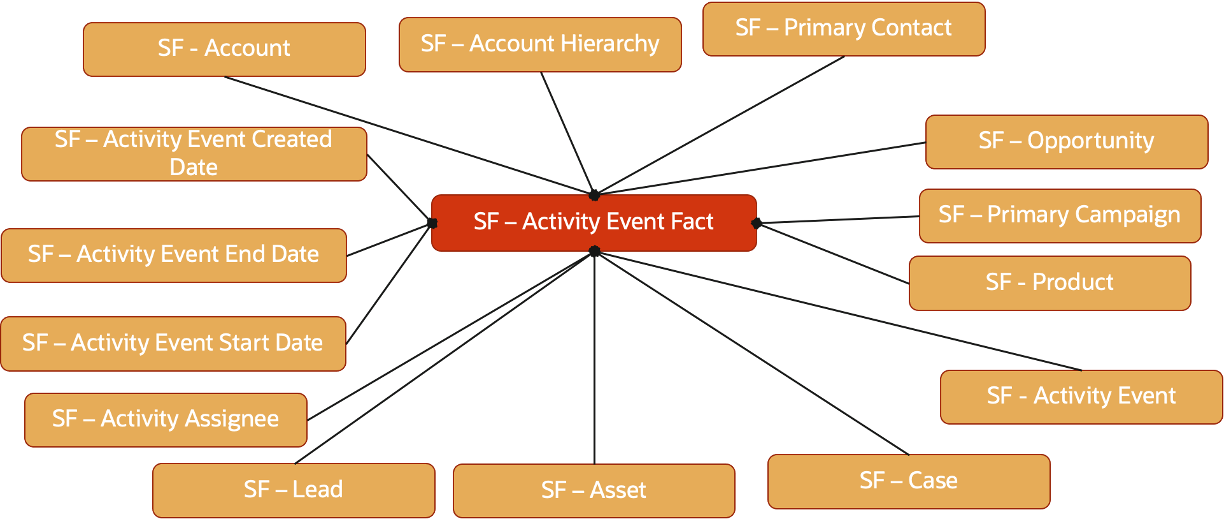
Below star schema details the Event fact
Figure 4: Activity Event Fact Star Schema
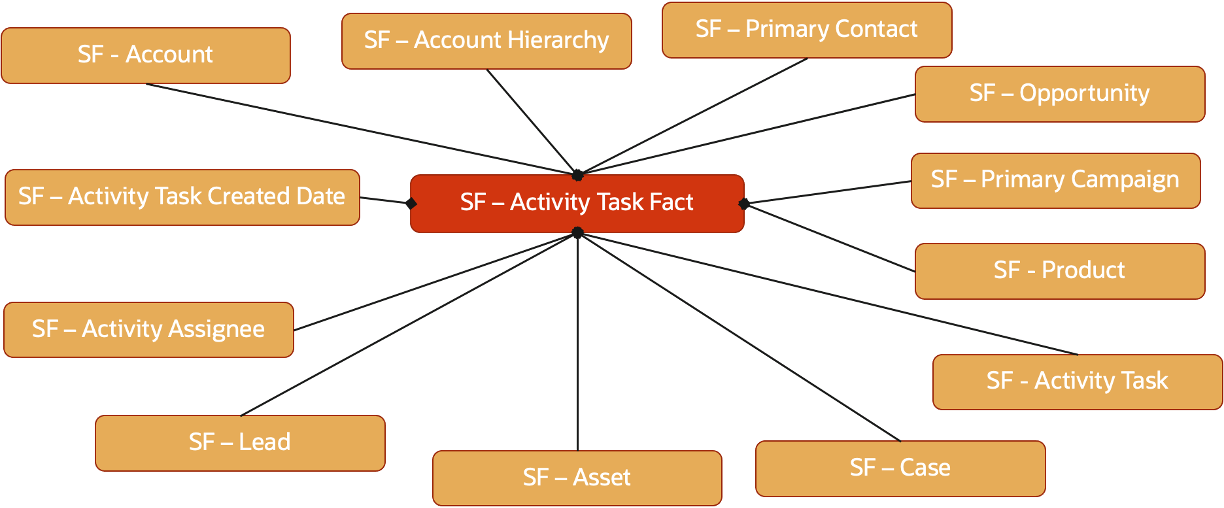
Below star schema details the Task fact
Figure 5: Activity Task Fact Star Schema
Salesforce Leads
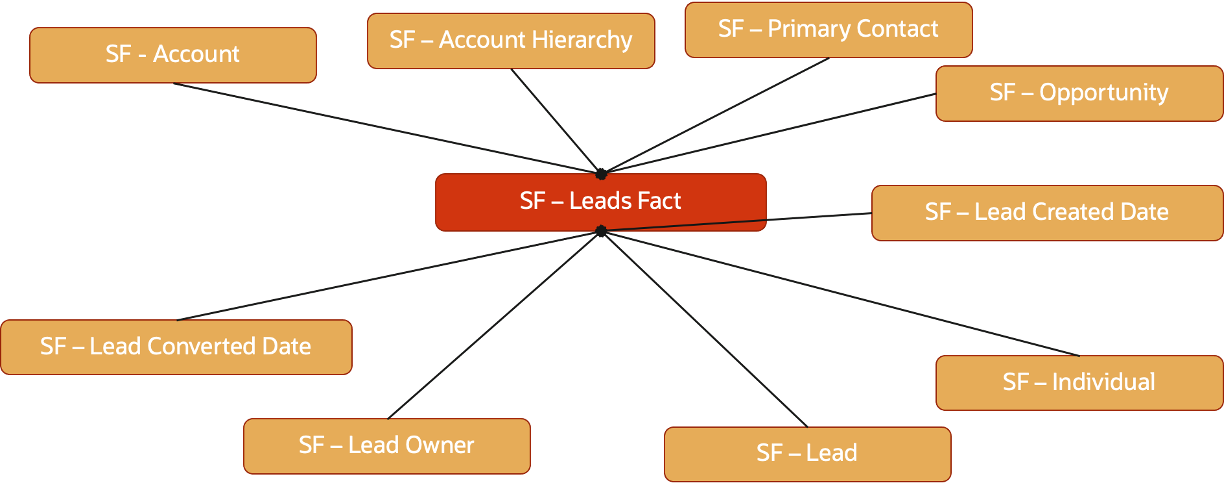
Below star schema details the Leads fact
Figure 6: Leads Fact Star Schema
Salesforce Opportunity Activity
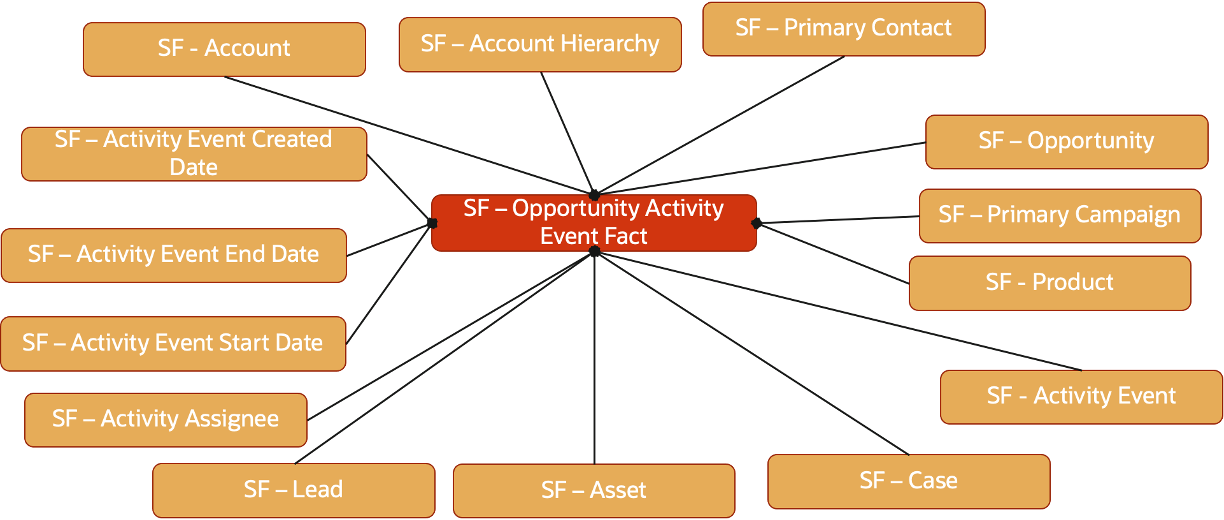
Below star schema details the Opportunity Event Fact:
Figure 7: Opportunity EventFact Star Schema
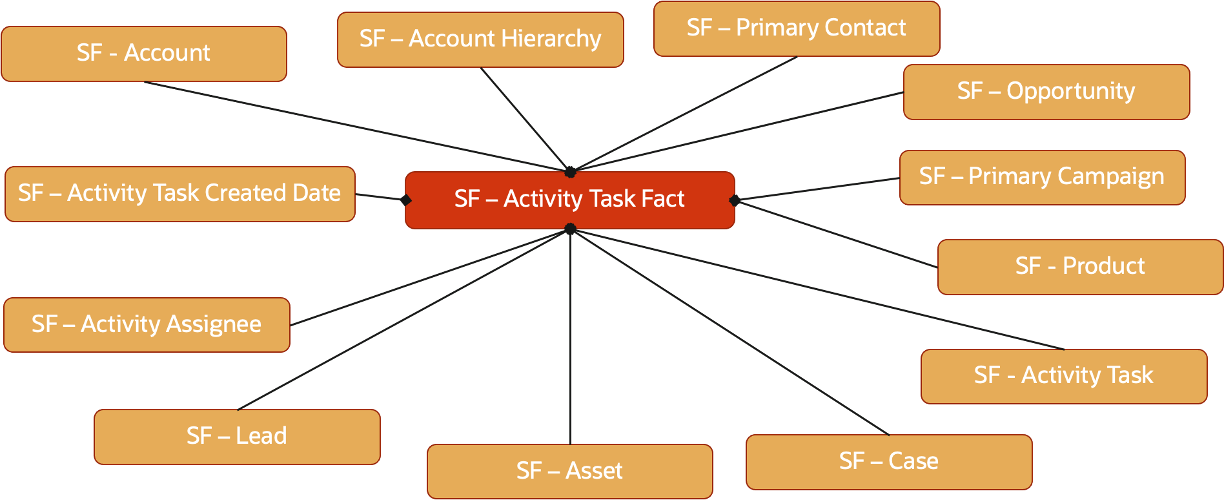
Below star schema details the Opportunity Task Fact:
Figure 8: Opportunity Task Fact Star Schema
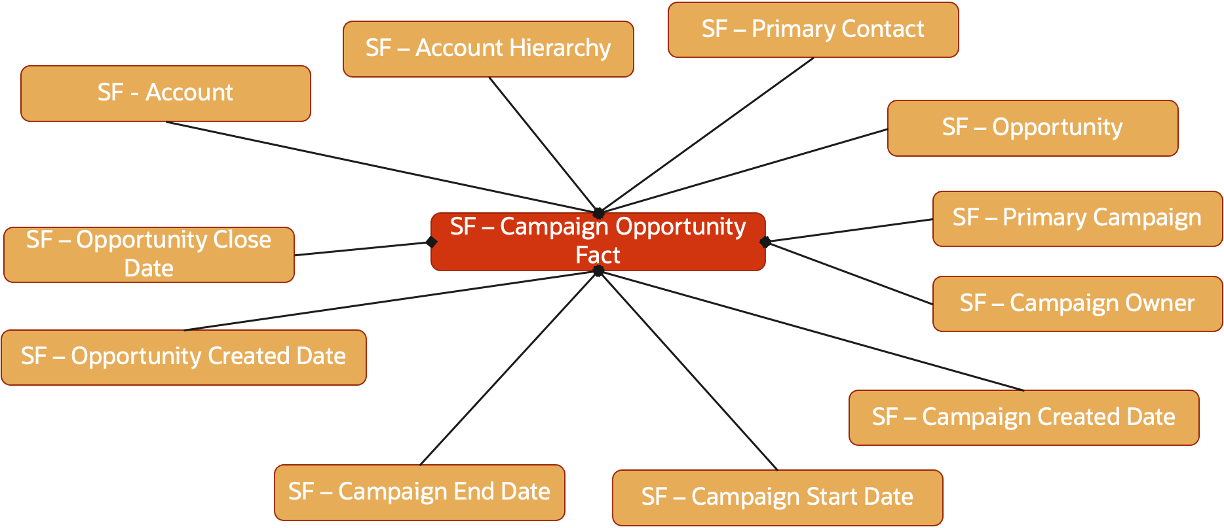
Salesforce Campaign Opportunity
Below star schema details the Campaign Opportunity fact
Figure 9: Campaign Opportunity Fact Star Schema
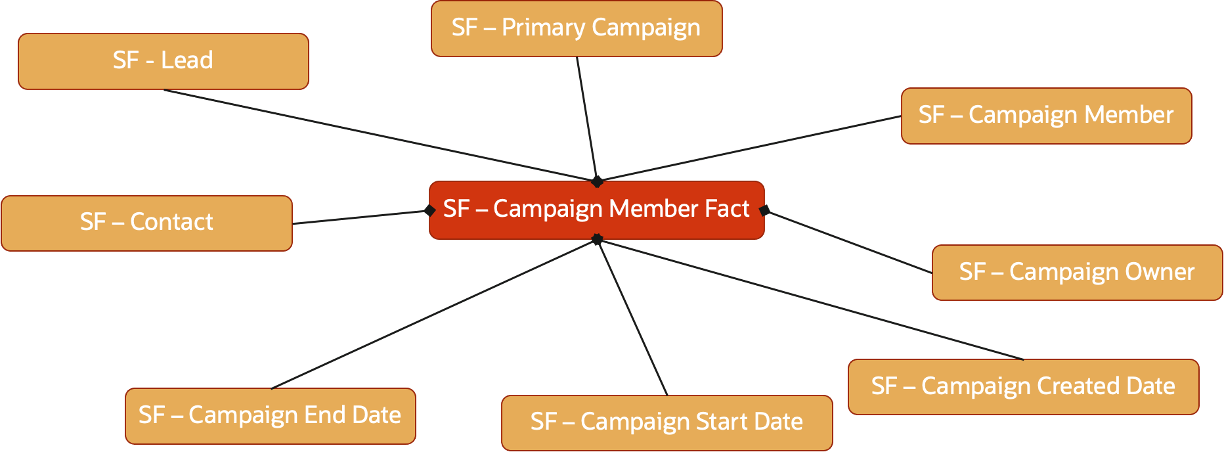
Salesforce Campaign Member
Below star schema details the Campaign Member fact
Figure 10: Campaign Member Fact Star Schema
Let’s watch the Video, download and deploy the bundles
The Youtube Video the Semantic model
Download the artefacts
Below are the download link to the Data Augmentation Bundle, the SQL Views, the Semantic Model Extensions and
Ensure the Salesforce REST connection is enabled in Fusion Analytics
Ensure the Salesforce REST connection test is successfull
Ensure Salesforce REST metadata are extracted
Import the Data Augmentation, Semantic Model Extension and Content bundles and wait for deploying
Deploy the Data Augmentation and choose “Import the data pipelines, but do not activate” option
Activate each Data Augmentation one by one, once the Data Augmentation bundle is deployed
Execute the SQL to create the views in the OAX_USER schema and grant proper access to views to OAX$OAC user
Deploy the Semantic Model Extension bundle
(publish the Salesforce branch)
Deploy the Content Bundle and validate the Salesforce catalog folder is created
To deploy the artefact, watch the video below:
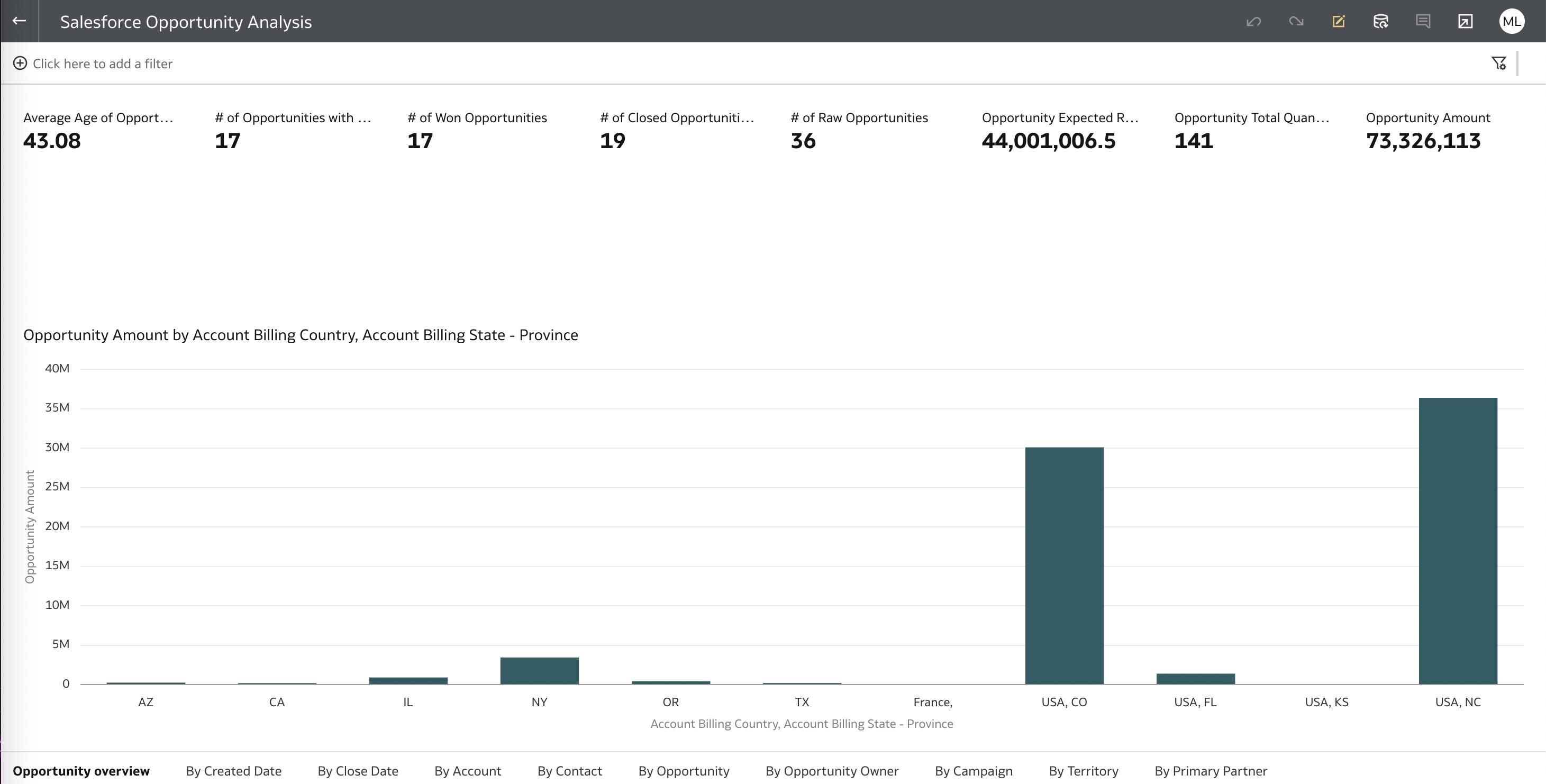
Accessing an OAC Workbook to Gain Business Insight with Salesforce Data
Now that we have imported and deployed the bundles, we can open Salesforce visualization in OAC.
Figure 11: Salesforce visualization
This concludes the activities in the blog.
Want to Learn More?
Click here to sign up to the RSS feed to receive notifications for when new A-team blogs are published.
Summary
This blog described how to utilize Fusion Analytics (FAW) Data Augmentation Connector to replicate transactions data from Salesforce Cloud Applications into Autonomous Data Warehouse (ADW) to extend the Data Layer of FAW. This blog also detailed the steps to extend the semantic model to ultimate allow customers to answer business questions and gaining business insight such as :
Opportunity conversion: As open sales opportunities move through the stages of sales, a sales executive wants to track the progress so that he/she can guide their team members
Bookings and Revenue by Customers and/or Channels or Regions
Forecast accuracy : As a sales/business executive, compute and manage open opportunities to bookings
Average resolution time : Compute and manage/improve resolution of customer issues 
Customer retention: An executive in customer support or customer experience organization needs to track and manage customer satisfaction leading to customer retention, in many industries such as retail, banking, financial services, etc.
Lead generation : Gaining the interest of potential customers in order to increase future sales
This blog also shared the artefacts that Fusion Analytics and Salesforce users can use as a starting point to analyze Salesforce data, that is :
Data Augmentation Bundles
SQL Views (to allow snowflake modeling)
Semantic Model Extensions Bundles
OAC Visualization Bundles
To conclude, this blog walked through how to deploy these artefacts into a target environment.
Bookmark this post to stay up-to-date on changes made to this blog as our products evolve.
Authors
Matthieu Lombard
Consulting Solution Architect
The Oracle A-Team is a central, outbound, highly technical team of enterprise architects, solution specialists, and software engineers.
The Oracle A-Team works with external customers and Oracle partners around the globe to provide guidance on implementation best practices, architecture design reviews, troubleshooting, and how to use Oracle products to solve customer business challenges.
I focus on data integration, data warehousing, Big Data, cloud services, and analytics (BI) products. My role included acting as the subject-matter expert on Oracle Data Integration and Analytics products and cloud services such as Oracle Data Integrator (ODI), and Oracle Analytics Cloud (OAC, OA For Fusion Apps, OAX).