
This blog stems from a real-world customer requirement: they needed a way to review user accounts within an OCI Identity Domain — specifically to identify accounts that might pose a security risk. Manually tracking compliance, locating dormant accounts, and enforcing multi-factor authentication (MFA) introduces significant operational overhead.
To address this, we developed a Python-based script that automates these essential identity lifecycle management tasks. It enables teams to routinely audit accounts, flag inactive users without MFA, and streamline security reviews. This not only reduces administrative burden but also strengthens your organization’s readiness for audits and regulatory compliance.
Our team has previously shared a related approach using a confidential application. You may refer to that article — [Deleting Inactive Users Based on Their Last Successful Login Date in OCI IAM Identity Domains] — to determine which solution best fits your use case.
Why Focus on Inactive Users Without MFA?
This combination — active accounts that haven’t logged in for over three months and don’t have MFA enabled — represents a meaningful security concern. These accounts may be susceptible to compromise through methods like credential stuffing or phishing, offering attackers a potential foothold into your OCI tenancy. Identifying and deactivating such accounts proactively helps reduce your cloud attack surface and mitigates unnecessary risk.
What the Script Does
- Connects to OCI Identity Domains using your existing CLI profile (no admin credentials required).
- Fetches all user metadata including:
- Username, display name, active status
- MFA enrollment (via IDCS extension)
- Last successful login timestamp
- Filters for users who:
- Are active
- Have not logged in within the past 90 days
- Have not enrolled in MFA
- Displays the flagged users in a clean, tabular format.
- Allows account deactivation:
- One-by-one with skip and quit options
- Or in fully automated batch mode using BATCH_MODE=true
Here is a code snippet:
Note: This is a sample script provided for educational and illustrative purposes only. It should be tested thoroughly in a non-production or sandbox environment before being used in any customer tenancy. Ensure appropriate error handling, logging, and access controls are in place when adapting this for use in real-world environments.
import oci
import requests
from dateutil import parser
from datetime import datetime, timedelta, timezone
import os
import sys
# — Configuration —
config = oci.config.from_file(os.path.expanduser(CONFIG_PATH), PROFILE)
domain_url=“https://idcs-88xxxxxxxxx.identity.oraclecloud.com”
THREE_MONTHS_AGO = datetime.now(timezone.utc) – timedelta(days=90)
BATCH_MODE = os.environ.get(“BATCH_MODE”, “false”).lower() == “true”
# — Initialize OCI Clients —
oci_client = oci.identity_domains.IdentityDomainsClient(config, domain_url)
def list_users():
users = []
page_token = None
attributes = (
“userName,id,displayName,active,meta.lastModified,isFederatedUser,” \
“urn:ietf:params:scim:schemas:oracle:idcs:extension:passwordState:User:lastSuccessfulSetDate,” \
“urn:ietf:params:scim:schemas:oracle:idcs:extension:user:User:isMFAEnabled,” \
“urn:ietf:params:scim:schemas:oracle:idcs:extension:userState:User:lastSuccessfulLoginDate”
)
try:
while True:
response = oci_client.list_users(attributes=attributes, page=page_token, limit=100)
users.extend(response.data.resources)
if response.has_next_page:
page_token = response.next_page
else:
break
except oci.exceptions.ServiceError as e:
print(f”Error listing users: {e}”)
return users
def classify_and_flag_users(users):
review_users = []
for user in users:
if not getattr(user, “active”, True):
continue
username = getattr(user, “user_name”, None)
user_id = getattr(user, “id”, None)
display_name = getattr(user, “display_name”, “Unknown”)
mfa_ext = getattr(user, “urn_ietf_params_scim_schemas_oracle_idcs_extension_user_user”, {}) or {}
is_mfa_enabled = getattr(mfa_ext, “is_mfa_enabled”, False)
state_ext = getattr(user, “urn_ietf_params_scim_schemas_oracle_idcs_extension_user_state_user”, {}) or {}
last_login = getattr(state_ext, “last_successful_login_date”, None)
last_login_date = parser.parse(last_login) if last_login else None
if last_login_date is not None and last_login_date.tzinfo is None:
last_login_date = last_login_date.replace(tzinfo=timezone.utc)
if not is_mfa_enabled and (not last_login_date or last_login_date < THREE_MONTHS_AGO):
review_users.append({
‘user_id’: user_id,
‘username’: username or “N/A”,
‘display_name’: display_name or “N/A”,
‘last_login’: last_login or “Never”,
‘parsed_login’: last_login_date or datetime.min.replace(tzinfo=timezone.utc),
‘is_mfa_enabled’: is_mfa_enabled
})
review_users.sort(key=lambda x: x[‘parsed_login’])
return review_users
def print_review_list(users, title):
print(f”\n{title}”)
print(f”{‘Username’:50} {‘Display Name’:30} {‘Last Login’:30} {‘MFA Enabled’:15}”)
print(“-” * 110)
for u in users:
username = u.get(‘username’, ‘N/A’)
display_name = u.get(‘display_name’, ‘N/A’)
last_login = u.get(‘last_login’, ‘Never’) or ‘Never’
mfa_enabled = str(u.get(‘is_mfa_enabled’, ‘N/A’))
print(f”{username:50} {display_name[:30]:30} {last_login:30} {mfa_enabled:15}”)
def deactivate_users(user_list):
for user in user_list:
if not BATCH_MODE:
action = input(f”[Enter=Deactivate, s=Skip, q=Quit] {user[‘username’]}: “).strip().lower()
if action == ‘s’:
print(f”[SKIPPED] {user[‘username’]}”)
continue
elif action == ‘q’:
print(“Aborting further processing.”)
break
try:
print(f”Deactivating {user[‘username’]}”)
oci_client.patch_user(
user_id=user[‘user_id’],
patch_op={
“schemas”: [“urn:ietf:params:scim:api:messages:2.0:PatchOp”],
“Operations”: [{“op”: “replace”, “path”: “active”, “value”: False}]
}
)
except Exception as e:
print(f”Failed to deactivate {user[‘username’]}: {e}”)
def main():
expires_after, expire_warning = get_password_policy()
list_users_data = list_users()
flagged_users = classify_and_flag_users(list_users_data)
print_review_list(flagged_users, “Dormant Users: Users have not logged-in the last 3 months and have no MFA enabled”)
should_deactivate = input(“\nDo you want to deactivate users from the list? (yes/no): “).strip().lower()
if should_deactivate == ‘yes’:
deactivate_users(flagged_users)
if __name__ == “__main__”:
main()
Running the Script
To execute the script in interactive mode:
python user_audit.py or
To run it in batch mode (automatically deactivate all flagged users without prompting):
Sample Output
The script will display a list of users who meet the following criteria:
- The account is active
- MFA is not enabled
- The user has not logged in within the last 90 days
The output is presented in a formatted table showing username, display name, last login date, and MFA status.
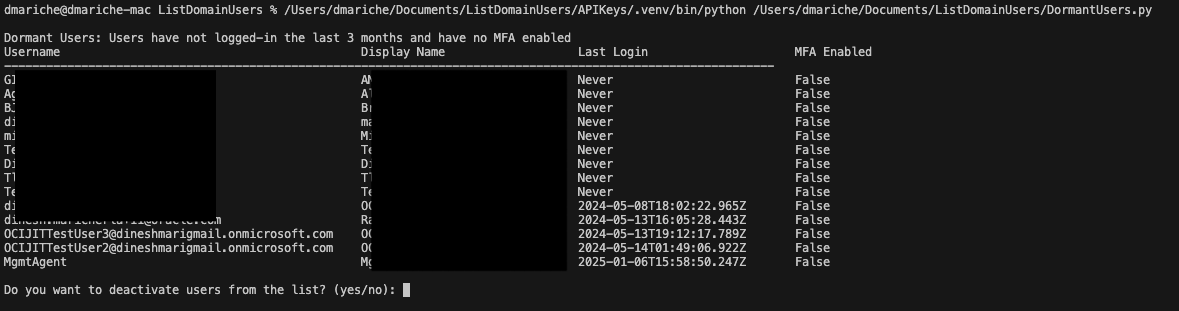
Once the script identifies users who are active, lack MFA, and haven’t logged in recently, it will provide you with the option to deactivate them.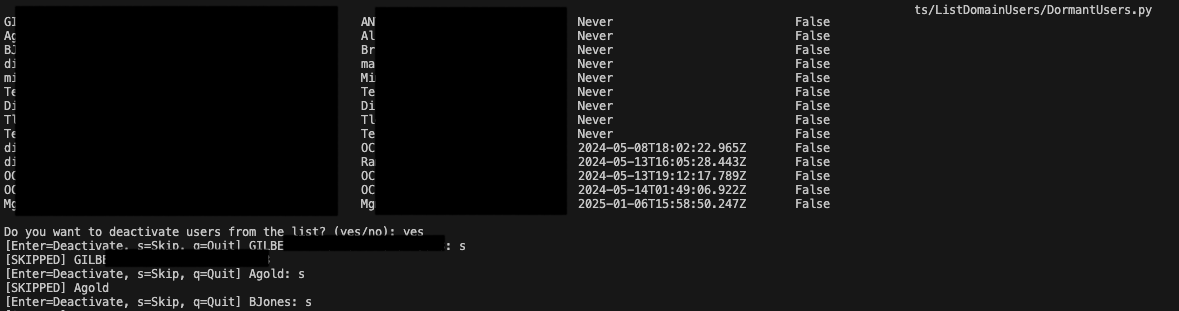
In interactive mode, you’ll be prompted for each user:
[Enter=Deactivate, s=Skip, q=Quit] username:
This allows you to:
- Deactivate the user immediately by pressing Enter
- Skip the user by entering s
- Quit the process entirely by entering q
In batch mode, all flagged users are deactivated automatically without any prompts.
Final Thoughts
What we’ve done here is deliver a practical tool to help strengthen the security posture of your OCI Identity Domain. By automating the identification — and optional deactivation — of inactive users who do not have MFA enabled, you can proactively address a common vulnerability, enhance compliance readiness, and maintain a leaner, more secure user directory.
This script is not just a one-time utility. With minor enhancements, it can evolve into a scheduled function that runs at regular intervals, ensuring continuous enforcement of your security policies.
As a next step, you can expand its capabilities to:
- Log activity to a file or dashboard for audit tracking
- Exclude service accounts by applying name patterns or metadata
- Notify users before deactivation to give them a chance to take action
Strong IAM governance begins with consistent visibility and proactive hygiene — and this script provides both in a scalable, repeatable way.