
Introduction
OAuth client credentials with a shared client secret is simple, but it is not always the model customers want for external integrations. In some environments, especially integrations with strict key ownership requirements, the consuming system wants to own the private key and avoid exchanging a shared secret with the API provider.
OCI IAM Domain supports this model using JWT client assertion, commonly referred to as private_key_jwt. The client signs a JWT with its private key, OCI IAM Domain validates the JWT with the public certificate associated with the confidential application, and the token endpoint issues an access token.
The basic flow is well documented. The more interesting question is operational:
How do we rotate the signing certificate without downtime?
This post walks through the working pattern.
What Is JWT Client Assertion?
JWT client assertion is a way for a confidential OAuth client to authenticate to the token endpoint without sending a client secret.
Instead of this:
client_id=<client_id>
client_secret=<client_secret>
the client sends:
client_id=<client_id>
client_assertion_type=urn:ietf:params:oauth:client-assertion-type:jwt-bearer
client_assertion=<signed_jwt>
The signed JWT contains claims like:
{
  "iss": "<client_id>",
  "sub": "<client_id>",
  "aud": ["https://<domain>.identity.oraclecloud.com/"],
  "iat": 1780000000,
  "nbf": 1780000000,
  "exp": 1780003600,
  "jti": "<unique_id>"
}
The JWT header identifies the signing certificate:
{
  "alg": "RS256",
  "typ": "JWT",
  "kid": "public_certificate_1.crt"
}
OCI supports kid or x5t to identify the certificate. This example uses kid because the confidential application references certificate aliases, and the JWT kid must match the alias attached to the app.
The Use Case: Certificate Rotation
For a one-time setup, a single certificate is enough:
Private Key 1 signs the JWT
Public Certificate 1 validates the JWT
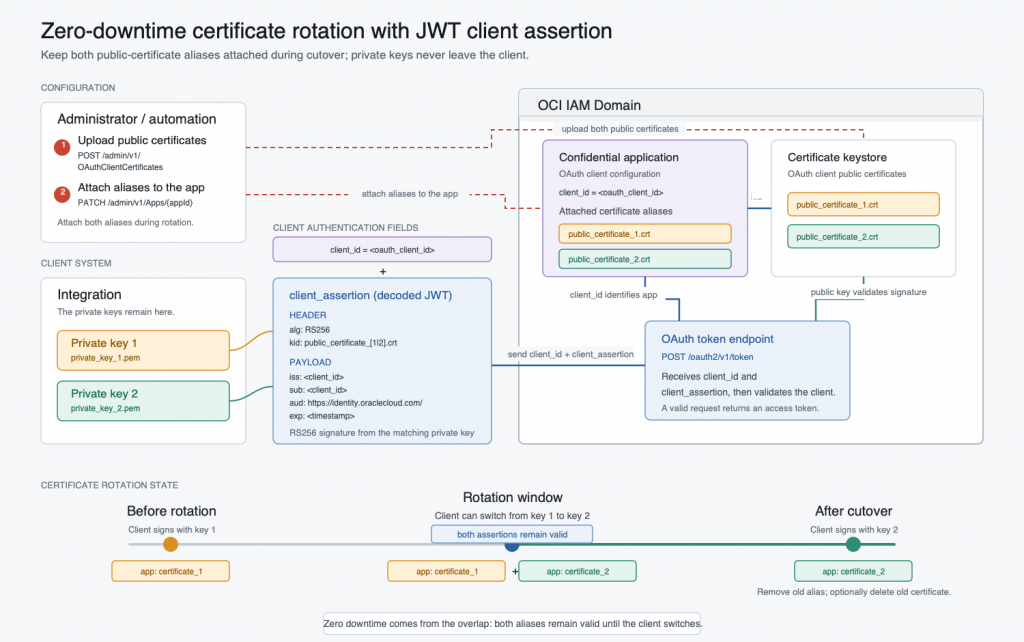
For rotation, we need a transition window:
Private Key 1 -> Public Certificate 1
Private Key 2 -> Public Certificate 2
During that window, both assertions should work:
kid=public_certificate_1.crt signed by private_key_1.pem
kid=public_certificate_2.crt signed by private_key_2.pem
After cutover, only certificate 2 should remain active.
Understanding The UI Path And The Keystore Model
The confidential application UI provides a certificate upload flow, which is useful for a simple single-certificate setup. In a rotation scenario, however, uploading another certificate through that UI flow can appear to replace the current certificate reference on the app.
For an overlapping rotation window, it helps to work with the keystore and app certificate-alias model directly.
The working model is to use the lower-level API:
- Upload certificates to the OAuth client certificate keystore.
- PATCH the confidential app so it references the certificate aliases.
- During rotation, attach both aliases to the same app.
- After cutover, replace the app’s certificate list with only the active alias.
This gives us a single confidential application with an old/new certificate overlap window.
Step 1: Generate Key Pair And Certificate
Generate the first private key:
openssl genrsa -out private_key_1.pem 2048Generate the first public certificate:
openssl req -new -x509 \
  -key private_key_1.pem \
  -out public_certificate_1.crt \
  -days 365 \
  -subj "/CN=oci-iam-jwt-assertion-1"
Generate the second pair for rotation:
openssl genrsa -out private_key_2.pem 2048

openssl req -new -x509 \
  -key private_key_2.pem \
  -out public_certificate_2.crt \
  -days 365 \
  -subj "/CN=oci-iam-jwt-assertion-2"
Keep the private keys private. Only the certificates are uploaded to the OCI IAM Domain OAuth client certificate keystore.
Step 2: Configure The Confidential Application
In OCI Console:
- Open the target IAM Domain.
- Create or open a confidential application.
- Edit the OAuth configuration.
- Select
Configure this application as a client now. - Set the client type to
Trusted. - Enable the Client Credentials grant type.
- If you want to validate the returned access token by calling the users API, add the
User Administratorapp role to the confidential application. - Activate the application.
- Copy the OAuth client ID and application ID.
For API calls in the next steps, use an admin access token that can call /admin/v1 APIs.
HOST=https://<domain>.identity.oraclecloud.com
APP_ID=<confidential_app_id>
CLIENT_ID=<oauth_client_id>
ACCESS_TOKEN=<admin_access_token_for_calling_admin_v1_apis>
Step 3: Upload Certificates To The Keystore
Convert the certificate to base64 DER:
CERT_ALIAS=public_certificate_1.crt
CERT_B64=$(openssl x509 -in public_certificate_1.crt -outform DER | openssl base64 -A)
Upload it to the OAuth client certificate keystore:
curl -X POST "$HOST/admin/v1/OAuthClientCertificates" \
  -H "Authorization: Bearer $ACCESS_TOKEN" \
  -H "Content-Type: application/json" \
  -d "{
    \"schemas\": [
      \"urn:ietf:params:scim:schemas:oracle:idcs:OAuthClientCertificate\"
    ],
    \"certificateAlias\": \"$CERT_ALIAS\",
    \"x509Base64Certificate\": \"$CERT_B64\"
  }"
Repeat with public_certificate_2.crt:
CERT_ALIAS=public_certificate_2.crt
CERT_B64=$(openssl x509 -in public_certificate_2.crt -outform DER | openssl base64 -A)

curl -X POST "$HOST/admin/v1/OAuthClientCertificates" \
  -H "Authorization: Bearer $ACCESS_TOKEN" \
  -H "Content-Type: application/json" \
  -d "{
    \"schemas\": [
      \"urn:ietf:params:scim:schemas:oracle:idcs:OAuthClientCertificate\"
    ],
    \"certificateAlias\": \"$CERT_ALIAS\",
    \"x509Base64Certificate\": \"$CERT_B64\"
  }"
Verify the certificates in the keystore:
curl -X GET "$HOST/admin/v1/OAuthClientCertificates" \
  -H "Authorization: Bearer $ACCESS_TOKEN" | jq
Each certificate alias must be unique. The alias is important because the client assertion JWT uses it as kid.
Step 4: Attach Certificate Aliases To The App
Patch the confidential app to reference the first certificate alias:
curl -X PATCH "$HOST/admin/v1/Apps/$APP_ID" \
  -H "Authorization: Bearer $ACCESS_TOKEN" \
  -H "Content-Type: application/json" \
  -d '{
    "schemas": [
      "urn:ietf:params:scim:api:messages:2.0:PatchOp"
    ],
    "Operations": [
      {
        "op": "add",
        "path": "certificates",
        "value": [
          {
            "certAlias": "public_certificate_1.crt"
          }
        ]
      }
    ]
  }'
During rotation, attach the second alias as well:
curl -X PATCH "$HOST/admin/v1/Apps/$APP_ID" \
  -H "Authorization: Bearer $ACCESS_TOKEN" \
  -H "Content-Type: application/json" \
  -d '{
    "schemas": [
      "urn:ietf:params:scim:api:messages:2.0:PatchOp"
    ],
    "Operations": [
      {
        "op": "add",
        "path": "certificates",
        "value": [
          {
            "certAlias": "public_certificate_2.crt"
          }
        ]
      }
    ]
  }'
Verify the certificate aliases attached to the app:
curl -X GET "$HOST/admin/v1/Apps/$APP_ID" \
  -H "Authorization: Bearer $ACCESS_TOKEN" | jq
At this point, the same confidential app can validate assertions signed by either key.
Step 5: Generate A Client Assertion With Python
Use the Python helper below to generate a JWT client assertion:
#!/usr/bin/env python3
import argparse
import base64
import json
import time
import uuid

from cryptography.hazmat.primitives import hashes, serialization
from cryptography.hazmat.primitives.asymmetric import padding


def base64_url_encode(value):
    return base64.urlsafe_b64encode(value).rstrip(b"=").decode("ascii")


def json_base64_url_encode(value):
    return base64_url_encode(
        json.dumps(value, separators=(",", ":")).encode("utf-8")
    )


def parse_args():
    parser = argparse.ArgumentParser(
        description="Generate an OCI IAM Domain JWT client assertion."
    )
    parser.add_argument(
        "--certname",
        default="public_certificate_1.crt",
        help="Certificate alias used as JWT kid.",
    )
    parser.add_argument(
        "--clientid",
        required=True,
        help="OAuth client ID used as iss and sub.",
    )
    parser.add_argument(
        "--privatekey",
        default="./private_key_1.pem",
        help="Path to private key PEM file.",
    )
    parser.add_argument(
        "--audience",
        default="https://identity.oraclecloud.com/",
        help="JWT audience.",
    )
    parser.add_argument(
        "--expires-in-seconds",
        type=int,
        default=3600,
        help="Assertion lifetime in seconds.",
    )
    return parser.parse_args()


def load_private_key(path):
    with open(path, "rb") as key_file:
        return serialization.load_pem_private_key(key_file.read(), password=None)


def sign_rs256(private_key, signing_input):
    return private_key.sign(
        signing_input.encode("ascii"),
        padding.PKCS1v15(),
        hashes.SHA256(),
    )


def main():
    args = parse_args()
    if args.expires_in_seconds <= 0:
        raise SystemExit("--expires-in-seconds must be a positive number")

    now = int(time.time())
    header = {
        "alg": "RS256",
        "typ": "JWT",
        "kid": args.certname,
    }
    payload = {
        "iss": args.clientid,
        "sub": args.clientid,
        "aud": [args.audience],
        "iat": now,
        "nbf": now,
        "exp": now + args.expires_in_seconds,
        "jti": str(uuid.uuid4()),
    }

    signing_input = f"{json_base64_url_encode(header)}.{json_base64_url_encode(payload)}"
    signature = sign_rs256(load_private_key(args.privatekey), signing_input)
    print(f"{signing_input}.{base64_url_encode(signature)}")


if __name__ == "__main__":
    main()
python3 -m pip install cryptographypython3 generate-client-assertion.py \
--certname public_certificate_1.crt \
--clientid "$CLIENT_ID" \
--privatekey ./private_key_1.pemFor certificate 2:
python3 generate-client-assertion.py \
  --certname public_certificate_2.crt \
  --clientid "$CLIENT_ID" \
  --privatekey ./private_key_2.pem
The script uses RS256 and includes iss, sub, aud, iat, nbf, exp, and jti.
Oracle’s client/user assertion documentation says the identity domain URL should be one of the aud values. The helper script uses https://identity.oraclecloud.com/ as the audience value by default. If your environment requires the identity domain URL explicitly, pass it using --audience:
--audience "https://<domain>.identity.oraclecloud.com/"
Step 6: Request An Access Token
Generate an assertion and call the token endpoint:
CLIENT_ASSERTION=$(python3 generate-client-assertion.py \
  --certname public_certificate_1.crt \
  --clientid "$CLIENT_ID" \
  --privatekey ./private_key_1.pem)

curl -X POST "$HOST/oauth2/v1/token" \
  -H "Content-Type: application/x-www-form-urlencoded" \
  --data-urlencode "grant_type=client_credentials" \
  --data-urlencode "scope=urn:opc:idm:__myscopes__" \
  --data-urlencode "client_id=$CLIENT_ID" \
  --data-urlencode "client_assertion_type=urn:ietf:params:oauth:client-assertion-type:jwt-bearer" \
  --data-urlencode "client_assertion=$CLIENT_ASSERTION"
Repeat with certificate 2. During the rotation window, both should return access tokens.
Step 7: Validate The Access Token
Getting a token proves that OCI IAM Domain accepted the JWT client assertion. For a stronger end-to-end test, call an API with that token.
If the confidential application has the User Administrator app role, you can call the users endpoint:
ACCESS_TOKEN_FROM_ASSERTION=<access_token_from_token_response>

curl -X GET "$HOST/admin/v1/Users?count=5" \
  -H "Authorization: Bearer $ACCESS_TOKEN_FROM_ASSERTION"
This confirms that:
Private key signed the JWT assertion
OCI IAM Domain validated the assertion using the attached certificate alias
OCI IAM Domain issued an access token
The access token can call an authorized API
Step 8: Complete The Rotation
After the client has moved to certificate 2, replace the app’s certificates list with only the active alias:
curl -X PATCH "$HOST/admin/v1/Apps/$APP_ID" \
  -H "Authorization: Bearer $ACCESS_TOKEN" \
  -H "Content-Type: application/json" \
  -d '{
    "schemas": [
      "urn:ietf:params:scim:api:messages:2.0:PatchOp"
    ],
    "Operations": [
      {
        "op": "replace",
        "path": "certificates",
        "value": [
          {
            "certAlias": "public_certificate_2.crt"
          }
        ]
      }
    ]
  }'
Optionally delete the old certificate from the keystore. Use the keystore verification command above to find the certificate resource ID:
curl -X DELETE "$HOST/admin/v1/OAuthClientCertificates/<oAuthClientCertificateId>" \
  -H "Authorization: Bearer $ACCESS_TOKEN"
Using JWT Client Assertion With User Assertion
JWT client assertion is used to authenticate the confidential client at the token endpoint. The same client authentication mechanism can be used in other token endpoint exchanges too.
For example, in the JWT user assertion grant, the confidential application must have the JWT Assertion grant type enabled. The user assertion is sent as assertion, while the client can authenticate using JWT client assertion.
grant_type=urn:ietf:params:oauth:grant-type:jwt-bearer
assertion=<user_assertion_jwt>
client_assertion=<client_assertion_jwt>
In this flow:
user assertion:   sub = username
client assertion: sub = client ID
Use user assertion carefully. A signed user assertion allows a trusted client to request tokens for an asserted user without that user interactively signing in for the token request. This should be limited to tightly controlled trusted integrations, service accounts, or service-user scenarios where the client is explicitly authorized to assert those users.
Use the Python helper below to generate the user assertion:
#!/usr/bin/env python3
import argparse
import base64
import json
import time
import uuid

from cryptography.hazmat.primitives import hashes, serialization
from cryptography.hazmat.primitives.asymmetric import padding


def base64_url_encode(value):
    return base64.urlsafe_b64encode(value).rstrip(b"=").decode("ascii")


def json_base64_url_encode(value):
    return base64_url_encode(
        json.dumps(value, separators=(",", ":")).encode("utf-8")
    )


def parse_args():
    parser = argparse.ArgumentParser(
        description="Generate an OCI IAM Domain JWT user assertion."
    )
    parser.add_argument(
        "--certname",
        default="public_certificate_1.crt",
        help="Certificate alias used as JWT kid.",
    )
    parser.add_argument(
        "--clientid",
        required=True,
        help="OAuth client ID used as iss.",
    )
    parser.add_argument(
        "--username",
        required=True,
        help="User name used as sub.",
    )
    parser.add_argument(
        "--privatekey",
        default="./private_key_1.pem",
        help="Path to private key PEM file.",
    )
    parser.add_argument(
        "--audience",
        default="https://identity.oraclecloud.com/",
        help="JWT audience.",
    )
    parser.add_argument(
        "--expires-in-seconds",
        type=int,
        default=3600,
        help="Assertion lifetime in seconds.",
    )
    return parser.parse_args()


def load_private_key(path):
    with open(path, "rb") as key_file:
        return serialization.load_pem_private_key(key_file.read(), password=None)


def sign_rs256(private_key, signing_input):
    return private_key.sign(
        signing_input.encode("ascii"),
        padding.PKCS1v15(),
        hashes.SHA256(),
    )


def main():
    args = parse_args()
    if args.expires_in_seconds <= 0:
        raise SystemExit("--expires-in-seconds must be a positive number")

    now = int(time.time())
    header = {
        "alg": "RS256",
        "typ": "JWT",
        "kid": args.certname,
    }
    payload = {
        "iss": args.clientid,
        "sub": args.username,
        "aud": [args.audience],
        "iat": now,
        "nbf": now,
        "exp": now + args.expires_in_seconds,
        "jti": str(uuid.uuid4()),
    }

    signing_input = f"{json_base64_url_encode(header)}.{json_base64_url_encode(payload)}"
    signature = sign_rs256(load_private_key(args.privatekey), signing_input)
    print(f"{signing_input}.{base64_url_encode(signature)}")


if __name__ == "__main__":
    main()
python3 generate-user-assertion.py \
--certname public_certificate_1.crt \
--clientid "$CLIENT_ID" \
--username "<username>" \
--privatekey ./private_key_1.pemAn end-to-end token request using user assertion plus JWT client assertion looks like this. Replace <username> with the user you want to assert and replace <scope> with the scope required for your use case. For quick IAM Domain API testing, you can use urn:opc:idm:__myscopes__.
CLIENT_ASSERTION=$(python3 generate-client-assertion.py \
  --certname public_certificate_1.crt \
  --clientid "$CLIENT_ID" \
  --privatekey ./private_key_1.pem)

USER_ASSERTION=$(python3 generate-user-assertion.py \
  --certname public_certificate_1.crt \
  --clientid "$CLIENT_ID" \
  --username "<username>" \
  --privatekey ./private_key_1.pem)

curl -X POST "$HOST/oauth2/v1/token" \
  -H "Content-Type: application/x-www-form-urlencoded" \
  --data-urlencode "grant_type=urn:ietf:params:oauth:grant-type:jwt-bearer" \
  --data-urlencode "assertion=$USER_ASSERTION" \
  --data-urlencode "client_id=$CLIENT_ID" \
  --data-urlencode "client_assertion_type=urn:ietf:params:oauth:client-assertion-type:jwt-bearer" \
  --data-urlencode "client_assertion=$CLIENT_ASSERTION" \
  --data-urlencode "scope=<scope>"
If you request offline_access and the application policy allows it, user-context flows can return a refresh token. Client credentials flows normally return only an access token because there is no user session to refresh.
Conclusion
JWT client assertion removes the need for shared client secrets, but certificate rotation is where the operational details matter.
For zero-downtime rotation in OCI IAM Domain, use the keystore and app PATCH APIs:
Attach both old and new certificate aliases during the rotation window, make sure the JWT kid matches the active alias, and then replace the app’s certificate list after cutover.
That gives you customer-managed signing keys, no shared client secret, and a clean rotation path with one confidential application.