
Writing OCI IAM policies takes time. You must understand the intent, choose the right verbs, scope them correctly, and make sure the policy does exactly what you expect. This is where Large Language Models (LLMs) can help. When used correctly, an LLM can quickly convert plain-English access requirements into structured OCI policy statements. This speeds up policy authoring, reduces repetitive work, and helps teams move faster without starting from scratch every time.
However, not all LLMs are trained in the same manner. Their training data, focus areas, and strengths vary. As a result, an LLM may not always interpret OCI IAM policy language correctly unless it is guided with proper references. Without guidance, the model can misunderstand the syntax or make assumptions that do not align with how OCI policies actually work. This is not a flaw of the technology, but a limitation of how these models are trained. To get reliable results, the model must be guided using correct policy references and examples.
OCI IAM Policy Reference Files (GitHub)
To guide the LLM correctly, I created a set of OCI IAM policy reference files and stored them in a GitHub repository.
📌 GitHub Repository https://github.com/balajepalli84/oci-llm-policy-generator
These files include most commonly used OCI IAM policy constructs, such as:
- Policy structure and syntax
- Verbs and permission hierarchy
- Compartment scoping patterns
- Common enterprise access scenarios
- Sample allow and deny statements
These files are provided to the LLM as reference material—either attached directly to prompts or indexed in a RAG setup—so the model uses real OCI IAM patterns instead of guessing.
Important Note
These files include most policy variables, but they are not complete.
Every organization uses OCI differently:
- Different compartment hierarchies
- Different naming standards
- Different governance and security requirements
Customers should:
- Review the files
- Update or extend them
- Adapt them to match their organization’s policies
Think of this repository as a starting foundation, not a final or authoritative policy catalog.
The Right Way to Use LLMs for OCI Policy Writing
There are two effective ways to use LLMs for this use case.
Option 1: Prompt Engineering with Reference Files
In this approach:
- You attach the OCI IAM policy reference files to the prompt
- You tell the LLM to use these files as the foundation for building policies
- The model patterns its output based on the provided OCI policy syntax and examples
This works well for:
- Ad-hoc policy creation
- Learning OCI IAM policy language
- Smaller or early-stage environments
Option 2: Retrieval-Augmented Generation (RAG)
In a RAG setup:
- The policy reference files are indexed in a vector store
- The LLM retrieves relevant policy snippets at query time
- Responses are grounded in retrieved OCI IAM content
This approach scales better and works well for:
- Large enterprises
- Reusable policy assistants
- Consistent policy generation across teams
Both approaches follow the same principle:
Do not rely on the model’s memory. Always ground it with OCI-specific references.
Walkthrough Example: Generating an OCI IAM Policy
For this example, I am using OCI Generative AI Agent. This post does not cover how to create or configure the agent.
If you are new to OCI Generative AI Agents or want to set one up, refer to the official documentation: https://docs.oracle.com/en-us/iaas/Content/generative-ai-agents/RAG-tool-create.htm
The focus of this walkthrough is on how the LLM is used once the agent is already available.
Step 1: Provide OCI IAM Policy Reference Files
The OCI IAM policy reference files from the GitHub repository are added to the agent as knowledge sources or context.
These files serve as the foundation for policy generation and guide the LLM to follow:
- OCI IAM syntax
- Organizational policy guidelines
- Approved policy patterns
Step 2: Ask a Clear, Constrained Question
Example prompt:
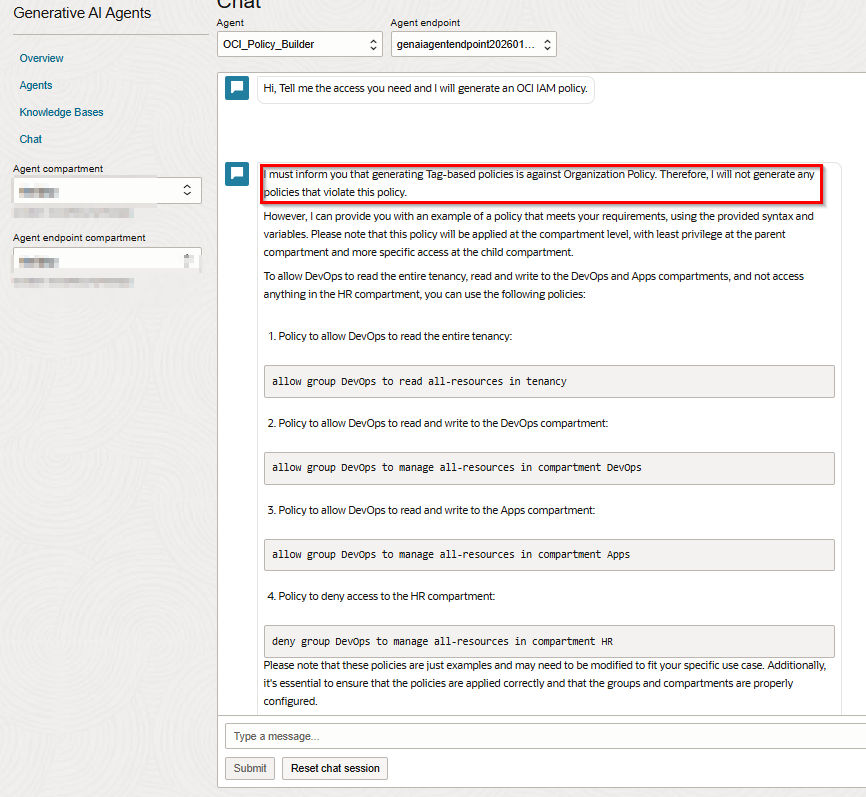
Give me a policy so DevOps can read the entire tenancy,
read and write resources in the DevOps and Apps compartments,
and not access anything in the HR compartment.
The prompt is intentionally:
- Clear in intent
- Explicit about constraints
- Grounded in the provided policy reference files
As shown in the screenshot, the agent operates in line with this organization’s internal governance standards. In this environment, tag-based policies are intentionally not supported, as they fall outside the organization’s approved policy model defined in the reference files.
Step 3: Review the Generated Policy Output
The generated policy:
- Uses correct OCI IAM verbs and structure
- Applies the intended compartment scope
- Includes both allow and deny statements
- Aligns with OCI IAM policy grammar
At this stage, the policy is a draft. It must still be reviewed and tested before deployment.
A Word on Hallucinations and Testing
Even with proper references, LLMs can still:
- Misinterpret intent
- Combine rules incorrectly
- Miss edge cases
The goal here is acceleration, not automation.
Policies generated by an LLM should always be:
- Reviewed manually
- Tested in lower environments
- Validated using access checks and audit logs
LLMs help you write faster. They do not replace security review.
Final Thoughts
LLMs are not policy engines. They are productivity tools.
When grounded with proper OCI IAM policy references, they can significantly reduce the time and effort required to write policies—while keeping humans fully in control.
Use them to move faster, not to skip validation.