

Introduction
Modern Oracle SaaS environments generate large volumes of identity audit events, capturing every login attempt, Multi Factor Authentication (MFA) challenge, authorization decision, and administrative change. These logs contain valuable identity intelligence, but without a unified analytics layer, much of this information remains buried inside raw JavaScript Object Notation (JSON) records.
The introduction of the Oracle Identity and Access Management (IAM) Domain for SaaS centralizes these identity events in Oracle Cloud Infrastructure (OCI) Audit, providing consistent formatting, long term retention, and a standardised audit model across Oracle SaaS services. With OCI Log Analytics as the analytical platform and LoganAI as the intelligence layer for summarisation, query generation, and alert setup, organisations can transform these audit events into actionable insights for security, compliance, and operational monitoring.
This article provides a comprehensive technical deep dive with reusable queries, detection rule examples, and dashboard recommendations. The guidance applies to all Oracle SaaS environments that use IAM Identity Domains, including Enterprise Resource Planning (ERP), Human Capital Management (HCM), Supply Chain Management (SCM), Customer Experience (CX), Enterprise Performance Management (EPM), and additional services. It explains how OCI natively supports identity threat detection for Oracle SaaS without requiring external Security Information and Event Management (SIEM) tooling.
Audit Flow
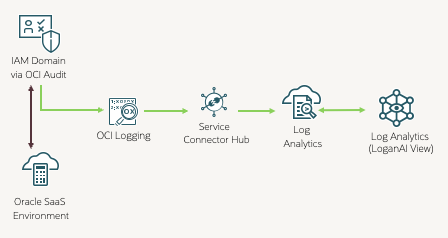
Identity audit events follow a clear path into OCI Log Analytics. Oracle SaaS applications integrated with IAM Identity Domains generate audit records for sign ins, MFA actions, session activity, authorization decisions, and administrative or configuration changes. These events flow automatically into OCI Audit, which serves as the authoritative long retention store for identity activity. OCI Audit surfaces these logs through OCI Logging, from where they can be forwarded using a Service Connector into OCI Log Analytics.
Once ingested, Log Analytics parses, indexes, and enriches the events for search, correlation, dashboarding, detection rules, and alerting. LoganAI enhances this process by helping teams generate queries, summarise patterns, interpret anomalies, and build detections or alerts using natural language. The result is a streamlined and minimal configuration pipeline that delivers identity audit data ready for analysis across any Oracle SaaS tenancy.
Webinar Context
This article complements our recent Oracle Customer Connect webinar “Oracle Go – See Beyond the Logs: Artificial Intelligence (AI)-Driven IAM Audit Analysis for Oracle SaaS with OCI Log Analytics” and provides a deeper technical exploration of the concepts and configurations demonstrated and includes reusable material you can adopt in your own environment. The replay is available here if you would like to follow along with the live session.
In the session, we discussed & showcased:
- Existing Application Programming Interface (API) to get session Information Fusion Security: Using Sign In – Sign Out Audit Representational State Transfer (REST) API (Doc ID 2661308.1) would not work post ongoing Identity upgrade into OCI IAM & would be replaced by OCI Audit , refer – Methods and ways to extract Session Information using OCI Audit and Integrate into external systems
- Enabled LoganAI within OCI Log Analytics for their tenancy and regions
- Enabled OCI Audit as log source in OCI Log Analytics from OCI Logging via Service Connector as OOTB configurations.
- Used Log Explorer to query and analyze identity sign-on events from Oracle Fusion Cloud Applications
- Implemented detection rules for threat monitoring (e.g., brute-force, MFA fatigue, impossible travel)
- Automated alarm notifications with Oracle Monitoring and Notifications services
- Build a Fusion SaaS Security Dashboard consolidating all detection reports in one view
This blog documents all nine identity threat detection use cases demonstrated live during the session – complete with working Log Explorer queries, detection rule guidance, Alarms and sample visualizations.
Prerequisites
Following IAM Policies are required to enable Access to OCI Audit Logs & use OCI Logging features, you need to setup these policies accordingly to your OCI governance requirements.
- Enable Access to Log Analytics and Its resources
Policies to use Oracle Log Analytics
- Viewing Audit Log Events
- Logging Search
Use the Logging Search page to search logs.
Details
Below are nine practical security detection use cases implemented using OCI Log Analytics, you can click over each of them to navigate & go in details of implementation.
- Brute-Force / Password-Spray
- Multiple Geo Logins (Impossible Travel) – By Internet Protocol (IP)
- Multiple Geo Logins by Countries
- Fusion Active User Count
- Off-Hours Login (Unusual hour)
- Authentication Failures
- Service Account Interactive Login
- Access from Known Risky IPs (fast spike)
- High-Velocity Session Creation (Scripted)
Each includes a short description, Log Explorer query, detection rule configuration, and example output.
We will explain each scenario & how it can be implemented in log explorer as saved search, do AI driven analysis using LoganAI, create Dashboard report out of it.
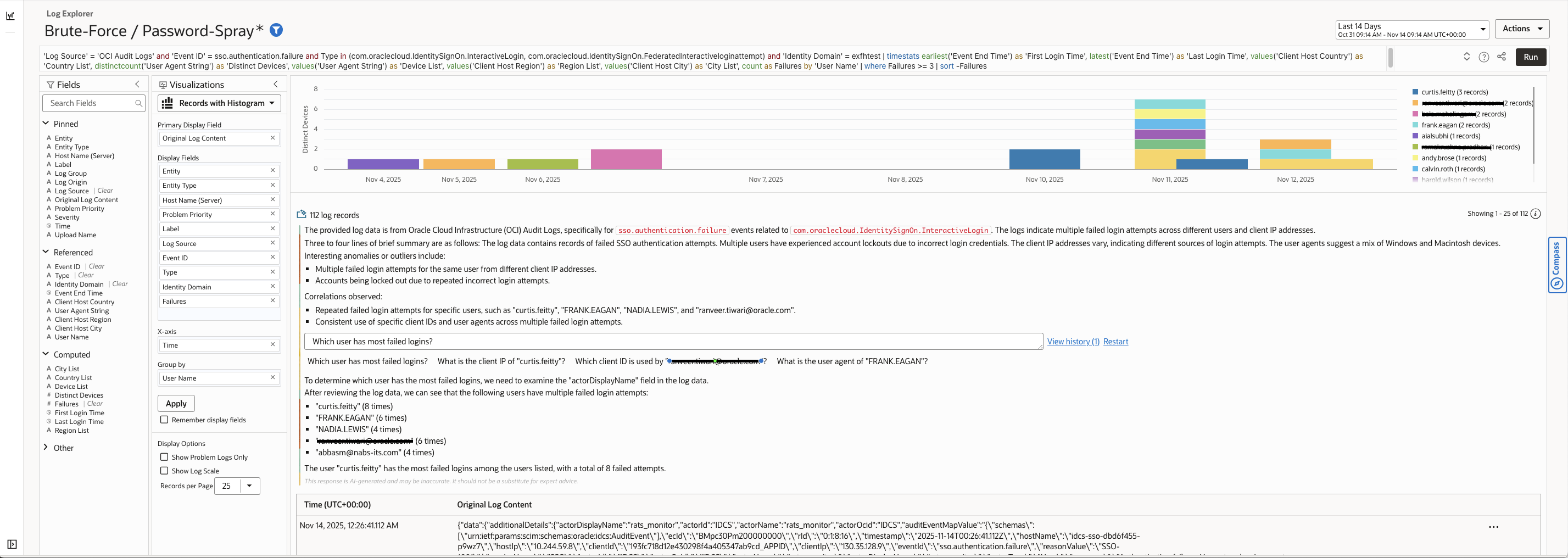
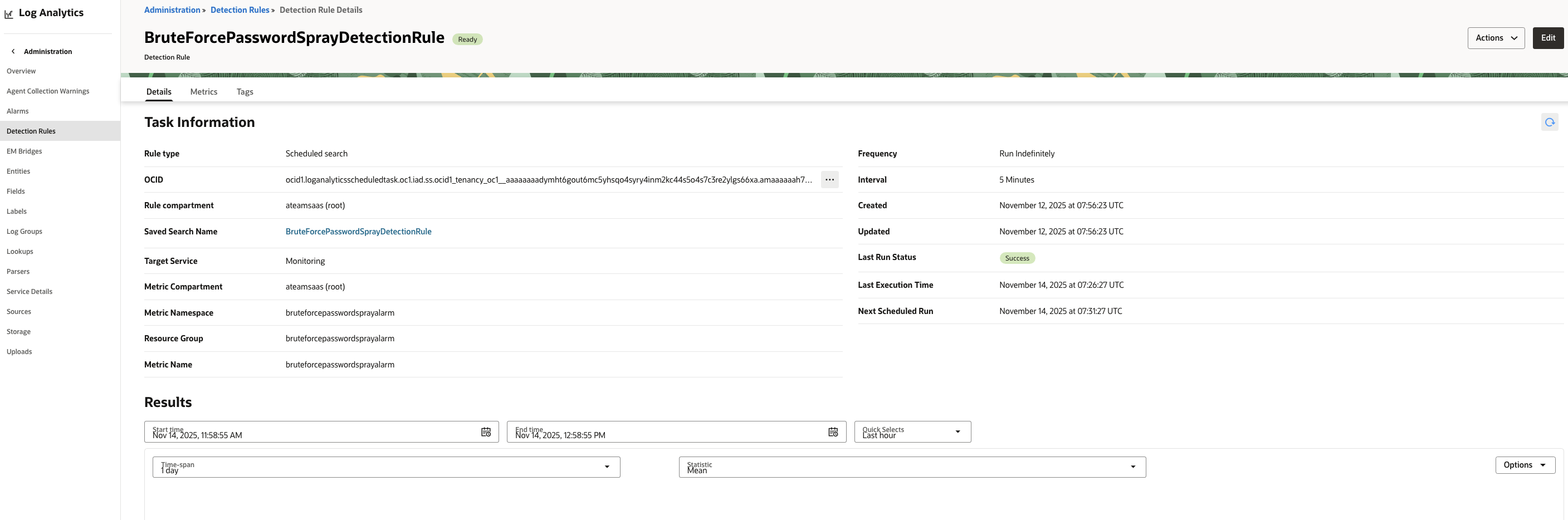
You can enable Logon AI for summarization & search analysis further you can create Detection Rule & Alarms if you want to monitor for any specific search, we will explain that in First Scenario (Brute-Force / Password-Spray), for remaining you can follow same steps.
Replace <identitydomain> with your Identity Domain and adjust thresholds/IP lists as needed.
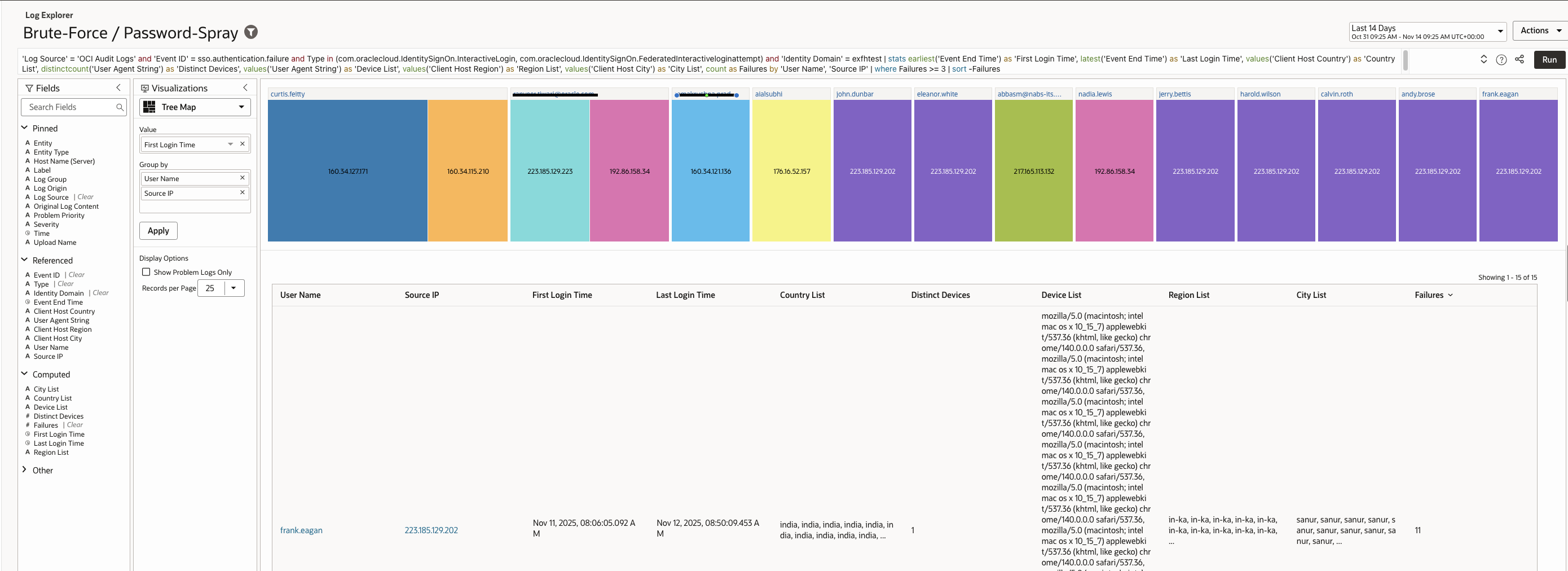
Brute-force and password-spray attacks involve repeated authentication attempts to guess valid credentials. Password spraying typically uses a small list of common passwords across many users to avoid lockout thresholds.
This Log Explorer query detects these attacks by identifying users or IPs generating repeated authentication failures within a short timeframe.
Log Explorer Query :
| ‘Log Source’ = ‘OCI Audit Logs’ and ‘Event ID’ = sso.authentication.failure and Type in (com.oraclecloud.IdentitySignOn.InteractiveLogin, com.oraclecloud.IdentitySignOn.FederatedInteractiveloginattempt) and ‘Identity Domain’ = exfhtest | stats earliest(‘Event End Time’) as ‘First Login Time’, latest(‘Event End Time’) as ‘Last Login Time’, values(‘Client Host Country’) as ‘Country List’, distinctcount(‘User Agent String’) as ‘Distinct Devices’, values(‘User Agent String’) as ‘Device List’, values(‘Client Host Region’) as ‘Region List’, values(‘Client Host City’) as ‘City List’, count as Failures by ‘User Name’, ‘Source IP’ | where Failures >= 3 | sort -Failures |
Sample records (example output):
Analysis Using LoganAI
Change Visualization to Records with Histogram & press star sign to enable summarization & analysis by LoganAI.
Detection Query (simplified): BruteForcePasswordSprayDetectionRule
| ‘Log Source’ = ‘OCI Audit Logs’ and ‘Event ID’ = sso.authentication.failure and ‘Identity Domain’ = <identitydomain> | stats count as Failures by ‘User Name’ | where Failures >= 3 |
Alarm configuration :
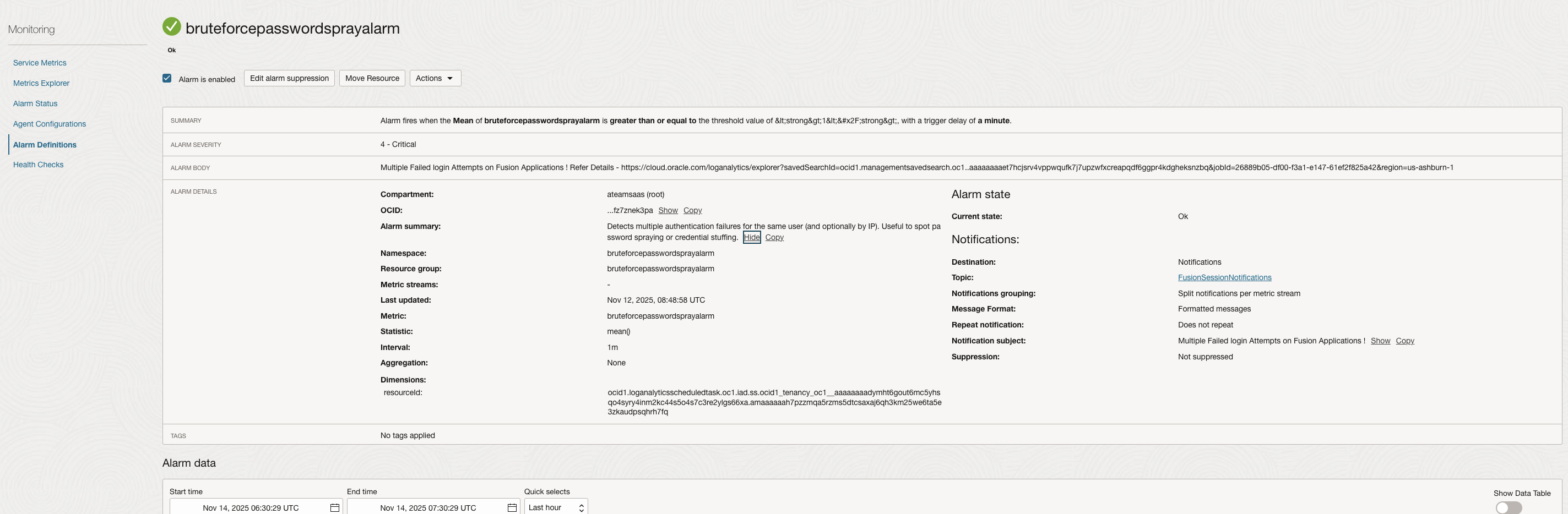
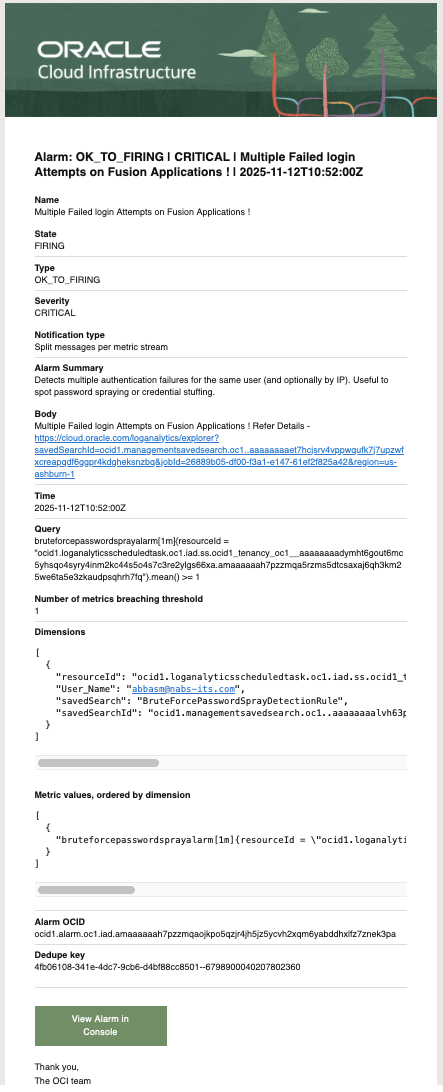
Alarm Received as Email Notification –
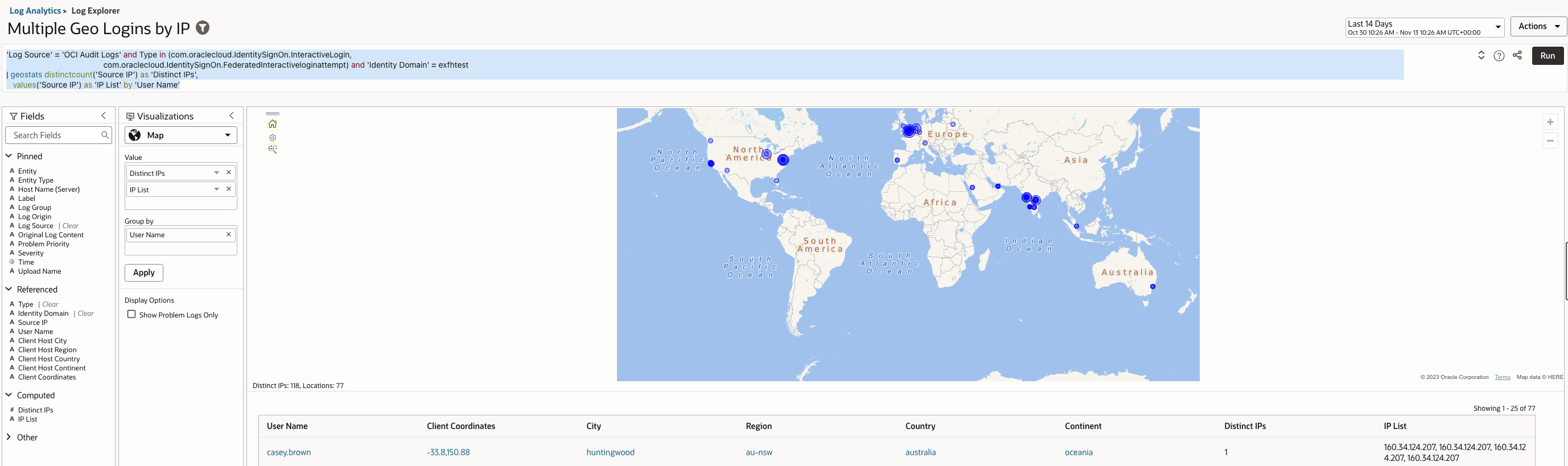
Impossible travel occurs when a user appears to log in from two geographically distant IP addresses in a timeframe that would be impossible for legitimate travel. This often indicates credential compromise or session hijacking.
The query detects this behaviour by counting distinct source IPs per user and surfacing patterns that indicate geographically impossible access.
Log Explorer Query –
| ‘Log Source’ = ‘OCI Audit Logs’ and Type in (com.oraclecloud.IdentitySignOn.InteractiveLogin, com.oraclecloud.IdentitySignOn.FederatedInteractiveloginattempt) and ‘Identity Domain’ = <identitydomain> | geostats distinctcount(‘Source IP’) as ‘Distinct IPs’, values(‘Source IP’) as ‘IP List’ by ‘User Name’ |
Output – Set Visualization to Map
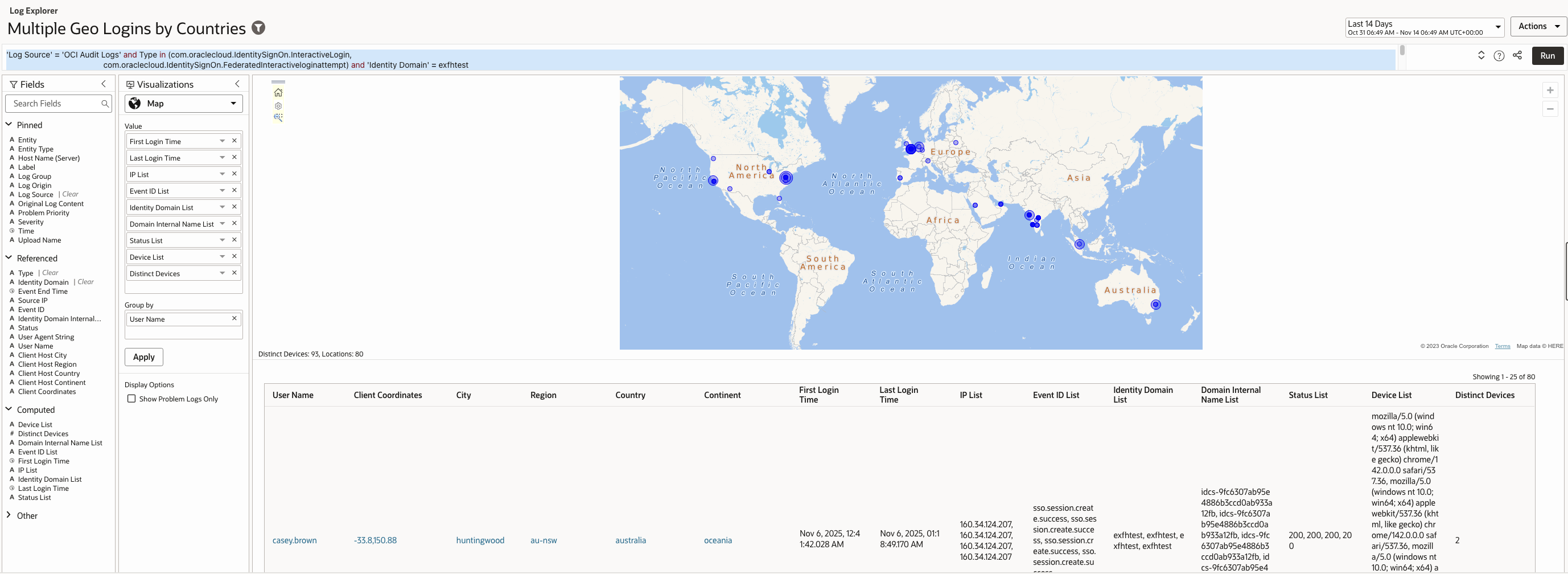
Changes in authentication location across countries within minutes or hours usually signal malicious access, bot based login attempts, or attacker use of distributed infrastructure.
The query identifies this attack vector by analysing logins mapped to different countries and detecting rapid geographic shifts that legitimate users cannot perform.
Log Explorer Query –
| ‘Log Source’ = ‘OCI Audit Logs’ and Type in (com.oraclecloud.IdentitySignOn.InteractiveLogin, com.oraclecloud.IdentitySignOn.FederatedInteractiveloginattempt) and ‘Identity Domain’ = <identitydomain> | geostats earliest(‘Event End Time’) as ‘First Login Time’, latest(‘Event End Time’) as ‘Last Login Time’, values(‘Source IP’) as ‘IP List’, values(‘Event ID’) as ‘Event ID List’, values(‘Identity Domain’) as ‘Identity Domain List’, values(‘Identity Domain Internal Name’) as ‘Domain Internal Name List’, values(Status) as ‘Status List’, values(‘User Agent String’) as ‘Device List’, distinctcount(‘User Agent String’) as ‘Distinct Devices’ by ‘User Name’ |
Sample records (example output):
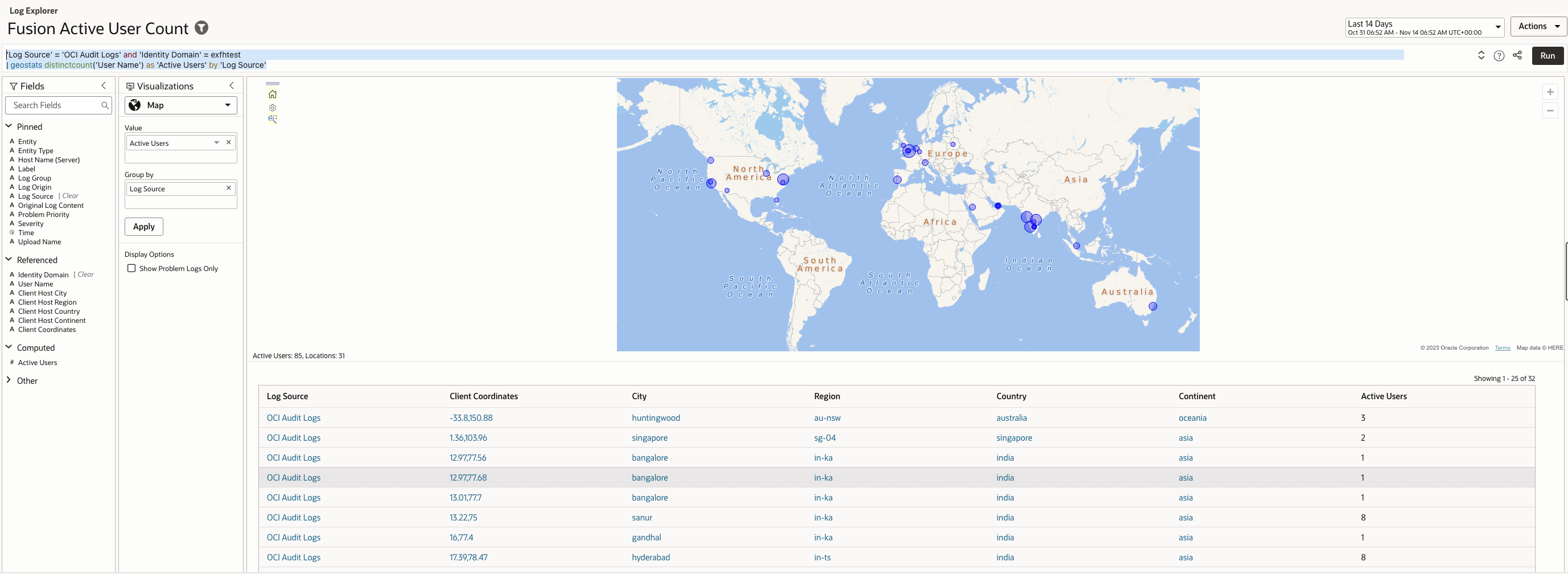
Monitoring active user volume can reveal anomalies such as bursts of automated logins, credential testing, or scripted session creation.
The query detects such events by counting distinct active users over a given interval and highlighting unexpected spikes.
Log Explorer Query –
| ‘Log Source’ = ‘OCI Audit Logs’ and ‘Identity Domain’ = <identitydomain> | geostats distinctcount(‘User Name’) as ‘Active Users’ by ‘Log Source’ |
Sample records (example output):
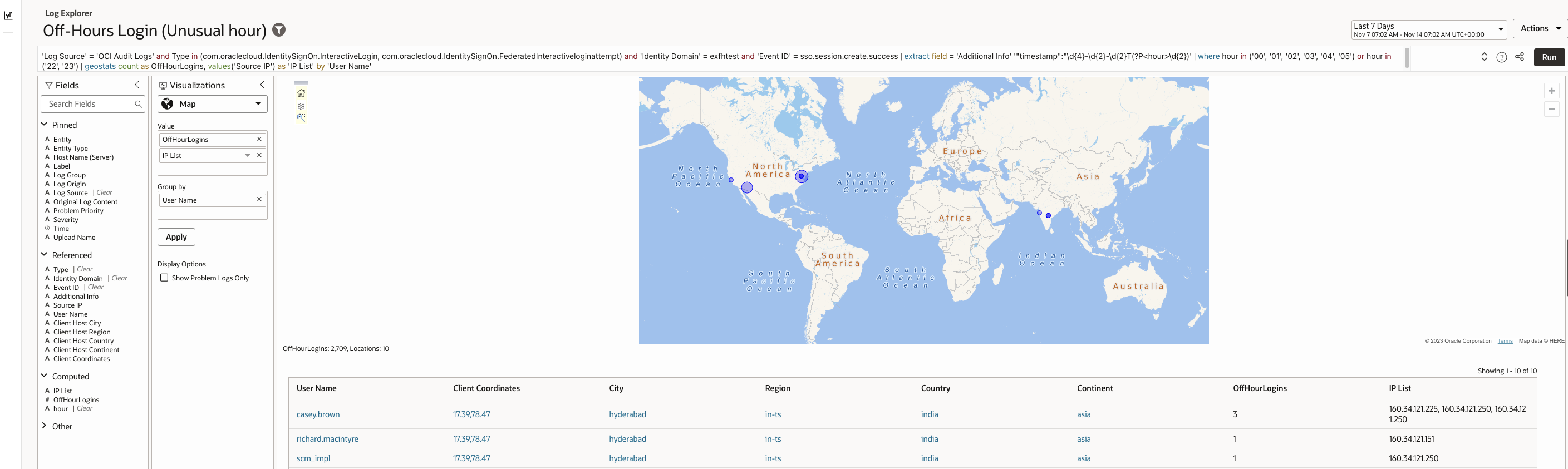
Most users authenticate during predictable business hours. Logins during late night or early morning periods may indicate misuse, compromised credentials, or attempts to avoid detection.
The query detects this scenario by extracting login timestamps and surfacing authentication events outside normal operating hours.
If you prefer the off-hours window to be different (for example 23:00–06:00), replace where line with:
| where hour IN (’23’,’00’,’01’,’02’,’03’,’04’,’05’,’06’)
Log Explorer Query –
| ‘Log Source’ = ‘OCI Audit Logs’ and Type in (com.oraclecloud.IdentitySignOn.InteractiveLogin, com.oraclecloud.IdentitySignOn.FederatedInteractiveloginattempt) and ‘Identity Domain’ = exfhtest and ‘Event ID’ = sso.session.create.success | extract field = ‘Additional Info’ ‘”timestamp”:”\d{4}-\d{2}-\d{2}T(?P<hour>\d{2})’ | where hour in (’00’, ’01’, ’02’, ’03’, ’04’, ’05’) or hour in (’22’, ’23’) | geostats count as OffHourLogins, values(‘Source IP’) as ‘IP List’ by ‘User Name’ |
Sample records (example output):
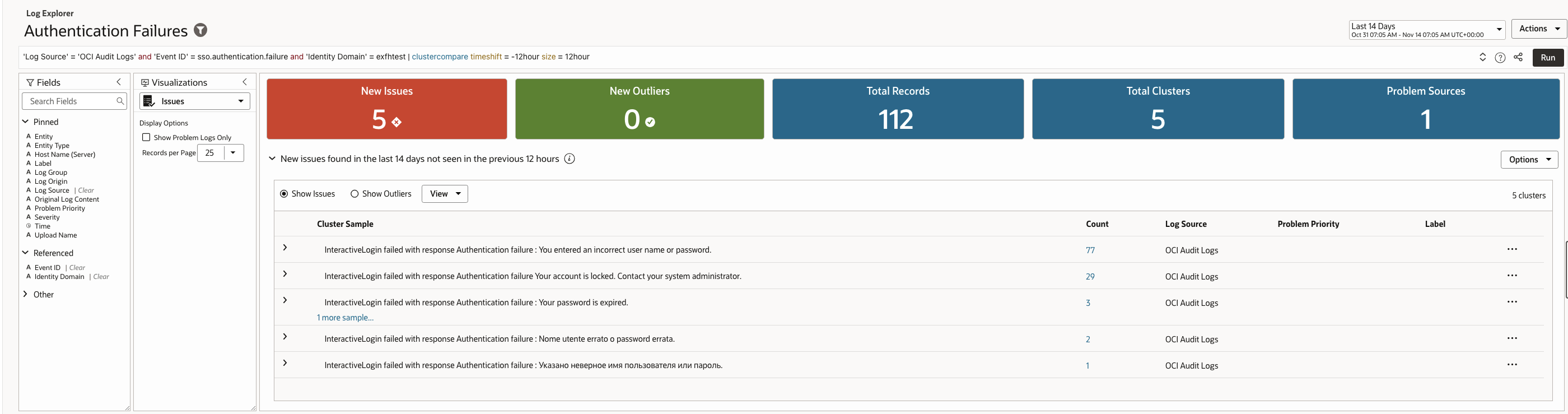
Patterns of failed authentication attempts reveal more than simple user error, particularly when failures cluster around the same user, device, or source.
The query detects these patterns by grouping failures by category and volume, allowing teams to distinguish benign failures from coordinated attack activity.
Log Explorer Query –
| ‘Log Source’ = ‘OCI Audit Logs’ and ‘Event ID’ = sso.authentication.failure and ‘Identity Domain’ = <identitydomain>| clustercompare timeshift = -12hour size = 12hour |
Sample records (example output):
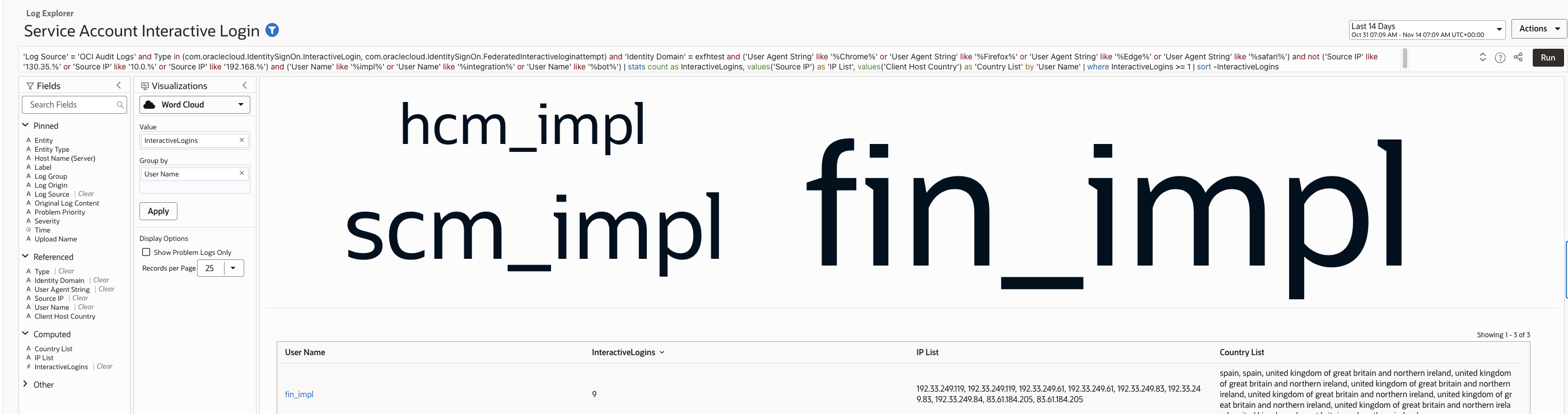
Service accounts are intended for automated workflows and should not authenticate through browsers. Interactive login attempts often indicate credential leakage, misuse, or attacker probing.
The query detects this vector by flagging browser user agents under accounts that are expected to be non interactive.
Log Explorer Query –
| ‘Log Source’ = ‘OCI Audit Logs’ and Type in (com.oraclecloud.IdentitySignOn.InteractiveLogin, com.oraclecloud.IdentitySignOn.FederatedInteractiveloginattempt) and ‘Identity Domain’ = <identitydomain> and (‘User Agent String’ like ‘%Chrome%’ or ‘User Agent String’ like ‘%Firefox%’ or ‘User Agent String’ like ‘%Edge%’ or ‘User Agent String’ like ‘%safari%’) and not (‘Source IP’ like ‘130.35.%’ or ‘Source IP’ like ‘10.0.%’ or ‘Source IP’ like ‘192.168.%’) and (‘User Name’ like ‘%impl%’ or ‘User Name’ like ‘%integration%’ or ‘User Name’ like ‘%bot%’) | stats count as InteractiveLogins, values(‘Source IP’) as ‘IP List’, values(‘Client Host Country’) as ‘Country List’ by ‘User Name’ | where InteractiveLogins >= 1 | sort -InteractiveLogins |
Sample records (example output):
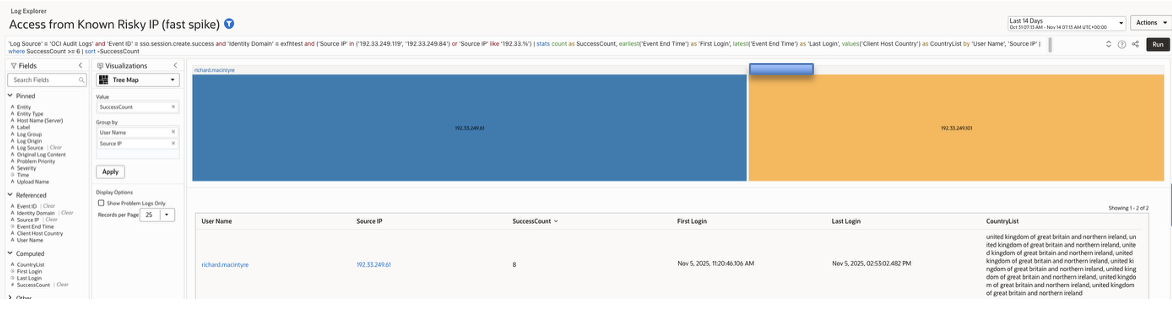
Attackers commonly use anonymising proxies, VPN exit nodes, and cloud hosted IP blocks. Successful logins from risky networks are an early indicator of compromise.
The query detects this by filtering for successful sessions originating from non corporate, non private, or known suspicious IP ranges.
Log Explorer Query –
| ‘Log Source’ = ‘OCI Audit Logs’ and ‘Event ID’ = sso.session.create.success and ‘Identity Domain’ = <identitydomain> and not (‘Source IP’ like ’10.%’ or ‘Source IP’ like ‘192.168.%’ or ‘Source IP’ like ‘130.35.%’) and (‘User Agent String’ like ‘%Chrome%’ or ‘User Agent String’ like ‘%Edge%’ or ‘User Agent String’ like ‘%Firefox%’) | timestats count as Sessions, values(‘Source IP’) as ‘IP List’, values(‘Client Host Country’) as ‘Country List’, earliest(‘Event End Time’) as ‘First Session Time’, latest(‘Event End Time’) as ‘Last Session Time’ by ‘User Name’ | where Sessions >= 6 | sort -Sessions |
Sample records (example output):
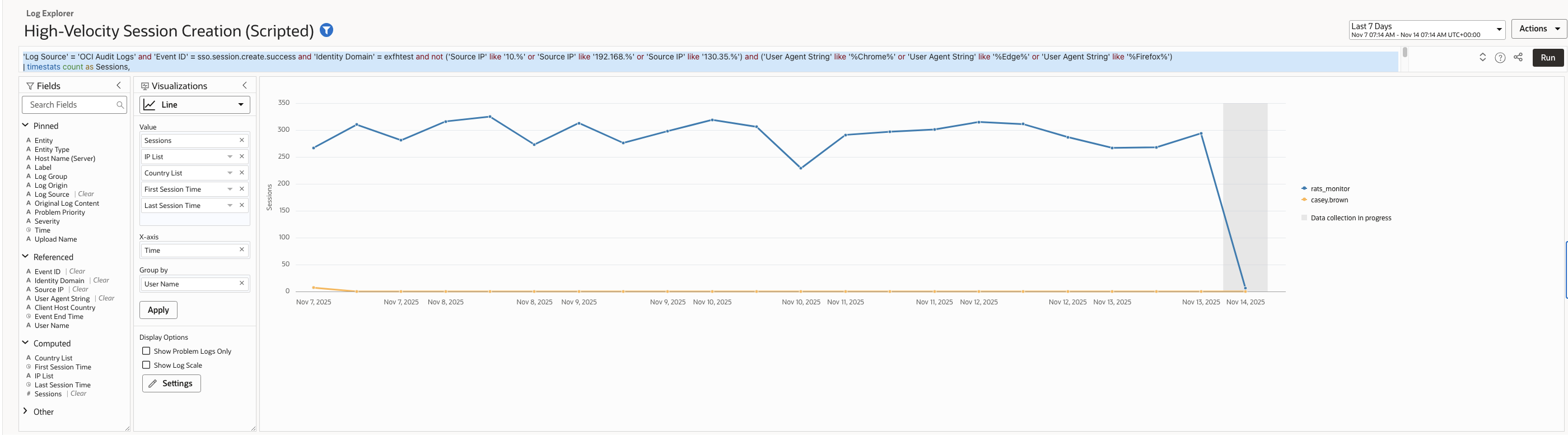
A high number of session creation events within a short period is typical of scripted attacks, automation abuse, or compromised tokens.
The query detects this vector by analysing session creation frequency per user and surfacing abnormally high authentication volume.
Log Explorer Query –
| ‘Log Source’ = ‘OCI Audit Logs’ and ‘Event ID’ = sso.session.create.success and ‘Identity Domain’ = <identitydomain> and not (‘Source IP’ like ’10.%’ or ‘Source IP’ like ‘192.168.%’ or ‘Source IP’ like ‘130.35.%’) and (‘User Agent String’ like ‘%Chrome%’ or ‘User Agent String’ like ‘%Edge%’ or ‘User Agent String’ like ‘%Firefox%’) | timestats count as Sessions, values(‘Source IP’) as ‘IP List’, values(‘Client Host Country’) as ‘Country List’, earliest(‘Event End Time’) as ‘First Session Time’, latest(‘Event End Time’) as ‘Last Session Time’ by ‘User Name’ | where Sessions >= 6 | sort -Sessions |
Sample records (example output):
Creating the SaaS Security Dashboard
Once all queries are validated in Log Explorer, each saved search can be pinned to a custom OCI Log Analytics Dashboard named “Fusion SaaS Security”.
In demonstration, the dashboard included:
- Geographic map visualization for Multiple Geo Logins
- Bar and trend charts for Brute-Force and Push Bombing activity
- Table widgets for Off-Hours Logins, Service Account Usage, and Risky IP Access
- Real-time counter widgets tied to Detection Rules for immediate visibility
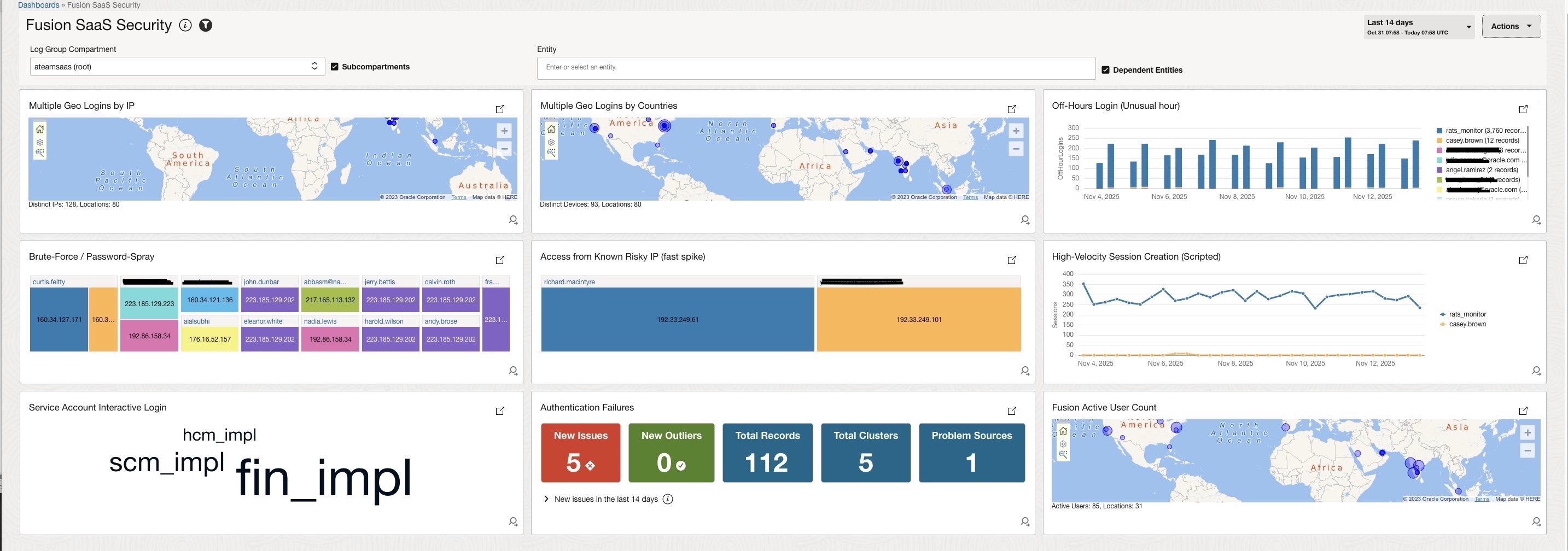
This single-pane view provides real-time threat posture monitoring and complements compliance mandates under CIS Controls (Access Management, Logging & Monitoring, and Security Operations).
Operational Recommendations
- Evaluation interval: 1–10 minutes (depending on detection sensitivity).
- Use OCI Functions or an enrichment pipeline to transform raw alarm JSON into human-readable notifications and include Saved Search links for rapid investigation.
- For production: tune thresholds, maintain a dynamic list of risky IPs, whitelist known automation/service IPs, and schedule the full saved-search exports for regular reporting.
Conclusion
OCI Log Analytics and LoganAI together provide a powerful, integrated platform for analysing Oracle SaaS IAM audit logs and transforming raw identity events into meaningful security insights. With AI assisted query generation, natural language log exploration, and built in visualisation, administrators can detect abnormal login patterns, track suspicious access, and monitor identity posture in real time without external SIEM tools or complex integrations.
The nine use cases in this article form a strong foundation for identity threat detection across Oracle SaaS. Organisations can extend them by:
- Enriching audit data using OCI Functions (e.g., add GeoIP metadata, tag service accounts, classify devices)
- Adding additional detection rules, such as:
- excessive session deletes
- MFA enrollments
- privileged user sign-in anomalies
- Expanding the Fusion SaaS Security Dashboard with new widgets, KPIs, or heatmaps
- Creating more targeted alarms, such as alerts for:
- first-time login from a new country
- sudden spike in federated login failures
- login attempts from outdated or risky browsers
- dormant accounts suddenly reactivated
As organizations grow, these detections can evolve into a continuous monitoring framework, enabling identity teams to move from reactive investigations to proactive defense.
With Log Analytics and LoganAI, Oracle SaaS customers now have native, data-driven identity security at their fingertips – simple to deploy, easy to extend, and powerful enough to detect emerging threats.
Refer Customer Connect Session for brief demo :
Oracle Go – See Beyond the Logs: AI-Driven IAM Audit Analysis for Oracle SaaS with OCI Log Analytics
https://community.oracle.com/customerconnect/events/607029-oracle-go-see-beyond-the-logs-ai-driven-iam-audit-analysis-for-oracle-saas-with-oci-log-analytics
References
- OCI Audit
- Oracle Go – See Beyond the Logs: AI-Driven IAM Audit Analysis for Oracle SaaS with OCI Log Analytics
- Methods and ways to extract Session Information using OCI Audit and Integrate into external systems
- Enable LoganAI
- Create Saved Search Query & Detection Rules
- Create Alerts for Detected Events
- Create Dashboards
- CIS Benchmark for Oracle SaaS