
Introduction
OCI Audit is an OCI service that automatically records calls to all supported OCI APIs as events. OCI Audit offers the following benefits:
- All audit data with multiple identity domains is available in one central place
- Provides a single source of truth for all actions in your cloud
- Tracking who did what, when, and from where
- Data can be pushed to external systems such as SIEMs.
- OCI Audit stores event data for a year
Please read blog – Methods and ways to extract OCI Events using OCI Audit and Integrate into external systems, to understand various options available & implementation details along with prerequisites, same would be used to extract Session Information – in our use case we will consider – Fusion Cloud Application hosted inside OCI.
In Current state for Fusion cloud applications, to get Fusion Session Login Information below API is used – Fusion Security: Using Sign In – Sign Out Audit REST API (Doc ID 2661308.1)
This provides login IP Address, type, login status, device (browser as user agent) etc…
However, post ongoing identity upgrade into OCI IAM, this method would no longer work.
Oracle Cloud Infrastructure Identity and Access Management Audit Events API’s which was earlier used for IAM identity domains will be deprecated
Therefore now we have standardization of Audit API’s for all OCI resources, going forward you will need to use the OCI Audit APIs instead.
This blog explores methods to extract session-related events (e.g., logins) for any application hosted on OCI, in this case – Fusion Cloud Applications —and integrate the data into external systems like SIEM for enhanced visibility and security.
Details
Below are choices of how Session information can be extracted for given compartment ID, in our use case we will consider compartment where Fusion Application is hosted, we will discuss all this in detail.
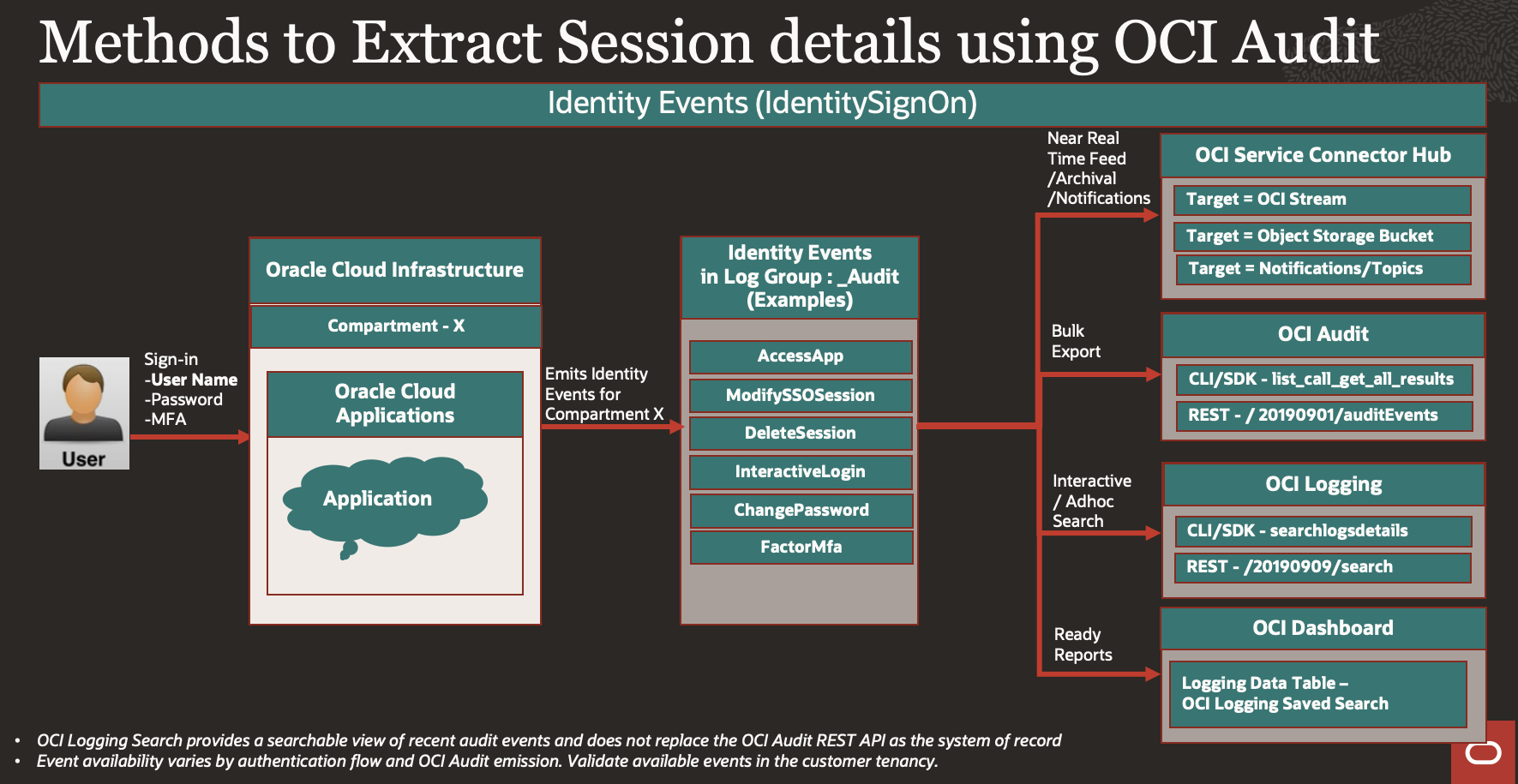
Examples of events associated with IAM Activities are listed here, We will use them to track Fusion Application Session information which is residing in Fusion Application IAM domain.
OCI Events which are interest to us are grouped under – IdentitySignOn events
The following are examples of IdentitySignOn-related events that may be observed depending on the authentication flow and what OCI Audit emits for the identity domain. Validate event availability in the customer tenancy around a specific event name.
OCI Audit / IdentitySignOn events provide visibility into sign-on, session, application access, MFA, password, and related IAM activity.
| Event Name | Description |
| IdentitySignOn.ModifySSOSession | A user’s session was modified, such as extending duration or updating session state.sso.session.modify.* |
| IdentitySignOn.InteractiveLogin | A user initiated an interactive login, typically via UI (console, federated login, etc.).sso.session.create.* sso.authentication.failure |
| IdentitySignOn.FactorMfa | A specific MFA factor (like OTP, push notification) was triggered or used.sso.auth.factor.initiated |
| IdentitySignOn.DeleteSession | User session was explicitly terminated or logged out.sso.session.delete.* |
| IdentitySignOn.ChangePassword | User changed their password through self-service or admin action.admin.me.password.change.* |
| IdentitySignOn.AccessApp | User accessed an OCI-integrated application or service via identity federation.sso.app.access.* |
Listing few Important attributes that can be extracted out of IdentitySignOn events JSON response
data.additionalDetails
| Event Name | Description |
| actorDisplayName | rats_monitor |
| clientIp | X.X.X.X |
| eventid | sso.session.delete.success |
| ssoIdentityProvider | UserNamePassword |
| compartmentId | ocid1.tenancy.oc1 |
| compartmentName | XXX |
| eventName | DeleteSession |
| message | DeleteSession succeeded |
| response. Status | 200 |
| responseTime | 2025-08-01T09:57:57.699Z |
| type | com.oraclecloud.IdentitySignOn.DeleteSession |
data.identity
| Attributes Name | Example |
| ipAddress | X.X.X.X |
| principalId | ocid1.user.oc1.. |
| principalName | casey.brown |
| tenantId | ocid1.tenancy.oc1… |
| userAgent | Mozilla/5.0 (Windows NT 10.0; Win64; x64) |
We will use below options for extracting and processing Fusion Session Information.
- OCI CLI/SDK
- OCI Logging search API (SearchLogsDetails)
- OCI Audit API (list_call_get_all_results)
- Service Connector
- Stream logs to Oracle Streaming
- Export logs to Object Storage
- Topics for Notifying
- OCI Logging UI
- Saved Search
- OCI Dashboard
- OCI REST API
- OCI Logging search (/20190909/search)
- OCI Audit API (/ 20190901/auditEvents)
1. OCI CLI/SDK
Connecting to OCI REST APIs using an SDK involves leveraging language-specific libraries provided by Oracle to interact with OCI services programmatically. This approach simplifies API calls by handling authentication, request signing, and response parsing.
OCI CLI commands wrapped inside scripts or Python code that run as serverless functions (OCI Functions). These functions can be triggered via API Gateway endpoints, enabling external systems to call them easily over REST APIs.
We will use Oracle Cloud Infrastructure SDK for Python
Below two methods can be used to fetch Audit logs –
1.1 OCI Logging search API (SearchLogsDetails)
Invoke oci.loggingsearch.models.SearchLogsDetails to perform log queries, as we search in OCI Logging UI Search.
Refer example – Export OCI Audit Logs in CSV format for a custom time range
You need to pass query statement as you can query in Logging UI along with start time & end time
Query variable contains – Compartment ID, User Principle, Events, Event Attributes etc., same way you query in Logging UI, this search provides more flexibility for adhoc searches.
Sample Code –
Below is Sample code how to extract event from API, you need to extend this method to write as file in Object Storage & then use it inside Oracle Functions to be called Via REST API or whatever ways you need to consume it.
import oci
from datetime import datetime, timedelta, timezone

# Load OCI config from default location (~/.oci/config) and default profile
config = oci.config.from_file()

# Optional: print config to confirm it's loading correctly
# print(config)

# Initialize LogSearchClient
client = oci.loggingsearch.LogSearchClient(config)

# Replace this with your compartment OCID (tenancy or sub-compartment)
compartment_id = config["tenancy"]

# Time range: last 1 day
# Use explicit time range (example: last 1 hour)
end_time = datetime.now(timezone.utc)
start_time = end_time - timedelta(hours=1)

# Convert to ISO 8601 string with 'Z' for UTC
iso_start = start_time.strftime("%Y-%m-%dT%H:%M:%S.%f")[:-3] + "Z"
iso_end = end_time.strftime("%Y-%m-%dT%H:%M:%S.%f")[:-3] + "Z"
# Print to verify
print(f"Query Time Range:\nStart: {iso_start}\nEnd:   {iso_end}")

# Query to Pass for selected compartment and identity events

query = f'search "{compartment_id}/_Audit" "{compartment_id}" | where upper(data.eventName) in (\'ACCESSAPP\', \'INTERACTIVELOGIN\', \'MODIFYSSOSESSION\', \'FACTORMFA\', \'DELETESESSION\', \'CHANGEPASSWORD\') | sort by datetime desc'

print(query)

# Prepare search request
search_details = oci.loggingsearch.models.SearchLogsDetails(
    time_start=start_time,
    time_end=end_time,
    search_query=query,
    is_return_field_info=False
)

# Execute search

print("Execute search.")

response = client.search_logs(search_logs_details=search_details)
print("Status Code:", response.status)
#print("Headers:", response.headers)
#print("Data:", response.data)

results = response.data.results

if results:
    for item in results:
     #   print(item)
      continue  # Skip non-matching domains
else:
    print("No results found or query failed.")

# Define expected fields
fields = [
    "actorName", "eventId", "httpResponseStatus",
    "ssoLocalIp", "domainDisplayName", "domainName", "actorType",
    "message", "userAgent", "authType", "callerId", "callerName",
    "credentials", "ipAddress", "principalName"
]

# Print header
print("|".join(fields))

# Iterate through each result
for item in response.data.results:
    log_data = item.data.get("logContent", {}).get("data", {})
    additional = log_data.get("additionalDetails", {})
    identity = log_data.get("identity", {})

    row = [
        str(additional.get("actorName", "")),
        str(additional.get("eventId", "")),
        str(additional.get("httpResponseStatus", "")),
        str(additional.get("ssoLocalIp", "")),
        str(additional.get("domainDisplayName", "")),
        str(additional.get("domainName", "")),
        str(additional.get("actorType", "")),
        str(log_data.get("message", "")),
        str(identity.get("userAgent", "")),
        str(identity.get("authType", "")),
        str(identity.get("callerId", "")),
        str(identity.get("callerName", "")),
        str(identity.get("credentials", "")),
        str(identity.get("ipAddress", "")),
        str(identity.get("principalName", ""))
    ]

    print("---------")
    print("|".join(row))
Response variable will return JSON Payload response as per Audit REST API Schema.
1.2 OCI Audit API (list_call_get_all_results)
Automatically fetches more data from the service until the no more records are available
Use oci.pagination.list_call_get_all_results to fetch complete results efficiently
Refer pagination API Sample Code using oci-python-sdkYou need to pass Compartment ID (tenancy ID), start time & end time & it will return all information till all pages are fetched recursively, this way you can export entire audit logs for provided time range.
Sample Code –
Below is Sample code how to extract event from API, you need to extend this method to write as file in Object Storage & then use it inside Oracle Functions to be called Via REST API or whatever ways you need to consume it.
import oci

from datetime import datetime, timedelta, timezone

config = oci.config.from_file("~/.oci/config", "DEFAULT")

audit_client = oci.audit.AuditClient(config)

#print(config["region"])

# Set compartment OCID

compartment_id = config["tenancy"]

# Define time range (last 1 hour)

end_time = datetime.now(timezone.utc)

start_time = end_time - timedelta(hours=10)

# Get ALL events,

response = oci.pagination.list_call_get_all_results(

    audit_client.list_events,

    compartment_id=compartment_id,

    start_time=start_time,

    end_time=end_time

)

# Print header

print("event_time | event_id | principal_name | domain | Action | Device | IP | Event")

print('#####')

# Track if any logs matched

matched = False

count = 0

# Filter and display

for event in response.data:

    data = event.data

    #print(data)

    identity = getattr(data, "identity", None)

    additional_details = getattr(data, "additional_details", None)

    domain = additional_details.get("domainDisplayName", "-") if additional_details else "-"

# FILTER: Only show events with domain = exfhtest

    if domain != "XX":

       continue  # Skip non-matching domains

    # EXCLUDE: Skip if principal name or event contains 'rats_monitor'

    if "rats_monitor" in (getattr(identity, "principal_name", "").lower()):

        continue  # Skip events triggered by rats_monitor

    #print(data)

    print('---------------------------------------------------------------------------')

    FulleventId = additional_details.get("eventId", "-") if additional_details else "-"

    #resource_name = getattr(event, "resource_name", "-")

    action = getattr(data, "event_name", "-")

    principal_name = getattr(identity, "principal_name", "-") if identity else "-"

    user_agent= getattr(identity, "user_agent", "-")

    ip_address= getattr(identity, "ip_address", "-")

    print(f"{event.event_time} | {event.event_id} | {principal_name} | {domain}  | {action} | {user_agent} | {ip_address} | {FulleventId}")

    matched = True

    count += 1

    if count >= 100:

        break  # STOP after 100 rows

# If no logs matched, print a message

if not matched:

    print(f"\nNo logs found for domain 'exfhtest' between {start_time} and {end_time}.")
Response variable will return JSON Payload response as per Audit REST API Schema.
2 Using Service Connector
Service Connector in OCI Logging is used to stream log data from one OCI service (like Logging or Audit) to another destination (like Object Storage, Streaming, Functions, Topics, Monitoring, etc.)
We will use Standard Source – _Audit log group provided by OCI Audit.
We will cover below targets , you can refer for more scenarios
2.1 Stream logs to Oracle Streaming for real-time processing or alerting.
Create Connector, Source as Log group – _Audit , Target as StreamFilter on OCI Service Name & OCI Event Type which you want to capture.Select All Event Types for Service – Identity SignOn.
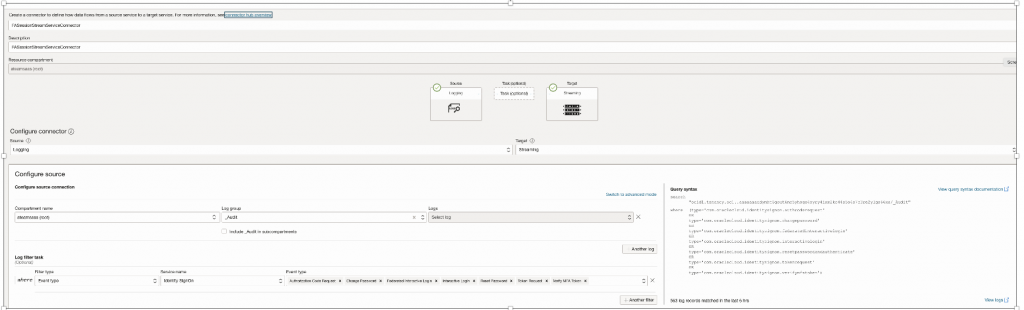
Define Oracle Stream & use that as Target
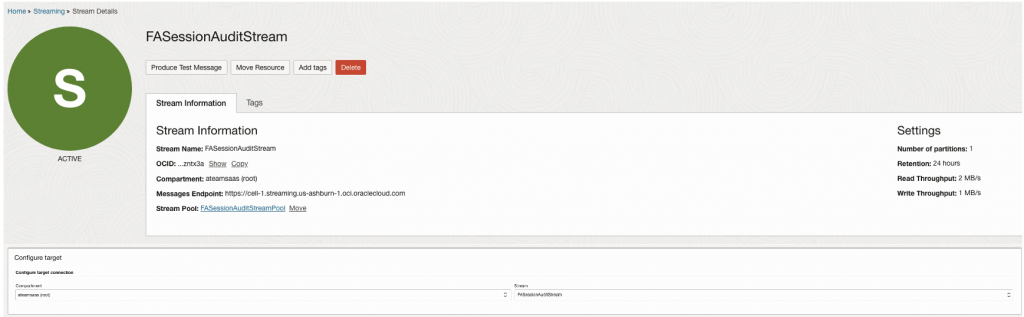
Create Policies so that Connector can Access Target to Stream data.
Script to test if Stream is working –
import oci

import base64

import time

# Load config from ~/.oci/config (or specify config_path, profile_name)

config = oci.config.from_file()

# Replace with your actual values

stream_ocid = "ocid1.stream. "

# your stream endpoint

stream_endpoint = "https://<XXX>.streaming.us-ashburn-1.oci.oraclecloud.com"

# Create StreamClient with custom endpoint

stream_client = oci.streaming.StreamClient(config, service_endpoint=stream_endpoint)

# Create a cursor to read messages

cursor_details = oci.streaming.models.CreateCursorDetails(

    partition="0",  # assuming 1 partition

    type="TRIM_HORIZON"

)

cursor = stream_client.create_cursor(stream_ocid, cursor_details).data

# Read messages

get_messages_result = stream_client.get_messages(stream_ocid, cursor.value, limit=10)

print("Read messages:")

for msg in get_messages_result.data:

    print("Key:", msg.key, "Value:", base64.b64decode(msg.value).decode())
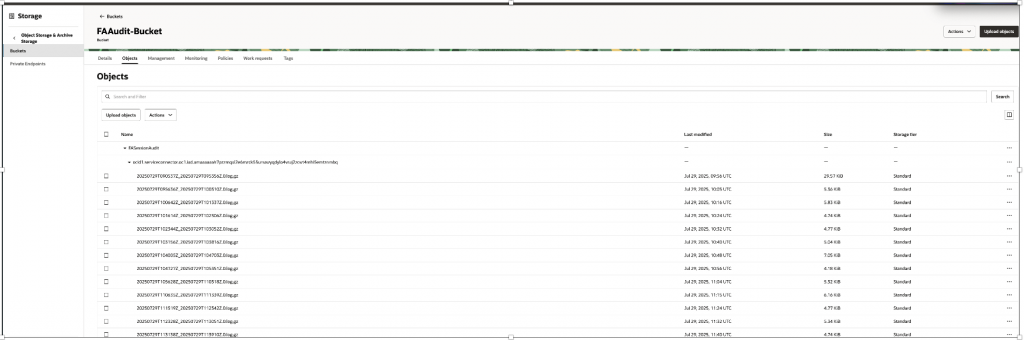
2.2 Export logs to Object Storage for long-term retention and analysis.
Create Connector, Source as Log group – _Audit , Target as Object Storage.
Filter on OCI Service Name & OCI Event Type which you want to capture.
Select All Event Types for Service – Identity SignOn
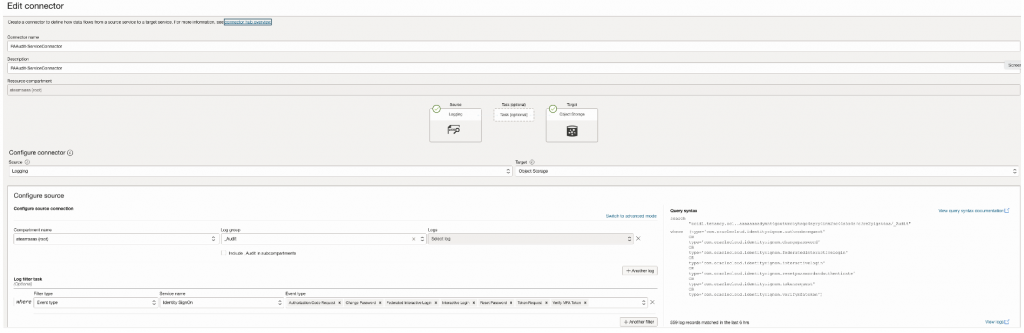
Define Object Storage Bucket & use that as Target

Create Policies so that Connector can Access Target to Write files to Object Storage.
After Connector is activated it will start writing files frequently –
2.3 Using Topics for Notifying external receipting using – Email, Slack, SMS
Create Connector, Source as Log group – _Audit , Target as Stream
Filter on OCI Service Name & OCI Event Type which you want to capture.
Select Event Types for Service – Identity SignOn in which you want to be notified, in below case I have used event – Change Password Event.
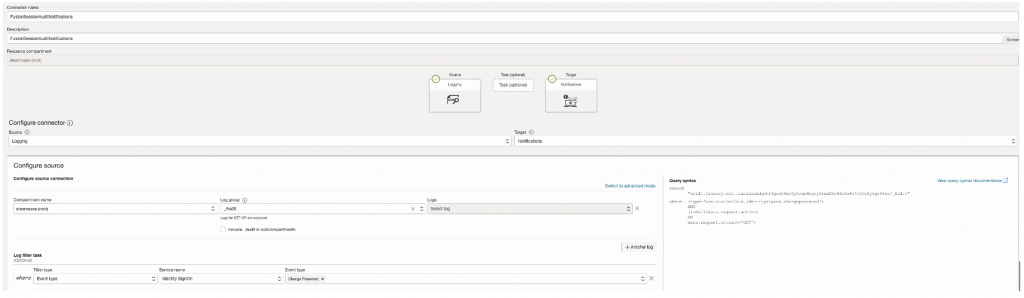
Define Topic & use that as Target
Create Policies so that Connector can Access Target to Send Notification to Topic.
Check if mail Notification is received after Event occurred.
3.Using OCI Logging UI
3.1 Saved Search
OCI Logging Saved Search – A predefined query in OCI Logging that filters and retrieves log data based on custom criteria for quick access and analysis
Create Saved Searches and build custom dashboards to visualize and monitor audit events interactively.
In our case refer Search query being used, this uses Identity SignOn Events.
Search Query –
Change <ocid1.tenancy.oc1..XXXXX> to your tenancy ID
Change <IdentityDomainDisplayName> to Identity Domain Name of Fusion Application
search "<ocid1.tenancy.oc1..XXXXX>"

| sort by datetime desc | where upper(data.eventName)

in ('ACCESSAPP', 'INTERACTIVELOGIN', 'MODIFYSSOSESSION','FACTORMFA', 'DELETESESSION', 'CHANGEPASSWORD') and (data.additionalDetails.actorName != 'rats_monitor') and (data.additionalDetails.domainDisplayName ='<IdentityDomainDisplayName>')

| select data.additionalDetails.domainDisplayName as Domain, data.additionalDetails.actorDisplayName as User, data.additionalDetails.actorName as Login, data.additionalDetails.eventId as "Success/Failure", data.additionalDetails.ssoRp as Application, data.identity.ipAddress as "IP Address", data.identity.userAgent as "User Agent",time_format(datetime, 'yyyy-MM-dd hh:mm:ss z') as Date
However this UI method has limitations , You can only query for 14 days range & It renders limited data (Rows within 500 to 1000) , anything beyond that , UI will not render all data & show this warning message –

In this case to Extract data OCI Logging Search API with pagination controls should be used as explained in Section – 4.2 OCI Logging Search API as REST Method OR 1.1 OCI Logging search API (SearchLogsDetails) as SDK method.
3.2 OCI Dashboard
OCI Dashboard – A customizable visual interface in OCI that displays metrics, logs, and saved searches in a unified, interactive view for monitoring and insights
Refer this working example how to create Dashboard report from Saved Search – Generate Identity and Access Management Reports from Oracle Cloud Infrastructure Audit
4 Using OCI REST API via Middleware (e.g., Oracle Integration Cloud)
OCI provides two mechanisms to access audit data Via REST : the Audit REST API for authoritative extraction and the Logging Search API for query-based analysis of recent events, this we have already discussed in Main Blog – – Methods and ways to extract OCI Events using OCI Audit and Integrate into external systems with Use Case Characteristics, refer section (Using OCI REST API via Middleware (e.g., Oracle Integration Cloud)
We will explain how to get Fusion Session information using those APIs.
4.1 OCI Audit REST API
Bulk Export of OCI Audit
API Document – https://docs.oracle.com/en-us/iaas/api/#/en/audit/20190901/AuditEvent/ListEvents
Operation – GET
EndPoint – https://audit.us-ashburn-1.oraclecloud.com/20190901/auditEvents?compartmentId=<ocid1.tenancy.oc1..> &startTime=2025-09-20T00:00:00Z&endTime=2025-09-21T00:00:00Z
Replace <ocid1.tenancy.oc1..> with your tenancy ID & StartTime, EndTime as desired.
End Point URL Depends on OCI region, please check accordingly .
https://docs.oracle.com/en-us/iaas/api/#/en/audit/20190901/
Since parameters are limited to compartment ID, start time & end time, Post Processing of records is required to filter records over Identity Domain & IdentitySignOn events.
4.2 OCI Logging Search API
Search Audit Log for specific Query
API Document – https://docs.oracle.com/en-us/iaas/api/#/en/logging-search/20190909/SearchResult/SearchLogs
Operation – POST
EndPoint – https://logging.us-ashburn-1.oci.oraclecloud.com/20190909/search
End Point URL Depends on OCI region, please check accordingly .
https://docs.oracle.com/en-us/iaas/api/#/en/logging-search/20190909/
Request Body : Query to Get Login/Logout Session Information over Fusion Domain.
Replace – Tenancy OCID with <ocid1.tenancy.oc1..>
Identity Domain Display Name with <IdentityDomainDisplayName>
{

"timeStart": "2025-12-08T18:32:34.862Z",

"timeEnd": "2025-12-20T19:32:34.862Z",

"isReturnFieldInfo": false,

"searchQuery": "search \"<ocid1.tenancy.oc1..>/_Audit\" | sort by datetime desc | where (data.additionalDetails.eventId = 'sso.session.create.success' or data.additionalDetails.eventId = 'sso.authentication.failure' or data.additionalDetails.eventId = 'sso.session.delete.success') and (data.additionalDetails.actorName != 'rats_monitor') and (data.additionalDetails.domainDisplayName = ‘<IdentityDomainDisplayName>')",

"limit": 100

}
This Log Search API would work between 14 days gap (from timeStart to timeEnd ).
Pagination – You can apply Pagination controls using response header that will contain parameter – opc-next-page, If this header exists, more data is available, continue sending requests with additional header (opc-next-page: eyJvZmZzZXQiOjUwMH0=) received from last response until opc-next-page header is absent in response, which means you have reached end of result.
Refer Pagination – https://docs.oracle.com/en-us/iaas/Content/API/Concepts/usingapi.htm#nine
Since Oracle Cloud Infrastructure (OCI) REST APIs do not support Basic Authentication (username/password) — you must use OCI Signature-based authentication, Oracle Integration Cloud (OIC) Gen 3 and other OCI services enforce OCI Signature Version 1.
You need to setup OCI API keys for the user based on which REST APIs will connect to the OCI tenancy.
Use the REST Adapter with OCI Signature-based authentication to programmatically retrieve audit events into workflows or third-party tools.
Refer OCI Gen3 Connection Method – OCI Signature Version 1
Refer Oracle Cloud Infrastructure – REST APIs (Postman Workspace) to test run OCI Audit & Log Search API’s.
https://www.postman.com/oracledevs/oracle-cloud-infrastructure-rest-apis/overview
Conclusion
Each method for accessing and analyzing OCI Audit logs offers distinct advantages based on use case, scalability, and integration needs
| Need / Scenario | Methods |
| Ad-hoc search and filtering of audit or session events | OCI Logging Search via CLI/SDK (SearchLogsDetails) OR REST (POST /20190909/search) |
| Bulk download of audit events programmatically | OCI Audit API via CLI/SDK (list_call_get_all_results) OR REST (GET /20190901/auditEvents) |
| Near-real-time log delivery or long-term archival | OCI Service Connector Hub targeting OCI Streaming or Object Storage |
| Dashboards and saved reports for audit or security teams | OCI Logging UI using Saved Searches and Dashboards |
Align the choice of method with your organization’s operational model, tooling maturity, and compliance requirements.
References
- Fusion Identity Upgrade
- OCI Audit
- OCI Events
- OCI Service Connector
- OCI Logging
- OCI CLI
- OCI Dashboard
- OCI SDK
- OCI Audit API
- Manage Oracle Cloud Infrastructure REST APIs Programmatically using Shell and Java Code
- Export OCI Audit Logs in CSV format for a custom time range
- Implement multicloud security using OCI Audit to capture events from OCI Identity and Access Management
- Generate Identity and Access Management Reports from Oracle Cloud Infrastructure Audit