
Introduction
OCI Workload Identity Federation (WIF) allows workloads such as GitHub Actions or Azure AD applications to authenticate to OCI without using long-lived credentials. If you are new to Workload Identity Federation, you can read more about this service here.
In this blog, I will show how to set up WIF using Terraform and deploy it with OCI Resource Manager. A complete, ready-to-use Terraform project is available on GitHub repo, which automates the process end-to-end.
GitHub Repo, Resource Manager and Service Users
The service_users.json file contains key information about your service users and their rule mappings:
- username – The service user that will be impersonated in OCI.
- claim_name – The claim from the requesting IdP’s JWT used for mapping.
- claim_value – The expected value of the claim.
- operator – Supported operators are eq (equals) and co (contains).
Note: Customers can use different claim names for different rules depending on their workload identity setup.
For more information on the Terraform scripts, check out the README file in the repository.
When deploying with Resource Manager:
- In the OCI Console, navigate to: Developer Services → Resource Manager → Stacks.
- Click Create Stack and upload the folder containing the Terraform files cloned from the GitHub repo.
- Click Next and set required variables.
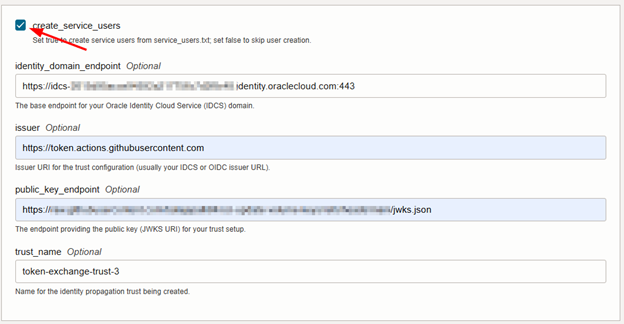
Note: If create_service_users is unchecked and the referenced service users do not already exist, the deployment will fail.
Terraform Execution Flow
When you run Apply, the Terraform scripts execute in sequence:
Step 1 – Create Confidential Application
A confidential application is created in the Identity Domain. Terraform captures the client ID and client secret automatically. These will be used by workloads during federation.
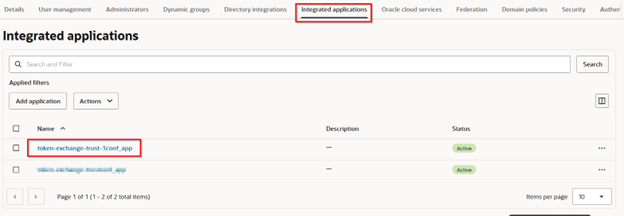
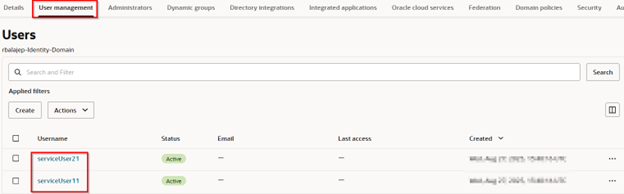
Step 2 – Create Service Users (Optional)
If create_service_users = true, Terraform will:
- Read service_users.json.
- Create each user in the Identity Domain.
Step 3 – Create Federation Trust
Terraform configures a propagation trust with rules derived from service_users.json. This establishes which workload claims are trusted to impersonate OCI service users.
Conclusion
This Terraform automation simplifies deploying OCI Workload Identity Federation with user impersonation.
Important: This deployment only works for user impersonation mode.
If you want to use non-impersonation mode, you must modify trust.tf to adjust how the trust is created.