

Introduction
Many Oracle customers use Oracle Data Transforms (ODT) to build and operate data ingestion and transformation pipelines. ODT is often configured through its UI, which is effective for initial development but can become difficult to scale when teams need repeatable promotions across DEV / TEST / PROD, stronger governance, and reduced manual change risk.
A common enterprise requirement is to treat ODT assets (for example, projects, connection configurations, and migration artifacts) as deliverables that can be promoted through environments in a controlled way, ideally using a standard CI/CD pipeline.
In this post, we’ll discuss how you can bring modern CI/CD practices to your ODT projects by leveraging the REST APIs. We’ll look at why CI/CD makes a difference, how the integration works, and potential areas for enhancement. This post includes practical reference to the included Jenkinsfile and Python automation script (without a tedious line-by-line walkthrough).
Why Use ODT REST APIs in a CI/CD Model
A CI/CD model is what brings repeatability, controls, and automation across DEV / TEST / PROD. ODT REST APIs let you apply those practices to projects and workflows by promoting and operating assets programmatically instead of relying on manual UI steps. Some of the CI/CD benefits are:
- Consistent environment promotions: CI/CD promotes the same versioned migration artifacts across environments, reducing drift and “works in DEV” surprises.
- Traceability and rollback: CI/CD uses version control and approvals to track changes in automation and configuration, while the APIs export/import a versioned migration artifact so releases can be reproduced or rolled back.
- Faster, safer releases: CI/CD reduces manual steps and enables pipeline validation stages, while the APIs automate export/import and expose job status for reliable execution.
- Governance and operational integration: CI/CD enforces approvals and credential boundaries, and API-driven runs plug cleanly into orchestration, monitoring, and release workflows.
ODT is a strong fit for CI/CD because its REST APIs expose the key actions needed to integrate with standard enterprise delivery pipelines, including promotion, execution, and monitoring.
Prerequisites
To get started, you’ll need:
- A Jenkins environment with the required plugins (for pipeline orchestration, credentials, and notifications) and Python 3.8+ installed.
- Jenkins credentials configured for source and target environments, including a file credential for the OCI config.
- An OCI tenancy set up with Object Storage buckets and IAM policies granting read/write access as needed.
- Source and target ODT instances up, reachable, and configured with appropriate Object Storage connections.
How Does the Integration Work?
The Python helper keeps all ODT/OCI details out of the pipeline. It authenticates with ODT, discovers the correct Object Storage connection, starts export/import jobs, and waits for completion:
def generate_token(host, username, password, db_name, tenant_name, adw_ocid):
url = f"https://{host}/odi/broker/pdbcs/public/v1/token"
payload = {
    "username": username,
    "password": password,
    "database_name": db_name,
    "tenant_name": tenant_name,
    "cloud_database_name": adw_ocid,
    "grant_type": "password"
}
resp = requests.post(url, json=payload)
resp.raise_for_status()
return resp.json()['access_token']
def export_project(host, token, obj_storage_id, project_id, export_file_name):
url = f"https://{host}/odi/dt-rest/v2/migration/export"
payload = {
"objectStorageConnectionId": obj_storage_id,
"exportFileName": export_file_name,
"objects": [{"objectId": project_id, "objectType": "Project"}]
}
response = requests.post(url, json=payload, headers={'Authorization': f'Bearer {token}', 'Content-Type': 'application/json'})
response.raise_for_status()
return response.json()def check_job_status(host, token, job_id):
url = f"https://{host}/odi/dt-rest/v2/jobs/{job_id}"
headers = {'Authorization': f'Bearer {token}'}
while True:
response = requests.get(url, headers=headers)
response.raise_for_status()
status = response.json()['status']
print(f"Job {job_id} status: {status}")
if status in ['SUCCEEDED', 'DONE']:
return True
elif status in ['FAILED', 'ERROR']:
raise ValueError(f"Job {job_id} failed with status {status}")
time.sleep(10)def import_project(host, token, obj_storage_id, import_file_name):
url = f"https://{host}/odi/dt-rest/v2/migration/import"
payload = {
"objectStorageConnectionId": obj_storage_id,
"importFileName": import_file_name,
"importOption": "OVERWRITE"
}
response = requests.post(url, json=payload, headers={'Authorization': f'Bearer {token}', 'Content-Type': 'application/json'})
response.raise_for_status()
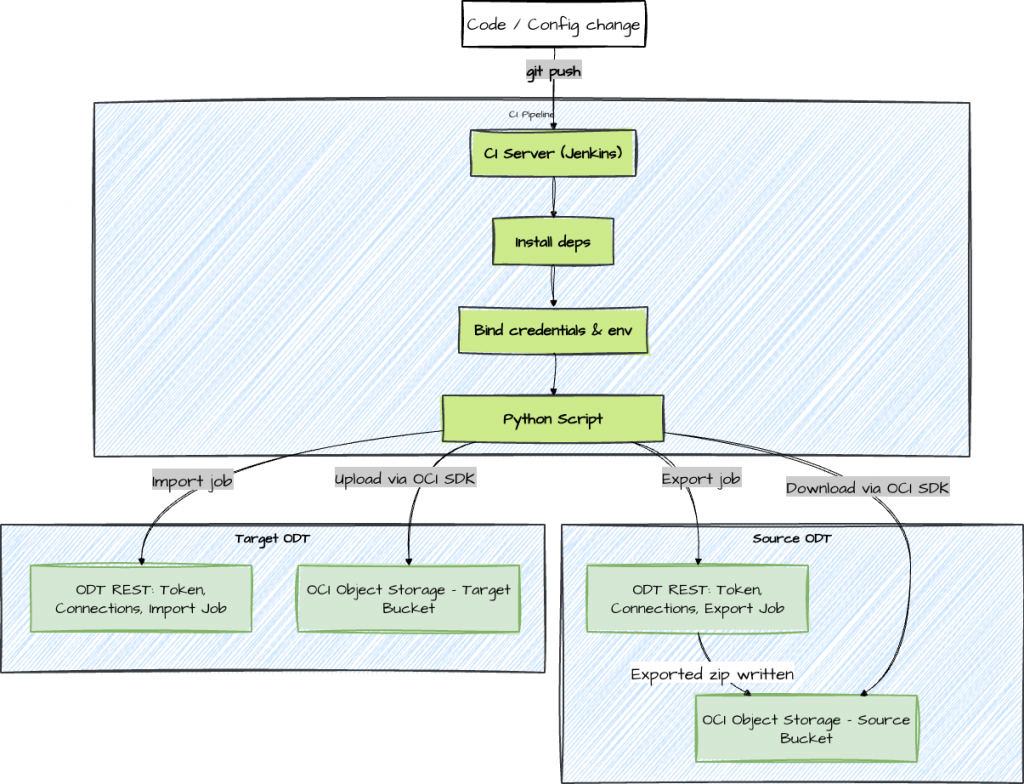
return response.json()At a high level, this automation treats an ODT project promotion as a controlled export → artifact transfer → import workflow. The ODT REST APIs initiate and track export/import jobs, while OCI Object Storage is used as the transport layer for the migration artifact (project ZIP). Jenkins provides the orchestration, credentials injection, and run history, so every promotion is repeatable and auditable. Here’s a high-level look at what the automated pipeline actually does:
- Prepare the Environment: Installs minimal required dependencies like Python, the requests library, and the OCI SDK.
- Handle Credentials: Pulls in secrets and config values from the Jenkins system’s credential store.
- Call ODT REST APIs: Obtains authentication tokens for ODT, discovers which connections and projects need handling, and kicks off an export job, monitoring its progress.
- Move Artifacts: Downloads the exported project ZIP from the source bucket and uploads it to the target bucket in OCI Object Storage using the OCI SDK.
def download_from_oci(config, namespace, bucket, object_name, local_path):
object_storage = oci.object_storage.ObjectStorageClient(config)
get_obj = object_storage.get_object(namespace, bucket, object_name)
with open(local_path, 'wb') as f:
for chunk in get_obj.data.raw.stream(1024 * 1024, decode_content=False):
f.write(chunk)def upload_to_oci(config, namespace, bucket, object_name, local_path):
object_storage = oci.object_storage.ObjectStorageClient(config)
with open(local_path, 'rb') as f:
object_storage.put_object(namespace, bucket, object_name, f)- Import on Target: Uses the ODT import API to bring the project into the destination instance, again monitoring for success.
- Clean Up & Report: Removes temporary files and reports the result back to the CI server for tracking.
The provided Jenkinsfile orchestrates the whole process, while automate_migration.py encapsulates the details of interacting with ODT and OCI.
Pipeline Overview
The Jenkinsfile orchestrates stages (pre-checks, export, transfer, import), while the Python script encapsulates REST/OCI calls. In practice, the clean separation of responsibilities is what makes this approach maintainable. The Jenkinsfile focuses on the pipeline itself: stage ordering, credentials binding, timeouts, notifications, and approvals. The Python automation focuses on ODT/OCI mechanics such as API calls, job polling, and artifact download/upload. This makes it easier to troubleshoot issues (pipeline vs service/API) and easier to extend the solution without turning the Jenkinsfile into application code.
pipeline {
agent any
parameters {
string(name: 'PROJECT_ID', defaultValue: '', description: 'Export a specific project (optional)')
}
environment {
SOURCE_HOST = '<source-host>'
TARGET_HOST = '<target-host>'
OCI_PROFILE = '<oci-profile>'
NAMESPACE = '<namespace>'
SOURCE_BUCKET = '<source-bucket>'
TARGET_BUCKET = '<target-bucket>'
}
stages {
stage('Checkout') {
steps {
git url: 'https://github.com/<user>/OracleDataTransforms ', branch: 'main'
}
}
stage('Install Dependencies') {
steps {
sh 'pip install requests oci'
}
}
stage('Migrate') {
steps {
withCredentials([
string(credentialsId: 'SOURCE_USER', variable: 'SOURCE_USER'),
string(credentialsId: 'SOURCE_PASS', variable: 'SOURCE_PASS'),
string(credentialsId: 'SOURCE_DB', variable: 'SOURCE_DB'),
string(credentialsId: 'SOURCE_TENANT', variable: 'SOURCE_TENANT'),
string(credentialsId: 'SOURCE_ADW', variable: 'SOURCE_ADW'),
string(credentialsId: 'TARGET_USER', variable: 'TARGET_USER'),
string(credentialsId: 'TARGET_PASS', variable: 'TARGET_PASS'),
string(credentialsId: 'TARGET_DB', variable: 'TARGET_DB'),
string(credentialsId: 'TARGET_TENANT', variable: 'TARGET_TENANT'),
string(credentialsId: 'TARGET_ADW', variable: 'TARGET_ADW'),
file(credentialsId: 'oci-config', variable: 'OCI_CONFIG_FILE')
]) {
sh '''
mkdir -p ~/.oci && cp "$OCI_CONFIG_FILE" ~/.oci/config
export SOURCE_USER SOURCE_PASS SOURCE_DB SOURCE_TENANT SOURCE_ADW
export TARGET_USER TARGET_PASS TARGET_DB TARGET_TENANT TARGET_ADW
if [ -n "$PROJECT_ID" ]; then
python automate_migration.py --project_id "$PROJECT_ID"
else
python automate_migration.py
fi
'''
}
}
}
}
post {
always { echo 'Pipeline completed' }
success { echo 'Migration succeeded' }
failure { echo 'Migration failed' }
}
}The implementation covers essential steps like:
- Checking that services are up and reachable before starting.
- Securely generating and handling temporary tokens.
- Discovering the right Object Storage connections and project IDs via the API.
- Triggering export/import jobs and tracking their completion.
- Handling artifact downloads/uploads between environments.
- Cleaning up temporary files when done.
Security & Governance Highlights
Because this pipeline interacts with both ODT and OCI, security is not just about storing credentials safely. It also includes logging, access scoping, and promotion controls. The goal is to make automation safer than manual execution: fewer human steps, fewer opportunities to expose secrets, and clearer traceability when something changes.
Security remains a priority throughout:
- Credential Management: Secrets (like usernames and passwords) are always injected at runtime and never hardcoded or committed to the repository.
- Least Privilege: Pipeline users are limited to only the permissions necessary to perform migrations and access Object Storage.
- Audit Trails: Every run is logged, and exported artifacts can be retained as immutable records.
- Failure Handling: Quick service availability checks ensure the pipeline fails early if an environment isn’t reachable.
def check_service_availability(host, label):
url = f"https://{host}/odi/dt-rest/v2/connections" # Using connections endpoint as example; adjust if needed
print(f"Checking availability for {label} at URL: {url}")
try:
response = requests.get(url)
if response.status_code == 503:
print(f"{label} service is unavailable (status 503), please resume the instance.")
exit(1)
else:
print(f"{label} service responded with status {response.status_code} (not 503), assuming available.")
# Proceed without raising, even if not 200
except requests.exceptions.RequestException as e:
print(f"Connection Error: {e}")
print(f"Unable to connect to {label} service at {host}. Please check the host and network.")
exit(1)Conclusion
Automating Oracle Data Transforms deployments with CI/CD and REST APIs significantly streamlines your release pipeline.
The Jenkinsfile and Python script in this repo are a solid foundation: they handle token acquisition, artifact movement, import, export, and verification, all while keeping security and traceability front and center.
Get started by running the pipeline in a test environment, fine-tuning your credentials and settings. As you get comfortable, add more advanced controls like approvals and monitoring. Before long, your data integration releases will be a routine, safe, and well-governed part of your DevOps process.
Note: Endpoint paths and required payload fields can vary by ODT version and service configuration. Always validate against the official REST API reference for your specific environment, and treat the endpoint list below as a starting point.
Appendix: Key ODT REST Endpoints
- Obtain access token: POST /odi/broker/pdbcs/public/v1/token
- Discover connections: GET /odi/dt-rest/v2/connections
- List projects: GET /odi/dt-rest/v2/projects
- Start export job: POST /odi/dt-rest/v2/migration/export
- Poll job status: GET /odi/dt-rest/v2/jobs/{jobId}
- Import artifact: POST /odi/dt-rest/v2/migration/import
With these APIs integrated into your pipeline, you can treat migrations as code, enabling safer, faster, and more reliable delivery for Oracle Data Transforms.
Reference
Oracle Documentation: REST API for Oracle Data Transforms
Code Examples
Disclaimer
- The sample code and guidance are provided “as is,” without warranties of any kind, and are intended solely for educational and illustrative purposes. Use at your own risk.
- You are responsible for reviewing and complying with all applicable licenses, terms of use, and service agreements for any APIs, SDKs, or cloud resources referenced (including Oracle Cloud Infrastructure and Oracle Data Transforms).
- Do not include or expose any sensitive information (e.g., passwords, tokens, tenancy OCIDs, bucket names, namespaces, hostnames, or profile names) in source code, logs, screenshots, or version control. Use environment variables or a secure secrets manager, and mask or redact sensitive values in any output.
- Before running this code in any environment, validate it in a non-production setting, apply least-privilege IAM policies, use HTTPS/TLS, rotate credentials regularly, and implement appropriate error handling, logging, and monitoring. Ensure storage buckets, objects, and downloaded files are protected and cleaned up as needed.
- Network endpoints and configurations (including hosts, ports, and paths) should be verified and restricted according to your organization’s security policies.
- This code may interact with external services. Confirm that any third-party libraries or tools (e.g., requests, argparse, oci SDK) align with your organization’s security, privacy, and compliance requirements before use.
- Availability checks, status polling, export/import operations, and job handling behaviors may change if service APIs evolve. Always consult the latest product documentation and test accordingly.
- No guarantee is made that this code meets your regulatory, data residency, or audit requirements. You are responsible for obtaining necessary approvals before using it with real data.
Python Script
import requests
import json
import time
import argparse
import os
import oci
from oci.config import from_file
def generate_token(host, username, password, db_name, tenant_name, adw_ocid):
url = f"https://{host}/odi/broker/pdbcs/public/v1/token"
payload = {
"username": username,
"password": password,
"database_name": db_name,
"tenant_name": tenant_name,
"cloud_database_name": adw_ocid,
"grant_type": "password"
}
print(f"Generating token for URL: {url}")
# Print full payload except password for debugging
print(f"Full Payload (password masked): {json.dumps({k: (v if k != 'password' else 'MASKED') for k, v in payload.items()})}")
response = requests.post(url, json=payload)
try:
response.raise_for_status()
except requests.exceptions.HTTPError as e:
print(f"HTTP Error: {e}")
print(f"Response content: {response.text}")
raise
return response.json()['access_token']
def list_connections(host, token):
url = f"https://{host}/odi/dt-rest/v2/connections"
headers = {'Authorization': f'Bearer {token}'}
response = requests.get(url, headers=headers)
response.raise_for_status()
return response.json()
def get_object_storage_conn_id(connections):
for conn in connections:
if conn['connectionType'] == 'ORACLE_OBJECT_STORAGE':
return conn['connectionId']
raise ValueError("No Object Storage connection found")
def list_projects(host, token):
url = f"https://{host}/odi/dt-rest/v2/projects"
headers = {'Authorization': f'Bearer {token}'}
response = requests.get(url, headers=headers)
response.raise_for_status()
return response.json()
def export_project(host, token, obj_storage_id, project_id, export_file_name):
    url = f"https://{host}/odi/dt-rest/v2/migration/export"
    payload = {
        "objectStorageConnectionId": obj_storage_id,
        "exportFileName": export_file_name,
        "objects": [{"objectId": project_id, "objectType": "Project"}]
    }
    response = requests.post(url, json=payload, headers={'Authorization': f'Bearer {token}', 'Content-Type': 'application/json'})
    response.raise_for_status()
    return response.json()
def check_job_status(host, token, job_id):
    url = f"https://{host}/odi/dt-rest/v2/jobs/{job_id}"
    headers = {'Authorization': f'Bearer {token}'}
    while True:
        response = requests.get(url, headers=headers)
        response.raise_for_status()
        status = response.json()['status']
        print(f"Job {job_id} status: {status}")
        if status in ['SUCCEEDED', 'DONE']:
            return True
        elif status in ['FAILED', 'ERROR']:
            raise ValueError(f"Job {job_id} failed with status {status}")
        time.sleep(10)
def download_from_oci(config, namespace, bucket, object_name, local_path):
object_storage = oci.object_storage.ObjectStorageClient(config)
get_obj = object_storage.get_object(namespace, bucket, object_name)
with open(local_path, 'wb') as f:
for chunk in get_obj.data.raw.stream(1024 * 1024, decode_content=False):
f.write(chunk)
def upload_to_oci(config, namespace, bucket, object_name, local_path):
object_storage = oci.object_storage.ObjectStorageClient(config)
with open(local_path, 'rb') as f:
object_storage.put_object(namespace, bucket, object_name, f)
def import_project(host, token, obj_storage_id, import_file_name):
    url = f"https://{host}/odi/dt-rest/v2/migration/import"
    payload = {
        "objectStorageConnectionId": obj_storage_id,
        "importFileName": import_file_name,
        "importOption": "OVERWRITE"
    }
    response = requests.post(url, json=payload, headers={'Authorization': f'Bearer {token}', 'Content-Type': 'application/json'})
    response.raise_for_status()
    return response.json()
def check_service_availability(host, label):
    url = f"https://{host}/odi/dt-rest/v2/connections"  # Using connections endpoint as example; adjust if needed
    print(f"Checking availability for {label} at URL: {url}")
    try:
        response = requests.get(url)
        if response.status_code == 503:
            print(f"{label} service is unavailable (status 503), please resume the instance.")
            exit(1)
        else:
            print(f"{label} service responded with status {response.status_code} (not 503), assuming available.")
            # Proceed without raising, even if not 200
    except requests.exceptions.RequestException as e:
        print(f"Connection Error: {e}")
        print(f"Unable to connect to {label} service at {host}. Please check the host and network.")
        exit(1)
def main():
parser = argparse.ArgumentParser(description="Automate migration of Oracle Data Transforms projects.")
parser.add_argument('--project_id', default=None, help="Specific project ID to export (if not provided, export all)")
args = parser.parse_args()
source_host = os.environ.get('SOURCE_HOST')
target_host = os.environ.get('TARGET_HOST')
if not source_host or not target_host:
raise ValueError("Missing SOURCE_HOST or TARGET_HOST environment variables.")
print("Checking service availability...")
# Check service availability
check_service_availability(source_host, "Source")
check_service_availability(target_host, "Target")
print("Service availability check completed.")
print("Loading environment variables...")
# Load sensitive info from environment variables
source_user = os.environ.get('SOURCE_USER')
source_pass = os.environ.get('SOURCE_PASS')
source_db = os.environ.get('SOURCE_DB')
source_tenant = os.environ.get('SOURCE_TENANT')
source_adw = os.environ.get('SOURCE_ADW')
target_user = os.environ.get('TARGET_USER')
target_pass = os.environ.get('TARGET_PASS')
target_db = os.environ.get('TARGET_DB')
target_tenant = os.environ.get('TARGET_TENANT')
target_adw = os.environ.get('TARGET_ADW')
if not all([source_user, source_pass, source_db, source_tenant, source_adw,
target_user, target_pass, target_db, target_tenant, target_adw]):
raise ValueError("Missing required environment variables for credentials.")
oci_profile = 'ATEAMCPT'
oci_config = from_file(profile_name=oci_profile)
namespace = 'idprle0k7dv3'
source_bucket = 'BucketToDelete'
target_bucket = 'BucketFiles'
print("Generating tokens...")
source_token = generate_token(source_host, source_user, source_pass, source_db, source_tenant, source_adw)
target_token = generate_token(target_host, target_user, target_pass, target_db, target_tenant, target_adw)
print("Tokens generated.")
print("Retrieving object storage connection IDs...")
source_conns = list_connections(source_host, source_token)
source_obj_id = get_object_storage_conn_id(source_conns)
target_conns = list_connections(target_host, target_token)
target_obj_id = get_object_storage_conn_id(target_conns)
print("Connection IDs retrieved.")
print("Determining projects to export...")
# Get projects to export
if args.project_id:
projects = [{'projectId': args.project_id, 'name': args.project_id}]
else:
projects = list_projects(source_host, source_token)
print(f"Projects to export: {[p['projectId'] for p in projects]}")
for proj in projects:
proj_id = proj['projectId']
proj_name = proj.get('name', proj_id)
export_name = f"{proj_name}.zip"
print(f"Processing project: {proj_name} ({proj_id})")
print("Starting export...")
export_resp = export_project(source_host, source_token, source_obj_id, proj_id, export_name)
job_id = export_resp['jobDTO']['jobId']
export_file = export_resp['exportFileName'] # Timestamped name
print(f"Export job started: {job_id}, file: {export_file}")
print("Polling export job status...")
check_job_status(source_host, source_token, job_id)
print("Export job completed.")
# Download from source OCI
local_zip = f"/tmp/{export_file}"
print(f"Downloading from source OCI: {export_file} to {local_zip}")
download_from_oci(oci_config, namespace, source_bucket, export_file, local_zip)
print("Download completed.")
# Upload to target OCI
print(f"Uploading to target OCI: {local_zip} to {export_file}")
upload_to_oci(oci_config, namespace, target_bucket, export_file, local_zip)
print("Upload completed.")
# Import to target
print("Starting import...")
import_resp = import_project(target_host, target_token, target_obj_id, export_file)
# Assuming import response has jobDTO similar to export
import_job_id = import_resp.get('jobDTO', {}).get('jobId')
if not import_job_id:
raise ValueError("Import job ID not found in response")
print(f"Import job started: {import_job_id}")
print("Polling import job status...")
check_job_status(target_host, target_token, import_job_id)
print("Import job completed.")
# Clean up local file
print(f"Cleaning up local file: {local_zip}")
os.remove(local_zip)
print("Cleanup completed.")
print("Migration completed successfully.")
exit(0)
if __name__ == "__main__":
main()Jenkins File
pipeline {
    agent any

    parameters {
        string(name: 'PROJECT_ID', defaultValue: '', description: 'Specific project ID to export (leave blank to export all)')
    }

    environment {
        SOURCE_HOST = '<host>.adb.<region>.oraclecloudapps.com'
        TARGET_HOST = '<host>.adb.<region>.oraclecloudapps.com'
        OCI_PROFILE = 'DEFAULT'
        NAMESPACE = '<namespace>'
        SOURCE_BUCKET = '<source_bucket>'
        TARGET_BUCKET = '<target_bucket>'
    }

    stages {
        stage('Checkout') {
            steps {
                git url: 'https://github.com/<user>/<repo_name>', branch: 'main'
            }
        }

        stage('Install Dependencies') {
            steps {
                script {
                    if (isUnix()) {
                        sh 'pip install requests oci'
                    } else {
                        bat 'py -m pip install requests oci'
                    }
                }
            }
        }

        stage('Migrate') {
            steps {
                withCredentials([
                    string(credentialsId: 'SOURCE_USER', variable: 'SOURCE_USER'),
                    string(credentialsId: 'SOURCE_PASS', variable: 'SOURCE_PASS'),
                    string(credentialsId: 'SOURCE_DB', variable: 'SOURCE_DB'),
                    string(credentialsId: 'SOURCE_TENANT', variable: 'SOURCE_TENANT'),
                    string(credentialsId: 'SOURCE_ADW', variable: 'SOURCE_ADW'),
                    string(credentialsId: 'TARGET_USER', variable: 'TARGET_USER'),
                    string(credentialsId: 'TARGET_PASS', variable: 'TARGET_PASS'),
                    string(credentialsId: 'TARGET_DB', variable: 'TARGET_DB'),
                    string(credentialsId: 'TARGET_TENANT', variable: 'TARGET_TENANT'),
                    string(credentialsId: 'TARGET_ADW', variable: 'TARGET_ADW'),
                    file(credentialsId: 'oci-config', variable: 'OCI_CONFIG_FILE')
                ]) {
                    script {
                        if (isUnix()) {
                            sh '''
                                # Copy OCI config if needed
                                cp $OCI_CONFIG_FILE ~/.oci/config

                                export SOURCE_USER=$SOURCE_USER
                                export SOURCE_PASS=$SOURCE_PASS
                                export SOURCE_DB=$SOURCE_DB
                                export SOURCE_TENANT=$SOURCE_TENANT
                                export SOURCE_ADW=$SOURCE_ADW
                                export TARGET_USER=$TARGET_USER
                                export TARGET_PASS=$TARGET_PASS
                                export TARGET_DB=$TARGET_DB
                                export TARGET_TENANT=$TARGET_TENANT
                                export TARGET_ADW=$TARGET_ADW

                                if [ -n "$PROJECT_ID" ]; then
                                    python automate_migration.py --project_id $PROJECT_ID
                                else
                                    python automate_migration.py
                                fi
                            '''
                        } else {
                            bat '''
                                copy %OCI_CONFIG_FILE% %USERPROFILE%\\.oci\\config

                                set SOURCE_USER=%SOURCE_USER%
                                set SOURCE_PASS=%SOURCE_PASS%
                                set SOURCE_DB=%SOURCE_DB%
                                set SOURCE_TENANT=%SOURCE_TENANT%
                                set SOURCE_ADW=%SOURCE_ADW%
                                set TARGET_USER=%TARGET_USER%
                                set TARGET_PASS=%TARGET_PASS%
                                set TARGET_DB=%TARGET_DB%
                                set TARGET_TENANT=%TARGET_TENANT%
                                set TARGET_ADW=%TARGET_ADW%

                                if "%PROJECT_ID%"=="" (
                                    python automate_migration.py
                                ) else (
                                    python automate_migration.py --project_id %PROJECT_ID%
                                )
                            '''
                        }
                    }
                }
            }
        }

        stage('Cleanup') {
            steps {
                script {
                    if (isUnix()) {
                        sh 'rm -f /tmp/*.zip'
                    } else {
                        bat 'del /Q %TEMP%\\*.zip'
                    }
                }
            }
        }
    }

    post {
        always {
            echo 'Pipeline completed'
        }
        success {
            echo 'Migration succeeded'
        }
        failure {
            echo 'Migration failed'
        }
    }
}