Oracle Analytics for Applications (FAW / OAX) is built on top of Oracle Analytics Cloud (OAC) and is powered by Oracle Autonomous Data Warehouse (ADW). FAW extracts and loads data from your Oracle Fusion Applications Cloud into an instance of ADW and provides a semantic model with prebuilt KPIs, dashboards, and reports in OAC.
The Oracle document here lists the currently regions available for provisioning.
This post describes the OCI and Fusion Applications components required to provision FAW, the components created by the provisioning process and a step-by-step guide to the process.
Validations
September 30, 2020
June 30, 2020 with FAW 5.6 and FA 20.4
Topics
Before You Begin
Provisioning FAW in OCI
Validating and Connecting to the OAC instance
Viewing the OAC Application in IDCS
Before You Begin
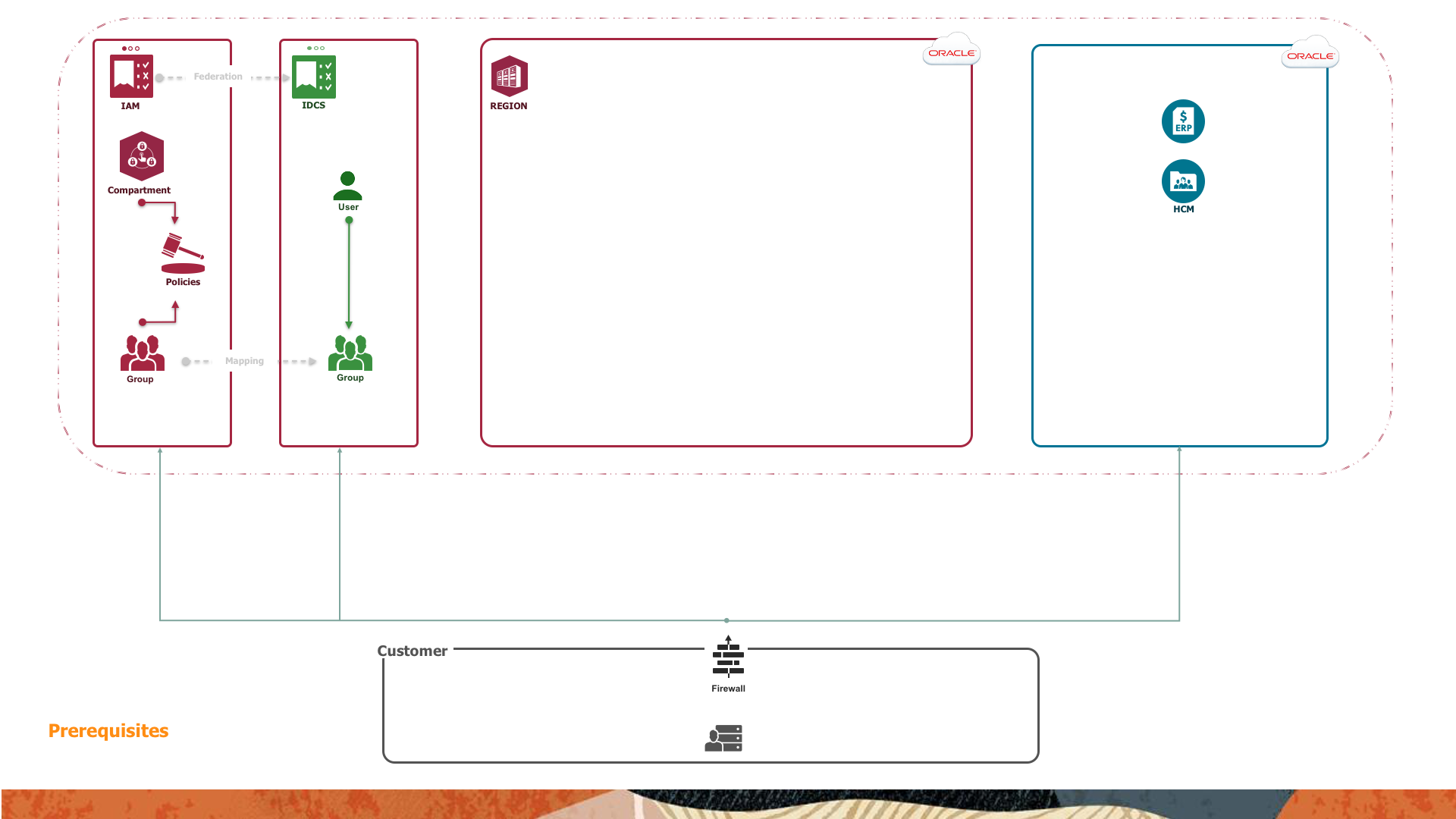
The following diagram depicts the prerequisites required before provisioning FAW.
FA Prerequisites
Ensure that your version is 19B PB7, or 19C, or later.
The URL for your FA offering and valid credentials for an FA administrative account with privileges to schedule and execute BI Cloud Connector (BICC) extracts.
IDCS Prerequisites
The following tasks must be completed by an IDCS administrator.
Creating an IDCS User
If you are the owner of the Oracle Cloud Account then you have a user account in IDCS. If not, create an IDCS user to perform the provisioning. Refer here for documentation.
Creating an IDCS Group
Create an IDCS group e.g. FAW-Admin-IDCS-Group for the IDCS user. Refer here for documentation. This group is mapped to an OCI group in the next section.
Assigning the IDCS User to the IDCS Group
Add the IDCS user to the IDCS group. Refer here for documentation.
OCI Prerequisites
The following tasks must be completed by an OCI Identity and Access Management (IAM) administrator.
Creating an IAM Group
Create an IAM Group e.g. FAW-Admin-IAM-Group.Refer here for documentation. This group is mapped to the IDCS group above and granted OCI privileges to provision OAC.
Mapping the IDCS Group to the IAM Group
Map the IDCS group to the IAM group.Refer here for documentation. This mapping provides the IDCS user/group the privileges to provision OAC.
Creating a Compartment
Create a compartment e.g. FAW-Compartment.Refer here for documentation. This compartment isolates and secures the FAW instances.
Creating a Compartment Policy
Create a Compartment Policy e.g. FAW-Admin-Policy. Refer to Policy Basics and Policy Syntax for documentation. This post uses default administrative statements:
allow group <IAM Group> to manage all-resources in compartment <Compartment>
allow service FAW to manage all-resources in compartment <Compartment>
Provisioned FAW Components
The provisioning process creates the additional components shown below.
OCI Instances
OCI instances contain metadata such as URLs, Wallets, etc. about the instance and administrative functions such as start, scale, stop etc. The following are created in the provisioned region and are accessible from the OCI console by the provisioning user.
An Analytics Cloud (OAC) instance.
An Analytics Apps for Fusion (FAW) instance.
An Autonomous Data Warehouse (ADW) instance.
IDCS Applications
IDCS applications contain metadata about the application including application roles and their associated IDCS group and user memberships. The following are created and are accessible from the IDCS console by the provisioning user. The provisioning user is granted Administrator application roles in these applications.
An ANALYTICSAPP application. This is the parent application for all FAW application instances.
An ANALYTICSAPP_<instance name> application. This application is for the provisioned FAW instance.
An ANALYTICSINST_oax<instance name> application. This is application is for the provisioned OAC instance.
FAW Applications
FAW applications are those accessible by users and applications via URL, REST, CLI and authenticated development client tools. The following are created in the provisioned region.
Note: Each application has public and private components. Public components include read access to the pre-seeded components and full access to custom extensions added by your administrators and users. Private components are the pre-seeded objects created and maintained by Oracle.
FAW
The provisioned FAW is configured with the methods and credentials to access the associated FA offerings and the provisioned ADW instance. Initial domain data is extracted from FA and loaded into the seeded ADW schemas. The seeded decks, KPIs, data visualizations, and RPD metadata are deployed into the private areas of OAC.
OAC
The provisioned OAC hosts the pre-seeded FAW objects and provides the ability to add custom extensions to the FAW application.
ADW
The provisioned ADW contains the Oracle managed schemas and objects. These are populated with initial domain data from your FA instance(s). Custom schemas and objects extensions may be added.
Provisioning FAW
The following is a step-by-step guide to provisioning FAW.
Connecting to the OCI Console
If you are new user, open your e-mail address, find the welcome email, and change your password. Connect to the OCI console.Refer here for documentation. The URL should be in the format
https://console.< home region >.oraclecloud.com e.g. https://console.us-ashburn-1.oraclecloud.com
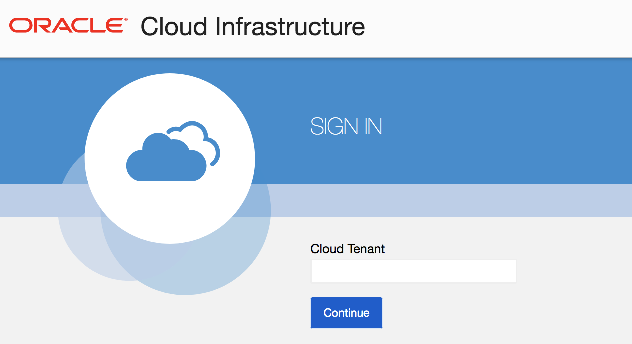
You may be prompted to enter your tenancy name. Enter it and press Continue.
Selecting the Region
Your current region is displayed at the top of the Console. If your tenancy is subscribed to multiple regions, you can switch regions by selecting a different region from the Region menu.
Navigating to Analytics Apps for Fusion
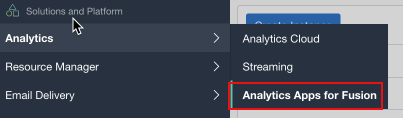
Navigate to the Analytics Apps for Fusion.
Open the navigation menu in the upper left , scroll down and hover over Analytics and click Analytics Apps for Fusion.
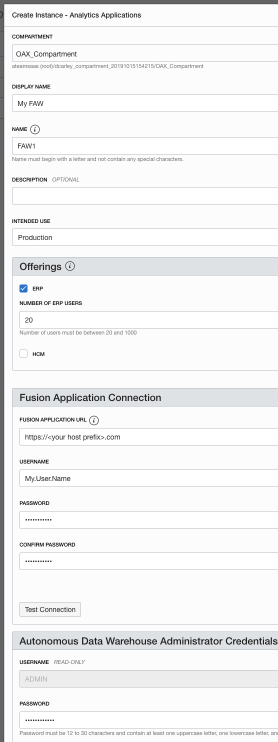
Creating the FAW Instances
For a new OCI console session, choose a Compartment you have privileges in.
Click Create Instance.
Accept or select a Compartment you have privileges in.
Enter a Display Name and a Name. The name must start with a letter and can contain only letters and numbers.
Optionally enter a Description.
Select the Intended Use.
Select the Offering(s)
Enter your Fusion Application URL e.g. https://<your host prefix>.com
Enter your FA Username and Password.
Click Test Connection to validate the connectivity to FA.
Enter a Password for the ADMIN user in the ADW that is created by the process.
Enter a Notification Email for the process result.
Verify that the details are correct and click Create Instance.
For example:
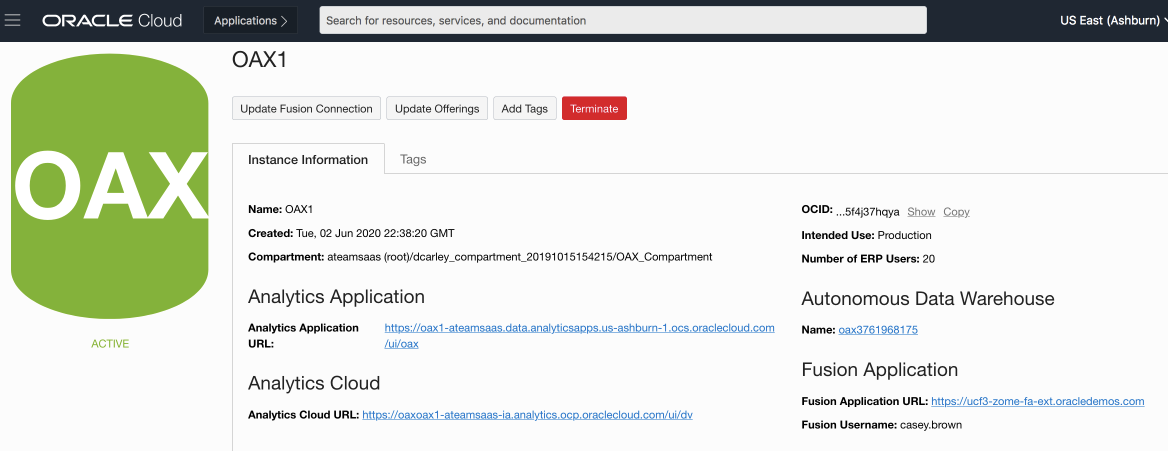
The Instance Details page shows the initial status Creating. When it is finished the status changes to Active.
Accessing the FAW components
The FAW components are accessible from the OCI console.
Connect to the OCI console with the provisioning user credentials and navigate to Analytics Apps for Fusion as shown above.
Choose the Region and Compartment where FAW is provisioned.
Click on the provisioned FAW instance and you see the screen below. It shows the instance metadata, provides administrative links and links to FAW, OAC, ADW and FA.
Accessing FAW
Click on the Analytics Application URL to view the seeded decks, KPIs, projects, subject-area data sets and the console for maintaining data pipelines and security.
Accessing IDCS
From within FAW, The IDCS administrative console is accessed via Navigation Menu > Console > Users or Groups.
Accessing OAC
Click on the Analytics Cloud URL to view the seeded projects and data sets and optionally add custom content.
Accessing ADW
Click on the ADW URL to navigate to the OCI ADW instance to view instant metadata, obtain credentials and access development tools.
Accessing FA
Click on the Fusion Application URL to navigate to your FA home page.
Summary
This post described the OCI and Fusion Applications components required to provision FAW, the components created by the provisioning process and a step-by-step provisioning guide.


 Provisioned FAW Components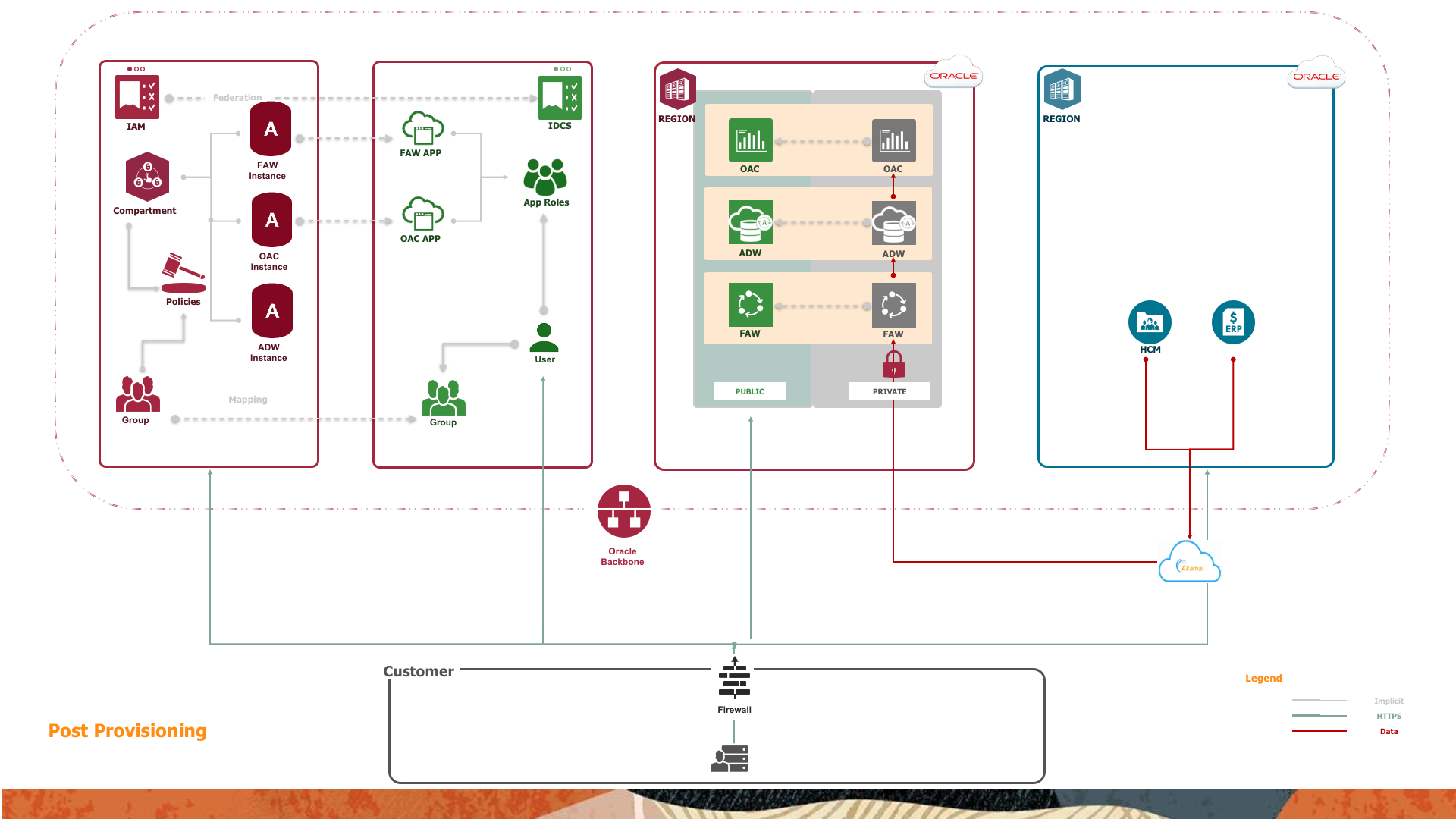


 , scroll down and hover over Analytics and click Analytics Apps for Fusion.