Oracle Analytics Cloud (OAC) may now be provisioned within a Virtual Cloud network (VCN) with a private IP address.
This post describes the Oracle Cloud Infrastructure (OCI) components required to provision a private OAC instance, the components created by the provisioning process and a step-by-step guide to the process.
This is one of the guides referenced in thisparent post.
Validations
Validated May 17, 2021 with OAC 6.0
September 30, 2020 with OAC 5.8
July 24, 2020 with OAC 5.7
Topics
Before You Begin
Provisioning OAC in OCI with a Private End-Point
Viewing the OAC Instance Details in OCI
Viewing the OAC Application in Identity Cloud Service (IDCS)
Before You Begin
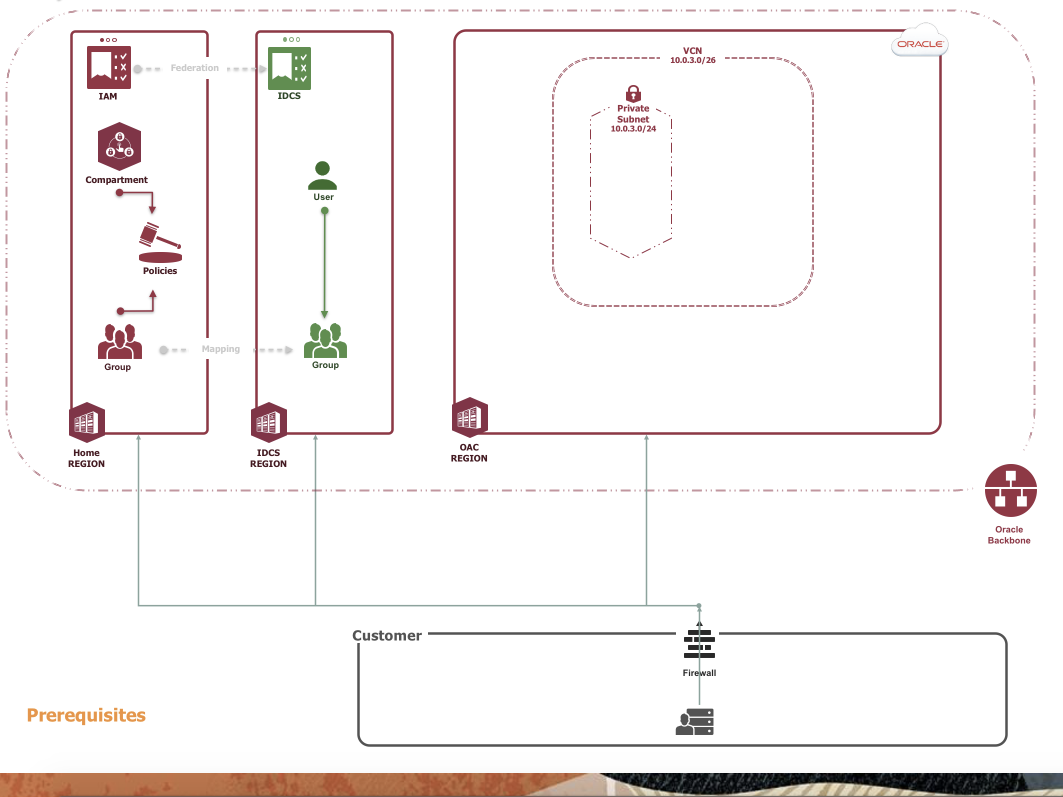
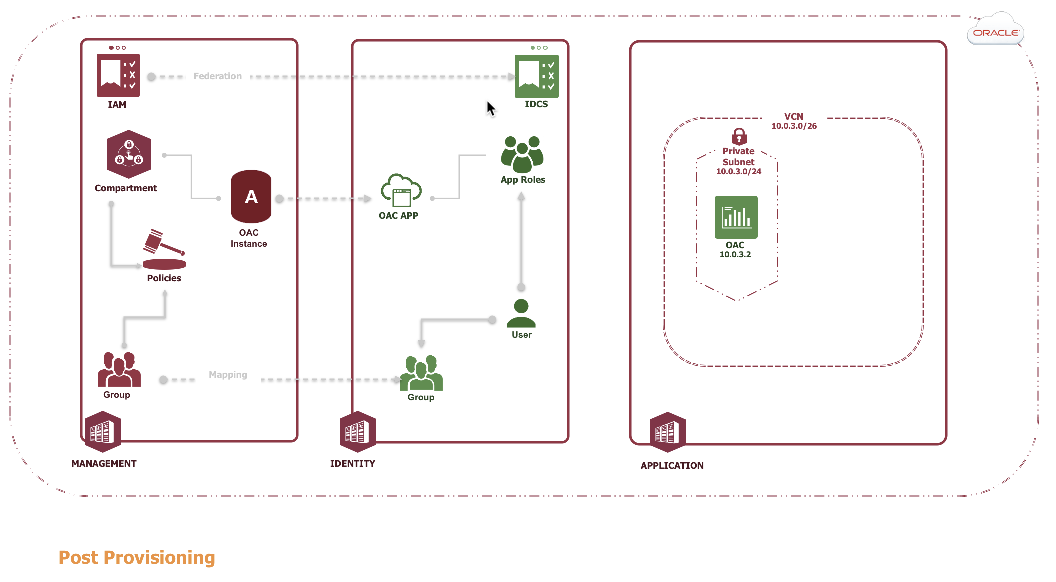
The following diagram depicts the prerequisites required before provisioning OAC. This posts assumes new components are desired. You may use an existing compartment and VCN if you have the privileges to do so.
IDCS Prerequisites
The following tasks must be completed by an IDCS administrator.
Creating an IDCS User
If the provisioning user does not have a user account in IDCS, create one. Refer here for documentation.
Creating an IDCS Group
Create an IDCS group e.g. OAC-IDCS-Admin-Group for the IDCS user. Refer here for documentation. This group is mapped to an OCI group in the next section.
Assigning the IDCS User to the IDCS Group
Add the IDCS user to the IDCS group. Refer here for documentation.
OCI Prerequisites
The following tasks must be completed by an OCI Identity and Access Management (IAM) administrator.
Creating an IAM Group
Create an IAM Group e.g. OAC-IAM-Admin-Group.Refer here for documentation. This group is mapped to the IDCS group above and granted OCI privileges to provision OAC.
Mapping the IDCS Group to the IAM Group
Map the IDCS group to the IAM group.Refer here for documentation. This mapping provides the IDCS user/group the privileges to provision OAC.
Creating a Compartment
Create a compartment e.g. OAC-Compartment.Refer here for documentation. This compartment isolates and secures the OAC instances.
Creating a Compartment Policy
Create a Compartment Policy e.g. OAC-Admin-Policy. Refer to Policy Basics and Policy Syntax for documentation. This post uses a default administrative statement:
allow group <IAM Group> to manage all-resources in compartment <Compartment>
OCI VCN Prerequisites
The following tasks may be completed by the provisioning user or by an (IAM) administrator.
Selecting the Region
If your home region is not enabled for OAC Native, then switch to a region that is e.g. Japan East (Tokyo). Refer here for documentation.
Your current region is displayed at the top of the Console. If your tenancy is subscribed to multiple regions, you can switch regions by selecting a different region from the Region menu.
Creating a VCN
Createa VCN in the prerequisite compartment from above. Documentation for the VCN and subnet is here.
Note: For your VCN, Oracle recommends using one of the private IP address ranges specified in RFC 1918 (10.0.0.0/8, 172.16/12, and 192.168/16).
Enter a CIDR block that does not overlap any network CIDR blocks the VCN may be peered with e.g. 10.0.3.0/24(this notation allows for 254 IP addresses and exists inside the 10.0.0.0/8 range above)
Within the VCN create a subnet:
Createa public or private regional subnet. Instances within a public subnet may be public or private. Instances within a private subnet must be private. Use a portion of the VCN’s CIDR block as the CIDR notation e.g. 10.0.3.0/26. Allow the defaults for everything else.
Provisioned OAC Components
The provisioning process creates an OCI OAC instance in the prerequisite compartment from above. It also creates an IDCS application with the standard OAC IDCS application roles and the actual OAC instance in the prerequisite VCN above.
OCI OAC Instance
An OCI OAC instance contains metadata such as the URL and IP address and administrative functions such as start, scale and stop. The OCI OAC instance is accessible from the OCI console by the provisioning user.
IDCS Application
IDCS applications contain metadata about the application including application roles and their associated IDCS group and user memberships. An ANALYTICSINST<instance name> application is created to provide authentication and optionally authorization for OAC.
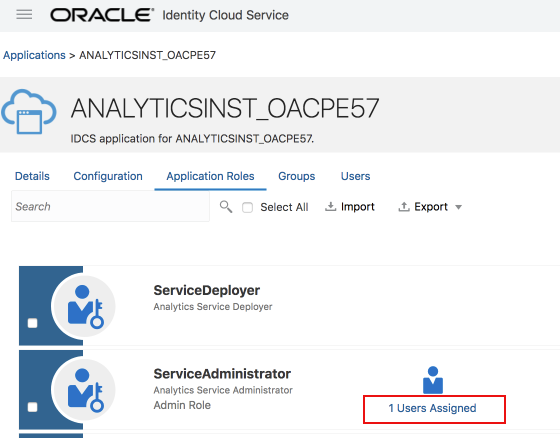
The provisioning user is granted the ServiceAdministrator application role in the application.
OAC Instance
The OAC instance is provisioned in the VCN with a private IP address and with the BI Service Administrator application role mapped to the IDCS ServiceAdministrator application role allowing the provisioning user to authenticate and access the OAC console.
Provisioning OAC in OCI with a Private End-Point
The following is a step-by-step guide for provisioning OAC with a private end-point.
Connecting to the OAC Console
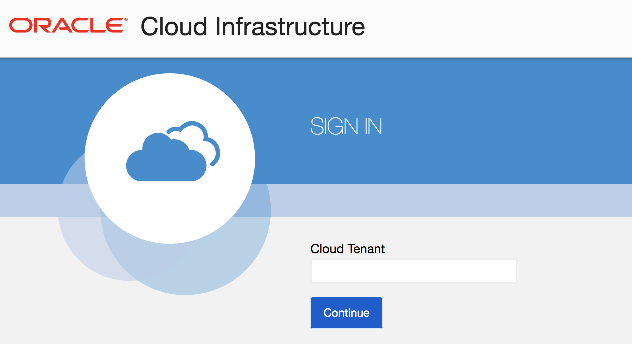
If you are new user, open your e-mail address, find the welcome email, and change your password. Connect to the OCI console.Refer here for documentation. The URL should be in the format:
https://console.< home region >.oraclecloud.com e.g. https://console.us-ashburn-1.oraclecloud.com
You may be prompted to enter your tenancy name. Enter it and press Continue.
Selecting the Region
Select the region containing the prerequisite VCN above for OAC.
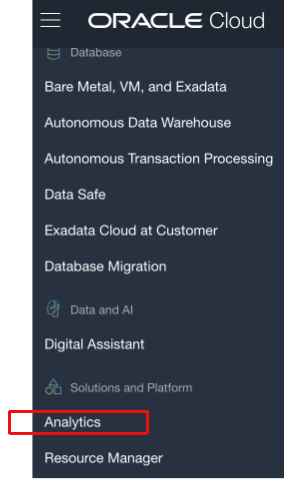
Open the navigation menu in the upper left , scroll down and hover over Analytics and click Analytics Cloud.
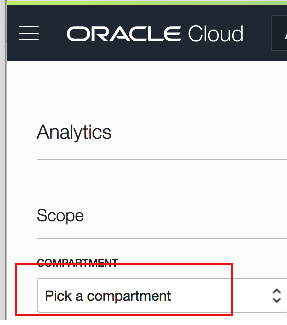
Selecting the Compartment
From the Compartment dropdown, choose the prerequisite compartment from above.
Creating the OAC Instance
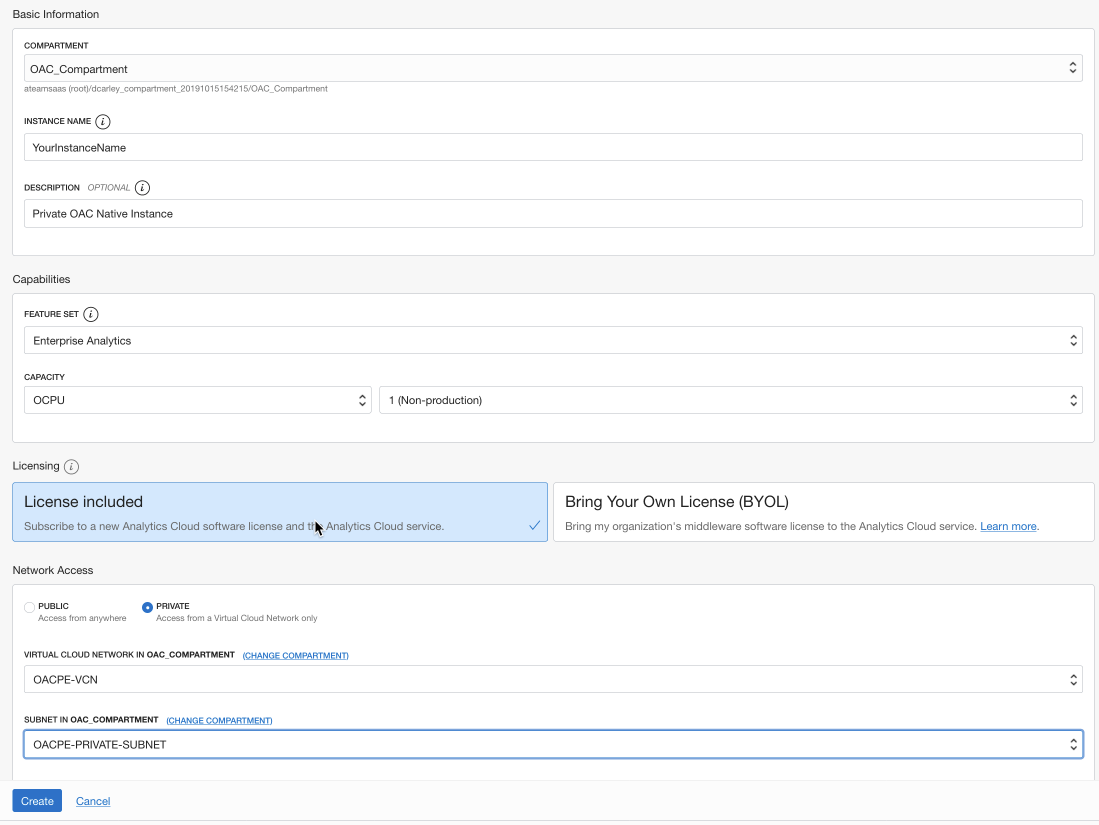
Create the OAC Instance. Refer here for the official documentation.
Click Create Instance.
Ensure the Compartment is the prerequisite compartment from above.
Enter an Instance Name and a brief description. The name must start with a letter and can contain only letters and numbers.
Optionally enter a Description.
Select the Feature Set you want to deploy.
Self Service Analytics: Deploys an instance with data visualization. Select this option if you subscribe to Professional Edition.
Enterprise Analytics: Deploys an instance with enterprise modeling, reporting, and data visualization. Select this option if you subscribe to Enterprise Edition.
For Capacity, select the number of OCPUs that you want for the service.
For production services, select the number of OCPUs you want to deploy (between 2 and 52). If you want to create an instance for trial purposes, you can select 1 OCPU.
For Licensing, select whether you want to use your Oracle Middleware on-premises license with Oracle Analytics Cloud and be charged the Bring Your Own License (BYOL) rate or subscribe to a new Oracle Cloud license for Oracle Analytics Cloud.
Use Network Access to specify how you want users to access Oracle Analytics Cloud: over the public internet or through a private network. This post uses Private access. Private access allows traffic from an on-premise network or hosts on a peered virtual cloud network (VCN). Private access means that traffic doesn’t go over the internet. The Private option deploys Oracle Analytics Cloud with a private endpoint.
Select the prerequisite Virtual Cloud Network from above from the drop-down. If necessary click Change Compartment to select the prerequisite compartment from above.
Select the prerequisite Subnet from above from the drop-down. If necessary click Change Compartment to select the prerequisite compartment from above.
Optionally enter Tags.
Verify that the details are correct and click Create.
For example:
The Instance Details page shows the initial status Creating. It takes about 20 minutes to create the service. The status to Active when the process is complete.
Viewing the OAC Instance Details in OCI
If necessary connect to the OAC Console, select the region and compartment and navigate to the Analytics Cloud instances.
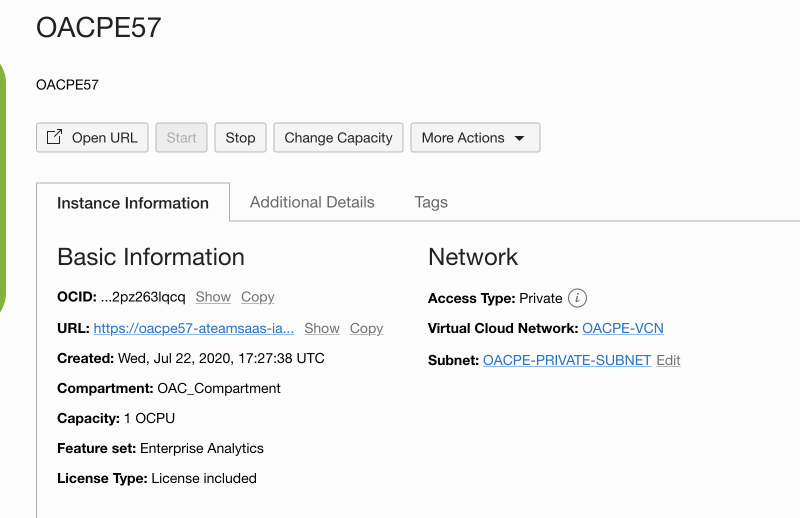
Instance Details
From the list of instances, click on the Name created above. Click on the Instance Details tab to display the basic and network details as well as useful links to open the URL, stop/start, change capacity and more.
Additional Details
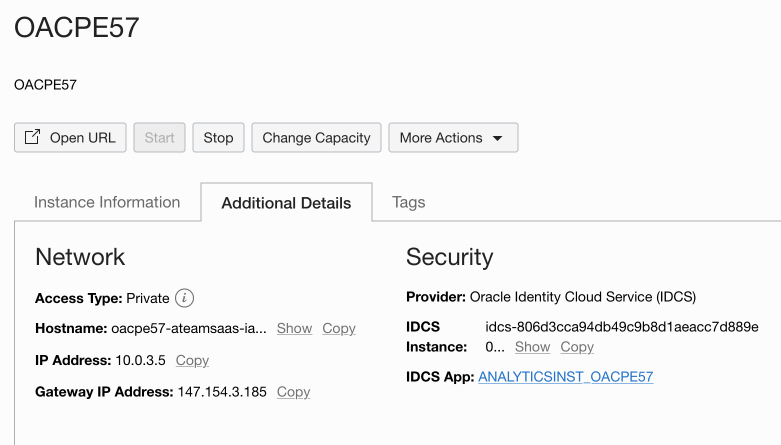
Click on the Additional Details tab to view detailed information about the network and security.
Viewing the OAC Application in IDCS
IDCS Application Details
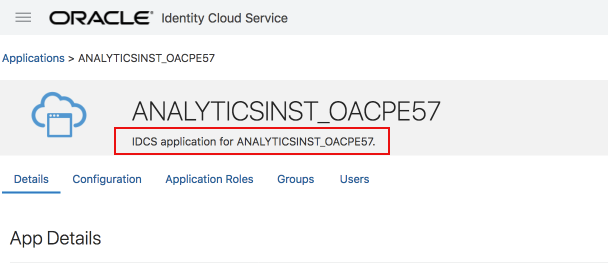
Click on the IDCS APP link shown directly above to navigate to the OAC Application in IDCS.
IDCS Application Roles
Click Application Roles to view the roles and your membership in the ServiceAdministrator role.
Summary
This post described the Oracle Cloud Infrastructure (OCI) components required to provision a private OAC instance, the components created by the provisioning process and a step-by-step guide to the process.





 , scroll down and hover over Analytics and click Analytics Cloud.