
Hi! Welcome to a 3-part blog in which we discuss why and how you can leverage Oracle Cloud services to build your own “light” Content Delivery Network. In this part, we will discuss the various pieces involved and, in parts 2 and 3, we will see demos on a small CDN deployment.
Blog list:
Build your own CDN on OCI – part 1 – Concepts
Build your own CDN on OCI – part 2 – demo 1 – Website
Build your own CDN on OCI – part 3 – demo 2 – Object Storage
Content Delivery Networks
So what is a CDN? At the very bottom, it is a collection of proxy servers distributed geographically which typically use a robust network to connect a user to a service with improved quality compared to the same connection without a CDN.
CDNs are very complicated systems with lots of moving parts but, if we were to simplify them a lot, the basic components would be:
- One or more Origins – the origin is the place that holds the service exposed to clients. This service can have many faces, it can be a website, a video streaming source, anything. While it’s not necessarily part of the CDN itself, it must be mentioned as it is the target of all connections.
- CDN POPs/PODs – The CDN Points of Delivery (or Presence) are clusters of servers distributed around the world which act as an intermediary between the users and the Origin.
- The network – the flow of data would be user -> CDN -> Origin. The user’s connection to the CDN is the Internet, which we all know is best-effort. Once the flow enters the CDN, the rest of the network should be under the CDN’s control/management. The better the network is (less latency, less packet loss, higher throughput), the better the quality of the service.
- DNS – with DNS we force users to the closest geographical CDN POD so the Internet path is as short as possible. Many times, it will work together with IP Anycast, but it’s not mandatory.
The CDN has two major roles:
- Proxy – the CDN will go to the Origin to fetch the content and give it to the client;
- Cache – the CDN will keep a copy of the static content (ex: pictures), so next time someone asks for the same content it will only go to the Origin for some of the data, making the connection much faster.
As said above, real CDNs are very complicated and have many layers and services. However, one could leverage the Oracle Cloud to build a very lightweight CDN for a basic application. Let’s see how.
Light CDN on Oracle Cloud
Let’s refer to the basic components above. If we wanted to build a small CDN on OCI, the following components would be used:
1. The Origin
The Origin can be any service deployed on Oracle Cloud, in any region, that can be accessed with a Public IP. Examples would be:
- A website deployed in an OCI region;
- OCI Object Storage static content;
- Basically, anything that has an Oracle Cloud Public IP and it is HTTP(S) based.
2. PODs deployed on Oracle Cloud.
OCI has over 40 available regions which can be used to deploy PODs. The more PODs, the better the user experience as that user needs to reach the closest POD via the Internet.
POD Design – the POD architecture can be anything we can think of that meets some basic requirements:
- It is highly available but simple;
- It has the ability to proxy the connections and to cache content;
- It leverages highly available services so we don’t have too much management overhead;
- It is easily automated;
Considering the above, a POD design could be this:
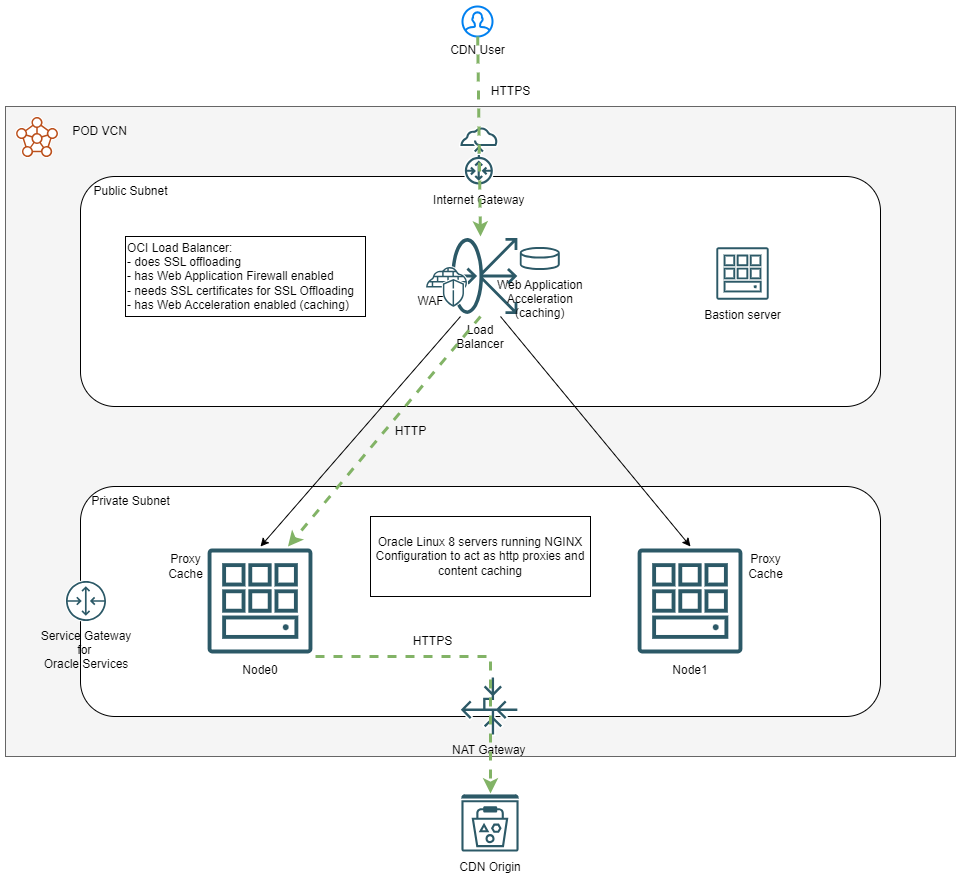
POD Components:
a. OCI Load Balancer service – the OCI Flexible Load Balancer is the entry point into the CDN POD. Besides load balancing and health checking the backend, it will also:
– Autoscale with the load.
– Do SSL offloading.
– Provide its own layer of content caching via the Web Acceleration addon.
– Protect the CDN against HTTP-based attacks via the integrated Web Application Firewall.
b. Backend servers – The backend/workload systems can be any Operating System with any Software that can do reverse proxy and content caching. For this blog entry I chose to go with Oracle Linux 8 running NGINX services but, again, there are many other choices available. As discussed, the backend systems will:
– Act as reverse proxies, fetching the content from the Origin and serving it upstream to the Load Balancer and the requestor.
– Cache the served content so subsequent requests for it are much faster.
– For some types of content we will also need to do HOST header rewriting so we do not break SSL.
c. An OCI VCN, subnets and various gateways are needed to support this deployment.
3. Network.
As described at the beginning, one important component is the network. The connection between OCI’s regions runs on OCI’s backbone, a high throughput, low latency, highly available network. As long as the source and the destination IPs are OCI’s, the connection will be routed through the backbone, which will greatly increase the quality of the connection. Furthermore, most services have JUMBO frames enabled, which helps a lot with file transfers.
4. DNS
For the DNS part, we will use OCI’s Traffic Steering policies with Geolocation. These will have two roles:
a. Steer the user’s traffic to the closest deployed POD;
b. Monitor the PODs and reroute the traffic if one of the PODs fails.
Putting all of the above on a diagram, we get:

Further enhancements not covered in this blog series:
- You can use Terraform and OCI Resource Manager to fully automate your CDN deployment;
- You can use Autoscaling so the PODs grow/shrink based on demand;
- You can use Logging Analytics and Connector HUB to aggregate logs from all the CDN Components (LBs, WAF, VCN Flow Logs, NGINX, etc.) and build a fully fledged monitoring system for the CDN.
Conclusion
As we can see, we can leverage OCI’s infrastructure to build a lightweight CDN. While it does not have the full functionality of current CDN commercial offerings, it will do the job of improving your connection to a service. The prerequisites are:
- The Origin service has to be hosted on OCI;
- OCI must control the DNS Zone;
With that in mind, let’s see some use cases that could benefit from deploying a small CDN.
Blog2 shows how you can improve website loading times.
Blog3 shows how you can create a custom URL for Object Storage and improve file transfer speeds.