

Oracle Data Safe provides continuous security monitoring for databases by generating alerts for risky or non-compliant activity. By default, these alerts are viewed in the Data Safe Console or delivered through Oracle Cloud Infrastructure (OCI) Notifications such as email. While suitable for individual administrators, security operations and compliance teams typically rely on SIEM platforms like Splunk to centrally correlate and respond to security events at scale.
Oracle supports multiple integration options, including direct Data Safe APIs, exporting audit data to OCI Object Storage, using OCI Logging, or building custom integrations. However, many customers prefer a simpler and more lightweight approach that minimizes operational overhead. Oracle Data Safe audit alerts capture the most relevant security context from underlying audit logs, and for many SIEM use cases, this alert-level information is sufficient to support SOC operations and SOX compliance requirements.
Overview
This blog presents a streamlined architecture for streaming Oracle Data Safe audit alerts to Splunk in near real time using native OCI services, a lightweight OCI Function, and Kafka Connect.
We cover the following implementation options:
Option 1 – OCI Functions (Serverless Push Model): A step-by-step implementation guide is provided in this blog.
Option 2 – Kafka-Compatible Streaming: For detailed guidance on integrating OCI Streaming with Kafka Connect and Splunk, refer to: https://www.ateam-oracle.com/kafka-connect-with-oci-streaming.
Why This Integration Is Needed
Modern SOC teams require centralized, real-time security monitoring across all environments. Oracle Data Safe generates high-value database security alerts, which can be integrated with a SIEM to provide centralized visibility and streamlined SOC operations.
Operational Challenges
- Manual alert review leads to delayed response
- Alerts cannot be correlated with other security telemetry
- Email notifications do not scale effectively in multi-database environments where SIEM platforms support security monitoring and response.
Automated Solution
A fully automated, OCI-native architecture that streams Oracle Data Safe alerts directly into Splunk SIEM:
- Oracle Data Safe generates audit-based security alerts
- OCI Events and OCI Streaming capture and transport alerts durably
- Service Connector Hub and OCI Functions deliver structured events to Splunk
Solution Overview
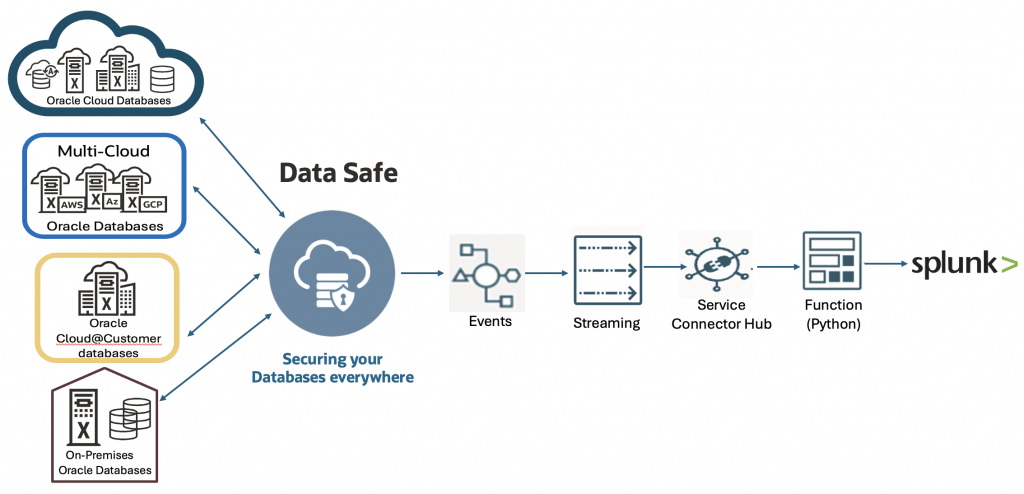
The architecture relies entirely on managed OCI services and Splunk HTTP Event Collector (HEC):
- Oracle Data Safe – Detects and generates security alerts
- OCI Events – Captures Data Safe alert events
- OCI Streaming – Buffers and transports events reliably
- Service Connector Hub – Connects streaming data to downstream targets
- OCI Functions (Python) – Decodes streaming payloads and forwards the events to Splunk.
- Splunk HEC – Ingests the events into the SIEM.
High-Level Architecture
Oracle Data Safe → OCI Events → OCI Streaming → Service Connector Hub → OCI Function → Splunk HEC
Phase 1: Oracle Data Safe Alert Generation
- Enable Unified Audit Policies : Deploy required audit policies on the target database.
- Verify Audit Collection: Ensure relevant audit records are collected and visible in Data Safe Audit Reports.
- Enable Alert Policies: Enable policies such as:
- User entitlement changes
- User creation/modification
- Privilege escalation
- Trigger Sample Activities: Perform actions such as:
- GRANT
- DROP USER
- CREATE TABLE
- Validate Alerts: Confirm alerts appear in the Data Safe console.
At this stage, structured security alerts are generated and ready for streaming.
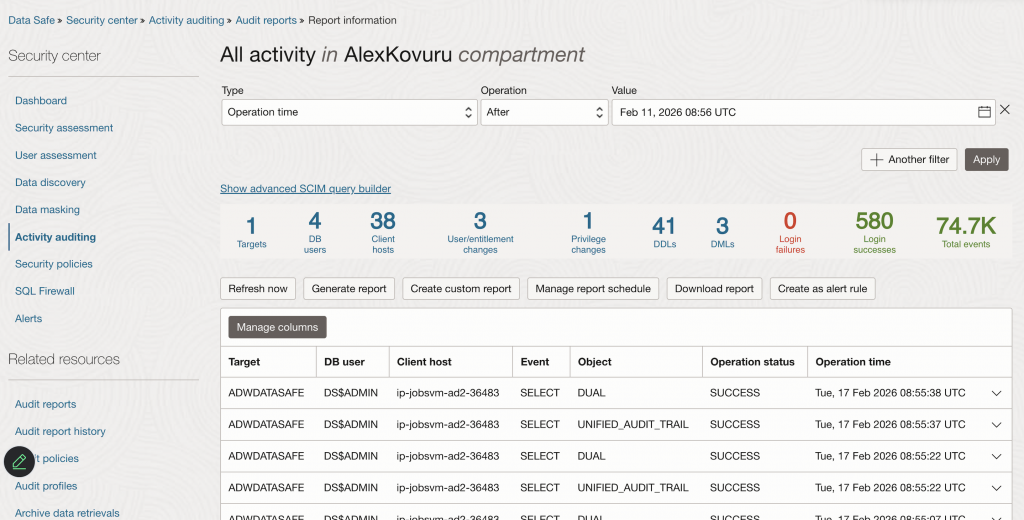
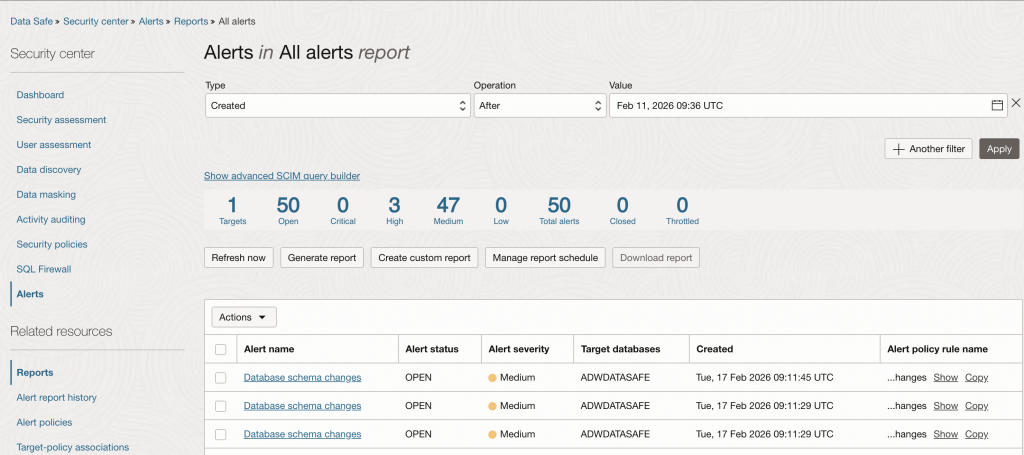
Phase 2: Capturing Alerts with OCI Events and OCI Streaming
OCI Events captures Data Safe alerts as CloudEvents and publishes them to OCI Streaming for durable, replayable transport.
OCI Streaming Configuration
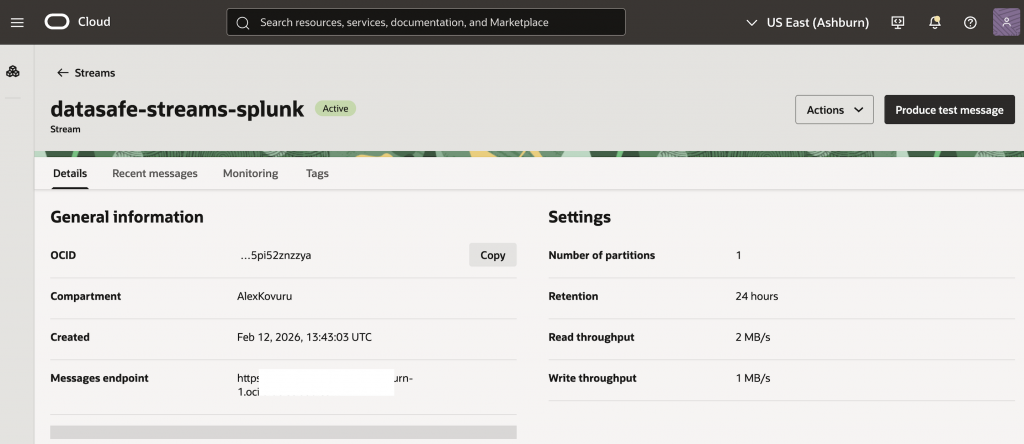
- Stream name: datasafe-streams-splunk
- Partitions: 1 (sufficient for PoC)
- Retention: 24 hours
- Stream pool: DefaultPool
OCI Events Rule Configuration
From the OCI Console, open the hamburger menu and navigate to Observability & Management → Event Services → Rules.
Rule Conditions
Configure the event rule with the following conditions:
- Condition: Event type
- Service name: Data Safe
- Event type:
- Alert Generated
- Security Assessment Drift From Baseline
- User Assessment Drift From Baseline
Actions
Configure the following actions for the rule:
- Action type: Streaming
- Stream compartment: <stream_compartment>
- Stream: datasafe-streams-splunk
- Action type: Notifications (Optional)
- Notification compartment: <notification_compartment>
- Topic: <email-notification-topic>
Email subscriptions are optional and useful for testing, and can be removed later to avoid duplicate notifications once alerts are delivered to the SIEM.
Phase 3: IAM Policy Configuration
Configure the required IAM policies to enable OCI Streaming, Service Connector Hub, and OCI Functions. Add the policies in the deployment compartment, replacing COMPARTMENT_NAME and ADMIN_GROUP with values from your environment.
You can add the following policies to the same compartment where your Streaming Service, Service Connector, and OCI Function are deployed (replace placeholders such as COMPARTMENT_NAME and ADMIN_GROUP with values from your environment).
Allow service service-connector-hub to use stream-family in compartment COMPARTMENT_NAME
Allow service service-connector-hub to {STREAM_READ, STREAM_CONSUME} in compartment COMPARTMENT_NAME
Allow service service-connector-hub to use functions-family in compartment COMPARTMENT_NAME
Allow service service-connector-hub to manage object-family in compartment COMPARTMENT_NAME
Allow service faas to read repos in compartment COMPARTMENT_NAME
Allow any-user to {STREAM_READ, STREAM_CONSUME} in compartment COMPARTMENT_NAME
Allow any-user to use fn-function in compartment COMPARTMENT_NAME
Allow any-user to use fn-invocation in compartment COMPARTMENT_NAME
Allow any-user to manage objects in compartment COMPARTMENT_NAME
Allow group ADMIN_GROUP to manage serviceconnectors in compartment COMPARTMENT_NAME
Allow group ADMIN_GROUP to use stream-family in compartment COMPARTMENT_NAME
Allow group ADMIN_GROUP to use functions-family in compartment COMPARTMENT_NAME
Allow group ADMIN_GROUP to manage object-family in compartment COMPARTMENT_NAME
Allow group ADMIN_GROUP to read all-resources in compartment COMPARTMENT_NAME
Phase 4: Integrating with Splunk Using OCI Functions
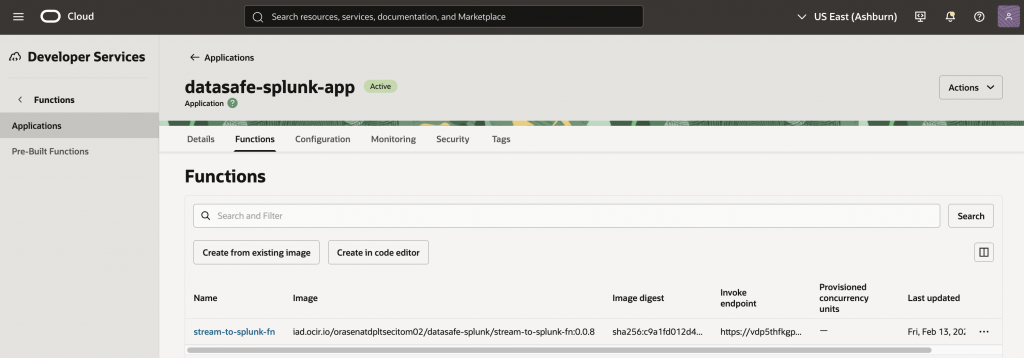
Create and Develop a function. For the complete code used in this blog, including the OCI Function source code and configuration details, see the GitHub repository: oci-datasafe-splunk-streaming
OCI Streaming delivers record values as Base64-encoded payloads. In this solution, OCI Functions provides a serverless integration layer to decode streaming records and securely forward events to Splunk HEC.
Creating Service Connector Hub
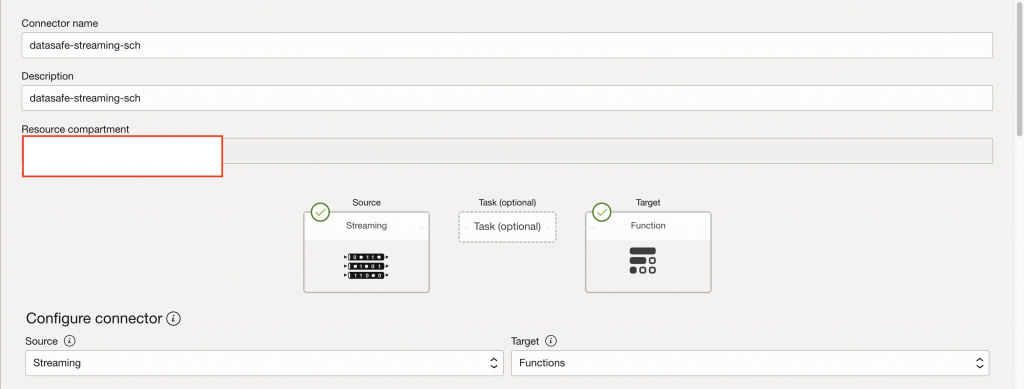
Create a new Service Connector Hub (datasafe-streaming-sch) to deliver streaming data to OCI Functions.
Source configuration:
- OCI Streaming
- Stream: datasafe-streams-splunk
- Read position: Latest
Target configuration:
- OCI Functions
- Function: stream-to-splunk-fn
Configuring Splunk HTTP Event Collector
In Splunk Cloud:
- Navigate to Settings → Data Inputs → HTTP Event Collector
- Enable HEC
- Create a new HEC token
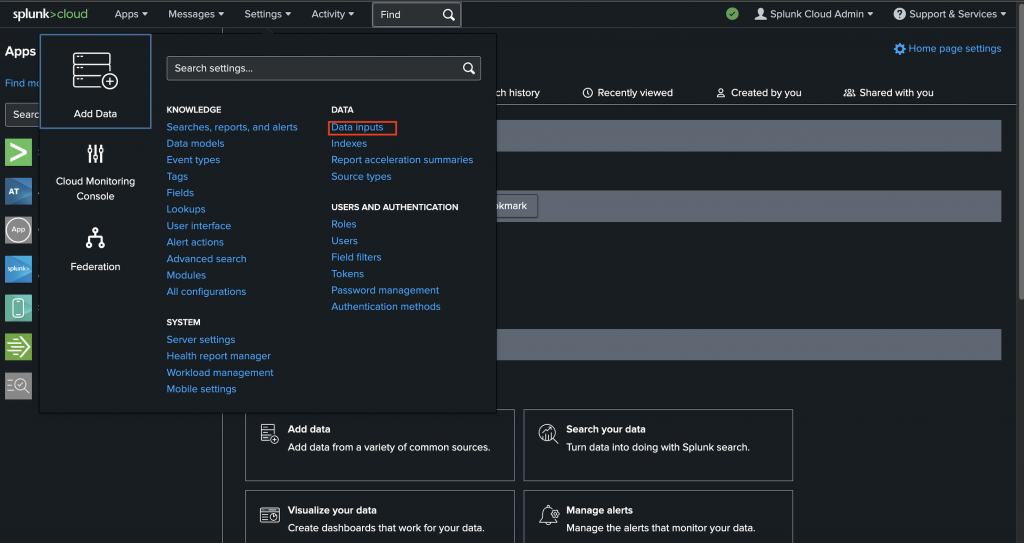
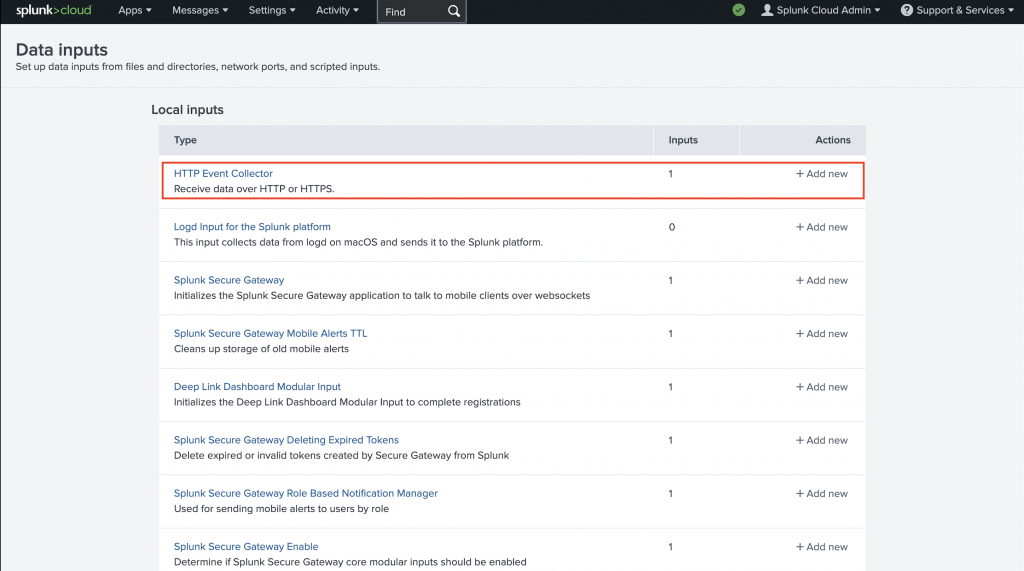
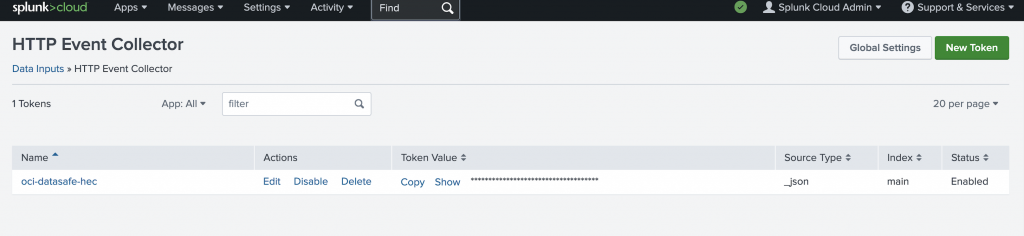
Capture the following details:
- HEC endpoint:
https://<splunk-host>.splunkcloud.com:8088/services/collector - HEC token:
- Index name: (for example, oci-datasafe-hec)
- Set the source type to _json
Note: Configure the HEC token and HEC endpoint as OCI Function configuration variables to enable event delivery to Splunk.
Phase 5: Validating Data in Splunk
In Splunk Search, verify ingestion using:
index=* source=oci:datasafe
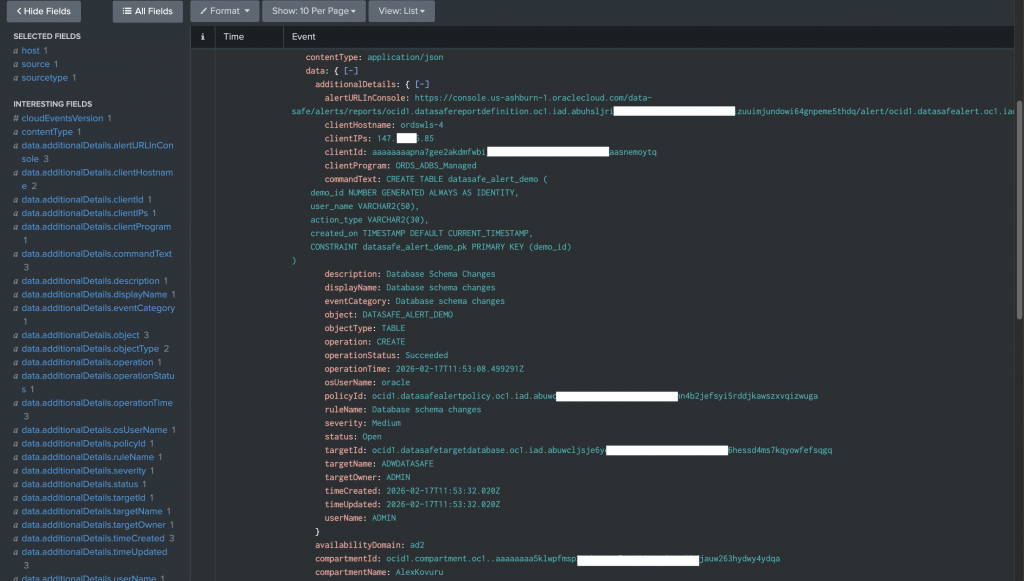
Alert details include severity, rule name, SQL command text, target database, username, and client IP address.
Conclusion
As security teams move beyond inbox-driven alerting toward centralized and operationally scalable monitoring, integrating database security signals into a SIEM becomes essential. By combining Oracle Data Safe with OCI Events, OCI Streaming, Service Connector Hub, and OCI Functions, organizations can stream database security alerts to Splunk in near real time using fully managed, cloud-native OCI services.
This architecture offers a scalable integration pattern that aligns well with enterprise security requirements and can be adapted for other consumers, including Microsoft Sentinel or Kafka.