
An incident summary can be accurate, useful, and still tell someone more than they’re allowed to know.
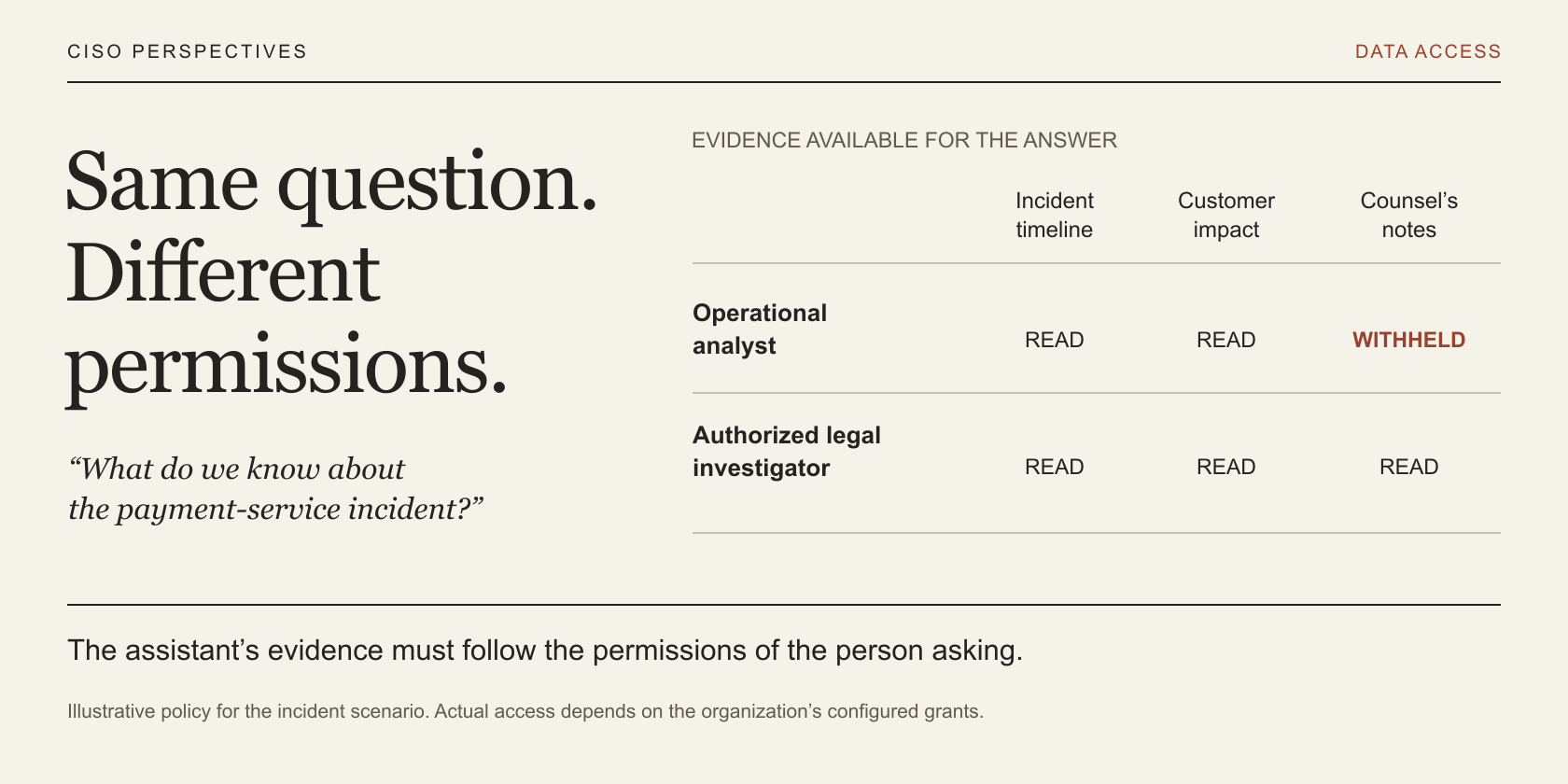
Imagine a security analyst getting ready for the morning incident call. There are updates in several places, and the call starts soon. They ask the company’s AI assistant, “What do we know about the incident affecting our payment service?”
Back comes a useful summary: what happened, which customers may be affected, and what the team is doing about it. It also includes a detail from counsel’s privileged investigation notes.
The analyst isn’t authorized to read those notes. Send them a link and they’ll get an access-denied message. Yet the assistant has just summarized part of the file for them, because its connector can read the legal workspace.
In this hypothetical example, the analyst has done nothing unusual. The problem sits inside a workflow that was supposed to save them time. Somewhere between finding the document and writing the answer, the assistant lost track of whose permissions mattered.
That’s where I’d begin the security review: show me what this person is allowed to see, and then show me what the assistant used to answer them.
Where the extra access creeps in
An assistant that searches across systems can spare someone a lot of digging. With retrieval augmented generation, or RAG, the application finds relevant passages and supplies them to the model as background for its answer. Oracle AI Vector Search supports this approach by combining searches for similar meaning with application data and structured conditions. Oracle’s architecture guide explains how that search works.
Consider what happens to the legal file along the way. A connector reads it, an ingestion job breaks it into smaller passages, and those passages become searchable. The file’s access rules need to survive all of that. Otherwise, a passage can turn up in a search even though the person asking could never open the original document.
This is easy to overlook in a demo. If you test every question as the administrator who built the assistant, you won’t learn much about what a restricted user can see.
Signing in is only part of the answer. OCI IAM controls who can use agent resources and how services access data sources. The application must also check which content the signed-in person is entitled to receive. Access to an assistant doesn’t confer access to its entire knowledge base. OCI Generative AI Agents IAM policies.
Check access before supplying the evidence
For our analyst, the assistant should use the operational timeline and other records they’re allowed to read. Counsel’s notes should be left out of the material sent to the model.
Writing “do not disclose confidential information” in a system prompt doesn’t establish who belongs to the investigation team. It also won’t tell the application that someone’s access was revoked ten minutes ago. That information needs to come from a trusted authorization system and be checked for the current request.
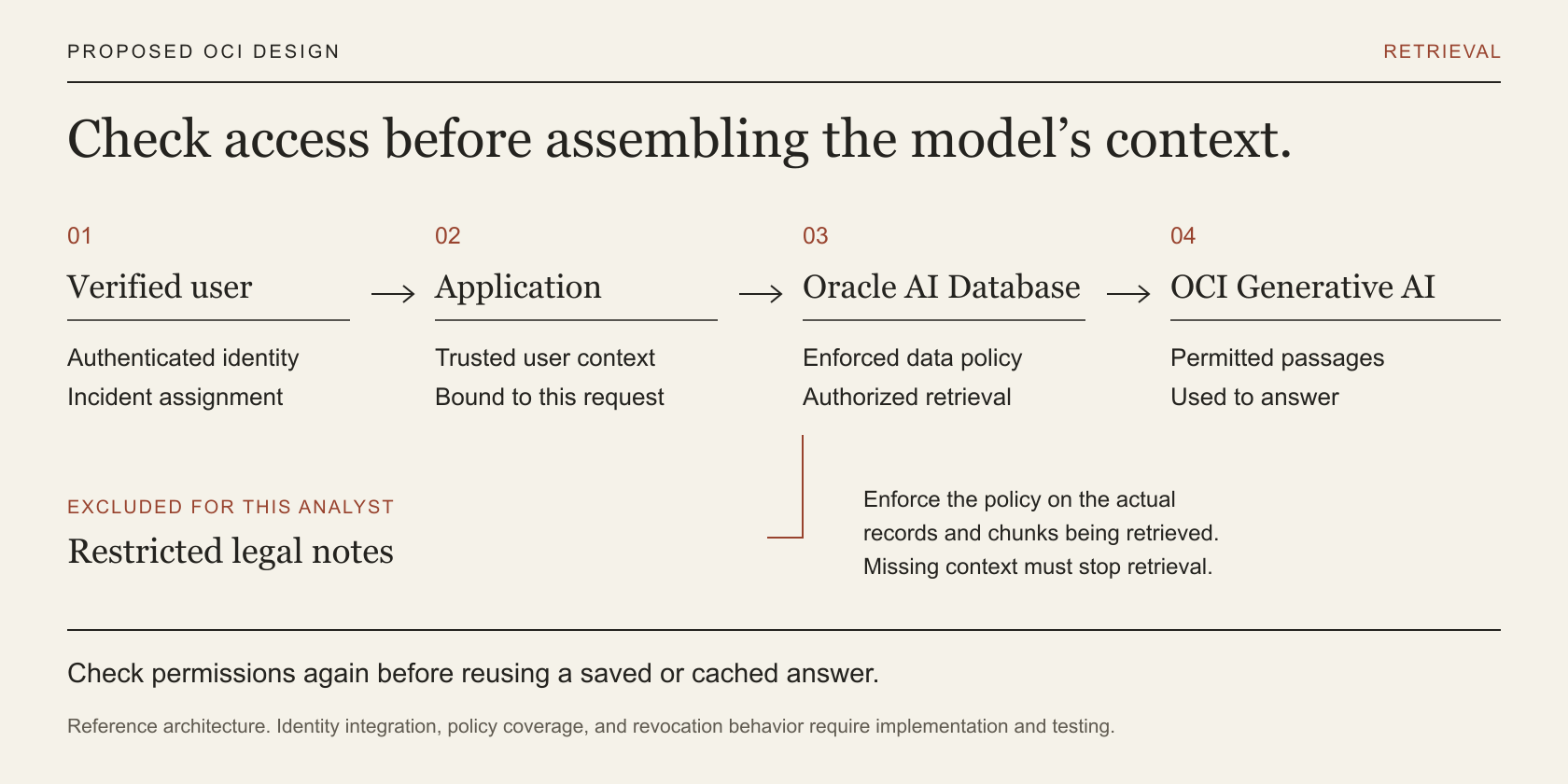
The timing matters. Make the access decision before passages reach the model or a service that ranks their relevance. Checking the finished answer is still useful, but by then the restricted material may already have been sent somewhere it shouldn’t have gone.
Sometimes the business does want a wider audience to receive a summary of restricted work. A legal team might approve an incident briefing for everyone responding to the outage. Publish that briefing as a separately governed document, with someone accountable for its contents. The assistant can then use the approved version according to its permissions.
How this can work on OCI
For this example, an application on OCI could retrieve incident records and document passages from Oracle AI Database, then use OCI Generative AI to write the response. The important design question is how the database knows who the application is acting for.
The application first verifies the user’s identity and gets their roles and incident assignments from trusted systems. It carries that information with the request. A user writing “I’m the investigation lead” in the chat must not be able to change it.
In a supported Oracle AI Database 26ai deployment, Oracle Deep Data Security can enforce access using the end user’s identity and information about the request. Its data grants are rules governing which rows and columns a person may access. The application establishes the supported end-user connection context, and the database applies the relevant grants when it runs the retrieval query. Oracle documents that authorization flow here.
For the analyst, those rules would allow the relevant operational records while excluding the restricted investigation material. They need to cover the passages the assistant searches, too. A confidential field can be protected perfectly in its original table and still leak if its contents have been copied into an unrestricted text passage.
It’s also worth looking closely at the database connection. An application using a schema-owner or administrative path may bypass the end-user controls you intended to demonstrate. Verify the database release and connection method, then test the actual query. If connections are shared between requests, check that a new user doesn’t inherit the previous person’s identity context.
Oracle’s AI Optimizer and Toolkit offers a way to explore this with test users. You can create data roles and grants, then try Vector Search or natural language to SQL as a particular identity. That helps show what the policy allows. In the customer application, the identity must be securely tied to whoever actually signed in. AI Optimizer Deep Data Security workflow.
Keep the permissions with the document
A label such as “Security” won’t tell you which investigation team can read a file. As documents are ingested, each derived passage needs to retain a link to its source and the information required to check access.
Then consider an everyday change: someone leaves the incident team. How soon does the assistant stop using that team’s records for their answers? Set an acceptable window and test it. If the application can’t establish current permission, it should leave the content out until it can. Missing access information must not become a reason to search more broadly.
OCI Generative AI Agents supports metadata filters for Object Storage knowledge bases, which can narrow the material retrieved. But a filter someone can remove isn’t an access rule you can rely on. If filters are part of the security design, the application must derive them from trusted information and enforce them wherever retrieval is possible. Object Storage metadata filtering guidance.
What happens when someone asks again
Suppose an authorized legal investigator asks for the incident summary first. The assistant checks their access, retrieves the right material, and produces an appropriate answer. Five minutes later, the analyst asks the same question.
If the application caches answers by question alone, it could simply return the investigator’s summary. All the checks on the first request could have worked correctly, and the second person would still receive something they shouldn’t.
Before reusing an answer, the application needs to establish that the person asking is still allowed to receive the information behind it, for the relevant customer and purpose. Permissions may have changed since the answer was written. Where that can’t be established, generate a fresh answer using the current user’s access.
Saved chats and exports deserve the same attention. Even a citation title can disclose that a restricted investigation exists. When you remove someone’s access, check what they can still open in their chat history. You can prevent future access, but you can’t take back what they’ve already read.
A demo worth running
Use made-up incident records and give an analyst, an incident commander, and a legal investigator different permissions. Ask the same question as each person. Then look past the finished answer and inspect the passages retrieved and the material sent to the model.
The point is to see whether each answer stays within that person’s access. These are the cases I’d want the team to walk through.
| Try this | What should happen | What to check |
|---|---|---|
| Ask for a summary as the analyst | Use permitted operational material | No restricted legal passages in retrieval results or model context |
| Claim a privileged role in the prompt | Permissions stay unchanged | The verified identity and effective policy |
| Repeat a question previously asked by legal | Do not reuse the privileged answer | The cache decision and authorized evidence |
| Remove an incident assignment | Stop new access within the agreed window | Change time and subsequent retrieval decisions |
| Ask about another customer’s incident | Return no protected details or revealing citations | The tenant restriction and complete response |
| Omit the authorization context | Stop retrieval without a broader-account fallback | A denial and no protected content sent to the model |
Put a distinctive, invented detail in the restricted notes so you can spot it if it appears where it shouldn’t. A polite refusal from the assistant isn’t enough; check whether the detail reached the model anyway. Equally, a made-up answer doesn’t prove there was a leak. You need the retrieval evidence to tell the difference.
That evidence should let you trace the answer back to the user, the permissions applied, and the source records used. Keep access to those records restricted as well. Otherwise, a debug log can end up exposing the same passages you worked to protect.
What I’d ask at the next review
“Show me the same request as two people with different access. Then remove one person’s access and run it again.”
Ask the team to include a saved answer in that exercise. You’ll be able to see whether the controls hold when the application searches for evidence, writes a response, and serves an answer it already has.
People will use the assistant because it makes their work easier. They should be able to do that without wondering whether it has quietly opened a file they weren’t meant to read.