
- The CIS compliance checking script is not impacted. Users should continue using it to determine tenancy compliance with the CIS OCI Foundations Benchmark.
- Users looking for a deployment experience similar to CIS Landing Zone should now use OCI Core Landing Zone, where the same features are available. OCI Core Landing Zone evolves CIS Landing Zone and complies with CIS OCI Foundations Benchmark.
- Users looking for a deployment experience based on fully declarable and customizable templates should use the Operating Entities Landing Zone or the OCI Landing Zones Modules in the OCI Landing Zones GitHub organization.
The CIS OCI Landing Zone automates the creation of a secure tenancy that follows the guidelines in the CIS (Center for Internet Security) OCI benchmark. Customers often want a tenancy that spans multiple regions for purposes of high availability, disaster recovery, and geographic proximity. In this post we explain how easy it is to create a Landing Zone that spans multiple OCI regions.
A strategy to increase availability is to deploy a copy or subset of an infrastructure in another OCI region and use the services’ built-in ability to replicate data across regions. A few examples of services that support cross region replication include most of the storage services, Vault service and the database services. When working with multiple regions, customers expect to replicate the security best practices and the overall IAM configuration that the Landing Zone deployed in their primary region. It is logical to deploy the CIS OCI Landing Zone in a secondary region, by reusing the IAM resources created by the Landing Zone in the primary region(*) and then creating regional resources like VCNs, vaults, events, topics, subscriptions, to name a few.
The diagram below shows a hypothetical Landing Zone deployment extended across two regions. The primary region in blue and secondary in pink are overlayed on top of the base Landing Zone. A few points worth mentioning:
- Compartments, groups, and policies are the same across regions. In the diagram we show compartments stretching across to make it clear the regional resources that are deployed in them.
- Cloud Guard, Events (for IAM), Budget and Budget notifications are defined at the Root compartment and apply to all regions.
- Regional resources are created in each region where Landing Zone extends to.
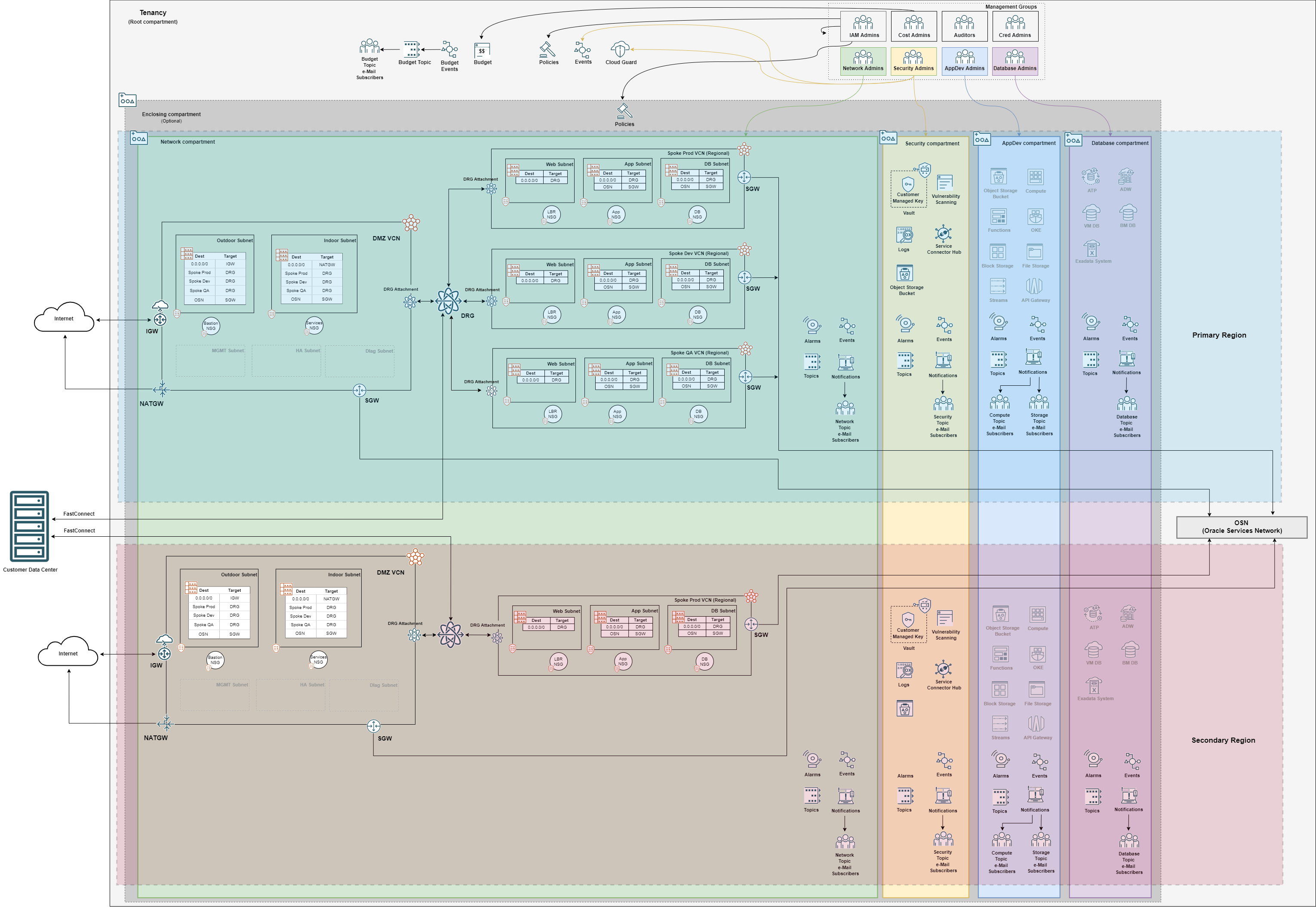
Right-click here to download this diagram in svg format.
To support this scenario, we introduced a single variable that when set to true extends an existing Landing Zone to a new region:
- extend_landing_zone_to_new_region: whether Landing Zone is being extended to a new region. When set to true, compartments, groups, dynamic groups, policies and other resources pertaining to home region are not provisioned, but reused from an existing Landing Zone deployment.
Extending with OCI Resource Manager Service
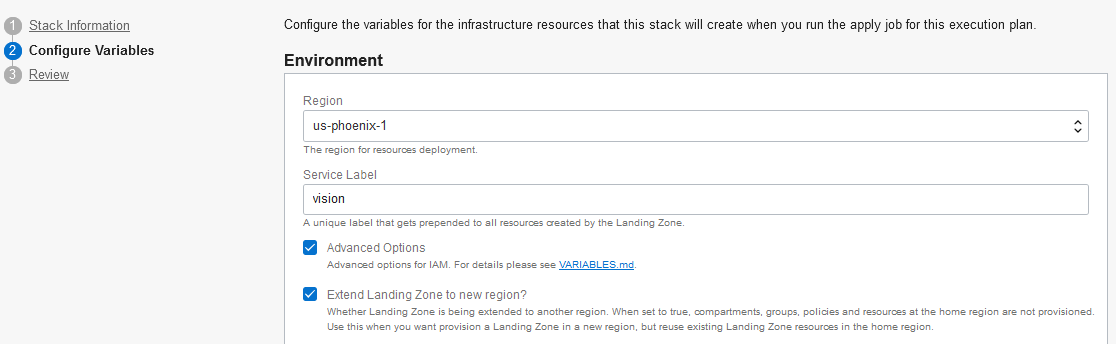
With OCI Resource Manager, create a new Stack, as each Stack manages its own state. When configuring variables, choose say “us-phoenix-1” as the (secondary) Region, use the same Service Label as in the primary region and check Extend Landing Zone to new region? (under Advanced Options), as per image below:
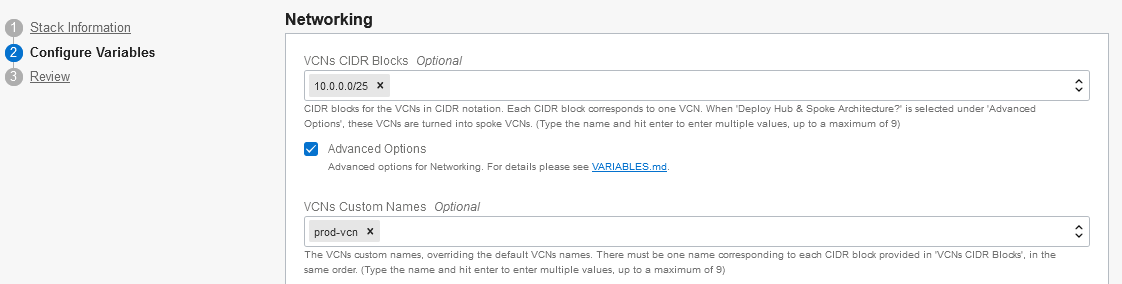
All other variables depend on what you intend to create in the secondary region and should be assigned as in any Landing Zone. For instance, in the primary region you may have created three VCNs (picture distinct VCNs for prod, test and dev) but you want to keep a single VCN in the secondary region to eventually run prod workloads:
Extending with Terraform CLI using Workspaces
Terraform workspaces keep Terraform state files separate from each other. This allows you to work in the same Terraform configuration folder when managing different regions. You need to make sure to switch between workspaces and the respective input variables file.
Assuming your primary region is managed by the default workspace, create a workspace for your secondary region, say secondary-phx. The workspace name can be any string, but we are using something to remember us what it is about. phx is the key for the Phoenix region, that this example is taking as the secondary region. Also, prepare one input file with proper variable assignments, say secondary-phx.tfvars.
In secondary_phx.tfvars, make sure the following variables are set:
region = "us-phoenix-1"
 service_label = "<the_same_string_used_in_primary_region_landing_zone>"
 exntend_landing_zone_to_new_region = true
Here is how it looks like using Terraform CLI commands:
> terraform workspace new secondary-phx (creates and switches to secondary-phx workspace)
> terraform plan -var-file=./secondary-phx.tfvars -out plan.out (creates a plan using variables in secondary-phx.tfvars file)
> terraform apply plan.out (applies the plan according to state file kept in secondary-phx workspace)
Ending Remarks
The ability to extend a Landing Zone to multiple regions is an important aspect for enterprise customers that want to maintain a strong and consistent cloud security posture while increasing the availability of their services. To know more about the CIS OCI Landing Zone, please check our GitHub repo. There you can easily find extensive documentation, including the Deployment Guide that can help you get the most of the Landing Zone. It goes without saying we do welcome your feedback. To get in touch, please file an issue in the GitHub repo.