
Introduction
In a recent project with Oracle Business Intelligence Cloud Connector (BICC), a customer faced a challenge with filtering data during a full extract. They needed to restrict the dataset from a Public View Object (PVO), such as BalanceExtractPVO, to a specific BalancePeriodName instead of extracting all available data. In this blog, I’ll discuss the issue, the limitations encountered, and how I leveraged BICC APIs to meet their unique business integration needs.
The Business Requirement
When performing a full data extract in BICC, the default configuration retrieves the entire dataset for a given PVO. Customer requirement was to filter the data and extracting only records tied to a specific BalancePeriodName.
One possible option would be to manually adding filters through the BICC UI, but this approach wasn’t feasible due to the automated nature of the business integration process, which required a programmatic solution.
Given the limitations, I shifted focus to leveraging BICC’s APIs to achieve the desired filtering. BICC provides a set of RESTful APIs that allow for more granular control over data extracts, including the ability to define custom queries or parameters programmatically. This approach aligned with the need for automation and integration with external systems as part of the business workflow.
Solution: Using BICC APIs for Filtered Extracts
To address the filtering requirement, I developed a solution using BICC APIs to customize the extract process. Here’s a high-level overview of the steps I took:
- Leverage BICC REST APIs: Utilized the BICC API endpoints to initiate and configure the extract job. Specifically, I used the API to pass a custom query or parameter to filter data based on
BalancePeriodName. - Automate the Process: Integrated the API calls into the existing business integration workflow to ensure the filtered extract runs on a schedule without manual intervention.
- Validate the Output: Tested the solution to confirm that only the relevant data for the specified
BalancePeriodNamewas extracted, reducing data volume and processing overhead.
BICC REST APIs
We used specific BICC API endpoints for our metadata-driven approach:
- GET /biacm/rest/meta/offerings: Retrieves list of offerings.The value of Offering ID is required for metadata table.
- GET /biacm/rest/meta/datastores/{datastoreId}: Retrieves current datastore metadata and configuration
- PUT /biacm/rest/meta/datastores/: Updates datastore configuration with new filters and offerings
Metadata Driven Framework
The solution relies on a metadata table (BIACM_METADATA) that contains:
- DATASTORE_ID: Unique identifier for each data source
- OFFERINGS: Specific data offerings to be extracted
- FILTERS: Dynamic filter criteria to be applied at the PVO level
Implementation Workflow
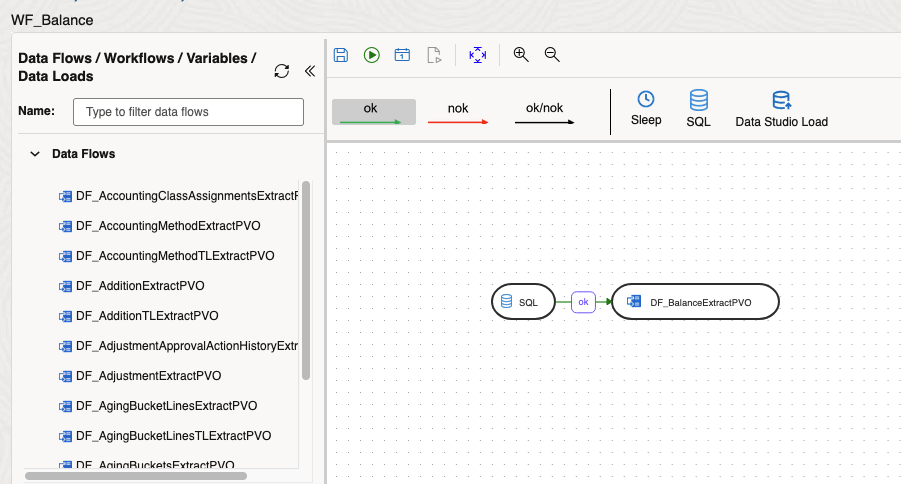
The process involves updating PVOs with filters using BICC APIs and then executing Data Flows in Oracle Data Transforms. Below are the high-level steps for the workflow:
Step 1: Create Objects and set up ACLs
Step 2: Metadata Table Setup
Create a centralized metadata repository that defines extraction parameters for each datastore. This table stores configuration details like DATASTORE_ID, OFFERINGS, and FILTERS in a metadata table (BIACM_METADATA) to drive the process.
Step 3: Dynamic PVO Filter Application
The core of our solution involves dynamically updating PVO configurations using BICC APIs. The process includes:
- Retrieve Current Configuration: Using GET API to fetch existing datastore metadata
- Apply Business Filters: Modify the configuration with specific filter criteria from metadata
- Update Datastore: Push the modified configuration back using PUT API
- Logging: Maintain comprehensive logs for auditing and troubleshooting
Step 4: Data Flow Execution
Once PVOs are updated with appropriate filters, Oracle Data Transforms execute the actual data extraction with significantly reduced data volumes.
Conclusion
By leveraging BICC APIs, I was able to implement a filtered data extract for BalanceExtractPVO that met the specific business requirement of limiting data to a particular BalancePeriodName. This solution not only addressed the immediate challenge but also provided a repeatable framework for similar use cases in the future.