
Introduction
We began to publish a series of articles recently covering the capabilities and options to extend existing SaaS implementations with AI/ML capabilities. In our first issue I gave an introduction about possible use cases and how to use SaaS data for modelling in OCI Data Science. Furthermore we outlined to our interested readers and Data Scientists some principals in the SaaS data model that can be useful for an implementation of AI/ML extensions.
In our second issue of that series our A-Team mate Rekha gave an update about the modelling capabilities in OCI Data Science and the direct usage of BICC CSV data. Her use case was the following: the File Based Loader for Items (Product Data Hub) requires a valid Item Class existing in SaaS being assigned to each loadable record. Otherwise the Item record will be rejected during the loader process. The prediction of the Item Class via OCI Data Science uses the Item description to identify most similar Items in SaaS and determines the assigned Item Class to be used also with the loadable record.
In this article we will explain another SaaS data holding approach that might fit better for complex data handling requirements. Here especially addressing those customers who are still very actively using Oracle on-premise databases. In future articles we plan to cover related scenarios like using a cloud database like OCI Applications Data Warehouse or even OCI Data Integration.
This article will cover a situation where our customers are using an on-premise Oracle DB that should be continued for using and with requirements for complex data modelling in ML.
Using a direct access to BICC extracts like explained in Rekha’s blog might not be feasible or the best option in various complex customer use cases due to existing high data volumes, requirements for serialization of data or mixing SaaS with non-SaaS data for modelling.
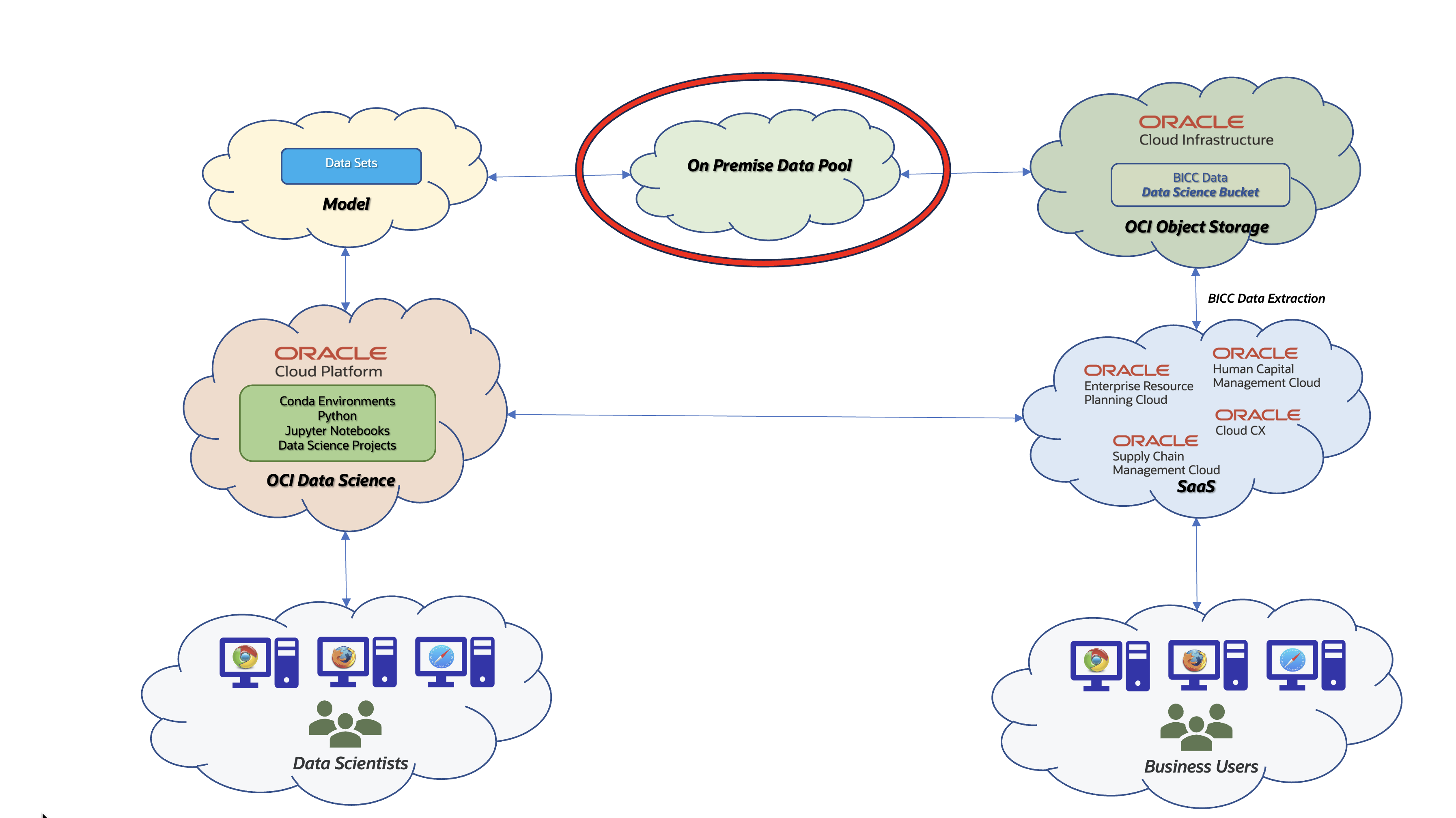
Figure 1: External Data Pool Architecture
The proposed solution will show how BICC extraction data can be loaded into an Oracle on-premise Database and quite complex data structures can be stripped of their complexity to ease the data modelling by Data Scientists. I’m focusing on the explanation of BICC (hence SaaS data) handling, but will not cover any 3rd party data. For one reason this is caused by the broad variety to load data (DB to DB connections, Streaming, importing via external tools and others) and by another reason that this would extend the scope of this article too much. So lets cover the BICC data import into an Oracle on-premise Database that will be used from OCI Data Science to create a model.
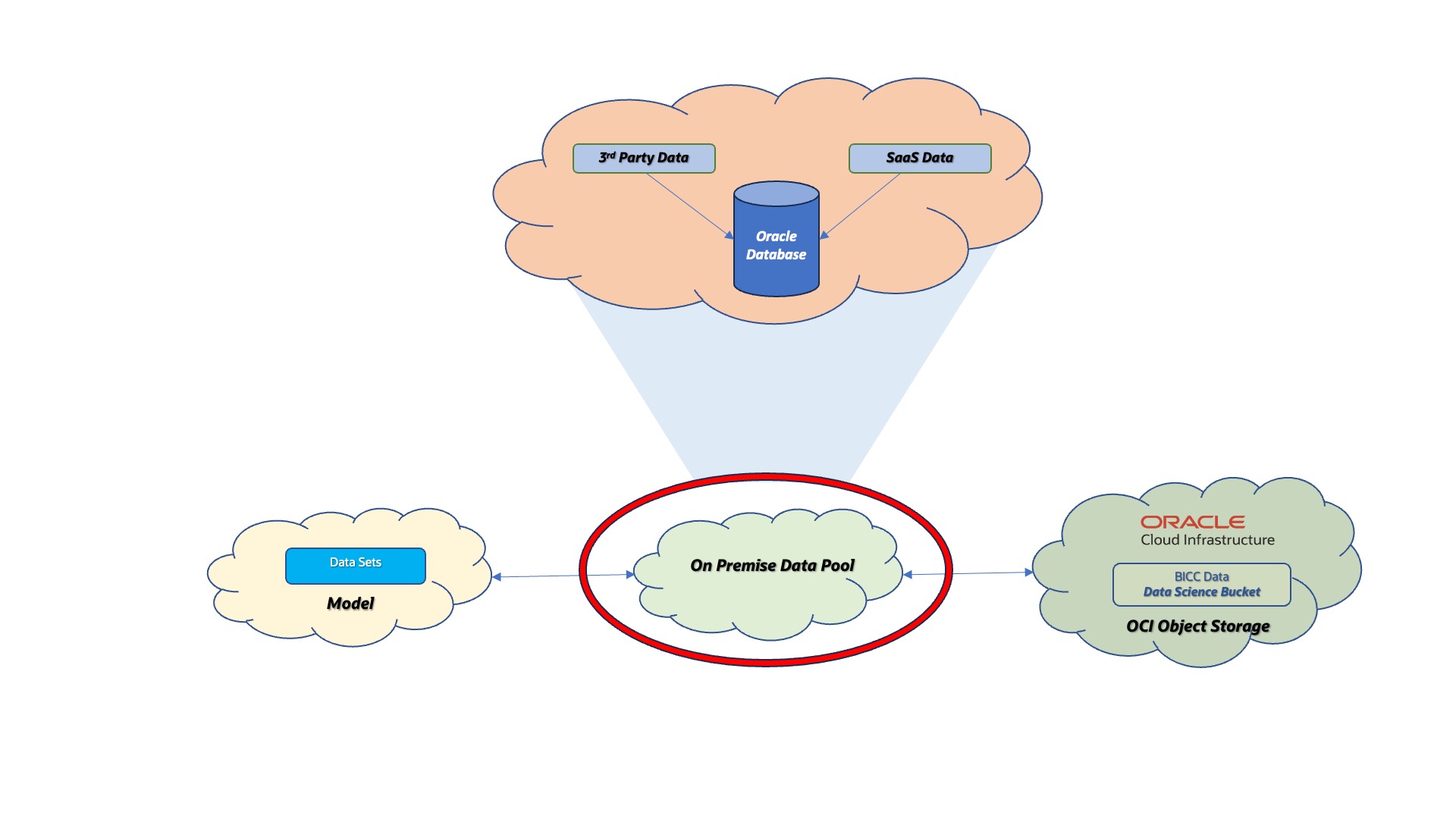
Figure 2: Data Pool Options
The so called On Premise Data Pool in figure above stands for a collection of data being existent in an on-premise Oracle Database. It can be accessed via REST or DB networking proocols. The term itself is a self-creation as its meaning is a more abstract placeholder for data being required for data modelling. Further option for such a Data Pool and to be covered in future articles would be a cloud-based solution.
Solution Design
The basic idea of this solution design is the following:
- BICC extracts will be stored in OCI Object Storage which is accessible as a S3FS mount on a local machine
- We will reuse the same data structures from BICC Public View Objects (PVO’s) in our data model inside the data pool
- BICC logical PVO names are reused as table names for a unique naming of objects.
- As we are using the identical data structures between BICC PVO and database tables in our data pool we are also dealing with partially very complex structures. Later in the process we will create the DB objects providing exactly the fields being used by OCI Data Science for model creation. Those structures will consist of a better readable DB view name with column aliases that are easier to understand. Further explanation see below.
- BICC is providing the metadata defining the structures, data types and meanings of the PVO’s and we will use these CSV based information to create the according SQL for a DDL operation
- As part of this article I’ve created some sample bash scripts to read and parse the CSV meta information per create the DDL statements
- The solution allows a continuing import (insert or update) of BICC data into the data pool. For that purpose the extract CSV date are becoming imported into external database tables first before we perform a database MERGE operation into the dedicated pool tables.
- Not handled in this scenario is the handling of a record deletion in SaaS. BICC would inform us about the primary key being affected and that database operation would be another one than Merging. So I’ve left that use case out of scope.
Figure below shows the tasks in order to prepare or provide the data for ML Data Model creation or training. All sample scripts are available here for download and must be used on own risk and under self responsibility.
- Import: This is a process that scans the S3FS mount on a local server for new BICC extracts. This mount points to the OCI Object Store bucket which is the external target for BICC extracts. In screenshots below I’m proposing a structure of sub-directories like to_load (containing the extract files to be loaded into the data pool) and processed (having the files being successfully loaded into the data pool).
Worth to mention: the extraction files come with a gz compression and must be uncompressed before further processing. That would be a chained execution to uncompress the extracts file by file and to move the uncompressed files into the to_load folder.
Further worth to mention: there is a broad variety of tools that can be used for the periodic scanning of new files. In the script collection I have not provided any sample script for such a periodic scanning. Easiest tool to use could be a cron job on OS level.
In script collection folder bin I’ve provided a script called loadExtData.sh that performs some flushing of new BICC CSV data into the external tables. The file names in this script are hard coded and the script itself will need some rework for a dynamic handling of source files being dumped into the correct external table file. - Merge: After filling the external tables with initial or update information we must merge them with the data in the regular database tabels. For this purpose we will use the MERGE SQl statement. In script folder sql I was providing some SQL sample scripts to run the merge operation using data from external table. These scripts start with a merge in their name. In folder bin I was sharing a script named mergeData.sh as a sample how the merge operation can be executed from outside the database. There are plenty of other options obviously also to run an according job from inside the DB.
- Define: This task is an almost one-time activity. Data Scientists will pick the columns they need from the various database tables and create a database view that can be used by OCI Data Science for modelling. Modifications are only required if underlying data structures become modified or the scope in model is changing.
- Publish: The activity named publish stands for the link between the on-premise database (our data pool) and the Data Modelling task in the cloud in OCI Data Science. Technically there are various options to access the data pool – i.e. via REST. Those details will not further explained in this article.
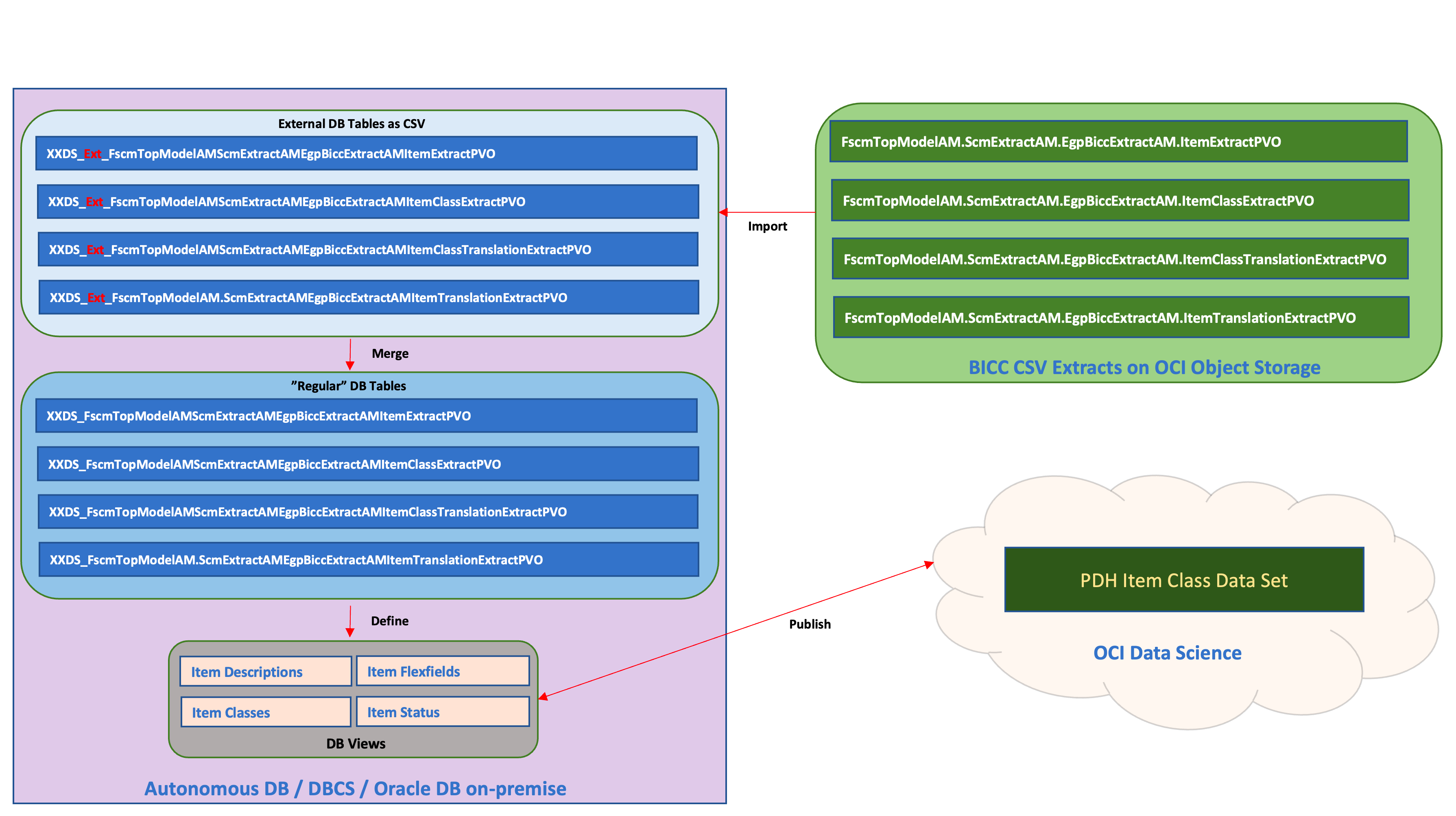
Figure 3: SaaS Data import flow
In this article and the attached scripts I’ve made the following proposal for the naming of DB objects:
- The names are starting with a prefix XXDS_ which stands for XX=Extensions and DS=Data Science or in a more understandable fashion for Data Science Extension Object. This is not a mandatory naming convention, but a proven practice from long lasting implementation experience in Appstech.
- In the sample used for this article I’m using some objects from SaaS Supply Chain Management family dealing i.e. with Items, Item Translations and Item Classes. For the naming of the data pool tables I’m following this assumption: the same BICC PVO name will be used for table name. It provides the benefit of a very clear identification about tables contains specific PVO data. On a possible downside it creates very long names used for DB objects inside our SQL which makes it sometimes quite hard to read. Data Scientists have to make their own decisions which path to follow when making decisions about their own naming conventions.
- In our figure we find the BICC PVO containing Item date named FscmTopModelAM.ScmExtractAM.EgpBiccExtractAM.ItemExtractPVO which will translate into xxds_fscmtopmodelam_scmextractam_egpbiccextractam_itemextractpvo for the dedicated database table.
- The external tables which are in fact CSV files attached to the database, are holding the temporary data before merging and will have an extra EXT_ in their name. For the sample above we will create an external table called xxds_ext_fscmtopmodelam_scmextractam_egpbiccextractam_itemextractpvo being created with an identical structure like xxds_fscmtopmodelam_scmextractam_egpbiccextractam_itemextractpvo. As said: the EXT_ table holds the temporary from a BICC extract file data before merging with the table used by OCI Data Science.
The described principles are used consistently throughout this article and also inside the sample code snippets. As mentioned Implementers and Data Scientists may use a similar approach or use their own principles.
BICC Data Structures and Configuration
An accurate documentation of BICC PVO’s is required in order to understand the structures, data types and meaning of data elements. The standard BICC documentation provides all information we need to understand the PVO details. The information in the documentation are covering more the logical and functional aspects of a PVO while the technical details must be obtained from BICC UI as shown further below.
The screenshot below shows the Item Extract PVO details as a sample object we’re using in this use case and also inside the scripts. The Item object belongs to one of the most complex PVO’s in BICC. It has more than 300 attributes and this number of elements is a definite challenge for the handling of DDL creation and DML execution.
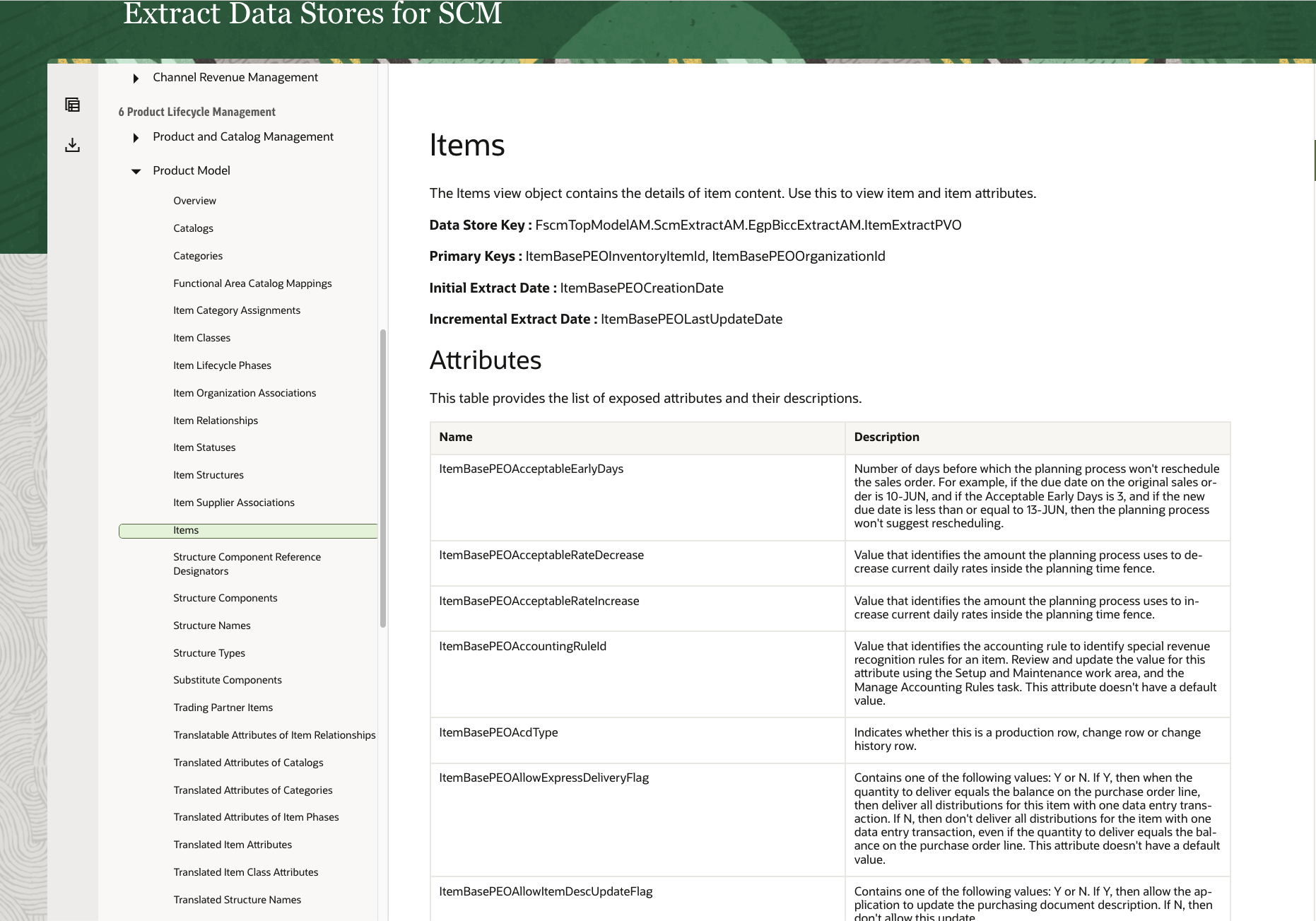
Figure 4: BICC Documentation explaining PVO details
Once the PVO’s to be used were identified using the BICC docs, we can do the next step and download the metadata for the PVO. For every chosen PVO we can use the Export Metadata Definition (CSV) functionality as it can be found in the context menu named Actions.
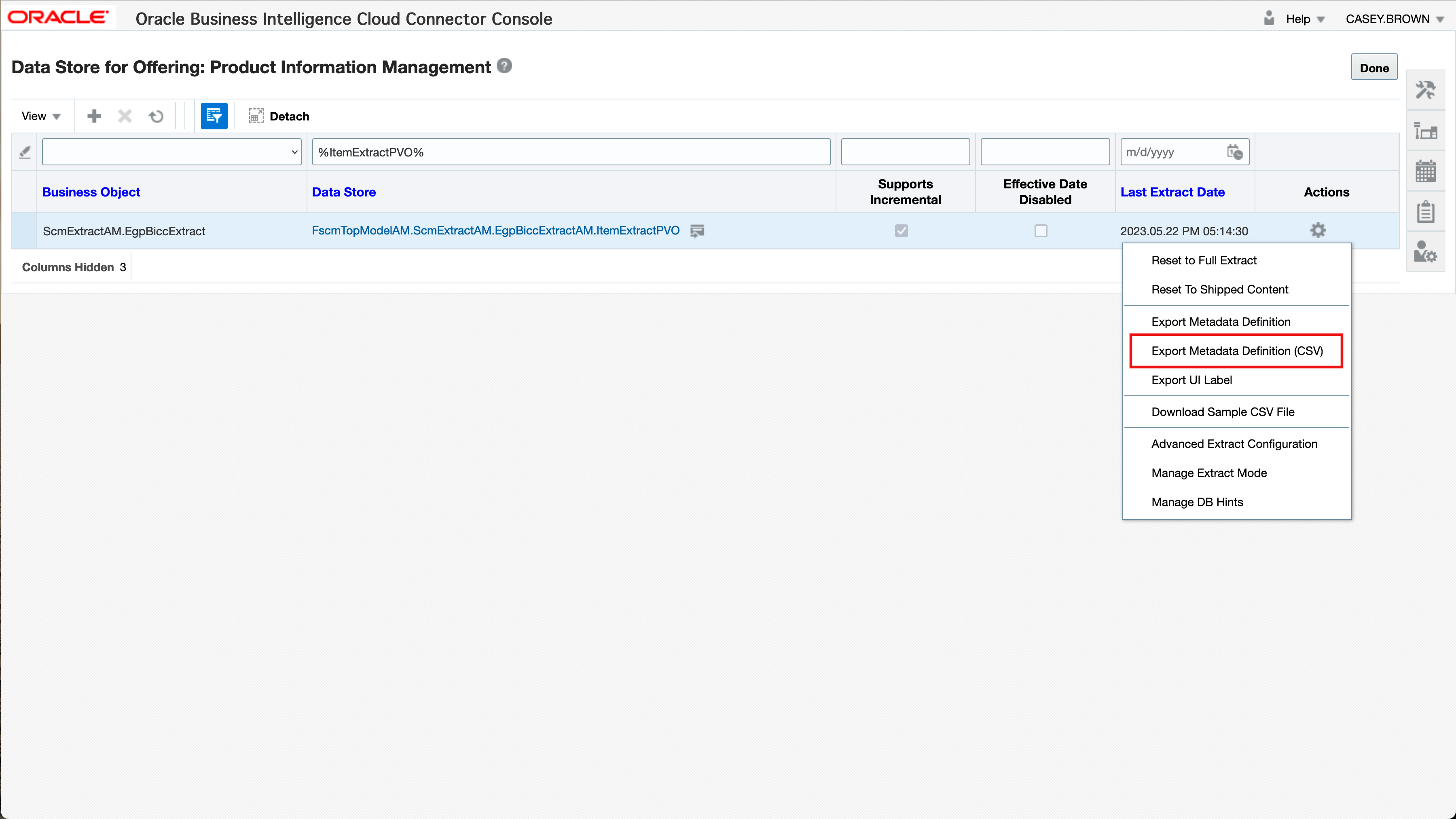
Figure 5: Metadata CSV Export in BICC
Those CSV’s contain all information needed to create a DDL statement that can be used to create a database table with the same structures. Further down this article I’m introducing a script I’ve shared in the collection attached above. The screenshot below shows the sample metadata for the Item PVO.
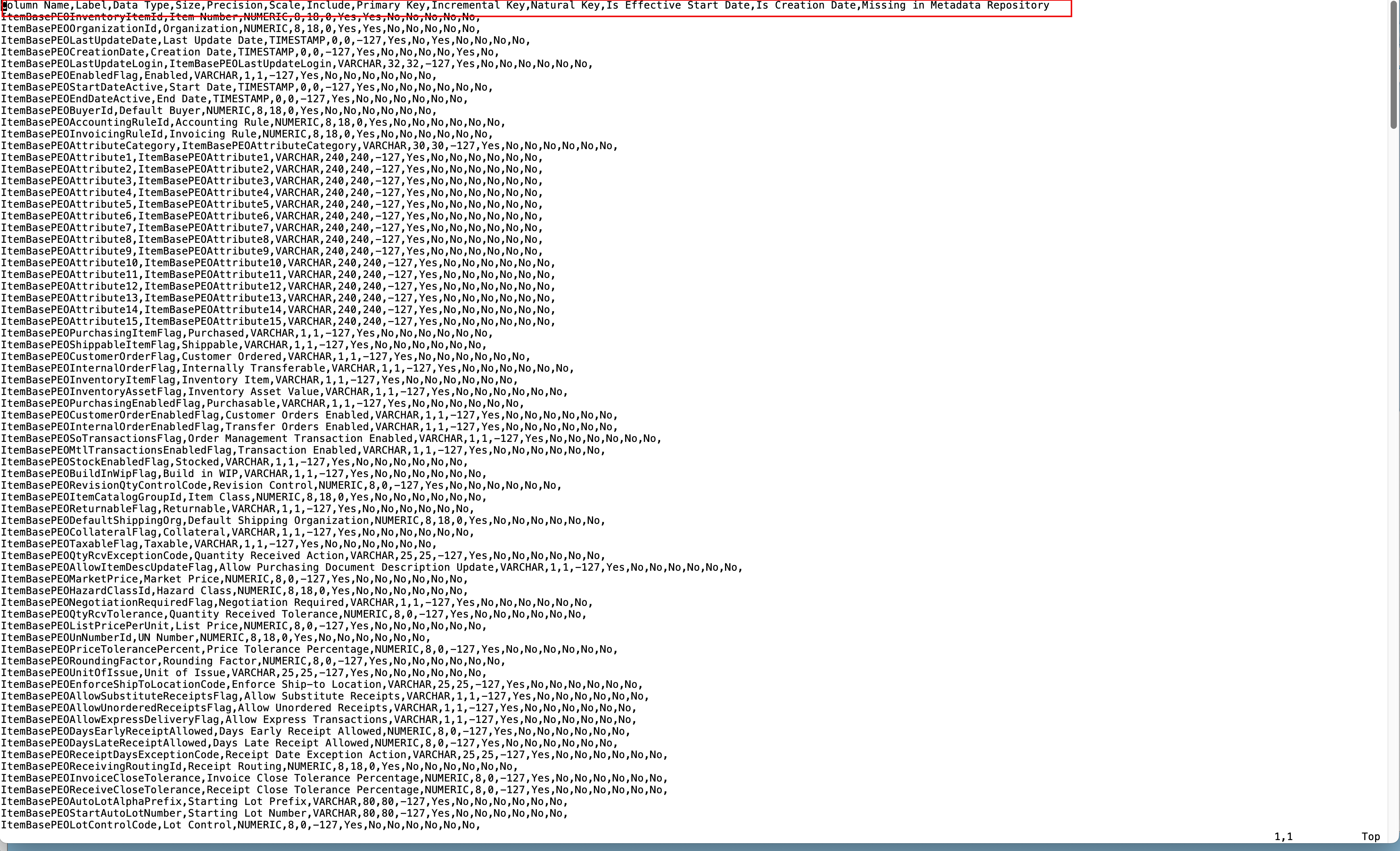
Figure 6: Sample file with PVO metedata
The screenshot below shows the options to filter or include/exclude elements from the PVO’s extraction list. Those modifications can be made dynamically between various extraction runs. If an according table in the data pool using the full list of elements had been created previously, there should be no technical issues feeding it with a subset or filtered data. However it might be a better solution to extract/import unfiltered data including all available columns. The filtering and scoping of model data might be better done within the data pool and during the data modelling tasks.
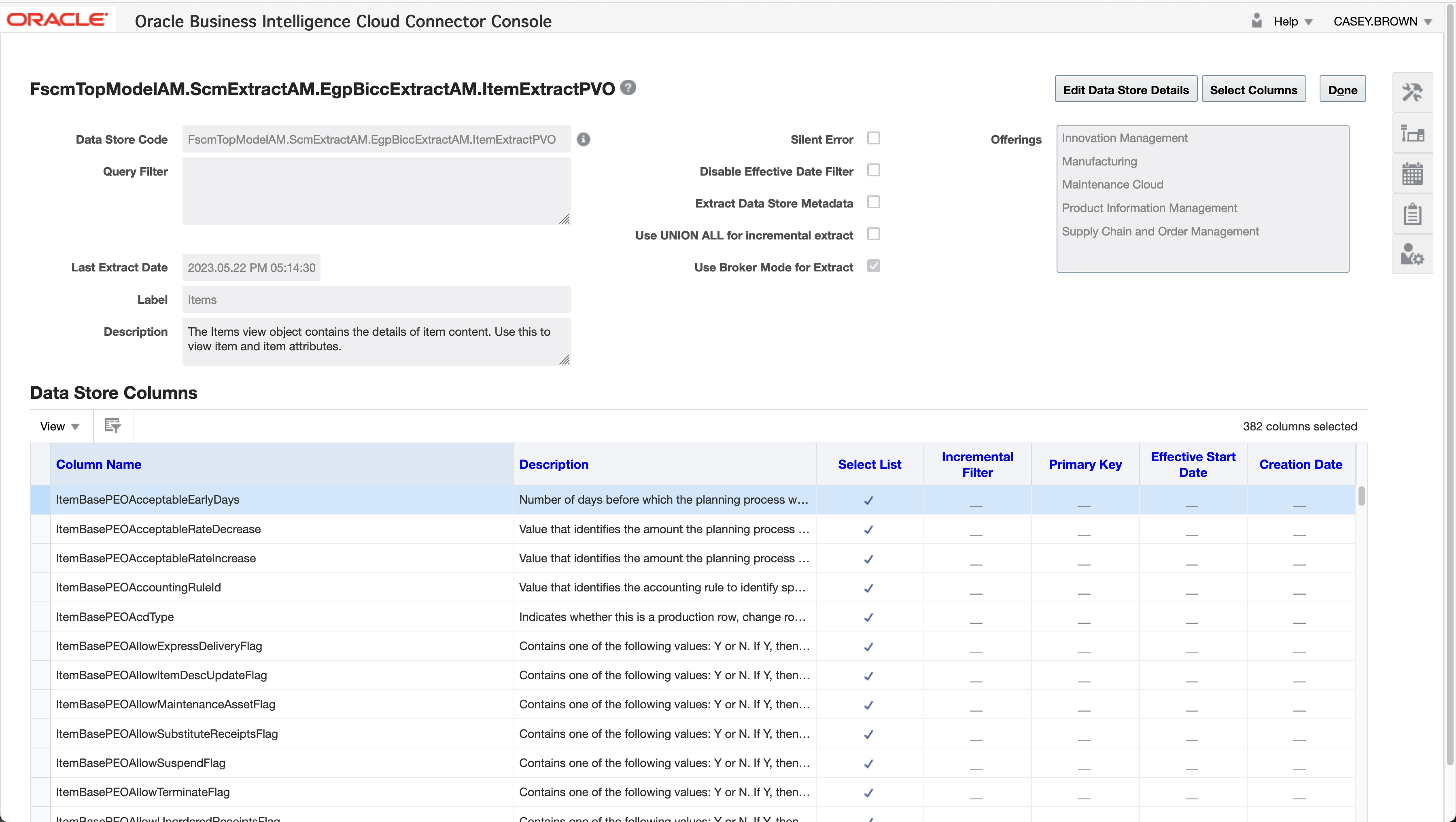
Figure 7: PVO Attribute Configuration in BICC
Another preperation task is the creation of an OCI Object Storage Bucket as a target for BICC extractions and to register it within BICC. Further down in this article we’re showing the connection to this bucket to process the extract data. The screenshot below is a reminder how to configure such an External Storage in BICC. The details of these tasks have been provided in another A-Team Chronicles Blog and is also documented here.
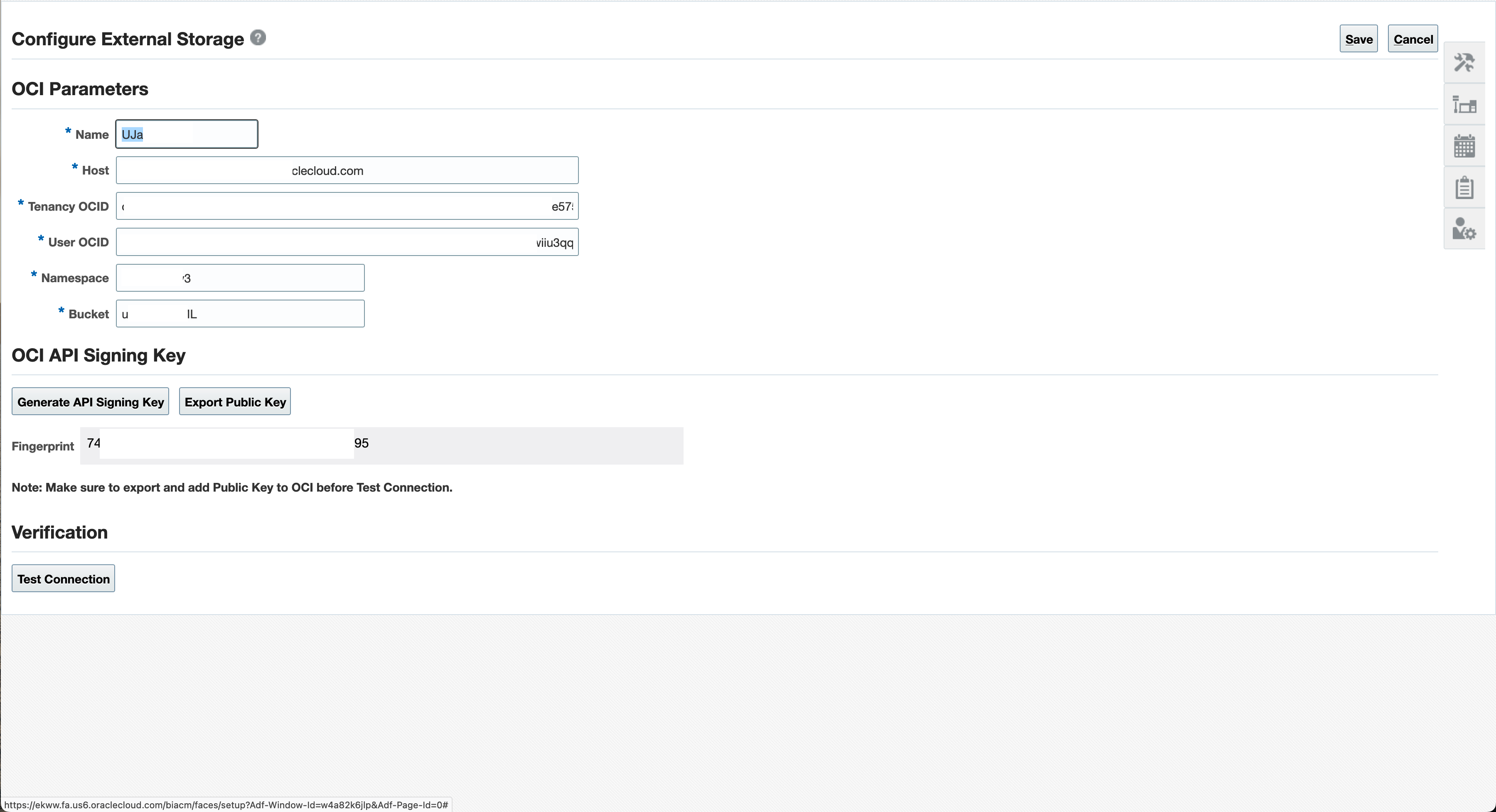
Figure 8: Configure External Storage in BICC
After preparing the BICC side for a data extraction into the on-premise data pool we can focus now on the data handling itself. Just to summarize the tasks in BICC: a data scientiests work will most likely start at the review of available SaaS data, the configuration of according data extract runs and the download of metadata describing the formats and data structures of SaaS data.
Accessing BICC Extracts On OCI Object Storage
An BICC extract will be loaded to the destination as a zipped CSV file following a special nomenclature for the naming. The details can be found in the BICC documentation here. It’s also possible that these extracts become very large and will be split up into chunks of files. Another option would be a possible encryption of data. All those specific features require an according pre-import handling of the BICC data. For this task we can use a dedicated on-premise machine that will run a periodic process to scan for new files and to prepare the files.
The challenge to access cloud based data in an OCI Object Storage bucket from a local computer can be resolved by using a special S3FS mount. Details about the package to be installed and the configuration steps are available in Oracle Support via DocID 2577407.1 as shown in screenshort below.
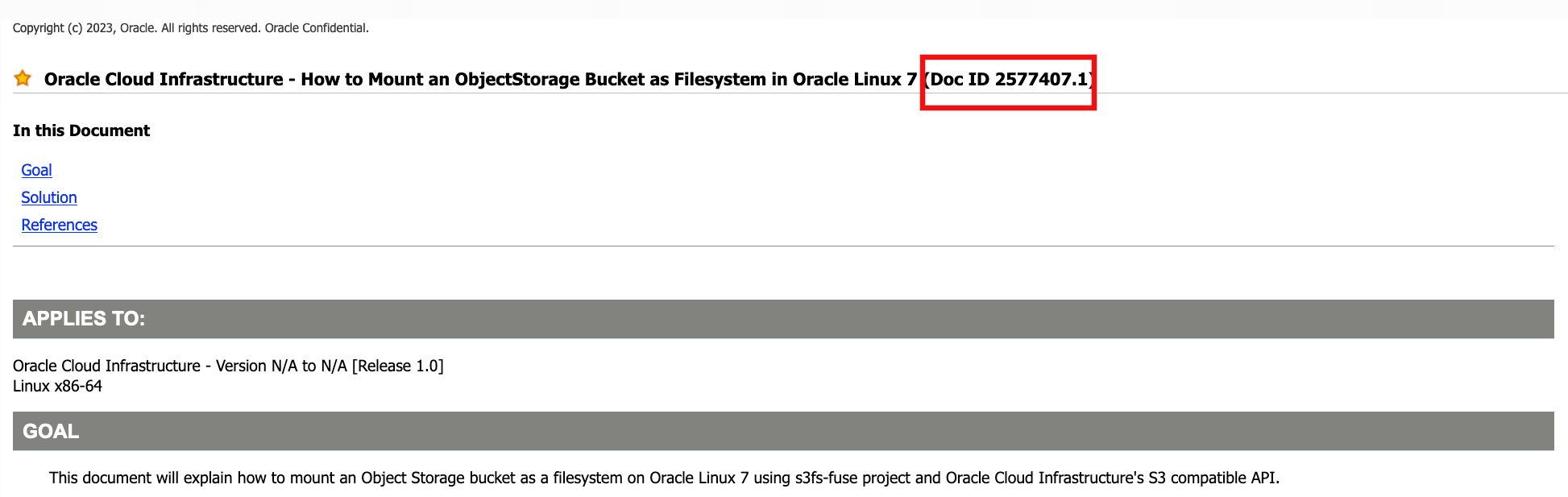
Figure 9: Oracle Support Note 2577407.1
In essence the Linux package s3fs-fuse must be installed in a first step. Afterwards there must be a key being generated in OCI via the Oracle Cloud Infrastructure Web Console, Profile icon in top-right corner by using User Settings. There we use the Generate Secret Key functionality to create such a key. On local machine this key must be registered in a password file and the mount command must point to those information.
The mount command itself will look like this:
	s3fs [bucket_name] [mount_point] -o url=https://[namespace_name].compat.objectstorage.[region].oraclecloud.com
	-o nomultipart -o use_path_request_style -o endpoint=[region]

Figure 10: Mounting an OCI Bucket via S3FS
Screenshot above shows some details from being explained before: (1) displaying the content of the password file, (2) mount after running the s3fs command and (3) the mount command itself.
The screenshot below shows the structure of the bucket directory – here mounted as /mnt/bicc_bucket. BICC will load the files into this location. To master the challenge of separating processed files from the rest we created two subdirectories: processed and to_load as shown in (4).
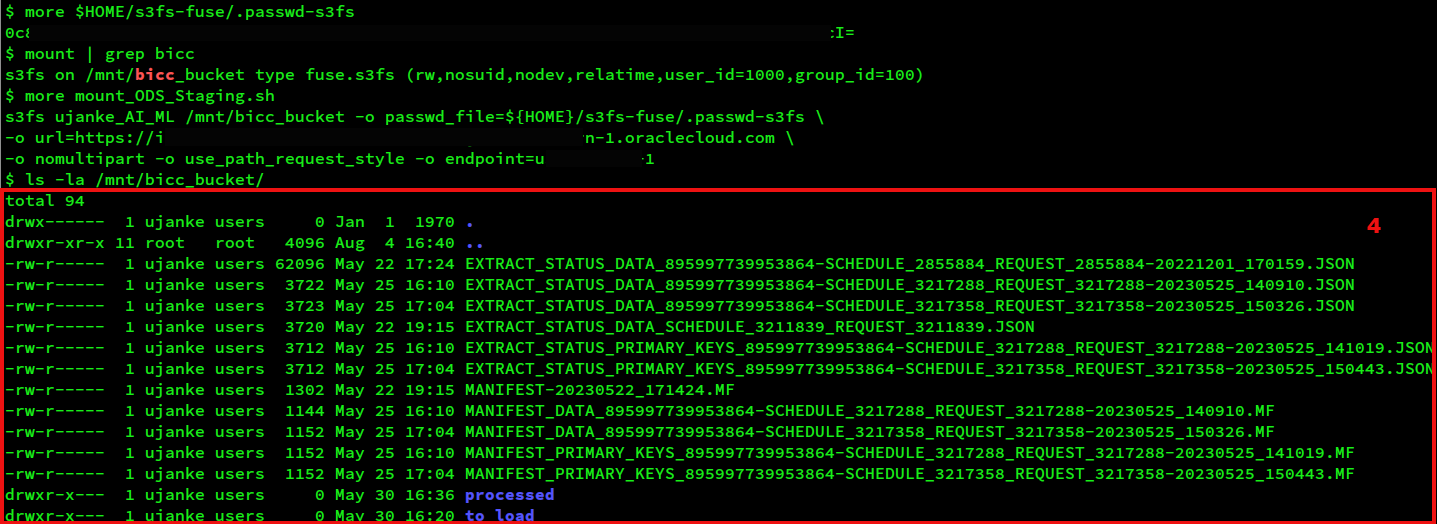
Figure 11: List an OCI Bucket after mounting via S3FS
On the local machine we can schedule a process (for instance performed as a cron job) to monitor the appearance of next extract files. Once those new files become available, this monitoring process can be zsed to run the unzipping (optionally also including the decryption) into the folder to_load. We have not provided any scripts in the attached collection as that would be a customer task to implement.
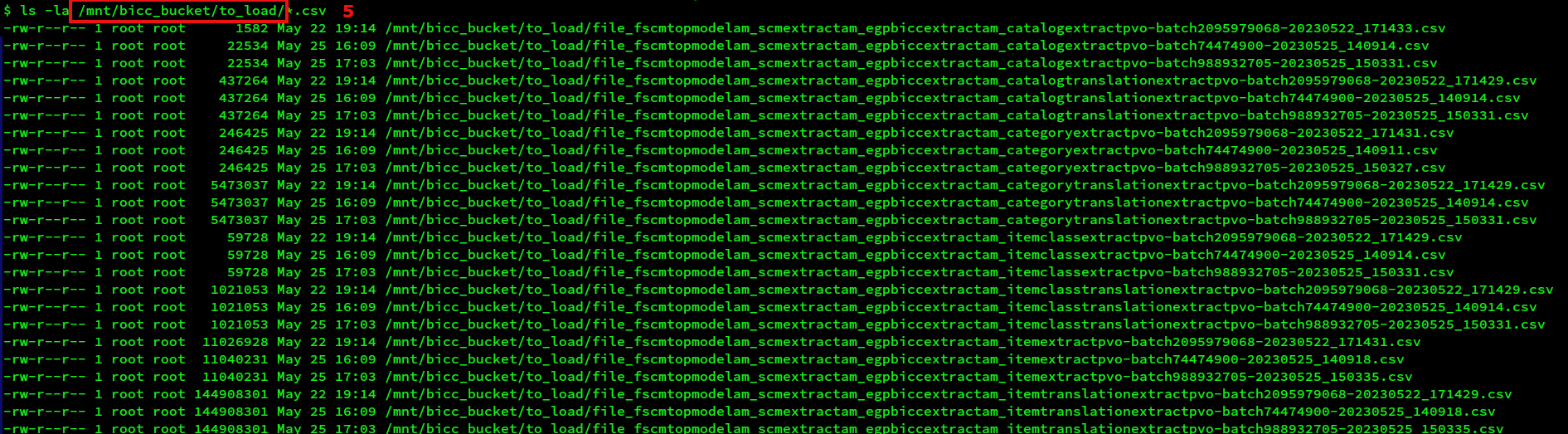
Figure 12: Bucket with BICC extracts ready for processing
Like shown in screenshot above (5) at the end of the unzipping/moving the extracts become ready for an import in folder to_load. The custom file handling script should move the files into the processed folder after successfully importing into the external tables in data pool.
After successfully extracting the SaaS data they can be used for merging into the internal data pool tables like explained further below.
Creating and Running Data Pool DDL Statements
Once we finished downloading the specific CSV’s containing the metadata for PVO, we can use that information to create some SQL scripts (each per PVO) to create the according DDL statements. There are obviously plenty of tools that could be used and also various programming languages come into play for parsing the metadata and generating the DDL statements. For this I have chosen a long-time established solution by using bash and awk that goes along with the BICC PVO name that becomes also part of the table name.
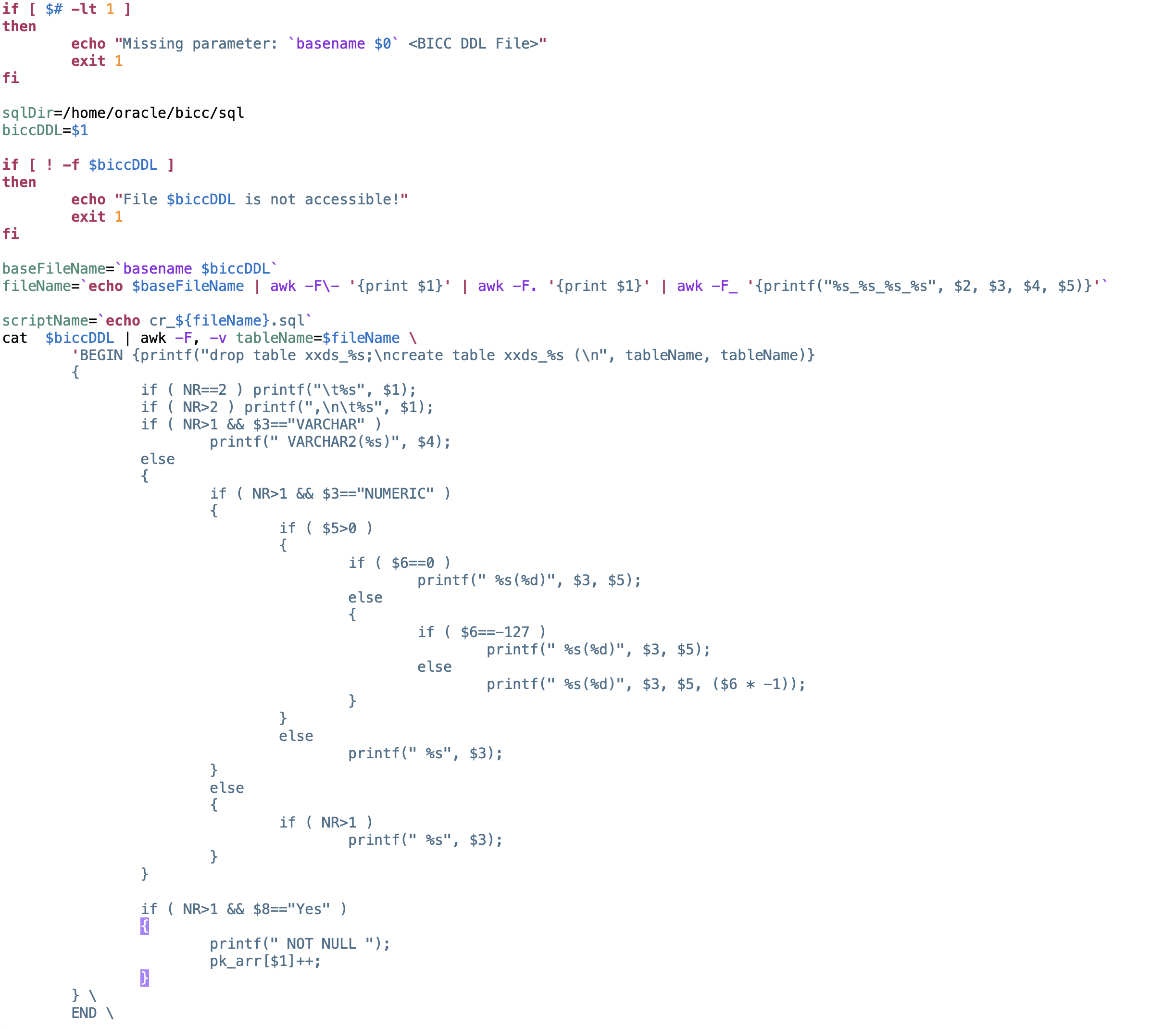
Figure 13: Screenshot of script bin/createTableDDL.sh
The figure above shows the code to create the DDL statement for an internal table in data pool. That must be run for each PVO being used. The sample code can be found in script bin/createTableDDL.sh. In the actual version the script is creating a file with a name in a format like this: cr_fscmtopmodelam_scmextractam_egpbiccextractam_itemextractpvo.sql. Under bottom line this program parses the metadata CSV line by line and field by field. It writes the SQL statement to create an identical table into the specific file.
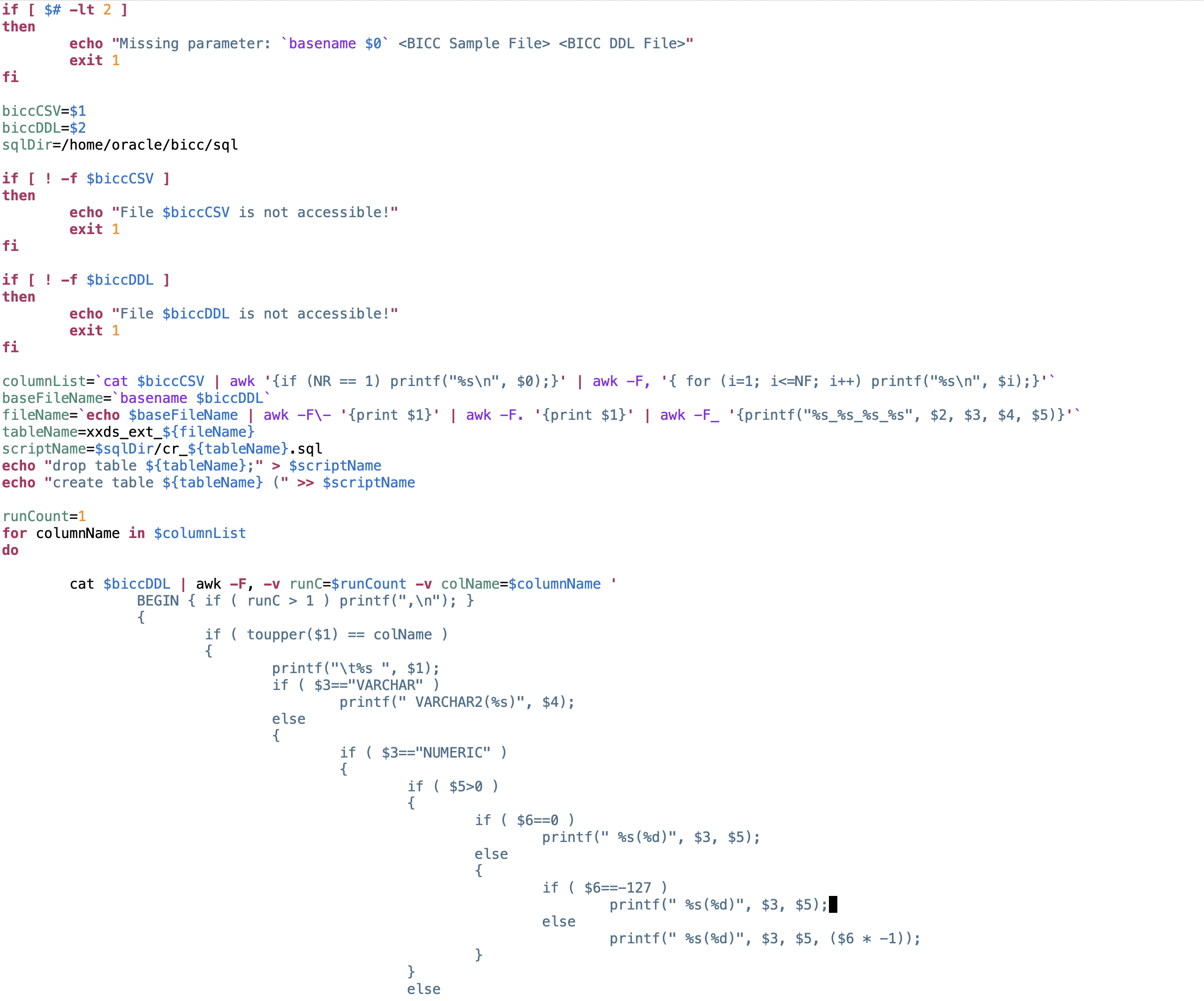
Figure 14: Screenshot of script bin/createExtTableDDL.sh
Similar to the creation of internal database tables as explained previously, I’ve also provided another script like shown in figure above for external tables. These external tables are in fact CSV files mounted by the database with a double access to the file either directly by adding/changing/removing CSV data or performing similar operations via SQL from within the database.
The code can be found in bin/createExtTabDDL.sh. As the logic to create an external table statement differs from the previous script, we’re using a second parameter here: a sample file containing records with PVO data. As we use only line number 1 containing the column names it would be sufficient to take a sample file and delete all the remaining lines starting with line number 2. Alternately we can use any regular extract without truncating and it is not recommended to use a very large file containing gigabytes of data.

Figure 15: Screenshot of script bin/generateDDL.sh
Running the scripts for DDL generation can again be organized via a bash script named bin/generateDDL.sh as shown in figure above. Each execution of the script will create a file containing the SQL statement for object creation. As shown above we will create the DDL for external and internal tables in this script. The file names for the CSV containing the metadata and sample data are a customers choice. In my sample I’ve used own names (equally to the PVO names) for the metadata CSV’s and the original sample data file names for the second parameter in EXT table creation script.
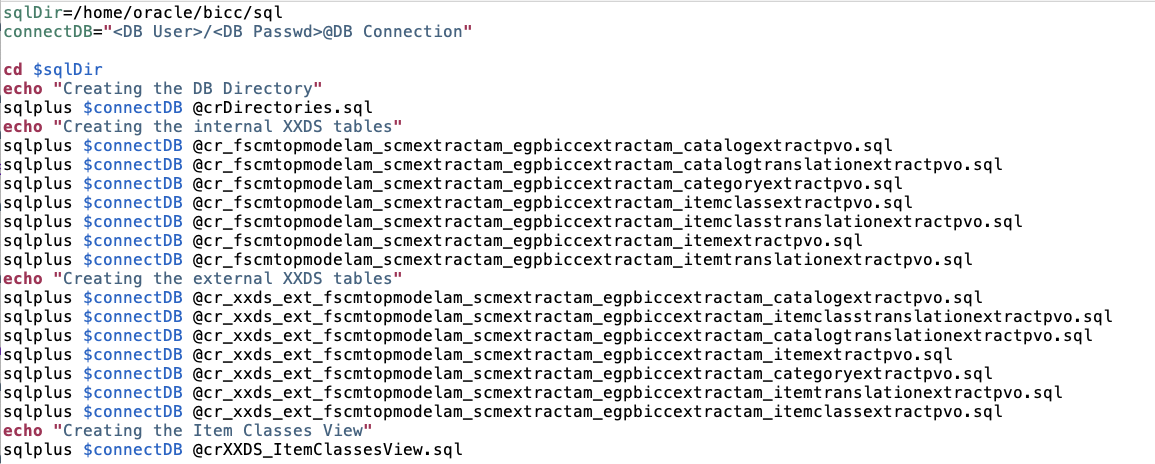
Figure 16: Screenshot of script bin/createObjects.sh
The execution of SQL statements to perform the DDL operations is bundled in another bash script named bin/createObjects.sh as shown in figure above. Important to mention: the first SQL script sql/crDirectories.sql has to create the directory in database where we will locate the external CSV files including an assignment of according permissions. The SQL statements look like this:
CREATE OR REPLACE DIRECTORY bicc_import_dir as '[ORACLE_HOME]/oradata/external/data';
CREATE OR REPLACE DIRECTORY bicc_import_log_dir as '[ORACLE_HOME]/oradata/external/log';
CREATE OR REPLACE DIRECTORY bicc_import_bad_dir as '[ORACLE_HOME]/oradata/external/bad';

GRANT READ ON DIRECTORY bicc_import_dir to [schema_name];
GRANT WRITE ON DIRECTORY bicc_import_log_dir to [schema_name];
GRANT WRITE ON DIRECTORY bicc_import_bad_dir to [schema_name];

alter session enable parallel dml;
The DDL directory statement hasn’t been created by a script. It was a manual task as this is one-time job with a lower size and complexity.
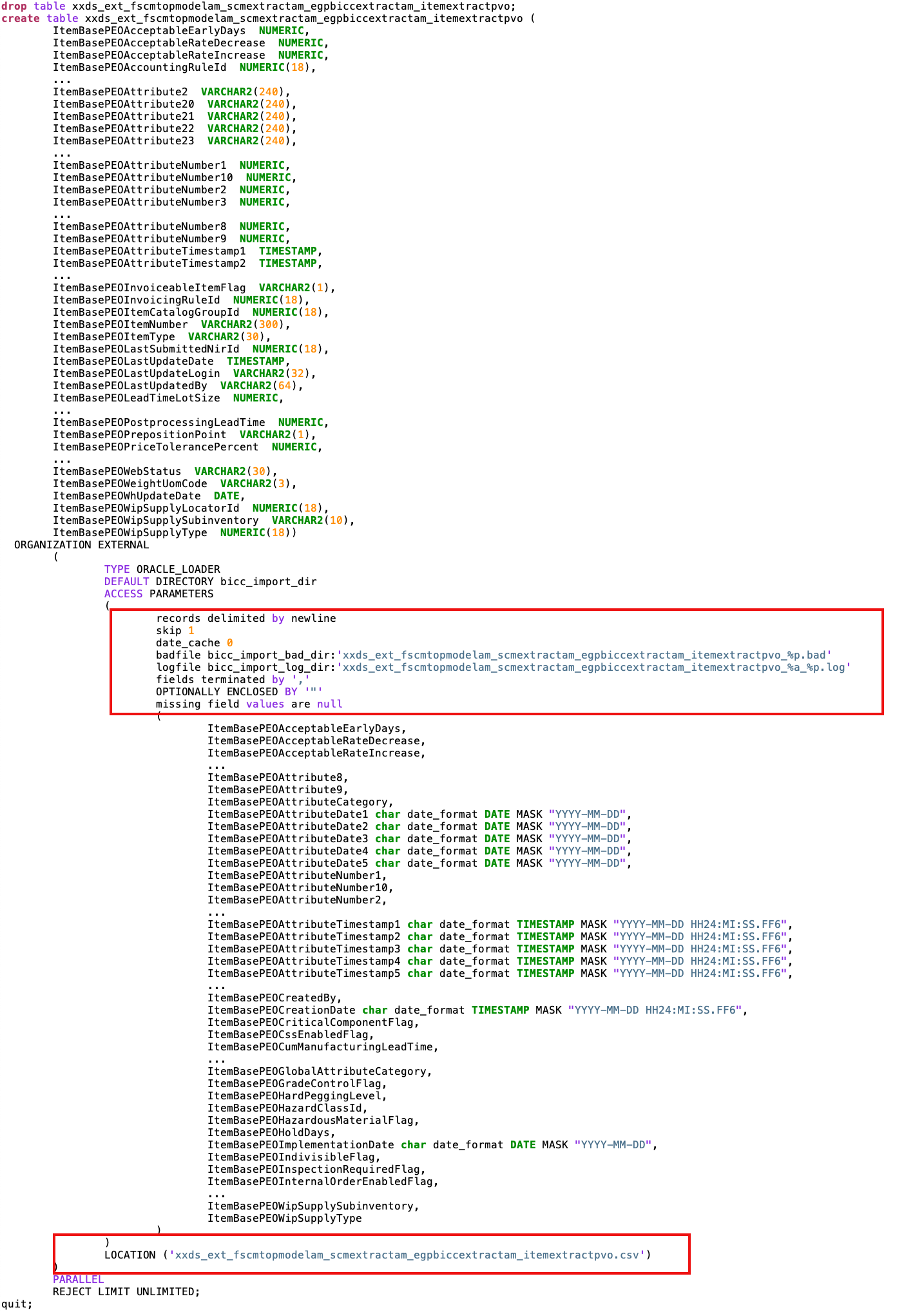
Figure 17: Sample script for external table to load Items
Figure above shows a generated sample script – here to create the very complex internal database table xxds_fscmtopmodelam_scmextractam_egpbiccextractam_itemextractpvo which is holding the merged data for BICC PVO FscmTopModelAM.ScmExtractAM.EgpBiccExtractAM.ItemExtractPVO as it covers the Item object.
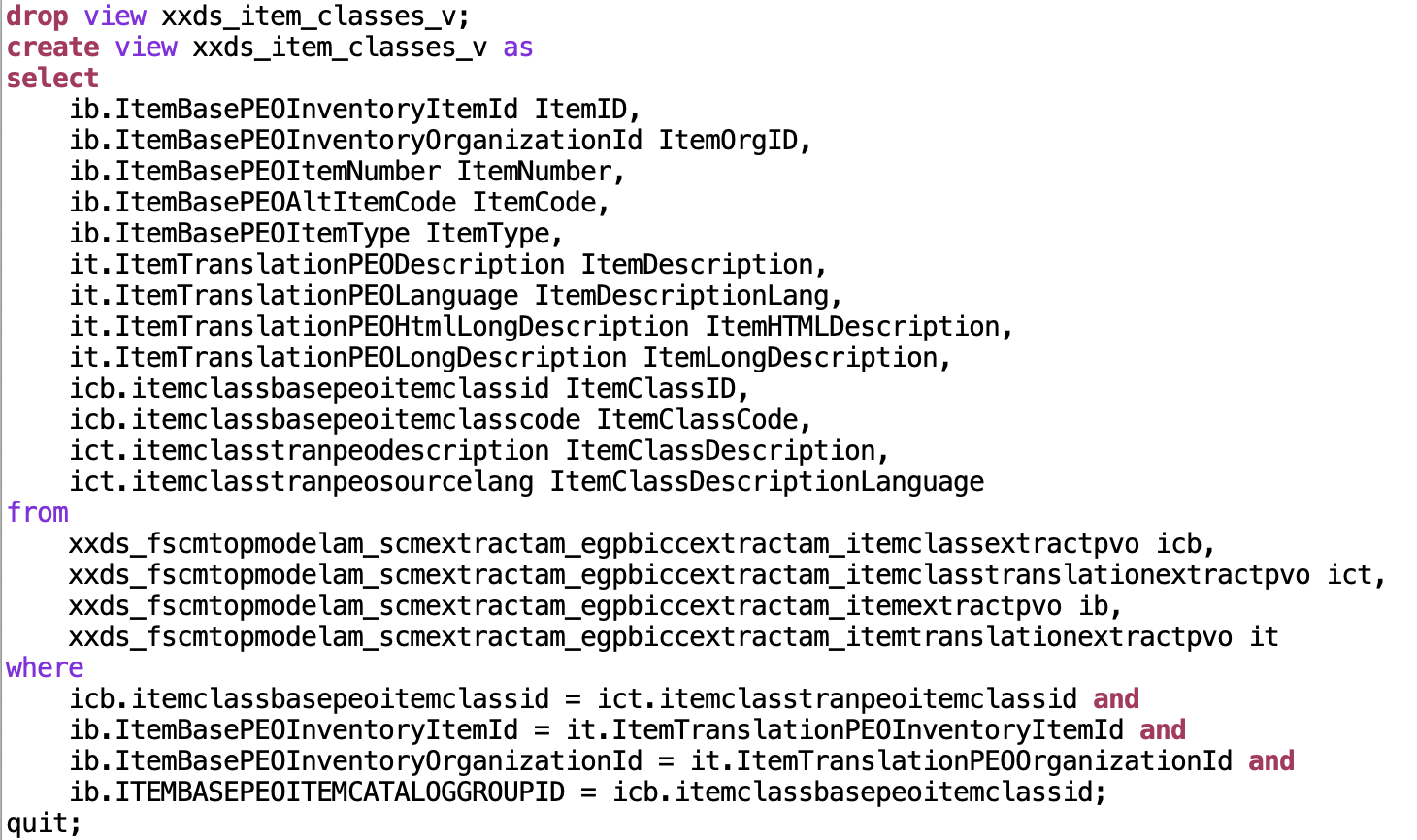
Figure 18: Sample script sql/crXXDS_ItemClassesView.sql
The last statement in DDL execution script creates a database view via script sql/crXXDS_ItemClassesView.sql as shown in figure above. The following consideration was used here: after we are importing very complex data structures into our data pool, we use a database view with an excerpt of columns that has a meaning for data modeling in OCI Data Science. Also here we are not generating that statement via a script, but create it manually. In fact a data scientist can use as many database views as needed. Means: the SaaS data extract procedures and data pool import scripts sync a full set of data while the database views reduce the complexity by limiting the number of attributes and using self-speaking attribute names.
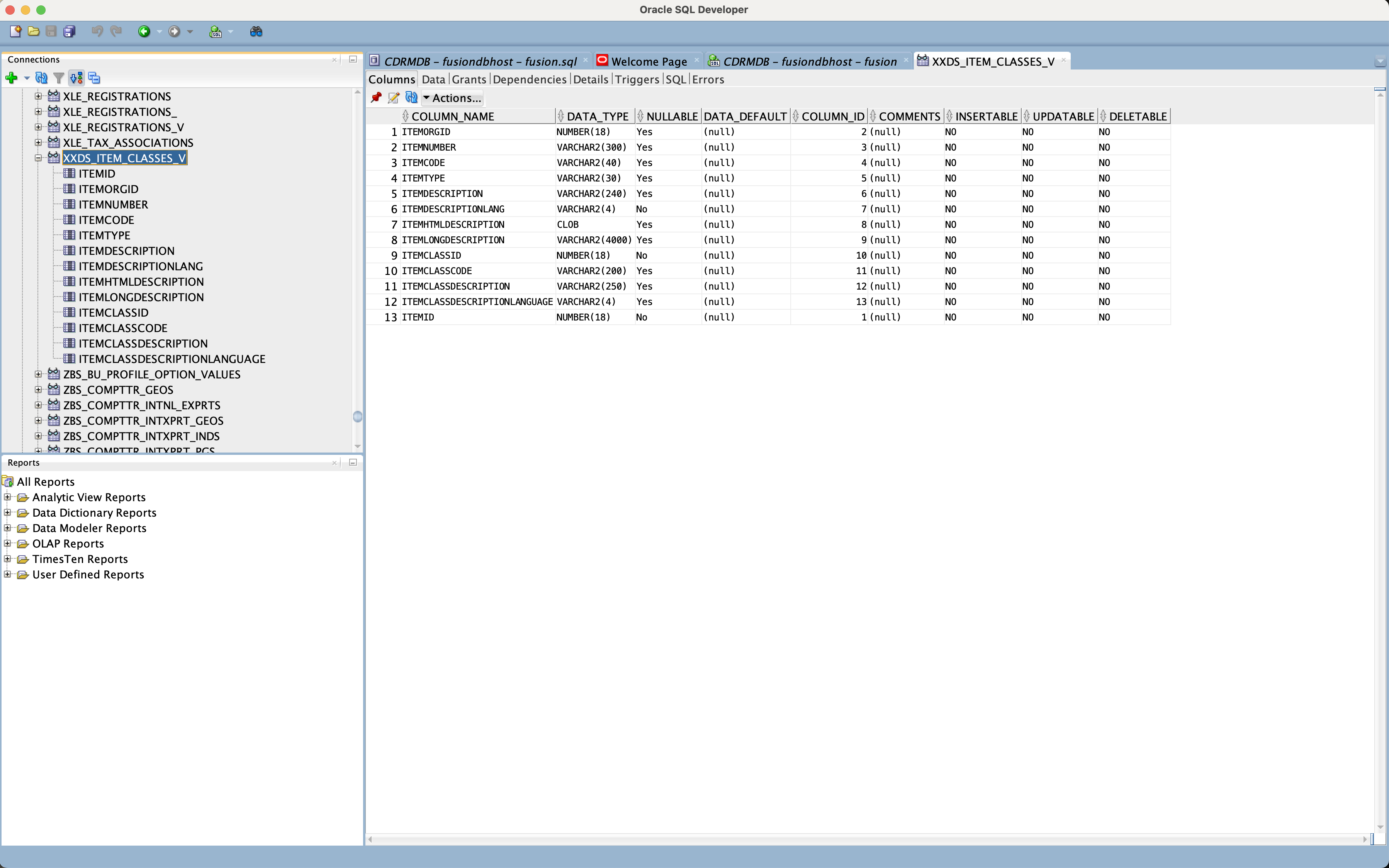
Figure 19: View appearance in SQL Developer ready for modelling by Data Scientists
Figure above shows the database view definition containing the Item and Item Class information within SQL Developer. This view might be used from OCI Data Science for modelling.
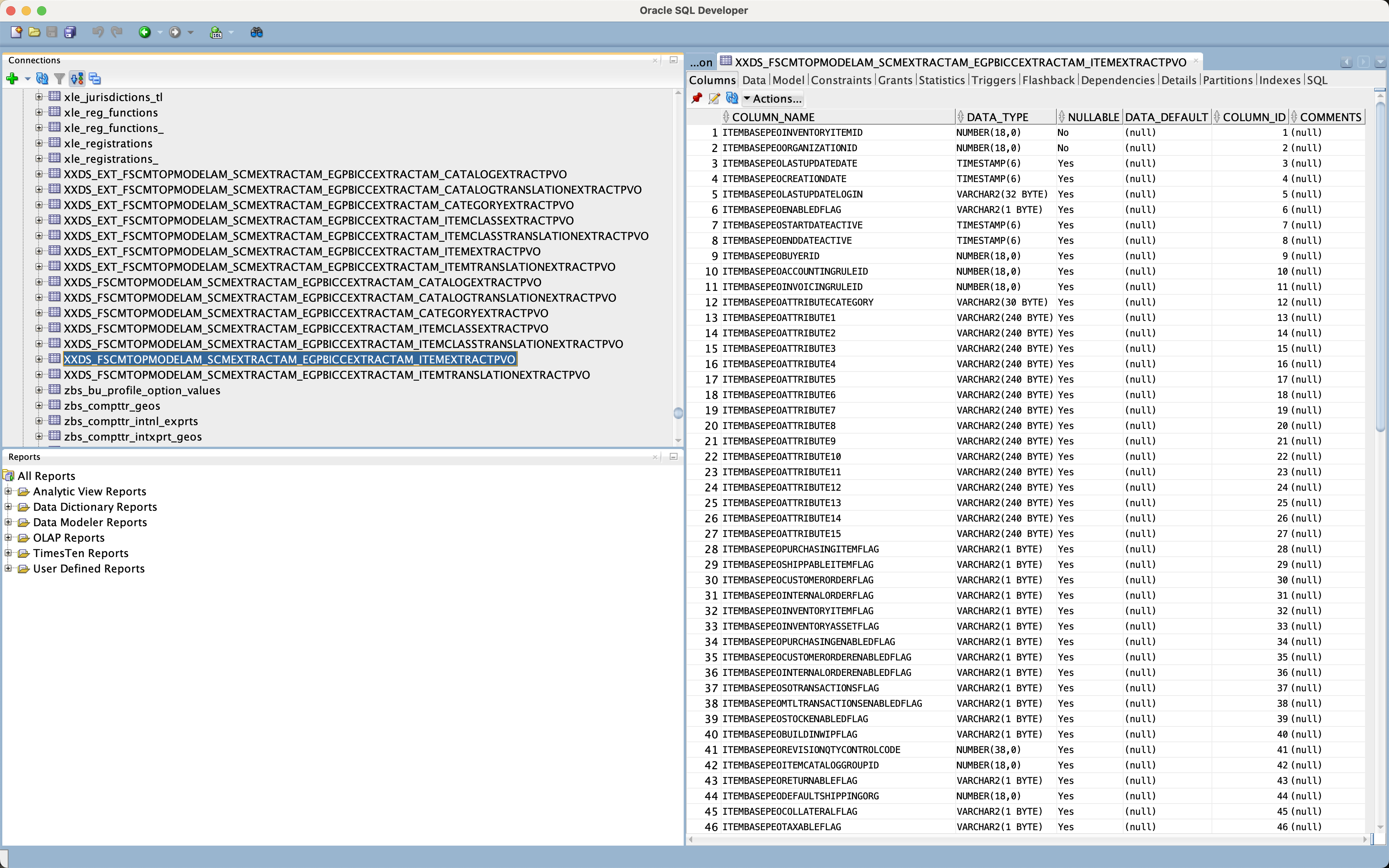
Figure 20: Item Table Structure in SQL Developer (internal table)
Figure above shows the internal database tables appearing in SQL Developer as being imported from BICC.
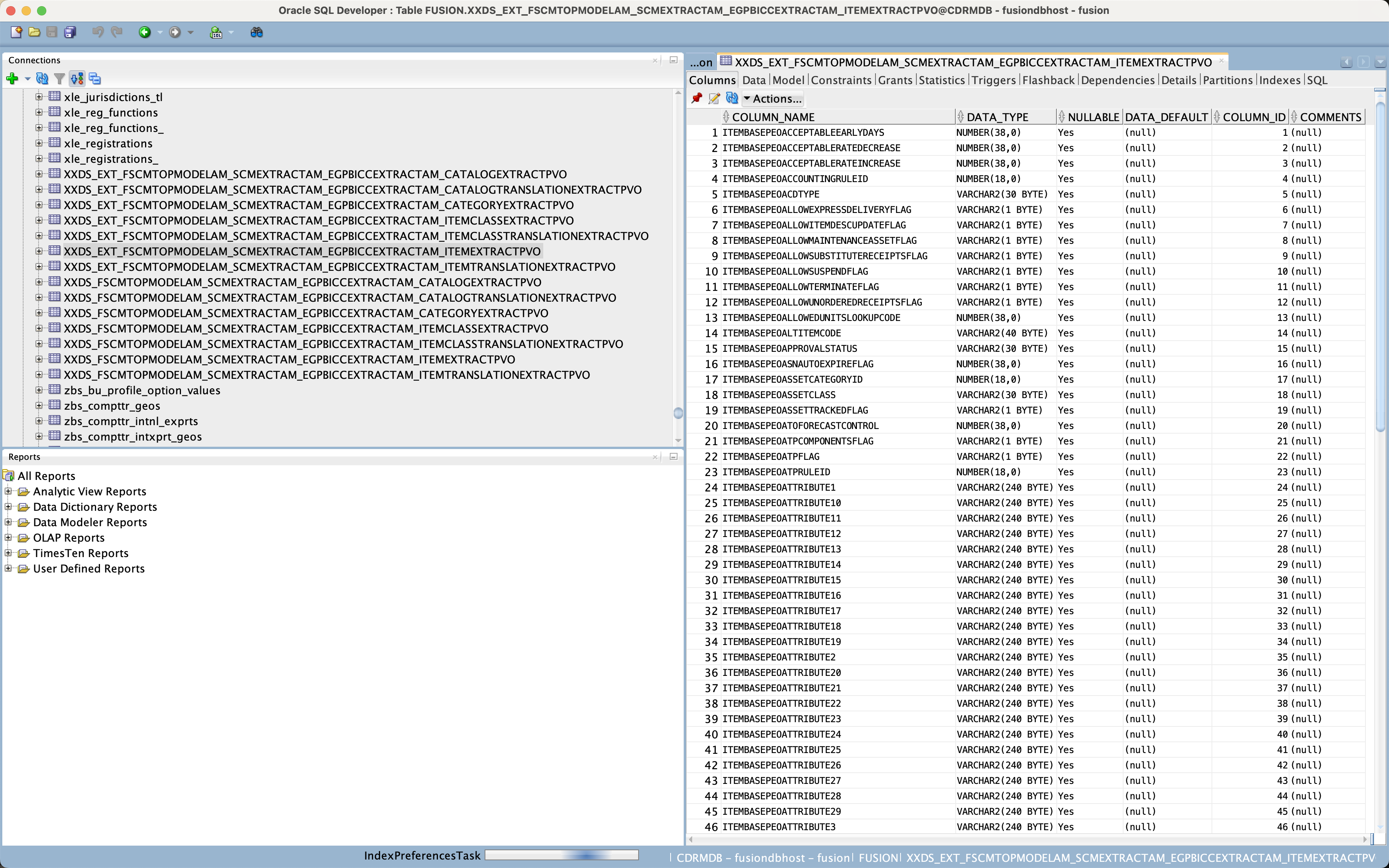
Figure 21: External Item Table Structure in SQL Developer (CSV file based)
At this stage we are ready with the preparation of the on-premise database, the BICC configuration, the configuration of a Linux mount pointing to the OCI Bucket with the BICC extracts and can continue with the data import itself.
Loading BICC Data into Data Pool
The previous section was handling one-time maintenance activities to be performed for initialization purposes or when implementing changes in PVO definitions. In this section we’ll have a look how a regular and periodic import of SaaS data into the data pool can be implemented. Important to mention: this solution is meant to use no extra tools or services. It is supposed to introducs into a basic configuration using Oracle DB client software and Linux Shell commands. We intend to deliver other articles in near future that will highlight how a similar solution could work using an Oracle cloud database or other Oracle cloud services.
Under bottom line the import and merge of SaaS data will use the following principles:
- Via a monitoring process we acknowledge the appearance of new SaaS data loads in the mounted bucket.
- Once there are new files (hence data) existing, we unzip and move the files to a special directory like the one we have named to_load here.
- Those data will be loaded into the external staging tables first. As these tables are stored in regular CSV files mounted to the database, we can flush our new records into those files by presuming that there are no acticve processes actually merging the external data with the internal data pool tables. This can me performed on OS level by dumping the new CSV data from SaaS into the external CSV files.
- As soon as this update has been successfully completed we can run a merging process performing an Insert or Update of these data into the internal table. For this purpose we are using the SQL command MERGE. In this sample the SQL exists in a file and will be executed from command line.
- After merging data we have to ensure that there are no unprocessed records that couldn’t be processed caused by a broad bandwidth of reasons like data format incompatibilities, incompatible characterset or any other issue that might occur. The merge run will create records in log and bad files in case of occurring errors. If those issues have been reported they must be solved manually.
- Finally there are some tidy up activities like moving the BICC CSV file from to_load to processed folder and also emptying the external database (CSV) files optionally.
The figure below shows the sample code of such a dump script. Maybe worth to mention that we are using here some sample filenames and that it is in the implemeters responsibility to make this script more generic.
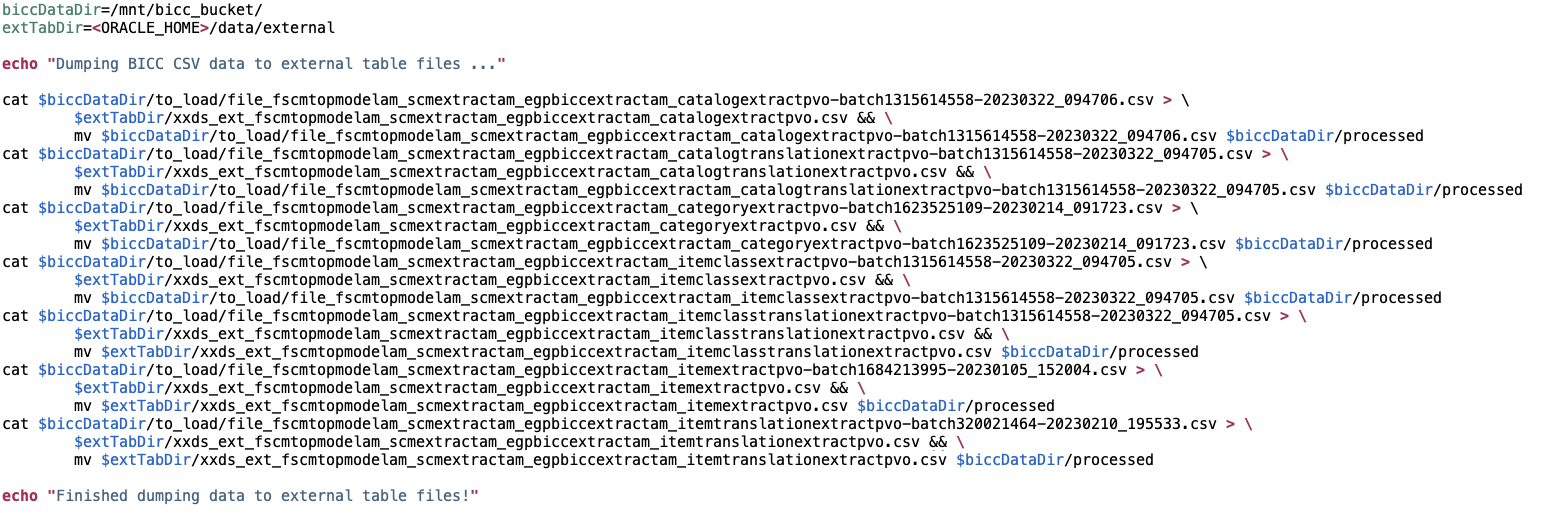
Figure 22: Sample script bin/loadExtData.sh to load BICC extracts
As soon as the import into the external tabes has been finished, the CSV records appear in the database like regular data than can be handled via SQL statements. Figure below shows the external table existing in SQL Developer like an internal table. Also there is no difference handling the data between internal and external tables via SQL as said before.
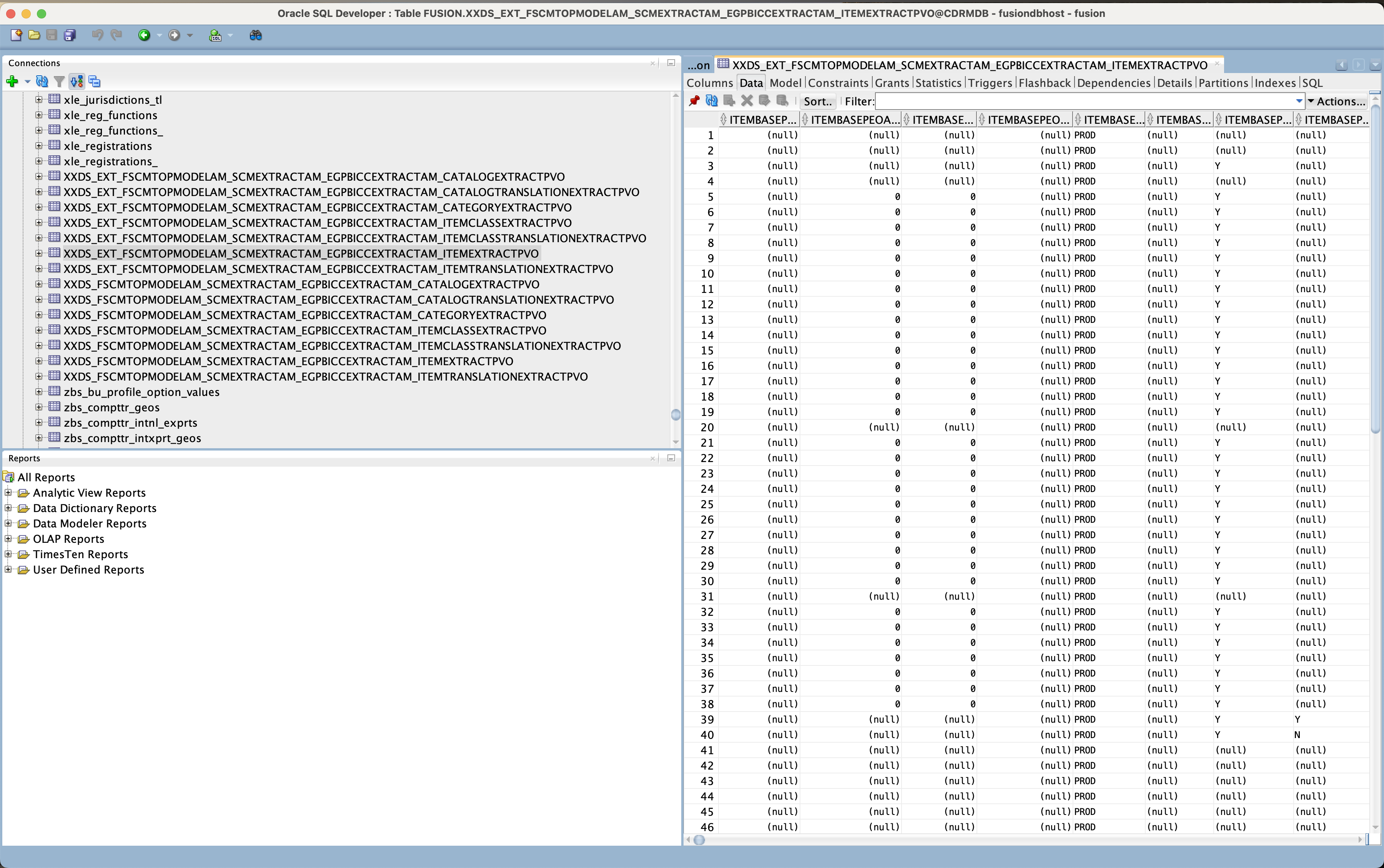
Figure 23: External table containing the data after being dumped from BICC files
The merge scripts themselves are very entity specific and will obviously require some manual coding. Not provided in the script collection is a generator script to create some code skeletons for these merge activities. The screenshot in figure below is showing a sample SQL snippet to merge Items extracted from SaaS in a merge operation – from the external into the internal table as a snapshot of SaaS data.
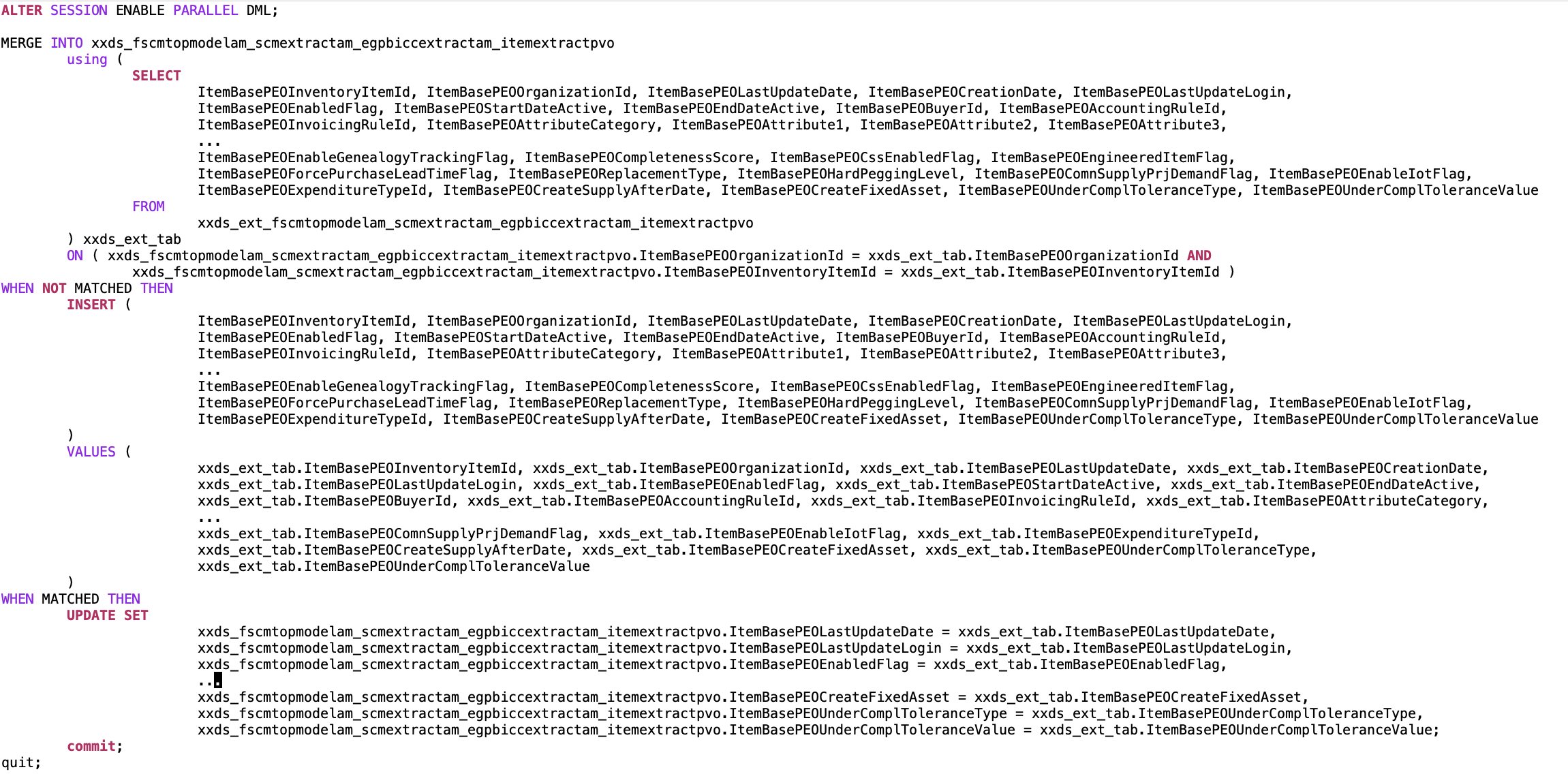
Figure 24: Sample merge script for Items sql/mergeItemExtractPVO.sql
Such a merge task will contain instructions for Insert and Update tasks. For this purpose we have to provide a condition that helps making a decision about the operation to be performed. This condition will be defined within the ON clause of the SQL statement. The statement below names the Organization ID and Item ID as the combined identifiers:
xxds_fscmtopmodelam_scmextractam_egpbiccextractam_itemextractpvo.ItemBasePEOOrganizationId =
	xxds_ext_tab.ItemBasePEOOrganizationId AND
xxds_fscmtopmodelam_scmextractam_egpbiccextractam_itemextractpvo.ItemBasePEOInventoryItemId =
	xxds_ext_tab.ItemBasePEOInventoryItemId
Probably worth mentioning that an INSERT will take all values 1:1 from the external table while an UPDATE operation can possibly ignore fields like Creation Date or Created By or any other values that are not intended to be touched for any functional reasons.
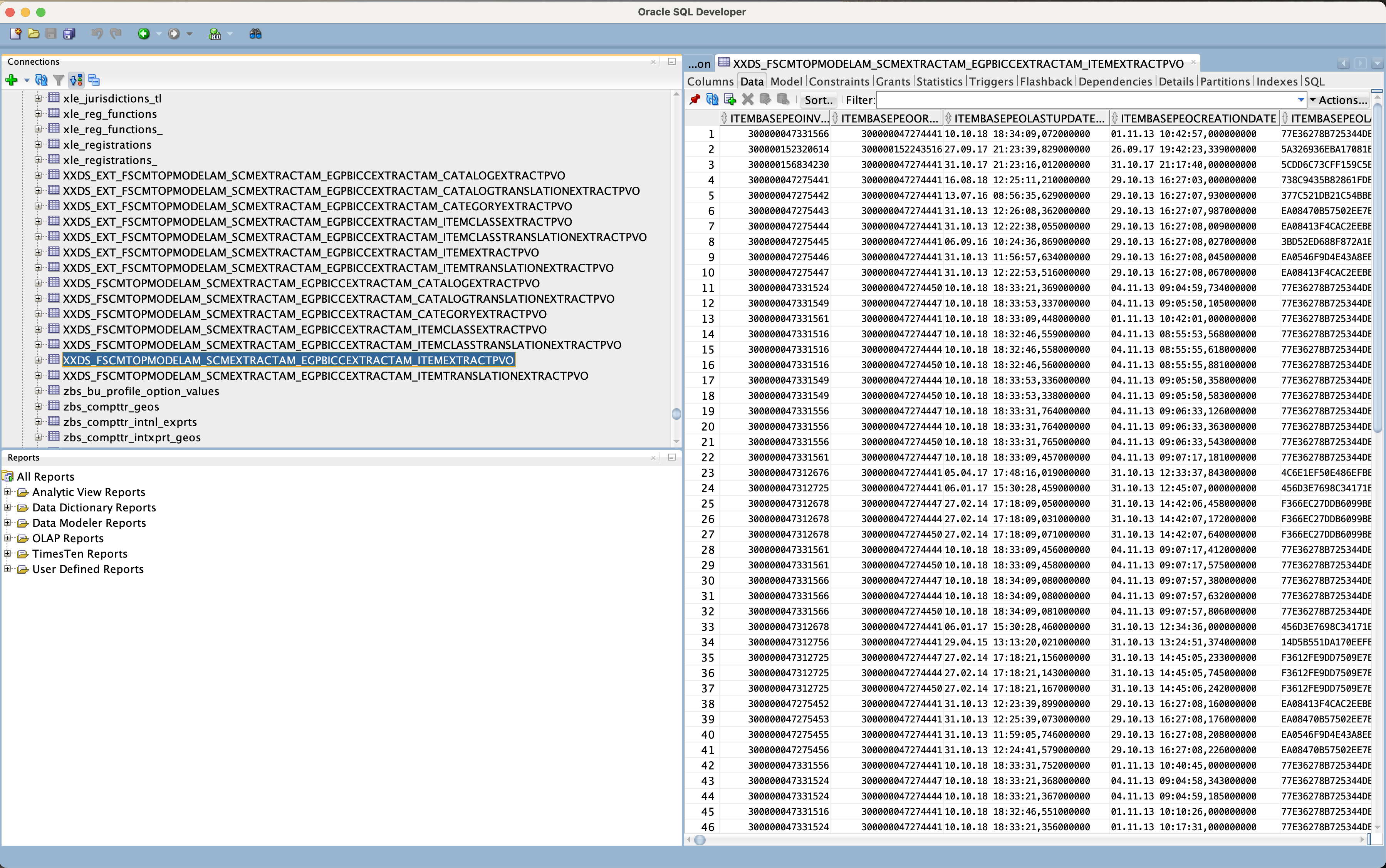
Figure 25: SQL Developer exposing the data in the internal table with Items
Screenshot above shows the merged data in the internal tables reflecting a snapshot of actual SaaS data while the external tables are only holding volatile and temporary data.
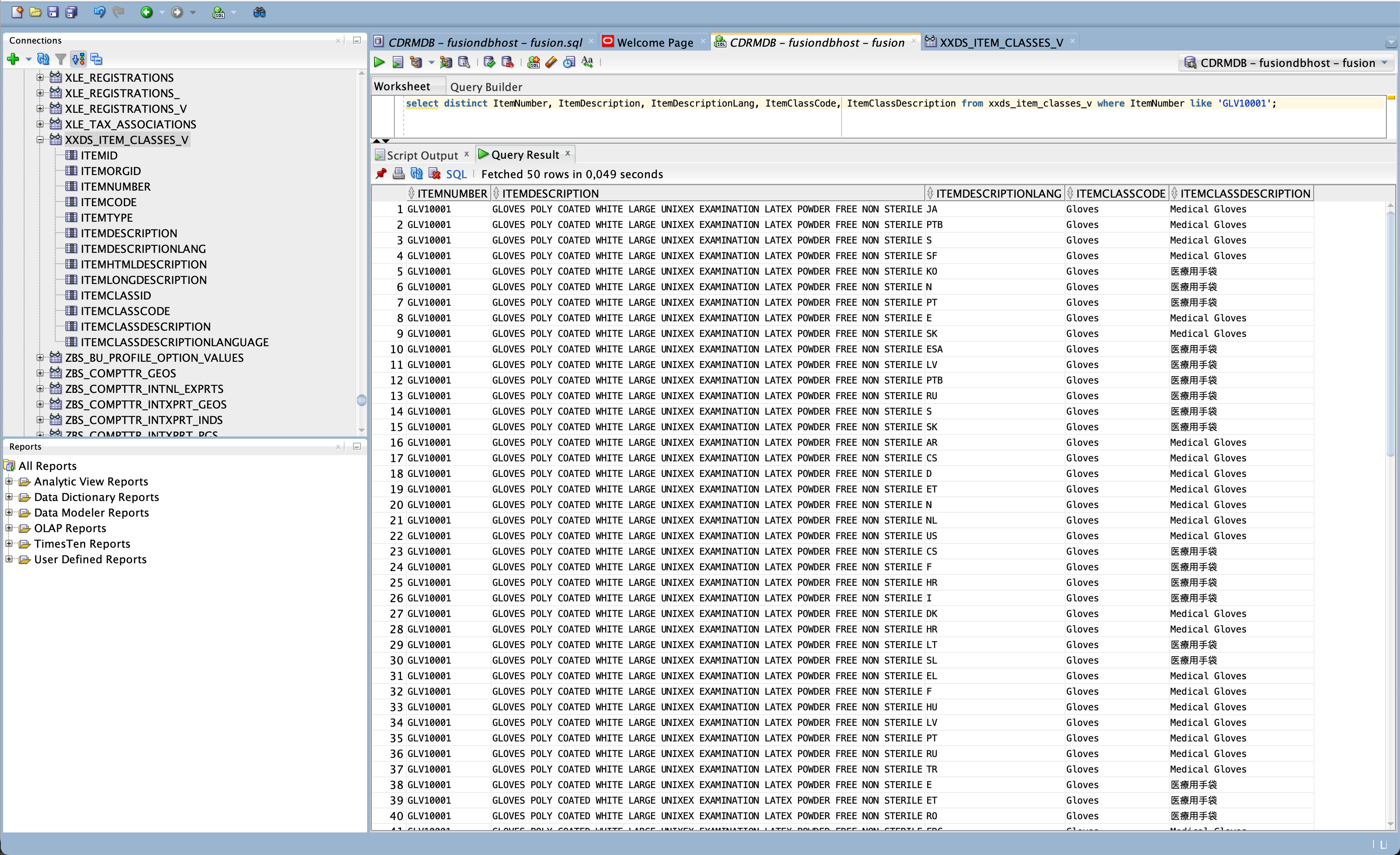
Figure 26: Database view with a limited number of columns
The last screenshot in this article is exposing the results of our activities: Items and their assigned Item Classes as entities Data Scientists can use to create a model that helps identifying item classes based on the item descriptions. This view has been created via SQL script sql/crXXDS_ItemClassesView.sql as mentioned before.
Such a database view is capable to hide the complexity in terms of data structures as well as long names for columns and tables. For data modelling a read-only access is supposed to be sufficient.
Summary
This article was intended to share some ideas how Oracle on-premise databases can be used as a data pool to hold SaaS data as replica via BICC extracts. I did not cover the topic in details in this paper, but potentially another benefit would be the option to load any 3rd party data into the same pool and to create a cross link between all those entities. Such a database related solution is also capable to handle large volumes of data if required for data modelling. But the most obvious reason implementing such a solution would be easily the fact that existing database licenses can be further used for SaaS AI/ML extension scenarios.
We didn’t handle in detail the connectivity from OCI Data Science to an on-premise database. Via ORDS it would be possible to access the model data via REST and other options would require individual investigations that would also include evolving connectivity features by our data science services.
As mentioned before we will continue explaining these topics and plan to provide more articles about it in near future.