
Introduction
Welcome to part 4 of the blog series. In this blog, we will see how we can do few-shot learning with the SaaS dataset using LangChain.
Few-shot learning is a machine learning technique that allows models to learn a new task with only a few labeled examples. The model can be fine-tuned to perform the task by including concatenated training examples of these tasks in its input and asking the model to predict the output of a target text.
LangChain is a framework for developing applications powered by language models. LangChain enables developers to seamlessly integrate LLMs with real-world data by giving a generic interface for various LLMs, prompt management, chaining, data-augmented generation, agent orchestration, memory, and evaluation. It provides a number of features that make it well-suited for few-shot learning, such as the ability to load and concatenate multiple training examples.
Architecture
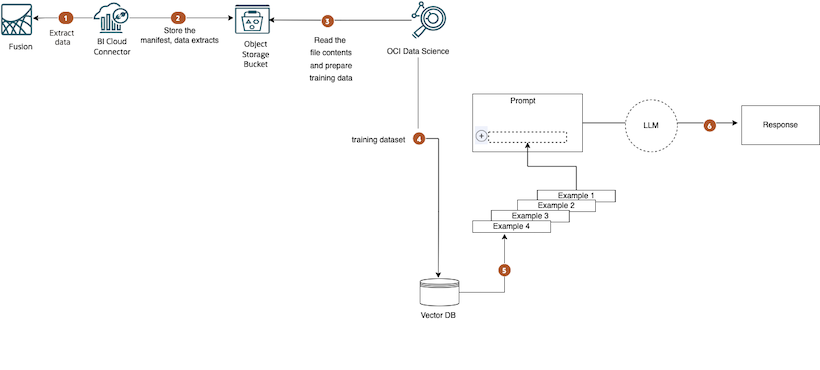
Following is the reference architecture.
Review the first and second entries in this blog series to gain a comprehensive understanding of the underlying architecture.
Steps
In this part of the blog series, we’ll delve into steps 4, 5, and 6 of the diagram. To proceed, we’ll use the pandas dataframe with the SaaS dataset obtained from step 3 of the diagram. Refer to the second entry in this blog series to see how to get this. This dataset will be used to create examples for the few-shot prompt templates.
A sample of df, which is a pandas dataframe that contains 2 columns, is given below. Our task is to classify item_description to an item_classcode.
 df.set_axis(['item_description', 'item_classcode'], axis='columns', inplace=True)
 print(df.to_string(index=False))
 item_description item_classcode
                                                     Laser Printer                      Printers
                                         Portable Wireless Printer                      Printers
        Wireless All-in-One Printer (Printer/Fax/Scan)  - Velocity                      Printers

             Work Instructions for Robot Hand Assembly RA-100-4000                 Documentation
                    Mini Holographic Tablet Specification Document                 Documentation
      Mechanical Specification Document - Mini Holographic Tablet                  Documentation
Power Management Specification Document - Mini Holographic Tablet                  Documentation
        Software Specification Document - Mini Holographic Tablet                  Documentation
Tablet Electronic Specification Document - Mini Holographic Tablet                 Documentation
                   Default Electronics and Computers Item Template     Electronics_and_Computers

                                      Vision Platinum Service Plan         Warranty_and_Services
                               Platinum Vision Service and Support         Warranty_and_Services
                  Vision Xper,t Onsite, Phone and Live Chat Support         Warranty_and_Services
                                                  2 Years Warranty         Warranty_and_Services
Getting Started
LangChain is available on PyPi. It can be easily installed with pip, but the dependencies (such as model providers and data stores) are not included by default. You will need to install these dependencies separately, depending on your specific needs.
# Install the LangChain package
 !pip install langchain
LangChain supports several LLM model providers, we will be using Cohere Command model, which is Cohere’s text generation model. Make sure that you have a Cohere API key to invoke the model.
# Install cohere
 !pip install cohere
We are using a Vector store in step 5. Vector stores are for storing embeddings, which are a way of representing data in numerical format. Embeddings allow us to cluster similar data together and enable highly efficient similarity search. There are several vector stores, Chroma is one of them. LangChain has a Chroma integration which we will be using.
# Install chroma
!pip install chromadb
Generate a prompt with LangChain
Prompting a model is the process of providing it with instructions on what to do. The prompt can be as simple or as complex as needed, but it is important to be as specific as possible in order to get the desired results.
Few-shot prompting is a technique where you provide the model with a few examples of the kind of response you are looking for. This can help the model learn the desired style or format and produce more accurate and relevant responses.
Having the ability to include a dynamic number of examples is essential because our prompt and completion outputs are constrained by a maximum context window.
context window=input tokens+output tokens
LangChain provides several classes and functions to help construct and work with prompts.
- Prompt templates: Parametrized model inputs
- Example selectors: Dynamically select examples to include in prompts
We will look into an example selector in LangChain, SemanticSimilarityExampleSelector.
Using SemanticSimilarityExampleSelector
Use SemanticSimilarityExampleSelector to select prompt examples by similarity. It does this by finding the examples with the embeddings that have the greatest cosine similarity with the inputs. In this example, Chroma is used as the VectorStore class that is used to store the embeddings and do a similarity search. This example uses CohereEmbeddings.
1. First let’s import the necessary modules,
from langchain.prompts.example_selector import SemanticSimilarityExampleSelector
from langchain.vectorstores import Chroma
from langchain.embeddings import CohereEmbeddings
2. Set your API key
Cohere.api_key = os.environ["COHERE_API_KEY"]
3. Use PromptTemplate to create a template for a string prompt. It uses Python’s str.format syntax for templating. This would take in the input_variables and construct the PromptValue dynamically. Since the dataframe we are using has 2 columns , we pass those as the input_variables.
example_prompt = PromptTemplate(
    input_variables=["item_description", "item_classcode"],
    template="item_description: {item_description}\nitem_classcode: {item_classcode}",
)
4. The list of examples available to select from are passed as a list of dictionaries examples_list which is constructed from df.
examples_list = df.to_dict(orient='records')

semantic_example_selector = SemanticSimilarityExampleSelector.from_examples(
    # This is the list of examples available to select from.
    examples=examples_list,
    # This is the embedding class used to produce embeddings which are used to measure semantic similarity.
    embeddings=CohereEmbeddings(),
    # This is the VectorStore class that is used to store the embeddings and do a similarity search.
    vectorstore_cls=Chroma,
    # This is the number of examples to produce.
    k=10
)
5. Now we will construct the FewShotPromptTemplate with examples from semantic_example_selector. The examples selected will be the most similar examples to the input.
few_shot_prompt = FewShotPromptTemplate(

    example_selector=semantic_example_selector,
    example_prompt=example_prompt,
    prefix="Classify the item_description to one of the item_classcode."
           " A few examples are given below where this classification is done:",

    suffix="Here is the text that needs to be classified\nitem_description: {item_description}\nitem_classcode:",
    input_variables=["item_description"],
)
6. Use the format method on our prompt to get the similar item_description as examples for the prompt.
few_shot_prompt.format(item_description="<pass the input item description here>")
7. Assign Cohere as llm.
llm = Cohere(temperature=0.7)
8. Create a chain using LLMChain and run the chain to get a response.
chain = LLMChain(llm=llm, prompt=few_shot_prompt)
print(chain.run("<pass the input item description here>"))
9. chain.run() will return the item_classcode for the input item description passed in step 8.
Conclusion
Prompts play a vital role in the evolving landscape of LLMs. I hope this blog has given you an idea of how we can use enterprise data as examples for prompting and deriving inferences using LLMs. Exploring LangChain’s additional capabilities and employing diverse prompt engineering techniques holds the potential to build robust AI applications based on SaaS data.