
Introduction
The Oracle Cloud Infrastrucure Command Line Interface (OCI-CLI) is a great tool to gather information and make quick modifications to OCI. But sometimes the responses you get back is TMI (too much Information). This post will go over some of the techniques to control the response/output from the CLI. I will discuss three methods to control the outputt from a CLI command. Specifically the OCI commands we will cover are related to OCI IAM/Identity Domains users. The three methods I will discuss are:
- Using the ‘–query’ flag
- Using the ‘–filter’ flag and
- Using a third party tool, ‘jq‘.
Details
First lets take an example to list out users in a specific Identity Domain:
oct identity-domains users list --endpoint <Domain URL>
The endpoint URL can be found on the main page for the specific identity domain you are interested in. Copy the Domain URL and use this value for the endpoint.
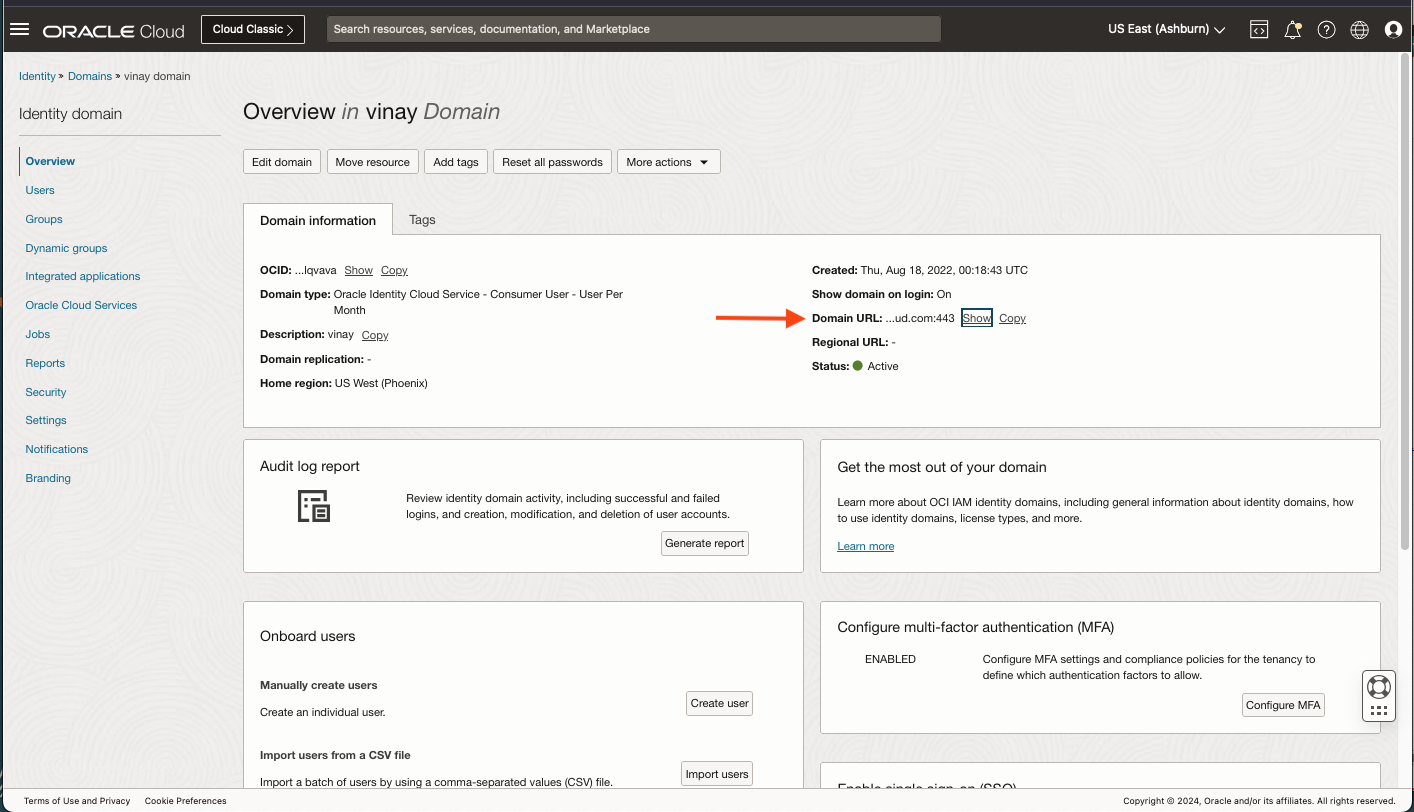
To list users:
oci identity-domains users list --endpoint <Domain URL>
This will list users in the specified identity domain. In the docummentation you will notice an ‘–all’ option. Use this sparingly if at all, especially if you have a large set of users. Using the ‘–all’ flag you may experience some latency and you will hit limits on the amout of data returned. It is for this reason, I recommend you use ‘pagination’ to get the next page of users. To get the next page, you are requires to run this command again with a ‘–page <argument>” parameter. The argument value is stored in the response as attribuute ‘opc-next-page’. Or you can use the ‘–count’ and ‘–start-index’ parameters to page through your results.
See the documentation here.
Using ‘–query’
In the above call, all the the data is returned to the client. The ‘–query’ just filters some of it out. If you want just ‘username’ and ‘id’ then just ask for that. The –query argument uses the JMESPath framework when accessing JSON responses. You can use the JMESPath site to test out a specific JSON responses and test it by running a query against it.
In our above scenario, the CLI command below will list all users with a limited set of attributes. The ‘id’ and ‘user-name” will be returned. This is called ‘mulitselect” in JMESPath.
oci identity-domains users list --endpoint <Domain URL> --query 'data.resources[].[id, "user-name"]'
The output will look something like”
[
[
"91096669f.......",
"vinay.kalra@oracle.com"
],
[
"cdd7a710e.......",
"john.doe@domain.com"
],
[
"bb9634964.......",
"john.hancock@domain.com"
]
]
You can also add a name for the attribute or ‘multiselect hash‘.
oci identity-domains users list --endpoint <Domain URL> --query 'data.resources[].{UserId:id,"The User Name": "user-name"}'
[
{
"The User Name": "vinay.kalra@oracle.com",
"UserId": ""91096669f......."
},
{
"The DispUserlay Name": "john.doe@domain.com",
"UserId": "cdd7a710e......."
},
{
"The User Name": "john.hancock@domain.com",
"UserId": "bb9634964......."
}
]
When adding a name for an attribute you must provide the name and then the actual attribute name like: ‘MyAttribute : attribute’. When doing so notice that the query syntax changes from ‘[]’ to ‘{}’ after the data.resources[]. Because this is no longer an array but a hash with two keys; “The User Name” and “UserId”.
You can also write ‘filter projections‘ or conditions to limit the number of records returned.
For example:
oci identity-domains users list --endpoint <Domain URL> --query "data.resources[?active].name"
In this case, the attribute ‘active’ is a boolean type. When ‘active’ is ‘true’ then it will return the ‘name’ value.
[
{
"family-name": "Kalra",
"formatted": "Vinay Kalra",
"given-name": "Vinay",
"honorific-prefix": null,
"honorific-suffix": null,
"middle-name": null
},
...
]
Here is an example to check if a user is not a federated user:
oci identity-domains users list --endpoint <Domain URL> --query 'data.resources[?!("urn-ietf-params-scim-schemas-oracle-idcs-extension-user-user"."is-federated-user")].name'
As I mentioned above, when using the ‘–query’ flag, it will return the results to the client before performing the query.
This means for large data sets, you may see some latency and limits; especially if you use the ‘–all” flag. You can avoid this by using the ‘–filter’ flag.
Using ‘–filter’
When using the ‘–filter” flag the results are generated on the server before sending to the client. The client will only display the results from the server.
Let’s take a look at a couple of examples.
This example will list out all users that have a username that starts with “Vinay”
oci identity-domains users list --endpoint <Domain URL> --filter 'username sw "Vinay"'
Here is a snippet of the output:
},
"user-name": "vinay.kalra@oracle.com",
"user-type": null,
"x509-certificates": null
}
Notice the attribute name ‘user-name’. This is NOT what I used in my filter when running the comman d above. As a matter of fact, if you tried to use the attribute ‘user-name’ in the filter you will get a 400 error.
What’s going on here?!?
The ‘–filter’ parameter is based on the System for Cross-domain Identity Management (SCIM) specification. The filter parameter uses the SCIM specifications, which defines the user schema for interopability. The user name is defined as ‘username’ (case insensitive); but the output will be translated to OCI’s schema ‘user-name’.
Let’s look at another example; get a list of users that have been modified after a certain date:
oci identity-domains users list --endpoint <Domain URL> --filter 'meta.lastModified gt "2011-05-13T04:42:34Z"'
NOTE: You can also add the ‘–query’ flag alongside the ‘–filter’ flag. In this case, the query will be applied to the client after the results of the filter.
Using ‘jq’
Some customers also use‘ jq‘ in liu of the ‘–query’ flag. From our example abve using ‘query’:
oci identity-domains users list --endpoint <Domain URL> --query 'data.resources[?!("urn-ietf-params-scim-schemas-oracle-idcs-extension-user-user"."is-federated-user")].name'
Here is the same using jq:
oci identity-domains users list --endpoint <Domain URL> | jq '.data.resources[] | select(."urn-ietf-params-scim-schemas-oracle-idcs-extension-user-user"."is-federated-user" != true) | .name'
Remember, as with the ‘–query’ flag, the data will be returned to the client before ‘jq’ queries the response.
Summary
- Be careful when using the ‘–query’ flag or ‘jq’ with the –all flag. All results will be returned before applying the query.
- Using the ‘–filter’ flag with ‘–query’ flag (or jq) can mitigate receiving large data sets to the client.
- Using the ‘–filter’ flag uses SCIM so be aware that attributes names are different than the CLI. The CLI normalizes the result set based on OCI user schema.