
Introduction
Oracle BI Publisher data models often hide their most valuable implementation detail: the SQL. In this project, the source artifact is a BI Publisher `.xdm.catalog` file. The goal is to extract the embedded SQL and convert it into a Data extraction definition.
This process does that in three stages:
1. Extract SQL queries from the BI Publisher data model.
2. Send a selected SQL query to Oracle AI Agent Studio for conversion into extraction query JSON.
3. Use that generated payload to create and run a Data extract through the Batch API.
The result is a practical bridge from BIP data model SQL to an API-created Data export definition.
Workflow
The project workflow starts with a compressed BI Publisher catalog file and ends with Data and SaaS Batch API response artifacts written to disk.
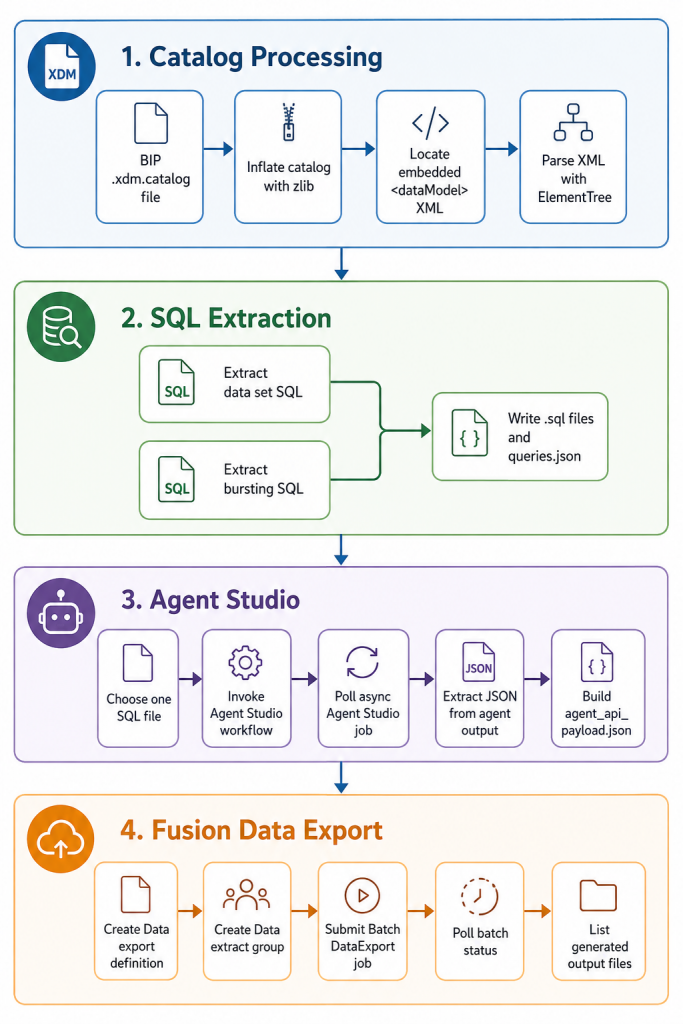
Important: Currently, only a small subset of tables are mapped to Extraction Views. For tables that are not supported, the agent cannot provide an SQL translation. As a prerequisite, customers should first verify that the tables they want to translate are supported.
Step 1: Extract SQL from the BIP Catalog
The first script is `scripts/extract_bip_xdm_queries.py`. It reads the catalog file as bytes, decompresses it, finds the embedded `<dataModel>` XML, and parses SQL nodes from normal data sets and bursting definitions.
Run it with an output directory:
python3 scripts/extract_bip_xdm_queries.py \
  bip.xdm.catalog \
  --out-dir extracted
The core decompression step is small:
def inflate_catalog(catalog_path):
    return zlib.decompress(Path(catalog_path).read_bytes()).decode(
        "utf-8",
        errors="replace",
    )
After inflation, the script finds the data model XML directly inside the payload:
def extract_data_model_xml(inflated_text):
    start = inflated_text.find("<dataModel")
    if start == -1:
        raise ValueError("Could not find a <dataModel> element in the inflated catalog payload.")

    end_tag = "</dataModel>"
    end = inflated_text.find(end_tag, start)
    if end == -1:
        raise ValueError("Found <dataModel>, but could not find the closing </dataModel> tag.")

    return inflated_text[start : end + len(end_tag)]
Once the XML is parsed, top-level data set SQL is collected from `<dataSets>/<dataSet>/<sql>`:
def top_level_data_sets(root):
    data_sets = child_named(root, "dataSets")
    if data_sets is None:
        return []

    queries = []
    for data_set in children_named(data_sets, "dataSet"):
        sql = child_named(data_set, "sql")
        if sql is None:
            continue

        queries.append(
            {
                "kind": "dataSet",
                "name": data_set.attrib.get("name", "unnamed_data_set"),
                "dataSourceRef": sql.attrib.get("dataSourceRef"),
                "sql": extract_sql(sql),
            }
        )

    return queries
Bursting queries are extracted separately because they live under `<bursting>/<burst>/<dataSet>/<sql>`:
def bursting_data_sets(root):
    bursting = child_named(root, "bursting")
    if bursting is None:
        return []

    queries = []
    for burst in children_named(bursting, "burst"):
        burst_name = burst.attrib.get("name")
        for index, data_set in enumerate(children_named(burst, "dataSet"), start=1):
            sql = child_named(data_set, "sql")
            if sql is None:
                continue

            fallback_name = f"{burst_name or 'burst'}_{index}"
            queries.append(
                {
                    "kind": "bursting",
                    "name": data_set.attrib.get("name", fallback_name),
                    "burstName": burst_name,
                    "dataSourceRef": sql.attrib.get("dataSourceRef"),
                    "sql": extract_sql(sql),
                }
            )

    return queries
For the included sample, the script writes four SQL files:
extracted/
  data_model.xml
  queries.json
  extracted_sql1.sql
  extracted_sql2.sql
The manifest in queries.json records the query kind, name, data source reference, and generated SQL file name.
Step 2: Convert SQL with Oracle AI Agent Studio
After extraction, `scripts/call_agent_studio.py` sends one SQL file to an Oracle AI Agent Studio workflow.
Run it like this:
python3 scripts/call_agent_studio.py \
  --sql-file extracted/extracted_sql1.sql \
  --out-dir extracted/agent_studio/extracted_sql1
When a SQL file is provided, the script prepends fixed instructions so the agent returns only the JSON object needed by the downstream API:
AGENT_OUTPUT_INSTRUCTIONS = """\
Convert the following SQL into the extraction query JSON format.
Return only the final BQL representation (viewQueries/select/namedSelect).
Do not include markdown, explanations, comments, or any text outside the JSON object.
Keep the output concise.
"""
The script then invokes the async Agent Studio endpoint:
def invoke_agent(args, token, message):
    url = (
        f"{args.agent_base_url.rstrip('/')}/api/fusion-ai/orchestrator/agent/v2/"
        f"{urllib.parse.quote(args.workflow_code)}/invokeAsync"
    )
    payload = {
        "conversational": True,
        "version": args.version,
        "status": args.status,
        "message": message,
    }
    return request_json(
        url,
        method="POST",
        headers={
            "Content-Type": "application/json",
            "Authorization": f"Bearer {token}",
        },
        data=json.dumps(payload).encode("utf-8"),
    )
Because the job is asynchronous, the script polls until the status is COMPLETE:
def poll_agent(args, token, job_id):
    url = (
        f"{args.agent_base_url.rstrip('/')}/api/fusion-ai/orchestrator/agent/v2/"
        f"{urllib.parse.quote(args.workflow_code)}/status/{urllib.parse.quote(job_id)}"
    )

    while time.monotonic() <= deadline:
        last_response = request_json(
            url,
            method="GET",
            headers={"Authorization": f"Bearer {token}"},
        )
        status = last_response.get("status") or "UNKNOWN"
        if status == "COMPLETE":
            return last_response
        time.sleep(args.poll_interval)
The output field can contain JSON embedded inside text, so the script scans for the first valid JSON object or array:
def extract_first_json(value):
    decoder = json.JSONDecoder()
    text = str(value)
    for index, char in enumerate(text):
        if char not in "{[":
            continue
        try:
            parsed, _ = decoder.raw_decode(text[index:])
            return parsed
        except json.JSONDecodeError:
            continue

    raise ValueError("Could not find a JSON object or array in the agent output.")
Finally, the extracted JSON is wrapped in the shape expected by the Data Tool API:
def build_Data_artifacts_payload(agent_output):
    extraction_query = extract_first_json(agent_output)
    if not isinstance(extraction_query, dict):
        raise ValueError("Agent output must contain a JSON object for extractionQuery.")

    return {
        "DataArtifacts": {
            "extractionQuery": json.dumps(extraction_query, separators=(",", ":")),
        }
    }
With `–out-dir`, this stage writes:
agent_invoke_response.json
agent_status_response.json
agent_output.json
agent_api_payload.json
The most important file for the next stage is agent_api_payload.json.
Step 3: Create and Run the Data Extract
The final script, scripts/call_Data_extract_api.py, reads extracted/agent_api_payload.json and uses it to create a Data export definition.
Run it from the project root:
python3 scripts/call_Data_extract_api.pyThe script starts by loading the generated Agent Studio payload:
def load_agent_api_payload(path):
    payload = json.loads(Path(path).read_text(encoding="utf-8"))
    Data_artifacts = payload.get("DataArtifacts")
    if not isinstance(Data_artifacts, dict):
        raise ValueError("agent_api_payload.json must contain a DataArtifacts object.")

    extraction_query = Data_artifacts.get("extractionQuery")
    if not isinstance(extraction_query, str) or not extraction_query.strip():
        raise ValueError(
            "agent_api_payload.json must contain DataArtifacts.extractionQuery "
            "as a non-empty string."
        )

    return Data_artifacts
It then builds the export definition payload:
def build_create_extract_payload(extract_name, Data_artifacts):
    return {
        "name": extract_name,
        "description": EXTRACT_DESCRIPTION,
        "owner": OWNER,
        "ownerRole": OWNER_ROLE,
        "exportConfiguration": {
            "type": "BV",
            "outputDataFormat": OUTPUT_DATA_FORMAT,
            "csvDelimiter": CSV_DELIMITER,
            "sortBy": None,
            "csvFormat": None,
            "historyStartDate": None,
        },
        "DataArtifacts": Data_artifacts,
    }
Next, it creates an extract group that points to the newly created extract:
def build_create_group_payload(extract_name, extract_group):
    return {
        "name": extract_group,
        "owner": OWNER,
        "ownerRole": OWNER_ROLE,
        "groupedExtracts": {
            "items": [
                {
                    "name": extract_name,
                }
            ]
        },
    }
Then it submits a SaaS Batch job for the Data `DataExport` job definition:
def build_batch_payload(extract_name):
    schedule_name = f"{extract_name}Schedule"
    return {
        "serviceName": "Data",
        "jobDefinitionName": "DataExport",
        "description": f"{schedule_name}::{extract_name}::{BATCH_EXTRACT_TYPE}::{BATCH_RECURRENCE}",
        "requestParameters": {
            "submit.argument1": extract_name,
            "submit.argument2": BATCH_SUBMIT_ARGUMENT2,
        },
    }
The batch job is polled until it reaches a success or failure state:
def poll_batch(batch_token, job_request_id):
    while time.monotonic() <= deadline:
        last_response = api_request(
            "GET",
            f"/api/saas-batch/jobscheduler/v1/jobRequests/{urllib.parse.quote(job_request_id)}",
            batch_token,
        )
        body = last_response["body"]
        status = (
            body.get("jobStatus")
            or body.get("jobDetails", {}).get("jobStatus")
            or body.get("jobProgress", {}).get("status")
            or "UNKNOWN"
        )

        if status in BATCH_FAILURE_STATES:
            raise RuntimeError(f"Batch job {job_request_id} ended with status {status}")
        if status in BATCH_SUCCESS_STATES:
            return last_response

        time.sleep(POLL_INTERVAL_SECONDS)
If the job succeeds, the script lists the output files:
output_files_response = api_request(
    "GET",
    f"/api/saas-batch/jobfilemanager/v1/jobRequests/{urllib.parse.quote(job_request_id)}/outputFiles",
    batch_token,
)
output_files = output_files_response["body"].get("items", [])
This stage writes Data and batch request and response artifacts under `extracted/Data`.
Conclusion
This project turns a difficult to inspect BI Publisher .xdm.catalog artifact into a repeatable extraction and conversion workflow. The extractor makes the hidden SQL visible, Agent Studio transforms that SQL into the extraction-query JSON expected by Data, and the final script creates and executes the Data export through Batch.