
Executive Summary
The Fusion AI Agent framework currently supports two agent-team patterns: Supervisor and Workflow. The best choice is primarily a design decision: Supervisor agents are useful when the agent must plan, select tools, delegate, and synthesize under uncertainty, while Workflow agents are better when the steps are deterministic and must run in a known order [2][3][4].
This blog uses a deliberately small test case: a Procurement Policy Advisor-style agent with a single RAG Document tool. The ingested source document was the Oracle Fusion AI Agent Studio user guide, and the runtime prompt asked the agent to list the providers allowed for using a custom LLM in Fusion AI. The names in the screenshots come from the template, but the comparison is about the runtime behavior of the two orchestration patterns.
The result is not a universal benchmark. It is a practical illustration of a larger rule: count the LLM calls you actually need. Oracle’s guidance on agent response time emphasizes token volume and prompt/output length as major contributors to latency [5]. When a Workflow can avoid unnecessary LLM nodes for a structured retrieval task, it can reduce both latency and measured token consumption.
Background
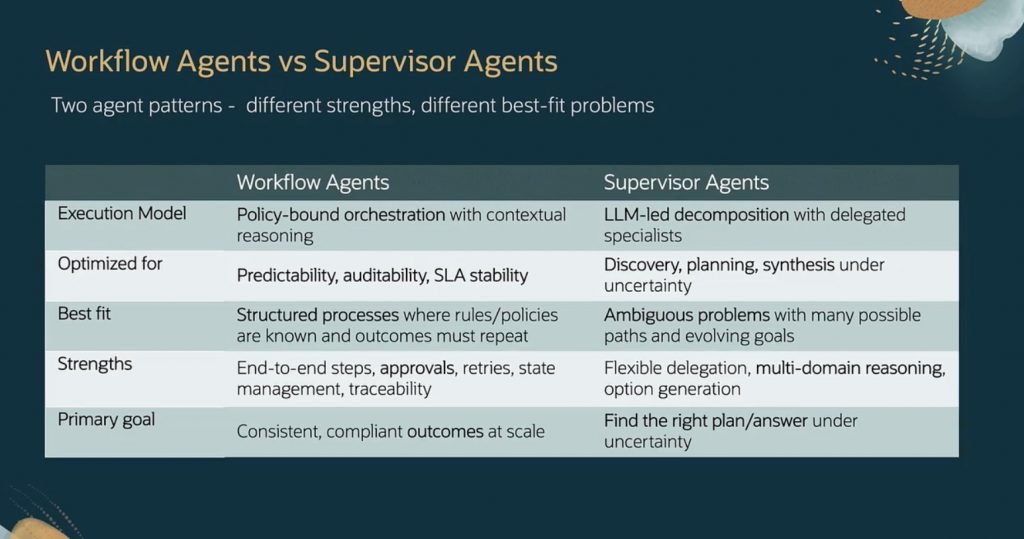
The use case requirements primarily dictate which pattern is best suited for the implementation (Table 1). However, it will be helpful to be aware of each pattern’s performance and costs to make a well-informed decision.
Technical Architecture
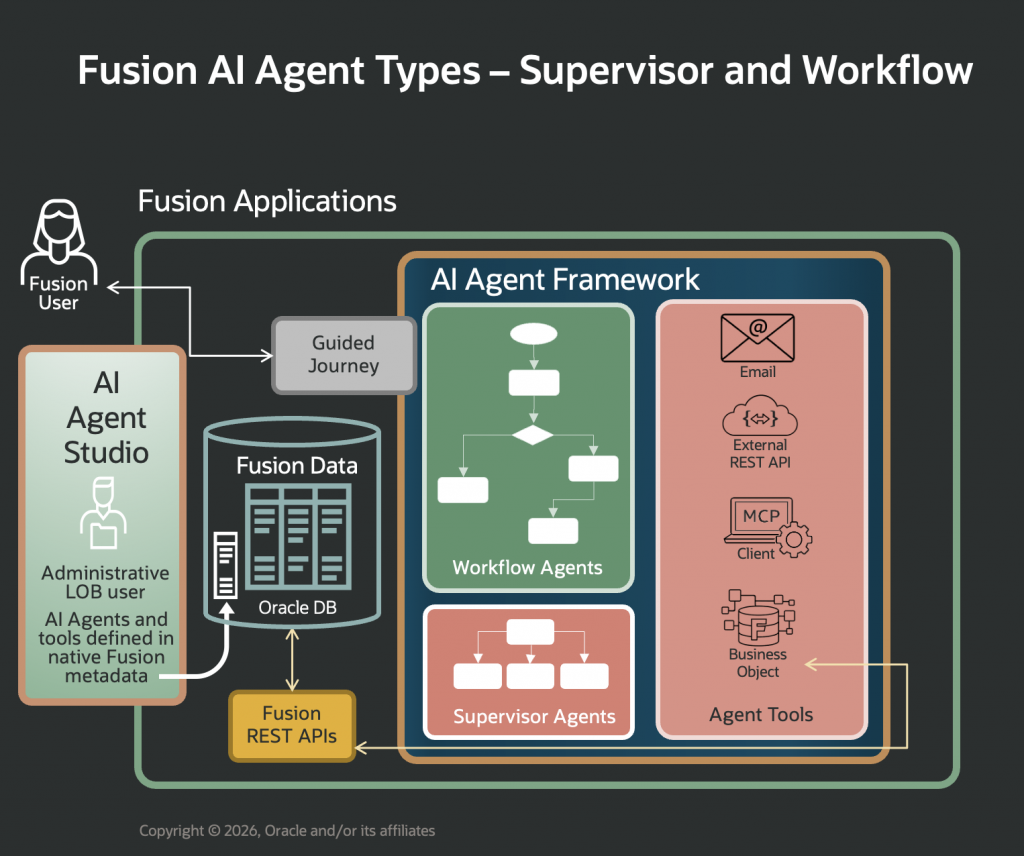
The test environment was a basic Fusion instance with AI Agent Studio enabled (Fig. 1).
To keep the comparison focused, both implementations used the same RAG Document tool, named Procurement Policy Document. A Document tool allows an AI agent to search uploaded documents and answer with grounded content [2]. The same prompt, same source document, and same tool were used in both runs.
Environment Setup
The following two subsections describe the configuration of the supervisor and the workflow agents. Both use the same RAG Document tool, the Procurement Policy Document. The document used for ingestion here was the standard PDF user guide for Fusion AI Agent Studio from Oracle Product Documentation [1].
Supervisor Agent
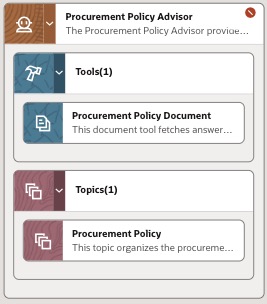
The Supervisor implementation uses a single agent, a single topic, and the shared Procurement Policy Document tool (Fig. 2). In a Supervisor pattern, the supervisor is responsible for orchestrating and planning the work for the agent team [3].
Workflow Agent
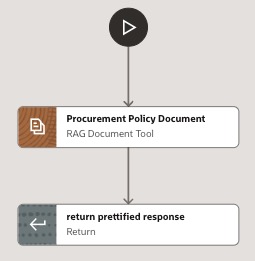
The Workflow version uses the same RAG Document tool but places it in a predetermined flow (Fig. 3). The final node returns a prettified response by extracting the answer text from the tool output. This design matches Oracle’s description of Workflow agent teams as deterministic, rule-based sequences in which each node performs a defined function and passes its output to the next node [4].
Runtime Tests
Tests were conducted in AI Agent Studio debug mode to inspect latency, token usage, tool calls, and LLM calls after each run. Each implementation was tested several times; the values below are representative of the observed runs rather than a formal production benchmark.
Test prompt: “list all the providers that are allowed for using our own LLM in Fusion AI“
- Held constant: Fusion instance, source PDF, RAG Document tool, and user prompt.
- Compared: LLM call count, debug-mode latency, input tokens, output tokens, and total tokens.
- Excluded: any underlying cost of document retrieval, because the same RAG Document tool was invoked in both implementations.
Supervisor Agent
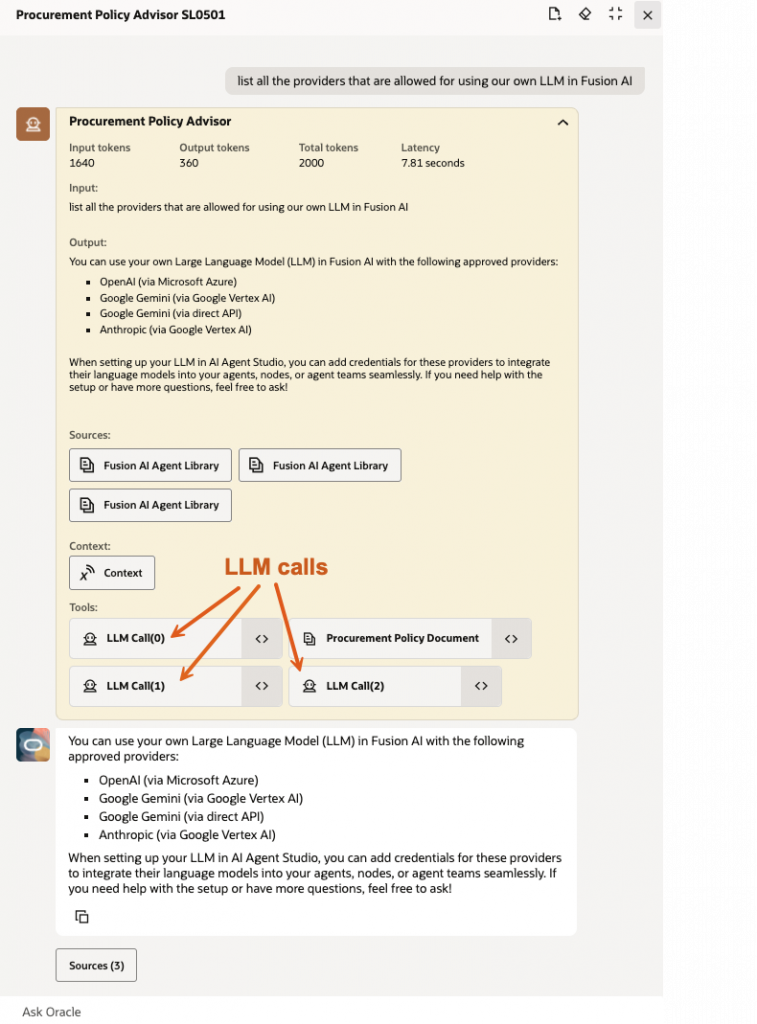
The Supervisor test invoked the shared RAG Document tool and made three LLM calls (Fig. 4).
| # | Component | Latency (sec) | % Time | Input Tokens | Output Tokens | Total Tokens | % Tokens |
| 1 | LLM Call (0) | 0.70 | 10% | 328 | 90 | 418 | 21% |
| 2 | RAG Document Tool | 4.01 | 57% | – | – | – | 0% |
| 3 | LLM Call (1) | 1.07 | 15% | 536 | 129 | 665 | 33% |
| 4 | LLM Call (2) | 1.26 | 18% | 776 | 141 | 917 | 46% |
| 5 | Component subtotal | 7.04 | 100% | 1,640 | 360 | 2,000 | 100% |
The debug panel reported 1,640 input tokens, 360 output tokens, and 2,000 total tokens (Table 2). The component timings captured from the debug trace sum to 7.04 seconds, while the panel screenshot shows 7.81 seconds end-to-end. That difference is expected in debug observations because UI-level elapsed time may include overhead outside the component subtotal.
Workflow Agent
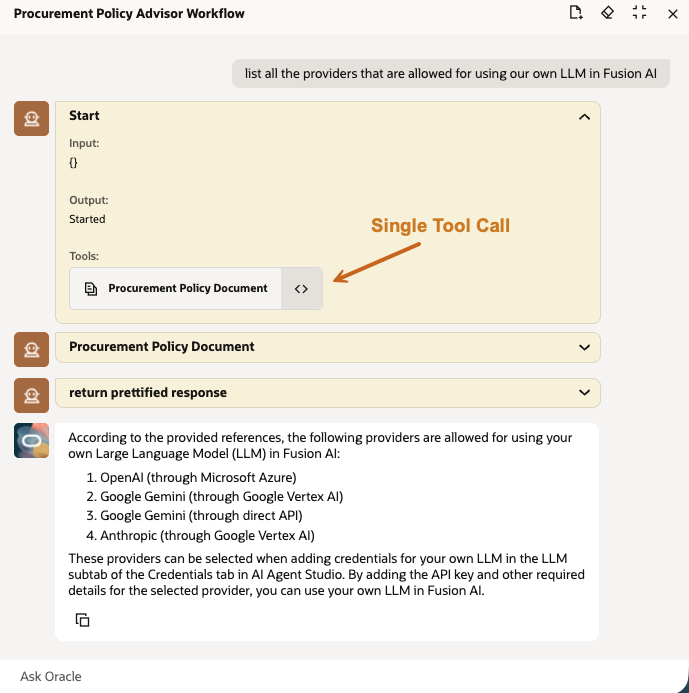
The Workflow agent test used the same RAG Document tool and did not show separate LLM calls in the debug trace for this flow (Fig. 5). In this specific configuration, no LLM input or output tokens were reported for the workflow run. Runtime was therefore dominated by the RAG Document tool, at approximately four seconds in the observed debug output.
Analysis
| Observation | Supervisor Agent | Workflow Agent | Implication |
| LLM orchestration | Three LLM calls | No separate LLM calls observed | Workflow avoids orchestration overhead when the path is fixed. |
| Measured tokens | 2,000 total tokens | 0 reported LLM tokens | Token savings can be material for high-volume, repeatable queries. |
| Dominant latency | RAG tool plus LLM calls | RAG tool | The common retrieval step becomes the performance floor for both patterns. |
| Best use | Ambiguous or multi-agent questions | Deterministic document lookup | Choose the pattern based on task shape, not on a universal speed rule. |
For this narrowly scoped RAG lookup, the Workflow implementation is more efficient because the flow is known in advance: call the document tool, extract the answer, and return a readable response. The Supervisor implementation performs additional orchestration, which is valuable when the user intent, tool path, or answer synthesis is uncertain, but it adds token usage and latency in a simple one-tool scenario (Table 3).
Practical design rule: Use Workflow when the process is already known; use Supervisor when the agent must choose a path, coordinate specialists, or synthesize across tools.
Limitations
- This is a debug-mode micro-benchmark, not a production performance test under load.
- Only one simple prompt and one uploaded document source were used.
- The RAG Document tool’s underlying processing was treated as common overhead and excluded from token-based cost comparison.
- A Workflow that includes LLM nodes, branching, external REST calls, business-object updates, or approval steps will have a different latency and cost profile.
Summary
The test confirms a useful design intuition for Fusion AI Agent Studio: when a user request maps to a known, repeatable sequence, Workflow can reduce orchestration overhead and improve predictability. When the request requires planning, delegation, or flexible synthesis, the supervisor remains the better fit even if it consumes more tokens in a small test.
The implementation decision should therefore balance three factors: the shape of the business process, the need for runtime reasoning, and the operating profile observed in AI Agent Studio debug tests. Performance and cost are important inputs, but they should reinforce the design choice rather than replace it.
Acknowledgements
I would like to recognize the assistance of my colleagues from the Fusion Procurement Engineering Team, Reza Widjaja and Diego Olvera, in setting up and testing the Procurement Policy Advisor Agent. I would also like to acknowledge the help from the Oracle Learning Team in providing the educational slide from the Fusion AI Agent training module.
References
- Oracle AI for Fusion Applications – Oracle AI for Fusion Applications, Oracle Product Documentation
- Get Started with AI Agent Studio – How do I use AI Agent Studio? Oracle Product Documentation
- Create Custom AI Agents of Type Supervisor – How do I use AI Agent Studio? Oracle Product Documentation
- Create Custom AI Agents of Type Workflow – How do I use AI Agent Studio? Oracle Product Documentation
- How do I make agents respond faster? – How do I use AI Agent Studio? Oracle Product Documentation