Lan Kieu
FAIDP Engineering Lead
Oracle Analytics
Introduction
In this article, we will discuss the Data Augmentation Scripts (DAS) feature now available as Preview feature in Oracle Fusion AI Data Platform. It’s a quick introduction to DAS and includes a short demo video.
What is DAS?
Data Augmentation Scripts (DAS) is a declarative ETL language that lets Oracle Fusion AI Data Platform users build custom data pipelines. Data applications built using this feature are fully integrated and managed within Oracle Fusion AI Data Platform’s SaaS infrastructure, thereby extending all the benefits of an Oracle-managed analytics platform to your tailored solution.
- DAS covers all aspects of building a commercial analytics data model. It’s an IDE with developer-friendly essential tools with a high degree of automation built into it. So, developers can now execute instruction-driven pipeline actions across all stages of the FAIDP platform (Extract/ Transform/ Publish).
- It has a simple, human-readable format, empowering even citizen developers to build data pipelines programmatically. A high level of ETL abstractions simplifies how to develop and deploy an application, such that domain experts with or without deep technical ETL knowledge can also safely build analytics insights for their business users on their own.
- DAS facilitates rapid application deployment which improves your ability to serve analytics solutions to your business users (or customers, if you are an Oracle Fusion AI Data Platform implementation partner). It has a high level of ETL abstractions such as built-in functions and also supports user-built functions as well.
- It is built for robustness and scalability. DAS supports Oracle data sources (Fusion and NetSuite) as well as third-party data sources and customizations.
Who should use it?
It’s an excellent option for customers who want to address custom use cases. These use cases could either be specific to an industry or organization, or a niche business requirement that‘s not presently served by Oracle Fusion AI Data Platform.
Oracle Fusion AI Data Platform implementation partners can also use DAS to create new solutions that can serve their customers, both current and prospective. Partners can publish the application bundle in Oracle Fusion AI Data Platform’s Global Bundle Repository, with only a preview available to all Oracle Fusion AI Data Platform users, and the full bundle and deployment access can be managed by the partner themselves.
Comparing DAS with the Data Augmentation (DA) feature
Data Augmentations is an existing feature in Oracle Fusion AI Data Platform, and it has some similarity with DAS in that DA also allows Oracle Fusion AI Data Platform users to enrich data from Fusion (or non-Fusion) data sources. However, the DA feature doesn’t allow an Oracle Fusion AI Data Platform user to perform any transformations to the underlying data model, making it suitable for adding new data, context, or completeness to an existing dataset. For example, you can add currency exchange rates to a financial report and make navigation easier for business users in different geographies.
Let’s also talk about Bulk Data Augmentation (BDA) feature in this context. BDA allows bundling of multiple related data sources into Oracle Fusion AI Data Platform as a single extraction job, reducing maintenance and accelerating setup for analytics of non-Fusion data in Oracle Fusion AI Data Platform. As an example, you can use BDA to load entire ledgers from a non-Fusion CRM system to create comprehensive analytics for your organization.
DAS expands on the principle of Oracle Fusion AI Data Platform extensibility, but with an immensely more powerful, feature-rich development environment that allows users to harness product capabilities for serving entirely new use cases.
An example use case for DAS
Oracle Fusion AI Data Platform provides extensive analytics for e-commerce and point-of-sale (POS) data, including demand forecasting and customer purchase history analysis. However, it currently doesn’t automatically ingest and process data from physical, non-POS sources in the stores like IoT sensors, video footage of customer paths in-store, or geolocation data from applications used in store. So, it’s not possible to conduct an analysis correlating in-store physical behavior of a customer with sales and inventory levels, impact of product or display placement, etc.
Here’s how DAS can serve this use case:
- Data Ingestion – Use DAS to create a custom Oracle Fusion AI Data Platform pipeline that will extract video analytics and IoT sensor data.
- Transform – Convert behavioral data (timestamps, locations, dwell times) to match the DAS data model.
- Load – Load data into Oracle Autonomous AI Lakehouse and it becomes available in Oracle Analytics Cloud, along with existing Oracle Fusion SCM and ERP Analytics.
- Build Analytics – Correlating foot traffic patterns with sales to reveal insights like high-traffic and low-conversion displays.
In this example, DAS will connect physical store data with enterprise analytics for data-driven store optimization and improved profitability.
Workflow for bringing your desired analytics to life with a DAS data application
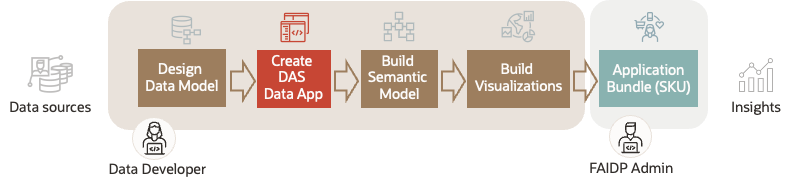
To deploy a new use case in Oracle Fusion AI Data Platform using DAS, here are the steps that a developer must follow:
- Design a data model that reflects the business function or process you want to analyze.
- Use the DAS feature for data enrichment (e.g., integrating supplemental data) and perform data transformations that fit the data model.
- Use the Semantic Model Extensions framework in Oracle Fusion AI Data Platform Console to build a semantic model for this business process flow and publish it in Oracle Analytics Cloud.
- Create visualizations and analyses.
- Build an application bundle and deploy it in Oracle Fusion AI Data Platform Console to access all visualizations you created for this business process.
Demo
The example of retail store analytics we discussed above is a comprehensive, prebuilt solution that will serve select organizations and Oracle Fusion AI Data Platform users. However, DAS can be leveraged for simpler use cases, too.
The following demonstration video shows how to create a simple data application in DAS, with its easy-to-use IDE and powerful ETL abstractions:
For details on how to enable DAS feature and how to use it, review the following links:
Lan Kieu
FAIDP Engineering Lead
Lan Kieu is a senior engineering lead for FAIDP platform, with deep expertise in building Analytics Applications and large-scale, optimized Data Warehouses with Big Data technologies.