
Introduction
As organizations adopt AI-driven agents and orchestration frameworks, the Model Context Protocol (MCP) has emerged as a powerful mechanism for connecting models, tools, and data sources securely. MCP servers often expose APIs and capabilities that require strict authentication and authorization to prevent misuse and ensure data confidentiality.
The earlier two-part blog series explored the core components of the Model Context Protocol (MCP) and revealed the underlying implementation details that are often abstracted away by modern AI agent SDKs — by building the OIC Monitoring Agent with MCP integration. Together, those blogs established a strong foundation for understanding how MCP servers can expose structured, model-driven capabilities to agentic applications.
This two-part blog series continues that journey by focusing on one of the most critical aspects of any MCP deployment — security. We’ll explore how to secure the MCP server using Oracle Identity Domain, where the client leverages Identity Domain SDKs to obtain an access token and invoke the secured MCP server.
In Part 1, we’ll walk through the steps to secure the MCP server implementation, while Part 2 will focus on the MCP client implementation. Together, these posts provide a complete end-to-end view from registering an OAuth application and requesting an access token, to the MCP server validating it and securely invoking the OIC Monitoring APIs, backed by detailed code examples and a live demo.
Secure MCP Server Flow
The security architecture of an MCP server typically follows the OAuth 2.1 authorization framework. In this setup, the OIC MCP server is secured using the Oracle Identity Domain, the same identity domain where OIC is provisioned. The overall flow can be summarized as follows:
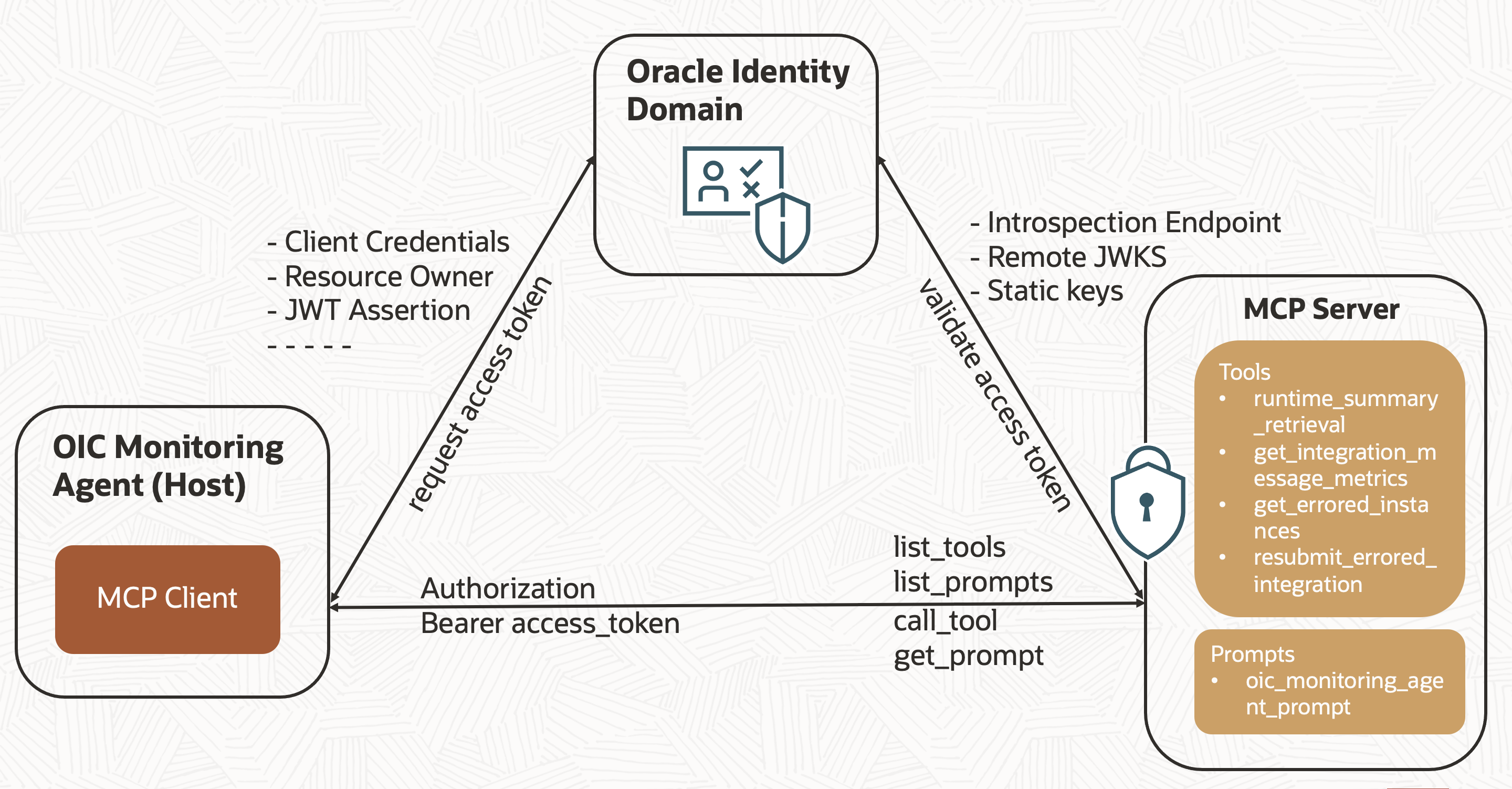
- Create a Confidential Application in the Oracle Identity Domain. (Optional if a client application for the OIC instance already exists)
- Assign the Service Invoker role to the newly created Confidential Application, this role is required to invoke OIC integrations.
- The MCP client (used by the agentic application) initiates a client credentials, resource owner, JWT assertion, or other supported flow to request an access token from the Oracle Identity Domain. In this blog, we’ll focus on the client credentials and resource owner flows.
- The Identity Domain authorization server issues an access token.
- The client sends this access token to the MCP server when listing or executing tools, prompts, or resources typically via the Authorization: Bearer <token> header.
- The MCP server validates the token’s signature and claims using the Oracle Identity Domain, through one of the supported methods: Introspect endpoint, Remote JWKS, or Static keys. In this blog, we’ll cover the Introspect endpoint approach.
- If the token is valid, the request proceeds; otherwise, the server returns an HTTP 401 Unauthorized response.
This ensures that only trusted clients can invoke the MCP server’s Tools, protecting internal data and logic from unauthorized access.
Secure MCP Server Architecture
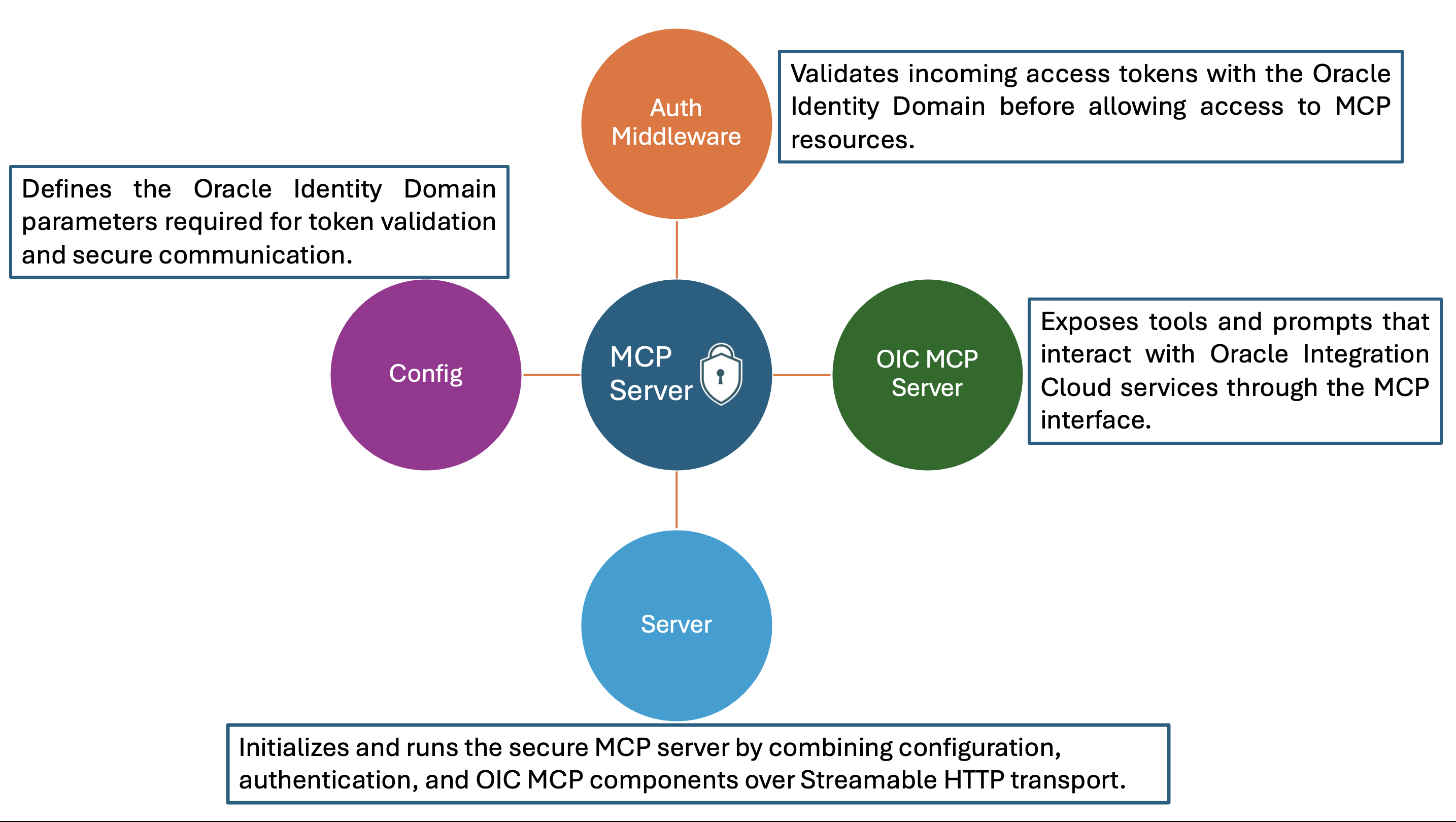
To implement a secure MCP server that integrates with Oracle Identity Domain for authentication and authorization, the server architecture is organized into four key components. Each plays a distinct role in configuring, validating, and serving MCP requests over a secure channel.
Config
The configuration file (typically a JSON file) contains environment-specific details required for integrating with the Oracle Identity Domain. This includes parameters such as the Introspection Endpoint URL, Client ID, Client Secret, Audience, and Issuer values. The MCP server and authentication middleware both reference this file to ensure consistency across environments and simplify maintenance. This modular configuration approach allows for easy updates or environment transitions (for example, from dev to prod) without changing any code. In production environment, all sensitive configuration details such as client credentials, secrets, and endpoint URLs should be securely stored and managed in OCI Vault to ensure better protection and compliance.
    file name: mcp_server_config.json
    {
       "ClientId" : "client_id",
       "ClientSecret" : "client_secret",
       "IntrospectionEndpoint" : "https://idcs-xxxx.identity.oraclecloud.com/oauth2/v1/introspect",
       "Issuer" : "https://identity.oraclecloud.com/",
       "Audience" : ["https://xxx.integration.region.ocp.oraclecloud.com"]
    }
Auth Middleware
The authentication middleware is responsible for validating access tokens issued by the Oracle Identity Domain before allowing access to any MCP resource. When a request is received, the middleware performs the following sequence.
- Extracts the Authorization: Bearer <access_token> header from the incoming request.
- Verifies the token’s validity, issuer, audience, and expiration time.
- Sends the token to the Oracle Identity Domain introspection endpoint, authenticating with the client ID and client secret.
- If valid, the request proceeds to the MCP server; otherwise, the middleware responds with HTTP 401 Unauthorized.
This middleware acts as a security gatekeeper, ensuring that only authorized clients with valid tokens can invoke tools or prompts exposed by the MCP server. The token can also be validated using Remote JWKS, where the MCP server fetches public signing keys from the Identity Domain and verifies JWTs locally. This approach reduces network calls and improves performance but requires proper handling of key rotations. Alternatively, Static keys can be used, where a locally configured public key verifies the token, a faster option best suited for development or controlled environments where keys rarely change.
To optimize performance and reduce repeated validation calls to the Oracle Identity Domain, the MCP server can implement token caching. When a client presents an access token, the Auth Middleware validates it (via Introspect Endpoint or JWKS) and then temporarily stores the token’s metadata — such as token ID, expiration time, and associated scopes in a local cache (for example, in-memory or distributed cache like OCI cache). Subsequent requests with the same token can be verified directly from the cache instead of revalidating with the Identity Domain, significantly improving response time and reducing network overhead. This blog post does not include coverage of token caching.
    file name: auth.py
    import json
    import logging
    from fastapi import HTTPException, Request
    from fastapi.security import HTTPBearer
    from fastapi.responses import JSONResponse
    from starlette.middleware.base import BaseHTTPMiddleware
    import httpx, jwt, time

    # Configure logging
    logging.basicConfig(
        level=logging.INFO,
        format='%(asctime)s - %(name)s - %(levelname)s - %(message)s'
    )
    logger = logging.getLogger(__name__)

    # Security scheme for Bearer token
    security = HTTPBearer()

    # Authentication middleware
    class AuthMiddleware(BaseHTTPMiddleware):
        async def dispatch(self, request: Request, call_next):

            fo = open("mcp_server_config.json", "r")
            config = fo.read()
            config_options = json.loads(config)

            introspection_endpoint = config_options['IntrospectionEndpoint']
            client_id = config_options['ClientId']
            client_secret = config_options['ClientSecret']

            auth_header = request.headers.get("Authorization")
            if not auth_header or not auth_header.startswith("Bearer "):
                raise HTTPException(status_code=401, detail="Missing or invalid authorization header")

            token = auth_header.split(" ")[1]

            decoded_token = jwt.decode(token, options={"verify_signature": False})
            if (config_options['Issuer']!=decoded_token['iss']):
                raise HTTPException(status_code=401, detail="Invalid Access Token")

            for audence in config_options['Audience']:
                if audence not in decoded_token['aud']:
                    print(f"{audence} is not in the list.")
                    raise HTTPException(status_code=401, detail="Invalid Access Token")

            curTime = round(time.time())
            if (decoded_token['exp'] < curTime):
                raise HTTPException(status_code=401, detail="Access Token is expired.")

            async with httpx.AsyncClient(
                verify=True,  # Enforce SSL verification
            ) as client:
                try:
                    response = await client.post(
                        introspection_endpoint,
                        data={"token": token},
                        headers={"Content-Type": "application/x-www-form-urlencoded"},
                        auth=(client_id, client_secret)
                    )

                    if response.status_code != 200:
                        logger.debug(f"Token introspection returned status {response.status_code}")
                        raise HTTPException(status_code=response.status_code, detail="Invalid access Token")

                    data = response.json()
                    if not data.get("active", False):
                        raise HTTPException(status_code=401, detail="Invalid access Token")

                    return await call_next(request)

                except HTTPException as e:
                    return JSONResponse(
                        status_code=e.status_code,
                        content={"error": "unauthorized" if e.status_code == 401 else "forbidden", "error_description": e.detail},
                        headers={
                            "WWW-Authenticate": f'Bearer realm="OAuth"'
                        }
                    )
OIC MCP Server
The OIC MCP Server defines and exposes the core MCP interface, which includes tools, resources, and prompts. In this implementation, the server provides four tools — runtime_summary_retrieval, get_integration_message_metrics, get_errored_instances, and resubmit_errored_integration along with one prompt, oic_monitoring_agent_prompt. These components interact with Oracle Integration Cloud (OIC) APIs to perform operations such as monitoring integrations, retrieving runtime data, and resubmitting errored instances..
Each tool adheres to the MCP standard, specifying its schema, input and output parameters, and logic to communicate with the respective OIC service endpoints. The prompt, on the other hand, provides contextual guidance that helps agentic clients understand how to effectively use the available tools.
In the earlier MCP blog series, these tools fetched the access token directly from a file. In the enhanced, secured version, the access token is instead derived from the context object passed to each tool by the MCP server. A new helper method, get_bearer_token, has been added to the OIC MCP server code to extract the access token from this context object. Each tool has been updated to call this method ensuring a cleaner, more secure, and consistent token handling mechanism. By structuring the MCP layer this way, developers can easily extend it with new tools or prompts without touching the underlying security or transport logic.
    file name: oic_mcp_server.py
    # math-mcp.py
    import os,requests,json
    from mcp.server.fastmcp import FastMCP,Context
    # Create an MCP server
    mcp = FastMCP("OICMonitoringServer")

    oic_base_url="https://xxx.ocp.oraclecloud.com"
    oicinstance="Integration Instance Part of Design time url"

    # add tool for Retrieve Message Count Summary
    #get me the summary of all messages
    @mcp.tool()
    def runtime_summary_retrieval(ctx: Context) :
        """Use this tool to retrieve the summary of all integration messages by viewing aggregated counts of total, processed, succeeded, errored, and aborted messages"""
        apiEndpoint = "/ic/api/integration/v1/monitoring/integrations/messages/summary"
        oicUrl = oic_base_url+apiEndpoint+"?integrationInstance="+oicinstance
        print(oicUrl)

        token = get_bearer_token(ctx)

        headers = {
            "Authorization": f"Bearer {token}",
            "Accept": "application/json"
        }

        response = requests.get(oicUrl,headers=headers)
        if response.status_code >= 200 and response.status_code < 300:
            messageSummary = response.json()['messageSummary']
            return (json.dumps(messageSummary))
        else:
            return f"Failed to call events API with status code {response.status_code}"

    @mcp.tool()
    def get_integration_message_metrics(ctx: Context,integration_name: str,timewindow: str) -> dict:
        """Use this tool to retrieve message metrics for given integration and time window by viewing aggregated counts of total, processed, succeeded, errored, and aborted messages."""
        apiEndpoint = "/ic/api/integration/v1/monitoring/integrations"
        qParameter="{name:'"+integration_name+"',timewindow:'"+timewindow+"'}"
        oicUrl = oic_base_url+apiEndpoint+"?integrationInstance="+oicinstance+"&q="+qParameter
        print(oicUrl)

        token = get_bearer_token(ctx)

        headers = {
            "Authorization": f"Bearer {token}",
            "Accept": "application/json"
        }

        response = requests.get(oicUrl,headers=headers)
        if response.status_code >= 200 and response.status_code < 300:

            integration_details = [{
                "name": item['name'],
                "version": item['version'],
                "noOfAborted": item['noOfAborted'],
                "noOfErrors": item['noOfErrors'],
                "noOfMsgsProcessed": item['noOfMsgsProcessed'],
                "noOfMsgsReceived": item['noOfMsgsReceived'],
                "noOfSuccess": item['noOfSuccess'],
                "scheduleApplicable": item['scheduleApplicable'],
                "scheduleDefined": item['scheduleDefined']
            } for item in response.json()['items']]
            return (json.dumps(integration_details))
        else:
            return (f"Failed to call events API with status code {response.status_code}")

    @mcp.tool()
    def get_errored_instances(ctx: Context,timewindow: str) -> dict:
        """Use this tool to find all recently errored integration instances and prioritize them based on the latest update time."""
        apiEndpoint = "/ic/api/integration/v1/monitoring/errors"
        qParameter="{timewindow:'"+timewindow+"'}"
        limit="5"
        oicUrl = oic_base_url+apiEndpoint+"?integrationInstance="+oicinstance+"&q="+qParameter+"&limit="+limit
        print(oicUrl)

        token = get_bearer_token(ctx)

        headers = {
            "Authorization": f"Bearer {token}",
            "Accept": "application/json"
        }

        response = requests.get(oicUrl,headers=headers)
        if response.status_code >= 200 and response.status_code < 300:

            error_integration_details = [{
                "instanceId": item['instanceId'],
                "primaryValue": item['primaryValue'],
                "recoverable": item['recoverable'],
                "errorCode": item['errorCode'],
                "errorDetails": item['errorDetails']
            } for item in response.json()['items']]
            return (json.dumps(error_integration_details))
        else:
            return (f"Failed to call events API with status code {response.status_code}")

    @mcp.tool()
    def resubmit_errored_integration(ctx: Context,instanceId:str) -> str:
        """Use this tool to automatically resubmit a failed integration instance by providing its unique identifier, helping you recover from errors quickly."""
        apiEndpoint = f"/ic/api/integration/v1/monitoring/errors/{instanceId}/resubmit"
        oicUrl = oic_base_url+apiEndpoint+"?integrationInstance="+oicinstance

        token = get_bearer_token(ctx)

        headers = {
            "Authorization": f"Bearer {token}",
            "Accept": "application/json"
        }

        response = requests.post(oicUrl,headers=headers)
        if response.status_code >= 200 and response.status_code < 300:
            return ("Your resubmission request was processed successfully.")
        else:
            return f"Failed to call events API with status code {response.status_code}"

    @mcp.prompt()
    def oic_monitoring_agent_prompt() -> str:
        """OIC Monitoring Agent designed to help administrators and support teams actively monitor and manage Oracle Integration Cloud runtime activity."""

        return """You are The OIC Monitoring Agent designed to help administrators and support teams actively monitor and manage Oracle Integration Cloud runtime activity.
            It provides real‑time insights into integration health and also supports automated remediation actions.

            Core Capabilities:

            1. Runtime Summary Retrieval
            The agent can retrieve an aggregated summary of all messages (integration instances) currently present in the tracking runtime, broken down into:
            - Total messages
            - Processed
            - Succeeded
            - Errored
            - Aborted
            Use **runtime_summary_retrieval** tool to retrieve the data. This gives a quick health snapshot of your OIC environment.

            2. Retrieve Message Metrics for provided Integration and time window
            The agent can retrieve an aggregated summary of messages for specified integration within specified timewindow :
            - Total
            - Processed
            - Succeeded
            - Errored
            - Aborted
            timewindow values: 1h, 6h, 1d, 2d, 3d, RETENTIONPERIOD. Default value is 1h.
            Use **get_integration_message_metrics** tool to retrieve the data.
            This allows you to quickly identify which integrations are generating errors or bottlenecks.

            3. Errored Instances Discovery
            The agent can fetch information about all integration instances with an errored status in the past hour.
            timewindow values: 1h, 6h, 1d, 2d, 3d, RETENTIONPERIOD. Default value is 1h.
            Use **get_errored_instances** tool to retrieve the data.
            Results are ordered by last updated time, making it easy to prioritize the most recent or urgent failures.

            4. Automatic Resubmission of Error Integrations
            For recovery actions, the agent can resubmit an errored integration instance when provided with its unique identifier, helping to automate operational fixes without manual intervention.
            Use **resubmit_errored_integration** tool to resubmit the error instance.
            """
    def get_bearer_token(ctx):
        """
        Extracts the Bearer token from the Authorization header
        in an MCP server context. Returns None if not present.
        """
        req = ctx.request_context.request
        auth_header = req.headers.get("authorization")

        if not auth_header:
            return None

        if auth_header.lower().startswith("bearer "):
            return auth_header[7:].strip()

        return auth_header.strip()
Server
The Server component acts as the entry point of the application. It imports both the Auth Middleware and the OIC MCP Server, then starts the MCP server over a Streamable HTTP Transport enabling secure, real-time interaction with connected clients. The flow is as follows.
- The server initializes by reading the configuration file.
- It registers the authentication middleware to intercept incoming requests.
- It mounts the OIC MCP Server, so its tools and prompts become available over the secured transport.
- Finally, it launches the server, making it ready to accept and process authenticated client requests.
This design ensures separation of concerns, where configuration, authentication, business logic, and transport setup are cleanly separated, resulting in a maintainable, scalable, and secure MCP implementation.
    file name: server.py
    import contextlib
    import uvicorn
    from fastapi import FastAPI
    from fastapi.middleware.cors import CORSMiddleware

    from auth import AuthMiddleware
    from securemcp.oic_mcp_server import mcp
    import json

    # Create a combined lifespan to manage the MCP session manager
    @contextlib.asynccontextmanager
    async def lifespan(app: FastAPI):
        async with mcp.session_manager.run():
            yield

    app = FastAPI(lifespan=lifespan)

    # Add CORS middleware
    app.add_middleware(
        CORSMiddleware,
        allow_origins=["*"],  # In production, specify your actual origins
        allow_credentials=True,
        allow_methods=["GET", "POST", "PUT", "DELETE", "OPTIONS"],
        allow_headers=["*"],
    )

    # Create and mount the MCP server with authentication
    mcp_server = mcp.streamable_http_app()
    app.add_middleware(AuthMiddleware)
    app.mount("/", mcp_server)

    def main():
        """Main entry point for the MCP server."""
        uvicorn.run(app, host="localhost", port=9002, log_level="debug")

    if __name__ == "__main__":
        main()
Testing with MCP Inspector
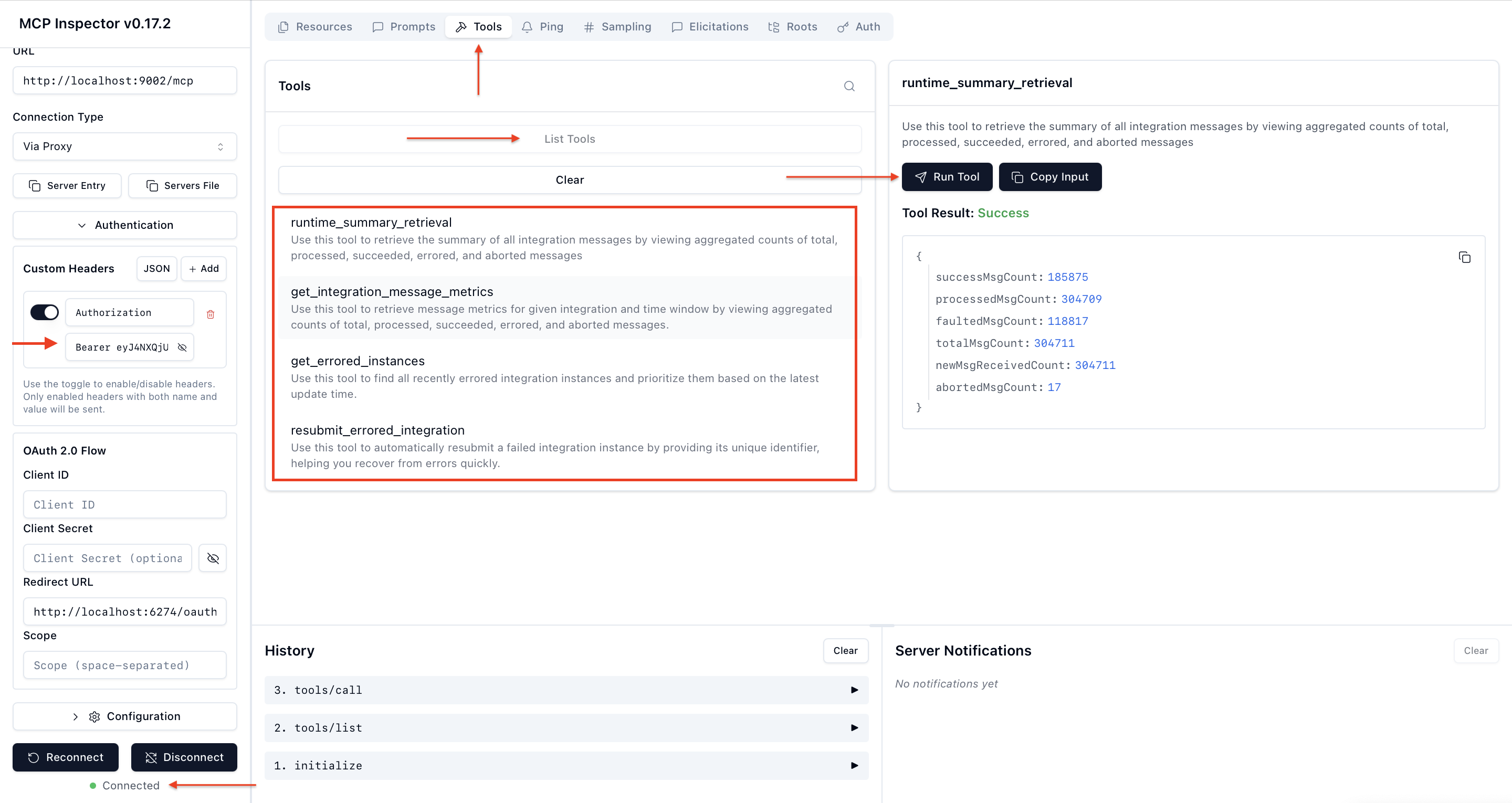
To validate the MCP Server security flow, follow the steps below using MCP Inspector:
- Start the MCP Server
- Open a terminal and run the following command: uv run server.py
- The MCP server will start and be accessible at: http://localhost:9002/mcp
- Generate an Access Token
- Use Postman (or any API client) to send a POST request to the token endpoint: https://idcs-<domain>.oraclecloud.com/oauth2/v1/token
- Obtain the token using either the Client Credentials flow or the Resource Owner flow.
- Launch MCP Inspector
- Open another terminal and start the MCP Inspector by running: npx @modelcontextprotocol/inspector
- Connect and Test the MCP Server
- Enter the MCP Server URL: http://localhost:9002/mcp
- Provide the access token in the following format: Authorization: Bearer <access_token>
- Connect to the MCP server, then navigate to: Tools → List Tools → runtime_summary_retrieval, and run the tool to complete the validation.
Conclusion
In the first part of this blog series, we explored the Secure MCP Server Architecture, its key components, and walked through the MCP server implementation process including registering an OAuth application, creating the MCP server, and testing it using MCP Inspector and Postman. In the next part, we’ll focus on the MCP client implementation, where the client will obtain a token from the Oracle Identity Domain and securely invoke the MCP server.